Kubernetes
An Introduction
It’s like landing on Pluto when people
are still trying to figure out Mars (other
tools) properly – Rishabh Indoria 
Why learn Kubernetes?
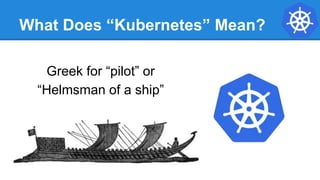
What Does “Kubernetes” Mean?
Greek for “pilot” or
“Helmsman of a ship”
What is Kubernetes?
● A Production-Grade Container Orchestration System Google-grown,
based on Borg and Omega, systems that run inside of Google right now
and are proven to work at Google for over 10 years.
● Google spawns billions of containers per week with these systems.
● Created by three Google employees initially during the summer of 2014;
grew exponentially and became the first project to get donated to the
CNCF.
● Hit the first production-grade version v1.0.1 in July 2015. Has continually
released a new minor version every three months since v1.2.0 in March
2016. Lately v1.13.0 was released in December 2018.
Decouples Infrastructure and Scaling
● All services within Kubernetes are natively
Load Balanced.
● Can scale up and down dynamically.
● Used both to enable self-healing and
seamless upgrading or rollback of
applications.
Self Healing
Kubernetes will ALWAYS try and steer the cluster to its
desired state.
● Me: “I want 3 healthy instances of redis to always be
running.”
● Kubernetes: “Okay, I’ll ensure there are always 3
instances up and running.”
● Kubernetes: “Oh look, one has died. I’m going to
attempt to spin up a new one.”
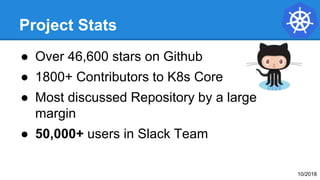
Project Stats
● Over 46,600 stars on Github
● 1800+ Contributors to K8s Core
● Most discussed Repository by a large
margin
● 50,000+ users in Slack Team
10/2018
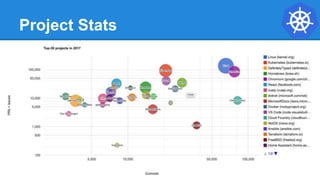
Project Stats
A Couple
Key Concepts...
Pods
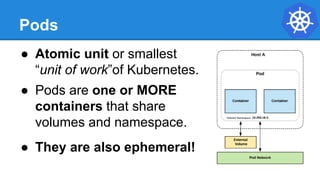
● Atomic unit or smallest
“unit of work”of Kubernetes.
● Pods are one or MORE
containers that share
volumes and namespace.
● They are also ephemeral!
Services
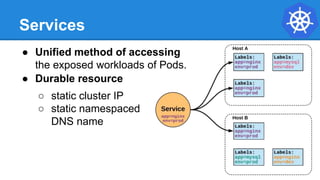
● Unified method of accessing
the exposed workloads of Pods.
● Durable resource
○ static cluster IP
○ static namespaced
DNS name
Services
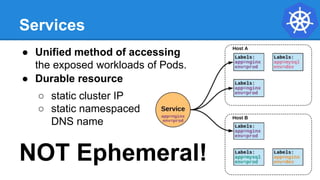
● Unified method of accessing
the exposed workloads of Pods.
● Durable resource
○ static cluster IP
○ static namespaced
DNS name
NOT Ephemeral!
Architecture
Overview
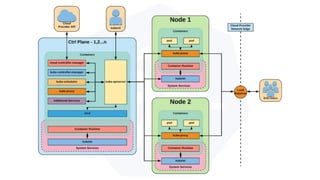
Architecture Overview
Control Plane
Components
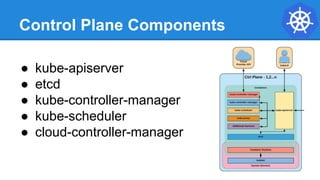
Control Plane Components
● kube-apiserver
● etcd
● kube-controller-manager
● kube-scheduler
● cloud-controller-manager
kube-apiserver
● Provides a forward facing REST interface into the
kubernetes control plane and datastore.
● All clients and other applications interact with
kubernetes strictly through the API Server.
● Acts as the gatekeeper to the cluster by handling
authentication and authorization, request validation,
mutation, and admission control in addition to being the
front-end to the backing datastore.
etcd
● etcd acts as the cluster datastore.
● Purpose in relation to Kubernetes is to provide a strong,
consistent and highly available key-value store for
persisting cluster state.
● Stores objects and config information.
etcd
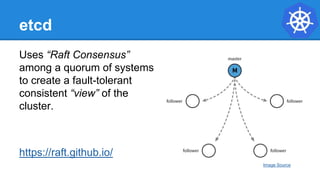
Uses “Raft Consensus”
among a quorum of systems
to create a fault-tolerant
consistent “view” of the
cluster.
https://raft.github.io/
Image Source
kube-controller-manager
● Monitors the cluster state via the apiserver
and steers the cluster towards the
desired state.
● Node Controller: Responsible for noticing and responding when nodes go down.
● Replication Controller: Responsible for maintaining the correct number of pods for
every replication controller object in the system.
● Endpoints Controller: Populates the Endpoints object (that is, joins Services &
Pods).
● Service Account & Token Controllers: Create default accounts and API access
tokens for new namespaces.
kube-scheduler
● Component on the master that watches newly created
pods that have no node assigned, and selects a node
for them to run on.
● Factors taken into account for scheduling decisions
include individual and collective resource requirements,
hardware/software/policy constraints, affinity and anti-
affinity specifications, data locality, inter-workload
interference and deadlines.
cloud-controller-manager
● Node Controller: For checking the cloud provider to determine if a
node has been deleted in the cloud after it stops responding
● Route Controller: For setting up routes in the underlying cloud
infrastructure
● Service Controller: For creating, updating and deleting cloud
provider load balancers
● Volume Controller: For creating, attaching, and mounting volumes,
and interacting with the cloud provider to orchestrate volumes
Architecture Overview
Node
Components
Node Components
● kubelet
● kube-proxy
● Container Runtime Engine
kubelet
● An agent that runs on each node in the
cluster. It makes sure that containers are
running in a pod.
● The kubelet takes a set of PodSpecs that
are provided through various mechanisms
and ensures that the containers described in
those PodSpecs are running and healthy.
kube-proxy
● Manages the network rules on each node.
● Performs connection forwarding or load balancing for
Kubernetes cluster services.
Container Runtime Engine
● A container runtime is a CRI (Container Runtime
Interface) compatible application that executes and
manages containers.
○ Containerd (docker)
○ Cri-o
○ Rkt
○ Kata (formerly clear and hyper)
○ Virtlet (VM CRI compatible runtime)
Architecture Overview
Security
Authentication
● X509 Client Certs (CN used as user, Org fields as group) No way
to revoke them!! – wip 
● Static Password File (password,user,uid,"group1,group2,group3")
● Static Token File (token,user,uid,"group1,group2,group3")
● Bearer Token (Authorization: Bearer 31ada4fd-ade)
● Bootstrap Tokens (Authorization: Bearer
781292.db7bc3a58fc5f07e)
● Service Account Tokens (signed by API server’s private TLS key
or specified by file)
Role - Authorization
RoleBinding - Authorization
Admission Control
● AlwaysPullImages
● DefaultStorageClass
● DefaultTolerationSeconds
● DenyEscalatingExec
● EventRateLimit
● ImagePolicyWebhook
● LimitRanger/ResourceQuota
● PersistentVolumeClaimResize
● PodSecurityPolicy
Request/Response
{
"apiVersion": "authentication.k8s.io/v1beta1",
"kind": "TokenReview",
"status": {
"authenticated": true,
"user": {
"username": "janedoe@example.com",
"uid": "42",
"groups": [
"developers",
"qa"
]
}
}
}
{
"apiVersion": "authentication.k8s.io/v1beta1",
"kind": "TokenReview",
"spec": {
"token": "(BEARERTOKEN)"
}
}
Architecture Overview
Networking
Fundamental Networking Rules
● All containers within a pod can communicate with each
other unimpeded.
● All Pods can communicate with all other Pods without
NAT.
● All nodes can communicate with all Pods (and vice-
versa) without NAT.
● The IP that a Pod sees itself as is the same IP that
others see it as.
Fundamentals Applied
● Container-to-Container
○ Containers within a pod exist within the same
network namespace and share an IP.
○ Enables intrapod communication over localhost.
● Pod-to-Pod
○ Allocated cluster unique IP for the duration of its life
cycle.
○ Pods themselves are fundamentally ephemeral.
Fundamentals Applied
● Pod-to-Service
○ managed by kube-proxy and given a persistent
cluster unique IP
○ exists beyond a Pod’s lifecycle.
● External-to-Service
○ Handled by kube-proxy.
○ Works in cooperation with a cloud provider or other
external entity (load balancer).
Concepts and Resources
Core
Objects and API
● Namespaces
● Pods
● Labels
● Selectors
● Services
Namespaces
Namespaces are a logical cluster or environment, and are
the primary method of partitioning a cluster or scoping
access.
apiVersion: v1
kind: Namespace
metadata:
name: prod
labels:
app: MyBigWebApp
$ kubectl get ns --show-labels
NAME STATUS AGE LABELS
default Active 11h <none>
kube-public Active 11h <none>
kube-system Active 11h <none>
prod Active 6s app=MyBigWebApp
Pod Examples
apiVersion: v1
kind: Pod
metadata:
name: pod-example
labels:
app: nginx
spec:
template:
metadata:
labels:
app: nginx
spec:
containers:
- name: nginx
image: nginx
apiVersion: v1
kind: Pod
metadata:
name: pod-example
spec:
containers:
- name: nginx
image: nginx:stable-alpine
ports:
- containerPort: 80
Key Pod Container Attributes
● name - The name of the container
● image - The container image
● ports - array of ports to expose. Can
be granted a friendly name and
protocol may be specified
● env - array of environment variables
● command - Entrypoint array (equiv to
Docker ENTRYPOINT)
● args - Arguments to pass to the
command (equiv to Docker CMD)
Container
name: nginx
image: nginx:stable-alpine
ports:
- containerPort: 80
name: http
protocol: TCP
env:
- name: MYVAR
value: isAwesome
command: [“/bin/sh”, “-c”]
args: [“echo ${MYVAR}”]
Pod Template
● Workload Controllers manage instances of Pods based
off a provided template.
● Pod Templates are Pod specs with limited metadata.
● Controllers use
Pod Templates to
make actual pods.
apiVersion: v1
kind: Pod
metadata:
name: pod-example
labels:
app: nginx
spec:
template:
metadata:
labels:
app: nginx
spec:
containers:
- name: nginx
image: nginx
Labels
● key-value pairs that are used to
identify, describe and group
together related sets of objects or
resources.
● NOT characteristic of uniqueness.
● Have a strict syntax with a slightly
limited character set*.
* https://kubernetes.io/docs/concepts/overview/working-with-objects/labels/#syntax-and-character-set
Selectors
Selectors use labels to filter
or select objects, and are
used throughout Kubernetes.
apiVersion: v1
kind: Pod
metadata:
name: pod-label-example
labels:
app: nginx
env: prod
spec:
containers:
- name: nginx
image: nginx:stable-alpine
ports:
- containerPort: 80
nodeSelector:
gpu: nvidia
apiVersion: v1
kind: Pod
metadata:
name: pod-label-example
labels:
app: nginx
env: prod
spec:
containers:
- name: nginx
image: nginx:stable-alpine
ports:
- containerPort: 80
nodeSelector:
gpu: nvidia
Selector Example
Equality based selectors allow for
simple filtering (=,==, or !=).
Selector Types
Set-based selectors are supported
on a limited subset of objects.
However, they provide a method of
filtering on a set of values, and
supports multiple operators including:
in, notin, and exist.
selector:
matchExpressions:
- key: gpu
operator: in
values: [“nvidia”]
selector:
matchLabels:
gpu: nvidia
Services
● Unified method of accessing the exposed workloads
of Pods.
● Durable resource (unlike Pods)
○ static cluster-unique IP
○ static namespaced DNS name
<service name>.<namespace>.svc.cluster.local
Services
● Target Pods using equality based selectors.
● Uses kube-proxy to provide simple load-balancing.
● kube-proxy acts as a daemon that creates local
entries in the host’s iptables for every service.
Service Types
There are 4 major service types:
● ClusterIP (default)
● NodePort
● LoadBalancer
● ExternalName
ClusterIP Service
ClusterIP services exposes a
service on a strictly cluster
internal virtual IP.
apiVersion: v1
kind: Service
metadata:
name: example-prod
spec:
selector:
app: nginx
env: prod
ports:
- protocol: TCP
port: 80
targetPort: 80
Cluster IP Service
Name: example-prod
Selector: app=nginx,env=prod
Type: ClusterIP
IP: 10.96.28.176
Port: <unset> 80/TCP
TargetPort: 80/TCP
Endpoints: 10.255.16.3:80,
10.255.16.4:80
/ # nslookup example-prod.default.svc.cluster.local
Name: example-prod.default.svc.cluster.local
Address 1: 10.96.28.176 example-prod.default.svc.cluster.local
ClusterIP Service Without Selector
NodePort Service
● NodePort services extend
the ClusterIP service.
● Exposes a port on every
node’s IP.
● Port can either be statically
defined, or dynamically taken
from a range between 30000-
32767.
apiVersion: v1
kind: Service
metadata:
name: example-prod
spec:
type: NodePort
selector:
app: nginx
env: prod
ports:
- nodePort: 32410
protocol: TCP
port: 80
targetPort: 80
NodePort Service
Name: example-prod
Selector: app=nginx,env=prod
Type: NodePort
IP: 10.96.28.176
Port: <unset> 80/TCP
TargetPort: 80/TCP
NodePort: <unset> 32410/TCP
Endpoints: 10.255.16.3:80,
10.255.16.4:80
LoadBalancer Service
apiVersion: v1
kind: Service
metadata:
name: example-prod
spec:
type: LoadBalancer
selector:
app: nginx
env: prod
ports:
protocol: TCP
port: 80
targetPort: 80
● LoadBalancer services
extend NodePort.
● Works in conjunction with an
external system to map a
cluster external IP to the
exposed service.
LoadBalancer Service
Name: example-prod
Selector: app=nginx,env=prod
Type: LoadBalancer
IP: 10.96.28.176
LoadBalancer
Ingress: 172.17.18.43
Port: <unset> 80/TCP
TargetPort: 80/TCP
NodePort: <unset> 32410/TCP
Endpoints: 10.255.16.3:80,
10.255.16.4:80
ExternalName Service
apiVersion: v1
kind: Service
metadata:
name: example-prod
spec:
type: ExternalName
spec:
externalName: example.com
● ExternalName is used to
reference endpoints
OUTSIDE the cluster.
● Creates an internal
CNAME DNS entry that
aliases another.
Ingress – Name Based Routing
apiVersion: extensions/v1beta1
kind: Ingress
metadata:
name: name-virtual-host-ingress
spec:
rules:
- host: first.bar.com
http:
paths:
- backend:
serviceName: service1
servicePort: 80
- host: second.foo.com
http:
paths:
- backend:
serviceName: service2
servicePort: 80
- http:
paths:
- backend:
serviceName: service3
servicePort: 80
● An API object that manages
external access to the services
in a cluster
● Provides load balancing, SSL
termination and name/path-
based virtual hosting
● Gives services externally-
reachable URLs
Ingress – Path Based Routing
apiVersion: extensions/v1beta1
kind: Ingress
metadata:
name: simple-fanout-example
spec:
rules:
- host: foo.bar.com
http:
paths:
- path: /foo
backend:
serviceName: service1
servicePort: 4200
- path: /bar
backend:
serviceName: service2
servicePort: 8080
Lab - github.com/mrbobbytables/k8s-intro-tutorials/blob/master/core
Exploring
the Core
Concepts and Resources
Workloads
● ReplicaSet
● Deployment
● DaemonSet
● StatefulSet
● Job
● CronJob
ReplicaSet
● Primary method of managing pod replicas and their
lifecycle.
● Includes their scheduling, scaling, and deletion.
● Their job is simple: Always ensure the desired
number of pods are running.
ReplicaSet
● replicas: The desired number of
instances of the Pod.
● selector:The label selector for
the ReplicaSet will manage
ALL Pod instances that it
targets; whether it’s desired or
not.
apiVersion: apps/v1
kind: ReplicaSet
metadata:
name: rs-example
spec:
replicas: 3
selector:
matchLabels:
app: nginx
env: prod
template:
<pod template>
ReplicaSet
$ kubectl describe rs rs-example
Name: rs-example
Namespace: default
Selector: app=nginx,env=prod
Labels: app=nginx
env=prod
Annotations: <none>
Replicas: 3 current / 3 desired
Pods Status: 3 Running / 0 Waiting / 0 Succeeded / 0 Failed
Pod Template:
Labels: app=nginx
env=prod
Containers:
nginx:
Image: nginx:stable-alpine
Port: 80/TCP
Environment: <none>
Mounts: <none>
Volumes: <none>
Events:
Type Reason Age From Message
---- ------ ---- ---- -------
Normal SuccessfulCreate 16s replicaset-controller Created pod: rs-example-mkll2
Normal SuccessfulCreate 16s replicaset-controller Created pod: rs-example-b7bcg
Normal SuccessfulCreate 16s replicaset-controller Created pod: rs-example-9l4dt
apiVersion: apps/v1
kind: ReplicaSet
metadata:
name: rs-example
spec:
replicas: 3
selector:
matchLabels:
app: nginx
env: prod
template:
metadata:
labels:
app: nginx
env: prod
spec:
containers:
- name: nginx
image: nginx:stable-alpine
ports:
- containerPort: 80
$ kubectl get pods
NAME READY STATUS RESTARTS AGE
rs-example-9l4dt 1/1 Running 0 1h
rs-example-b7bcg 1/1 Running 0 1h
rs-example-mkll2 1/1 Running 0 1h
Deployment
● Way of managing Pods via ReplicaSets.
● Provide rollback functionality and update control.
● Updates are managed through the pod-template-hash
label.
● Each iteration creates a unique label that is assigned to
both the ReplicaSet and subsequent Pods.
Deployment
Deployment
● revisionHistoryLimit: The number of previous
iterations of the Deployment to retain.
● strategy: Describes the method of updating the
Pods based on the type. Valid options are
Recreate or RollingUpdate.
○ Recreate: All existing Pods are killed before
the new ones are created.
○ RollingUpdate: Cycles through updating the
Pods according to the parameters:
maxSurge and maxUnavailable.
apiVersion: apps/v1
kind: Deployment
metadata:
name: deploy-example
spec:
replicas: 3
revisionHistoryLimit: 3
selector:
matchLabels:
app: nginx
env: prod
strategy:
type: RollingUpdate
rollingUpdate:
maxSurge: 1
maxUnavailable: 0
template:
<pod template>
Deployment
$ kubectl create deployment test --image=nginx
$ kubectl set image deployment test nginx=nginx:1.9.1 --record
$ kubectl rollout history deployment test
deployments "test"
REVISION CHANGE-CAUSE
1 <none>
2 kubectl set image deployment test nginx=nginx:1.9.1 --record=true
$ kubectl annotate deployment test kubernetes.io/change-cause="image updated to 1.9.1"
$ kubectl rollout undo deployment test
$ kubectl rollout undo deployment test --to-revision=2
$ kubectl rollout history deployment test
deployments "test"
REVISION CHANGE-CAUSE
2 kubectl set image deployment test nginx=nginx:1.9.1 --record=true
3 <none>
kubectl scale deployment test --replicas=10
kubectl rollout pause deployment test
kubectl rollout resume deployment test
RollingUpdate Deployment
$ kubectl get pods
NAME READY STATUS RESTARTS AGE
mydep-6766777fff-9r2zn 1/1 Running 0 5h
mydep-6766777fff-hsfz9 1/1 Running 0 5h
mydep-6766777fff-sjxhf 1/1 Running 0 5h
$ kubectl get replicaset
NAME DESIRED CURRENT READY AGE
mydep-6766777fff 3 3 3 5h
Updating pod template generates a
new ReplicaSet revision.
R1 pod-template-hash:
676677fff
R2 pod-template-hash:
54f7ff7d6d
RollingUpdate Deployment
$ kubectl get replicaset
NAME DESIRED CURRENT READY AGE
mydep-54f7ff7d6d 1 1 1 5s
mydep-6766777fff 2 3 3 5h
$ kubectl get pods
NAME READY STATUS RESTARTS AGE
mydep-54f7ff7d6d-9gvll 1/1 Running 0 2s
mydep-6766777fff-9r2zn 1/1 Running 0 5h
mydep-6766777fff-hsfz9 1/1 Running 0 5h
mydep-6766777fff-sjxhf 1/1 Running 0 5h
New ReplicaSet is initially scaled up
based on maxSurge.
R1 pod-template-hash:
676677fff
R2 pod-template-hash:
54f7ff7d6d
RollingUpdate Deployment
$ kubectl get pods
NAME READY STATUS RESTARTS AGE
mydep-54f7ff7d6d-9gvll 1/1 Running 0 5s
mydep-54f7ff7d6d-cqvlq 1/1 Running 0 2s
mydep-6766777fff-9r2zn 1/1 Running 0 5h
mydep-6766777fff-hsfz9 1/1 Running 0 5h
$ kubectl get replicaset
NAME DESIRED CURRENT READY AGE
mydep-54f7ff7d6d 2 2 2 8s
mydep-6766777fff 2 2 2 5h
Phase out of old Pods managed by
maxSurge and maxUnavailable.
R1 pod-template-hash:
676677fff
R2 pod-template-hash:
54f7ff7d6d
RollingUpdate Deployment
$ kubectl get replicaset
NAME DESIRED CURRENT READY AGE
mydep-54f7ff7d6d 3 3 3 10s
mydep-6766777fff 0 1 1 5h
$ kubectl get pods
NAME READY STATUS RESTARTS AGE
mydep-54f7ff7d6d-9gvll 1/1 Running 0 7s
mydep-54f7ff7d6d-cqvlq 1/1 Running 0 5s
mydep-54f7ff7d6d-gccr6 1/1 Running 0 2s
mydep-6766777fff-9r2zn 1/1 Running 0 5h
Phase out of old Pods managed by
maxSurge and maxUnavailable.
R1 pod-template-hash:
676677fff
R2 pod-template-hash:
54f7ff7d6d
RollingUpdate Deployment
$ kubectl get replicaset
NAME DESIRED CURRENT READY AGE
mydep-54f7ff7d6d 3 3 3 13s
mydep-6766777fff 0 0 0 5h
$ kubectl get pods
NAME READY STATUS RESTARTS AGE
mydep-54f7ff7d6d-9gvll 1/1 Running 0 10s
mydep-54f7ff7d6d-cqvlq 1/1 Running 0 8s
mydep-54f7ff7d6d-gccr6 1/1 Running 0 5s
Phase out of old Pods managed by
maxSurge and maxUnavailable.
R1 pod-template-hash:
676677fff
R2 pod-template-hash:
54f7ff7d6d
RollingUpdate Deployment
$ kubectl get replicaset
NAME DESIRED CURRENT READY AGE
mydep-54f7ff7d6d 3 3 3 15s
mydep-6766777fff 0 0 0 5h
$ kubectl get pods
NAME READY STATUS RESTARTS AGE
mydep-54f7ff7d6d-9gvll 1/1 Running 0 12s
mydep-54f7ff7d6d-cqvlq 1/1 Running 0 10s
mydep-54f7ff7d6d-gccr6 1/1 Running 0 7s
Updated to new deployment revision
completed.
R1 pod-template-hash:
676677fff
R2 pod-template-hash:
54f7ff7d6d
Taints and Tolerations
$ kubectl taint nodes node1 key=value:NoSchedule
tolerations:
- key: "key"
operator: "Equal"
value: "value"
effect: "NoSchedule”
-------------------------------------------------
tolerations:
- operator: "Exists"
tolerations:
- key: "key"
operator: "Exists”
tolerations:
- key: "key1"
operator: "Equal"
value: "value1"
effect: "NoExecute"
tolerationSeconds: 3600
$ kubectl taint nodes node1 gpu=nvidia:NoSchedule
apiVersion: v1
kind: Pod
metadata:
name: nginx
spec:
containers:
- image: nginx
name: nginx
tolerations:
- key: gpu
value: nvidia
effect: NoSchedule
DaemonSet
● Ensure that all nodes matching certain criteria will run
an instance of the supplied Pod.
● Are ideal for cluster wide services such as log
forwarding or monitoring.
StatefulSet
● Tailored to managing Pods that must persist or maintain
state.
● Pod lifecycle will be ordered and follow consistent
patterns.
● Assigned a unique ordinal name following the
convention of ‘<statefulset name>-<ordinal index>’.
StatefulSet
apiVersion: apps/v1
kind: StatefulSet
metadata:
name: sts-example
spec:
replicas: 2
revisionHistoryLimit: 3
selector:
matchLabels:
app: stateful
serviceName: app
updateStrategy:
type: RollingUpdate
rollingUpdate:
partition: 0
template:
metadata:
labels:
app: stateful
<continued>
<continued>
spec:
containers:
- name: nginx
image: nginx:stable-alpine
ports:
- containerPort: 80
volumeMounts:
- name: www
mountPath: /usr/share/nginx/html
volumeClaimTemplates:
- metadata:
name: www
spec:
accessModes: [ "ReadWriteOnce" ]
storageClassName: standard
resources:
requests:
storage: 1Gi
StatefulSet
apiVersion: apps/v1
kind: StatefulSet
metadata:
name: sts-example
spec:
replicas: 2
revisionHistoryLimit: 3
selector:
matchLabels:
app: stateful
serviceName: app
updateStrategy:
type: RollingUpdate
rollingUpdate:
partition: 0
template:
<pod template>
● revisionHistoryLimit: The number of
previous iterations of the StatefulSet to
retain.
● serviceName: The name of the associated
headless service; or a service without a
ClusterIP.
Headless Service
/ # dig sts-example-0.app.default.svc.cluster.local +noall +answer
; <<>> DiG 9.11.2-P1 <<>> sts-example-0.app.default.svc.cluster.local +noall +answer
;; global options: +cmd
sts-example-0.app.default.svc.cluster.local. 20 IN A 10.255.0.2
apiVersion: v1
kind: Service
metadata:
name: app
spec:
clusterIP: None
selector:
app: stateful
ports:
- protocol: TCP
port: 80
targetPort: 80
$ kubectl get pods
NAME READY STATUS RESTARTS AGE
sts-example-0 1/1 Running 0 11m
sts-example-1 1/1 Running 0 11m
<StatefulSet Name>-<ordinal>.<service name>.<namespace>.svc.cluster.local
/ # dig app.default.svc.cluster.local +noall +answer
; <<>> DiG 9.11.2-P1 <<>> app.default.svc.cluster.local +noall +answer
;; global options: +cmd
app.default.svc.cluster.local. 2 IN A 10.255.0.5
app.default.svc.cluster.local. 2 IN A 10.255.0.2
/ # dig sts-example-1.app.default.svc.cluster.local +noall +answer
; <<>> DiG 9.11.2-P1 <<>> sts-example-1.app.default.svc.cluster.local +noall +answer
;; global options: +cmd
sts-example-1.app.default.svc.cluster.local. 30 IN A 10.255.0.5
Headless Service
/ # dig sts-example-0.app.default.svc.cluster.local +noall +answer
; <<>> DiG 9.11.2-P1 <<>> sts-example-0.app.default.svc.cluster.local +noall +answer
;; global options: +cmd
sts-example-0.app.default.svc.cluster.local. 20 IN A 10.255.0.2
apiVersion: v1
kind: Service
metadata:
name: app
spec:
clusterIP: None
selector:
app: stateful
ports:
- protocol: TCP
port: 80
targetPort: 80
$ kubectl get pods
NAME READY STATUS RESTARTS AGE
sts-example-0 1/1 Running 0 11m
sts-example-1 1/1 Running 0 11m
<StatefulSet Name>-<ordinal>.<service name>.<namespace>.svc.cluster.local
/ # dig app.default.svc.cluster.local +noall +answer
; <<>> DiG 9.11.2-P1 <<>> app.default.svc.cluster.local +noall +answer
;; global options: +cmd
app.default.svc.cluster.local. 2 IN A 10.255.0.5
app.default.svc.cluster.local. 2 IN A 10.255.0.2
/ # dig sts-example-1.app.default.svc.cluster.local +noall +answer
; <<>> DiG 9.11.2-P1 <<>> sts-example-1.app.default.svc.cluster.local +noall +answer
;; global options: +cmd
sts-example-1.app.default.svc.cluster.local. 30 IN A 10.255.0.5
Headless Service
/ # dig sts-example-0.app.default.svc.cluster.local +noall +answer
; <<>> DiG 9.11.2-P1 <<>> sts-example-0.app.default.svc.cluster.local +noall +answer
;; global options: +cmd
sts-example-0.app.default.svc.cluster.local. 20 IN A 10.255.0.2
apiVersion: v1
kind: Service
metadata:
name: app
spec:
clusterIP: None
selector:
app: stateful
ports:
- protocol: TCP
port: 80
targetPort: 80
$ kubectl get pods
NAME READY STATUS RESTARTS AGE
sts-example-0 1/1 Running 0 11m
sts-example-1 1/1 Running 0 11m
<StatefulSet Name>-<ordinal>.<service name>.<namespace>.svc.cluster.local
/ # dig app.default.svc.cluster.local +noall +answer
; <<>> DiG 9.11.2-P1 <<>> app.default.svc.cluster.local +noall +answer
;; global options: +cmd
app.default.svc.cluster.local. 2 IN A 10.255.0.5
app.default.svc.cluster.local. 2 IN A 10.255.0.2
/ # dig sts-example-1.app.default.svc.cluster.local +noall +answer
; <<>> DiG 9.11.2-P1 <<>> sts-example-1.app.default.svc.cluster.local +noall +answer
;; global options: +cmd
sts-example-1.app.default.svc.cluster.local. 30 IN A 10.255.0.5
CronJob
An extension of the Job Controller, it provides a method of
executing jobs on a cron-like schedule.
CronJobs within Kubernetes
use UTC ONLY.
CronJob
● schedule: The cron schedule for the
job.
● successfulJobHistoryLimit: The
number of successful jobs to retain.
● failedJobHistoryLimit: The number of
failed jobs to retain.
apiVersion: batch/v1beta1
kind: CronJob
metadata:
name: cronjob-example
spec:
schedule: "*/1 * * * *"
successfulJobsHistoryLimit: 3
failedJobsHistoryLimit: 1
jobTemplate:
spec:
completions: 4
parallelism: 2
template:
<pod template>
CronJob
$ kubectl describe cronjob cronjob-example
Name: cronjob-example
Namespace: default
Labels: <none>
Annotations: <none>
Schedule: */1 * * * *
Concurrency Policy: Allow
Suspend: False
Starting Deadline Seconds: <unset>
Selector: <unset>
Parallelism: 2
Completions: 4
Pod Template:
Labels: <none>
Containers:
hello:
Image: alpine:latest
Port: <none>
Command:
/bin/sh
-c
Args:
echo hello from $HOSTNAME!
Environment: <none>
Mounts: <none>
Volumes: <none>
Last Schedule Time: Mon, 19 Feb 2018 09:54:00 -0500
Active Jobs: cronjob-example-1519052040
Events:
Type Reason Age From Message
---- ------ ---- ---- -------
Normal SuccessfulCreate 3m cronjob-controller Created job cronjob-example-1519051860
Normal SawCompletedJob 2m cronjob-controller Saw completed job: cronjob-example-1519051860
Normal SuccessfulCreate 2m cronjob-controller Created job cronjob-example-1519051920
Normal SawCompletedJob 1m cronjob-controller Saw completed job: cronjob-example-1519051920
Normal SuccessfulCreate 1m cronjob-controller Created job cronjob-example-1519051980
apiVersion: batch/v1beta1
kind: CronJob
metadata:
name: cronjob-example
spec:
schedule: "*/1 * * * *"
successfulJobsHistoryLimit: 3
failedJobsHistoryLimit: 1
jobTemplate:
spec:
completions: 4
parallelism: 2
template:
spec:
containers:
- name: hello
image: alpine:latest
command: ["/bin/sh", "-c"]
args: ["echo hello from $HOSTNAME!"]
restartPolicy: Never
$ kubectl get jobs
NAME DESIRED SUCCESSFUL AGE
cronjob-example-1519053240 4 4 2m
cronjob-example-1519053300 4 4 1m
cronjob-example-1519053360 4 4 26s
Health checks
• initialDelaySeconds: Number of seconds after the container
has started before liveness or readiness probes are initiated.
• periodSeconds: How often (in seconds) to perform the
probe. Default to 10 seconds. Minimum value is 1.
• timeoutSeconds: Number of seconds after which the probe
times out. Defaults to 1 second. Minimum value is 1.
• successThreshold: Minimum consecutive successes for the
probe to be considered successful after having failed.
Defaults to 1. Must be 1 for liveness. Minimum value is 1.
• failureThreshold: When a Pod starts and the probe fails,
Kubernetes will try failureThreshold times before giving up.
Giving up in case of liveness probe means restarting the
Pod. In case of readiness probe the Pod will be marked
Unready. Defaults to 3. Minimum value is 1.
apiVersion: v1
kind: Pod
metadata:
labels:
test: liveness
name: liveness-readiness-http
spec:
containers:
- name: liveness-readiness-http
image: k8s.gcr.io/ liveness-readiness-http
livenessProbe:
httpGet:
path: /healthz
port: 8080
initialDelaySeconds: 5
periodSeconds: 10
timeoutSeconds: 4
failureThreshold: 5
readinessProbe:
httpGet:
path: /healthz
port: 8080
initialDelaySeconds: 100
periodSeconds: 10
timeoutSeconds: 4
failureThreshold: 2
Concepts and Resources
Storage
● Volumes
● Persistent
Volumes
● Persistent
Volume Claims
● StorageClass
Storage
Pods by themselves are useful, but many workloads
require exchanging data between containers, or persisting
some form of data.
For this we have Volumes, PersistentVolumes,
PersistentVolumeClaims, and StorageClasses.
StorageClass
● Storage classes are an abstraction on top of an external
storage resource (PV)
● Work hand-in-hand with the external storage system to
enable dynamic provisioning of storage by eliminating
the need for the cluster admin to pre-provision a PV
StorageClass
● provisioner: Defines the ‘driver’ to be
used for provisioning of the external
storage.
● parameters: A hash of the various
configuration parameters for the
provisioner.
● reclaimPolicy: The behaviour for the
backing storage when the PVC is
deleted.
○ Retain - manual clean-up
○ Delete - storage asset deleted by
provider
kind: StorageClass
apiVersion: storage.k8s.io/v1
metadata:
name: standard
provisioner: kubernetes.io/gce-pd
parameters:
type: pd-standard
zones: us-central1-a, us-central1-b
reclaimPolicy: Delete
Available StorageClasses
● AWSElasticBlockStore
● AzureFile
● AzureDisk
● CephFS
● Cinder
● FC
● Flocker
● GCEPersistentDisk
● Glusterfs
● iSCSI
● Quobyte
● NFS
● RBD
● VsphereVolume
● PortworxVolume
● ScaleIO
● StorageOS
● Local
Internal Provisioner
Volumes
● Storage that is tied to the Pod’s Lifecycle.
● A pod can have one or more types of volumes attached
to it.
● Can be consumed by any of the containers within the
pod.
● Survive Pod restarts; however their durability beyond
that is dependent on the Volume Type.