Spatial filters
Remember thattypes of neighborhood:
Remember that types of neighborhood:
intensity transformation: neighborhood of size 1x1
spatial filter (or mask ,kernel, template or window): neighborhood of
larger size , like 3*3 mask
The spatial filter mask is moved from point to point in an
image. At each point (x,y), the response of the filter is
calculated
Ch3, lesson 6: spatial filters
Origin x
y Image f (x, y)
(
x, y
)
Neighbourhood
3.
Neighbourhood Operations
Foreach pixel in the origin image, the
outcome is written on the same location at
the target image.
Origin x
y Image f (x, y)
(
x, y
)
Neighbourhood
Targe
t
Origi
n
4.
Simple Neighbourhood Operations
Simpleneighbourhood operations
example:
Min: Set the pixel value to the minimum in the
neighbourhood
Max: Set the pixel value to the maximum in
the neighbourhood
5.
The Spatial FilteringProcess
j k l
m n o
p q r
Origin x
y Image f (x, y)
eprocessed = n*e + j*a + k*b +
l*c + m*d + o*f + p*g + q*h +
r*i
Filter (w)
Simple 3*3
Neighbourhood
e 3
*
3
Filter
a b c
d e f
g h i
Original
Image
Pixels
*
The above is repeated for every pixel in
the original image to generate the filtered
image
Spatial filters :Smoothing ( low pass)
Ch3, lesson 6: Smoothing filters
Use: for blurring and noise reduction.
Type of smoothing filters:
1.Standard average
2. weighted average.
3. Median filter
linear
Order statistics
8.
Smoothing Spatial Filters
Oneof the simplest spatial filtering
operations we can perform is a smoothing
operation
Simply average all of the pixels in a
neighbourhood around a central value
Especially useful
in removing noise
from images
Also useful for
highlighting gross
detail
1
/9
1
/9
1
/9
1
/9
1
/9
1
/9
1
/9
1
/9
1
/9
Simple
averaging
filter
9.
Smoothing Spatial Filtering
Originx
y Image f (x, y)
e = 1
/9*106 + 1
/9*104 + 1
/9*100 +
1
/9*108 + 1
/9*99 + 1
/9*98 + 1
/9*95 +
1
/9*90 + 1
/9*85 = 98.3333
Filter
Simple 3*3
Neighbourhood
106
104
99
95
100 108
98
90 85
1
/9
1
/9
1
/9
1
/9
1
/9
1
/9
1
/9
1
/9
1
/9
3
*
3
Smoothing
Filter
104 100 108
99 106 98
95 90 85
Original
Image
Pixels
*
The above is repeated for every pixel in
the original image to generate the
smoothed image
10.
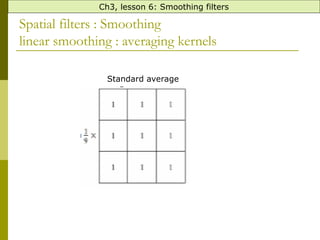
Spatial filters :Smoothing
linear smoothing : averaging kernels
Ch3, lesson 6: Smoothing filters
Standard average
11.
Spatial filters :Smoothing
Standard and weighted Average- example
Ch3, lesson 6: Smoothing filters
110
120
90
130
91
94
98
200
90
91
99
100
82
96
85
90
Standard averaging filter:
(110 +120+90+91+94+98+90+91+99)/9 =883/9 = 98.1
The mask is moved
from point to point in
an image. At each
point (x,y), the
response of the filter
is calculated
12.
What happens whenthe Values of the Kernel Fall
Outside the Image
!??
Ch3, lesson 6: Smoothing filters
13.
First solution :Zeropadding
,
Ch3, lesson 6: Smoothing filters
-
ve: black border
Spatial filters :Smoothing
Averaging effects: blurring + reducing noise
Ch3, lesson 6: Smoothing filters
Original image 3
x 3 averaging
5
x 5 averaging 9
x 9 averaging
15
x 15 averaging 35
x 35 averaging
Notice how detail begins to disappear
16.
Spatial filters :Smoothing
linear smoothing : averaging kernels
Ch3, lesson 6: Smoothing filters
weighted average
.
Used to reduce blurring more.
17.
Spatial filters :Smoothing
Standard and weighted Average- example
Ch3, lesson 6: Smoothing filters
110
120
90
130
91
94
98
200
90
91
99
100
82
96
85
90
:
Weighted averaging filter
:
(110 +2 x 120+90+2 x 91+4 x 94+2 x 98+90+2 x 91+99)/16 =
The mask is moved
from point to point in
an image. At each
point (x,y), the
response of the filter
is calculated
18.
Spatial filters :Smoothing
order statistics: Median filter
Ch3, lesson 6: Smoothing filters
110
120
90
130
91
94
98
200
90
95
99
100
82
96
85
90
Steps:
1. Sort the pixels in ascending order:
90,90, 91, 94, 95, 98, 99, 110, 120
2. replace the original pixel value by the median :
95
95
becomes
19.
Spatial filters :Smoothing
order statistics: Median filter
use : blurring + reduce salt and pepper noise
The original
image with salt
and pepper noise
The smoothed
image using
averaging
The smoothed image
using median
Ch3, lesson 6: Smoothing filters
20.
Smoothing Filters: MedianFiltering
(non-linear)
Very effective for removing “salt and pepper” noise).
averaging
median
filtering
21.
Smoothing Filters
:
Ch3, lesson7: sharpening filters
Example1:
v=imread('cameraman.tif');
x=imnoise(v,'salt & pepper', 0.02); % added noise to the image
h=fspecial('average',[3 3]); % create a two-dimensional filter
xx=imfilter(x,h); % apply the filter on the image
imshow(x),figure, imshow(xx)
Example2:
v=imread('cameraman.tif');
x=imnoise(v,'salt & pepper', 0.02);
xx=medfilt2(x);
imshow(x),figure, imshow(xx)
Note: medfilt2 (x,[a b]) where a
and b the size of filter.


![Spatial filters
Ch3, lesson 5: spatial filters
1.Smoothing Spatial filters [low pass].
2.Sharpening Spatial Filters[high pass].](https://image.slidesharecdn.com/part9-260209151811-76ee82cb/85/image-filetering-techniques-spatial-fileters-6-320.jpg)




![Spatial filters
Ch3, lesson 5: spatial filters
1.Smoothing Spatial filters [low pass].
2.Sharpening Spatial Filters[high pass].](/p?url=https%3A%2F%2Fimage.slidesharecdn.com%2Fpart9-260209151811-76ee82cb%2F85%2Fimage-filetering-techniques-spatial-fileters-6-320.jpg&__src=https%3A%2F%2Fwww.slideshare.net%2Fslideshow%2Fimage-filetering-techniques-spatial-fileters%2F285948603&__type=image)


![Smoothing Filters
:
Ch3, lesson 7: sharpening filters
Example1:
v=imread('cameraman.tif');
x=imnoise(v,'salt & pepper', 0.02); % added noise to the image
h=fspecial('average',[3 3]); % create a two-dimensional filter
xx=imfilter(x,h); % apply the filter on the image
imshow(x),figure, imshow(xx)
Example2:
v=imread('cameraman.tif');
x=imnoise(v,'salt & pepper', 0.02);
xx=medfilt2(x);
imshow(x),figure, imshow(xx)
Note: medfilt2 (x,[a b]) where a
and b the size of filter.](/p?url=https%3A%2F%2Fimage.slidesharecdn.com%2Fpart9-260209151811-76ee82cb%2F85%2Fimage-filetering-techniques-spatial-fileters-21-320.jpg&__src=https%3A%2F%2Fwww.slideshare.net%2Fslideshow%2Fimage-filetering-techniques-spatial-fileters%2F285948603&__type=image)


![Lec5_AIP [Spatial Filtering] (1).pptxt767686777](https://cdn.slidesharecdn.com/ss_thumbnails/lec5aipspatialfiltering1-240729201851-b222fde6-thumbnail.jpg?width=640&height=640&fit=bounds)
![Lec5_AIP [Spatial Filtering] (1).pptxJJJJJJJJJJJJJJJJJJJJJJJ](https://cdn.slidesharecdn.com/ss_thumbnails/lec5aipspatialfiltering1-240805131531-de004d64-thumbnail.jpg?width=640&height=640&fit=bounds)


