How We Learned To Stop Worrying
And Love (Or At Least Live With)
GitHub
Open Source Bridge 2015
Jen Griffin (@kareila)
Athena Yao (@afuna)
Dreamwidth Studios (dreamwidth.org)
How We Learned To Stop Worrying
And Love (Or At Least Live With)
GitHub
These slides may be downloaded
from
http://slideshare.net/dreamwidth
Our code may be downloaded from
https://github.com/afuna/ghi-assist
What Is GitHub?
GitHub is the most widely used platform
for managing open source projects. It
provides:
• source code management
• issue management (aka bug tracking)
• collaboration tools
Anyone can easily sign up for a free
account, modify a copy of an open source
project, and request for their changes to
be accepted.
Why Use GitHub?
Strengths Weaknesses
• popularity / ubiquity
• ease of use
• powerful features
• limited/difficult
customization
• Git (SCM) is hard
• all-or-nothing permissions
It is possible to use GitHub as a basic
code repository and use other products
for the rest of your project’s workflow.
Case History: Dreamwidth
• 2008: self-hosted Mercurial + Bugzilla
• 2012: GitHub + Bugzilla
• 2014: GitHub only
Our code’s migration was planned and
orderly.
Switching issue trackers was not.
Why Did We Wait?
• More Flexible, Powerful Metadata
• Easier Drop-In Contributions
• Better Permissions & Privacy
Bottom line: Bugzilla is a more fully featured
bug tracker than GitHub Issues.
Considering Our Options
• Start again with Bugzilla - rejected because we
didn’t want to continue self-hosting
• Use a different hosted bug tracker - rejected
because we couldn’t find anything that fit our
needs (YMMV)
• Set up an issues-only GitHub repo with admin
access for all - rejected as messy and confusing
• What we finally decided - use GitHub Issues
normally and do our best to work around rough
spots
GitHub Permissions (For
Teams)
• Anyone: can browse, create and comment
on issues, fork the code, and submit pull
requests.
• Members: can also have issues assigned
to them by admins and be referenced by
name in comments.
• Admins: can commit code changes and
make changes to issues, including labels
and assignments.
Permissions: What We Wanted
• Anyone: can browse, create and comment
on issues, fork the code, and submit pull
requests.
• Members: can also assign issues to
themselves, be referenced by name in
comments, and categorize existing issues
with labels.
• Admins: can commit code changes and
make changes to issues, including labels
and assignments.
Enter The API
GitHub provides a programming interface for
interacting with issues and pull requests:
https://developer.github.com/
Notifications are sent when items are
opened, closed, or commented on. Since
anyone can comment, anyone can trigger
API actions via specially formatted
comments!
How It Works
• The service is similar to a chatbot. It
listens for GitHub API events and
responds as desired.
• In order to execute the requested actions,
it will need to be linked to a GitHub
account that has access to commit the
changes.
• You will probably want to give it a name
that makes clear it is an automated
process.
Currently Defined Actions
Assign Related Issue: If a pull request claims to fix
an issue, assign the issue to the author
Claim Issue: Assign[*] issue to anyone who leaves
a comment saying “claim”, “claiming” or
“claimed”
Add Labels: Labels can be added via comments
by prefixing the name of the label (##labelname)
Stop! Demo Time!
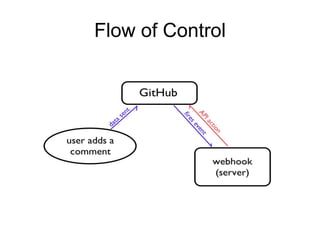
Flow of Control
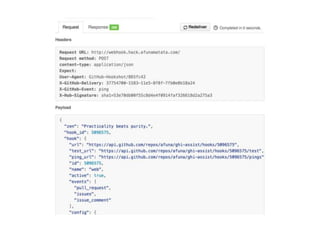
Anatomy of a Webhook
1. Verify request came from GitHub
2. Determine event type
3. Do some action based on the payload
contents
def signature_valid(self, data=None,
signed_data=None, digest=sha1):
mac = hmac.new(self.secret, msg=data,
digestmod=digest)
try:
return hmac.compare_digest(
mac.hexdigest(), signed_data)
except AttributeError:
# < Python 2.7.7
return mac.hexdigest() == signed_data
signature_header = request.headers.get(
'X-Hub-Signature')
digest, signature = signature_header.split('=’)
if digest != "sha1":
abort(501, "'%s' not supported." % digest)
if not webhook.signature_valid(
data=request.body.read(),
signed_data=signature):
abort(403, "Signature does not match
expected value.")
Anatomy of a Webhook
1. Verify request came from GitHub
2. Determine event type
3. Do some action based on the payload
contents
event = request.headers.get(
'X-GitHub-Event')
Anatomy of a Webhook
1. Verify request came from GitHub
2. Determine event type
3. Do some action based on the payload
contents
CLAIM_PATTERN =
re.compile(r'bclaim(?:ed|ing)?b', re.I)
class ClaimHook(Hook):
def should_perform_action(self, payload,
api):
if payload["issue"]["assignee"] is None 
and CLAIM_PATTERN.search(
payload["comment"]["body"]):
return True
else:
return False
headers = {
'User-Agent': "GHI Assist Bot",
'Authorization': "token %s" % self.token,
}
response = requests.request("PATCH",
"https://api.github.com…",
headers=headers,
data=json.dumps({"assignee": assignee})
)
Resources
Code for our GitHub assistant:
https://github.com/afuna/ghi-assist
GitHub’s API reference:
https://developer.github.com/
Download link for our slides:
http://slideshare.net/dreamwidth
Any Questions?
You can find us on
Dreamwidth, GitHub, and Twitter:
Jen Griffin (kareila@dreamwidth.org)
Athena Yao (afuna@dreamwidth.org)
Thank you for coming!