Git-flow
& pull requests
Bartosz Kosarzycki Apr 15, 2016
Git-flow & pull requests
AGENDA
❏ Git competition?
❏ Git workflows
❏ Gitflow workflow
❏ GF: Historical branches
❏ GF: Feature branches
❏ GF: Maintenance & Release branches
❏ Pull-requests
❏ Issues with gitflow
❏ Github-flow, git-lab flow
❏ Merge vs rebase
❏ Git stash vs temporary branches
❏ Reflog
❏ Commit granularity
❏ Comparison of git desktop clients
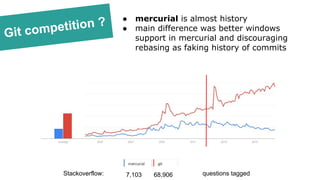
Git competition ? ● mercurial is almost history
● main difference was better windows
support in mercurial and discouraging
rebasing as faking history of commits
Stackoverflow: questions tagged7,103 68,906
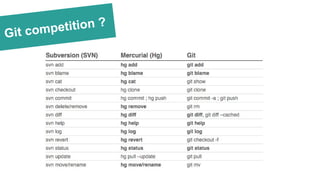
Git competition ?
Workflows
● like SVN
● based on rebasing
one master branch
● full & light
● master, develop, feature, hotfix and
release branches
● [optional] pull-requests - recommended
● all feature development in a
dedicated branch
● master branch will never
contain broken code
● feature-branches are merged
to master branch
● [optional] pull-requests
LIGHT HEAVY
● fork
● every developer has two
repositories - private local and
server-side public
● feature-branch with pull request
as added functionality/feedback
● popular on github libraries
where we do not have write
access to repository
● [required] pull-requests
images: atlassian
Gitflow workflow
Git-flow workflow:
● has two historical branches - master & develop
● feature branches
● release & maintenance branches
● based on merging
● git plugin is available on github (link)
● is derived from the work of Vincent Driessen (blog)
Historical
branches
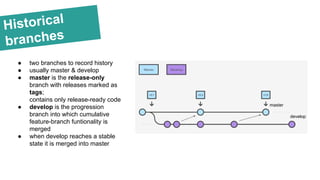
● two branches to record history
● usually master & develop
● master is the release-only
branch with releases marked as
tags;
contains only release-ready code
● develop is the progression
branch into which cumulative
feature-branch funtionality is
merged
● when develop reaches a stable
state it is merged into master
master
develop
Feature
branches
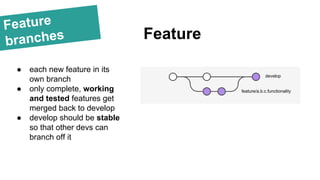
● each new feature in its
own branch
● only complete, working
and tested features get
merged back to develop
● develop should be stable
so that other devs can
branch off it
Feature
develop
feature/a.b.c.functionality
Feature
branches
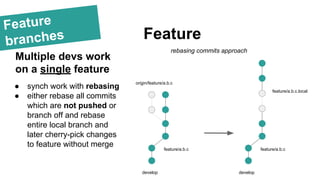
● synch work with rebasing
● either rebase all commits
which are not pushed or
branch off and rebase
entire local branch and
later cherry-pick changes
to feature without merge
Feature
Multiple devs work
on a single feature
develop
feature/a.b.c
develop
feature/a.b.c
feature/a.b.c.local
rebasing commits approach
origin/feature/a.b.c
Feature
branches
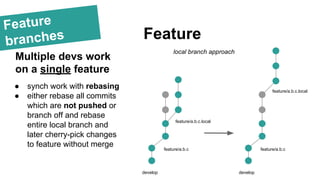
● synch work with rebasing
● either rebase all commits
which are not pushed or
branch off and rebase
entire local branch and
later cherry-pick changes
to feature without merge
Feature
Multiple devs work
on a single feature
develop
feature/a.b.c
feature/a.b.c.local
develop
feature/a.b.c
feature/a.b.c.local
local branch approach
Maintenance
& Release
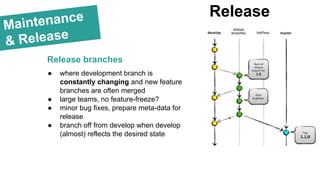
Release
Release branches
● where development branch is
constantly changing and new feature
branches are often merged
● large teams, no feature-freeze?
● minor bug fixes, prepare meta-data for
release
● branch off from develop when develop
(almost) reflects the desired state
Maintenance
& Release
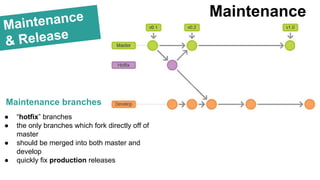
Maintenance branches
Maintenance
● “hotfix” branches
● the only branches which fork directly off of
master
● should be merged into both master and
develop
● quickly fix production releases
Summary
Git-flow workflow:
Git flow [...] advocates a master branch and a
separate develop branch. [...] [ There are ] supporting
branches for features, releases and hotfixes. The
development happens on the develop branch,
moves to a release branch and is finally merged
into the master branch.
source: http://gitlab.com
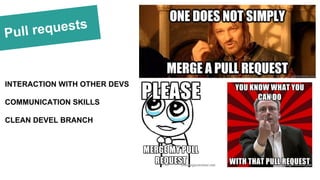
Pull requests
INTERACTION WITH OTHER DEVS
COMMUNICATION SKILLS
CLEAN DEVEL BRANCH
Issues with
gitflow
● gitflow seems too complex for simple projects
● release & hotfix branches seem redundant
(introduce complexity and are an overkill for most
projects)
● git log graph is crowded with paths
● alternative github-flow (link)
● alternative gitlab-flow (link)
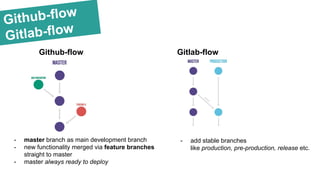
Github-flow
Gitlab-flow
Github-flow Gitlab-flow
- master branch as main development branch
- new functionality merged via feature branches
straight to master
- master always ready to deploy
- add stable branches
like production, pre-production, release etc.
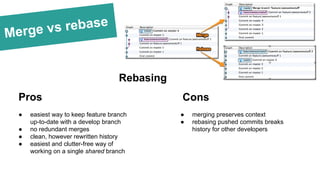
Merge vs rebase
Rebasing
Pros Cons
● easiest way to keep feature branch
up-to-date with a develop branch
● no redundant merges
● clean, however rewritten history
● easiest and clutter-free way of
working on a single shared branch
● merging preserves context
● rebasing pushed commits breaks
history for other developers
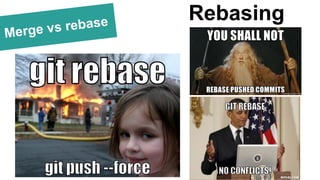
Merge vs rebase Rebasing
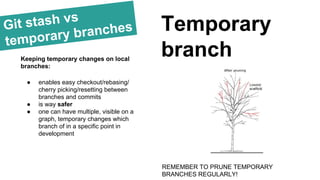
Git stash vs
temporary branches Temporary
branchKeeping temporary changes on local
branches:
● enables easy checkout/rebasing/
cherry picking/resetting between
branches and commits
● is way safer
● one can have multiple, visible on a
graph, temporary changes which
branch of in a specific point in
development
REMEMBER TO PRUNE TEMPORARY
BRANCHES REGULARLY!
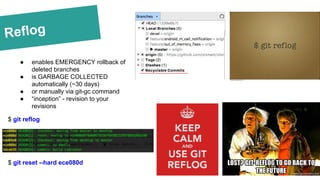
Reflog
● enables EMERGENCY rollback of
deleted branches
● is GARBAGE COLLECTED
automatically (~30 days)
● or manually via git-gc command
● “inception” - revision to your
revisions
$ git reflog
$ git reset --hard ece080d
● always compile!
● contain single action/ functionality/
addition/ change
● be well described
Commit
granularity
Keeping well-maintained
granularity enables:
● easy rollback when you decide to
implement the feature differently
● easy cherry-picking of specific
functionality from a feature branch
(every commit is separate!)
● describes feature branch and its
contents without looking into the
files
● makes you safer - you can always
use reflog to go back to anything
you commited
A commit should:
Git desktop
clients
OS support:
● OS X
● Windows
PROS:
● Free of charge
● Git-flow native support
● very popular
CONS:
● no advanced features
Atlassian SourceTree
Git desktop
clients
OS support:
● OS X
● Windows
PROS:
● Free of charge
● Git-flow native support
CONS:
● no advanced features
Github desktop
Git desktop
clients
OS support:
● OS X
● Linux
● Windows
PROS:
● Free of charge for non-
commercial
● Git-flow support
● Pull-request on internal
repositories
● distributed reviews
● excellent git-hub integration
CONS:
● PAID for commercial
● appearance
SmartGit
Git desktop
clients
OS support:
● OS X
PROS:
● appearance
● excellent git-hub integration
● stage separate lines
● display changes in tree-view
● Git-flow support
● excellent search
● new-branch, merge by dragging
branches
● visual conflict resolution
CONS:
● PAID
Tower 2
Resources
RESOURCES:
● https://www.google.com/trends/explore#q=mercurial,git
● https://about.gitlab.com/2014/09/29/gitlab-flow/
● http://nvie.com/posts/a-successful-git-branching-model/
● https://guides.github.com/introduction/flow/
● https://leanpub.com/git-flow/read
Thankyou!
Bartosz Kosarzycki
bartosz.kosarzycki@stxnext.pl
@bkosarzycki