Basic Git Into 
JivyGroup 2014 
yoad@jivygroup.com
Why Git and not X? 
• You can find many comparisons and 
discussions on line.. Will not talk about this 
here much 
• Yes, Git is Hard since it’s Complex. 
• It’s complex in order to be flexible and 
powerful 
• Yes, SVN is simpler, until you need to do 
something complicated
Why Git and not X? 
If simple was the only thing that matters we 
would still…
SVN Model 
The Server 
User2 
Repo2 
Commit 
User2 
Repo1 
Checkout 
Update 
commit 
trunk Branches 
trunk Branches/b1 
trunk 
User1 
Repo1 
b1 
root
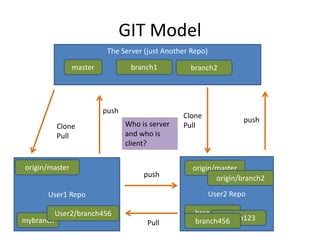
GIT Model 
The Server (just Another Repo) 
User2 Repo 
master branch1 
Clone 
Pull 
origin/master 
origin/master 
User1 Repo 
mybranch 
branch123 
branch4b5r6anch123 
push 
push 
branch2 
origin/branch2 
Clone 
Pull 
Pull 
User2/branch456 
push 
Who is server 
and who is 
client?
Local Git 
Single repository concepts 
LOCAL
Basic Definitions 
• Repository 
– Collection of files and their history organized in 
folders, branches, tags 
– Is stored in a normal file system somewhere 
– Can be on a local machine or a remote machine 
– To work with GIT you will need a repo somewhere 
– When creating a new one… it’s empty 
Example 1
Basic Definitions 
• Workspace 
– Where you do work.. 
• Index 
– Snapshot of files in the workspace (can be some of 
them. 
– You add to the index files you change / remove etc. 
• Commit 
– A snapshot of the workspace at some point 
– Has unique revision number 
– Knows the commit (commits) that it’s based on
workspace index 
Repository 
store 
changes 
staged add 
changes 
staged add 
Committed and generated unique commit 
rev. number
Simple Local GIT 
Work 
Add To Index 
Commit 
• Add / Remove 
• Change Files 
• Add (same as “stage”) the changes 
• Not all files must be staged 
• Can stage changes to same file several times 
• Think “snapshot” of the work 
• Changes from the index stored 
• Get a unique rev. number 
• Index emptied 
Example 2
Branches 
• Branch is a pointer to a commit 
• A branch can point at other commits – it can 
move 
• A branch is a way to organize working histories 
• Since commits know which commits they are 
based on – branch represents a commit and 
what came before it.
Branches 
• When doing a “commit” the current “branch” 
moves to point at the new commit 
bx C3 C2 C1 
On branch bx -> Commit of C4 
bx C4 C3 C2 C1 
Example 3
Branches 
• Here is a branch 
bx C3 C2 C1 
• Creating a new branch just adds another 
“pointer” to the same commit 
C3 C2 C1 
bx 
by 
Example 3
Branches 
• Other branches are not affected by a commit 
C3 C2 C1 
bx 
by 
On branch bx -> Commit of C4 
C3 C2 C1 
bx 
C4 
by 
Example 3
Branches 
• Checking out a branch puts the snapshot (the 
commit) it points to into the workspace 
workspace index 
Repository 
store 
Checkout branch y 
Branch y 
snapshot 
Branch x 
snapshot 
Now on branch y 
Example 3
Branches 
• master – is just another branch, but is the 
default one which gets created. (So you will 
always see it in a repo) 
• Branching is cheap – feel free to branch a lot. 
• Branch is a good way to work on multiple 
things in parallel
Merging 
• Combining one ore more branches into the 
current branch 
• Allows changes from other branches to be 
integrated into the current work history 
• Usually generates a new commit which has 
more than one predecessor 
• Other branches not affected
Merging 
C3 C2 C1 
bx 
by 
C4 
C5 
Merging bx into by 
C3 C2 C1 
bx C4 
by C6 
C5
Merging 
• The branch “bx” was not affected 
• Merge only changes the workspace. Still need 
to add (to index) and commit (“by”) to 
actually generate “c6” 
C3 C2 C1 
bx C4 
by C6 C5
Merging - Conflicts 
• When merging, if there are conflicts - need to 
solve them. 
• After solving, need to “add” the changes and 
commit the merged workspace 
C3 C2 C1 
Example 3 
bx C4 
by C6 C5
Merging – fast forward 
• Fast Forward – a type of merge which only 
requires moving the “branch” pointer 
• Possible when the current branch is an 
ancestor of the merged branch 
• No new “merge” commits need to be created
Merging – fast forward 
bx C3 C2 C1 
by 
C4 
Merging bx into by 
bx C3 C2 C1 
by 
C4 
C4 is based on C3 so 
“by” which points to 
C3 can move to 
point to C4 
Example 4
Merging – fast forward 
C3 C2 C1 
bx 
by 
C4 
C4 is not based on 
C5, so cannot fast 
forward. 
C5 
C3 C2 C1 
bx 
by 
C4 
C5 
C6 
Now its possible to ff by 
In that case, merge…
Remote 
More than one repository 
REMOTE
Collaborating 
• Clone – creates a local repository by copying 
another (remote) repository 
• Repositories which were cloned can exchange 
changes between them 
• Pull? For now forget about it. we will come 
back to it later 
• Commits are always local. But can be sent to 
other repositories.
Fetch 
• Fetch – gets changes from a remote repository 
that you don’t already have. 
• Fetch gets the changes to the local repository 
but does not touch the index or workspace. 
• After a fetch, usually a merge needs to take 
place (more on this later)
Remote Branches - fetch 
• Remote branches represent the state of a 
branch on the repository it is fetched from 
• It is like another branch when it comes to 
merging from 
• You cannot checkout a remote branch, you 
branch it (create a local pointer to it) 
• After fetching, a remote branch and it’s local 
branch counterpart may need to be merged
Remote Branches 
My Machine The Server 
master 
C1 
C0 
C1 clone 
origin/master 
C0 
master 
This is a remote 
branch 
origin is just a name 
for a “remote” 
Example 5
Remote Branches - fetch 
My Machine The Server 
Some changes on 
the server 
master 
C1 C2 
C1 
C0 
origin/master 
C0 
master 
fetch
Remote Branches - fetch 
My Machine The Server 
master 
C2 
C1 
C0 
origin/master 
C2 master 
C1 
C0 
Example 5
Remote Branches - fetch 
My Machine The Server 
master 
C2 master 
C1 C2 
C1 
C0 
origin/master 
C0 
Can 
merge!
Remote Branches - fetch 
My Machine The Server 
master 
C2 
C1 
C0 
origin/master 
C1 
C0 
master 
C2 
Now 
merged 
(fast 
forward in 
this case) 
Example 5
push 
• Will take local objects (commits, tags) which 
are required to make a remote branch 
complete – and send them. 
• Will merge those local changes into the 
remote branch 
• Will only do a “fast-forward” merge (other 
merge type, if required, will fail the push)
Remote Branches - Push 
My Machine The Server 
master 
C2 
C1 
C0 
master 
C3 
C2 
C1 
origin/master 
C0 
This commit is not 
on the remote 
master
Remote Branches - Push 
My Machine The Server 
master 
C2 
C1 
C0 
master 
C3 
C2 
C1 
origin/master 
C0 
push
Remote Branches - Push 
My Machine The Server 
master 
C2 
C1 
C0 
master 
C2 
C1 
origin/master 
C0 
Now merged and in 
a fast forward 
manner 
C3 C3 
Example 5
push 
• If cannot do a fast-forward – will fail. Then, a 
fetch + merge is required to allow the push. 
• Once remote changes merged locally again a 
fast forward is possible and the push would 
work.
Remote Branches - Push 
My Machine The Server 
master 
C2 
C1 
C0 
master 
C2 
C1 
origin/master 
C0 
This commit is not 
on the remote 
master 
C3 C4 
This commit is not 
on the local master 
But local 
origin/master does 
not know…
Remote Branches - Push 
My Machine The Server 
master 
C3 C4 
C2 
C1 
C0 
master 
C2 
C1 
origin/master 
C0 
No can do, fetch + 
merge first. 
push
Remote Branches - Push 
My Machine The Server 
master 
C3 C4 
C2 
C1 
C0 
master 
C2 
C1 
origin/master 
C0 
fetch
Remote Branches - Push 
My Machine The Server 
master 
C3 C4 
C2 
C1 
C0 
master 
C2 
C1 
origin/master 
C0 
C4 
The commit from 
the remote arrived 
This is what the 
remote knows about 
the master branch
Remote Branches - Push 
My Machine The Server 
master 
C2 
C1 
C0 
master 
C3 
C2 
C1 
origin/master 
C0 
C4 
C4 
C5 
Now 
merged 
to local 
master
Remote Branches - Push 
My Machine The Server 
master 
C2 
C1 
C0 
master 
C3 
C2 
C1 
origin/master 
C0 
C4 
C4 
C5 
push
Remote Branches - Push 
My Machine The Server 
master 
C3 
C2 
C1 
origin/master 
C0 
C4 
C5 
Now 
merged 
since fast 
forward is 
possible 
master 
C3 
C2 
C1 
C0 
C4 
C5 
The commits from 
the local arrived 
Example 6
Remote Branches 
• Reminder - Remote branches represent a 
branch on a remote repository 
• The branch origin/master for example is a 
local pointer to the “master” on “origin” 
• It reflects what the local repository currently 
knows about the state of “master” on “origin” 
• You cannot change them, but you can 
“checkout” to get a “remote tracking branch”
Remote Tracking Branches 
• A local branch which is configured to “track” a 
remote branch 
• Will allow commands like “fetch” and “push” 
to know where to send/get changes 
• Just a helper, you could specify all the 
locations in the command args 
• Helpful also to remember where a local 
branch points to
Remote Tracking Branches 
• When cloning a remote repo will check out 
the remote “master” 
• “origin” is default name for the remote you 
cloned from 
• So “origin/master” is the remote branch and 
“master” is configured to track it 
• master is a remote tracking branch
Remote Branches Summary 
My Machine The Server 
remote: srv1 -> https://the.server/... 
branch1 
tracks 
Cx srv1/branch1 
branch1 
Cx 
points at 
Local state of 
Cy Cy 
created 
when “fetch” 
from srv1 
Created when 
“checkout” 
srv1/branch1
pull 
• Now it’s time to talk about pull since it’s just a 
shortcut command to do: 
1. Fetch from a remote 
2. Merge changes from “remote branch” into the 
“remote tracking branch” 
• Sometimes the tool would also allow to 
“commit” merges for you right after the pull 
(not part of pull, but a helper)
Summary of operations 
workspace index 
Repository 
store 
clone 
Remote 
Repository 
checkout 
add 
push 
commit 
merge fetch 
Pull (fetch+merge)
Rebase 
• Instead of merging, replays set of changes on 
top of another branch 
• Affects the “rebased” branch only 
• Changes the history of commits 
• Can be dangerous 
• Very useful to remove history clutter 
• Simple rule, use locally only and for branches 
which you will never share
Rebase 
C2 
bx 
by 
C4 
C3 
C2 
Merge bx into by 
bx 
by 
C4 
C5 C3 
C2 
Rebase by on bx 
bx 
by 
C4 
C3’ C3 
Committing will have c4 
as the only ancestor of 
c3’ 
Committing will have c4 
and c3 as two ancestors 
of c5 
Note: In both cases can now fast-forward bx
Rebase – when to use 
• You have a local branch – has some changes 
committed to it 
• Fetched a remote branch 
• Instead of merging into remote branch – 
rebase on it 
• Now merge (fast forward) into the remote 
branch 
• Push happilly 
Example 7
We did not discuss 
• The “Pull Request” 
• Suggested work flow for small teams 
• GitHub and BitBucket 
Go learn more…
Summary 
• Git is complex, but flexible and powerful 
• Git supports distributed teams very well and 
also is the standard de-facto for OSS projects 
• Due to it’s flexibility, every team needs to 
decide on the workflow which works best for 
it
How to know more 
• Read the Git Pro Book 
• No really, its very good, explains most of the 
stuff well 
• Look for blog posts with titles like “how I got 
started with git”