Flutter
Learn to build native mobile apps
with Flutter.
Dave Chao
Basic
BLoC
Restful
GraphQL
Agenda
Basic
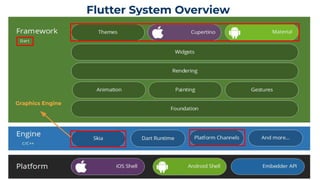
Flutter System Overview
Graphics Engine
“Everything’s a Widget.
Describes the
configuration for an
Element.
An instantiation of a
Widget at a particular
location in the tree.
Handles size, layout,
and painting.
Flutter has three trees.
Element - Lifecycle RenderObject - PaintWidget - Configure
- https://www.youtube.com/watch?v=996ZgFRENMs
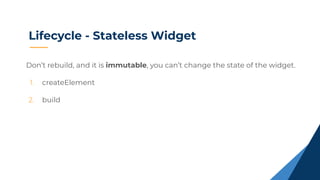
Lifecycle - Stateless Widget
Don’t rebuild, and it is immutable, you can’t change the state of the widget.
1. createElement
2. build
Lifecycle - Stateful Widget
Rebuild, It is mutable, and the state of the Widget can be changed and
it will be notified when a state changed.
1. createState
● When creating StatefulWidget, it will be called.
2. initState
● Only be called once.
3. didChangeDependencies
● After initState, it will be called.
● When the InheritedWidget changes, it will be called.
4. build
Lifecycle - Stateful Widget
5. didUpdateWidget
● After build, it will be called.
● After hot reload, it will be called.
● If the parent widget calls setState(), the child widget's didUpdateWidget will be called.
6. setState
● Call setState, build and redraw.
7. build
8. deactivate
● It will only be called when the State Widget is temporarily removed,
such as the page is changed.
9. dispose
● The State Widget will only be called when it is destroyed forever.
Interact with Widget
Remove widget or leave page
What seems to be the problem?
- https://flutter.dev/docs/development/data-and-backend/state-mgmt/options
BLoC
“BLoC make it easy to separate presentation from
business login, making your code fast, easy to test,
and reusable.
- https://bloclibrary.dev/#/
BLoC Widgets
It is used as a DI widget so that a
single instance of a bloc can be
provided to multiple widgets within
a subtree.
BlocProvider
BLoC Widgets
Handles building the widget in
response to new states.
BlocBuilder
BLoC Widgets
Invokes the listener in response to
state changes in the bloc, such as
navigation, showing a SnackBar,
showing a Dialog.
BlocListener
Getting Started
- Animation
Events
enum AnimationEvent {
idle,
cover_eyes_in,
cover_eyes_out,
success,
fail
}
BLoC
class AnimationBloc extends Bloc<AnimationEvent, String> {
@override
String get initialState => "idle";
@override
Stream<String> mapEventToState(AnimationEvent event) async* {
switch (event) {
case AnimationEvent.idle:
yield "idle";
break;
case AnimationEvent.cover_eyes_in:
yield "cover_eyes_in";
break;
case AnimationEvent.cover_eyes_out:
yield "cover_eyes_out";
break;
case AnimationEvent.success:
yield "success";
break;
case AnimationEvent.fail:
yield "fail";
break;
}}
}
在mapEventToState中,
定義Business Login
Event與State的資料型態
UI
class App extends StatelessWidget {
@override
Widget build(BuildContext context) {
return MaterialApp(
debugShowCheckedModeBanner: false,
home: BlocProvider<AnimationBloc>(
create: (context) => AnimationBloc(),
child: LoginPage(),
),
);
}
}
建立AnimationBloc, 再透過
BlocProvider注入到LoginPage中
UI
class LoginPage extends StatefulWidget {
@override
_LoginPageState createState() => _LoginPageState();
}
class _LoginPageState extends State<LoginPage> {
AnimationBloc animationBloc;
@override
initState() {
super.initState();
animationBloc = BlocProvider.of<AnimationBloc>(context);
_passwordFocusNode.addListener(() {
if (_passwordFocusNode.hasFocus) {
animationBloc.add(AnimationEvent.cover_eyes_in);
}
});
}
}
● 在LoginPage中, 透過BlocProvider.of
取得AnimationBloc
● 透過Bloc.add(Event Type), 告知Bloc,
依據不同的Event做不同的business
logic
UI
Widget _buildGuss() {
return BlocBuilder<AnimationBloc, String>(builder: (context, state) {
return Container(
height: 200,
padding: EdgeInsets.only(left: 30.0, right: 30.0),
child: FlareActor(
"assets/Guss.flr",
shouldClip: false,
alignment: Alignment.topCenter,
fit: BoxFit.cover,
animation: state,
),
);
});
}
透過BlocBuilder監聽Bloc的state,
依據不同的state, 繪製不同的view
JSON Serializable
JSON Serializable
part 'login_item.g.dart';
@JsonSerializable(nullable: false)
class LoginItem {
@JsonKey(name: "accessToken") String accessToken;
@JsonKey(name: "expiresIn") int expiresIn;
@JsonKey(name: "refreshExpiresIn") int refreshExpiresIn;
@JsonKey(name: "refreshToken") String refreshToken;
LoginItem(this.accessToken, this.expiresIn, this.refreshExpiresIn, this.refreshToken);
factory LoginItem.fromJson(Map<String, dynamic> json) =>
_$LoginItemFromJson(json);
Map<String, dynamic> toJson() => _$LoginItemToJson(this);
}
Generate Code:
flutter packages pub run build_runner build
JSON Serializable
part of 'login_item.dart';
// **************************************************************************
// JsonSerializableGenerator
// **************************************************************************
LoginItem _$LoginItemFromJson(Map<String, dynamic> json) {
return LoginItem(
json['accessToken'] as String,
json['expiresIn'] as int,
json['refreshExpiresIn'] as int,
json['refreshToken'] as String,
);
}
Map<String, dynamic> _$LoginItemToJson(LoginItem instance) => <String, dynamic>{
'accessToken': instance.accessToken,
'expiresIn': instance.expiresIn,
'refreshExpiresIn': instance.refreshExpiresIn,
'refreshToken': instance.refreshToken,
};
Restful
“Dio is a powerful Http client, which supports
Interceptors, Global configuration, FormData,
Request Cancellation, File downloading, Timeout.
- https://pub.dev/packages/dio
Dio
Init
Dio dio = Dio(new BaseOptions(
baseUrl: ‘https://api.xyzabc.com/’,
connectTimeout: 5000,
receiveTimeout: 100000,
contentType: ContentType.json.toString(),
responseType: ResponseType.json,
));
Dio
GET
Future<BikeListItem> fetchBikes() async {
final response = await _dio.get("youbike");
return BikeListItem.fromJson(response.data);
}
POST
Future<LoginItem> login(LoginRequest request) async {
final response = await _dio.post(
"v1/basicLogin",
data: request,
);
return LoginItem.fromJson(response.data["data"]);
}
Interceptors
dio.interceptors.add(InterceptorsWrapper(
onRequest: (RequestOptions options) async {
Fimber.d("headers: ${options.headers}");
Fimber.d("uri: ${options.uri}");
Fimber.d("data: ${options.data}");
Fimber.d("query: ${options.queryParameters}");
return options;
},
onResponse: (Response response) async {
return response;
},
onError: (DioError e) async {
return e;
}
));
Dio
Getting Started
- Login
Events
abstract class LoginEvent extends Equatable {
const LoginEvent();
}
class Login extends LoginEvent {
final LoginRequest request;
Login(this.request);
@override
List<Object> get props => [request];
}
States
class LoginState extends Equatable {
const LoginState();
@override
List<Object> get props => [];
}
class Loading extends LoginState {}
class DataEmpty extends LoginState {}
class Error extends LoginState {}
class Success extends LoginState {
final LoginItem loginItem;
Success([this.loginItem]) : assert(loginItem != null);
@override
List<Object> get props => [loginItem];
}
BLoC
class LoginBloc extends Bloc<LoginEvent, LoginState> {
final AccountRepository repository;
LoginBloc({@required this.repository});
@override
LoginState get initialState => Loading();
@override
Stream<LoginState> mapEventToState(LoginEvent event) async* {
if (event is Login) {
try {
yield Loading();
final loginItem = await repository.login(event.request);
yield Success(loginItem);
} catch (error) {
Fimber.e("Error: $error");
yield Error();
}
}
}
}
Repository
class AccountRepository {
Dio _dio;
AccountRepository(Dio dio) {
_dio = dio;
}
Future<LoginItem> login(LoginRequest request) async {
final response = await _dio.post(
"v1/login",
data: request,
);
Fimber.d("response.statusCode: ${response.statusCode}");
Fimber.d("response.data: ${response.data}");
return LoginItem.fromJson(response.data["data"]);
}
}
UI
class App extends StatelessWidget {
@override
Widget build(BuildContext context) {
Config _config = ConfigProvider.of(context).config;
return MaterialApp(
debugShowCheckedModeBanner: false,
home: MultiBlocProvider(
providers: [
BlocProvider<LoginBloc>(create: (context) => LoginBloc(repository: AccountRepository(_config.dio))),
BlocProvider<AnimationBloc>(create: (context) => AnimationBloc()),
],
child: LoginPage(),
),
);
}
}
UI
LoginBloc loginBloc = BlocProvider.of<LoginBloc>(context);
onTap: () {
if (_formKey.currentState.validate()) {
final account = _accountController.text.toString();
final password = _passwordController.text.toString();
final request = LoginRequest("app.internal", account, password);
loginBloc.add(Login(request));
}
}
BlocListener<LoginBloc, LoginState>(
listener: (context, state) {
if (state is Success) {
_navigateToHomeScreen();
} else if (state is Error) {
animationBloc.add(AnimationEvent.fail);
}
}
GraphQL
Init GraphQL Client
GraphQLClient _initGraphQLClient() {
final HttpLink _httpLink = HttpLink(
uri: 'http://11.222.333.444:8888/graphql',
headers: {
Constant.X_GRAPH_AUTH: Constant.X_GRAPH_AUTH_VALUE,
},
);
return GraphQLClient(
cache: InMemoryCache(),
link: _httpLink,
);
}
Query
const String readPodcasts = r'''
query ReadPodcasts {
podcast {
id,
artistName,
name,
artworkUrl100
}
}
''';
Query
Future<QueryResult> getPodCasts() async {
final QueryOptions _options = QueryOptions(
documentNode: gql(queries.readPodCasts),
);
return await client.query(_options);
}
Mutation
const String addUser = r'''
mutation AddUser($name: String!) {
id,
name
}
''';
Mutation
Future<QueryResult> addUser(String name) async {
final MutationOptions _options = MutationOptions(
documentNode: gql(mutations.adduser),
variables: <String, dynamic>{name: name},
);
return await client.mutate(_options);
}
Getting Started
- Fetch Collections
Query Language
const String readPodCastDetail = r'''
query ReadPodCastDetail($collectionId: String!) {
collection(id: $collectionId) {
artistId,
artistName,
artworkUrl100,
artworkUrl600,
collectionId,
collectionName,
country,
genreIds,
genres,
releaseDate,
contentFeed {
contentUrl,
desc,
publishedDate,
title
}
}
}
''';
Events
abstract class CollectionEvent extends Equatable {
const CollectionEvent();
}
class FetchPodCastDetail extends CollectionEvent {
final String collectionId;
FetchPodCastDetail(this.collectionId);
@override
List<Object> get props => [collectionId];
}
States
class CollectionState extends Equatable {
const CollectionState();
@override
List<Object> get props => [];
}
class Loading extends CollectionState {}
class DataEmpty extends CollectionState {}
class Error extends CollectionState {}
class Success extends CollectionState {
final PodCastDetailItem podCastDetailItem;
Success([this.podCastDetailItem]) : assert(podCastDetailItem != null);
@override
List<Object> get props => [podCastDetailItem];
}
BLoC
class CollectionBloc extends Bloc<CollectionEvent, CollectionState> {
final PodCastRepository repository;
CollectionBloc({@required this.repository,});
@override
CollectionState get initialState => Loading();
@override
Stream<CollectionState> mapEventToState(CollectionEvent event) async* {
if (event is FetchPodCastDetail) {
try {
final result = await repository.getPodCastDetail(event.collectionId);
final podCastDetailItem = PodCastDetailItem.fromJson(result.data);
yield Success(podCastDetailItem);
} catch (error) {
Fimber.e("Error: $error");
yield Error(error);
}
}
}
}
Repository
class PodCastRepository {
final GraphQLClient client;
PodCastRepository({@required this.client}) : assert(client != null);
Future<QueryResult> getPodCasts() async {
final QueryOptions _options = QueryOptions(documentNode: gql(queries.readPodCasts),);
return await client.query(_options);
}
Future<QueryResult> getPodCastDetail(String collectionId) async {
final QueryOptions _options = QueryOptions(
documentNode: gql(queries.readPodCastDetail),
variables: <String, dynamic>{'collectionId': collectionId},
);
return await client.query(_options);
}
}
UI
CollectionBloc bloc = BlocProvider.of<CollectionBloc>(context);
bloc.add(FetchPodCastDetail(widget.collectionId));
BlocBuilder<CollectionBloc, CollectionState>(
builder: (context, state) {
if (state is Success) {
final collectionItem = state.podCastDetailItem.collectionItem;
return Column(
children: <Widget>[
_buildCastDetail(collectionItem),
SizedBox(height: 16.0),
_buildTitle(),
_buildContentFeed(collectionItem)
],
);
} else {
return CustomerProgressIndicator();
}
}
Podcasts App
- https://github.com/davechao/podcast_app
Thanks!
Does anyone have any questions?