3
    1                        5
                             1
              1
              4
2
1
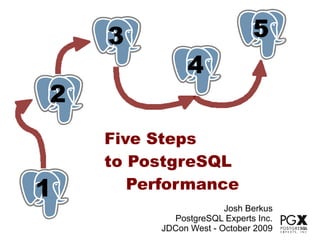
    Five Steps
    to PostgreSQL
1      Performance
                       Josh Berkus
           PostgreSQL Experts Inc.
         JDCon West - October 2009
3
                  1                     5
                                        1
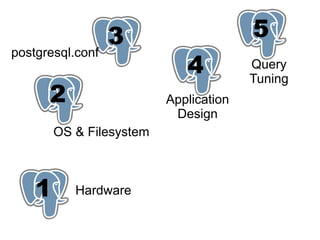
postgresql.conf
                             1
                             4          Query
                                        Tuning
      2
      1                   Application
                           Design
        OS & Filesystem


    1      Hardware
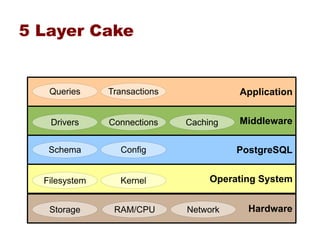
5 Layer Cake


   Queries     Transactions             Application


   Drivers     Connections    Caching   Middleware

   Schema        Config                 PostgreSQL


  Filesystem     Kernel            Operating System


   Storage      RAM/CPU       Network     Hardware
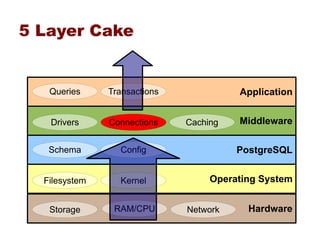
5 Layer Cake


   Queries     Transactions             Application


   Drivers     Connections    Caching   Middleware

   Schema        Config                 PostgreSQL


  Filesystem     Kernel            Operating System


   Storage      RAM/CPU       Network     Hardware
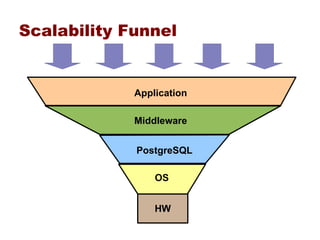
Scalability Funnel


             Application

             Middleware


             PostgreSQL

                 OS


                 HW
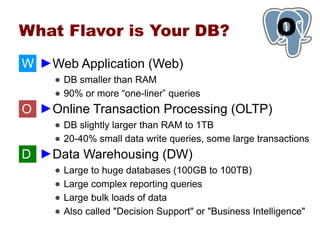
What Flavor is Your DB?                                    O
                                                           1
W ►Web Application (Web)
     ● DB smaller than RAM
     ● 90% or more “one-liner” queries
O ►Online Transaction Processing (OLTP)
     ● DB slightly larger than RAM to 1TB
     ● 20-40% small data write queries, some large transactions
D ►Data Warehousing (DW)
     ●   Large to huge databases (100GB to 100TB)
     ●   Large complex reporting queries
     ●   Large bulk loads of data
     ●   Also called "Decision Support" or "Business Intelligence"
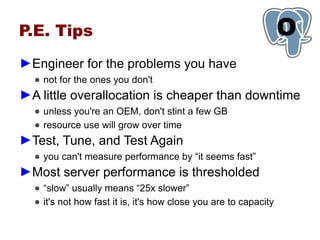
P.E. Tips                                                         O
                                                                  1
►Engineer for the problems you have
  ● not for the ones you don't
►A little overallocation is cheaper than downtime
  ● unless you're an OEM, don't stint a few GB
  ● resource use will grow over time
►Test, Tune, and Test Again
  ● you can't measure performance by “it seems fast”
►Most server performance is thresholded
  ● “slow” usually means “25x slower”
  ● it's not how fast it is, it's how close you are to capacity
1   Hardware
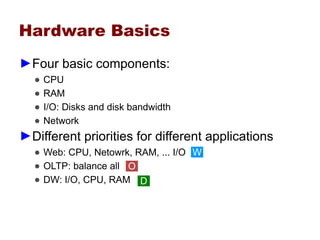
Hardware Basics
►Four basic components:
  ●   CPU
  ●   RAM
  ●   I/O: Disks and disk bandwidth
  ●   Network
►Different priorities for different applications
  ● Web: CPU, Netowrk, RAM, ... I/O W
  ● OLTP: balance all O
  ● DW: I/O, CPU, RAM D
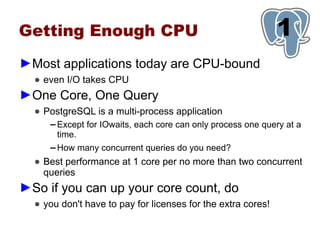
Getting Enough CPU                                             1
►Most applications today are CPU-bound
  ● even I/O takes CPU
►One Core, One Query
  ● PostgreSQL is a multi-process application
     ▬   Except for IOwaits, each core can only process one query at a
         time.
     ▬   How many concurrent queries do you need?
  ● Best performance at 1 core per no more than two concurrent
    queries
►So if you can up your core count, do
  ● you don't have to pay for licenses for the extra cores!
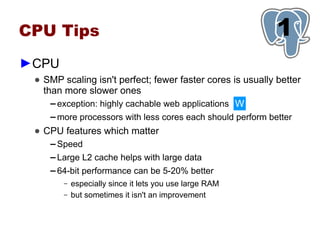
CPU Tips                                                      1
►CPU
 ● SMP scaling isn't perfect; fewer faster cores is usually better
   than more slower ones
     ▬ exception: highly cachable web applications W

    ▬   more processors with less cores each should perform better
 ● CPU features which matter
    ▬   Speed
    ▬   Large L2 cache helps with large data
    ▬   64-bit performance can be 5-20% better
         –   especially since it lets you use large RAM
         –   but sometimes it isn't an improvement
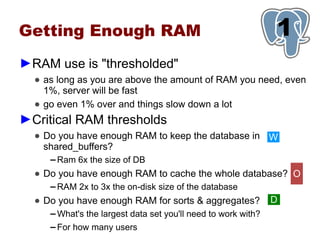
Getting Enough RAM                                               1
►RAM use is "thresholded"
  ● as long as you are above the amount of RAM you need, even
    1%, server will be fast
  ● go even 1% over and things slow down a lot
►Critical RAM thresholds
  ● Do you have enough RAM to keep the database in W
    shared_buffers?
     ▬   Ram 6x the size of DB
  ● Do you have enough RAM to cache the whole database? O
     ▬   RAM 2x to 3x the on-disk size of the database
  ● Do you have enough RAM for sorts & aggregates?               D
     ▬   What's the largest data set you'll need to work with?
     ▬   For how many users
Other RAM Issues                                         1
►Get ECC RAM
  ● Better to know about bad RAM before it corrupts your data.
►What else will you want RAM for?
  ● RAMdisk?
  ● SWRaid?
  ● Applications?
Getting Enough I/O                                          1
►Will your database be I/O Bound?
  ● many writes: bound by transaction log
  ● database 3x larger than RAM: bound by I/O for every query
►Optimize for the I/O you'll need
  ● if you DB is terabytes, spend most of your money on disks
  ● calculate how long it will take to read your entire database
    from disk
  ● don't forget the transaction log!
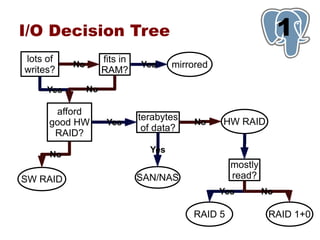
I/O Decision Tree                                                 1
lots of              fits in
           No                  Yes     mirrored
writes?              RAM?

     Yes        No

      afford
                               terabytes          HW RAID
     good HW          Yes                   No
                                of data?
      RAID?
                                 Yes
     No
                                                    mostly
SW RAID                        SAN/NAS              read?
                                                  Yes        No

                                           RAID 5             RAID 1+0
I/O Tips                                             1
►RAID
 ● get battery backup and turn your write cache on
 ● SAS has 2x the real throughput of SATA
 ● more spindles = faster database
     ▬   big disks are generally slow
►SAN/NAS
 ● measure lag time: it can kill response time
 ● how many channels?
     ▬   “gigabit” is only 100mb/s
     ▬   make sure multipath works
 ● use fiber if you can afford it
SSD: Not There Yet                                1
►Fast
  ● 1 SSD as fast as a 4-drive RAID
  ● low-energy and low-profile
►But not reliable
  ● MTF in months or weeks
  ● Mainly good for static data
  ● Seeks are supposed to be as fast as scans …
     ▬   but they're not
►Don't rely on SSD now
  ● but you will be using it next year
Network                                                  1
►Network can be your bottleneck
  ● lag time
  ● bandwith
  ● oversubscribed switches
►Have dedicated connections
  ● between appserver and database server
  ● between database server and failover server
  ● multiple interfaces!
►Data Transfers
  ● Gigabit is 100MB/s
  ● Calculate capacity for data copies, standby, dumps
The Most Important
Hardware Advice:
                                                            1
►Quality matters
  ●   not all CPUs are the same
  ●   not all RAID cards are the same
  ●   not all server systems are the same
  ●   one bad piece of hardware, or bad driver, can destroy your
      application performance
►High-performance databases means hardware
 expertise
  ●   the statistics don't tell you everything
  ●   vendors lie
  ●   you will need to research different models and combinations
  ●   read the pgsql-performance mailing list
The Most Important
Hardware Advice:
                                               1
►So Test, Test, Test!
  ●   CPU: PassMark, sysbench, Spec CPU
  ●   RAM: memtest, cachebench, Stream
  ●   I/O: bonnie++, dd, iozone
  ●   Network: bwping, netperf
  ●   DB: pgBench, sysbench
►Make sure you test your hardware before you
 put your database on it
  ● “Try before you buy”
  ● Never trust the vendor or your sysadmins
2
1
OS & Filesystem
Spread Your Files Around                                  1
                                                          2
►Separate the transaction log if possible               O D
  ● pg_xlog directory
  ● on a dedicated disk/array, performs 10-50% faster
  ● many WAL options only work if you have a separate drive


          number of drives/arrays     1     2       3
                                    which partition
          OS/applications             1     1       1
          transaction log             1     1       2
          database                    1     2       3
Spread Your Files Around                                       1
                                                               2
►Tablespaces for large tables                     O D
  ● try giving the most used table/index its own tablespace & disk
     ▬   if that table gets more transactions than any other
     ▬   if that table is larger than any other
     ▬   having tables and indexes in separate tablespaces helps with
         very large tables
  ● however, often not worth the headache for most applications
Linux Tuning                                              1
                                                          2
►Filesystems
  ● XFS & JFS are best in OLTP tests O
     ▬   but can be unstable on RHEL
  ● Otherwise, use Ext3
  ● Reduce logging
     ▬   data=writeback, noatime, nodiratime
►OS tuning
  ● must increase shmmax, shmall in kernel
  ● use deadline scheduler to speed writes O
  ● check your kernel version carefully for performance issues!
     ▬   any 2.6 before 2.6.9 is bad
Solaris Tuning                                               1
                                                             2
►Filesystems
  ● ZFS for very large DBs D
  ● UFS for everything else W O
  ● Mount the transaction log on a partition forcedirectio
     ▬   even if it's on the same disk
  ● turn off full_page_writes with UFS
►OS configuration
  ● no need to configure shared memory, semaphores in Solaris
    10
  ● compile PostgreSQL with aggressive optimization using Sun
    Studio 11/12
FreeBSD Tuning                                        1
                                                      2
►Filesystems
  ● Increase readahead on the FS    O D
    vfs.read_max = 64
►OS tuning
  ● need to increase shmall, shmmax and semaphores:
    kernel.ipc.shmmax = (1/3 RAM in Bytes)
    kernel.ipc.shmall = (1/3 RAM in pages)
    kernel.ipc.semmap = 256
    kernel.ipc.semmni = 256            W O D
    kernel.ipc.semmns = 512
    kernel.ipc.semmnu = 256
Windows Tuning           1
                         2
►You're joking, right?
Set up Monitoring!                                      1
                                                        2
►Get warning ahead of time
  ● know about performance problems before they go critical
  ● set up alerts
     ▬   80% of capacity is an emergency!
  ● set up trending reports
     ▬   is there a pattern of steady growth?
►Monitor everything
  ● cpu / io / network load
  ● disk space & memory usage
►Use your favorite tools
  ● nagios, cacti, reconnitor, Hyperic, OpenNMS
3
                  1
postgresql.conf
shared_buffers                                            3
                                                          1
►Increase: how much?
  ● shared_buffers are usually a minority of RAM
     ▬   use filesystem cache for data
  ● but should be large: 1/4 of RAM on a dedicated server
     ▬   as of 8.1, no reason to worry about too large
  ● cache_miss statistics can tell you if you need more
  ● more buffers needed especially for:
     ▬   many concurrent queries
                                    W O
     ▬   many CPUs
Other memory parameters                       3
                                              1
►work_mem
 ● non-shared
    ▬ lower it for many connections W O
    ▬ raise it for large queries D

 ● watch for signs of misallocation
    ▬   swapping RAM: too much work_mem
    ▬   log temp files: not enough work_mem
 ● probably better to allocate by task/ROLE
Other memory parameters                                  3
                                                         1
►maintenance_work_mem
 ● the faster vacuum completes, the better
    ▬   but watch out for multiple autovacuum workers!
 ● raise to 256MB to 1GB for large databases
 ● also used for index creation
    ▬   raise it for bulk loads
Commits                                                 3
                                                        1
►wal_buffers
  ● raise it to 8MB for SMP systems
►checkpoint_segments
  ● more if you have the disk: 16, 64, 128
►synchronous_commit             W
  ● response time more important than data integrity?
  ● turn synchronous_commit = off
  ● lose a finite amount of data in a shutdown
►effective_io_concurrency
  ● set to number of disks or channels
Query tuning                                   3
                                               1
►effective_cache_size
  ● RAM available for queries
  ● set it to 2/3 of your available RAM
►default_statistics_target           D
  ● raise to 200 to 1000 for large databases
  ● now defaults to 100
  ● setting statistics per column is better
Maintenance                                              3
                                                         1
►Autovacuum
  ● turn it on for any application which gets constant writes W O
  ● not so good for batch writes -- do manual vacuum for bulk
    loads D
  ● make sure to include analyze
  ● have 100's or 1000's of tables?
    multiple_autovacuum_workers
     ▬   but not more than ½ cores
►Vacuum delay
  ● 50-100ms
  ● Makes vacuum take much longer, but have little impact on
    performance
1
   4
Application
 Design
Schema Design                                                     1
                                                                  4
►Table design
  ● do not optimize prematurely
     ▬   normalize your tables and wait for a proven issue to
         denormalize
     ▬   Postgres is designed to perform well with normalized tables
  ● Entity-Attribute-Value tables and other innovative designs
    tend to perform poorly
  ● think of when data needs to be updated, as well as read
     ▬   sometimes you need to split tables which will be updated at
         different times
     ▬   don't trap yourself into updating the same rows multiple times
  ● BLOBs are slow
     ▬   have to be completely rewritten, compressed
Schema Design                                                   1
                                                                4
►Indexing
  ●   index most foreign keys
  ●   index common WHERE criteria
  ●   index common aggregated columns
  ●   learn to use special index types: expressions, full text, partial
►Not Indexing
  ● indexes cost you on updates, deletes
       ▬   especially with HOT
  ● too many indexes can confuse the planner
  ● don't index: tiny tables, low-cardinality columns
Right indexes?                                       5
                                                     1
►pg_stat_user_indexes
  ● shows indexes not being used
  ● note that it doesn't record unique index usage
►pg_stat_user_tables
  ● shows seq scans: index candidates?
  ● shows heavy update/delete tables: index less
Partitioning                                             5
                                                         1
►Partition large or growing tables
  ● historical data
     ▬   data will be purged
     ▬   massive deletes are server-killers
  ● very large tables
     ▬   anything over 1GB / 10m rows
     ▬   partition by active/passive
►Application must be partition-compliant
  ● every query should call the partition key
  ● pre-create your partitions
     ▬   do not create them on demand … they will lock
Query design                                           1
                                                       4
►Do more with each query
  ● PostgreSQL does well with fewer larger queries
  ● not as well with many small queries
  ● avoid doing joins, tree-walking in middleware
►Do more with each transaction
  ● batch related writes into large transactions
►Know the query gotchas (per version)
  ●   try swapping NOT IN and NOT EXISTS for bad queries
  ●   avoid multiple outer joins before 8.2 if you can
  ●   try to make sure that index/key types match
  ●   avoid unanchored text searches "ILIKE '%josh%'"
But I use ORM!                                            1
                                                          4
►Object-Relational Management
                    != high performance
  ● ORM is for ease of development
  ● make sure your ORM allows "tweaking" queries
  ● applications which are pushing the limits of performance
    probably can't use ORM
     ▬   but most don't have a problem
It's All About Caching                              1
                                                    4
►Use prepared queries W O
►Cache, cache everywhere                      W O
  ● plan caching: on the PostgreSQL server
  ● parse caching: in some drivers
  ● data caching:
     ▬   in the appserver
     ▬   in memcached
     ▬   in the client (javascript, etc.)
  ● use as many kinds of caching as you can
►think carefully about cache invalidation
  ● and avoid “cache storms”
Connection Management                                    1
                                                         4
►Connections take resources                W O
  ● RAM, CPU
  ● transaction checking
►Make sure you're only using connections you
 need
  ● look for “<IDLE>” and “<IDLE> in Transaction”
  ● log and check for a pattern of connection growth
     ▬   may indicate a “connecion leak”
  ● make sure that database and appserver timeouts are
    synchronized
  ● if your app requires > 500 database connections, you need
    better pooling
Pooling                                                        1
                                                               4
►New connections are expensive                  W
  ● use persistent connections or connection pooling sofware
     ▬   appservers
     ▬   pgBouncer / pgPool
  ● set pool side to maximum connections needed
     ▬   establishing hundreds of new connections in a few seconds can
         bring down your application

      Webserver

     Webserver                 Pool               PostgreSQL

     Webserver
5
1
Query
Tuning
Optimize Your Queries
                                            5
                                            1
in Test
►Before you go production
  ● simulate user load on the application
  ● monitor and fix slow queries
  ● look for worst procedures
►Look for “bad queries”
  ●   queries which take too long
  ●   data updates which never complete
  ●   long-running stored procedures
  ●   interfaces issuing too many queries
  ●   queries which block
Bad Queries                                                                                                                      5
                                                                                                                                 1
                                   Ranked Query Execution Times


                   5000


                   4000


                   3000
  execution time


                   2000


                   1000


                     0
                          5   10   15   20   25   30   35   40   45   50
                                                                           %55     60
                                                                             ranking    65   70   75   80   85   90   95   100
Finding bad queries                    5
                                       1

                ►Log Analysis
                  ● dozens of logging options
                  ● log_min_duration
                  ● pgfouine
Fixing bad queries                                                5
                                                                  1
►EXPLAIN ANALYZE
 ● things to look for:
     ▬   bad rowcount estimates
     ▬   sequential scans
     ▬   high-count loops
 ● reading explain analyze is an art
     ▬   it's an inverted tree
     ▬   look for the deepest level at which the problem occurs
 ● try re-writing complex queries several ways
Query Optimization Cycle

    log queries               run pg_fouine


                                   explain analyze
apply fixes                        worst queries


                  troubleshoot
                  worst queries
Query Optimization Cycle (8.4)
          check pg_stat_statement


                               explain analyze
apply fixes                    worst queries


              troubleshoot
              worst queries
Procedure Optimization Cycle

    log queries            run pg_fouine


                                  instrument
apply fixes                       worst
                                  functions


                  find slow
                  operations
Procedure Optimization (8.4)
          check pg_stat_function


                                   instrument
apply fixes                        worst
                                   functions

                find slow
                operations
Questions?                                                                                               6
                                                                                                         1
►Josh Berkus                                          ►More Advice
  ● josh@pgexperts.com                                       ● www.postgresql.org/docs
  ● www.pgexperts.com                                        ● pgsql-performance mailing
     ▬   /presentations.html                                   list
  ● it.toolbox.com/blogs/datab                               ● planet.postgresql.org
    ase-soup                                                 ● irc.freenode.net
                                                                    ▬   #postgresql


                This talk is copyright 2009 Josh Berkus, and is licensed under the creative commons attribution license