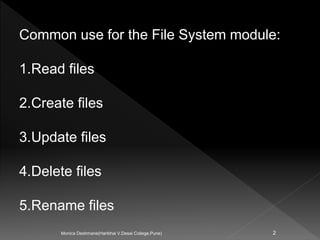
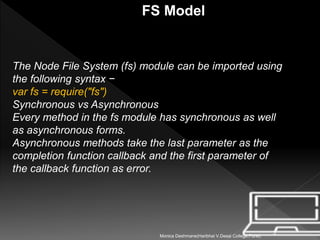
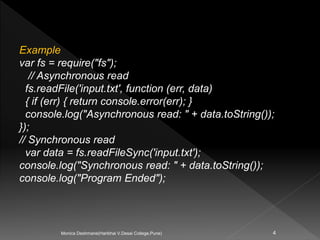
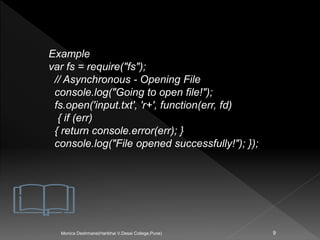
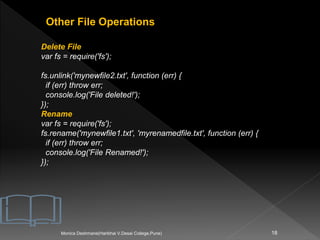
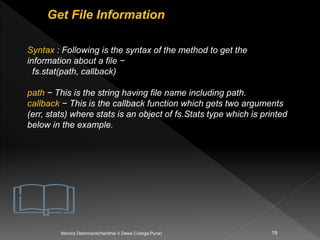
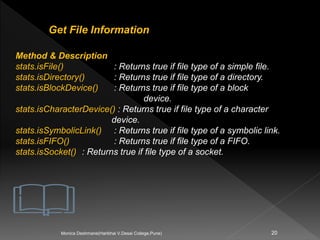
The document discusses the Node.js file system (fs) module. It describes common uses of the file system like reading, creating, updating, deleting, and renaming files. It explains that every fs method has synchronous and asynchronous forms, with asynchronous methods using callbacks. Examples are provided to demonstrate reading and writing files asynchronously and synchronously. Additional file operations like getting file info, renaming, deleting are also covered with code snippets.

![Important method of fs module
Method Description
fs.readFile(fileName [,options], callback) Reads existing file.
fs.writeFile(filename, data[, options], callback) Writes to the file. If file
exists then overwrite the
content otherwise creates
new file.
fs.open(path, flags[, mode], callback) Opens file for reading
or writing.
fs.rename(oldPath, newPath, callback) Renames an existing file.
fs.chown(path, uid, gid, callback) Asynchronous chown.
fs.stat(path, callback) Returns fs.stat object which
includes important file
statistics.
fs.link(src path, dst path, callback) Links file asynchronously.
fs.symlink(destination, path[, type], callback) Symlink asynchronously.
5
Monica Deshmane(Haribhai V.Desai College,Pune)](https://image.slidesharecdn.com/filesystemnodejs-210507081641/85/File-system-node-js-5-320.jpg)
![Important method of fs module
fs.utimes(path, atime, mtime, callback)
Changes the timestamp of the file.
fs.exists(path, callback)
Determines whether the specified file exists or not.
fs.access(path[, mode], callback)
Tests a user's permissions for the specified file.
fs.appendFile(file, data[, options], callback)
Appends new content to the existing file.
6
Monica Deshmane(Haribhai V.Desai College,Pune)](https://image.slidesharecdn.com/filesystemnodejs-210507081641/85/File-system-node-js-6-320.jpg)
![Opening Files
7
Monica Deshmane(Haribhai V.Desai College,Pune)
1) Open a File
Syntax : open a file in asynchronous mode −
fs.open (path, flags[, mode], callback)
Parameters-
1.path − This is the string having file name including path.
2.flags − Flags indicate the behavior of the file to be opened.
All possible values have been mentioned below.
3.mode − It sets the file mode (permission and sticky bits),
but only if the file was created. It defaults to 0666, readable
and writeable.](https://image.slidesharecdn.com/filesystemnodejs-210507081641/85/File-system-node-js-7-320.jpg)

![12
Monica Deshmane(Haribhai V.Desai College,Pune)
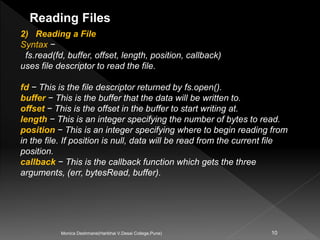
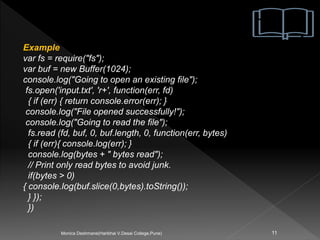
Use fs.readFile() method to read the physical file asynchronously.
Syntax:
fs.readFile(fileName [,options], callback)
Parameter Description:
filename: Full path and name of the file as a string.
options: The options parameter can be an object or string
which can include encoding and flag. The default encoding is
utf8 and default flag is "r".
callback: A function with two parameters err and fd. This will
get called when readFile operation completes.](https://image.slidesharecdn.com/filesystemnodejs-210507081641/85/File-system-node-js-12-320.jpg)

![Writing a File
15
Monica Deshmane(Haribhai V.Desai College,Pune)
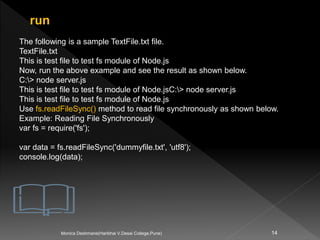
Syntax :
fs.writeFile(filename, data[, options], callback)
filename − This is the string having the file name including path.
data − This is the String or Buffer to be written into the file.
options − The third parameter is an object which will hold {encoding,
mode, flag}. By default. encoding is utf8, mode is octal value 0666. and
flag is 'w'
callback − This is the callback function which gets a single parameter
err that returns an error in case of any writing error.](https://image.slidesharecdn.com/filesystemnodejs-210507081641/85/File-system-node-js-15-320.jpg)



![Important method of fs module
Method Description
fs.readFile(fileName [,options], callback) Reads existing file.
fs.writeFile(filename, data[, options], callback) Writes to the file. If file
exists then overwrite the
content otherwise creates
new file.
fs.open(path, flags[, mode], callback) Opens file for reading
or writing.
fs.rename(oldPath, newPath, callback) Renames an existing file.
fs.chown(path, uid, gid, callback) Asynchronous chown.
fs.stat(path, callback) Returns fs.stat object which
includes important file
statistics.
fs.link(src path, dst path, callback) Links file asynchronously.
fs.symlink(destination, path[, type], callback) Symlink asynchronously.
5
Monica Deshmane(Haribhai V.Desai College,Pune)](/p?url=https%3A%2F%2Fimage.slidesharecdn.com%2Ffilesystemnodejs-210507081641%2F85%2FFile-system-node-js-5-320.jpg&__src=https%3A%2F%2Fwww.slideshare.net%2Fslideshow%2Ffile-system-node-js%2F247983633&__type=image)
![Important method of fs module
fs.utimes(path, atime, mtime, callback)
Changes the timestamp of the file.
fs.exists(path, callback)
Determines whether the specified file exists or not.
fs.access(path[, mode], callback)
Tests a user's permissions for the specified file.
fs.appendFile(file, data[, options], callback)
Appends new content to the existing file.
6
Monica Deshmane(Haribhai V.Desai College,Pune)](/p?url=https%3A%2F%2Fimage.slidesharecdn.com%2Ffilesystemnodejs-210507081641%2F85%2FFile-system-node-js-6-320.jpg&__src=https%3A%2F%2Fwww.slideshare.net%2Fslideshow%2Ffile-system-node-js%2F247983633&__type=image)
![Opening Files
7
Monica Deshmane(Haribhai V.Desai College,Pune)
1) Open a File
Syntax : open a file in asynchronous mode −
fs.open (path, flags[, mode], callback)
Parameters-
1.path − This is the string having file name including path.
2.flags − Flags indicate the behavior of the file to be opened.
All possible values have been mentioned below.
3.mode − It sets the file mode (permission and sticky bits),
but only if the file was created. It defaults to 0666, readable
and writeable.](/p?url=https%3A%2F%2Fimage.slidesharecdn.com%2Ffilesystemnodejs-210507081641%2F85%2FFile-system-node-js-7-320.jpg&__src=https%3A%2F%2Fwww.slideshare.net%2Fslideshow%2Ffile-system-node-js%2F247983633&__type=image)


![12
Monica Deshmane(Haribhai V.Desai College,Pune)
Use fs.readFile() method to read the physical file asynchronously.
Syntax:
fs.readFile(fileName [,options], callback)
Parameter Description:
filename: Full path and name of the file as a string.
options: The options parameter can be an object or string
which can include encoding and flag. The default encoding is
utf8 and default flag is "r".
callback: A function with two parameters err and fd. This will
get called when readFile operation completes.](/p?url=https%3A%2F%2Fimage.slidesharecdn.com%2Ffilesystemnodejs-210507081641%2F85%2FFile-system-node-js-12-320.jpg&__src=https%3A%2F%2Fwww.slideshare.net%2Fslideshow%2Ffile-system-node-js%2F247983633&__type=image)


![Writing a File
15
Monica Deshmane(Haribhai V.Desai College,Pune)
Syntax :
fs.writeFile(filename, data[, options], callback)
filename − This is the string having the file name including path.
data − This is the String or Buffer to be written into the file.
options − The third parameter is an object which will hold {encoding,
mode, flag}. By default. encoding is utf8, mode is octal value 0666. and
flag is 'w'
callback − This is the callback function which gets a single parameter
err that returns an error in case of any writing error.](/p?url=https%3A%2F%2Fimage.slidesharecdn.com%2Ffilesystemnodejs-210507081641%2F85%2FFile-system-node-js-15-320.jpg&__src=https%3A%2F%2Fwww.slideshare.net%2Fslideshow%2Ffile-system-node-js%2F247983633&__type=image)


![U4-01-Node JS.pptxweasrdtfyhg[]"Piuytrhedfyguhijokpl](https://cdn.slidesharecdn.com/ss_thumbnails/u4-01-nodejs-250211165901-72f1c3a7-thumbnail.jpg?width=640&height=640&fit=bounds)


