FACEBOOK
FUNDAMENTALS FOR
BUSINESS
CARI SULTANIK
DIRECTOR, INTERACTIVE ACCOUNT MANAGEMENT
FULCRUMTECH, LLC
HTTP://WWW.FULCRUMTECH.NET


            COPYRIGHT © 2012 FULCRUMTECH, LLC. ALL RIGHTS RESERVED.
WHAT WE’LL COVER TODAY
§  Part 1: Just a little of the “why”
§  Part 2: Getting started
§  Part 3: Building your audience
§  Part 4: Best practices
§  Part 5: When you’re ready for more—
    advanced opportunities
PART 1


WHY
FACEBOOK?
FOR STARTERS…
BUT SERIOUSLY…
§  The numbers
    §    Over 900M active users
    §    425MM access via mobile
    §    57% female / 43% male
    §    Average time per visit of about 20 minutes

§  People are well trained to actively share on Facebook
    §  82% of users who click on a news feed post shared by a friend who
        interacted with a Facebook application continue to participate on
        their own
§  People expect to be able to find businesses and interact
    §  When fans get a response to their posts on a brand page, 80%
        complete a purchase
    §  28% purchase when brands proactively reach out


                             Sources: Mari Smith and Wildfire
PART 2


GETTING STARTED
BEFORE YOU START
§  First things first: Do you have a website?
    §  Don’t rest the entire digital presence of your business on real
        estate you don’t own
§  Have a goal in mind
    §  Fans are nice, but what do you ultimately want them to do?
§  Think about who you are and what makes you different
    §  Don’t be afraid to have a personality
    §  People do business with people, not websites or Facebook pages
§  Be sure you’re ready
    §  Commit to spending at least a few minutes a day on your
        Facebook page
§  Assumption: You already have a personal Facebook account
    (if not, set that up first)
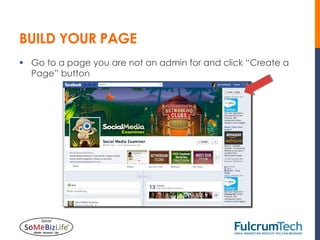
BUILD YOUR PAGE
§  Go to a page you are not an admin for and click “Create a
    Page” button
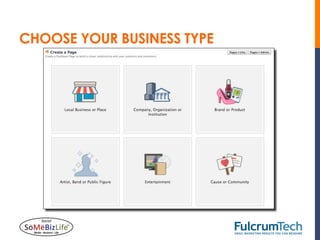
CHOOSE YOUR BUSINESS TYPE
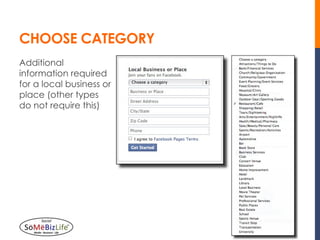
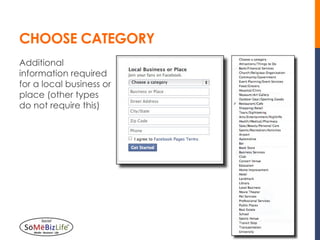
CHOOSE CATEGORY
Additional
information required
for a local business or
place (other types
do not require this)
CHOOSE CATEGORY
Additional
information required
for a local business or
place (other types
do not require this)
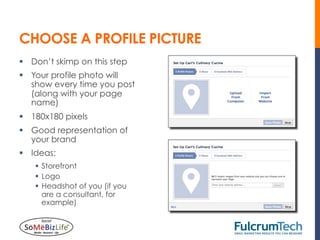
CHOOSE A PROFILE PICTURE
§  Don’t skimp on this step
§  Your profile photo will
    show every time you post
    (along with your page
    name)
§  180x180 pixels
§  Good representation of
    your brand
§  Ideas:
    §  Storefront
    §  Logo
    §  Headshot of you (if you
        are a consultant, for
        example)
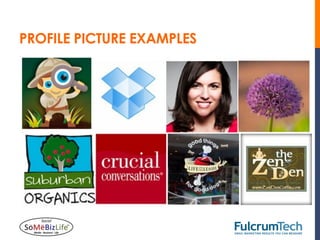
PROFILE PICTURE EXAMPLES
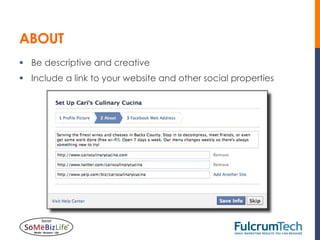
ABOUT
§  Be descriptive and creative
§  Include a link to your website and other social properties
CHOOSE YOUR FACEBOOK WEB ADDRESS
Choose carefully
§  Difficult (not impossible) to change
§  Make it easy to remember and type
§  Closely related to page name
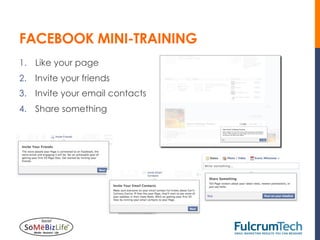
FACEBOOK MINI-TRAINING
1.  Like your page
2.  Invite your friends
3.  Invite your email contacts
4.  Share something
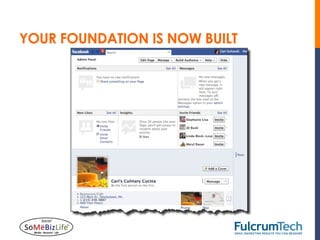
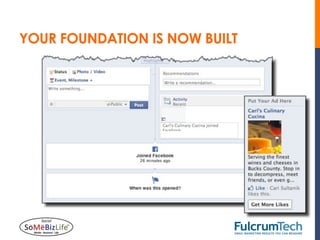
YOUR FOUNDATION IS NOW BUILT
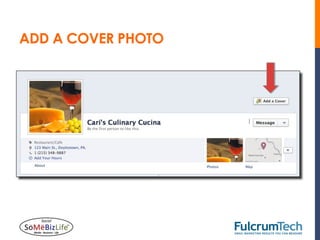
ADD A COVER PHOTO
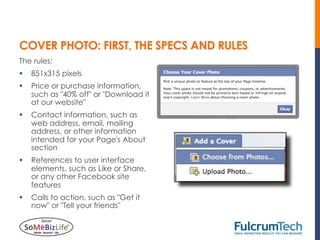
COVER PHOTO: FIRST, THE SPECS AND RULES
The rules:
§  851x315 pixels
§  Price or purchase information,
    such as "40% off" or "Download it
    at our website"
§  Contact information, such as
    web address, email, mailing
    address, or other information
    intended for your Page's About
    section
§  References to user interface
    elements, such as Like or Share,
    or any other Facebook site
    features
§  Calls to action, such as "Get it
    now" or "Tell your friends"
COVER PHOTO: SOME GREAT EXAMPLES
COVER PHOTO ADVICE
§  Follow the rules, but be creative.
§  When you upload a new cover image, it is noted in your
    timeline and in your fans’ newsfeeds.
§  You can include promotional copy, links, and calls to action
    in the descriptions for the photo.
§  Change it as frequently as you can—it’s a great way to drive
    engagement if you’re being creative.
§  If you use Photoshop, you can find various templates for
    cover photo and profile image design.
    §  I like this one: http://www.hongkiat.com/blog/creative-
        facebook-timeline-covers/#fb_timeline_template
COVER PHOTO ADVICE
COVER PHOTO COMPLETE
NEW COVER IMAGES SHOW UP ON YOUR TIMELINE
FINISHING DETAILS
§  Add hours, if relevant
§  Check your About
    page and add detail
    (edit button shows up
    when you hover over
    About or Basic info)
    §  Add start date
    §  Start type (born,
        founded, opened,
        etc.)
    §  Add description
        (helps you with
        search)
    §  Add contact info
        (e.g., email address)
    §  Tons more detail
        options—take
        advantage of them!
PART 3


BUILDING YOUR
AUDIENCE
START WITH FRIENDS
START WITH FRIENDS
Facebook makes it
easy to decide which
friends to invite.
§  Recent interactions
§  All friends
§  Location-based
§  Groups
§  Lists
Don’t be shy!
SHARE YOUR PAGE ON YOUR TIMELINE
INVITE EMAIL CONTACTS
OTHER FACEBOOK OPPORTUNITIES
§  Use Facebook as page to
    comment on other pages
§  Be sure to switch back to your
    own account when you’re
    finished
OTHER FACEBOOK OPPORTUNITIES
§  Integrate Facebook Like box on
    your site
   §  Visitors can see which friends
       already like your page
   §  If you choose, they can also see
       recent posts
   §  Facebook will generate code for
       you
   §  http://developers.facebook.com/
       docs/reference/plugins/like/
KICKIN’ IT OLD SCHOOL
§  Point-of-sale display
§  Package inserts
§  Direct mail
§  Word of mouth
§  Business cards
§  Use your imagination!
FACEBOOK ADS
§  Wait until you have established a fan base and content
    before advertising
§  Facebook will guide you
§  Many webinars and articles
PART 4


BEST PRACTICES
CONTENT, CONTENT, AND MORE CONTENT
§  Plan ahead for content to post on your Facebook
    page
§  Test different days of the week and times of day
§  Test frequency
§  Be personal and human
   §  Share personal interests
   §  Include success stories
   §  Think about what would make you Like or Comment
ENGAGEMENT TIPS
§  Use lots of photographs
    §  They take up more room on people’s timelines.
    §  Photographs get more engagement than any other type of post
        (including video).
    §  You can use original photography or buy stock photography.
§  Post articles your fans will care about (with links)
    §  Add a comment about why you’re posting it (“Great article,”
        “How do you feel about this?”)
§  Don’t be afraid to go off-topic (e.g., random question of the
    day, fill-in-the-blanks, polls)
    §  People want to talk to people
    §  Build relationships
    §  Show personality
MORE ENGAGEMENT TIPS
§  A post that specifically asks fans to Like or
    Comment will get more engagement than one
    that doesn’t.
§  A study by Buddy Media showed that posts with 80
    or fewer characters get 27% higher engagement.
§  Respond to people who engage with you!
MILESTONES
§  Milestones help tell the story of
    your business
§  Prominent in timeline
§  Lend credibility
HIGHLIGHTING POSTS
Highlight a post
§  Stretches across timeline
    instead of showing in one
    column
§  Draws attention to important
    updates
PINNING POSTS
Pin to top
§  Stays at top of timeline for 7
    days or until a new post is
    pinned
§  Can pin a call to action for
    your site or applications (more
    on this later)
§  Try pinning strong images that
    draw attention to what you
    most want fans to know about
    you (404x404 pixels)
PART 5


ADVANCED
OPPORTUNITIES
CUSTOM APPLICATIONS
§  Formerly known as “tabs”
§  Can create up to 12
§  Photos always in first spot
§  Put most important apps in
    next three spots
§  Design custom app
    thumbnails (111 x 74 pixels)
EXAMPLES OF CUSTOM APPLICATIONS
WHAT CAN YOU DO WITH APPS?
§  Email sign-up
§  Fan-only promotions (must
    Like page to see content)
§  YouTube channel integration
§  Twitter integration
§  RSS widget (feed from your
    blog)
§  Photo shows
§  Contests
§  Sweepstakes
§  Fundraising
§  Map and location
§  Coupons
FREE AND LOW-COST APP TOOLS
ADMIN PANEL OPTIONS
NOTIFICATIONS
§  New comments and likes will appear here
§  Check frequently and interact with your fans
MESSAGES
§  Messages are turned on by default
§  Be sure you can check and answer
    daily (if not, turn them off)
§  New messages will appear here
INSIGHTS
§  Not available until you have
    30 fans
§  Snapshot will show you
    activity at a high level
§  Click “See All” for detailed
    insights
§  Determine how engaging
    your posts are so you can
    focus on best content for
    your audience
INSIGHTS
INSIGHTS
INSIGHTS
CONTACT INFO
Cari Sultanik, Director, Interactive Account Management
Email: csultanik@fulcrumtech.net
Phone: 215-348-9887
Twitter: @CariSultanik
Facebook: Facebook.com/FulcrumTech
LinkedIn: FulcrumTech | Cari Sultanik


Special Offer: http://www.fulcrumtech.net/email-roi
Promo code: somebizlife12 (sign up by 6/20/12 for a 90-day free trial)