Diagnosing and Fixing
    MySQL Performance Problems
                 Percona, Inc.
          http://www.percona.com/


1
Table Of Contents

    0. Welcome                   5. Your Toolchest


    1. Defining Performance      6. CPUs and Tasks


    2. The Stack at 10000 Feet   7. Utilization versus Backlog


    3. Isolating Problems        8. External-to-the-database Problems


    4. Approaching the Stack     9. Conclusion


2
Introduction
★ Welcome Everybody!
★ Your hosts for the next 3 1/2 hours are @jswanhart

  and @RoomieGunns from @percona.


3
House Keeping
★ Restrooms? -> Leave if you need to.
★ Questions? -> Ask at any time.

★ Heckling?  -> There will be a prize for the best
  heckle.

★   I hope you enjoyed lunch. We‟ll be taking one
    scheduled break in the middle of the tutorial..


4
Wifi / Power?!
★ Everyone connected, are the wifi instructions posted?
★ Be kind to your neighbour - share the power strips in

  the room.


5
Where does this talk come from?
★ If you‟re curious – some of this presentation comes
  from the slide decks we use at our training.
★ However, we‟ve prepared this material for this

  conference.


6
Can we get a show of hands:
★ MySQL 5 / MySQL 5.1 / MySQL 5.5 / Anything else?
★ Linux / Windows / Solaris / BSD / Something else?

★ Oracle / SQL Server experience?

★ What are you interested in knowing -

    ✦   Problems you are currently having?
    ✦   Weird things that happened you could never explain?
    ✦   Something else?


7
Can you have this slide deck?
★ We‟ll give you the URL at the very end of the day.
★ Be careful to write it down!

    ✦   O‟Reilly doesn‟t normally upload tutorial slides the same
        way they do for conference sessions.


8
Table Of Contents

    0. Welcome                   5. Your Toolchest


    1. Defining Performance      6. CPUs and Tasks


    2. The Stack at 10000 Feet   7. Utilization versus Backlog


    3. Isolating Problems        8. External-to-the-database Problems


    4. Approaching the Stack     9. Conclusion


9
What about Performance?
★ Performance optimization should start with a goal.
★ That goal can be to -

     ✦   Improve time for users?
     ✦   Reduce load?
     ✦   Grow the service?


10
What performance is not:
★ CPU Usage
★ Memory Usage

★ Load Average


11
Performance is best measured as:
★ The response (R) time for a user‟s task.
★ What is a task?

     ✦   a unit of work
     ✦   a business unit of work
     ✦   something a user wants to do
     ✦   some function of the application


12
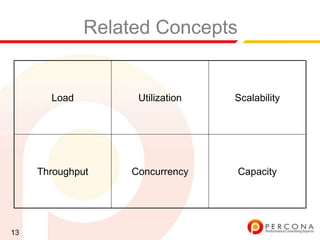
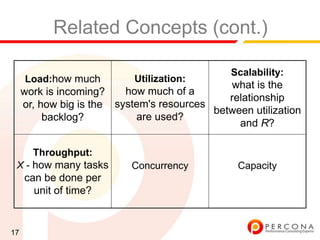
Related Concepts


       Load         Utilization   Scalability


     Throughput    Concurrency    Capacity


13
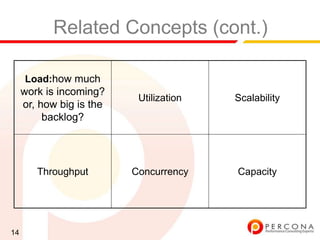
Related Concepts (cont.)

     Load:how much
     work is incoming?
                           Utilization   Scalability
     or, how big is the
          backlog?


        Throughput        Concurrency    Capacity


14
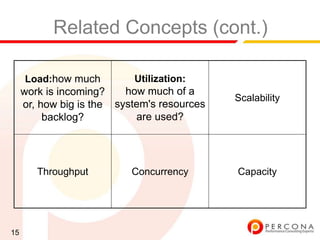
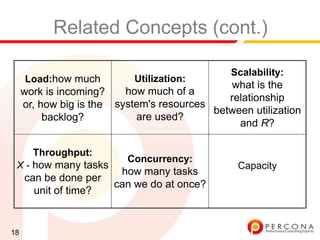
Related Concepts (cont.)

     Load:how much         Utilization:
     work is incoming?    how much of a
                                             Scalability
     or, how big is the system's resources
          backlog?          are used?


        Throughput         Concurrency       Capacity


15
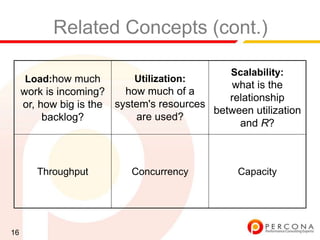
Related Concepts (cont.)

                                               Scalability:
     Load:how much          Utilization:
                                              what is the
     work is incoming?    how much of a
                                              relationship
     or, how big is the system's resources
                                           between utilization
          backlog?          are used?
                                                and R?


        Throughput         Concurrency           Capacity


16
Related Concepts (cont.)

                                               Scalability:
     Load:how much          Utilization:
                                              what is the
     work is incoming?    how much of a
                                              relationship
     or, how big is the system's resources
                                           between utilization
          backlog?          are used?
                                                and R?

       Throughput:
 X - how many tasks        Concurrency           Capacity
     can be done per
       unit of time?


17
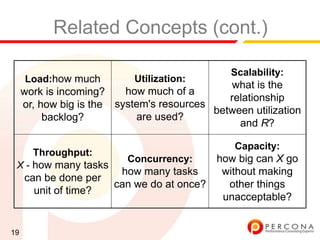
Related Concepts (cont.)

                                               Scalability:
     Load:how much          Utilization:
                                              what is the
     work is incoming?    how much of a
                                              relationship
     or, how big is the system's resources
                                           between utilization
          backlog?          are used?
                                                and R?

       Throughput:
                          Concurrency:
 X - how many tasks                              Capacity
                        how many tasks
     can be done per
                       can we do at once?
       unit of time?


18
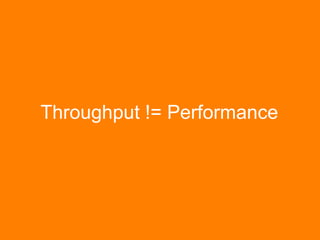
Related Concepts (cont.)

                                               Scalability:
     Load:how much          Utilization:
                                              what is the
     work is incoming?    how much of a
                                              relationship
     or, how big is the system's resources
                                           between utilization
          backlog?          are used?
                                                and R?

                                                Capacity:
       Throughput:
                          Concurrency: how big can X go
 X - how many tasks
                     how many tasks     without making
  can be done per
                    can we do at once?   other things
     unit of time?
                                        unacceptable?


19
Throughput != Performance
R = Time / Task
X = Tasks / Time
Why Throughput != Performance
★    Big Niagara machines with many
     cores, each of them very slow.
     ✦   Also not reciprocal of performance,
         because....


                                               Sun T2000. Photo Credit:
                                               http://www.flickr.com/photos/clone
                                               dmilkmen/310565533/


22
Throughput != Performance
                    (cont.)
★    Parallelism
     ✦   10 tasks at once take 10 seconds.
     ✦   X = 10/10 = 1, R = 10
★    Non-uniform distribution
     ✦   100 tasks take 100 seconds, what is R? Don't know, it
         could be 99 fast and 1 slow task.


23
What is important...
★ Is the relationship between throughput, utilization,
  response time and capacity.
★ Queuing may occur:

     ✦   R is the combination of service time and wait time.


24
What to take away:
★    Above all, focus on time.
     ✦   For performance optimization, reduce time spent waiting
         for response.
     ✦   For load reduction, reduce total time consumed by the task.


25
Table Of Contents

     0. Welcome                   5. Your Toolchest


     1. Defining Performance      6. CPUs and Tasks


     2. The Stack at 10000 Feet   7. Utilization versus Backlog


     3. Isolating Problems        8. External-to-the-database Problems


     4. Approaching the Stack     9. Conclusion


26
What is the performance
               problem?

                        Web   Web


                        Web   Web
     15 second login?               Database Server


                        Web   Web


                        Web   Web


27
If you said that...
★    The Database
     ✦   You‟ll be right most of the time - but you‟re not being 100%
         honest with yourself.
     ✦   The database has more scalability challenges than the
         other components. For the most part we can just add web
         servers.


28
However;
★ We can lead ourselves into a real trap by guessing
  based on previous experience.
★ Proving is probably a lot more important than knowing.


29
What‟s interesting...
★ What‟s more interesting than drawing the stack is
  drawing the flow of information between each
  component of the stack.
★ It‟s important to be able to do this while users execute

  tasks.


30
Following the Flow:
★    For a given task, measure the breakdown in time:


31
Wait, what.!?
★ Updating the last_login_date takes a sizeable
  amount of time?
★ For the value that it provides, why are we spending so

  long on that sub-task?


32
My analysis:
★    Query is:
     ✦   UPDATE users SET last_login_date=NOW()
          WHERE id = N;
★    Schema is:
     ✦   CREATE TABLE users (
           id INT NOT NULL PRIMARY KEY auto_increment,
           username CHAR(32) NOT NULL,
           ..
           last_login_date DATETIME,
           UNIQUE (username)
         ) ENGINE=MyISAM;

33
+------+------+-----------+------------------+---------+------+--------------+-----------------------------------------------------------+
| Id   | User | Host       | db              | Command | Time | State        | Info                                                      |
+------+------+-----------+------------------+---------+------+--------------+-----------------------------------------------------------+
|    1 | root | localhost | myapp_production | Query   |    0 | NULL         | show processlist                                          |
| 9688 | root | localhost | myapp_production | Query   |    2 | Sending Data | SELECT COUNT(*) from users                                |
| 9689 | root | localhost | myapp_production | Query   |    2 | Locked       | UPDATE users SET last_login_date=NOW() WHERE id = 986755 |
| 9690 | root | localhost | myapp_production | Query   |    2 | Locked       | UPDATE users SET last_login_date=NOW() WHERE id = 607334 |
| 9691 | root | localhost | myapp_production | Query   |    2 | Locked       | UPDATE users SET last_login_date=NOW() WHERE id = 1802251 |
| 9692 | root | localhost | myapp_production | Query   |    2 | Locked       | UPDATE users SET last_login_date=NOW() WHERE id = 1076084 |
| 9693 | root | localhost | myapp_production | Query   |    2 | Locked       | UPDATE users SET last_login_date=NOW() WHERE id = 141037 |
| 9694 | root | localhost | myapp_production | Query   |    2 | Locked       | UPDATE users SET last_login_date=NOW() WHERE id = 1418038 |
| 9695 | root | localhost | myapp_production | Query   |    2 | Locked       | UPDATE users SET last_login_date=NOW() WHERE id = 1156819 |
| 9696 | root | localhost | myapp_production | Query   |    2 | Locked       | UPDATE users SET last_login_date=NOW() WHERE id = 165878 |
| 9697 | root | localhost | myapp_production | Query   |    2 | Locked       | UPDATE users SET last_login_date=NOW() WHERE id = 1345988 |
| 9698 | root | localhost | myapp_production | Query   |    2 | Locked       | UPDATE users SET last_login_date=NOW() WHERE id = 1783549 |
| 9699 | root | localhost | myapp_production | Query   |    2 | Locked       | UPDATE users SET last_login_date=NOW() WHERE id = 665358 |
| 9700 | root | localhost | myapp_production | Query   |    2 | Locked       | UPDATE users SET last_login_date=NOW() WHERE id = 168566 |
| 9701 | root | localhost | myapp_production | Query   |    2 | Locked       | UPDATE users SET last_login_date=NOW() WHERE id = 1531867 |
| 9702 | root | localhost | myapp_production | Query   |    2 | Locked       | UPDATE users SET last_login_date=NOW() WHERE id = 931161 |
| 9703 | root | localhost | myapp_production | Query   |    2 | Locked       | UPDATE users SET last_login_date=NOW() WHERE id = 342250 |
| 9704 | root | localhost | myapp_production | Query   |    2 | Locked       | UPDATE users SET last_login_date=NOW() WHERE id = 437672 |
| 9705 | root | localhost | myapp_production | Query   |    2 | Locked       | UPDATE users SET last_login_date=NOW() WHERE id = 976963 |
| 9706 | root | localhost | myapp_production | Query   |    2 | Locked       | UPDATE users SET last_login_date=NOW() WHERE id = 615735 |
| 9707 | root | localhost | myapp_production | Query   |    2 | Locked       | UPDATE users SET last_login_date=NOW() WHERE id = 1152889 |
| 9708 | root | localhost | myapp_production | Query   |    2 | Locked       | UPDATE users SET last_login_date=NOW() WHERE id = 1748237 |
| 9709 | root | localhost | myapp_production | Query   |    2 | Locked       | UPDATE users SET last_login_date=NOW() WHERE id = 652162 |
| 9710 | root | localhost | myapp_production | Query   |    2 | Locked       | UPDATE users SET last_login_date=NOW() WHERE id = 1067106 |
| 9711 | root | localhost | myapp_production | Query   |    2 | Locked       | UPDATE users SET last_login_date=NOW() WHERE id = 1920992 |
| 9712 | root | localhost | myapp_production | Query   |    2 | Locked       | UPDATE users SET last_login_date=NOW() WHERE id = 1698141 |
| 9713 | root | localhost | myapp_production | Query   |    2 | Locked       | UPDATE users SET last_login_date=NOW() WHERE id = 1649822 |
| 9714 | root | localhost | myapp_production | Query   |    2 | Locked       | UPDATE users SET last_login_date=NOW() WHERE id = 94358   |
| 9715 | root | localhost | myapp_production | Query   |    2 | Locked       | UPDATE users SET last_login_date=NOW() WHERE id = 983337 |
| 9716 | root | localhost | myapp_production | Query   |    2 | Locked       | UPDATE users SET last_login_date=NOW() WHERE id = 1091145 |
| 9717 | root | localhost | myapp_production | Query   |    2 | Locked       | UPDATE users SET last_login_date=NOW() WHERE id = 255341 |
| 9718 | root | localhost | myapp_production | Query   |    2 | Locked       | UPDATE users SET last_login_date=NOW() WHERE id = 25397   |
| 9719 | root | localhost | myapp_production | Query   |    2 | Locked       | UPDATE users SET last_login_date=NOW() WHERE id = 1223432 |
| 9720 | root | localhost | myapp_production | Query   |    2 | Locked       | UPDATE users SET last_login_date=NOW() WHERE id = 1001712 |
| 9721 | root | localhost | myapp_production | Query   |    2 | Locked       | UPDATE users SET last_login_date=NOW() WHERE id = 1995106 |
| 9722 | root | localhost | myapp_production | Query   |    2 | Locked       | UPDATE users SET last_login_date=NOW() WHERE id = 508775 |
| 9723 | root | localhost | myapp_production | Query   |    1 | Locked       | UPDATE users SET last_login_date=NOW() WHERE id = 1121464 |
| 9724 | root | localhost | myapp_production | Query   |    1 | Locked       | UPDATE users SET last_login_date=NOW() WHERE id = 946613 |
| 9725 | root | localhost | myapp_production | Query   |    1 | Locked       | UPDATE users SET last_login_date=NOW() WHERE id = 1153740 |
| 9726 | root | localhost | myapp_production | Query   |    1 | Locked       | UPDATE users SET last_login_date=NOW() WHERE id = 1656344 |
| 9727 | root | localhost | myapp_production | Query   |    1 | Locked       | UPDATE users SET last_login_date=NOW() WHERE id = 102982 |
| 9728 | root | localhost | myapp_production | Query   |    1 | Locked       | UPDATE users SET last_login_date=NOW() WHERE id = 1672517 |
| 9729 | root | localhost | myapp_production | Query   |    1 | Locked       | UPDATE users SET last_login_date=NOW() WHERE id = 350907 |
...
+------+------+-----------+------------------+---------+------+--------------+-----------------------------------------------------------+
101 rows in set (0.00 sec)


   34
$ uptime
15:00 up 11 days, 16:58, 5 users, load averages: 0.88 0.61 0.44


35
$ uptime
15:00 up 11 days, 16:58, 5 users, load averages: 0.88 0.61 0.44


mysql> show global status like 'slow_queries%';
+---------------+-------+
| Variable_name | Value |
+---------------+-------+
| Slow_queries | 3      |
+---------------+-------+
1 row in set (0.00 sec)


36
$ uptime
15:00 up 11 days, 16:58, 5 users, load averages: 0.88 0.61 0.44


mysql> show global status like 'slow_queries%';
+---------------+-------+
| Variable_name | Value |
+---------------+-------+
| Slow_queries | 3      |
+---------------+-------+
1 row in set (0.00 sec)


mysql> show global status like 'table_lock%';
+-----------------------+-------+
| Variable_name         | Value |
+-----------------------+-------+
| Table_locks_immediate | 2267 |
| Table_locks_waited    | 15640 |
+-----------------------+-------+
2 rows in set (0.00 sec)


37
Why do I show you this example?
★    A lock is a form of queue.
     ✦   R = Queue + Service Time
★    Some queuing shows up as “Load”.
     ✦   CPUs have a run queue.
     ✦   IO requests are queued before execution.


38
However;
★    Not all queuing shows up in the Operating System -
     such as internal locking contention.
     Cause:                        Possible Effect:
     More people request a         System may look busy
     resource than current         (CPU or Disks).
     capacity that can be offered.


★    It‟s always better to instrument for the cause - as it
     may still be there without any „effect‟ present.

39
Back to the Sequence Diagram
★ You want to find what doesn’t look right. Then take
  those quick wins.
★ This sounds trivial - but without instrumentation your

  guesses are often not correct.


40
Another Sequence Diagram:


41
The Lesson
★ In this case, the external API looks like a great piece
  to attack first.
★ How do we improve it?

     ✦   Maybe a developer can help here..
     ✦   Can we cache the credentials?


42
The Important Lesson (cont.)
★    We had a customer exactly like this:
     ✦   They looked at their webservers.
     ✦   They weren‟t loaded.
     ✦   They looked at their database servers.
     ✦   They weren‟t loaded either.
     ✦   They tried to optimize their database servers because „it
         was a database problem last time‟.
     ✦   Performance wasn‟t much better.


43
Why do we set different goals for
         each task?
Two different Tasks:
★    Sequence #1: (Total time 0.01 seconds)

      Start    Update my status   Done


★    Sequence #2: (Total time 60 seconds)


     Start    Prepare Report             Done


45
The “Optimization”
★ The customer was worried about a 60 second long
  query that ran at 3am every night.
★ Oh no, let‟s optimize it by adding an index!


46
The outcome:
★    Sequence #1: (Total time 0.02 seconds)

      Start    Update my status   Done


★    Sequence #2: (Total time 10 seconds)


     Start    Prepare Report             Done


47
Optimize what matters:
★ The (ideally user facing) tasks matter.
★ Write instrumentation so that you can think like a

  sequence diagram does.


48
Limits of Sequence Diagrams:
★    Why you might not see everyone using a sequence
     diagram in production -
     ✦   It breaks down when there‟s too many sub-tasks involved
         in execution.


49
Introducing the Profile


50
Introducing the Profile (cont.)
★    The profile is related to the sequence diagram;
     ✦   What we do in a profile is aggregate similar sub-tasks into
         one entry.
     ✦   Then we order the profile from total R of a given task.


51
Table Of Contents

     0. Welcome                   5. Your Toolchest


     1. Defining Performance      6. CPUs and Tasks


     2. The Stack at 10000 Feet   7. Utilization versus Backlog


     3. Isolating Problems        8. External-to-the-database Problems


     4. Approaching the Stack     9. Conclusion


52
The Method for Isolation
★    In general:
     ✦   Start at the user, measure time taken from the front to the
         backend.
★    The absolutely certain method:
     ✦   Plod through the sequence diagram, measure each step.


53
The sequence diagram
★    Advantage:
     ✦   You will inevitably find the solution and be able to prove it.
★    Disadvantages:
     ✦   might take too much time
     ✦   things might be too hard or impossible to measure
     ✦   there might be too much information


54
Method for Isolation (cont.)
★    Slightly more practical preferred way:
     ✦   1. Use a tool that makes it easy
     ✦   2. If that's not possible, guess and measure.
     ✦   3. If you can't measure anything, reason from logic.


55
Method #1: Instrument by time
★ Our favourite - and where you should start.
★ Only Con:

     ✦   Not always that easy to do in a complicated system.
     ✦   May not always be feasible to install instrumentation


56
Method #2: Guess and Measure
★ Look for a part of the system that “looks bad”
★ How much time does it consume?

★ Example: If logging in takes 2.1 seconds and DNS

  takes 2 seconds, you found the problem.


57
Method #3 - Reason from Logic
★ Really hard, really slow.
★ If you can't do any of those, you can

     ✦   ask for help
     ✦   trial-and-error (more on this later)
★    We suggest asking for help.


58
What not to do.
Work on Unimportant Things
★ [DO] Apply Amdahl's Law: a 5% time consumer can't
  benefit you more than 5%.
★ [DON’T] Apply "best practices"

     ✦   These can have unexpected side effects.
     ✦   Example: I see many sort_merge_passes, maybe I need to
         increase sort_buffer_size.
     ✦   Example: I've heard that I should put the logs and data on
         different disks.


60
Guess-and-don't-measure
★    If you skip measuring, then you cause problems.
     ✦   This is also known as trial-and-error.
★    This method has 3 interesting properties:
     ✦   It sometimes works.
     ✦   It often wastes a lot of time and makes things worse.
     ✦   It can cost you your job.


61
Guess and Feel-Good-Measure
★    Apply BS-Benchmarks:
     ✦   Time how long it takes to create 10,000 tables and
         conclude InnoDB is slower.
     ✦   Write an application benchmark that doesn‟t mimic that of
         your application (not enough data, single threaded only).


62
The best tool to make things easy
           is a profiler.
System-wide
★       System-wide:
     ✦   oprofile, strace -c
★ Perl: Devel::NYTProf
★ Ruby: ruby -r profile (or just NewRelic)

★ PHP:

    ✦    Instrumentation-for-PHP -
         http://code.google.com/p/instrumentation-for-php
     ✦    Xdebug + KCachegrind -- but not in production
     ✦    XHProf http://mirror.facebook.net/facebook/xhprof/
     ✦    New Relic - http://www.newrelic.com

64
Instrumentation Demo
★    We‟ve got it running here:
     ✦   http://204.236.183.243/my-movies


65
Table Of Contents

     0. Welcome                   5. Your Toolchest


     1. Defining Performance      6. CPUs and Tasks


     2. The Stack at 10000 Feet   7. Utilization versus Backlog


     3. Isolating Problems        8. External-to-the-database Problems


     4. Approaching the Stack     9. Conclusion


66
Real Life.
★    Custom written profiling code from boardreader.com.
     ✦   Works similar to what you can achieve with NewRelic and
         XHProf or Instrumentation-for-PHP


67
A Screenshot:


68
Another Screenshot:


69
Another Screenshot:


70
User Tasks
★    If I had to guess it - I would say that they have a few
     different tasks that people do:
     ✦   Loading Static Pages (like the home page)
     ✦   Browse by a popular topic.
     ✦   Returning results for a custom search.


71
Task Goals
★    Each of these items (in my mind) has a different
     response time goal. Let's make some up for context:
     ✦   Loading the homepage 100ms.
     ✦   Browsing by a popular topic 500ms
     ✦   Search requests 2000ms (2 seconds)


72
Measuring Goals
★    Here's how boardreader.com stores the information:
     CREATE TABLE `performance_log_090721` (
       `ip` varchar(15) NOT NULL,
       `server_ip` varchar(25) NOT NULL,
       `page` varchar(3000) NOT NULL,
       `utime` float NOT NULL,
       `stime` float NOT NULL,
       `wtime` float NOT NULL,
       `mysql_time` float NOT NULL,
       `sphinx_time` float NOT NULL,
       `mysql_count_queries` int(11) NOT NULL,
       `mysql_queries` text NOT NULL,
       `sphinx_count_queries` int(11) NOT NULL,
       `sphinx_queries` text NOT NULL,
     ..
     ) ENGINE=MyISAM DEFAULT CHARSET=latin1;


73
Measuring Goals (cont.)
★    Here's an aggregation of a day's worth of search
     responses:
     mysql> select avg(wtime) request, avg(stime+utime)/avg(wtime) cpu
     ,avg(mysql_time)/avg(wtime) mysql, avg(sphinx_time)/avg(wtime)
     sphinx, avg(wtime-stime-utime-sphinx_time-mysql_time)/avg(wtime)
     rest from performance_log_090721 where page_type='search' G
     *************************** 1. row ***************************
     request: 1.2175869055517
         cpu: 0.16983144536072
       mysql: 0.1544487152423
      sphinx: 0.61537297006254
        rest: 0.060346869334443
     1 row in set (4.16 sec)


74
Measuring Goals (cont.)
★    mysql> select date_format(logged,"%H") h ,round(avg(wtime),3) r,
     round(avg(stime+utime)/avg(wtime),2) cpup ,round(avg(mysql_time)/avg(wtime),2) mp,
     round(avg(sphinx_time)/avg(wtime),2) sp, round(avg(wtime-stime-utime-sphinx_time-
     mysql_time)/avg(wtime),2) rst from performance_log_090721 where page_type='search' group by h;
     +------+-------+------+------+------+------+
     | h    | r     | cpup | mp   | sp   | rst |
     +------+-------+------+------+------+------+
     | 00   | 1.816 | 0.11 | 0.14 | 0.70 | 0.05 |
     | 01   | 1.480 | 0.17 | 0.18 | 0.59 | 0.06 |
     | 02   | 1.394 | 0.16 | 0.22 | 0.53 | 0.09 |
     ....
     | 08   | 1.384 | 0.13 | 0.09 | 0.74 | 0.04 |
     | 09   | 1.315 | 0.17 | 0.11 | 0.67 | 0.04 |
     | 10   | 0.950 | 0.20 | 0.15 | 0.60 | 0.05 |
     | 11   | 0.874 | 0.21 | 0.16 | 0.57 | 0.06 |
     | 12   | 1.139 | 0.17 | 0.13 | 0.65 | 0.05 |
     | 13   | 1.191 | 0.16 | 0.14 | 0.65 | 0.05 |
     | 14   | 1.349 | 0.16 | 0.19 | 0.58 | 0.06 |
     | 15   | 1.076 | 0.20 | 0.21 | 0.53 | 0.06 |
     | 16   | 1.526 | 0.14 | 0.14 | 0.58 | 0.13 |
     | 17   | 0.853 | 0.24 | 0.19 | 0.50 | 0.07 |
     | 18   | 0.978 | 0.25 | 0.23 | 0.43 | 0.09 |
     | 19   | 0.924 | 0.23 | 0.17 | 0.54 | 0.06 |
     | 20   | 1.310 | 0.18 | 0.26 | 0.47 | 0.09 |
     | 21   | 1.211 | 0.17 | 0.24 | 0.51 | 0.08 |
     | 22   | 1.538 | 0.14 | 0.19 | 0.59 | 0.08 |
     | 23   | 1.450 | 0.15 | 0.18 | 0.60 | 0.06 |
     +------+-------+------+------+------+------+
     24 rows in set (4.33 sec)
75
Interpreting Results
★ Always interesting to see the difference in timing on a
  production system with real load!
★ 1 hour as I've got on my slides is probably not the best

  aggregate - some „blips‟ in service may not show up.


76
Interpreting Results (cont.)
★ Average (mean) is easy to do in MySQL - but 95th
  percentile is probably better.
★ What is the problem with min/max/mean?


77
Actioning Results
★ It is only when you've got these metrics in place that
  you can start to look at where to fix the problem.
★ This is where the toolchest comes in.


78
Table Of Contents

     0. Welcome                   5. Your Toolchest


     1. Defining Performance      6. CPUs and Tasks


     2. The Stack at 10000 Feet   7. Utilization versus Backlog


     3. Isolating Problems        8. External-to-the-database Problems


     4. Approaching the Stack     9. Conclusion


79
Quick Glossary of Tools
Top
★    Best use it to confirm what is really running.
     ✦   On a DB server mysqld should be at the top.
     ✦   Most of the time there should only be one mysqld process.
★    Example usage:
     ✦   top -bn1


81
ps
★    Quick Trick - verify that the sum of VSZ adds up to
     roughly the amount of memory used by the system:
     ✦   ps -e -o vsz | awk '{size += $1}END{print(size)}'
★    Check for all running servers:
     ✦   ps aux | grep mysqld


82
free
★    Doesn‟t really show anything vmstat won‟t.
     ✦   But very handy one line math to show caches. Example:
         $ free -m
                    total     used      free     shared       buffers     cached
         Mem:         32177    30446      1730            0         368      16649
         -/+ buffers/cache:    13428     18748
         Swap:         4095        2      4093


83
vmstat
★    Best run when server is busy. You can watch what is
     happening right now. Example:
     ✦   vmstat 5
★    General-purpose, but a good way to sense what the
     system as a whole is doing.


84
vmstat (cont.)
★        Most important bits:
     ✦   si/so should be zero
     ✦   bi/bo are blocks read and written, so you can see IO
     ✦   What does 12% cpu usage mean?


85
vmstat (cont)
$ vmstat   5 5
procs -----------memory---------- ---swap-- -----io---- --system-- -----cpu-----
 r   b   swpd     free   buff   cache    si   so   bi   bo    in    cs us sy id wa st
 0   3     0     44604   15980 1585532    0    0    3   281    6     9    0   0 97   3   0
 0   3     0     44232   16072 1586572    0    0    1 17718   110   138   0   5   0 94   1
 0   4     0     46960   16152 1581112    0    0   30 18514   108   152   0   5   0 94   1
 0   3     0     46712   16284 1581196    0    0   29 26166   159   201   0   7   0 91   2
 0   3     0     47332   16388 1581220    0    0    1 18990   114   145   0   5   0 94   1


86
mpstat
★ Installed as part of sysstat.
★ More useful than vmstat because it shows individual

  CPUs. Example:
     ✦   mpstat -P ALL 5


87
mpstat (cont)
# mpstat -P ALL 5
Linux 2.6.18-238.el5 (livecd.localdomain)           03/10/2011


11:01:49 PM   CPU   %user   %nice    %sys %iowait       %irq     %soft   %steal   %idle    intr/s
11:01:54 PM   all   10.31   0.00     4.64   0.00       0.00      0.17     0.00    84.89   1004.00
11:01:54 PM     0   0.20    0.00     0.00   0.00       0.00      0.20     0.00    99.60   1000.20
11:01:54 PM     1   0.00    0.00     0.00   0.00       0.00      0.40     0.00    99.60      0.20
11:01:54 PM     2   15.40   0.00     7.40   0.00       0.00      0.20     0.00    77.00      0.00
11:01:54 PM     3   8.40    0.00     3.60   0.00       0.00      0.20     0.00    87.80      0.00
11:01:54 PM     4   31.60   0.00    14.40   0.00       0.00      0.20     0.00    53.80      0.00
11:01:54 PM     5    6.20    0.00    2.40    0.00      0.00      0.20     0.00    91.20      3.60


88
netstat (cont.)
★    Show count of states:
     ✦   netstat -antp | awk '{print $6}' | sort | uniq -c | sort -rn
★    Show count of peers:
     ✦   netstat -antp | awk '{print $5}' | cut -d: -f1 | sort | uniq -c |
         sort -rn


89
netstat
★    netstat -antp
     ✦     "ss -ant" works acceptably as well.

     $ sudo netstat -antp
     Active Internet connections (servers and established)
     Proto Recv-Q Send-Q Local Address              Foreign Address     State       PID/Program name
     tcp       0       0 0.0.0.0:22                 0.0.0.0:*           LISTEN      943/sshd
     tcp       0       0 127.0.0.1:25               0.0.0.0:*           LISTEN      965/sendmail: accep
     tcp       0       0 0.0.0.0:3306               0.0.0.0:*           LISTEN      20237/mysqld
     tcp       0      52 10.170.182.171:22          24.6.173.25:52944   ESTABLISHED 20470/sshd: ec2-use
     tcp       0       0 :::22                      :::*                LISTEN      943/sshd


90
netstat (cont.)
★    Things to inspect:
     ✦   Are there a lot of sockets in TIME_WAIT?
     ✦   A lot going to port 53 (DNS) ?
     ✦   Who's connecting to mysqld?
★    You need to know the TCP handshake process:
     ✦   SYN, SYN-ACK, ACK, ESTABLISHED.


91
ping
★ useful for checking for packet loss.
★ let it run, watch the rtt, cancel,

★ look for missing packets.

★ icmp packets may be deprioritized


92
iostat
★    Much better IO statistics than what vmstat provides.
     Example usage:
     ✦   iostat -dx 5 (need x for extended statistics)
     ✦   iostat -kx 5 (show CPU stats at the same time)
★    Main problem is that it lumps reads and writes
     together.
     ✦   Look for what the disks are doing and ask if this is
         reasonable.


93
iostat (cont.)
★    Main items to look at:
     ✦   What is the queue length?
     ✦   How much is being read and written?
     ✦   What is the average wait, and what is the service time?


94
iostat (cont)
avg-cpu:   %user     %nice %system %iowait     %steal   %idle
           0.11       0.00     5.13    93.91    0.85     0.00


Device:            rrqm/s    wrqm/s     r/s      w/s    rkB/s    wkB/s avgrq-sz avgqu-sz   await   svctm   %util
xvdap1               0.00     35.15    0.00    14.85      0.00   200.00   26.94     1.97    2.49    1.70    2.52
xvdap2               0.00    2819.23   0.00    302.24     0.00 32481.20   82.59    74.39   23.71    1.76   53.29
xvdap3               0.00      0.00    0.00      0.00     0.00     0.00    0.00     0.00    0.00    0.00    0.00


95
Aspersa toolkit
Open source tools which improve upon the toolchest
     ✦   Disk statistics
            • diskstat – does not lump reads/writes, interactive
            • ioprofile – shows exactly where a process is using IO


     ✦   Diagnostics
            •   stalk / collect – get well scoped diagnostic data
            •   pmp – diagnose mutex contention
            •   sift – quickly filter information from collect
            •   summary / mysql-summary – important info at a glance


96
Case Study #1
Scope of Problem:
★ Overnight the query performance went from <1ms to
  50x worse.
★ Nothing changed in terms of server configuration,

  schema, etc.
★ Tried throttling the server to 1/2 of its workload

     ✦   from 20k QPS to 10k QPS
     ✦   no improvement.


98
Train of thought
★ Change in config client doesn't know about?
★ Hardware problem such as a failing disk?

★ Load increase: data growth or QPS crossed a "tipping

  point"?
★ Schema changes client doesn't know about (missing

  index?)
★ Network component such as DNS?


99
Elimination of easy possibilities:
★     ALL queries are found to be slower in slow-query-log
    ✦   eliminates DNS as a possibility.
★     Queries are slow when run via Unix socket
    ✦   eliminates network.
★     No errors in dmesg or RAID controller
    ✦   suggests (doesn't eliminate) that hardware is not the
        problem.


100