LO1 Write anSQL Statement to retrieve and sort data
1.1 Introduction to SQL
1.1.1 What is SQL?
• SQL (Structured Query Language) is a database computer
language designed for managing data in relational database
management systems (RDBMS).
• Most Relational Database Management Systems like MS
SQL Server, Microsoft Access, Oracle, MySQL, DB2,
Sybase, PostgreSQL and Informix use SQL as a database
querying language. Even though SQL is defined by both ISO
and ANSI there are many SQL implementation, which do not
fully comply with those definitions
3.
Categories of SQLApplication
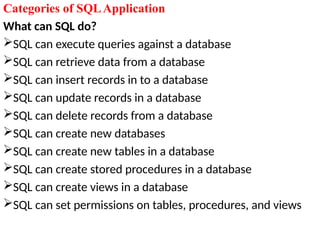
Whatcan SQL do?
SQL can execute queries against a database
SQL can retrieve data from a database
SQL can insert records in to a database
SQL can update records in a database
SQL can delete records from a database
SQL can create new databases
SQL can create new tables in a database
SQL can create stored procedures in a database
SQL can create views in a database
SQL can set permissions on tables, procedures, and views
4.
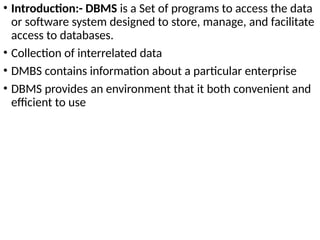
• Introduction:- DBMSis a Set of programs to access the data
or software system designed to store, manage, and facilitate
access to databases.
• Collection of interrelated data
• DMBS contains information about a particular enterprise
• DBMS provides an environment that it both convenient and
efficient to use
Purpose of DatabaseSystems
• Database management systems were developed to handle the
following difficulties of typical file-processing systems
supported by conventional operating systems:
• Data redundancy and inconsistency
• Difficulty in accessing data
• Data isolation – multiple files and formats
• Integrity problems
• Atomicity of updates
• Concurrent access by multiple users
• Security problems
7.
Create Database
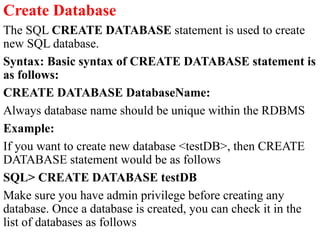
The SQLCREATE DATABASE statement is used to create
new SQL database.
Syntax: Basic syntax of CREATE DATABASE statement is
as follows:
CREATE DATABASE DatabaseName:
Always database name should be unique within the RDBMS
Example:
If you want to create new database <testDB>, then CREATE
DATABASE statement would be as follows
SQL> CREATE DATABASE testDB
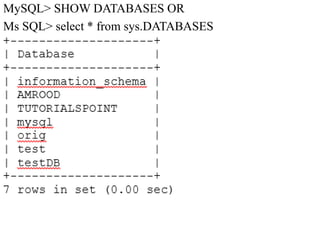
Make sure you have admin privilege before creating any
database. Once a database is created, you can check it in the
list of databases as follows
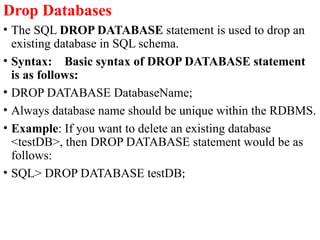
Drop Databases
• TheSQL DROP DATABASE statement is used to drop an
existing database in SQL schema.
• Syntax: Basic syntax of DROP DATABASE statement
is as follows:
• DROP DATABASE DatabaseName;
• Always database name should be unique within the RDBMS.
• Example: If you want to delete an existing database
<testDB>, then DROP DATABASE statement would be as
follows:
• SQL> DROP DATABASE testDB;
10.
Creating Tables
• Creatinga basic table involves naming the table and defining
its columns and each column's data type. The SQL
CREATE TABLE statement is used to create a new table.
• Syntax: Basic syntax of CREATE TABLE statement is as
follows:
11.
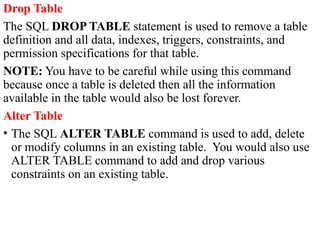
Drop Table
The SQLDROP TABLE statement is used to remove a table
definition and all data, indexes, triggers, constraints, and
permission specifications for that table.
NOTE: You have to be careful while using this command
because once a table is deleted then all the information
available in the table would also be lost forever.
Alter Table
• The SQL ALTER TABLE command is used to add, delete
or modify columns in an existing table. You would also use
ALTER TABLE command to add and drop various
constraints on an existing table.
12.
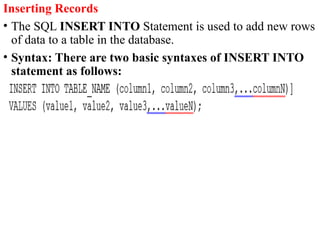
Inserting Records
• TheSQL INSERT INTO Statement is used to add new rows
of data to a table in the database.
• Syntax: There are two basic syntaxes of INSERT INTO
statement as follows:
13.
Data Types
• SQLdata type is an attribute that specifies type of data of
any object. Each column, variable and expression has related
data type in SQL. You would use these data types while
creating your tables. You would choose a particular data type
for a table column based on your requirement.
• SQL Server offers six categories of data types for your use
15.
Expressions
• An expressionis a combination of one or more values,
operators, and SQL functions that evaluate to a value.
• SQL EXPRESSIONs are like formulas and they are written in
query language. You can also use them to query the
database for specific set of data.
Syntax:
• Consider the basic syntax of the SELECT statement as follows:
SELECT column1, column2, columnN
FROM table_name
WHERE [CONDITION|EXPRESSION];
• There are different types of SQL expressions, which are
mentioned below:
•
16.
SQL Logical/Boolean Operators
Thereare three Logical Operators namely, AND, OR, and
NOT. These operators compare two conditions at a time to
determine whether a row can be selected for the output.
When you are retrieving data using a SELECT statement, you
can use logical operators in the WHERE clause, which allows
you to combine more than one condition
19.
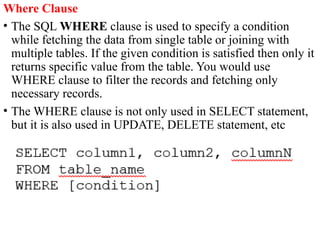
Where Clause
• TheSQL WHERE clause is used to specify a condition
while fetching the data from single table or joining with
multiple tables. If the given condition is satisfied then only it
returns specific value from the table. You would use
WHERE clause to filter the records and fetching only
necessary records.
• The WHERE clause is not only used in SELECT statement,
but it is also used in UPDATE, DELETE statement, etc
20.
Updating Tables
• TheSQL UPDATE Query is used to modify the existing
records in a table.
• You can use WHERE clause with UPDATE query to update
selected rows otherwise all the rows would be affected.
21.
Deleting New Rows
•The SQL DELETE Query is used to delete the existing
records from a table.
• You can use WHERE clause with DELETE query to delete
selected rows, otherwise all the records would be deleted.
22.
Like Operator
• TheSQL LIKE clause is used to compare a value to similar
values using wildcard operators. There are two wildcards
used in conjunction with the LIKE operator
• The percent sign (%)
• The underscore (_)






![Expressions
• An expression is a combination of one or more values,
operators, and SQL functions that evaluate to a value.
• SQL EXPRESSIONs are like formulas and they are written in
query language. You can also use them to query the
database for specific set of data.
Syntax:
• Consider the basic syntax of the SELECT statement as follows:
SELECT column1, column2, columnN
FROM table_name
WHERE [CONDITION|EXPRESSION];
• There are different types of SQL expressions, which are
mentioned below:
•](https://image.slidesharecdn.com/databasesqlserver-250916123342-69f1da51/85/database-sql-server-pptx1223344556677889-15-320.jpg)




![Expressions
• An expression is a combination of one or more values,
operators, and SQL functions that evaluate to a value.
• SQL EXPRESSIONs are like formulas and they are written in
query language. You can also use them to query the
database for specific set of data.
Syntax:
• Consider the basic syntax of the SELECT statement as follows:
SELECT column1, column2, columnN
FROM table_name
WHERE [CONDITION|EXPRESSION];
• There are different types of SQL expressions, which are
mentioned below:
•](/p?url=https%3A%2F%2Fimage.slidesharecdn.com%2Fdatabasesqlserver-250916123342-69f1da51%2F85%2Fdatabase-sql-server-pptx1223344556677889-15-320.jpg&__src=https%3A%2F%2Fwww.slideshare.net%2Fslideshow%2Fdatabase-sql-server-pptx1223344556677889%2F283196621&__type=image)


