“Any fool can write code that
a computer can understand.
Good programmers write
code that humans can
understand.”
Martin Fowler
1
Data Structure & Algorithms
CS-2510
2
Engr. Syed Zaid Irshad
MS Software Engineering (2017)
BSc Computer System Engineering (2014)
3
Rules
 No use of Cell Phone (Except Emergency)
 Respect Boundaries
 Stay Clam and Cool
4
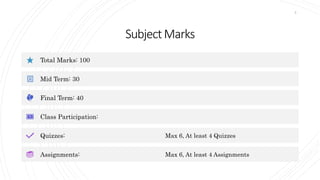
SubjectMarks
Total Marks: 100
Mid Term: 30
Final Term: 40
Class Participation:
Quizzes: Max 6, At least 4 Quizzes
Assignments: Max 6, At least 4 Assignments
5
Deadline
 Quizzes
 On Time: Obtained Marks
 After Due Time: Obtained Marks – 40%
 Assignments
 Till Due Date: Obtained Marks
 After Due Date: Obtained Marks – 40%
 Presentation/Quizzes/Assignments
 Max Time: May 28, 2022
6
Outline
 Intro to Data Structures and Algorithms
 Types of data and its nature
 DS operations
 Time-space trade-off
 How to write an algorithm
 Introduction to Asymptotic Notation and its
importance
 Abstract data types arrays
 ADT strings and their operations
 Introduction to Java
 Practical Implementation of Java
 Linear Search and Binary Search
 Polish notation
7
Outline
 Elementary Sorting techniques: Bubble, Selection,
Insertion
 Advance Sorting Techniques: Merge and Quick Sort,
Intro to Recursions
 Implementing algorithms through recursions
 Stacks, its operations, Polish notations
 Queues, Types of queues and their representation
 Link List (Single Linked List), Traversing, Insertion,
Updating and Deletion cases
 Doubly Linked List, Traversing, Insertion, updating
and deletion cases. Circular Linked List
 Sequential Search in Unordered Linked List
8
Outline
 Binary Search algorithm with Implementation & Intro
to Trees
 Binary Search Tree basic
 BST implementation, Traversing (BFS, DFS), Insert,
update and delete cases
 AVL trees Traversing, Insert, update and delete cases
 Graph Applications and algorithms, BFS, DFS, SPF
graphs
 Heap
 Hashing Tables
 Searching in Strings
9
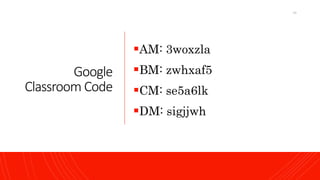
Google
Classroom Code
AM: 3woxzla
BM: zwhxaf5
CM: se5a6lk
DM: sigjjwh
10
Your Turn
Introduce yourself
Name, Why picked this Subject, What you
Expect from me (except good marks)
11
Thinksyou
shouldKnow
 what is a programming language?
 how the instructions can be coded?
 how these instructions will be understood by the CPU
of computer so that they can be executed?
 Choose any language and try to get basics such as
 Data types & how memory is allocated to them
 Basic arithmetic like add, subtract etc.,
 Basic flows such as if, switch , loops etc.
 how control flows from one part of a program to another
 how to compile & run a program
 environments that support this programming language
 Basic Discrete Math's: Logic, Probability, Combination,
Algebra, Geometry, Topology
12
Why Learn DSA?
 To get an output you need two main things:
 Data
 Procedure
 To process the data using procedure you can do:
 Smart way
 Hard way
 If the scope of the problem is big you must
consider:
 How much Space it need?
 How much Time it will take?
13
Books
 Data Structures and Algorithms in C++ 4th
Edition- by Adam Drozdek
 Data Structures and algorithms by Goodrich,
4th edition.
 Algorithms by Robert and Wayne 4th edition.
14
DataStructures
 Data Structures are a specialized means of organizing
and storing data in computers in such a way that we
can perform operations on the stored data more
efficiently.
 Data structures have a wide and diverse scope of usage
across the fields of Computer Science and Software
Engineering.
 Types
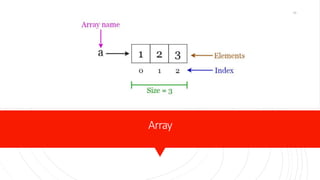
 Array
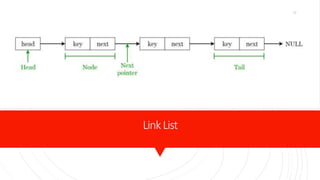
 Link List
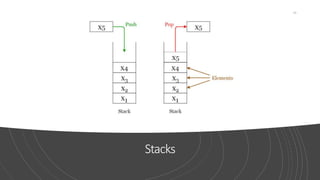
 Stacks
 Queues
 Hash Tables
 Trees
 Heaps
 Graphs
15
Array
16
LinkList
17
Stacks
18
Queues
19
HashTables
20
Trees
21
Heaps
22
Graphs
23
Operations on
Data Structure
 There are four common operations that can
be performed:
 Traverse
 Search
 Insert
 Delete
24
“Before software can
be reusable it first
has to be usable.”
Ralph Johnson
25
Algorithm
 Algorithms are a step-by-step equation which makes
up a list of actions to perform a task in a program.
 Searching: Algorithms are used to search for an item
within the data.
 Sorting: Algorithms are used to sort different items
into a specific order.
 Inserting: Algorithms are used to insert items into the
data structure.
 Updating: Algorithms are used to update items in the
data structure.
 Deleting: Finally, algorithms can be used to delete
items from the data.
26
Trade-Off
 A tradeoff is a situation where one thing
increases, and another thing decreases.
 It is a way to solve a problem in:
 Either in less time and by using more space, or
 In very little space by spending a long amount of
time, or
 Making the right decision depending upon the
situation
 Types of Space-Time Trade-off
 Compressed or Uncompressed data
 Re Rendering or Stored images
 Smaller code or loop unrolling
 Lookup tables or Recalculation
27
Algorithm
Development
Process
 Step 1: Obtain a description of the problem.
 Step 2: Analyze the problem.
 Step 3: Develop a high-level algorithm.
 Step 4: Refine the algorithm by adding more detail.
 Step 5: Review the algorithm.
28
Obtaina
descriptionof
theproblem
 Defects that could be part of the description:
 The description relies on unstated assumptions
 The description is ambiguous
 The description is incomplete
 The description has internal contradictions
29
Analyzethe
problem
 Starting point
 What data are available?
 Where is that data?
 What formulas pertain to the problem?
 What rules exist for working with the data?
 What relationships exist among the data values?
 Ending point
 What new facts will we have?
 What items will have changed?
 What changes will have been made to those items?
 What things will no longer exist?
30
Developahigh-
levelalgorithm
 Problem: I need a send a birthday card to my brother, Mark.
 Analysis: I don't have a card. I prefer to buy a card rather than
make one myself.
 High-level algorithm:
 Go to a store that sells greeting cards
Select a card
Purchase a card
Mail the card
 This algorithm is satisfactory for daily use, but it lacks details
that would have to be added were a computer to carry out the
solution. These details include answers to questions such as the
following.
 "Which store will I visit?"
 "How will I get there: walk, drive, ride my bicycle, take the bus?"
 "What kind of card does Mark like: humorous, sentimental,
risqué?"
31
Refinethe
algorithmby
addingmoredetail
 A high-level algorithm shows the major steps that need
to be followed to solve a problem.
 Now we need to add details to these steps, but how
much detail should we add? Unfortunately, the answer
to this question depends on the situation.
 We must consider who (or what) is going to implement
the algorithm and how much that person (or thing)
already knows how to do.
 If someone is going to purchase Mark's birthday card
on my behalf, my instructions must be adapted to
whether that person is familiar with the stores in the
community and how well the purchaser knows my
brother's taste in greeting cards.
32
Reviewthe
algorithm
 Does this algorithm solve a very specific problem, or
does it solve a more general problem? If it solves a very
specific problem, should it be generalized?
 Can this algorithm be simplified?
 Is this solution like the solution to another problem?
How are they alike? How are they different?
33
Example
 A Jeroo starts at (0, 0) facing East with no flowers in
its pouch. There is a flower at location (3, 0). Write a
program that directs the Jeroo to pick the flower and
plant it at a location (3, 2). After planting the flower,
the Jeroo should hop one space East and stop. There
are no other nets, flowers, or Jeroo's on the island.
34
Step1
35
Step2
 The flower is exactly three spaces ahead of the jeroo.
 The flower is to be planted exactly two spaces South of
its current location.
 The Jeroo is to finish facing East one space East of the
planted flower.
 There are no nets to worry about.
36
Step3
 Let's name the Jeroo Bobby. Bobby should do the
following:
 Get the flower
Put the flower
Hop East
37
Step4
 Let's name the Jeroo Bobby. Bobby should do the
following:
 Get the flower
 Hop 3 times
Pick the flower
 Put the flower
 Turn right Hop 2 times Plant a flower
 Hop East
 Turn left Hop once
38
Step5
 The high-level algorithm partitioned the problem into
three rather easy subproblems. This seems like a good
technique.
 This algorithm solves a very specific problem because
the Jeroo and the flower are in very specific locations.
 This algorithm is a solution to a slightly more general
problem in which the Jeroo starts anywhere, and the
flower is 3 spaces directly ahead of the Jeroo.
39
Asymptotic
Notations
 Asymptotic Notations are languages that allow us to
analyze an algorithm’s running time by identifying its
behavior as the input size for the algorithm increases.
 These notations invented by Paul Bachmann, Edmund
Landau, and others, collectively called Bachmann–
Landau notation or asymptotic notation.
 This is also known as an algorithm’s growth rate.
 Does the algorithm suddenly become incredibly slow
when the input size grows?
 Does it mostly maintain its quick run time as the input
size increases?
 Asymptotic Notation gives us the ability to answer
these questions.
40
Functionsof
GrowthRates
 Constant
 1
 Logarithmic Function
 log n
 Linear Function
 a*n + b
 Quadratic Function
 a*n^2 + bn + c
 Polynomial Function
 a*n^z + . . . + an^2 + a*n^1 + a*n^0
 Exponential Function
 a^n
41
Types
ofAsymptotic
Notations
 Big-O notation
 Omega notation
 Theta notation
42
Big-O
 Big O notation is a mathematical notation that
describes the limiting behavior of a function when the
argument tends towards a particular value or infinity.
 Big-O notation represents the upper bound of the
running time of an algorithm. Thus, it gives the worst-
case complexity of an algorithm.
 f(n) < c*g(n)
 For any value of n, the running time of an algorithm
does not cross the time provided by O(g(n)).
43
44
Stepsto figuring
outtheBigO
 Step #1: Count the steps
 Step #2: Different steps get added
 Step#3: Drop constants and coefficients
 Step#4: Drop non-dominant terms
 Step #5: Different inputs get different variables
45
Example  Let f(n)=3n4+2n2, find c*g(n) and write in O(g(n))
46
Omega
notation
 Omega notation represents the lower bound of the
running time of an algorithm.
 Thus, it provides the best-case complexity of an
algorithm.
 f(n)>c*g(n)
 For any value of n, the minimum time required by the
algorithm is given by Omega Ω(g(n)).
47
48
Example  Let f(n)=3n+2, find c*g(n) and write in Ω(g(n))
49
Measuring programming
progress by the lines of
code is like measuring
aircraft building progress
by weight.
50
Theta notation
 Theta notation encloses the function from above and
below.
 c1*g(n)<f(n)<c2*g(n)
 Since it represents the upper and the lower bound of the
running time of an algorithm, it is used for analyzing the
average-case complexity of an algorithm.
51
52
Example
Let f(n)=10n3+3n+2,
find c1*g(n), c2*g(n) and write
in Theta(g(n))
53
AbstractData
Types
 An ADT is a mathematical model of a data structure
that specifies the type of data stored,
the operations supported on them, and the types
of parameters of the operations.
 An ADT specifies what each operation does, but not
how it does it.
 An Abstract Data Type (ADT) is a data type that has
values and operations that are not defined in the
language itself
 Typically, an ADT can be implemented using one of
many different data structures.
 In Java, an ADT is implemented using a class or an
interface
54
Abstract
DataTypes
 An Abstract Data Type (ADT) consists of:
 a set of values
 a defined set of properties of these values
 a set of operations for processing the values
55
AbstractData
Types
 In general, the steps of building ADT to data structures
are:
 Understand and clarify the nature of the target
information unit.
 Identify and determine which data objects and
operations to include in the models.
 Express this property somewhat formally so that it can
be understood and communicate well.
 Translate this formal specification into proper
language. In C++, this becomes a .h file. In Java, this is
called "user interface".
 Upon finalized specification, write necessary
implementation. This includes storage scheme and
operational detail. Operational detail is expressed as
separate functions (methods).
56
StringADT
 Properties
 The component characters are from the ASCII character
set
 They are comparable in lexicographic order
 They have a length, from 0 to the specified length
 Operations on the string ADT include:
 Input
 Output
 Initialization and assignment
 Comparison greater, equal, less
 Determination of length
 Concatenation
 Accessing component characters and substrings
57
Array
 Properties:
 Linear Data Structure
 Elements are stored in contiguous memory locations
 Can access elements randomly using index
 Stores homogeneous elements i.e., similar elements
 Syntax:
 Array declaration
 datatype var_name []=new datatype[size];
 datatype[] var_name=new datatype[size];
 Can also do declaration and initialization at once
 Datatype var_name [] = {ele1, ele2, ele3, ele4};
58
Array
 Advantages
 Random access
 Easy sorting and iteration
 Replacement of multiple variables
 Disadvantages
 Size is fixed
 Difficult to insert and delete
 If capacity is more and occupancy less, most of the array
gets wasted
 Needs contiguous memory to get allocated
 Applications
 For storing information in a linear fashion
 Suitable for applications that require frequent searching
59
Memory
Representation
60
Demonstration
ofArray
package array;
import java.util.*;
public class Array {
public static void main(String[] args) {
int[] priceOfPen= new int[5];
Scanner in=new Scanner(System.in);
for(int i=0;i<priceOfPen.length;i++)
{
System.out.print("Enter pen "+i+" price: ");
priceOfPen[i]=in.nextInt();
}
for(int i=0;i<priceOfPen.length;i++)
System.out.print(priceOfPen[i]+" ");
}
}
61
Stack
 Properties:
 Linear Data Structures using Java
 Follows LIFO: Last In First Out
 Only the top elements are available to be accessed
 Insertion and deletion takes place from the top
 I.e., a stack of plates, chairs, etc.
 Basic Operations of Stack
 Push: Add an element to the top of a stack
 Pop: Remove an element from the top of a stack
 IsEmpty: Check if the stack is empty
 IsFull: Check if the stack is full
 Peek: Get the value of the top element without removing
it
62
Stack
 Advantages
 Maintains data in a LIFO manner
 The last element is readily available for use
 All operations are of O(1) complexity
 Disadvantages
 Manipulation is restricted to the top of the stack
 Not much flexible
 Applications
 Recursion
 Parsing
 Browser
 Editors
63
64
Demonstration
ofStack
(Create)
private final int arr[];
private int top;
private final int capacity;
// Creating a stack
Stack(int size) {
arr = new int[size];
capacity = size;
top = -1;
}
65
Demonstration
ofStack
(State)
// Check if the stack is empty
public Boolean isEmpty() {
return top == -1;
}
// Check if the stack is full
public Boolean isFull() {
return top == capacity - 1;
}
66
Demonstration
ofStack
(Push)
// Add elements into stack
public void push(int x) {
if (isFull()) {
System.out.println("OverFlownProgram
Terminatedn");
System.exit(1);
}
System.out.println("Inserting " + x);
arr[++top] = x;
}
67
Demonstration
ofStack
(Pop)
// Remove element from stack
public int pop() {
if (isEmpty()) {
System.out.println("STACK EMPTY");
System.exit(1);
}
return arr[top--];
}
68
Demonstration
ofStack
(Peek)
// Display without removing element from stack
public int peek() {
if (isEmpty()) {
System.out.println("STACK EMPTY");
System.exit(1);
}
return arr[top];
}
69
Demonstration
ofStack
(Print)
public void printStack() {
for (int i = 0; i <= top; i++) {
System.out.println(arr[i]);
}
}
70
Demonstration
ofStack
(Main)
public static void main(String[] args) {
Stack stack = new Stack(5);
stack.push(1);
stack.push(2);
stack.push(3);
stack.push(4);
stack.pop();
System.out.println("nAfter popping out");
stack.printStack();
stack.peek();
System.out.println("nAfter peeking");
stack.printStack();
}
71
PolishNotation
 Polish notation is a notation form for expressing
arithmetic, logic and algebraic equations.
 Its most basic distinguishing feature is that operators
are placed on the left of their operands.
 If the operator has a defined fixed number of operands,
the syntax does not require brackets or parenthesis to
lessen ambiguity.
 Polish notation is also known as prefix notation, prefix
Polish notation, normal Polish notation, Warsaw
notation and Lukasiewicz notation.
72
Types
 Infix Notation
 We write expression in infix notation, e.g., a - b + c
 Prefix Notation
 In this notation, operator is prefixed to operands, i.e.
operator is written ahead of operands. For example, +ab.
This is equivalent to its infix notation a + b. Prefix
notation is also known as Polish Notation.
 Postfix Notation
 This notation style is known as Reversed Polish
Notation. In this notation style, the operator is postfixed
to the operands i.e., the operator is written after the
operands. For example, ab+. This is equivalent to its
infix notation a + b.
73
PostfixNotation
 Step 1: Add '')" to the end of the infix expression
 Step 2: Push ( onto the stack
 Step 3: Repeat until each character in the infix notation is scanned
 IF a ( is encountered, push it on the stack
 IF an operand (whether a digit or a character) is encountered, add it postfix
expression.
 IF a ")" is encountered, then
a. Repeatedly pop from stack and add it to the postfix expression until a "("
is encountered.
b. Discard the "(".That is, remove the(from stack and do not add it to the
postfix expression
 IF an operator O is encountered, then
a. Repeatedly pop from stack and add each operator ( popped from the stack)
to the postfix expression which has the same precedence or a higher
precedence than O
b. Push the operator to the stack
 [END OF IF]
 Step 4: Repeatedly pop from the stack and add it to the postfix
expression until the stack is empty
 Step 5: EXIT
74
Without requirements or
design, programming is
the art of adding bugs to
an empty text file.
75
PrefixNotation
 Step 1: Reverse the infix string. Note that while
reversing the string you must interchange left and
right parentheses.
 Step 2: Obtain the postfix expression of the infix
expression Step 1.
 Step 3: Reverse the postfix expression to get the prefix
expression
76
Examples
S.No. Infix Notation
Prefix
Notation
Postfix
Notation
1 a + b
2 (a + b) ∗ c
3 a ∗ (b + c)
4 a / b + c / d
5 (a + b) ∗ (c + d)
6 ((a + b) ∗ c) - d
77
Examples
S.No. Infix Notation
Prefix
Notation
Postfix
Notation
1 a + b + a b a b +
2 (a + b) ∗ c ∗ + a b c a b + c ∗
3 a ∗ (b + c) ∗ a + b c a b c + ∗
4 a / b + c / d + / a b / c d a b / c d / +
5 (a + b) ∗ (c + d) ∗ + a b + c d a b + c d + ∗
6 ((a + b) ∗ c) - d - ∗ + a b c d a b + c ∗ d -
78
Example 5 * ( ( ( 9 + 8 ) + ( 4 * 6 ) ) - 7 )
79
Step by Step
Conversion
5 * ( ( ( 9 + 8 ) + ( 4 * 6 ) ) - 7 )
Expression Stack Postfix
5 5
* * 5
9 *((( 59
+ *(((+ 59
8 *(((+ 598
) *(( 598+
+ *((+ 598+
4 *((+( 598+4
* *((+(* 598+4
6 *((+(* 598+46
) *((+ 598+46*
80
Step by Step
Conversion
5 * ( ( ( 9 + 8 ) + ( 4 * 6 ) ) - 7 )
Expression Stack Postfix
) *( 598+46*+
- *(- 598+46*+
7 *(- 598+46*+7
) * 598+46*+7-
598+46*+7-*
81
Post/Pre-fix Postfix : 598+46*+7-* | Prefix : *5-++98*467
82
Example
 Postfix form : 5 9 8 + 4 6 * + 7 - *
 Push( 5 ) Push( 9 ) Push( 8 )
 Push( Pop() + Pop() )
 Push( 4 ) Push( 6 )
 Push( Pop() * Pop() )
 Push( Pop() + Pop() )
 Push( 7 )
 Push( Pop() - Pop() )
 Push( Pop() * Pop() )
 Answer: 170
83
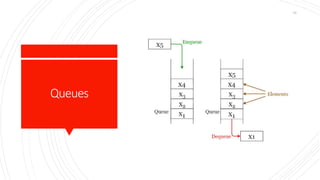
Queue
 Properties
 Linear Data Structure
 Follows FIFO: First In First Out
 Insertion can take place from the rear end.
 Deletion can take place from the front end.
 E.g.: queue at ticket counters, bus station
 5 major operations:
 Enqueue: Add an element to the end of the queue
 Dequeue: Remove an element from the front of the queue
 IsEmpty: Check if the queue is empty
 IsFull: Check if the queue is full
 Peek: Get the value of the front of the queue without
removing it
84
Queue
 Advantages
 Maintains data in FIFO manner
 Insertion from beginning and deletion from end
takes O(1) time
 Applications
 Scheduling
 Maintaining playlist
 Interrupt handling
85
86
Demonstration
ofQueue
(Create)
int SIZE = 5;
int items[] = new int[SIZE];
int front, rear;
Queue() {
front = -1;
rear = -1;
}
87
Demonstration
ofQueue
(State)
boolean isFull() {
if (front == 0 && rear == SIZE - 1) {
return true;
}
return false;
}
boolean isEmpty() {
if (front == -1)
return true;
else
return false;
}
88
Demonstration
ofQueue
(Enqueue)
void enQueue(int element) {
if (isFull()) {
System.out.println("Queue is full");
} else {
if (front == -1)
front = 0;
rear++;
items[rear] = element;
System.out.println("Inserted " + element);
}
}
89
Demonstration
ofQueue
(Dequeue)
if (isEmpty()) {
System.out.println("Queue is empty");
return (-1);
} else {
element = items[front];
if (front >= rear) {
front = -1;
rear = -1;
}
else {
front++;
}
System.out.println("Deleted -> " +
element);
return (element);
90
Demonstration
ofQueue
(Main)
q.deQueue();
q.enQueue(1);
q.enQueue(2);
q.enQueue(3);
q.enQueue(6);
q.display();
q.deQueue();
q.display();
91
Typesof Queue
 There are four different types of queues:
 Simple Queue
 Circular Queue
 Priority Queue
 Double Ended Queue
92
SimpleQueue
93
CircularQueue
94
PriorityQueue
95
DoubleEndedQueue
96
Circular
Queue
97
98
Demonstration
ofQueue
(State)
if (front == 0 && rear == SIZE - 1) {
return true;
}
if (front == rear + 1) {
return true;
}
return false;
}
// Check if the queue is empty
boolean isEmpty() {
if (front == -1)
return true;
else
return false;
99
"Programming isn't about
what you know; it's about
what you can figure out.”
Chris Pine
100