 Chapter 2
 Data Models
ISBN-13: 978-1337627900
ISBN-10: 1337627909
Buy Book Amazon.com URL
Modified by:
Usman Tariq, PhD
Associate Professor, PSAU
Office ☎ 00966 11 588 8386
Learning Objectives
 In this chapter, you will learn:
 About data modeling and why data models are
important
 About the basic data-modeling building blocks
 What business rules are and how they influence
database design
2
Learning Objectives
 In this chapter, you will learn:
 How the major data models evolved
 About emerging alternative data models and the need
they fulfill
 How data models can be classified by their level of
abstraction
3
Data Modeling and Data Models
• Data modeling: It is a process of creating a data model
for the data to be stored in a Database i.e. a conceptual
representation of
• Data objects
• The associations between different data objects
• The rules.
 Data modeling helps in the visual representation of data
and enforces business rules, regulatory compliances, and
government policies on the data. Data Models ensure
consistency in naming conventions, default values,
semantics, security while ensuring quality of the data.
4
Data Modeling and Data Models
Data model emphasizes on (1) what data is needed and
(2) how it should be organized instead of what
operations need to be performed on the data.
 Data models: Simple representations of complex
real-world data structures
 Useful for supporting a specific problem domain
 Model - Abstraction of a real-world object or event
5
Why use Data Model?
 The primary goal of using data model are:
1. Ensures that all data objects required by the database are accurately
represented. Omission of data will lead to creation of faulty reports and
produce incorrect results.
2. A data model helps design the database at the conceptual, physical and
logical levels.
3. Data Model structure helps to define the relational tables, primary and
foreign keys and stored procedures.
4. It provides a clear picture of the base data and can be used by database
developers to create a physical database.
5. It is also helpful to identify missing and redundant data.
6. Though the initial creation of data model is labor and time consuming, in
the long run, it makes your IT infrastructure upgrade and maintenance
cheaper and faster. 6
Types of Data Models [1/2]
 Conceptual: This Data Model defines WHAT the system
contains. This model is typically created by Business
stakeholders and Data Architects. The purpose is to organize,
scope and define business concepts and rules.
 Logical: Defines HOW the system should be implemented
regardless of the DBMS. This model is typically created by
Data Architects and Business Analysts. The purpose is to
developed technical map of rules and data structures.
 Physical: This Data Model describes HOW the system will be
implemented using a specific DBMS system. This model is
typically created by DBA and developers. The purpose is
actual implementation of the database.
7
Types of Data Models [2/2]
8
Advantages of Data model
 The main goal of a designing data model is to make certain that
data objects offered by the functional team are represented
accurately.
 The data model should be detailed enough to be used for building
the physical database.
 The information in the data model can be used for defining the
relationship between tables, primary and foreign keys, and stored
procedures.
 Data Model helps business to communicate the within and across
organizations.
 Data model helps to documents data mappings in ETL process
 Help to recognize correct sources of data to populate the model
9
Importance of Data Models
Are a communication tool
Give an overall view of the database
Organize data for various users
Are an abstraction for the creation of good
database
10
Disadvantages of Data model
 To develop Data model one should know
physical data stored characteristics.
 This is a navigational system produces
complex application development,
management. Thus, it requires a
knowledge of the biographical truth.
 Even smaller change made in structure
require modification in the entire
application.
 There is no set data manipulation
language in DBMS.
11Space in a Data File
Data Model Basic Building Blocks
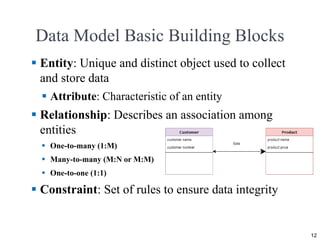
 Entity: Unique and distinct object used to collect
and store data
 Attribute: Characteristic of an entity
 Relationship: Describes an association among
entities
 One-to-many (1:M)
 Many-to-many (M:N or M:M)
 One-to-one (1:1)
 Constraint: Set of rules to ensure data integrity
12
Business Rules
Brief, precise, and unambiguous description of a
policy, procedure, or principle
Enable defining the basic building blocks
Describe main and distinguishing characteristics
of the data
13
Implementing a constraint imposed by
a database oriented business rule
14
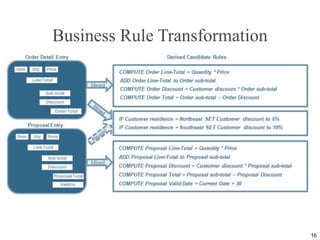
Business Process Mapping to Application Objects
15
Business Rule Transformation
16
Ask yourself the following questions,
before any modification
1. Will this rule be violated if I enter a new record into this
table?
2. Will this rule be violated if I do not enter a new record
into this table?
3. Will this rule be violated if I delete a record from this
table?
4. Will this rule be violated if I enter a value into this field?
5. Will this rule be violated if I do not enter a value into this
field?
6. Will this rule be violated if I update the value of this field?
7. Will this rule be violated if I delete the value of this field?
17
Business Rules are normalized to represent the
desired business level semantics
18
As-is Business Rule Model (Event-driven)
19
Sources of Business Rules
Company
managers
Policy makers
Department
managers
Written
documentation
Direct
interviews
with end users
20
Reasons for Identifying and Documenting
Business Rules
 Help standardize company’s view of data
 Communications tool between users and designers
 Allow designer to:
 Understand the nature, role, scope of data, and business
processes
 Develop appropriate relationship participation rules and
constraints
 Create an accurate data model
21
Translating Business Rules into ‘Data
Model Components’
 Nouns translate into entities
 Verbs translate into relationships among entities
 Relationships are bidirectional
 Questions to identify the relationship type
 How many instances of ‘B’ are related to one instance
of ‘A’?
 How many instances of ‘A’ are related to one instance
of ‘B’?
22
Naming Conventions
 Entity names - Required to:
 Be descriptive of the objects in the business
environment
 Use terminology that is familiar to the users
 Attribute name - Required to be descriptive of the
data represented by the attribute
 Proper naming:
 Facilitates communication between parties
 Promotes self-documentation
23
Database Naming Conventions Best Practices
1. Consistency is always the best policy.
2. Every table should have its own row identifier
3. Plural or singular names don’t really matter
4. Never allow the database to put in the constraint
names automatically
5. Avoid being redundant so you can avoid being
redundant
24
Hierarchical and Network Models
Hierarchical Models Network Models
 Manage large amounts of data
for complex manufacturing
projects
 Represented by an upside-
down tree which contains
segments
 Segments: Equivalent of a file
system’s record type
 Depicts a set of one-to-many
(1:M) relationships
 Represent complex data
relationships
 Improve database performance
and impose a database
standard
 Depicts both one-to-many
(1:M) and many-to-many
(M:N) relationships
25
Hierarchical Model
Advantages Disadvantages
 Promotes data sharing
 Parent/child relationship promotes
conceptual simplicity and data
integrity
 Database security is provided and
enforced by DBMS
 Efficient with 1:M relationships
 Requires knowledge of physical
data storage characteristics
 Navigational system requires
knowledge of hierarchical path
 Changes in structure require
changes in all application
programs
 Implementation limitations
 No data definition
 Lack of standards
26
Network Model
Advantages Disadvantages
 Conceptual simplicity
 Handles more relationship types
 Data access is flexible
 Data owner/member relationship
promotes data integrity
 Conformance to standards
 Includes data definition language
(DDL) and data manipulation
language (DML)
 System complexity limits
efficiency
 Navigational system yields
complex implementation,
application development, and
management
 Structural changes require
changes in all application
programs
27
Standard Database Concepts
28
 Schema
 Conceptual organization of the entire database as
viewed by the database administrator
 To add a new entity attribute in the relational model, you
need to modify the table definition. To add a new attribute
in the key-value store, you add a row to the key-value
store, which is why it is said to be “schema-less.”
 Schema is of three types: Physical schema, logical
schema and view schema.
 The design of a database at physical level is called physical schema. It describes how the data
stored on the disk or the physical storage.
 Design of database at logical level is called logical schema, programmers and database
administrator work at this level. At this level data can be described as certain types of data
records gets stored in data structures.
 Design of database at view level is called view schema. This generally describes end user
interaction with database systems.
Standard Database Concepts
 Subschema
 Portion of the database seen by the application programs that produce
the desired information from the data within the database
 A subschema provides a view of the database as seen by an
application program.
 This view is often a subset of the complete schema definition.
 A subschema is used at run time to provide the DBMS with a
description of those portions of the database that are accessible to the
application program.
 The subschema allows the user to view only that part of the
database that is of interest to him.
 The subschema defines the portion of the database as seen by the
application programs and the application programs can have different
view of data stored in the database. 29
Standard Database Concepts
30
 Data manipulation language (DML)
 Environment in which data can be managed and is used to work with the
data in the database
 SQL includes commands to insert, update, delete, and retrieve data within
the database tables.
 PL/SQL blocks can contain only standard SQL data manipulation language
(DML) commands such as SELECT, INSERT, UPDATE, and DELETE.
The use of data definition language (DDL) commands is not directly
supported in a PL/SQL block.
Standard Database Concepts
 Schema data definition language (DDL)
 Enables the database administrator to define the schema
components
 DDL allows a database administrator to define the
database structure, schema, and subschema.
 Sub-Schema DDL, allows application programs to
define the database components that will be used.
31
Standard Database Concepts
 Schema data definition language
 Data Definition allows the specification of not only a
set of relations but also information about each relation,
including:
 The schema for each relation.
 The domain of values associated with each attribute.
 Integrity constraints
 The set of indices to be maintained for each relations.
 Security and authorization information for each relation.
 The physical storage structure of each relation on disk.
32
Standard Database Concepts
 Schema data definition language (DDL) Commands
 CREATE
 ALTER
 The Oracle ALTER TABLE statement is used to add, modify, or drop/delete columns
in a table. The Oracle ALTER TABLE statement is also used to rename a table.
 DROP
 To remove a relation from an SQL database, we use the drop table command. The drop
table command deletes all information about the dropped relation from the database.
The command
drop table r 33
The Relational Model
 Produced an automatic transmission database that
replaced standard transmission databases
 Based on a relation
 Relation or table: Matrix composed of intersecting
tuple and attribute
 Tuple: Rows
 Attribute: Columns
 Describes a precise set of data manipulation
constructs
34
Relational Model
Advantages Disadvantages
 Structural independence is
promoted using independent
tables
 Tabular view improves
conceptual simplicity
 Ad hoc query capability is based
on SQL
 Isolates the end user from
physical-level details
 Improves implementation and
management simplicity
 Requires substantial hardware and
system software overhead
 Conceptual simplicity gives
untrained people the tools to use a
good system poorly
 May promote information
problems
35
Relational Database Management System(RDBMS)
 Performs basic functions provided by the hierarchical
and network DBMS systems
 Makes the relational data model easier to understand
and implement
 Hides the complexities of the relational model from
the user
36
Figure 2.2 - A Relational Diagram
Cengage Learning © 2018
37
SQL-Based Relational Database
Application
 End-user interface
 Allows end user to interact with the data
 Collection of tables stored in the database
 Each table is independent from another
 Rows in different tables are related based on common
values in common attributes
 SQL engine
 Executes all queries
38
The Entity Relationship Model
 Graphical representation of entities and their
relationships in a database structure
 Entity relationship diagram (ERD)
 Uses graphic representations to model database
components
 Entity instance or entity occurrence
 Rows in the relational table
 Connectivity: Term used to label the relationship
types
39
Entity Relationship Model
Advantages Disadvantages
 Visual modeling yields
conceptual simplicity
 Visual representation makes it
an effective communication
tool
 Is integrated with the dominant
relational model
 Limited constraint
representation
 Limited relationship
representation
 No data manipulation
language
 Loss of information content
occurs when attributes are
removed from entities to avoid
crowded displays
40
Figure 2.3 - The ER Model Notations
41
The Object-Oriented Data Model (OODM)
or Semantic Data Model
 Object-oriented database management system
(OODBMS)
 Based on OODM
 Object: Contains data and their relationships with
operations that are performed on it
 Basic building block for autonomous structures
 Abstraction of real-world entity
 Attributes - Describe the properties of an object
42
The Object-Oriented Data Model (OODM)
 Class: Collection of similar objects with shared
structure and behavior organized in a class hierarchy
 Class hierarchy: Resembles an upside-down tree in
which each class has only one parent
 Inheritance: Object inherits methods and attributes
of parent class
 Unified Modeling Language (UML)
 Describes sets of diagrams and symbols to graphically
model a system
43
Object-Oriented Model
Advantages Disadvantages
 Semantic content is added
 Visual representation includes
semantic content
 Inheritance promotes data
integrity
 Slow development of
standards caused vendors to
supply their own
enhancements
 Compromised widely accepted
standard
 Complex navigational system
 Learning curve is steep
 High system overhead slows
transactions
44
Figure 2.4 - A Comparison of OO, UML,
and ER Models
45
Object/Relational and XML
 Extended relational data model (ERDM)
 Supports OO features and complex data
representation
 Object/Relational Database Management System
(O/R DBMS)
 Based on ERDM, focuses on better data management
 Extensible Markup Language (XML)
 Manages unstructured data for efficient and
effective exchange of all data types
46
Big Data
 Aims to:
 Find new and better ways to manage large amounts of
web and sensor-generated data
 Provide high performance and scalability at a
reasonable cost
 Characteristics
 Volume
 Velocity
 Variety
47
Different formats of ‘big data’
 The three different formats of big data are:
 Structured: Organized data format with a fixed
schema. Ex: RDBMS
 Semi-Structured: Partially organized data which does
not have a fixed format. Ex: XML, JSON
 Unstructured: Unorganized data with an unknown
schema. Ex: Audio, video files etc.
48
Characteristics of Big Data
 Validity: correctness of data
 Variability: dynamic behavior
 Volatility: tendency to change in time
 Vulnerability: vulnerable to breach or attacks
 Visualization: visualizing meaningful usage of data
49
Big Data Challenges
Volume does not allow the usage of
conventional structures
Expensive
OLAP tools proved inconsistent dealing
with unstructured data
50
Big Data New Technologies
Hadoop
Hadoop Distributed
File System (HDFS)
MapReduce NoSQL
51
Big Data Tools
52
Big Data Applications
• Entertainment: Netflix and Amazon use Big Data to make shows and movie
recommendations to their users.
• Insurance: Uses Big data to predict illness, accidents and price their products
accordingly.
• Driver-less Cars: Google’s driver-less cars collect about one gigabyte of data per
second. These experiments require more and more data for their successful execution.
• Education: Opting for big data powered technology as a learning tool instead of
traditional lecture methods, which enhanced the learning of students as well aided the
teacher to track their performance better.
• Automobile: Rolls Royce has embraced Big Data by fitting hundreds of sensors into its
engines and propulsion systems, which record every tiny detail about their operation.
The changes in data in real-time are reported to engineers who will decide the best
course of action such as scheduling maintenance or dispatching engineering teams
should the problem require it.
• Government: A very interesting use of Big Data is in the field of politics to analyze
patterns and influence election results. Cambridge Analytica Ltd. is one such
organization which completely drives on data to change audience behavior and plays
a major role in the electoral process.
53
Big Data Use Cases https://www.oracle.com/big-data/guide/what-is-big-data.html
NoSQL Databases
 Not based on the relational model
 Support distributed database architectures
 Provide high scalability, high availability, and fault
tolerance
 Support large amounts of sparse data
 Geared toward performance rather than transaction
consistency
 Store data in key-value stores
54
55
NoSQL
Advantages Disadvantages
 High scalability, availability, and
fault tolerance are provided
 Uses low-cost commodity
hardware
 Supports Big Data
 4. Key-value model improves
storage efficiency
 In terms of data consistency, it
provides an eventually consistent
model
 Complex programming is
required
 There is no relationship support
 There is no transaction integrity
support
56
NoSQL and Relational Databases Comparison
57
NoSQL databases https://dev.to/lmolivera/everything-you-need-to-know-about-nosql-databases-3o3h
Figure 2.5 - A Simple Key-value Representation
58
Figure 2.6 - The Evolution of Data Models
59
Table 2.3 - Data Model Basic Terminology
Comparison
60
Figure 2.7 - Data Abstraction Levels
61
The External Model
 End users’ view of the data environment
 ER diagrams are used to represent the external views
 External schema: Specific representation of an
external view
62
Figure 2.8 - External Models for Tiny
College
63
The Conceptual Model
 Represents a global view of the entire database by the
entire organization
 Conceptual schema: Basis for the identification and
high-level description of the main data objects
 Has a macro-level view of data environment
 Is software and hardware independent
 Logical design: Task of creating a conceptual data
model
64
Figure 2.9 - Conceptual Model for Tiny College
65
The Internal Model
 Representing database as seen by the DBMS
mapping conceptual model to the DBMS
 Internal schema: Specific representation of an
internal model
 Uses the database constructs supported by the chosen
database
 Is software dependent and hardware independent
 Logical independence: Changing internal model
without affecting the conceptual model
66
Figure 2.10 - Internal Model for Tiny College
67
The Physical Model
 Operates at lowest level of abstraction
 Describes the way data are saved on storage media
such as disks or tapes
 Requires the definition of physical storage and data
access methods
 Relational model aimed at logical level
 Does not require physical-level details
 Physical independence: Changes in physical model
do not affect internal model
68
Table 2.4 - Levels of Data Abstraction
Cengage Learning © 2018
69