Data Binding в массы!
Анохин Михаил / Android Developer / MWDN Ltd.
Data Binding
● представлен на Google I/O 2015
● официальная библиотека от Google
● генерирует биндинг во время компиляции
● на данный момент доступна стабильная версия 1.0 и в
процессе разработки находится версия 2.0 2
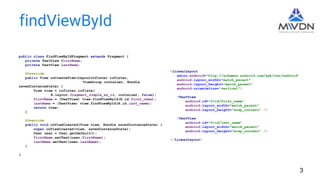
public class FindViewByIdFragment extends Fragment {
private TextView firstName;
private TextView lastName;
@Override
public View onCreateView(LayoutInflater inflater,
ViewGroup container, Bundle
savedInstanceState) {
View view = inflater.inflate(
R.layout.fragment_simple_as_is, container, false);
firstName = (TextView) view.findViewById(R.id.first_name);
lastName = (TextView) view.findViewById(R.id.last_name);
return view;
}
@Override
public void onViewCreated(View view, Bundle savedInstanceState) {
super.onViewCreated(view, savedInstanceState);
User user = User.getDefault();
firstName.setText(user.firstName);
lastName.setText(user.lastName);
}
}
<LinearLayout
xmlns:android="http://schemas.android.com/apk/res/android"
android:layout_width="match_parent"
android:layout_height="match_parent"
android:orientation="vertical">
<TextView
android:id="@+id/first_name"
android:layout_width="match_parent"
android:layout_height="wrap_content" />
<TextView
android:id="@+id/last_name"
android:layout_width="match_parent"
android:layout_height="wrap_content" />
</LinearLayout>
findViewById
3
public class ButterKnifeFragment extends Fragment {
@Bind(R.id.first_name)
TextView firstName;
@Bind(R.id.last_name)
TextView lastName;
@Override
public View onCreateView(LayoutInflater inflater,
ViewGroup container, Bundle savedInstanceState) {
View view = inflater.inflate(
R.layout.fragment_simple_as_is, container, false);
ButterKnife.bind(this, view);
return view;
}
@Override
public void onViewCreated(View view, Bundle savedInstanceState) {
super.onViewCreated(view, savedInstanceState);
User user = User.getDefault();
firstName.setText(user.firstName);
lastName.setText(user.lastName);
}
@Override
public void onDestroyView() {
super.onDestroyView();
ButterKnife.unbind(this);
}
}
<LinearLayout
xmlns:android="http://schemas.android.com/apk/res/android"
android:layout_width="match_parent"
android:layout_height="match_parent"
android:orientation="vertical">
<TextView
android:id="@+id/first_name"
android:layout_width="match_parent"
android:layout_height="wrap_content" />
<TextView
android:id="@+id/last_name"
android:layout_width="match_parent"
android:layout_height="wrap_content" />
</LinearLayout>
ButterKnife
4
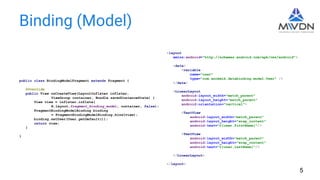
Binding (Model)
<layout
xmlns:android="http://schemas.android.com/apk/res/android">
<data>
<variable
name="user"
type="com.anokmik.databinding.model.User" />
</data>
<LinearLayout
android:layout_width="match_parent"
android:layout_height="match_parent"
android:orientation="vertical">
<TextView
android:layout_width="match_parent"
android:layout_height="wrap_content"
android:text="@{user.firstName}"/>
<TextView
android:layout_width="match_parent"
android:layout_height="wrap_content"
android:text="@{user.lastName}"/>
</LinearLayout>
</layout>
public class BindingModelFragment extends Fragment {
@Override
public View onCreateView(LayoutInflater inflater,
ViewGroup container, Bundle savedInstanceState) {
View view = inflater.inflate(
R.layout.fragment_binding_model, container, false);
FragmentBindingModelBinding binding
= FragmentBindingModelBinding.bind(view);
binding.setUser(User.getDefault());
return view;
}
}
5
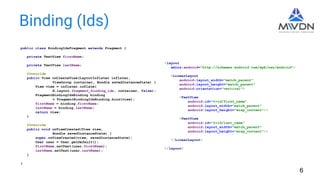
Binding (Ids)
public class BindingIdsFragment extends Fragment {
private TextView firstName;
private TextView lastName;
@Override
public View onCreateView(LayoutInflater inflater,
ViewGroup container, Bundle savedInstanceState) {
View view = inflater.inflate(
R.layout.fragment_binding_ids, container, false);
FragmentBindingIdsBinding binding
= FragmentBindingIdsBinding.bind(view);
firstName = binding.firstName;
lastName = binding.lastName;
return view;
}
@Override
public void onViewCreated(View view,
Bundle savedInstanceState) {
super.onViewCreated(view, savedInstanceState);
User user = User.getDefault();
firstName.setText(user.firstName);
lastName.setText(user.lastName);
}
}
<layout
xmlns:android="http://schemas.android.com/apk/res/android">
<LinearLayout
android:layout_width="match_parent"
android:layout_height="match_parent"
android:orientation="vertical">
<TextView
android:id="@+id/first_name"
android:layout_width="match_parent"
android:layout_height="wrap_content"/>
<TextView
android:id="@+id/last_name"
android:layout_width="match_parent"
android:layout_height="wrap_content"/>
</LinearLayout>
</layout>
6
Data Model
public class User {
private final String firstName;
private final String lastName;
public User(String firstName, String lastName) {
this.firstName = firstName;
this.lastName = lastName;
}
public String getFirstName() {
return firstName;
}
public String getLastName() {
return lastName;
}
}
public class User {
public final String firstName;
public final String lastName;
public User(String firstName, String lastName) {
this.firstName = firstName;
this.lastName = lastName;
}
}
7
Configuration
android {
…
buildToolsVersion "23.0.2"
…
dataBinding {
enabled = true
}
…
}
buildscript {
repositories {
jcenter()
}
dependencies {
classpath 'com.android.tools.build:gradle:1.5.0'
}
}
8
Compile-time Generation
View view = inflater.inflate(R.layout.fragment_main, container, false);
FragmentMainBinding binding = FragmentMainBinding.bind(view);
<data class="FragmentMainBinding">
...
</data>
<data class=".FragmentMainBinding">
...
</data>
<data class="com.example.FragmentMainBinding">
...
</data>
9
Generated classes location: /build/intermediates/classes/{$applicationId}/databinding
Variables and Imports
public abstract User getUser();
public abstract void setUser(User user);
public abstract Drawable getImage();
public abstract void setImage(Drawable image);
public abstract String getText();
public abstract void setText(String text);
<data>
<import type="android.graphics.drawable.Drawable" />
<import type="com.anokmik.databinding.model.User" />
<variable name="user" type="User" />
<variable name="image" type="Drawable" />
<variable name="text" type="String" />
</data>
10
Variables and Imports
<data>
<import type="android.util.SparseArray"/>
<import type="java.util.Map"/>
<import type="java.util.List"/>
<variable name="array" type="String[]" />
<variable name="list" type="List&lt;String>"/>
<variable name="sparse" type="SparseArray&lt;String>"/>
<variable name="map" type="Map&lt;String, String>"/>
<variable name="index" type="int"/>
<variable name="key" type="String"/>
</data>
<Button
android:layout_width="match_parent"
android:layout_height="wrap_content"
android:text="@{titles[0]}" />
<data>
<import type="android.app.Fragment"/>
<import type="android.support.v4.app.Fragment" alias="SupportFragment"/>
</data>
11
Data Objects
public class NotifyGreeting extends BaseObservable {
private String name;
@Bindable
public String getName() {
return name;
}
public void setName(String name) {
this.name = name;
notifyPropertyChanged(BR.name);
}
}
public class ObservableGreeting {
public ObservableString name
= new ObservableString();
}
12
Include and Merge
<layout
xmlns:android="http://schemas.android.com/apk/res/android"
xmlns:bind="http://schemas.android.com/apk/res-auto">
<data>
<variable name="user" type="com.example.User" />
</data>
<LinearLayout
android:layout_width="match_parent"
android:layout_height="match_parent"
android:orientation="vertical">
<include
layout="@layout/name"
bind:user="@{user}" />
</LinearLayout>
</layout>
<layout
xmlns:bind="http://schemas.android.com/apk/res-auto">
<data>
<variable name="user" type="com.example.User"/>
</data>
<merge>
<include layout="@layout/name"
bind:user="@{user}"/>
</merge>
</layout>
13
Expressions
● mathematical +, -, /, *, %
● string concatenation +
● logical &&, ||
● binary &, |, ^
● unary +, -, !, ~
● shift >>, >>>, <<
● comparison ==, >, <, >=, <=
● instanceof
● grouping ()
● literals - character, String, numeric, null
● cast
● method calls
● field access
● array access []
● ternary operator ?:
android:enabled="@{communicator.isLoginValid &amp; communicator.isPasswordValid}"
14
Null
android:text="@{user.firstName ?? user.lastName}"
android:text="@{user.firstName != null ? user.firstName : user.lastName}"
android:visibility="@{communicator.greeting.name.length > 0 ? View.VISIBLE : View.GONE}"
15
Setters
android:text="@{user.firstName}" bind:onClickListener="@{communicator.clickListener}"
bind:textWatcher="@{communicator.loginTextWatcher}" bind:bindingText="@{communicator.greeting.name}"
@BindingAdapter("bind:textWatcher")
public static void setTextWatcher(TextView view,
TextWatcher watcher) {
view.addTextChangedListener(watcher);
}
@BindingAdapter("bind:bindingText")
public static void setBindingText(TextView view,
final ObservableString text) {
view.addTextChangedListener(new SimpleTextWatcher() {
@Override
public void afterTextChanged(Editable s) {
text.set(s.toString());
}
});
}
16
Converters
public class Converters {
@BindingConversion
public static String convertObservableToString(ObservableString observableString) {
return observableString.get();
}
}
17
Binding executor
18
private static final boolean USE_CHOREOGRAPHER = SDK_INT >= 16;
...
protected ViewDataBinding(DataBindingComponent bindingComponent,
View root, int localFieldCount) {
...
if (USE_CHOREOGRAPHER) {
mChoreographer = Choreographer.getInstance();
mFrameCallback = new Choreographer.FrameCallback() {
@Override
public void doFrame(long frameTimeNanos) {
mRebindRunnable.run();
}
};
} else {
mFrameCallback = null;
mUIThreadHandler = new Handler(Looper.myLooper());
}
}
Binding execution
19
protected void requestRebind() {
...
if (USE_CHOREOGRAPHER) {
mChoreographer.postFrameCallback(mFrameCallback);
} else {
mUIThreadHandler.post(mRebindRunnable);
}
}
private final Runnable mRebindRunnable = new Runnable() {
@Override
public void run() {
...
executePendingBindings();
}
};
public void executePendingBindings() {
...
if (!mRebindHalted) {
executeBindings();
...
}
...
}
Generated binding
20
public class FragmentBindingModelBinding
extends android.databinding.ViewDataBinding {
...
@Override
protected void executeBindings() {
long dirtyFlags = 0;
synchronized(this) {
dirtyFlags = mDirtyFlags;
mDirtyFlags = 0;
}
java.lang.String firstNameUser = null;
java.lang.String lastNameUser = null;
com.anokmik.databinding.model.User user = mUser;
if ((dirtyFlags & 0x3L) != 0) {
user = user;
if (user != null) {
firstNameUser = user.firstName;
lastNameUser = user.lastName;
}
}
if ((dirtyFlags & 0x3L) != 0) {
this.mboundView1.setText(firstNameUser);
this.mboundView2.setText(lastNameUser);
}
}
...
}
New in 2.0-beta
21
Annotations: InverseBindingAdapter,
InverseBindingMethod,
InverseBindingMethods
Interface: InverseBindingListener
References
● http://developer.android.com/tools/data-binding/guide.html
● https://www.youtube.com/watch?v=ssayKH0tudk
● https://www.youtube.com/watch?v=WdUbXWztKNY
● https://realm.io/news/data-binding-android-boyar-mount/
● https://speakerdeck.com/rciovati/binding-data-with-android-databinding
● https://medium.com/@fabioCollini/android-data-binding-f9f9d3afc761
22
Спасибо за внимание!
source: https://github.com/anokmik/data-binding
mail: anokmik@gmail.com
skype: anokmik