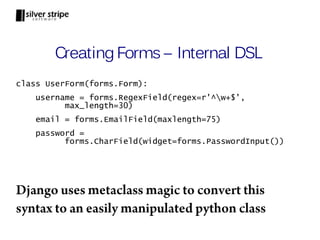
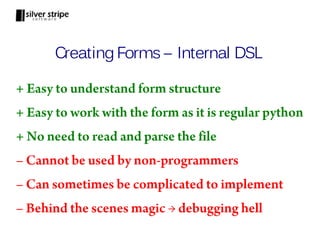
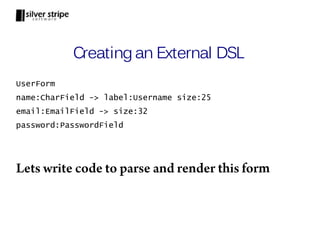
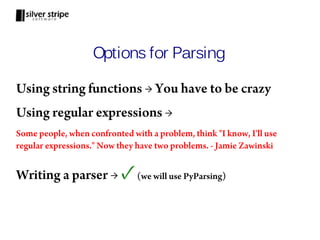
This document discusses domain specific languages (DSLs) and provides examples of creating DSLs in Python. It explains that DSLs allow users to work in specialized mini-languages tailored to specific problem domains. As examples, it discusses SQL as a DSL for databases and regular expressions as a DSL for patterns. It then demonstrates how to create an external DSL for defining forms using PyParsing and an internal DSL for the same using Python features like metaclasses. The document concludes that DSLs make code easier to read, write and maintain for non-programmers.

![Life Without Regular Expressions
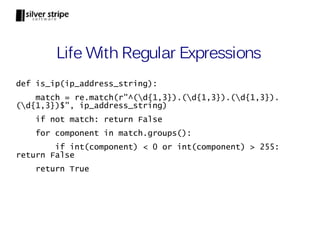
def is_ip_address(ip_address):
components = ip_address_string.split(".")
if len(components) != 4: return False
try:
int_components = [int(component) for component in
components]
except ValueError:
return False
for component in int_components:
if component < 0 or component > 255:
return False
return True](https://image.slidesharecdn.com/dslwithpython-111024121111-phpapp02/85/Creating-Domain-Specific-Languages-in-Python-5-320.jpg)
![Step 2: Design the Grammar
form ::= form_name newline field+
field ::= field_name colon field_type [arrow property+]
property ::= key colon value
form_name ::= word
field_name ::= word
field_type ::= CharField | EmailField | PasswordField
key ::= word
value ::= alphanumeric+
word ::= alpha+
newline ::= n
colon ::= :
arrow ::= ->](https://image.slidesharecdn.com/dslwithpython-111024121111-phpapp02/85/Creating-Domain-Specific-Languages-in-Python-20-320.jpg)


![Life Without Regular Expressions
def is_ip_address(ip_address):
components = ip_address_string.split(".")
if len(components) != 4: return False
try:
int_components = [int(component) for component in
components]
except ValueError:
return False
for component in int_components:
if component < 0 or component > 255:
return False
return True](/p?url=https%3A%2F%2Fimage.slidesharecdn.com%2Fdslwithpython-111024121111-phpapp02%2F85%2FCreating-Domain-Specific-Languages-in-Python-5-320.jpg&__src=https%3A%2F%2Fwww.slideshare.net%2Fslideshow%2Fcreating-domain-specific-languages-in-python%2F9860460%2336&__type=image)


![Step 2: Design the Grammar
form ::= form_name newline field+
field ::= field_name colon field_type [arrow property+]
property ::= key colon value
form_name ::= word
field_name ::= word
field_type ::= CharField | EmailField | PasswordField
key ::= word
value ::= alphanumeric+
word ::= alpha+
newline ::= n
colon ::= :
arrow ::= ->](/p?url=https%3A%2F%2Fimage.slidesharecdn.com%2Fdslwithpython-111024121111-phpapp02%2F85%2FCreating-Domain-Specific-Languages-in-Python-20-320.jpg&__src=https%3A%2F%2Fwww.slideshare.net%2Fslideshow%2Fcreating-domain-specific-languages-in-python%2F9860460%2336&__type=image)


![Output
> print form.parseString(input_form)
['UserForm', 'n', 'name', ':', 'CharField', '->',
'label', ':', 'Username', 'size', ':', '25', 'n',
'email', ':', 'EmailField', '->', 'size', ':', '25', 'n',
'password', ':', 'PasswordField', 'n']
PyParsing has neatly parsed our form input into
tokens. Thats nice, but we can do more.](/p?url=https%3A%2F%2Fimage.slidesharecdn.com%2Fdslwithpython-111024121111-phpapp02%2F85%2FCreating-Domain-Specific-Languages-in-Python-24-320.jpg&__src=https%3A%2F%2Fwww.slideshare.net%2Fslideshow%2Fcreating-domain-specific-languages-in-python%2F9860460%2336&__type=image)

![Output
> print form.parseString(input_form)
['UserForm', 'name', 'CharField', 'label', 'Username',
'size', '25', 'email', 'EmailField', 'size', '25',
'password', 'PasswordField']
All the noise tokens are now removed from the
parsed output](/p?url=https%3A%2F%2Fimage.slidesharecdn.com%2Fdslwithpython-111024121111-phpapp02%2F85%2FCreating-Domain-Specific-Languages-in-Python-26-320.jpg&__src=https%3A%2F%2Fwww.slideshare.net%2Fslideshow%2Fcreating-domain-specific-languages-in-python%2F9860460%2336&__type=image)

![Output
> print form.parseString(input_form)
['UserForm',
['name', 'CharField',
[['label', 'Username'], ['size', '25']]],
['email', 'EmailField',
[['size', '25']]],
['password', 'PasswordField',[]]]
Related tokens are now grouped together in a list](/p?url=https%3A%2F%2Fimage.slidesharecdn.com%2Fdslwithpython-111024121111-phpapp02%2F85%2FCreating-Domain-Specific-Languages-in-Python-28-320.jpg&__src=https%3A%2F%2Fwww.slideshare.net%2Fslideshow%2Fcreating-domain-specific-languages-in-python%2F9860460%2336&__type=image)

![Output
> parsed_form = form.parseString(input_form)
> print parsed_form.form_name
UserForm
> print parsed_form.fields[1].field_type
EmailField
Now we can refer to parsed tokens by name](/p?url=https%3A%2F%2Fimage.slidesharecdn.com%2Fdslwithpython-111024121111-phpapp02%2F85%2FCreating-Domain-Specific-Languages-in-Python-30-320.jpg&__src=https%3A%2F%2Fwww.slideshare.net%2Fslideshow%2Fcreating-domain-specific-languages-in-python%2F9860460%2336&__type=image)
![Step 7: Convert Properties to Dict
def convert_prop_to_dict(tokens):
prop_dict = {}
for token in tokens:
prop_dict[token.property_key] =
token.property_value
return prop_dict
field = Group(field_name + colon + field_type +
Optional(arrow + OneOrMore(field_property))
.setParseAction(convert_prop_to_dict) +
newline).setResultsName("form_field")](/p?url=https%3A%2F%2Fimage.slidesharecdn.com%2Fdslwithpython-111024121111-phpapp02%2F85%2FCreating-Domain-Specific-Languages-in-Python-31-320.jpg&__src=https%3A%2F%2Fwww.slideshare.net%2Fslideshow%2Fcreating-domain-specific-languages-in-python%2F9860460%2336&__type=image)
![Output
> print form.parseString(input_form)
['UserForm',
['name', 'CharField',
{'size': '25', 'label': 'Username'}],
['email', 'EmailField',
{'size': '32'}],
['password', 'PasswordField', {}]
]
Sweet! The field properties are parsed into a dict](/p?url=https%3A%2F%2Fimage.slidesharecdn.com%2Fdslwithpython-111024121111-phpapp02%2F85%2FCreating-Domain-Specific-Languages-in-Python-32-320.jpg&__src=https%3A%2F%2Fwww.slideshare.net%2Fslideshow%2Fcreating-domain-specific-languages-in-python%2F9860460%2336&__type=image)

![def get_field_html(field):
properties = field[2]
label = properties["label"] if "label" in properties else field.field_name
label_html = "<label>" + label + "</label>"
attributes = {"name":field.field_name}
attributes.update(properties)
if field.field_type == "CharField" or field.field_type == "EmailField":
attributes["type"] = "text"
else:
attributes["type"] = "password"
if "label" in attributes:
del attributes["label"]
attributes_html = " ".join([name+"='"+value+"'" for name,value in attributes.items()])
field_html = "<input " + attributes_html + "/>"
return label_html + field_html + "<br/>"
def render(form):
fields_html = "".join([get_field_html(field) for field in form.fields])
return "<form id='" + form.form_name.lower() +"'>" + fields_html + "</form>"](/p?url=https%3A%2F%2Fimage.slidesharecdn.com%2Fdslwithpython-111024121111-phpapp02%2F85%2FCreating-Domain-Specific-Languages-in-Python-34-320.jpg&__src=https%3A%2F%2Fwww.slideshare.net%2Fslideshow%2Fcreating-domain-specific-languages-in-python%2F9860460%2336&__type=image)


![class HtmlElement(object):
default_attributes = {}
tag = "unknown_tag"
def __init__(self, *args, **kwargs):
self.attributes = kwargs
self.attributes.update(self.default_attributes)
self.children = args
def __str__(self):
attribute_html = " ".join(["{}='{}'".format(name, value) for name,value in
self.attributes.items()])
if not self.children:
return "<{} {}/>".format(self.tag, attribute_html)
else:
children_html = "".join([str(child) for child in self.children])
return "<{} {}>{}</{}>".format(self.tag, attribute_html, children_html,
self.tag)](/p?url=https%3A%2F%2Fimage.slidesharecdn.com%2Fdslwithpython-111024121111-phpapp02%2F85%2FCreating-Domain-Specific-Languages-in-Python-39-320.jpg&__src=https%3A%2F%2Fwww.slideshare.net%2Fslideshow%2Fcreating-domain-specific-languages-in-python%2F9860460%2336&__type=image)

![class Input(HtmlElement):
tag = "input"
def __init__(self, *args, **kwargs):
HtmlElement.__init__(self, *args, **kwargs)
self.label = self.attributes["label"] if "label" in self.attributes else
self.attributes["name"]
if "label" in self.attributes:
del self.attributes["label"]
def __str__(self):
label_html = "<label>{}</label>".format(self.label)
return label_html + HtmlElement.__str__(self) + "<br/>"](/p?url=https%3A%2F%2Fimage.slidesharecdn.com%2Fdslwithpython-111024121111-phpapp02%2F85%2FCreating-Domain-Specific-Languages-in-Python-41-320.jpg&__src=https%3A%2F%2Fwww.slideshare.net%2Fslideshow%2Fcreating-domain-specific-languages-in-python%2F9860460%2336&__type=image)


![Step 7 Revisited: Output HTML
def render(form):
field_dict = {"CharField": CharField, "EmailField":
EmailField, "PasswordField": PasswordField}
fields = [field_dict[field.field_type]
(name=field.field_name, **field[2]) for field in
form.fields]
return Form(*fields, id=form.form_name.lower())
Now our output code uses our Internal DSL!](/p?url=https%3A%2F%2Fimage.slidesharecdn.com%2Fdslwithpython-111024121111-phpapp02%2F85%2FCreating-Domain-Specific-Languages-in-Python-45-320.jpg&__src=https%3A%2F%2Fwww.slideshare.net%2Fslideshow%2Fcreating-domain-specific-languages-in-python%2F9860460%2336&__type=image)


