Core Java Complete Tutorial
Prepared by:
LOKESH KAKKAR
eMail : kakkar.lokesh@gmail.com
LinkedIn : https://www.linkedin.com/in/lokeshkakkar
Mobile : +91 814 614 5674
1
Core Java Tutorial
Sr. No. Topic Name
01 OOPS Concepts
02 Java Evolution
03 Class Object basic
04 Class Object Constructor overloading
05 Inheritance
06 Array and String
07 Final Abstract class and interfaces
08 Exceptions
09 Streams
10 GUI Applications
11 Applet Programming
12 Network Programming and Java Sockets
13 Java Treads
2
Introduction to Object Oriented
Design
3
Overview
 Understand Classes and Objects.
 Understand some of the key
concepts/features in the Object Oriented
paradigm.
 Benefits of Object Oriented Design
paradigm.
4
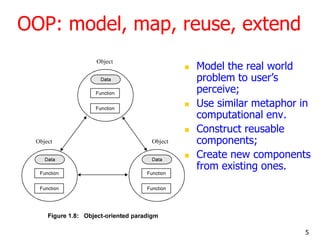
OOP: model, map, reuse, extend
 Model the real world
problem to user‘s
perceive;
 Use similar metaphor in
computational env.
 Construct reusable
components;
 Create new components
from existing ones.
5
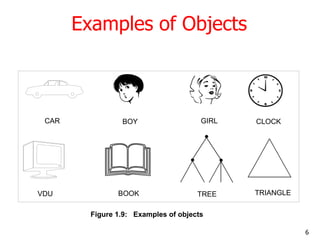
Examples of Objects
Figure 1.9: Examples of objects
CAR
VDU
BOY GIRL
TREEBOOK
CLOCK
TRIANGLE
6
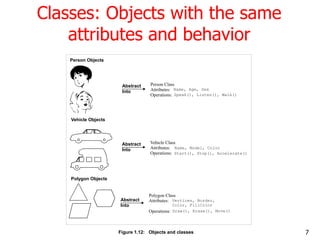
Classes: Objects with the same
attributes and behavior
Person Objects
Vehicle Objects
Polygon Objects
Abstract Person Class
Attributes:
Operations:
Name, Age, Sex
Speak(), Listen(), Walk()
Into
Abstract Vehicle Class
Attributes:
Operations:
Name, Model, Color
Start(), Stop(), Accelerate()
Into
Abstract
Polygon Class
Attributes:
Operations: Draw(), Erase(), Move()
Vertices, Border,
Color, FillColorInto
Figure 1.12: Objects and classes 7
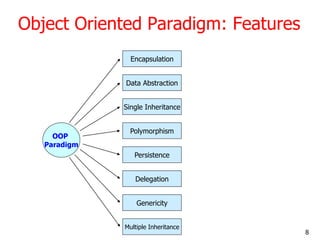
Object Oriented Paradigm: Features
OOP
Paradigm
Encapsulation
Multiple Inheritance
Genericity
Delegation
Persistence
Polymorphism
Single Inheritance
Data Abstraction
8
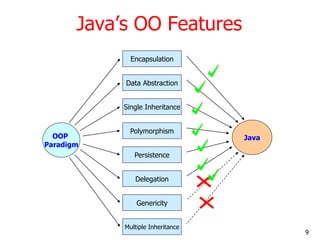
Java‘s OO Features
OOP
Paradigm
Encapsulation
Multiple Inheritance
Genericity
Delegation
Persistence
Polymorphism
Single Inheritance
Data Abstraction
Java
9
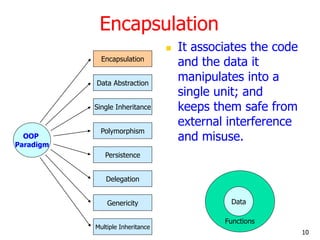
Encapsulation
 It associates the code
and the data it
manipulates into a
single unit; and
keeps them safe from
external interference
and misuse.OOP
Paradigm
Encapsulation
Multiple Inheritance
Genericity
Delegation
Persistence
Polymorphism
Single Inheritance
Data Abstraction
Data
Functions
10
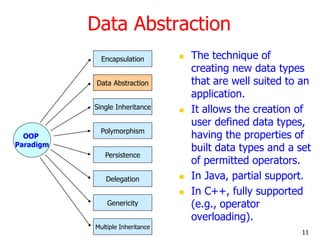
Data Abstraction
 The technique of
creating new data types
that are well suited to an
application.
 It allows the creation of
user defined data types,
having the properties of
built data types and a set
of permitted operators.
 In Java, partial support.
 In C++, fully supported
(e.g., operator
overloading).
OOP
Paradigm
Encapsulation
Multiple Inheritance
Genericity
Delegation
Persistence
Polymorphism
Single Inheritance
Data Abstraction
11
Abstract Data Type (ADT)
 A structure that contains both data
and the actions to be performed on
that data.
 Class is an implementation of an
Abstract Data Type.
12
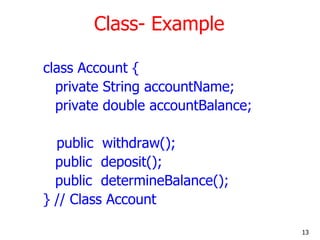
Class- Example
class Account {
private String accountName;
private double accountBalance;
public withdraw();
public deposit();
public determineBalance();
} // Class Account
13
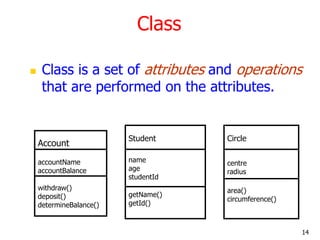
Class
 Class is a set of attributes and operations
that are performed on the attributes.
Account
accountName
accountBalance
withdraw()
deposit()
determineBalance()
Student
name
age
studentId
getName()
getId()
Circle
centre
radius
area()
circumference()
14
Objects
 An Object Oriented system is a
collection of interacting Objects.
 Object is an instance of a class.
15
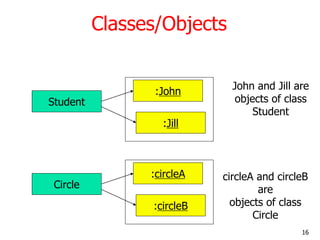
Classes/Objects
Student
:John
:Jill
John and Jill are
objects of class
Student
Circle
:circleA
:circleB
circleA and circleB
are
objects of class
Circle
16
Class
 A class represents a template for several
objects that have common properties.
 A class defines all the properties common
to the object - attributes and methods.
 A class is sometimes called the object‘s
type.
17
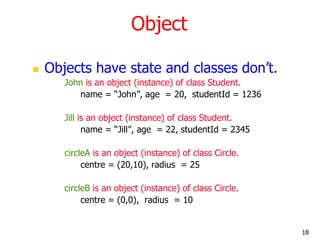
Object
 Objects have state and classes don‘t.
John is an object (instance) of class Student.
name = ―John‖, age = 20, studentId = 1236
Jill is an object (instance) of class Student.
name = ―Jill‖, age = 22, studentId = 2345
circleA is an object (instance) of class Circle.
centre = (20,10), radius = 25
circleB is an object (instance) of class Circle.
centre = (0,0), radius = 10
18
Encapsulation
 All information (attributes and methods) in an
object oriented system are stored within the
object/class.
 Information can be manipulated through
operations performed on the object/class –
interface to the class. Implementation is hidden
from the user.
 Object support Information Hiding – Some
attributes and methods can be hidden from the
user.
19
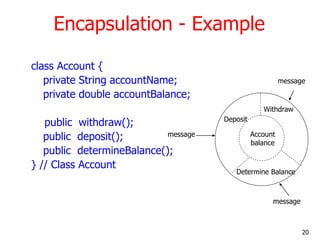
Encapsulation - Example
class Account {
private String accountName;
private double accountBalance;
public withdraw();
public deposit();
public determineBalance();
} // Class Account
Deposit
Withdraw
Determine Balance
Account
balance
message
message
message
20
Data Abstraction
 The technique of creating new data types
that are well suited to an application.
 It allows the creation of user defined data
types, having the properties of built in
data types and more.
21
Abstraction - Example
class Account {
private String accountName;
private double
accountBalance;
public withdraw();
public deposit();
public determineBalance();
} // Class Account
Creates a data
type Account
Account acctX;
22
Inheritance
 New data types (classes) can be defined
as extensions to previously defined types.
 Parent Class (Super Class) – Child Class
(Sub Class)
 Subclass inherits
properties from the
parent class.
Parent
Child
Inherited
capability
23
Inheritance - Example
 Example
 Define Person to be a class
 A Person has attributes, such as age, height, gender
 Assign values to attributes when describing object
 Define student to be a subclass of Person
 A student has all attributes of Person, plus attributes of
his/her own ( student no, course_enrolled)
 A student has all attributes of Person, plus attributes of
his/her own (student no, course_enrolled)
 A student inherits all attributes of Person
 Define lecturer to be a subclass of Person
 Lecturer has all attributes of Person, plus attributes of
his/her own ( staff_id, subjectID1, subjectID2)
24
Inheritance - Example
 Circle Class can be a subclass (inherited
from ) of a parent class - Shape
Shape
Circle Rectangle
25
Inheritance - Example
 Inheritance can also have multiple levels.
Shape
Circle Rectangle
GraphicCircle
26
Uses of Inheritance - Reuse
 If multiple classes have common
attributes/methods, these methods can be
moved to a common class - parent class.
 This allows reuse since the implementation is
not repeated.
Example : Rectangle and Circle method have a
common method move(), which requires changing
the centre coordinate.
27
Uses of Inheritance - Reuse
move(newCentre){
centre = newCentre;
}
Circle
centre
radius
area()
circumference()
move(newCentre)
Rectangle
centre
height
width
area()
circumference()
move(newCentre)
move(newCentre){
centre = newCentre;
}
28
Uses of Inheritance - Reuse
Shape
centre
area()
circumference()
move(newCentre)
Rectangle
height
width
area()
circumference()
Circle
radius
area()
circumference()
move(newCentre){
centre = newCentre
}
29
Uses of Inheritance - Specialization
 Specialized behavior can be added to the
child class.
 In this case the behaviour will be
implemented in the child class.
 E.g. The implementation of area() method in
the Circle class is different from the
Rectangle class.
 area() method in the child classes
override the method in parent classes().
30
Uses of Inheritance - Specialization
area(){
return height*width;
}
Circle
centre
radius
area()
circumference()
move(newCentre)
Rectangle
centre
height
width
area()
circumference()
move(newCentre)
area(){
return pi*r^2;
}
31
Uses of Inheritance - Specialization
Shape
centre
area()
circumference()
move(newCentre)
Rectangle
height
width
area()
circumference()
Circle
radius
area()
circumference()
area(); - Not implemented
And left for the child classes
To implement
area(){
return pi*r^2;
}
area(){
return height*width;
}
32
Uses of Inheritance – Common Interface
 All the operations that are supported for
Rectangle and Circle are the same.
 Some methods have common implementation
and others don‘t.
 move() operation is common to classes and can be
implemented in parent.
 circumference(), area() operations are significantly
different and have to be implemented in the
respective classes.
 The Shape class provides a common interface
where all 3 operations move(), circumference()
and area().
33
Uses of Inheritance - Extension
 Extend functionality of a class.
 Child class adds new operations to the
parent class but does not change the
inherited behavior.
 E.g. Rectangle class might have a special
operation that may not be meaningful to the
Circle class - rotate90degrees()
34
Uses of Inheritance - Extension
Shape
centre
area()
circumference()
move(newCentre)
Rectangle
height
width
area()
circumference()
rotate90degrees()
Circle
radius
area()
circumference()
35
Uses of Inheritance – Multiple Inheritance
 Inherit properties from more than one
class.
 This is called Multiple Inheritance.
Shape
Circle
Graphics
36
Uses of Multiple Inheritance
 This is required when a class has to
inherit behavior from multiple classes.
 In the example Circle class can inherit
move() operation from the Shape class
and the paint() operation from the
Graphics class.
 Multiple inheritance is not supported in
JAVA but is supported in C++.
37
Uses of Inheritance – Multiple Inheritance
Shape
centre
area()
circumference()
move(newCentre)
Circle
radius
area()
circumference()
GraphicCircle
color
paint()
38
Polymorphism
 Polymorphic which means ―many forms‖ has
Greek roots.
 Poly – many
 Morphos - forms.
 In OO paradigm polymorphism has many
forms.
 Allow a single object, method, operator
associated with different meaning depending
on the type of data passed to it.
39
Polymorphism
 An object of type Circle or Rectangle can be
assigned to a Shape object. The behavior of the
object will depend on the object passed.
circleA = new Circle(); Create a new circle object
Shape shape = circleA;
shape.area(); area() method for circle class will be executed
rectangleA = new Rectangle(); Create a new rectangle object
shape= rectangle;
shape.area() area() method for rectangle will be executed.
40
Polymorphism – Method Overloading
 Multiple methods can be defined with the
same name, different input arguments.
Method 1 - initialize(int a)
Method 2 - initialize(int a, int b)
 Appropriate method will be called based
on the input arguments.
initialize(2) Method 1 will be called.
initialize(2,4) Method 2 will be called.
41
Polymorphism – Operator Overloading
 Allows regular operators such as +, -, *, /
to have different meanings based on the
type.
 E.g. + operator for Circle can re-defined
Circle c = c + 2;
 Not supported in JAVA. C++ supports it.
42
Persistence
 The phenomenon where the object
outlives the program execution.
 Databases support this feature.
 In Java, this can be supported if users
explicitly build object persistency using
IO streams.
43
Why OOP?
 Greater Reliability
 Break complex software projects into
small, self-contained, and modular objects
 Maintainability
 Modular objects make locating bugs
easier, with less impact on the overall
project
 Greater Productivity through Reuse!
 Faster Design and Modelling
44
Benefits of OOP..
 Inheritance: Elimination of Redundant
Code and extend the use of existing
classes.
 Build programs from existing working
modules, rather than having to start from
scratch.  save development time and
get higher productivity.
 Encapsulation: Helps in building secure
programs.
45
Benefits of OOP..
 Multiple objects to coexist without any
interference.
 Easy to map objects in problem
domain to those objects in the
program.
 It is easy to partition the work in a
project based on objects.
 The Data-Centered Design enables us
in capturing more details of model in
an implementable form.
46
Benefits of OOP..
 Object Oriented Systems can be easily
upgraded from small to large systems.
 Message-Passing technique for
communication between objects make
the interface descriptions with external
systems much simpler.
 Software complexity can be easily
managed.
47
Summary
 Object Oriented Design, Analysis, and Programming
is a Powerful paradigm
 Enables Easy Mapping of Real world Objects to
Objects in the Program
 This is enabled by OO features:
 Encapsulation
 Data Abstraction
 Inheritance
 Polymorphism
 Persistence
 Standard OO Design (UML) and Programming
Languages (C++/Java) are readily accessible.
48
Java and its Evolution
49
Contents
 Java Introduction
 Java Features
 How Java Differs from other OO
languages
 Java and the World Wide Web
 Java Environment
 Build your first Java Program
 Summary and Reference
50
Java - An Introduction
 Java - The new programming language
developed by Sun Microsystems in 1991.
 Originally called Oak by James Gosling,
one of the inventors of the Java
Language.
 Java -The name that survived a patent
search
 Java Authors: James , Arthur Van , and
others
 Java is really ―C++ -- ++ ―
51
Java Introduction
 Originally created for consumer
electronics (TV, VCR, Freeze, Washing
Machine, Mobile Phone).
 Java - CPU Independent language
 Internet and Web was just emerging,
so Sun turned it into a language of
Internet Programming.
 It allows you to publish a webpage
with Java code in it.
52
Java Milestones
Year Development
1990 Sun decided to developed special software that could be
used for electronic devices. A project called Green Project
created and head by James Gosling.
1991 Explored possibility of using C++, with some updates
announced a new language named ―Oak‖
1992 The team demonstrated the application of their new
language to control a list of home appliances using a
hand held device.
53
Java Milestones
Year Development
1994 The team developed a new Web browsed called ―Hot
Java‖ to locate and run Applets. HotJava gained instance
success.
1995 Oak was renamed to Java, as it did not survive ―legal‖
registration. Many companies such as Netscape and
Microsoft announced their support for Java
1996 Java established itself it self as both 1. ―the language for
Internet programming‖ 2. a general purpose OO
language.
54
Sun white paper defines Java as:
 Simple and Powerful
 Safe
 Object Oriented
 Robust
 Architecture Neutral and Portable
 Interpreted and High Performance
 Threaded
 Dynamic
55
Java Attributes
 Familiar, Simple, Small
 Compiled and Interpreted
 Platform-Independent and Portable
 Object-Oriented
 Robust and Secure
 Distributed
 Multithreaded and Interactive
 High Performance
 Dynamic and Extensible
56
Java is Compiled and Interpreted
Text Editor Compiler Interpreter
Programmer
Source Code
.java file
Byte
Code
.class
file
Hardware and
Operating System
Notepad,
emacs,vi
java
c
java
appletviewer
netscape
57
Compiled Languages
Text Editor Compiler linker
Programmer
Source Code
.c file
Object
Code
.o file
Notepad,
emacs,vi
gcc
Executabl
e Code
a.out
file
58
Total Platform Independence
JAVA COMPILER
(translator)
JAVA BYTE CODE
JAVA INTERPRETER
Windows 95 Macintosh Solaris Windows NT
(same for all platforms)
(one for each different system)
59
Architecture Neutral & Portable
 Java Compiler - Java source code (file
with extension .java) to bytecode (file
with extension .class)
 Bytecode - an intermediate form, closer
to machine representation
 A interpreter (virtual machine) on any
target platform interprets the bytecode.
60
Architecture Neutral & Portable
 Porting the java system to any new
platform involves writing an interpreter.
 The interpreter will figure out what the
equivalent machine dependent code to
run
61
Rich Class Environment
 Core Classes
language
Utilities
Input/Output
Low-Level Networking
Abstract Graphical User Interface
 Internet Classes
TCP/IP Networking
WWW and HTML
Distributed Programs
62
How Does Java Compares to
C++ and Other OO Languages
63
Overlap of C, C++, and Java
C
C++
Java
64
Java better than C++ ?
 No Typedefs, Defines, or Preprocessor
 No Global Variables
 No Goto statements
 No Pointers
 No Unsafe Structures
 No Multiple Inheritance
 No Operator Overloading
 No Automatic Coercions
 No Fragile Data Types
65
Object Oriented Languages -A Comparison
Feature C++ Objective
C
Ada Java
Encapsulation Yes Yes Yes Yes
Inheritance Yes Yes No Yes
Multiple Inherit. Yes Yes No No
Polymorphism Yes Yes Yes Yes
Binding (Early or Late) Both Both Early Late
Concurrency Poor Poor Difficult Yes
Garbage Collection No Yes No Yes
Genericity Yes No Yes Limited
Class Libraries Yes Yes Limited Yes
66
Java Integrates
Power of Compiled Languages
and
Flexibility of Interpreted
Languages
67
Java Applications
 We can develop two types of Java
programs:
 Stand-alone applications
 Web applications (applets)
68
Applications v/s Applets
 Different ways to run a Java
executable are:
Application- A stand-alone program that can
be invoked from command line . A program
that has a “main” method
Applet- A program embedded in a web page
, to be run when the page is browsed . A
program that contains no “main” method
69
Applets v/s Applications
 Different ways to run a Java executable
are
Application- A stand-alone program that can be
invoked from command line . A program that has a
“main” method
Applet- A program embedded in a web page , to be
run when the page is browsed . A program that
contains no “main” method
 Application –Executed by the Java
interpreter.
 Applet- Java enabled web browser.
70
Java and World Wide Web
Turning the Web into an
Interactive and Application
Delivery Platform
71
What is World Wide Web ?
 Web is an open-ended information
retrieval system designed to be used in
the Internet wide distributed system.
 It contains Web pages (created using
HTML) that provide both information and
controls.
 Unlike a menu driven system--where we
are guided through a particular direction
using a decision tree, the web system is
open ended and we can navigate to a new
document in any direction.
72
Web Structure of Information
Search/Navigation
73
Execution of Applets
Hello
Hello Java
<app=
“Hello”>
4
APPLET
Development
“hello.java”
AT
SUN.COM
The Internet
hello.class
AT SUN’S
WEB
SERVER
2 31 5
Create
Applet
tag in
HTML
document
Accessing
from
Unimelb.edu.au
The browser
creates
a new
window and
a new thread
and
then runs the
code
74
Significance of downloading Applets
 Interactive WWW
 Flashy animation instead of static web pages
 Applets react to users input and dynamically
change
 Display of dynamic data
 WWW with Java - more than a document
publishing medium
 http://www.javasoft.com/applets/alpha/applets/St
ockDemo/standalone.html
75
Power of Java and the Web
 Deliver applications, not just
information
 Eliminate porting
 Eliminate end-user installation
 Slash software distribution costs
 Reach millions of customers - instantly
76
Java Development Kit
 javac - The Java Compiler
 java - The Java Interpreter
 jdb- The Java Debugger
 appletviewer -Tool to run the applets
 javap - to print the Java bytecodes
 javaprof - Java profiler
 javadoc - documentation generator
 javah - creates C header files
77
Java Environment
78
Java Development Kit
 javac - The Java Compiler
 java - The Java Interpreter
 jdb- The Java Debugger
 appletviewer -Tool to run the applets
 javap - to print the Java bytecodes
 javaprof - Java profiler
 javadoc - documentation generator
 javah - creates C header files
79
Process of Building and Running Java
Programs
Text Editor
Java Source
Code
javac
Java Class File
java
Outout
javadoc
javah
jdb
HTML Files
Header Files
80
Let us Try Out
Building your first Java Program
81
Hello Internet
// hello.java: Hello Internet program
class HelloInternet
{
public static void main(String args[])
{
System.out.println(―Hello Internet‖);
}
}
82
Program Processing
 Compilation
# javac hello.java
results in HelloInternet.class
 Execution
# java HelloInternet
Hello Internet
#
83
Simple Java Applet
//HelloWorld.java
import java.applet.Applet;
import java.awt.*;
public class HelloWorld extends Applet {
public void paint(Graphics g) {
g.drawString (“Hello World !”,25, 25);
}
}
84
Calling an Applet
<HTML>
<TITLE>HELLO WORLD APPLET</TITLE>
<HEAD>THE HELLO WORLD APPLET</HEAD>
<APPLET CODE=―HelloWorld.class‖ width=500
height=500>
</APPLET>
</HTML>
85
Applet Execution
Using AppletViewer
Using Browser
86
Summary
 Java has emerged as a general
purpose OO language.
 It supports both stand alone and
Internet Applications.
 Makes the Web Interactive and
medium for application delivery.
 Provides an excellent set of Tools for
Application Development.
 Java is ubiquitous!
87
Classes and Objects in Java
Basics of Classes in Java
88
Contents
 Introduce to classes and objects in Java.
 Understand how some of the OO
concepts learnt so far are supported in
Java.
 Understand important features in Java
classes.
89
Introduction
 Java is a true OO language and therefore the
underlying structure of all Java programs is classes.
 Anything we wish to represent in Java must be
encapsulated in a class that defines the ―state‖ and
―behaviour‖ of the basic program components known
as objects.
 Classes create objects and objects use methods to
communicate between them. They provide a
convenient method for packaging a group of logically
related data items and functions that work on them.
 A class essentially serves as a template for an object
and behaves like a basic data type ―int‖. It is therefore
important to understand how the fields and methods
are defined in a class and how they are used to build a
Java program that incorporates the basic OO concepts
such as encapsulation, inheritance, and polymorphism.90
Classes
 A class is a collection of fields (data) and
methods (procedure or function) that
operate on that data.
Circle
centre
radius
circumference()
area()
91
Classes
 A class is a collection of fields (data) and methods
(procedure or function) that operate on that data.
 The basic syntax for a class definition:
 Bare bone class – no fields, no methods
public class Circle {
// my circle class
}
class ClassName [extends
SuperClassName]
{
[fields declaration]
[methods declaration]
}
92
Adding Fields: Class Circle with fields
 Add fields
 The fields (data) are also called the
instance varaibles.
public class Circle {
public double x, y; // centre coordinate
public double r; // radius of the circle
}
93
Adding Methods
 A class with only data fields has no life.
Objects created by such a class cannot
respond to any messages.
 Methods are declared inside the body of
the class but immediately after the
declaration of data fields.
 The general form of a method declaration
is:
type MethodName (parameter-list)
{
Method-body;
}
94
Adding Methods to Class Circle
public class Circle {
public double x, y; // centre of the circle
public double r; // radius of circle
//Methods to return circumference and area
public double circumference() {
return 2*3.14*r;
}
public double area() {
return 3.14 * r * r;
}
}
Method Body
95
Data Abstraction
 Declare the Circle class, have created a
new data type – Data Abstraction
 Can define variables (objects) of that
type:
Circle aCircle;
Circle bCircle;
96
Class of Circle cont.
 aCircle, bCircle simply refers to a Circle
object, not an object itself.
aCircle
Points to nothing (Null Reference)
bCircle
Points to nothing (Null Reference)
null null
97
Creating objects of a class
 Objects are created dynamically using the
new keyword.
 aCircle and bCircle refer to Circle objects
bCircle = new Circle() ;aCircle = new Circle() ;
98
Creating objects of a class
aCircle = new Circle();
bCircle = new Circle() ;
bCircle = aCircle;
99
Creating objects of a class
aCircle = new Circle();
bCircle = new Circle() ;
bCircle = aCircle;
P
aCircle
Q
bCircle
Before Assignment
P
aCircle
Q
bCircle
Before Assignment
100