Year 3-4 Coding Lessons 
By Joanne 
Villis 
http://www.youtube.com/watch?v=nKIu9yen5nc
Australian Curriculum 
• Digital Technologies 
Define simple problems, and describe 
and follow a sequence of steps and 
decisions (algorithms) needed to solve 
them (ACTDIP010) 
Implement simple digital solutions as 
visual programs with algorithms 
involving branching (decisions) and 
user input (ACTDIP011)
Glossary 
Algorithm : A description of the steps and 
decisions required to solve a problem 
Branching: Occurs when an algorithm makes 
a choice to do one of two or more actions 
depending on sets of conditions and the data 
provided 
Digital solution: The result (or output) of 
transforming data into information using 
digital systems, skills, techniques and 
processes to meet a need or opportunity
Lesson 1 
An Algorithm is a set of steps and decisions required to 
solve a problem. Computers read and store data 
(information) in order to solve problems when people 
click the mouse or touch the screen. The individual sets 
of steps are called codes. Computers use code which 
consists of 0 and 1. However, we are going to have a 
look at codes which consist of black and white squares, 
arranged in a particular order to represent a letter of the 
alphabet. 
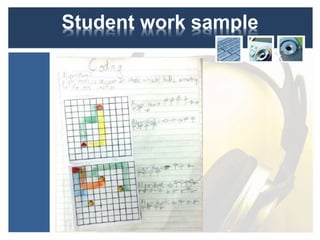
To begin the lesson use grid paper with an object on the 
page. I used an Angry Bird and on the second grid a 
Bee Bot. Ask students to draw a path and then 
represent the path movements using arrows.
Student work sample
Lesson 2 - 4 
For the following activities I divided the 
class into groups and rotated groups 
through the activities. This enabled me 
to work using limited resources. 
Explain each activity to the class at the 
start of the lesson and provide task 
cards at each of the activities. This 
helps clarification of tasks for students.
Lesson 2 - 4 
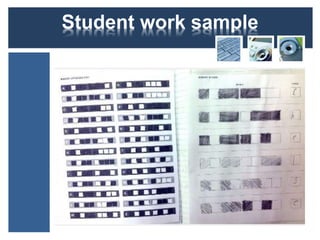
Task 1: Binary Coder 
Download this document created by 
code.og (I can’t find the original link) and 
print of pages 7-9 for students. Page 
10 can be used as an extension. Invite 
students to colour the codes (sequence 
of squares) in order to represent a letter 
of the alphabet. Can students colour 
the codes to represent their name? 
Students find this task rather easy.
Student work sample
Lesson 2 - 4 
Task 2: Graph Paper Coding 
Download this document 
(http://learn.code.org/s/1/level/23 ) and watch the 
video introduction: 
https://www.youtube.com/watch?v=4e3fi_ls8CA . 
In this activity, students use the grid paper and 
arrows to show the sequence of coding (steps) 
required in order to draw the images. I modified 
this lesson. I asked students to draw their own 
path on a blank grid, record the code and then 
have a go at recording the code for the paths 
provided on the worksheet.
Student work sample
Lesson 2 - 4 
Task 3: Kodable 
This task requires access to iPads ad the 
free app Kodable. Students open the 
app, draw the Kodable path in their book 
and record the algorithm (code) for the 
Kodable to get to the end destination. 
Once students have recorded their path 
and code invite them to test their 
prediction on the iPad.
Student work sample
Lesson 2-4 
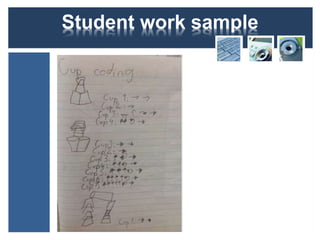
Task 4: Stacking cups 
For this activity you will need to watch the 
video 
(https://www.youtube.com/watch?v=xaW3PAz 
HxCU) and have a supply of plastic cups. 
I asked students to create sculpture using 6 
to 8 cups. I then asked them put an additional 
stack of cups to the left, pick up one cup and 
move it in the correct place to replicate the 
sculpture. Then record the moves.
Student work sample
Lesson 2-4 
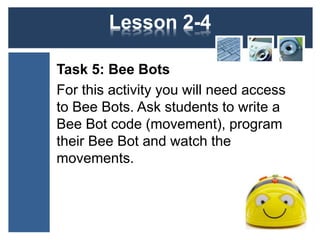
Task 5: Bee Bots 
For this activity you will need access 
to Bee Bots. Ask students to write a 
Bee Bot code (movement), program 
their Bee Bot and watch the 
movements.
Lesson 5 & 6 
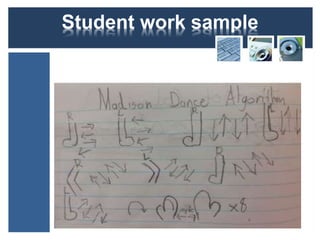
Part 1: Nutbush City Limits 
At the start of the lesson I showed 
students a video of the Nutbush City 
Limits Madison dance 
(https://www.youtube.com/watch?v=hoP9 
qrAYZsk ). We learnt the dance as a 
class. Then I invited students to think 
how might they write a code for the 
dance using symbols. How might they 
show repetition of a set of instructions?
Student work sample
Lesson 5 & 6 
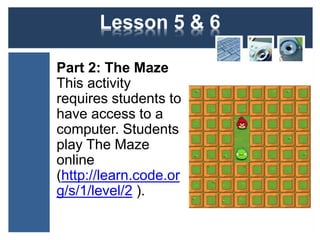
Part 2: The Maze 
This activity 
requires students to 
have access to a 
computer. Students 
play The Maze 
online 
(http://learn.code.or 
g/s/1/level/2 ).
Lesson 7-11 
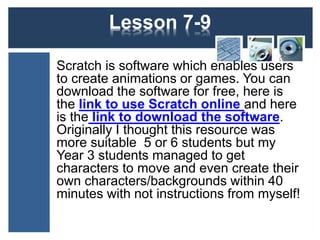
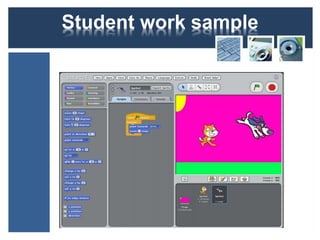
Scratch is software which enables users 
to create animations or games. You can 
download the software for free, here is 
the link to use Scratch online and here 
is the link to download the software. 
Alternatively, Scratch Junior may be 
more suitable for your class. You can 
download the software for free, here is 
the link and here is a link to free 
teaching ideas.
Student work sample
Lesson 12-15 
For these lessons you will need access 
to Bee Bots. Bee Bots are simple robots. 
You can program them to move forwards, 
backwards, right or left. These are basic 
algorithms. Students put the data in 
(input) and the Bee Bot provides the out 
put (series of programmed moves). They 
can be programmed to perform up to 40 
moves and the angle they turn is 90 
degrees.
Lesson 12-15 
Give groups of students the following 
design brief: 
Design a maze for a Bee Bot. Your 
Bee Bot must stay within the path and 
you need to program it to get from the 
start of the maze to the end of the 
maze. 
This design process took my Year 3 
students 2 lessons to complete.
Student work samples
Lesson 12-15 
Then I asked each group to record the 
algorithm (series of moves) for their 
Bee Bot to move from the start to the 
finish. Students then turned their 
algorithm over so that other groups 
couldn’t see. I then rotated groups so 
that they could predict the Bee Bot 
movements of other groups’ mazes, 
record, test and check their codes.
Student work sample
Assessment 
Throughout the unit I made observational 
assessments. At the end of the unit I asked 
students to play The Maze again and I gave them 
a 20 minute time limit. At the end of the 20 
minutes I recoded the level of which they were up 
to. I gave level 16-20 a high, level 9-16 a medium 
and below level 9 a developing. In terms of A-E 
grading, our school uses high, medium and 
developing for each reportable outcome and then 
the A-E grade for each subject is determined by 
how many high, mediums or lows a student 
receives for each curriculum area.
Additional Ideas 
Hopscotch for iPad 
This lesson was designed By iPad4Schools (Posted in 
Coding, How To, iPad, Specific Apps). You will need to 
download Hopscotch which is a free iPad app and view 
the instructional video before teaching the lesson. 
http://www.youtube.com/watch?v=4x5BtHlEAlQ
Additional Ideas 
Ideas by Michael Karlin: 
Michael has designed a range of lesson ideas 
using Cargo-bot, Daisy the Dinosaur and Move the 
Turtle. Here is the link for the PDF download.
Additional Ideas 
More apps: 
Light-bot is available for iPad and 
Android. Robozzle is free for iPad and 
Android.
Additional Ideas 
Bee Bot Dancing: 
Students create their own Bee Bot dance or they 
complete this task in pairs. I recommend that 
students choose one sound track and dances are 
limited to 30 seconds. 
http://www.youtube.com/watch?v=WmlokmEtpMg 
Something to aspire to: A collaborative dance Bee 
Bot algorithm. 
http://www.youtube.com/watch?v=YJ75y48UU8E
Additional Ideas 
Yana and Bo 
Yana costs $59 (AUS) and Bo costs $169 (AUS). I 
like the fact that they are both programmable with 
SCRATCH and Blockly. 
Web Link: Bo and Yana 
http://www.youtube.com/watch?v=nSRekzTPVE0
More resources and copyright 
RESOURCES: 
You can find additional resources on a website that I am working on 
called http://technologiesjvillis.weebly.com/ . You can also follow me 
on Pinterest http://www.pinterest.com/joannevillis/ 
COPYRIGHT: 
I give permission for the following: 
Adaptations and sharing of this resources for educational purpose 
only. I do not give permission for commercial use of this work. When 
sharing or adapting this work I ask that you give credit to the original 
creator, Joanne Villis at http://intertecheducation.edublogs.org/ . 
Some of the resources were noted and created by http://code.org/ 
and they expect the same (share, adapt, acknowledge for non 
commercial purposes). 
ENJOY! 
.