This document provides an overview of Chronon, a commercial Eclipse plugin that allows debugging of Java programs by creating recordings of program executions. It can record variables, method calls, exceptions, console output, and threads during a program run. The recording is stored efficiently on disk. Chronon then allows debugging the recording by stepping through time or viewing variable histories. It is compared to an academic back-in-time debugger that modifies the VM. Performance tests on open source projects show overhead of around 2-3x for recording. Limitations include inability to inspect external libraries and lack of automated slicing. Advantages include helping narrow down defects by searching through space and time of a recording.


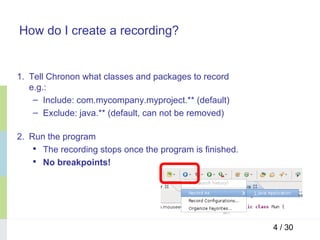
![How does the recording work? (1/4)
• What is recorded?
“every single line of code” [1] of the included packages/classes
– Variables history
– Method calls (arguments, return value)
– Exceptions
– Console output
– Threads
5 / 30](https://image.slidesharecdn.com/chronon-demo-110510125407-phpapp02/85/Chronon-A-Back-In-Time-Debugger-for-Java-5-320.jpg)
![How does the recording work? (3/4)
• How does Chronon try not to be slow? [2]
– Idea: Taking advantage of the hardware
• MultiCore (increasing number of cores)
• Memory is cheap
• Disks are getting faster (Solid State Drives – SDD)
– Only collect minimal amount of data needed during recording
– Minimal work inside application threads
– Recorded data is stored in a buffer in memory
– Flusher threads write buffer to disk in highly compressed file
(gets unpacked for debugging)
7 / 30](https://image.slidesharecdn.com/chronon-demo-110510125407-phpapp02/85/Chronon-A-Back-In-Time-Debugger-for-Java-7-320.jpg)
![How does the recording work? (4/4)
Image Source: [2]
8 / 30](https://image.slidesharecdn.com/chronon-demo-110510125407-phpapp02/85/Chronon-A-Back-In-Time-Debugger-for-Java-8-320.jpg)
![Comparison: "Practical Object-Oriented Back-In-Time
Debugging”, Lienhard et al. (ObjectFlow Debugger) [3]
• Short recap: What approach did the paper take?
– Extends the VM: object references are represented as real
objects (alias objects) on the heap
– Alias objects keep track of the object flow and field history
– Only keeps the history of those objects that are referenced in the
current program state (using standard VM garbage collection)
9 / 30](https://image.slidesharecdn.com/chronon-demo-110510125407-phpapp02/85/Chronon-A-Back-In-Time-Debugger-for-Java-9-320.jpg)


![Performance-Evaluation
• Two tests with open-source Java projects
– Java SE application: Object database db4o [4] (database file
on disk)
– Java EE application: Google Refine [5] (“a tool for working with
messy data”, ETL: Extract-Transform-Load), runs on Jetty
application server
• Micro-Benchmark
14 / 30](https://image.slidesharecdn.com/chronon-demo-110510125407-phpapp02/85/Chronon-A-Back-In-Time-Debugger-for-Java-14-320.jpg)


![Performance: Micro-Benchmark (1/2)
package chronontests.micro; public static class A {
private int a, b;
public class Test {
private static int COUNT = 1000000; public A(int a, int b) {
this.a = a;
public static void main(String[] this.b = b;
args) {
}
System.out.println("Start");
for (int i = 0; i < COUNT; i++) { public int test() {
A obj = new A(i, i + 1); return a + b;
//obj.test(); }
System.out.println(obj.test()); }
} }
System.out.println("End");
}
17 / 30](https://image.slidesharecdn.com/chronon-demo-110510125407-phpapp02/85/Chronon-A-Back-In-Time-Debugger-for-Java-17-320.jpg)


![How does the recording work? (1/4)
• What is recorded?
“every single line of code” [1] of the included packages/classes
– Variables history
– Method calls (arguments, return value)
– Exceptions
– Console output
– Threads
5 / 30](/p?url=https%3A%2F%2Fimage.slidesharecdn.com%2Fchronon-demo-110510125407-phpapp02%2F85%2FChronon-A-Back-In-Time-Debugger-for-Java-5-320.jpg&__src=https%3A%2F%2Fwww.slideshare.net%2Fslideshow%2Fchronon-a-backintimedebugger-for-java%2F7912992&__type=image)

![How does the recording work? (3/4)
• How does Chronon try not to be slow? [2]
– Idea: Taking advantage of the hardware
• MultiCore (increasing number of cores)
• Memory is cheap
• Disks are getting faster (Solid State Drives – SDD)
– Only collect minimal amount of data needed during recording
– Minimal work inside application threads
– Recorded data is stored in a buffer in memory
– Flusher threads write buffer to disk in highly compressed file
(gets unpacked for debugging)
7 / 30](/p?url=https%3A%2F%2Fimage.slidesharecdn.com%2Fchronon-demo-110510125407-phpapp02%2F85%2FChronon-A-Back-In-Time-Debugger-for-Java-7-320.jpg&__src=https%3A%2F%2Fwww.slideshare.net%2Fslideshow%2Fchronon-a-backintimedebugger-for-java%2F7912992&__type=image)
![How does the recording work? (4/4)
Image Source: [2]
8 / 30](/p?url=https%3A%2F%2Fimage.slidesharecdn.com%2Fchronon-demo-110510125407-phpapp02%2F85%2FChronon-A-Back-In-Time-Debugger-for-Java-8-320.jpg&__src=https%3A%2F%2Fwww.slideshare.net%2Fslideshow%2Fchronon-a-backintimedebugger-for-java%2F7912992&__type=image)
![Comparison: "Practical Object-Oriented Back-In-Time
Debugging”, Lienhard et al. (ObjectFlow Debugger) [3]
• Short recap: What approach did the paper take?
– Extends the VM: object references are represented as real
objects (alias objects) on the heap
– Alias objects keep track of the object flow and field history
– Only keeps the history of those objects that are referenced in the
current program state (using standard VM garbage collection)
9 / 30](/p?url=https%3A%2F%2Fimage.slidesharecdn.com%2Fchronon-demo-110510125407-phpapp02%2F85%2FChronon-A-Back-In-Time-Debugger-for-Java-9-320.jpg&__src=https%3A%2F%2Fwww.slideshare.net%2Fslideshow%2Fchronon-a-backintimedebugger-for-java%2F7912992&__type=image)


![Performance-Evaluation
• Two tests with open-source Java projects
– Java SE application: Object database db4o [4] (database file
on disk)
– Java EE application: Google Refine [5] (“a tool for working with
messy data”, ETL: Extract-Transform-Load), runs on Jetty
application server
• Micro-Benchmark
14 / 30](/p?url=https%3A%2F%2Fimage.slidesharecdn.com%2Fchronon-demo-110510125407-phpapp02%2F85%2FChronon-A-Back-In-Time-Debugger-for-Java-14-320.jpg&__src=https%3A%2F%2Fwww.slideshare.net%2Fslideshow%2Fchronon-a-backintimedebugger-for-java%2F7912992&__type=image)


![Performance: Micro-Benchmark (1/2)
package chronontests.micro; public static class A {
private int a, b;
public class Test {
private static int COUNT = 1000000; public A(int a, int b) {
this.a = a;
public static void main(String[] this.b = b;
args) {
}
System.out.println("Start");
for (int i = 0; i < COUNT; i++) { public int test() {
A obj = new A(i, i + 1); return a + b;
//obj.test(); }
System.out.println(obj.test()); }
} }
System.out.println("End");
}
17 / 30](/p?url=https%3A%2F%2Fimage.slidesharecdn.com%2Fchronon-demo-110510125407-phpapp02%2F85%2FChronon-A-Back-In-Time-Debugger-for-Java-17-320.jpg&__src=https%3A%2F%2Fwww.slideshare.net%2Fslideshow%2Fchronon-a-backintimedebugger-for-java%2F7912992&__type=image)


![Limitations (2/2)
• No automated dynamic slicing [6]
– Slice: a subset of a program relevant for a given statement S
• Forward slices: all statements influenced by S
• Backward slices: all statements that influence S
– Data/Control dependencies int main() {
int a, b, sum, mul;
• Where does this value go to? sum = 0;
mul = 1;
• Where does this value come from? a = read();
b = read();
• Why is this line of code executed? while (a <= b) {
• Why was this line of code not sum = sum + a;
mul = mul * a;
executed? a = a + 1;
}
write(sum);
write(mul);
Backward slice for write(mul) }
21 / 30](/p?url=https%3A%2F%2Fimage.slidesharecdn.com%2Fchronon-demo-110510125407-phpapp02%2F85%2FChronon-A-Back-In-Time-Debugger-for-Java-21-320.jpg&__src=https%3A%2F%2Fwww.slideshare.net%2Fslideshow%2Fchronon-a-backintimedebugger-for-java%2F7912992&__type=image)
![Advantages (1/4)
• Helps narrowing down the defect which caused a failure
– “Debugging is a search in space and time” [6]
→ Going backwards in time is extremely useful
– Eliminates problems of breakpoint debuggers [7]
• No “guessing” where to put the breakpoint
• No “Whoops, I went too far.”
Image Source: [6]
22 / 30](/p?url=https%3A%2F%2Fimage.slidesharecdn.com%2Fchronon-demo-110510125407-phpapp02%2F85%2FChronon-A-Back-In-Time-Debugger-for-Java-22-320.jpg&__src=https%3A%2F%2Fwww.slideshare.net%2Fslideshow%2Fchronon-a-backintimedebugger-for-java%2F7912992&__type=image)

![Advantages (3/4)
• Makes reproducing problems easier
– Record the program in an environment where the problem
occurs
– Analyze the recording on a development system
• Reproducing data / user interaction / communication / operating
environments / schedules
Replay
Image Source: [6]
24 / 30](/p?url=https%3A%2F%2Fimage.slidesharecdn.com%2Fchronon-demo-110510125407-phpapp02%2F85%2FChronon-A-Back-In-Time-Debugger-for-Java-24-320.jpg&__src=https%3A%2F%2Fwww.slideshare.net%2Fslideshow%2Fchronon-a-backintimedebugger-for-java%2F7912992&__type=image)


![References / Links
[1] Chronon:
http://www.chrononsystems.com/
[2] Design and Architecture of the Chronon Recorder, Chronon
Systems, 2010: http://eblog.chrononsystems.com/design-and-architecture-of-the-chronon-record-0#!/
[3] Practical Object-Oriented Back-in-Time Debugging, Adrian
Lienhard, Tudor Gîrba and Oscar Nierstrasz, 2008
[4] Object database db4o: http://www.db4o.com/
[5] Google Refine: http://code.google.com/p/google-refine/
[6] Why programs fail – A guide to systematic debugging, Andreas
Zeller, Second Edition, 2009
[7] Debugging Backwards in Time, Bill Lewis, 2003
29 / 30](/p?url=https%3A%2F%2Fimage.slidesharecdn.com%2Fchronon-demo-110510125407-phpapp02%2F85%2FChronon-A-Back-In-Time-Debugger-for-Java-29-320.jpg&__src=https%3A%2F%2Fwww.slideshare.net%2Fslideshow%2Fchronon-a-backintimedebugger-for-java%2F7912992&__type=image)


![[BGOUG] Memory analyzer](https://cdn.slidesharecdn.com/ss_thumbnails/memoryanalyzer-110515042302-phpapp02-thumbnail.jpg?width=640&height=640&fit=bounds)


