Specific Objectives
• Tocreate database driven business applications.
12/29/25
Mr.
Nilesh
Patil
2
3.
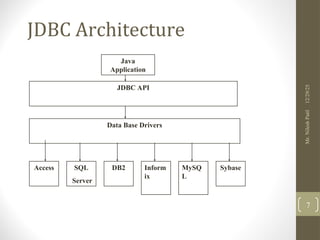
Database Drivers
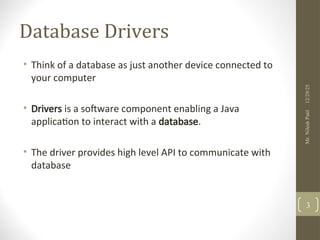
• Thinkof a database as just another device connected to
your computer
• Drivers is a software component enabling a Java
application to interact with a database.
• The driver provides high level API to communicate with
database
12/29/25
Mr.
Nilesh
Patil
3
4.
ODBC
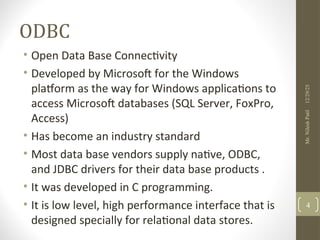
• Open DataBase Connectivity
• Developed by Microsoft for the Windows
platform as the way for Windows applications to
access Microsoft databases (SQL Server, FoxPro,
Access)
• Has become an industry standard
• Most data base vendors supply native, ODBC,
and JDBC drivers for their data base products .
• It was developed in C programming.
• It is low level, high performance interface that is
designed specially for relational data stores.
12/29/25
Mr.
Nilesh
Patil
4
5.
JDBC
• JDBC driversprovides the JDBC API for interacting
with your database.
• Package: java.sql
• JDBC drivers enable you to open database
connections and to interact with it by sending SQL
or database commands then receiving results with
Java.
12/29/25
Mr.
Nilesh
Patil
5
6.
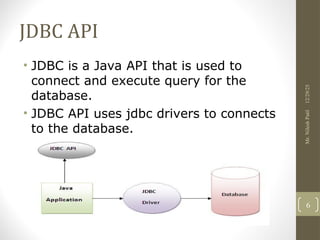
JDBC API
• JDBCis a Java API that is used to
connect and execute query for the
database.
• JDBC API uses jdbc drivers to connects
to the database.
12/29/25
Mr.
Nilesh
Patil
6
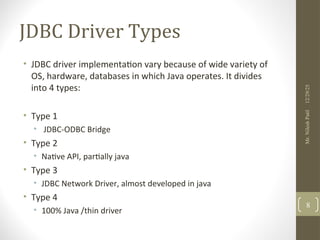
JDBC Driver Types
•JDBC driver implementation vary because of wide variety of
OS, hardware, databases in which Java operates. It divides
into 4 types:
• Type 1
• JDBC-ODBC Bridge
• Type 2
• Native API, partially java
• Type 3
• JDBC Network Driver, almost developed in java
• Type 4
• 100% Java /thin driver
12/29/25
Mr.
Nilesh
Patil
8
9.
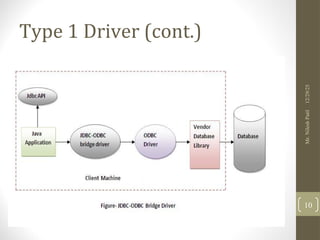
Type 1 Drivers
•The JDBC-ODBC bridge driver uses ODBC driver
to connect to the database.
• The JDBC-ODBC bridge driver converts JDBC
method calls into the ODBC function calls.
12/29/25
Mr.
Nilesh
Patil
9
Type 1 Drivers
•Advantages:
• easy to use.
• can be easily connected to any database.
• Disadvantages:
• Performance degraded because JDBC method call
is converted into the ODBC function calls.
• The ODBC driver needs to be installed on the
client machine.
12/29/25
Mr.
Nilesh
Patil
11
12.
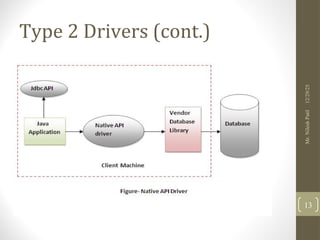
Type 2 Drivers
•The Native API driver uses the client-side libraries
of the database.
• The driver converts JDBC method calls into native
(c/c++ API) calls of the database API.
• If we change database, we have to change native
API.
• It is not written entirely in java.
12/29/25
Mr.
Nilesh
Patil
12
Type 2 Drivers
•Advantage:
• performance upgraded than JDBC-ODBC bridge driver.
• Disadvantage:
• The Native driver needs to be installed on the
each client machine.
• The Vendor client library needs to be installed on
client machine.
12/29/25
Mr.
Nilesh
Patil
14
15.
Type 3 Drivers
•The Network Protocol driver uses middleware
(application server) that converts JDBC calls
directly or indirectly into the vendor-specific
database protocol.
• It is almost written in java.
12/29/25
Mr.
Nilesh
Patil
15
Type 3 Drivers
•Advantage:
• No client side library is required because of
application server that can perform many tasks.
• Disadvantages:
• Network support is required on client machine.
• Requires database-specific coding to be done in
the middle tier.
• Maintenance of Network Protocol driver becomes
costly because it requires database-specific coding
to be done in the middle tier.
12/29/25
Mr.
Nilesh
Patil
17
18.
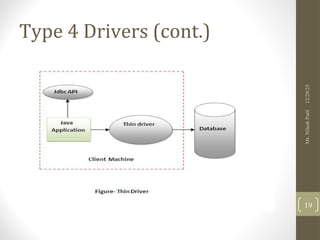
Type 4 Drivers
•The thin driver converts JDBC calls directly into
the vendor-specific database protocol. That is
why it is known as thin driver.
• It is fully written in Java language.
12/29/25
Mr.
Nilesh
Patil
18
Driver 4 Type
•Advantage:
• Better performance than all other drivers.
• No software is required at client side or server
side.
• Disadvantage:
• Drivers depends on the Database.
12/29/25
Mr.
Nilesh
Patil
20
21.
Which Driver shouldI used?
• If you are accessing one type of database, such as Oracle,
Sybase, or IBM, the preferred driver type is 4.
• If your Java application is accessing multiple types of
databases at the same time, type 3 is the preferred
driver.
• Type 2 drivers are useful in situations, where a type 3 or
type 4 driver is not available yet for your database.
• The type 1 driver is not considered a deployment-level
driver, and is typically used for development and testing
prposes only.
12/29/25
Mr.
Nilesh
Patil
21
22.
Steps to connectDatabase
• Register the driver class
• Creating connection
• Creating statement
• Executing queries
• Closing connection
12/29/25
Mr.
Nilesh
Patil
22
23.
Step 1
• TheforName() method of Class class is
used to register the driver class.
• This method is used to dynamically load
the driver class.
• public static void forName(String className)throws
ClassNotFoundException
• Example
• Class.forName("oracle.jdbc.driver.OracleDriver");
12/29/25
Mr.
Nilesh
Patil
23
24.
Step 2
• ThegetConnection() method of DriverManager class
is used to establish connection with the database.
• Syntax:
• 1) public static Connection getConnection(String url)thr
ows SQLException
• 2) public static Connection getConnection(String url,Stri
ng name,String password) throws SQLException
• Example
• Connection con=DriverManager.getConnection("jdbc:o
racle:thin:@localhost:1521:xe","system","password");
12/29/25
Mr.
Nilesh
Patil
24
25.
Step 3
• ThecreateStatement() method of Connection
interface is used to create statement.
• The object of statement is responsible to execute
queries with the database.
• Syntax:
• public Statement createStatement()throws SQLExc
eption
• Ex:
• Statement stmt=con.createStatement();
12/29/25
Mr.
Nilesh
Patil
25
26.
Step 4
• TheexecuteQuery() method of Statement interface is
used to execute queries to the database.
• This method returns the object of ResultSet that can be
used to get all the records of a table.
• Syntax:
• public ResultSet executeQuery(String sql)throws SQLEx
ception
• Ex:
ResultSet rs=stmt.executeQuery("select * from emp");
while(rs.next()){
System.out.println(rs.getInt(1)+" "+rs.getString(2));
}
12/29/25
Mr.
Nilesh
Patil
26
27.
Step 5
• Byclosing connection object statement and
ResultSet will be closed automatically.
• The close() method of Connection interface is used
to close the connection.
• public void close()throws SQLException
• Ex:
• con.close();
12/29/25
Mr.
Nilesh
Patil
27
28.
Types of Architecture
•Two tire architecture
• Three tire architecture
12/29/25
Mr.
Nilesh
Patil
28
29.
Statement Interface
• Itis mainly used to execute queries.
• Few methods of Statement interface:
• public ResultSet executeQuery(String sql)
• Used to execute select query.
• public int executeUpdate(String sql)
• Used to execute create, insert, update, delete or drop etc
• public boolean execute(String sql)
• Executes the given SQL statement, which may return multiple results.
• public int [] executeBatch()
• Submits a batch of commands to the database for execution and if all
commands execute successfully, returns an array of update counts.
12/29/25
Mr.
Nilesh
Patil
29
30.
Statement Interface
• InsertRecord:
• Statement st = con.createStatement();
• St.executeUpdate(“insert into dept values (‘comp’,0130,’GPAN’)”);
• Delete Record:
• Statement st = con.createStatement();
• St.executeUpdate(“delete from dept where deptno=0130”);
12/29/25
Mr.
Nilesh
Patil
30
31.
PreparedStatement and
CallableStatement Interface
•Precompiled sql statement object.
• It can read runtime input parameters.
• Ex: PreparedStatement pstmt =
con.prepareStatement(“update emp set salary = ?
Where id = ?”)
• CallableStatement interface used when Java
interacting with database using stored procedures.
• Ex:
• CallableStatement cstmt = null;
• String SQL = "{call getEmpName (?, ?)}";
• cstmt = conn.prepareCall (SQL);
12/29/25
Mr.
Nilesh
Patil
31
32.
PreparedStatement Example
String sql= "update DEPARTMENTS set DEPARTMENT_NAME
= ? where DEPARTMENT_ID = ?";
PreparedStatement pst = con.prepareStatement(sql);
pst.setString(1, "Information Technology");
pst.setInt(2, 60);
pst.executeUpdate();
12/29/25
Mr.
Nilesh
Patil
32
33.
Recommended Use
12/29/25
Mr.
Nilesh
Patil
33
Interfaces RecommendedUse
Statement Use the for general-purpose access to your database. Useful
when you are using static SQL statements at runtime. The
Statement interface cannot accept parameters.
PreparedStatement Use the when you plan to use the SQL statements many times.
The PreparedStatement interface accepts input parameters at
runtime.
CallableStatement Use the when you want to access the database stored
procedures. The CallableStatement interface can also accept
runtime input parameters.
Batch Execute Example
stmt.addBatch("updateDEPARTMENTS set DEPARTMENT_NAME =
'Administrations' where DEPARTMENT_ID = 10");
stmt.addBatch("update DEPARTMENTS set DEPARTMENT_NAME = 'Human
Resource' where DEPARTMENT_ID = 40");
stmt.executeBatch();
12/29/25
Mr.
Nilesh
Patil
35
36.
ResultSet Interface
• ResultSetis table of data which represents a data
from database.
• next() method is used to move cursor to next row.
• Type of ResultSet: Bydefault TYPE_FORWARD_ONLY
• ResultSet.TYPE_FORWARD_ONLY
• ResultSet.TYPE_SCROLL_INSENSITIVE
• ResultSet.TYPE_SCROLL_SENSITIVE
12/29/25
Mr.
Nilesh
Patil
36
Transaction
• All actioncarried out or none of them.
• For AutoCommit
• connection.setAutoCommit(false);
• For Rollback:
• connection.rollback();
• For Commit:
• connection.commit();
12/29/25
Mr.
Nilesh
Patil
38








![Statement Interface
• It is mainly used to execute queries.
• Few methods of Statement interface:
• public ResultSet executeQuery(String sql)
• Used to execute select query.
• public int executeUpdate(String sql)
• Used to execute create, insert, update, delete or drop etc
• public boolean execute(String sql)
• Executes the given SQL statement, which may return multiple results.
• public int [] executeBatch()
• Submits a batch of commands to the database for execution and if all
commands execute successfully, returns an array of update counts.
12/29/25
Mr.
Nilesh
Patil
29](/p?url=https%3A%2F%2Fimage.slidesharecdn.com%2Fchapter04-251229113919-370d3527%2F85%2Fchapter04-java-notes-for-diploma-second-year-29-320.jpg&__src=https%3A%2F%2Fwww.slideshare.net%2Fslideshow%2Fchapter04-java-notes-for-diploma-second-year%2F284885849&__type=image)


![DatabaseMetaData Interface
• Database Driver Version
• int driverMajorVersion = databaseMetaData.getDriverMajorVersion();
• int driverMinorVersion = databaseMetaData.getDriverMinorVersion();
• Listing Tables
String catalog = null;
String schemaPattern = null;
String tableNamePattern = null;
String[] types = null;
ResultSet result = databaseMetaData.getTables( catalog, schemaPattern,
tableNamePattern, types );
while(result.next()) { String tableName = result.getString(3);
}
12/29/25
Mr.
Nilesh
Patil
41](/p?url=https%3A%2F%2Fimage.slidesharecdn.com%2Fchapter04-251229113919-370d3527%2F85%2Fchapter04-java-notes-for-diploma-second-year-41-320.jpg&__src=https%3A%2F%2Fwww.slideshare.net%2Fslideshow%2Fchapter04-java-notes-for-diploma-second-year%2F284885849&__type=image)


