Page 1
CHAPTER 9
(Computer Programming)
Page 2
PROGRAMMING
• Programming or coding is
the process of designing,
writing, testing, debugging
/ troubleshooting, and
maintaining the source code
of computer programs.
• This source code is written
in a programming language.
The code may be a
modification of an existing
source or something
completely new.
Page 3
PURPOSE OF PROGRAMMING
• The purpose of programming is to create a
program that exhibits a certain desired
behaviour (customization).
• The process of writing source code often
requires expertise in many different subjects,
including knowledge of the application
domain, specialized algorithms and
formal logic.
Page 4
QUALITY
REQUIREMENTS
Page 5
QUALITY REQUIREMENTS
• Whatever the approach to software
development may be, the final
program must satisfy some
fundamental properties.
• The following properties are among
the most relevant:
Page 6
EFFICIENCY / PERFORMANCE
• Is the amount of system resources a
program consumes (processor time,
memory space, slow devices such as
disks, network bandwidth and to some
extent even user interaction): the less, the
better.
• This also includes correct disposal of
some resources, such as cleaning up
temporary files and lack of memory leaks
.
Page 7
RELIABILITY
• Is how often the results of a program are
correct.
• This depends on conceptual correctness of
algorithms, and minimization of
programming mistakes, such as mistakes in
resource management (e.g., buffer overflows
and race conditions) and logic errors (such
as division by zero or off-by-one errors).
Page 8
ROBUSTNESS
• Is how well a program anticipates
problems not due to programmer error.
• This includes situations such as incorrect,
inappropriate or corrupt data,
unavailability of needed resources such as
memory, operating system services and
network connections, and user error.
Page 9
USABILITY
• Is the ergonomics of a program: the ease
with which a person can use the program for
its intended purpose, or in some cases even
unanticipated purposes.
• Such issues can make or break its success
even regardless of other issues.
• This involves a wide range of textual,
graphical and sometimes hardware elements
that improve the clarity, intuitiveness,
cohesiveness and completeness of a
program's user interface.
Page 10
PORTABILITY
• Is the range of computer hardware and
operating system platforms on which the
source code of a program can be compiled/
interpreted and run.
• This depends on differences in the programming
facilities provided by the different platforms,
including hardware and operating system
resources, expected behavior of the hardware
and operating system, and availability of
platform specific compilers (and sometimes
libraries) for the language of the source code.
Page 11
MAINTAINABILITY
• Is the ease with which a program can be
modified by its present or future developers
in order to make improvements or
customizations, fix bugs and security holes,
or adapt it to new environments.
• Good practices during initial development
make the difference in this regard.
• This quality may not be directly apparent to
the end user but it can significantly affect the
fate of a program over the long term.
Page 12
METHODOLOGIES
IN
PROGRAMMING
Page 13
DEBUGGING
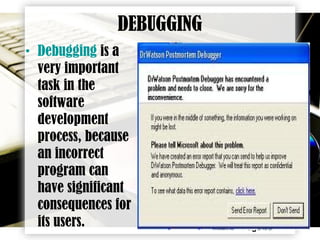
• Debugging is a
very important
task in the
software
development
process, because
an incorrect
program can
have significant
consequences for
its users.
Page 14
CONTINUATION:
• Some languages are more prone to some
kinds of faults because their specification
does not require compilers to perform as
much checking as other languages.
• Use of a static analysis tool can help detect
some possible problems
• Debugging often provide less of a visual
environment, usually using a command line.
Page 15
PROGRAMMING LANGUAGES
• Different
programming
languages support
different styles of
programming
(called
programming paradigms
).
Page 16
• The choice of language used is subject to many
considerations, such as company policy,
suitability to task, availability of third-party
packages, or individual preference.
• Ideally, the programming language best suited
for the task at hand will be selected. Trade-offs
from this ideal involve finding enough
programmers who know the language to build
a team, the availability of compilers for that
language, and the efficiency with which
programs written in a given language execute.
CONTINUATION:
Page 17
BASIC SYNTAX IN
PROGRAMMING
LANGUAGES
Page 18
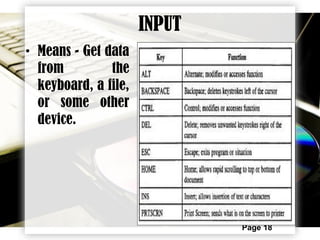
INPUT
• Means - Get data
from the
keyboard, a file,
or some other
device.
Page 19
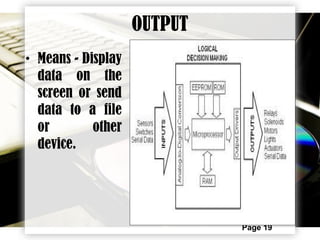
OUTPUT
• Means - Display
data on the
screen or send
data to a file
or other
device.
Page 20
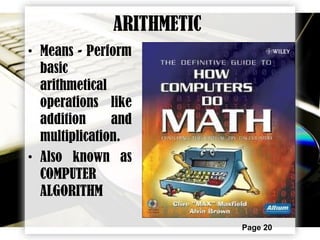
ARITHMETIC
• Means - Perform
basic
arithmetical
operations like
addition and
multiplication.
• Also known as
COMPUTER
ALGORITHM
Page 21
CONDITIONAL EXECUTION
• Means - Check
for certain
conditions and
execute the
appropriate
sequence of
statements.
• By using the
flow chart
Page 22
REPETITION
• Means - Perform
some action
repeatedly,
usually with
some variation.
Page 23
THE ALGORITHM
FLOW CHART
Page 24
FLOW CHART
• Is a type of diagram,
that represents an
algorithm or process
, showing the steps
as boxes of various
kinds, and their
order by connecting
these with arrows.
Page 25
FLOW CHART
• This diagrammatic representation can give a
step-by-step solution to a given problem.
• Data is represented in these boxes, and
arrows connecting them represent flow /
direction of flow of data.
• Flowcharts are used in analyzing, designing,
documenting or managing a process or
program in various fields
Page 26
4 GENERAL TYPES FLOW CHART
• Document flowcharts, showing controls over
a document-flow through a system
• Data flowcharts, showing controls over a
data flows in a system
• System flowcharts showing controls at a
physical or resource level
• Program flowchart, showing the controls in a
program within a system
Page 27
FLOW CHART SYMBOLS
The Basic Types of Flow Chart Symbols
• Start and End Symbols
• Arrows
• Processing Steps
• Input / Output
• Conditional or Decision
Page 28
START AND END SYMBOLS
• Is represented as
circles, ovals or
rounded rectangles,
usually containing the
word "Start" or "End",
or another phrase
signaling the start or
end of a process, such
as "submit enquiry" or
"receive product"
END
STARTSTART
Page 29
ARROW SYMBOLS
• Is showing what's
called "flow of control"
in computer science.
• An arrow coming from
one symbol and ending
at another symbol
represents that control
passes to the symbol
the arrow points to.
FLOW
OF
DIRECTION
Page 30
PROCESSING SYMBOLS / STEPS
• Is Represented as
rectangles.
• It also represents
any process,
function, or action
and is the most
frequently used
symbol in
flowcharting
DO SOMETHING
Page 31
INPUT AND OUTPUT SYMBOLS
• Is represented as a
parallelogram to
display the Input
and Output in
program.
INPUT
OUTPUT
Page 32
CONDITIONAL OR DECISION SYMBOL
• Is represented as a
diamond (rhombus).
• These typically
contain a Yes/No
question or
True/False test.
• This symbol is
unique in that it has
two arrows coming
out of it,
DECISION
Page 33
CONDITIONAL OR DECISION SYMBOL
• usually from the bottom point and right
point, one corresponding to Yes or True, and
one corresponding to No or False. The
arrows should always be labeled.
• A decision is necessary in a flowchart. More
than two arrows can be used, but this is
normally a clear indicator that a complex
decision is being taken, in which case it may
need to be broken-down further, or
replaced with the "pre-defined process"
symbol.
Page 34
CONNECTOR SYMBOL
• Is represented as
circle.
• To rejoin or attach
the arrow symbol for
the flow of direction
CONNECT
Page 35
EXAMPLE OF FLOWCHART PROCESS
STARTSTART
MIX THE INGREDIENTS
HOME
CONSUMPTION
ONLY
PACKAGING,
CARTONING/PALLETIZING
KNEADING, PROOFING ,
BAKING
ORDER?
STOPSTOP
Yes
No
SHIPPING / DELIVER
THE PRODUCT
Page 36
TURBO C
PROGRAMMING
Page 37
TURBO C PROGRAMMING
• Turbo Basic is a
BASIC compiler and
dialect originally
created by Robert
"Bob" Zale and
bought from him
by Borland.
Page 38
TURBO C PROGRAMMING
• This software is
from the 1987-
1988 period and
features the
Borland "black
screen" similar to
Turbo Pascal 4.0,
Turbo C 1.0/1.5,
and Turbo Prolog
1.1.
Page 39
CONTINUATION
• Borland did not adopt its trademark "blue
screen" integrated development
environment until the 1989 period when
Turbo C 2.0, Turbo C++ 1.1, etc. were
released. By this time, Turbo Basic and
Turbo Prolog were no longer being sold.
• Unlike most BASIC implementations of this
period, Turbo Basic was a full compiler
which generated native code for MS-DOS.
Page 40
TURBO C PROGRAM
SYNTAX
Page 41
• Basic command list
 #INCLUDE <STDIO.H> = Standard Input / Output
 { } = Cover of programs (start and Ends)
 ; = command function at the end of message
 CLRSCR ();
 PRINTF = display message ( INPUT QUESTIONS)
 IF = (Conditional commands)
 END IF / ELSE IF = (Conditional commands)
 SCANF = scanning of output response
 DO = process
 INPUT = process
 // Display = output response after the process
 LOOP = go back to previous
 NEXT = proceed to next process
 GO TO = proceed to specific input / command
 GETCH (); = End of program
Page 42
• EXAMPLE: TURBO C PROGRAM
#INCLUDE <STDIO.H>
MAIN
{
  CLRSCR ();
PRINTF ("Hit any key to continue: ");
// Wait for a key press, flashing the message
// “Welcome to Marianne’s Baking Business“; on
and off once per second.
// After any key is hit, display “(Y)!" ;
  // After any key is hit, display “(N)!" ;
INPUT “Y / N”;
SCANF (“Where Y = Yes, Where N = No");
Page 43
IF (N);
LOOP
PRINTF "Goodbye ";
IF (Y);
// Display “First Step: Mixing of Ingredients!" ;
DO
INPUT “Mixing of Ingredients";
// Display “Image of End Product" ;
NEXT 2
INPUT “Y / N”;
SCANF (“Where Y = Yes, Where N = No");
IF (N);
LOOP
PRINTF "Goodbye ";
Page 44
IF (Y);
// Display “Second Step: Kneading, Proofing and
Baking!" ;
DO
INPUT “Kneading, Proofing and Baking Process";
// Display “Image of End Product" ;
NEXT 3
INPUT “Y / N”;
SCANF (“Where Y = Yes, Where N = No");
IF (N);
LOOP
PRINTF "Goodbye ";
IF (Y);
// Display “Third Step: Packaging, Cartoning and
Palletizing!" ;
Page 45
DO
INPUT “Packaging, Cartoning and Palletizing Process";
// Display “Image of End Product" ;
NEXT 4
INPUT “Y / N”;
SCANF (“Where Y = Yes, Where N = No");
IF (N);
LOOP
PRINTF "Goodbye ";
IF (Y);
// Display “Is there any order?";
NEXT 5
INPUT “Y / N”;
SCANF (“Where Y = Yes, Where N = No");
Page 46
END IF (N);
// Display “For Home consumption only!";
PRINTF “Thank You for visiting our website!";
END IF (Y);
GO TO
// Display “Ready for Shipment and Delivery!";
DO
INPUT “Shipping and Delivering of Product!";
// Display “Image of Delivering Process" ;
PRINTF “Thank You for visiting our website!";
GETCH ();
}
Page 47
THE
PROGRAM
Page 48
PRESS ANY KEY TO CONTINUE
Y N
Page 49
Page 50
Page 51
Page 52
INGREDIENTS
Page 53
MIXING OF INGREDIENTS
Page 54
Page 55
Page 56
KNEADING
Page 57
PROOFING
Page 58
BAKING
Page 59
Page 60
Page 61
PACKAGING, CARTONING AND
PALLETIZING
Page 62
Page 63
Page 64
Page 65
Page 66
Page 67
SHIPPING AND DELIVERING
Page 68