Introduction to Programming 
Concepts
 Human Language: 
• Commonly used to express feelings and understand other person 
expressions. 
• It can be oral or gestural kind of communication 
 Computer Language: 
• Computer languages are the languages by which a user 
command a computer to work on the algorithm which a user has 
written to get an output.
 Programming languages are use to write application programs 
which are used by end users. 
 The programming languages are generally used only by 
professional programmers to write programs. 
 The development of programming languages has improved 
considerably with the ease and ability of programmers to write 
powerful applications programs that can solve any task in the 
world today. 
 Each computer programming language has its own distinctive 
grammars and syntax and its own manner of expressing 
ideas. In principle most computational task could be 
accomplish by any of the languages but the programs would 
look very different moreover, writing a program for a particular 
task could be easier with some languages than the others.
The Evolution of Programming Languages 
To build programs, people use languages that are similar 
to human language. The results are translated into 
machine code, which computers understand. 
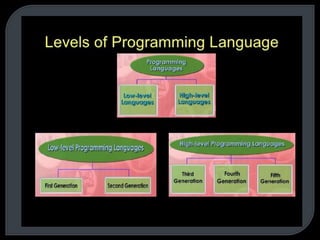
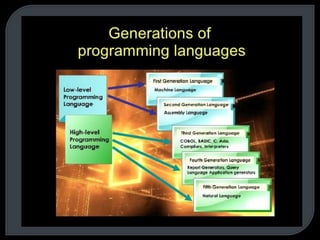
Programming languages fall into three broad categories: 
• Machine languages 
• Assembly languages 
• Higher-level languages
The Evolution of Programming Languages - 
Machine Languages 
• Machine languages (first-generation languages) are the 
most basic type of computer languages, consisting of 
strings of numbers the computer's hardware can use. 
• Different types of hardware use different machine 
code. For example, IBM computers use different 
machine language than Apple computers.
The Evolution of Programming Languages - 
Assembly Languages 
• Assembly languages (second-generation languages) 
are only somewhat easier to work with than machine 
languages. 
• To create programs in assembly language, developers 
use cryptic English-like phrases to represent strings 
of numbers. 
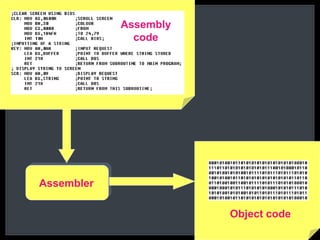
• The code is then translated into object code, using a 
translator called an assembler.
Assembler 
Assembly 
code 
Object code
The Evolution of Programming Languages - 
Higher-Level Languages 
Higher-level languages are more powerful than assembly 
language and allow the programmer to work in a more 
English-like environment. 
Higher-level programming languages are divided into 
three "generations," each more powerful than the last: 
• Third-generation languages 
• Fourth-generation languages 
• Fifth-generation languages
 Programming language history really began with the work of Charles Babbage in 
the early nineteenth century who developed automated calculation for 
mathematical functions. 
 Further developments in early 1950 brought us machine language without 
interpreters and compilers to translate languages. 
 The first generation computer language was machine language, all the machine 
used machine code which consisted of 0s and 1s. 
 Machine language is highly efficient and allows direct control of each operation; 
however programmers had to write computer programs using 0 and 1. 
 Machine languages were created differently for different CPUs. Machine 
dependency was a problem because this programming language would only 
work for the system that it was written for. 
 Some of the drawbacks of the first generations languages were: 
 Programs were difficult to write and debug 
 Programming process was tedious 
 Programming was time confusing 
 Programs were error prone: This generation of programming languages 
were written in binary, a series of zeros and ones. Binary is difficult to read 
and errors occurred frequently.
 These were developed in the mid 1950’s with the ability to use 
acronyms or symbolic codes to speed programming and coding of 
programs. They were called assembly languages. 
 Symbolic addresses allowed programmers to represent memory 
locations, variables and instructions with names. 
 They had the capability to performs operation such like add, sum. 
 Like machine languages, assembly languages were designed for 
specific machine and microprocessor, this implies that the program 
cannot be move from one computer architecture without writing the 
code which means learning another language where you are to 
transfer the programs.
 These were introduced between 1956 and 1963 which saw a major breakthrough in computing 
history with the development of high level computer languages popularly known as 3rd(3GLS). 
 Languages like ALGOL 58, 60 and 68, COBOL, FORTRAN IV, ADA and C are examples of this 
and were considered as high level languages. 
 Most of these languages had compilers and the advantage of this was speed. 
 Independence was another factor as these languages were machine independent and could run 
on different machines. 
 The advantages of high level languages include the support for ideas of abstraction so that 
programmers can concentrate on finding the solution to the problem rapidly, rather than on low-level 
details of data representation. 
 The comparative ease of use and learning, improved portability and simplified debugging, 
modifications and maintenance led to reliability and lower software costs. 
 Example of the 3rd generation languages includes the following: 
1. FORTRAN – Formula Translation 
 FORTRAN was developed in 1956 to provide easier way for scientific and engineering 
application and these were especially useful for processing Numeric data. 
2. COBOL – Common Business Oriented Languages 
 COBOL came into use in the early 1960. It was designed with business administration in 
mind for processing large data types with alphanumeric characters which were mixture of 
alphabet and data and does repetitive tasks like payroll. The other language was BASIC. 
These were the early computer programming languages in the early history of computers.
 A fourth-generation programming language(1970s-1990) (abbreviated 4GL) 
is a programming language or programming environment designed with a 
specific purpose in mind, such as the development of commercial business 
software. 
 programmers who use the computers and programs to solve problems from 
other applications are the main users of the fourth generation languages. 
 fourth generation languages must be user friendly, portable and independent 
of operating systems, usable by non-programmers, having intelligent default 
options about what the user wants and allowing the user to obtain results 
fasts using minimum requirement code generated with bug-free code from 
high-level expressions (employing a data-base and dictionary management 
which makes applications easy and quick to change), which was not 
possible using COBOL or PL/I. 
 Examples of this generation of languages are IBM's ADRS2, APL, CSP and 
AS, Power Builder, Access.
 The 1990's saw the developments of fifth generation languages. A 
fifth-generation programming language (abbreviated 5GL) is a 
programming language based around solving problems using 
constraints given to the program, rather than using an algorithm 
written by a programmer. Most constraint-based and logic 
programming languages and some declarative languages are fifth-generation 
languages. 
 Examples include PROLOG, referring to systems used in the field of 
artificial intelligence, fuzzy logic and neural networks. This means 
computers can in the future have the ability to think for themselves 
and draw their own inferences using programmed information in 
large databases. 
 Complex processes like understanding speech would appear to be 
trivial using these fast inferences and would make the software seem 
highly intelligent.
 Structured Approach in programming 
 Object Oriented Approach in programming
 Assemblers 
 Compilers 
 Interpretters
 Assembly language is converted into executable 
machine code by a utility program referred to as 
an assembler. 
 An assembler creates object code by translating 
assembly language instructions into opcodes.
 A computer program which reads source code and 
outputs assembly code or executable code is 
called compiler. 
 This software, converts the code written in high-level 
language into object file. 
 Compilers translate entire programs into machine 
code, which can be run later on the target 
computer. 
 Examples of Programming Languages Using 
compiler : 
• C 
• C++ etc.
 Interpreters translate source code into 
machine language while a program is 
running, one line at a time, unlike compiler, 
which processes everything at once. In this 
case a single line is executed at a time. It is 
time consuming. 
 Examples of Programming Languages Using 
Interpreter : 
• Lisp 
• BASIC
 Source Code is In the form of Text. 
 Source Code is Human Readable. 
 Source Code is Generated by Human. 
 Source Code is Input Given to Compiler.
 Object Code is in the form of Binary Numbers. 
 Object Code is in Machine Readable. 
 Object Code is Generated by Compiler. 
 Object code is Output of Compiler.
All the preprocessor commands written in 
a high level language are processed by the 
preprocessor before compiler takes over. 
Example: "#define MAX_ROWS 10" 
Preprocessor finds all the places and 
replaces MAX_ROWS with 10 in the files 
of the project.
Linker uses the object files created by the 
compiler and then uses the predefined 
library objects to create an executable.
 There are important differences between plain text files created by a text 
editor, and document files created by word processors such as Microsoft 
Word, WordPerfect etc. 
 A plain text file uses a simple character set such as ASCII to represent 
numbers, letters, and a small number of symbols. The only non-printing 
characters in the file, usable to format the text, are newline, tab, and 
formfeed. 
 Word processor documents generally contain formatted text, adding content 
that enables text to appear in boldface and italics, to use multiple fonts, and 
to be structured into columns and tables. 
 Word processors were developed to aid in formatting text for presentation on 
a printed page, while text editors treat text as data. 
 When both formats are available, the user must select with care. Saving a 
plain text file in a word-processor format will add formatting information that 
could disturb the machine-readability of the text. Saving a word-processor 
document as a text file will lose formatting information. 
 Unix and Unix-like operating systems have the vi editor (or a variant), but 
many also include the Emacs editor. Microsoft Windows systems come with 
the simple Notepad.
The program development cycle consists 
of four basic steps to follow when planning 
a computer program. However, often there 
are two more steps included in this cycle. 
By following this step-by-step process, the 
chance of making mistakes is minimal. We 
are going to take a look at each step in the 
cycle and what it is used for as well as why 
it is important when it comes to 
programming.
The first step in the cycle is analyzing. 
Analyzing basically defines the problem. 
This is a very important step in the process 
in order to develop an appropriate solution. 
At this time, an outline is made which 
defines the entire process including the 
program's input, output, and processing 
components.
 The second step in the cycle is design. At this 
time, any problems found during the analysis are 
broken down. The method and appropriate 
programming language are chosen during this 
process. Structured design allows the problem to 
be broken down into sections called modules. This 
can be done so that each routine performs a single 
task. The structured design is important because it 
turns the main routine into smaller ones which 
helps the programmers locate any problems easily 
and stay organized.
The third step in the process is validating 
the design. This is done by computer 
programmers who code the design into a 
programming language. 
 Implementing the design is step four. This 
is when the code to translate the design 
into a program is written. The new system 
is installed at this time.
 Steps five and six are testing and 
documenting the solution. The program is 
maintained and if any changes are needed, 
the cycle begins again. 
 The program development cycle is in fact 
called a cycle because any phase can lead to 
the previous or next step in the process. This 
normally happens only if an error is found. It 
is also referred to as a cycle because once it 
ends it begins again.
Besides the programmer, there are many 
other people involved in the stages of the 
program development cycle. System 
analysts, designers, system architects, 
coders and testers are also involved in the 
cycle. They are all important when it 
comes to developing a successful 
program.
 A good program is not necessarily a powerful application but 
at the very least, it must pass certain criteria so that it can 
stand out among other programs in the market. If you are a 
programmer by profession, your main goal in creating 
programs is and should always be to satisfy the requirements 
of your clients. Aside from attaining this goal, you should also 
take the following qualities into consideration when you create 
your program: 
 1) It should be free from bugs. 
• Program errors normally occur no matter how careful the programmer is 
in constructing the program. Even commercially released applications 
are not spared from this buggy predicament. The best thing a 
programmer can do is to constantly find bugs in the program or for large-scale 
applications, enlist the aid of beta testers. This will not necessarily 
eliminate every program error but at least it would minimize the 
occurrence of such bugs.
 2) It must run in an accurate and efficient manner. 
• During quality control, a program must be tested for its accuracy 
and efficiency. Not all programs are created equal. Some 
programs are not sophisticated enough to successfully complete 
multiple tasks. Others have a slew of powerful features but they 
take too long to load. As a programmer, it should be your priority 
to satisfy your client's needs without neglecting accuracy and 
efficiency. You must not compromise one for the other, instead, 
you should set some kind of equilibrium point which balances the 
two qualities. 
 3) The program's interface must be accessible and 
user-friendly. 
• No matter how good a program's features are, a cluttered user 
interface will most likely drag it down. Don't risk it. Potential users 
will steer clear from your program unless you have a 
comprehensive help file to go along with the messy UI.
 4) It should be easy to maintain and doesn't hog system 
resources. 
• What good is a program if it bogs down the entire computer system? 
Sometimes, you must carefully consider an average user's system 
specifications. If you're creating a program in a high-end computer and 
you notice that it runs really smoothly, you should also make the effort to 
test it in a system with only the barest necessities. Remember that there 
are still people out there who use relatively low-end computers, so if you 
don't want to alienate them, try to put yourself in their shoes. Of course, 
you should not sacrifice a program's quality in the process. You must 
strike a balance in this criterion as well. 
 5) The source code is well-organized and optimized for the 
best performance. 
• If your main goal is to share bits and pieces of your code to the 
community to showcase your skills as a programmer, then you should 
clean it up and trim down excess code. It is advisable to organize your 
code in such a manner that they will understand your program's flow.
 Every computer requires appropriate instruction set (programs) to 
perform the required task. The quality of the processing depends 
upon the given instructions. If the instructions are improper or 
incorrect, then it is obvious that the result will be superfluous. 
Therefore, proper and correct instructions should be provided to the 
computer so that it can provide the desired output. Hence, a program 
should be developed in such a way that it ensures proper 
functionality of the computer. In addition, a program should be 
written in such a manner that it is easier to understand the 
underlying logic. A few important characteristics that a computer 
program should possess are as follows: 
 Portability: Portability refers to the ability of an application to run on 
different platforms (operating systems) with or without minimal 
changes. Due to rapid development in the hardware and the 
software, nowadays platform change is a common phenomenon. 
Hence, if a program is developed for a particular platform, then the 
life span of the program is severely affected.
 Readability: The program should be written in such a way 
that it makes other programmers or users to follow the logic of 
the program without much effort. If a program is written 
structurally, it helps the programmers to understand their own 
program in a better way. Even if some computational efficiency 
needs to be sacrificed for better readability, it is advisable to 
use a more user-friendly approach, unless the processing of 
an application is of utmost importance. 
 Efficiency: Every program requires certain processing time 
and memory to process the instructions and data. As the 
processing power and memory are the most precious 
resources of a computer, a program should be laid out in such 
a manner that it utilizes the least amount of memory and 
processing time.
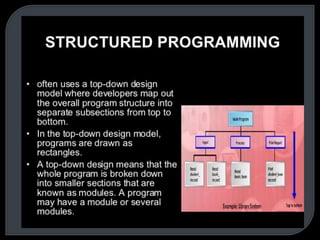
 Structural: To develop a program, the task must be broken 
down into a number of subtasks. These subtasks are 
developed independently, and each subtask is able to perform 
the assigned job without the help of any other subtask. If a 
program is developed structurally, it becomes more readable, 
and the testing and documentation process also gets easier. 
 Flexibility: A program should be flexible enough to handle 
most of the changes without having to rewrite the entire 
program. Most of the programs are developed for a certain 
period and they require modifications from time to time. For 
example, in case of payroll management, as the time 
progresses, some employees may leave the company while 
some others may join. Hence, the payroll application should 
be flexible enough to incorporate all the changes without 
having to reconstruct the entire application.
 Generality: Apart from flexibility, the program should also be 
general. Generality means that if a program is developed for a 
particular task, then it should also be used for all similar tasks 
of the same domain. For example, if a program is developed 
for a particular organization, then it should suit all the other 
similar organizations. 
 Documentation: Documentation is one of the most important 
components of an application development. Even if a program 
is developed following the best programming practices, it will 
be rendered useless if the end user is not able to fully utilize 
the functionality of the application. A well-documented 
application is also useful for other programmers because even 
in the absence of the author, they can understand it.