Module
Module
<html ng-app=”myApp” >
Config Filter Directive Factory Controller
Routes
Service
Value
Provider
Data Binding
Expression Syntax
Two way binding
<p>Hello {{name}}!</p>
One way binding
<p>Hello {{::name}}!</p>
Controller declare
/* recommended */
// dashboard.js
angular
.module('app')
.controller('DashboardController', DashboardController);
function DashboardController() { }
/* avoid */
angular
.module('app')
.controller('DashboardController', function() { })
controllerAs View Syntax
<!-- avoid -->
<div ng-controller="DashboardController">
{{ name }}
</div>
<!-- recommended -->
<div ng-controller="DashboardController as dashboard">
{{ dashboard.name }}
</div>
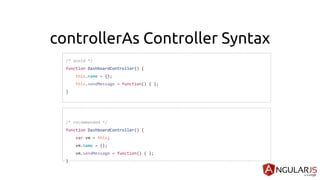
controllerAs Controller Syntax
/* avoid */
function DashboardController() {
this.name = {};
this.sendMessage = function() { };
}
/* recommended */
function DashboardController() {
var vm = this;
vm.name = {};
vm.sendMessage = function() { };
}
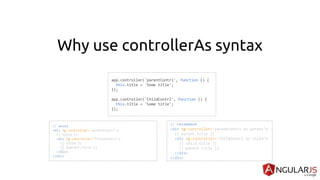
Why use controllerAs syntax
// avoid
<div ng-controller="parentContrl">
{{ title }}
<div ng-controller="ChildContrl">
{{ title }}
{{ $parent.title }}
</div>
</div>
app.controller('parentContrl', function () {
this.title = 'Some title';
});
app.controller('ChildContrl', function () {
this.title = 'Some title';
});
// recommend
<div ng-controller="parentContrl as parent">
{{ parent.title }}
<div ng-controller="ChildContrl as child">
{{ child.title }}
{{ parent.title }}
</div>
</div>
Working with Form
Form validation with HTML5
Form validation with Core Angular
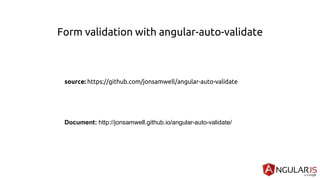
Form validation with angular-auto-validate
source: https://github.com/jonsamwell/angular-auto-validate
Document: http://jonsamwell.github.io/angular-auto-validate/
Form animation
source: https://github.com/sachinchoolur/ladda-angular
Simple: http://sachinchoolur.github.io/ladda-angular/
Submit form with $http
Document: https://docs.angularjs.org/api/ng/service/$http
$http({
method: 'GET',
url: '/someUrl'
}).then(function successCallback(response) {
// this callback will be called asynchronously
// when the response is available
}, function errorCallback(response) {
// called asynchronously if an error occurs
// or server returns response with an error status.
});
Event handle
ngClick
<ANY
ng-click="expression">
...
</ANY>
Work with JSON
[
{
"name":"Billy Williams",
"email":"bwilliams0@apple.com",
"job":"Actuary",
"skill":"PDF Creator",
"pic":"https://robohash.org/eanostrumincidunt.jpg?size=120x120u0026set=set1"
},
{
"name":"Steven Frazier",
"email":"sfrazier1@pinterest.com",
"job":"Design Engineer",
"skill":"NC-Verilog",
"pic":"https://robohash.org/repudiandaeomnisest.bmp?size=120x120u0026set=set1"
},
{
"name":"Doris Clark",
"email":"dclark2@uol.com.br",
"job":"Nurse Practicioner",
"skill":"Axis",
"pic":"https://robohash.org/providentvoluptateet.png?size=120x120u0026set=set1"
}
]
Show JSON with ngRepeat
<div ng-repeat="obj in myObj"> ... </div>
<ANY
ng-repeat="repeat_expression">
...
</ANY>
Example
Sorting
<div ng-repeat="obj in myObj | orderBy:sortType:sortReverse"> ... </div>
sortType: JSON field name
Params
sortReverse: ascending or descending
data
Filter
keyword: text for search
Params
<div ng-repeat="obj in myObj | filter:keyword"> ... </div>
Service
AngularJS world, the services are singleton objects or functions that carry out specific tasks. It holds
some business logic. Separation of concern is at the heart while designing an AngularJS application.
Your controller must be responsible for binding model data to views using $scope. It does not contain
logic to fetch the data or manipulating it.
There are 3 type of service factory, service, provider , you can use to communicate data between
controller also.
Factory
Factory Provider
Gives us the function's return value ie. You just create an object, add properties to it, then return that same
object.When you pass this service into your controller, those properties on the object will now be
available in that controller through your factory. (Hypothetical Scenario)
Singleton and will only be created once
Reusable components
Factory are a great way for communicating between controllers like sharing data.
Can use other dependencies
Usually used when the service instance requires complex creation logic
Cannot be injected in .config() function.
Used for non configurable services
If you're using an object, you could use the factory provider.
Service
Service Provider
Gives us the instance of a function (object)- You just instantiated with the ‘new’ keyword and you’ll add
properties to ‘this’ and the service will return ‘this’.When you pass the service into your controller,
those properties on ‘this’ will now be available on that controller through your service. (Hypothetical
Scenario)
Singleton and will only be created once
Reusable components
Services are used for communication between controllers to share data
You can add properties and functions to a service object by using the this keyword
Dependencies are injected as constructor arguments
Used for simple creation logic
Cannot be injected in .config() function.
If you're using a class you could use the service provider
Provider
Providers
● Syntax: module.provider( 'providerName', function );
Result: When declaring providerName as an injectable argument you will be provided with (new
ProviderFunction()).$get(). The constructor function is instantiated before the $get method is called -
ProviderFunction is the function reference passed to module.provider.
Providers have the advantage that they can be configured during the module configuration phase.
myApp.provider('helloWorld', function() {
// In the provider function, you cannot inject any
// service or factory. This can only be done at the
// "$get" method.
this.name = 'Default';
this.$get = function() {
var name = this.name;
return {
sayHello: function() {
return "Hello, " + name + "!"
}
}
};
this.setName = function(name) {
this.name = name;
};
});
//hey, we can configure a provider!
myApp.config(function(helloWorldProvider){ helloWorldProvider.setName('World'); });
Connect REST API with ngResource, $http
ngResource: https://docs.angularjs.org/api/ngResource
$http: https://docs.angularjs.org/api/ng/service/$http
function asyncGreet(name) {
var deferred = $q.defer();
setTimeout(function() {
deferred.notify('About to greet ' + name + '.');
if (okToGreet(name)) {
deferred.resolve('Hello, ' + name + '!');
} else {
deferred.reject('Greeting ' + name + ' is not allowed.');
}
}, 1000);
return deferred.promise;
}
var promise = asyncGreet('Robin Hood');
promise.then(function(greeting) {
alert('Success: ' + greeting);
}, function(reason) {
alert('Failed: ' + reason);
}, function(update) {
alert('Got notification: ' + update);
});
Directive
Directives are markers on a DOM element which attach a special behavior to it. For example, static HTML does not
know how to create and display a date picker widget. To teach HTML this new syntax we need a directive. The directive
will somehow create an element that behaves like a date picker. We will see how this is achieved subsequently.
syntax : app.directive('helloWorld', function() {...});
Directive
<!-- recommended -->
<my-calendar-range></my-calendar-range>
<div my-calendar-range></div>
/* recommended */
angular
.module('myApp)
.directive('helloWorld',helloWorld);
function helloWorld() {
var directive = {
link: link,
templateUrl: '/template/hello.html or <div> hello </div>',
restrict: 'EA'
};
return directive;
function link(scope, element, attrs) {
/* */
}
}
Directive isolate
● Share scope
● None isolate
● @ Local Scope Property
● = Local Scope Property
● & Local Scope Property
Share Scope
angular
.module('myApp')
.directive('sayHi',sayHi);
function sayHi() {
var directive = {
template: '<div> {{name}} </div>',
restrict: 'EA'
};
return directive;
}
angular
.module('myApp')
.controller('sayHi',hello);
function hello($scope) {
$scope.name = 'Hi';
}
Share scope
controller
$scope.name = 'Hi'
$scope.name = 'Hi'
directive
None isolate
angular
.module('myApp')
.directive('sayHi',sayHi);
function sayHi() {
var directive = {
scope: {},
template: '<div> {{name}} </div>',
restrict: 'EA'
};
return directive;
}
angular
.module('myApp')
.controller('sayHi',hello);
function hello($scope) {
$scope.name = 'Hi';
}
none isolate
controller
$scope.name = 'Hi'
$scope.name = 'Hi'
directive
@ Local Scope Property
angular
.module('myApp')
.directive('sayHi',sayHi);
function sayHi() {
var directive = {
scope: {name:'@'},
template: '<div> Hi {{name}} !!</div>',
restrict: 'EA'
};
return directive;
}
angular
.module('myApp')
.controller('sayHi',hello);
function hello($scope) {
$scope.name = 'Lisa';
}
@ scope
controller
<say-hi name={{name}}></say-hi>
Scope:{ name: '@' }
directive
Use to access string value
= Local Scope Property
angular
.module('myApp')
.directive('sayHi',sayHi);
function sayHi() {
var directive = {
scope: { people:'='},
template: '<div> Hi {{peopel.name}} !!</div>',
restrict: 'EA'
};
return directive;
}
angular
.module('myApp')
.controller('sayHi',hello);
function hello($scope) {
$scope.lisa = {
name.'Lisa';
age : 29
};
}
= scope two way binding
controller
<say-hi people=”lisa”></say-hi>
scope:{ people: '=' }
directive
Use to bind object
& Local Scope Property
angular
.module('myApp')
.directive('sayHi',sayHi);
function sayHi() {
var directive = {
scope: { people:'='},
template: '<ul><li ng-repeat="name in people">{{name}}</li></ul><button
ng-click="action()">swap</button>',
restrict: 'EA'
};
return directive;
}
angular
.module('myApp')
.controller('sayHi',hello);
function hello($scope) {
$scope.people = ['Lisa', 'John', 'Tom'];
$scope.swap = function() {
var j, x, i;
for (i = $scope.people.length; i; i -= 1) {
j = Math.floor(Math.random() * i);
x = $scope.people[i - 1];
$scope.people[i - 1] = $scope.people[j];
$scope.people[j] = x;
}
}
}
@ scope two way binding
controller
<say-hi people="people"
action="swap()"></say-hi>
scope:{ action: '&' }
directive
Use to call external function
Directive link function
angular
.module('myApp)
.directive('helloWorld',helloWorld);
function helloWorld() {
var directive = {
link: link,
templateUrl: '<div>{{name}}</div>',
restrict: 'EA'
};
return directive;
function link(scope, element, attrs) {
Scope.num = 2;
}
}
Routing app with uiRouter
Source & Document: https://github.com/angular-ui/ui-router
myApp.config(function($stateProvider, $urlRouterProvider) {
$urlRouterProvider.otherwise("/");
$stateProvider
.state('state1', {
url: "/state1",
templateUrl: "partials/state1.html"
})
.state('state2', {
url: "/state2",
templateUrl: "partials/state2.html"
});
});
Advance in Angular
Event in system $emit, $broadcast and $on via
$scope and $rootScope
Promise with $q and build-in $http
$q is a service that helps you run functions asynchronously, and use their return values (or
exceptions) when they are done processing.
This is an implementation of promises/deferred objects inspired by Kris Kowal's Q.
$q can be used in two fashions --- one which is more similar to Kris Kowal's Q or jQuery's Deferred implementations,
and the other which resembles ES6 (ES2015) promises to some degree.
Promise stop hell-callback
fn1(function() {
fn2(function() {
fn3(function() {
fn4(function() {
// your process
});
});
});
});
Deep dive a Scope
● Root Scope
● Child Scope
● Dot notation