Data	
  Persistence	
  in	
  Android	
  
Jussi	
  Pohjolainen	
  
Tampere	
  University	
  of	
  Applied	
  Sciences	
  
Contents	
  
•  Overview	
  
•  About	
  State	
  InformaAon	
  
•  Preferences	
  
•  Using	
  files	
  
•  Using	
  databases	
  
•  Accessing	
  Content	
  Providers	
  
Overview	
  of	
  Data	
  Storing	
  
•  App	
  data	
  is	
  private	
  to	
  the	
  applicaAon	
  
•  Several	
  mechanism	
  
–  State	
  Storage:	
  Ram	
  memory!	
  
•  Mechanism	
  for	
  saving	
  acAvity’s	
  state	
  temporarily	
  
–  Preferences	
  
•  Lightweight	
  mechanism	
  to	
  store	
  and	
  retrieve	
  key-­‐value	
  pairs	
  
–  Files	
  
•  Open	
  and	
  save	
  files	
  on	
  the	
  device	
  or	
  removable	
  storage	
  
–  SQLite	
  databases	
  
•  Databases	
  
•  Content	
  provider	
  is	
  used	
  to	
  give	
  the	
  data	
  to	
  other	
  apps	
  
AcAvity	
  State:	
  Using	
  RAM	
  
•  AcAvity’s	
  state	
  informaAon	
  can	
  be	
  lost,	
  if	
  it’s	
  
closed	
  
– When	
  acAvity	
  is	
  no	
  longer	
  on	
  the	
  screen	
  and	
  it’s	
  
closed	
  because	
  of	
  freeing	
  memory	
  
– When	
  screen	
  rota1on	
  is	
  changed,	
  the	
  acAvity	
  is	
  
destroyed	
  and	
  opened	
  again	


How	
  to	
  Store	
  State	
  InformaAon	
  
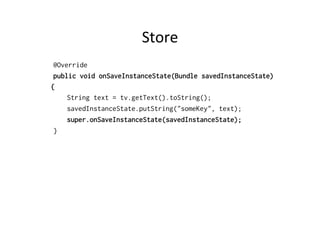
•  Store	
  state:	
  
– onSaveInstanceState(Bundle)
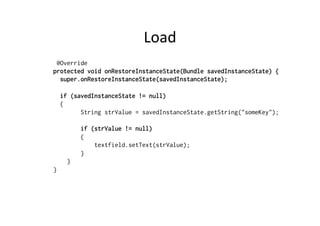
•  Read	
  state	
  
– onRestoreInstanceState(Bundle)
•  This	
  will	
  store	
  data	
  only	
  temporarily:	
  for	
  app	
  
life1me!	
  
•  Data	
  will	
  be	
  held	
  in	
  memory	
  un1l	
  the	
  app	
  is	
  
closed!	
  
Store	
  
@Override
public void onSaveInstanceState(Bundle savedInstanceState)
{
String text = tv.getText().toString();
savedInstanceState.putString("someKey", text);
super.onSaveInstanceState(savedInstanceState);
}
Load	
  
@Override
protected void onRestoreInstanceState(Bundle savedInstanceState) {
super.onRestoreInstanceState(savedInstanceState);
if (savedInstanceState != null)
{
String strValue = savedInstanceState.getString("someKey");
if (strValue != null)
{
textfield.setText(strValue);
}
}
}
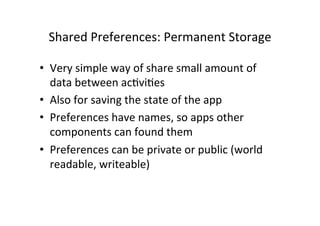
Shared	
  Preferences:	
  Permanent	
  Storage	
  
•  Very	
  simple	
  way	
  of	
  share	
  small	
  amount	
  of	
  
data	
  between	
  acAviAes	
  
•  Also	
  for	
  saving	
  the	
  state	
  of	
  the	
  app	
  
•  Preferences	
  have	
  names,	
  so	
  apps	
  other	
  
components	
  can	
  found	
  them	
  
•  Preferences	
  can	
  be	
  private	
  or	
  public	
  (world	
  
readable,	
  writeable)	
  
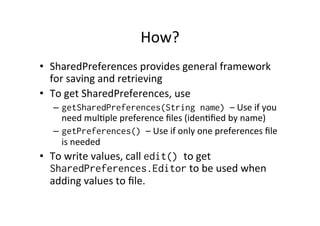
How?	
  
•  SharedPreferences	
  provides	
  general	
  framework	
  
for	
  saving	
  and	
  retrieving	
  
•  To	
  get	
  SharedPreferences,	
  use	
  
–  getSharedPreferences(String name) –	
  Use	
  if	
  you	
  
need	
  mulAple	
  preference	
  files	
  (idenAfied	
  by	
  name)	
  
–  getPreferences() –	
  Use	
  if	
  only	
  one	
  preferences	
  file	
  
is	
  needed	
  
•  To	
  write	
  values,	
  call	
  edit() to	
  get	
  
SharedPreferences.Editor	
  to	
  be	
  used	
  when	
  
adding	
  values	
  to	
  file.	
  
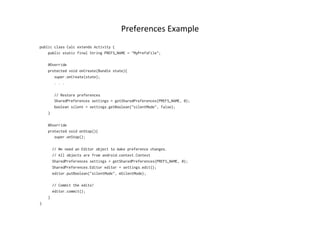
Preferences	
  Example	
  
public class Calc extends Activity {
    public static final String PREFS_NAME = "MyPrefsFile";
    @Override
    protected void onCreate(Bundle state){
       super.onCreate(state);
       . . .
       // Restore preferences
       SharedPreferences settings = getSharedPreferences(PREFS_NAME, 0);
       boolean silent = settings.getBoolean("silentMode", false);
    }
    @Override
    protected void onStop(){
       super.onStop();
      // We need an Editor object to make preference changes.
      // All objects are from android.context.Context
      SharedPreferences settings = getSharedPreferences(PREFS_NAME, 0);
      SharedPreferences.Editor editor = settings.edit();
      editor.putBoolean("silentMode", mSilentMode);
      // Commit the edits!
      editor.commit();
    }
}
Files	
  
•  It's	
  possible	
  to	
  store	
  files	
  on	
  the	
  mobile	
  device	
  or	
  on	
  a	
  
removable	
  storage	
  
•  Current	
  applica1on	
  folder	
  only.	
  ExcepAon	
  thrown	
  
otherwise.	
  
–  Modes:	
  MODE_PRIVATE,	
  MODE_WORLD_READABLE,	
  
MODE_WORLD_WRITABLE	
  
•  Reading	
  
–  openFileInput()
•  WriAng	
  
–  openFileOutput()
•  Standard	
  Java	
  streams	
  aer	
  that	
  
StaAc	
  files	
  
•  You	
  can	
  save	
  staAc	
  files	
  into	
  res/raw	
  directory	
  
•  Accessing	
  using	
  
openRawResource(R.raw.<filename>)
•  Returns	
  InputStream
•  Cannot	
  write	
  to	
  data	
  
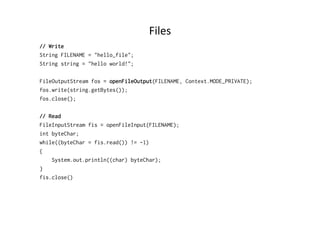
Files	
  
// Write
String FILENAME = "hello_file";
String string = "hello world!";
FileOutputStream fos = openFileOutput(FILENAME, Context.MODE_PRIVATE);
fos.write(string.getBytes());
fos.close();
// Read
FileInputStream fis = openFileInput(FILENAME);
int byteChar;
while((byteChar = fis.read()) != -1)
{
System.out.println((char) byteChar);
}
fis.close()
Reading	
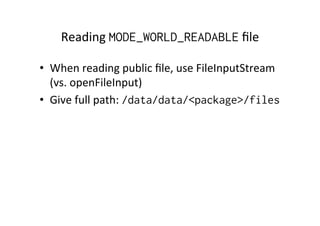
  MODE_WORLD_READABLE	
  file	
  
•  When	
  reading	
  public	
  file,	
  use	
  FileInputStream	
  
(vs.	
  openFileInput)	
  
•  Give	
  full	
  path:	
  /data/data/<package>/files
SQLite	
  
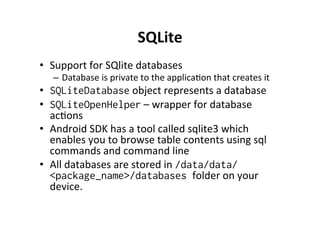
•  Support	
  for	
  SQlite	
  databases	
  
–  Database	
  is	
  private	
  to	
  the	
  applicaAon	
  that	
  creates	
  it	
  
•  SQLiteDatabase	
  object	
  represents	
  a	
  database	
  
•  SQLiteOpenHelper	
  –	
  wrapper	
  for	
  database	
  
acAons	
  
•  Android	
  SDK	
  has	
  a	
  tool	
  called	
  sqlite3	
  which	
  
enables	
  you	
  to	
  browse	
  table	
  contents	
  using	
  sql	
  
commands	
  and	
  command	
  line	
  
•  All	
  databases	
  are	
  stored	
  in	
  /data/data/
<package_name>/databases folder	
  on	
  your	
  
device.	
  
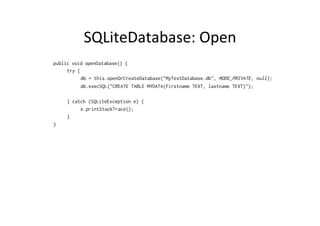
SQLiteDatabase:	
  Open	
  
public void openDatabase() {
try {
db = this.openOrCreateDatabase("MyTestDatabase.db", MODE_PRIVATE, null);
db.execSQL("CREATE TABLE MYDATA(firstname TEXT, lastname TEXT)");
} catch (SQLiteException e) {
e.printStackTrace();
}
}
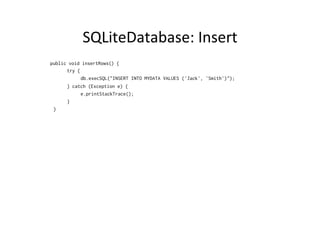
SQLiteDatabase:	
  Insert	
  
public void insertRows() {
try {
db.execSQL("INSERT INTO MYDATA VALUES ('Jack', 'Smith')");
} catch (Exception e) {
e.printStackTrace();
}
}
SQLiteDatabase:	
  Read	
  
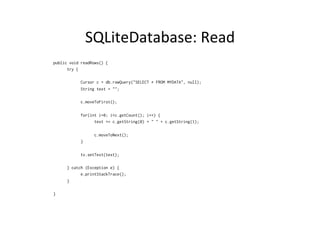
public void readRows() {
try {
Cursor c = db.rawQuery("SELECT * FROM MYDATA", null);
String text = "";
c.moveToFirst();
for(int i=0; i<c.getCount(); i++) {
text += c.getString(0) + " " + c.getString(1);
c.moveToNext();
}
tv.setText(text);
} catch (Exception e) {
e.printStackTrace();
}
}
SQLiteOpenHelper	
  
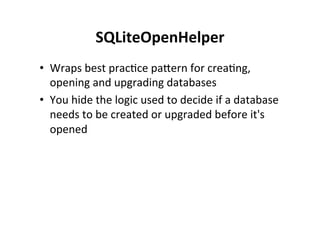
•  Wraps	
  best	
  pracAce	
  pacern	
  for	
  creaAng,	
  
opening	
  and	
  upgrading	
  databases	
  
•  You	
  hide	
  the	
  logic	
  used	
  to	
  decide	
  if	
  a	
  database	
  
needs	
  to	
  be	
  created	
  or	
  upgraded	
  before	
  it's	
  
opened	
  
Recommended	
  Way:	
  SQLiteOpenHelper	
  
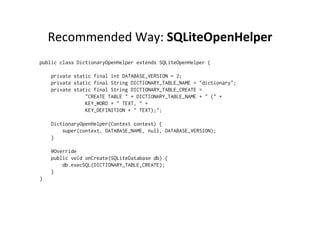
public class DictionaryOpenHelper extends SQLiteOpenHelper {
    private static final int DATABASE_VERSION = 2;
    private static final String DICTIONARY_TABLE_NAME = "dictionary";
    private static final String DICTIONARY_TABLE_CREATE =
                "CREATE TABLE " + DICTIONARY_TABLE_NAME + " (" +
                KEY_WORD + " TEXT, " +
                KEY_DEFINITION + " TEXT);";
    DictionaryOpenHelper(Context context) {
        super(context, DATABASE_NAME, null, DATABASE_VERSION);
    }
    @Override
    public void onCreate(SQLiteDatabase db) {
        db.execSQL(DICTIONARY_TABLE_CREATE);
    }
}
// Example
public class SQLiteExample extends Activity {
private MyDataHelper dbhelper;
@Override
public void onCreate(Bundle savedInstanceState) {
super.onCreate(savedInstanceState);
setContentView(R.layout.main);
dbhelper = new MyDataHelper(this);
dbhelper.deleteAll();
dbhelper.insert("Jussi");
dbhelper.insert("Pekka");
dbhelper.insert("Tiina");
List<String> list = dbhelper.selectAll();
for(String object : list) {
System.out.println(object);
}
}
}
Remote	
  Shell	
  for	
  Databases	
  
Content	
  Providers	
  
•  The	
  recommended	
  way	
  of	
  sharing	
  data	
  in	
  
Android	
  is	
  to	
  use	
  content	
  providers	
  
•  Generic	
  interface	
  for	
  data	
  
•  Permission	
  control	
  and	
  accessing	
  using	
  URI	
  
model	
  
•  NaAve	
  databases	
  available	
  as	
  Content	
  
Providers	
  
•  Publishing	
  your	
  own	
  data	
  source,	
  other	
  apps	
  
can	
  incorporate	
  your	
  database	
  
Content	
  Resolver	
  
•  ApplicaAon	
  context	
  has	
  Content	
  Resolver	
  
which	
  you	
  can	
  use	
  to	
  access	
  data	
  
– ContentResolver cr =
getContentResolver();
•  For	
  accessing	
  other	
  databases,	
  you	
  need	
  a	
  URI	
  
•  URI	
  is	
  arbitraty	
  String,	
  which	
  is	
  defined	
  in	
  
manifest	
  file	
  
Usage	
  
// Query
Cursor c = getContentResolver().query(URI, ..., ... ,...);
// Insert
getContentResolver().insert(URI, newValues);
// Delete
getContentResolver().delete(URIofTheRow, ...);
URIs	
  
•  Content	
  URIs	
  must	
  be	
  unique	
  between	
  
providers.	
  
•  Use	
  your	
  package	
  name	
  
•  General	
  form	
  
–  content://com.<company>.provider.<app>/<data>
•  Example	
  for	
  querying	
  all	
  items	
  
–  content://fi.pohjolainen_jussi.provider.myapp/items
•  Example	
  for	
  querying	
  single	
  item	
  (fih)	
  
–  content://fi.pohjolainen_jussi.provider.myapp/items/5
Manifest	
  
<?xml version="1.0" encoding="utf-8"?>
<manifest xmlns:android="http://schemas.android.com/apk/res/android"
package="fi.tamk"
android:versionCode="1"
android:versionName="1.0">
<application android:icon="@drawable/icon" android:label="@string/app_name">
<activity android:name=".CallMe"
android:label="@string/app_name">
<intent-filter>
<action android:name="android.intent.action.MAIN" />
<category android:name="android.intent.category.LAUNCHER" />
</intent-filter>
</activity>
<provider android:name=".Data"
android:authorities="fi.pohjolainen_jussi.provider.mycontentprovider"></provider>
</application>
<uses-sdk android:minSdkVersion="8" />
</manifest>
Accessing	
  Content	
  Provider	
  
public class MyContentProvider extends Activity {
/** Called when the activity is first created. */
@Override
public void onCreate(Bundle savedInstanceState) {
super.onCreate(savedInstanceState);
setContentView(R.layout.main);
ContentResolver cr = getContentResolver();
Uri uri = Uri.parse("content://fi.pohjolainen_jussi.provider.mycontentprovider");
Cursor cursor = cr.query(uri, null, null, null, null);
}
}
Extend	
  Content	
  Provider	
  
public class MyContentProvider extends ContentProvider {
@Override
public int delete(Uri uri, String selection, String[] selectionArgs) {...}
@Override
public String getType(Uri uri) {...}
@Override
public Uri insert(Uri uri, ContentValues values) {...}
@Override
public boolean onCreate() {...}
@Override
public Cursor query(Uri uri, String[] projection, String selection,
String[] selectionArgs, String sortOrder) {...}
@Override
public int update(Uri uri, ContentValues values, String selection,
String[] selectionArgs) {...}
}
URLMatcher	
  
•  The	
  content	
  provider	
  can	
  give	
  different	
  results	
  
depending	
  on	
  the	
  URI:	
  
– content://
fi.pohjolainen_jussi.provider.myapp/items
– content://
fi.pohjolainen_jussi.provider.myapp/
items/5
•  Use	
  UAlity	
  class	
  URLMatcher	
  to	
  differenAate	
  
the	
  given	
  URIs	
  
Example	
  of	
  URIMatcher	
  
public class Data extends ContentProvider {
@Override
public boolean onCreate() {
initializeUriMatcher();
return false;
}
...
// Differentiate between different URI requests
private static final int ALLROWS = 1;
private static final int SINGLE_ROW = 2;
// UriMatcher is utility class for aiding matching URIs in content providers
private UriMatcher uriMatcher;
private void initializeUriMatcher() {
// Root node for the URI Matcher
uriMatcher = new UriMatcher(UriMatcher.NO_MATCH);
// Add a URI to match, and the code to return when this URI is matched
uriMatcher.addURI("fi.pohjolainen_jussi.provider.mycontentprovider", "items", ALLROWS);
uriMatcher.addURI("fi.pohjolainen_jussi.provider.mycontentprovider", "items/#", SINGLE_ROW);
}
}
Example	
  of	
  URIMatcher	
  
public class Data extends ContentProvider {
@Override
public boolean onCreate() {
initializeUriMatcher();
return false;
}
@Override
public Cursor query(Uri uri, String[] projection, String selection,
String[] selectionArgs, String sortOrder) {
switch(uriMatcher.match(uri)) {
case SINGLE_ROW:
String rowNumber = uri.getPathSegments().get(1);
// ..
break;
case ALLROWS:
//
break;
}
return null;
}
}