An Introduction to Python
                   Concurrency
                                                         David Beazley
                                                    http://www.dabeaz.com

                       Presented at USENIX Technical Conference
                                 San Diego, June, 2009

Copyright (C) 2009, David Beazley, http://www.dabeaz.com                    1
This Tutorial
          • Python : An interpreted high-level programming
                  language that has a lot of support for "systems
                  programming" and which integrates well with
                  existing software in other languages.
          • Concurrency : Doing more than one thing at a
                  time. Of particular interest to programmers
                  writing code for running on big iron, but also of
                  interest for users of multicore PCs. Usually a
                  bad idea--except when it's not.

Copyright (C) 2009, David Beazley, http://www.dabeaz.com              2
Support Files

             • Code samples and support files for this class
              http://www.dabeaz.com/usenix2009/concurrent/


              • Please go there and follow along

Copyright (C) 2009, David Beazley, http://www.dabeaz.com      3
An Overview
             • We're going to explore the state of concurrent
                    programming idioms being used in Python
             • A look at tradeoffs and limitations
             • Hopefully provide some clarity
             • A tour of various parts of the standard library
             • Goal is to go beyond the user manual and tie
                    everything together into a "bigger picture."


Copyright (C) 2009, David Beazley, http://www.dabeaz.com           4
Disclaimers
              • The primary focus is on Python
              • This is not a tutorial on how to write
                      concurrent programs or parallel algorithms
              • No mathematical proofs involving "dining
                      philosophers" or anything like that
              • I will assume that you have had some prior
                      exposure to topics such as threads, message
                      passing, network programming, etc.

Copyright (C) 2009, David Beazley, http://www.dabeaz.com            5
Disclaimers
              • I like Python programming, but this tutorial is
                      not meant to be an advocacy talk
              • In fact, we're going to be covering some
                      pretty ugly (e.g., "sucky") aspects of Python
              • You might not even want to use Python by
                      the end of this presentation
              • That's fine... education is my main agenda.
Copyright (C) 2009, David Beazley, http://www.dabeaz.com              6
Part I
                                                     Some Basic Concepts


Copyright (C) 2009, David Beazley, http://www.dabeaz.com                   7
Concurrent Programming

                 • Creation of programs that can work on
                        more than one thing at a time
                 • Example : A network server that
                        communicates with several hundred clients
                        all connected at once
                 • Example : A big number crunching job that
                        spreads its work across multiple CPUs


Copyright (C) 2009, David Beazley, http://www.dabeaz.com            8
Multitasking
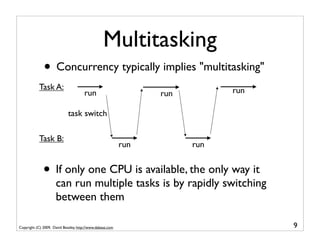
              • Concurrency typically implies "multitasking"
            Task A:                                                          run
                                      run                        run

                             task switch

            Task B:
                                                           run         run


              • If only one CPU is available, the only way it
                     can run multiple tasks is by rapidly switching
                     between them

Copyright (C) 2009, David Beazley, http://www.dabeaz.com                           9
Parallel Processing
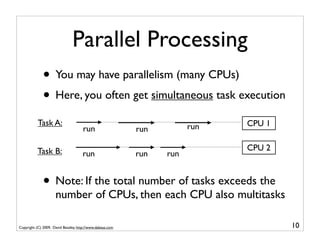
              • You may have parallelism (many CPUs)
              • Here, you often get simultaneous task execution
           Task A:                                                     run   CPU 1
                                      run                  run

           Task B:                                                           CPU 2
                                     run                   run   run


              • Note: If the total number of tasks exceeds the
                     number of CPUs, then each CPU also multitasks

Copyright (C) 2009, David Beazley, http://www.dabeaz.com                             10
Task Execution
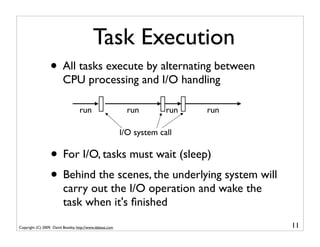
                  • All tasks execute by alternating between
                          CPU processing and I/O handling

                                    run                      run        run   run

                                                           I/O system call

                  • For I/O, tasks must wait (sleep)
                  • Behind the scenes, the underlying system will
                          carry out the I/O operation and wake the
                          task when it's finished
Copyright (C) 2009, David Beazley, http://www.dabeaz.com                            11
CPU Bound Tasks
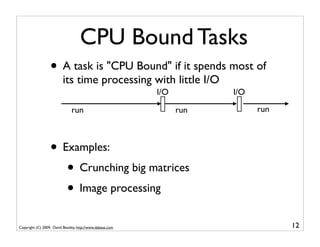
                  • A task is "CPU Bound" if it spends most of
                          its time processing with little I/O
                                                           I/O         I/O

                               run                               run         run


                  • Examples:
                     • Crunching big matrices
                     • Image processing
Copyright (C) 2009, David Beazley, http://www.dabeaz.com                           12
I/O Bound Tasks
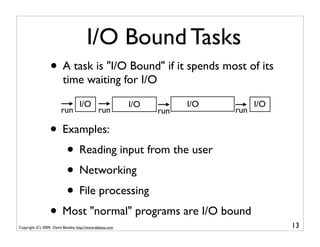
                  • A task is "I/O Bound" if it spends most of its
                          time waiting for I/O
                                   I/O                     I/O         I/O         I/O
                         run                   run               run         run

                  • Examples:
                     • Reading input from the user
                     • Networking
                     • File processing
                  • Most "normal" programs are I/O bound
Copyright (C) 2009, David Beazley, http://www.dabeaz.com                                 13
Shared Memory
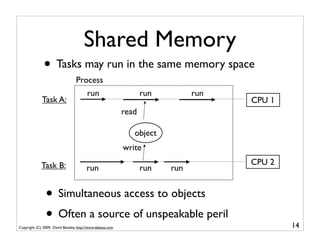
              • Tasks may run in the same memory space
                                 Process
                                        run                       run         run
             Task A:                                                                CPU 1
                                                           read

                                                              object
                                                           write

             Task B:                                                                CPU 2
                                        run                       run   run


               • Simultaneous access to objects
               • Often a source of unspeakable peril
Copyright (C) 2009, David Beazley, http://www.dabeaz.com                                    14
Processes
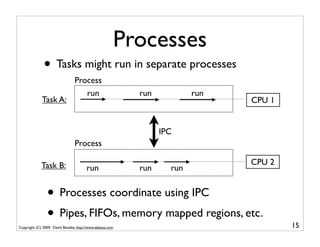
              • Tasks might run in separate processes
                                 Process
                                    run                    run           run
             Task A:                                                           CPU 1


                                                                 IPC
                                 Process

             Task B:                                                           CPU 2
                                        run                run     run


                • Processes coordinate using IPC
                • Pipes, FIFOs, memory mapped regions, etc.
Copyright (C) 2009, David Beazley, http://www.dabeaz.com                               15
Distributed Computing
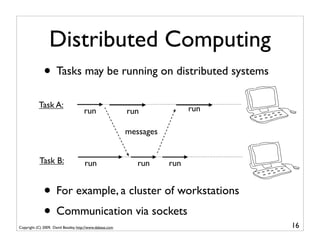
              • Tasks may be running on distributed systems
           Task A:                                                          run
                                      run                  run

                                                           messages


            Task B:                    run                    run     run


              • For example, a cluster of workstations
              • Communication via sockets
Copyright (C) 2009, David Beazley, http://www.dabeaz.com                          16
Part 2
                                       Why Concurrency and Python?


Copyright (C) 2009, David Beazley, http://www.dabeaz.com             17
Some Issues
                • Python is interpreted
                             "What the hardware giveth, the software taketh away."

                • Frankly, it doesn't seem like a natural match
                        for any sort of concurrent programming
                • Isn't concurrent programming all about high
                        performance anyways???


Copyright (C) 2009, David Beazley, http://www.dabeaz.com                             18
Why Use Python at All?
                 • Python is a very high level language
                 • And it comes with a large library
                    • Useful data types (dictionaries, lists,etc.)
                    • Network protocols
                    • Text parsing (regexs, XML, HTML, etc.)
                    • Files and the file system
                    • Databases
                 • Programmers like using this stuff...
Copyright (C) 2009, David Beazley, http://www.dabeaz.com             19
Python as a Framework
                • Python is often used as a high-level framework
                • The various components might be a mix of
                        languages (Python, C, C++, etc.)
                • Concurrency may be a core part of the
                        framework's overall architecture
                • Python has to deal with it even if a lot of the
                        underlying processing is going on in C


Copyright (C) 2009, David Beazley, http://www.dabeaz.com            20
Programmer Performance
              • Programmers are often able to get complex
                     systems to "work" in much less time using a
                     high-level language like Python than if they're
                     spending all of their time hacking C code.
                 "The best performance improvement is the transition from
                           the nonworking to the working state."
                                   - John Ousterhout
                              "Premature optimization is the root of all evil."
                                           - Donald Knuth
                                           "You can always optimize it later."
                                                     - Unknown
Copyright (C) 2009, David Beazley, http://www.dabeaz.com                          21
Performance is Irrelevant
                 • Many concurrent programs are "I/O bound"
                 • They spend virtually all of their time sitting
                         around waiting
                 • Python can "wait" just as fast as C (maybe
                         even faster--although I haven't measured it).
                 • If there's not much processing, who cares if
                         it's being done in an interpreter? (One
                         exception : if you need an extremely rapid
                         response time as in real-time systems)

Copyright (C) 2009, David Beazley, http://www.dabeaz.com                 22
You Can Go Faster
                   • Python can be extended with C code
                   • Look at ctypes, Cython, Swig, etc.
                   • If you need really high-performance, you're
                           not coding Python--you're using C extensions
                   • This is what most of the big scientific
                           computing hackers are doing
                   • It's called "using the right tool for the job"
Copyright (C) 2009, David Beazley, http://www.dabeaz.com                  23
Commentary
                 • Concurrency is usually a really bad option if
                        you're merely trying to make an inefficient
                        Python script run faster
                 • Because its interpreted, you can often make
                        huge gains by focusing on better algorithms
                        or offloading work into C extensions
                 • For example, a C extension might make a
                        script run 20x faster vs. the marginal
                        improvement of parallelizing a slow script to
                        run on a couple of CPU cores
Copyright (C) 2009, David Beazley, http://www.dabeaz.com                24
Part 3
                                           Python Thread Programming


Copyright (C) 2009, David Beazley, http://www.dabeaz.com               25
Concept: Threads
                • What most programmers think of when they
                       hear about "concurrent programming"
                • An independent task running inside a program
                • Shares resources with the main program
                       (memory, files, network connections, etc.)
                • Has its own independent flow of execution
                       (stack, current instruction, etc.)


Copyright (C) 2009, David Beazley, http://www.dabeaz.com           26
Thread Basics
                       % python program.py

                                      statement             Program launch. Python
                                      statement            loads a program and starts
                                         ...                  executing statements

                                    "main thread"


Copyright (C) 2009, David Beazley, http://www.dabeaz.com                                27
Thread Basics
                       % python program.py

                                      statement
                                      statement            Creation of a thread.
                                         ...               Launches a function.
                             create thread(foo)                             def foo():


Copyright (C) 2009, David Beazley, http://www.dabeaz.com                                 28
Thread Basics
                       % python program.py

                                      statement
                                      statement
                                         ...

                             create thread(foo)                            def foo():

                                      statement             Concurrent       statement
                                      statement                              statement
                                                             execution
                                         ...                                    ...
                                                           of statements


Copyright (C) 2009, David Beazley, http://www.dabeaz.com                                 29
Thread Basics
                       % python program.py

                                      statement
                                      statement
                                         ...

                             create thread(foo)                            def foo():

                                      statement                                 statement
                                      statement                                 statement
                                         ...               thread terminates       ...
                                                           on return or exit
                                      statement                                return or exit
                                      statement
                                         ...


Copyright (C) 2009, David Beazley, http://www.dabeaz.com                                        30
Thread Basics
                       % python program.py                     Key idea: Thread is like a little
                                                               "task" that independently runs
                                      statement
                                      statement                     inside your program
                                         ...
                                                           thread
                             create thread(foo)                         def foo():

                                      statement                            statement
                                      statement                            statement
                                         ...                                  ...


                                      statement                          return or exit
                                      statement
                                         ...


Copyright (C) 2009, David Beazley, http://www.dabeaz.com                                           31
threading module
                     • Python threads are defined by a class
                              import time
                              import threading

                              class CountdownThread(threading.Thread):
                                  def __init__(self,count):
                                      threading.Thread.__init__(self)
                                      self.count = count
                                  def run(self):
                                      while self.count > 0:
                                          print "Counting down", self.count
                                          self.count -= 1
                                          time.sleep(5)
                                      return

                       • You inherit from Thread and redefine run()
Copyright (C) 2009, David Beazley, http://www.dabeaz.com                      32
threading module
                     • Python threads are defined by a class
                              import time
                              import threading

                              class CountdownThread(threading.Thread):
                                  def __init__(self,count):
                                      threading.Thread.__init__(self)
                                      self.count = count
                                  def run(self):
                                      while self.count > 0:
       This code
                                          print "Counting down", self.count
      executes in                         self.count -= 1
      the thread                          time.sleep(5)
                                      return

                       • You inherit from Thread and redefine run()
Copyright (C) 2009, David Beazley, http://www.dabeaz.com                      33
threading module

                   • To launch, create thread objects and call start()
                            t1 = CountdownThread(10)       # Create the thread object
                            t1.start()                     # Launch the thread

                            t2 = CountdownThread(20)       # Create another thread
                            t2.start()                     # Launch


                   • Threads execute until the run() method stops


Copyright (C) 2009, David Beazley, http://www.dabeaz.com                                34
Functions as threads
                • Alternative method of launching threads
                          def countdown(count):
                              while count > 0:
                                  print "Counting down", count
                                  count -= 1
                                  time.sleep(5)

                          t1 = threading.Thread(target=countdown,args=(10,))
                          t1.start()


                  • Creates a Thread object, but its run()
                          method just calls the given function


Copyright (C) 2009, David Beazley, http://www.dabeaz.com                       35
Joining a Thread
                 • Once you start a thread, it runs independently
                 • Use t.join() to wait for a thread to exit
                               t.start()         # Launch a thread
                               ...
                               # Do other work
                               ...
                               # Wait for thread to finish
                               t.join()          # Waits for thread t to exit


                   • This only works from other threads
                   • A thread can't join itself
Copyright (C) 2009, David Beazley, http://www.dabeaz.com                        36
Daemonic Threads
              • If a thread runs forever, make it "daemonic"
                         t.daemon = True
                         t.setDaemon(True)


              • If you don't do this, the interpreter will lock
                     when the main thread exits---waiting for the
                     thread to terminate (which never happens)
              • Normally you use this for background tasks

Copyright (C) 2009, David Beazley, http://www.dabeaz.com            37
Interlude
               • Creating threads is really easy
               • You can create thousands of them if you want
               • Programming with threads is hard
               • Really hard
                    Q: Why did the multithreaded chicken cross the road?
                    A: to To other side. get the
                                                                 -- Jason Whittington

Copyright (C) 2009, David Beazley, http://www.dabeaz.com                                38
Access to Shared Data
              • Threads share all of the data in your program
              • Thread scheduling is non-deterministic
              • Operations often take several steps and might
                      be interrupted mid-stream (non-atomic)
              • Thus, access to any kind of shared data is also
                      non-deterministic (which is a really good way
                      to have your head explode)


Copyright (C) 2009, David Beazley, http://www.dabeaz.com              39
Accessing Shared Data
                  • Consider a shared object
                        x = 0


                  • And two threads that modify it
                         Thread-1                          Thread-2
                         --------                          --------
                         ...                               ...
                         x = x + 1                         x = x - 1
                         ...                               ...


                  • It's possible that the resulting value will be
                         unpredictably corrupted

Copyright (C) 2009, David Beazley, http://www.dabeaz.com               40
Accessing Shared Data
                    • The two threads
                            Thread-1                                        Thread-2
                            --------                                        --------
                            ...                                             ...
                            x = x + 1                                       x = x - 1
                            ...                                             ...

                    • Low level interpreter execution
                            Thread-1                                        Thread-2
                            --------                                        --------

                            LOAD_GLOBAL                    1 (x)
                            LOAD_CONST                     2 (1)
                                                                   thread   LOAD_GLOBAL 1 (x)
                                                                   switch
                                                                            LOAD_CONST   2 (1)
                                                                            BINARY_SUB
                                                                            STORE_GLOBAL 1 (x)
                            BINARY_ADD                             thread
                            STORE_GLOBAL 1 (x)                     switch
Copyright (C) 2009, David Beazley, http://www.dabeaz.com                                         41
Accessing Shared Data
                   • Low level interpreter code
                            Thread-1                                        Thread-2
                            --------                                        --------

                            LOAD_GLOBAL                    1 (x)
                            LOAD_CONST                     2 (1)
                                                                   thread   LOAD_GLOBAL 1 (x)
                                                                   switch
                                                                            LOAD_CONST   2 (1)
                                                                            BINARY_SUB
                                                                            STORE_GLOBAL 1 (x)
                            BINARY_ADD                             thread
                            STORE_GLOBAL 1 (x)                     switch


             These operations get performed with a "stale"
             value of x. The computation in Thread-2 is lost.
Copyright (C) 2009, David Beazley, http://www.dabeaz.com                                         42
Accessing Shared Data
                  • Is this actually a real concern?
                           x = 0            # A shared value
                           def foo():
                                 global x
                                 for i in xrange(100000000): x += 1

                           def bar():
                                global x
                                for i in xrange(100000000): x -= 1

                           t1 = threading.Thread(target=foo)
                           t2 = threading.Thread(target=bar)
                           t1.start(); t2.start()
                           t1.join(); t2.join()   # Wait for completion
                           print x                # Expected result is 0


                  • Yes, the print produces a random nonsensical
                         value each time (e.g., -83412 or 1627732)
Copyright (C) 2009, David Beazley, http://www.dabeaz.com                   43
Race Conditions
                    • The corruption of shared data due to
                           thread scheduling is often known as a "race
                           condition."
                    • It's often quite diabolical--a program may
                           produce slightly different results each time
                           it runs (even though you aren't using any
                           random numbers)
                    • Or it may just flake out mysteriously once
                           every two weeks

Copyright (C) 2009, David Beazley, http://www.dabeaz.com                  44
Thread Synchronization

                    • Identifying and fixing a race condition will
                           make you a better programmer (e.g., it
                           "builds character")
                    • However, you'll probably never get that
                           month of your life back...
                    • To fix :You have to synchronize threads

Copyright (C) 2009, David Beazley, http://www.dabeaz.com            45
Part 4
                                      Thread Synchronization Primitives


Copyright (C) 2009, David Beazley, http://www.dabeaz.com                  46
Synchronization Options
                    • The threading library defines the following
                           objects for synchronizing threads
                               • Lock
                               • RLock
                               • Semaphore
                               • BoundedSemaphore
                               • Event
                               • Condition
Copyright (C) 2009, David Beazley, http://www.dabeaz.com           47
Synchronization Options
                    • In my experience, there is often a lot of
                           confusion concerning the intended use of
                           the various synchronization objects
                    • Maybe because this is where most
                           students "space out" in their operating
                           system course (well, yes actually)
                    • Anyways, let's take a little tour

Copyright (C) 2009, David Beazley, http://www.dabeaz.com              48
Mutex Locks
                    • Mutual Exclusion Lock
                             m = threading.Lock()


                   • Probably the most commonly used
                           synchronization primitive
                   • Primarily used to synchronize threads so
                           that only one thread can make modifications
                           to shared data at any given time


Copyright (C) 2009, David Beazley, http://www.dabeaz.com                49
Mutex Locks
                 • There are two basic operations
                           m.acquire()                     # Acquire the lock
                           m.release()                     # Release the lock


                  • Only one thread can successfully acquire the
                         lock at any given time
                  • If another thread tries to acquire the lock
                         when its already in use, it gets blocked until
                         the lock is released


Copyright (C) 2009, David Beazley, http://www.dabeaz.com                        50
Use of Mutex Locks
                   • Commonly used to enclose critical sections
                              x = 0
                              x_lock = threading.Lock()

                             Thread-1                      Thread-2
                             --------                      --------
                             ...                           ...
                             x_lock.acquire()              x_lock.acquire()
      Critical               x = x + 1                     x = x - 1
      Section
                             x_lock.release()              x_lock.release()
                             ...                           ...


                   • Only one thread can execute in critical section
                           at a time (lock gives exclusive access)
Copyright (C) 2009, David Beazley, http://www.dabeaz.com                      51
Using a Mutex Lock
                   • It is your responsibility to identify and lock
                           all "critical sections"
                              x = 0
                              x_lock = threading.Lock()

                             Thread-1                                  Thread-2
                             --------                                  --------
                             ...                                       ...
                             x_lock.acquire()                          x = x - 1
                             x = x + 1                                 ...
                             x_lock.release()
                             ...
                                                            If you use a lock in one place, but
                                                             not another, then you're missing
                                                           the whole point. All modifications
                                                            to shared state must be enclosed
                                                                by lock acquire()/release().
Copyright (C) 2009, David Beazley, http://www.dabeaz.com                                          52
Locking Perils


                     • Locking looks straightforward
                     • Until you start adding it to your code
                     • Managing locks is a lot harder than it looks


Copyright (C) 2009, David Beazley, http://www.dabeaz.com              53
Lock Management
                     • Acquired locks must always be released
                     • However, it gets evil with exceptions and
                            other non-linear forms of control-flow
                     • Always try to follow this prototype:
                                   x = 0
                                   x_lock = threading.Lock()

                                   # Example critical section
                                   x_lock.acquire()
                                   try:
                                        statements using x
                                   finally:
                                        x_lock.release()


Copyright (C) 2009, David Beazley, http://www.dabeaz.com            54
Lock Management
                    • Python 2.6/3.0 has an improved mechanism
                           for dealing with locks and critical sections
                             x = 0
                             x_lock = threading.Lock()

                             # Critical section
                             with x_lock:
                                 statements using x
                             ...


                    • This automatically acquires the lock and
                           releases it when control enters/exits the
                           associated block of statements

Copyright (C) 2009, David Beazley, http://www.dabeaz.com                  55
Locks and Deadlock
                    • Don't write code that acquires more than
                            one mutex lock at a time
                             x = 0
                             y = 0
                             x_lock = threading.Lock()
                             y_lock = threading.Lock()

                             with x_lock:
                                 statements using x
                                 ...
                                 with y_lock:
                                     statements using x and y
                                     ...

                     • This almost invariably ends up creating a
                             program that mysteriously deadlocks (even
                             more fun to debug than a race condition)
Copyright (C) 2009, David Beazley, http://www.dabeaz.com                 56
RLock
              • Reentrant Mutex Lock
                       m = threading.RLock()                  # Create a lock
                       m.acquire()                            # Acquire the lock
                       m.release()                            # Release the lock


              • Similar to a normal lock except that it can be
                     reacquired multiple times by the same thread
              • However, each acquire() must have a release()
              • Common use : Code-based locking (where
                     you're locking function/method execution as
                     opposed to data access)
Copyright (C) 2009, David Beazley, http://www.dabeaz.com                           57
RLock Example
              • Implementing a kind of "monitor" object
                        class Foo(object):
                            lock = threading.RLock()
                            def bar(self):
                                with Foo.lock:
                                    ...
                            def spam(self):
                                with Foo.lock:
                                     ...
                                     self.bar()
                                     ...

               • Only one thread is allowed to execute
                       methods in the class at any given time
               • However, methods can call other methods that
                       are holding the lock (in the same thread)
Copyright (C) 2009, David Beazley, http://www.dabeaz.com           58
Semaphores
               • A counter-based synchronization primitive
                         m = threading.Semaphore(n) # Create a semaphore
                         m.acquire()                # Acquire
                         m.release()                # Release


               • acquire() - Waits if the count is 0, otherwise
                       decrements the count and continues
               • release() - Increments the count and signals
                       waiting threads (if any)
               • Unlike locks, acquire()/release() can be called
                       in any order and by any thread

Copyright (C) 2009, David Beazley, http://www.dabeaz.com                   59
Semaphore Uses

               • Resource control.       You can limit the number
                      of threads performing certain operations.
                      For example, performing database queries,
                      making network connections, etc.
               • Signaling. Semaphores can be used to send
                      "signals" between threads. For example,
                      having one thread wake up another thread.


Copyright (C) 2009, David Beazley, http://www.dabeaz.com            60
Resource Control
                • Using a semaphore to limit resources
                        sema = threading.Semaphore(5)      # Max: 5-threads

                        def fetch_page(url):
                            sema.acquire()
                            try:
                                 u = urllib.urlopen(url)
                                 return u.read()
                            finally:
                                 sema.release()


               • In this example, only 5 threads can be
                       executing the function at once (if there are
                       more, they will have to wait)

Copyright (C) 2009, David Beazley, http://www.dabeaz.com                      61
Thread Signaling
                • Using a semaphore to signal
                          done = threading.Semaphore(0)

                          Thread 1                         Thread 2
                          ...
                          statements                       done.acquire()
                          statements                       statements
                          statements                       statements
                          done.release()                   statements
                                                           ...


                 • Here, acquire() and release() occur in different
                         threads and in a different order
                 • Often used with producer-consumer problems
Copyright (C) 2009, David Beazley, http://www.dabeaz.com                    62
Events
                 • Event Objects
                           e = threading.Event()
                           e.isSet()        # Return True if event set
                           e.set()          # Set event
                           e.clear()        # Clear event
                           e.wait()         # Wait for event


                  • This can be used to have one or more
                         threads wait for something to occur
                  • Setting an event will unblock all waiting
                         threads simultaneously (if any)
                  • Common use : barriers, notification
Copyright (C) 2009, David Beazley, http://www.dabeaz.com                 63
Event Example
                • Using an event to ensure proper initialization
                         init = threading.Event()

                         def worker():
                             init.wait()                   # Wait until initialized
                             statements
                             ...

                         def initialize():
                             statements                    # Setting up
                             statements                    # ...
                             ...
                             init.set()                    # Done initializing

                         Thread(target=worker).start()                    # Launch workers
                         Thread(target=worker).start()
                         Thread(target=worker).start()
                         initialize()                                     # Initialize

Copyright (C) 2009, David Beazley, http://www.dabeaz.com                                     64
Event Example
                • Using an event to signal "completion"
                    def master():
                        ...
                        item = create_item()
                        evt = Event()                         Worker Thread
                        worker.send((item,evt))
                        ...                                item, evt = get_work()
                        # Other processing                 processing
                        ...                                processing
                        ...                                ...
                        ...                                ...
                        ...                                # Done
                        ...                                evt.set()
                        # Wait for worker
                        evt.wait()


                • Might use for asynchronous processing, etc.
Copyright (C) 2009, David Beazley, http://www.dabeaz.com                        65
Condition Variables
                 • Condition Objects
                          cv = threading.Condition([lock])
                          cv.acquire()     # Acquire the underlying lock
                          cv.release()     # Release the underlying lock
                          cv.wait()        # Wait for condition
                          cv.notify()      # Signal that a condition holds
                          cv.notifyAll()   # Signal all threads waiting


                  • A combination of locking/signaling
                  • Lock is used to protect code that establishes
                         some sort of "condition" (e.g., data available)
                  • Signal is used to notify other threads that a
                         "condition" has changed state
Copyright (C) 2009, David Beazley, http://www.dabeaz.com                     66
Condition Variables
                 • Common Use : Producer/Consumer patterns
                          items = []
                          items_cv = threading.Condition()


                           Producer Thread                 Consumer Thread
                           item = produce_item()           with items_cv:
                           with items_cv:                      ...
                               items.append(item)              x = items.pop(0)

                                                           # Do something with x
                                                           ...


                   • First, you use the locking part of a CV
                          synchronize access to shared data (items)

Copyright (C) 2009, David Beazley, http://www.dabeaz.com                           67
Condition Variables
                 • Common Use : Producer/Consumer patterns
                          items = []
                          items_cv = threading.Condition()


                           Producer Thread                 Consumer Thread
                           item = produce_item()           with items_cv:
                           with items_cv:                      while not items:
                               items.append(item)                  items_cv.wait()
                               items_cv.notify()               x = items.pop(0)

                                                           # Do something with x
                                                           ...

                   • Next you add signaling and waiting
                   • Here, the producer signals the consumer
                          that it put data into the shared list
Copyright (C) 2009, David Beazley, http://www.dabeaz.com                             68
Condition Variables
                 • Some tricky bits involving wait()
                                                  Consumer Thread
                 • Before waiting, you have                with items_cv:
                                                               while not items:
                         to acquire the lock                       items_cv.wait()


                 • wait() releases the lock
                                                               x = items.pop(0)

                                                           # Do something with x
                         when waiting and                  ...

                         reacquires when woken

                 • Conditions are often transient and may not
                        hold by the time wait() returns. So, you must
                        always double-check (hence, the while loop)

Copyright (C) 2009, David Beazley, http://www.dabeaz.com                       69
Interlude
                   • Working with all of the synchronization
                           primitives is a lot trickier than it looks
                   • There are a lot of nasty corner cases and
                           horrible things that can go wrong
                   • Bad performance, deadlock, livelock,
                           starvation, bizarre CPU scheduling, etc...
                   • All are valid reasons to not use threads
Copyright (C) 2009, David Beazley, http://www.dabeaz.com                70
Part 5
                                                           Threads and Queues


Copyright (C) 2009, David Beazley, http://www.dabeaz.com                        71
Threads and Queues
                   • Threaded programs are often easier to manage
                          if they can be organized into producer/
                          consumer components connected by queues

                                 Thread 1                  send(item)            Thread 2
                                                                        Queue
                                (Producer)                                      (Consumer)


                    • Instead of "sharing" data, threads only
                           coordinate by sending data to each other
                    • Think Unix "pipes" if you will...
Copyright (C) 2009, David Beazley, http://www.dabeaz.com                                     72
Queue Library Module
               • Python has a thread-safe queuing module
               • Basic operations
                         from Queue import Queue

                         q = Queue([maxsize])              #   Create a queue
                         q.put(item)                       #   Put an item on the queue
                         q.get()                           #   Get an item from the queue
                         q.empty()                         #   Check if empty
                         q.full()                          #   Check if full


               • Usage :You try to strictly adhere to get/put
                       operations. If you do this, you don't need to
                       use other synchronization primitives.
Copyright (C) 2009, David Beazley, http://www.dabeaz.com                                    73
Queue Usage
               • Most commonly used to set up various forms
                       of producer/consumer problems
                       from Queue import Queue
                       q = Queue()


              Producer Thread                              Consumer Thread
              for item in produce_items():                 while True:
                  q.put(item)                                  item = q.get()
                                                               consume_item(item)


               • Critical point :You don't need locks here
Copyright (C) 2009, David Beazley, http://www.dabeaz.com                            74
Queue Signaling
               • Queues also have a signaling mechanism
                        q.task_done()                      # Signal that work is done
                        q.join()                           # Wait for all work to be done


                • Many Python programmers don't know
                        about this (since it's relatively new)
                • Used to determine when processing is done
                         Producer Thread                                 Consumer Thread
                         for item in produce_items():                    while True:
                             q.put(item)                                     item = q.get()
                         # Wait for consumer                                 consume_item(item)
                         q.join()                                            q.task_done()


Copyright (C) 2009, David Beazley, http://www.dabeaz.com                                          75
Queue Programming
               • There are many ways to use queues
               • You can have as many consumers/producers
                      as you want hooked up to the same queue

                               producer
                                                                   consumer
                               producer                    Queue

                               producer                            consumer


               • In practice, try to keep it simple
Copyright (C) 2009, David Beazley, http://www.dabeaz.com                      76
Part 6
                                                The Problem with Threads


Copyright (C) 2009, David Beazley, http://www.dabeaz.com                   77
An Inconvenient Truth

                   • Thread programming quickly gets hairy
                   • End up with a huge mess of shared data, locks,
                           queues, and other synchronization primitives
                   • Which is really unfortunate because Python
                           threads have some major limitations
                   • Namely, they have pathological performance!

Copyright (C) 2009, David Beazley, http://www.dabeaz.com                  78
A Performance Test
                • Consider this CPU-bound function
                       def count(n):
                           while n > 0:
                               n -= 1

                • Sequential Execution:
                         count(100000000)
                         count(100000000)

                • Threaded execution
                         t1 = Thread(target=count,args=(100000000,))
                         t1.start()
                         t2 = Thread(target=count,args=(100000000,))
                         t2.start()

                • Now, you might expect two threads to run
                        twice as fast on multiple CPU cores
Copyright (C) 2009, David Beazley, http://www.dabeaz.com               79
Bizarre Results
                 • Performance comparison (Dual-Core 2Ghz
                        Macbook, OS-X 10.5.6)
                                     Sequential            : 24.6s
                                     Threaded              : 45.5s (1.8X slower!)

                  • If you disable one of the CPU cores...
                                     Threaded              : 38.0s
                  • Insanely horrible performance.    Better
                         performance with fewer CPU cores? It
                         makes no sense.

Copyright (C) 2009, David Beazley, http://www.dabeaz.com                            80
Interlude
                  • It's at this point that programmers often
                         decide to abandon threads altogether
                  • Or write a blog rant that vaguely describes
                         how Python threads "suck" because of their
                         failed attempt at Python supercomputing
                  • Well, yes there is definitely some "suck"
                         going on, but let's dig a little deeper...


Copyright (C) 2009, David Beazley, http://www.dabeaz.com               81
Part 7
                                The Inside Story on Python Threads
                                        "The horror! The horror!" - Col. Kurtz


Copyright (C) 2009, David Beazley, http://www.dabeaz.com                         82
What is a Thread?
              • Python threads are real system threads
                 • POSIX threads (pthreads)
                 • Windows threads
              • Fully managed by the host operating system
                 • All scheduling/thread switching
              • Represent threaded execution of the Python
                      interpreter process (written in C)

Copyright (C) 2009, David Beazley, http://www.dabeaz.com     83
The Infamous GIL
                    • Here's the rub...
                    • Only one Python thread can execute in the
                           interpreter at once
                    • There is a "global interpreter lock" that
                           carefully controls thread execution
                    • The GIL ensures that sure each thread gets
                           exclusive access to the entire interpreter
                           internals when it's running


Copyright (C) 2009, David Beazley, http://www.dabeaz.com                84
GIL Behavior
               • Whenever a thread runs, it holds the GIL
               • However, the GIL is released on blocking I/O
                                   run                     run             run                     run
                                              I/O                I/O             I/O

                                  e
                      ire ease uir ease                             u ire ease             u ire
                    qu el acq rel                                 cq rel               ac
                                                                                          q
                  ac r                                           a


               • So, any time a thread is forced to wait, other
                      "ready" threads get their chance to run
               • Basically a kind of "cooperative" multitasking
Copyright (C) 2009, David Beazley, http://www.dabeaz.com                                                 85
CPU Bound Processing

              • To deal with CPU-bound threads, the
                      interpreter periodically performs a "check"
              • By default, every 100 interpreter "ticks"
                                                                k             k            k
                                                              ec            ec           ec
                                                           ch            ch            ch
                   CPU Bound
                     Thread                      Run 100       Run 100       Run 100
                                                  ticks         ticks         ticks


Copyright (C) 2009, David Beazley, http://www.dabeaz.com                                       86
The Check Interval
              • The check interval is a global counter that is
                      completely independent of thread scheduling
                                                                  k              k             k
                                                               ec             ec             ec
                                                 100 ticks   ch 100 ticks   ch 100 ticks   ch 100 ticks
                 Main Thread

                     Thread 2

                     Thread 3

                     Thread 4


               • A "check" is simply made every 100 "ticks"
Copyright (C) 2009, David Beazley, http://www.dabeaz.com                                                  87
The Periodic Check
               • What happens during the periodic check?
                   • In the main thread only, signal handlers
                                        will execute if there are any pending
                                        signals
                                • Release and reacquisition of the GIL
               • That last bullet describes how multiple CPU-
                      bound threads get to run (by briefly releasing
                      the GIL, other threads get a chance to run).

Copyright (C) 2009, David Beazley, http://www.dabeaz.com                        88
What is a "Tick?"
       • Ticks loosely map to interpreter instructions
                                                                    >>> import dis
          def countdown(n):                                         >>> dis.dis(countdown)
              while n > 0:                                          0 SETUP_LOOP             33 (to 36)
                  print n                                           3 LOAD_FAST               0 (n)
                  n -= 1                                            6 LOAD_CONST              1 (0)
                                                                    9 COMPARE_OP              4 (>)

       •       Instructions in                             Tick 1   12 JUMP_IF_FALSE
                                                                    15 POP_TOP
                                                                                              19 (to 34)

               the Python VM                                        16 LOAD_FAST               0 (n)
                                                                    19 PRINT_ITEM
                                                           Tick 2   20 PRINT_NEWLINE
                                                                    21 LOAD_FAST               0 (n)
                                                           Tick 3   24 LOAD_CONST              2 (1)
                                                                    27 INPLACE_SUBTRACT
                                                                    28 STORE_FAST              0 (n)
                                                           Tick 4   31 JUMP_ABSOLUTE           3
                                                                    ...

Copyright (C) 2009, David Beazley, http://www.dabeaz.com                                               89
Tick Execution
           • Interpreter ticks are not time-based
           • Ticks don't have consistent execution times
           • Long operations can block everything
                     >>> nums = xrange(100000000)
                     >>> -1 in nums                        1 tick (~ 6.6 seconds)
                     False
                     >>>

           • Try hitting Ctrl-C (ticks are uninterruptible)
                     >>> nums = xrange(100000000)
                     >>> -1 in nums
                     ^C^C^C   (nothing happens, long pause)
                     ...
                     KeyboardInterrupt
                     >>>

Copyright (C) 2009, David Beazley, http://www.dabeaz.com                            90
Thread Scheduling
                • Python does not have a thread scheduler
                • There is no notion of thread priorities,
                       preemption, round-robin scheduling, etc.
                • For example, the list of threads in the
                       interpreter isn't used for anything related to
                       thread execution
                • All thread scheduling is left to the host
                       operating system (e.g., Linux, Windows, etc.)


Copyright (C) 2009, David Beazley, http://www.dabeaz.com                91
GIL Implementation
              • The GIL is not a simple mutex lock
              • The implementation (Unix) is either...
                 • A POSIX unnamed semaphore
                 • Or a pthreads condition variable
              • All interpreter locking is based on signaling
                 • To acquire the GIL, check if it's free. If
                                 not, go to sleep and wait for a signal
                          • To release the GIL, free it and signal
Copyright (C) 2009, David Beazley, http://www.dabeaz.com                  92
Thread Scheduling
                • Thread switching is far more subtle than most
                       programmers realize (it's tied up in the OS)
                                                                     k                 k             k
                                                                  ec               he
                                                                                      c            ec
                                                               ch                 c              ch
                                          100 ticks                100 ticks
                   Thread 1                                                                ...            SUSPENDED

                                                    signal               signal
                                                                                                 Thread
                                                               Operating                         Context
                                                                System                            Switch
                                                                                                                 signal       signal
                                                           signal
                   Thread 2                                         SUSPENDED
                                                                                                             k            k
                                                                                                           ec           ec
                                                                                                         ch           ch

                • The lag between signaling and scheduling may
                       be significant (depends on the OS)
Copyright (C) 2009, David Beazley, http://www.dabeaz.com                                                                               93
CPU-Bound Threads
                   • As we saw earlier, CPU-bound threads have
                          horrible performance properties
                   • Far worse than simple sequential execution
                        • 24.6 seconds (sequential)
                        • 45.5 seconds (2 threads)
                   • A big question : Why?
                        • What is the source of that overhead?
Copyright (C) 2009, David Beazley, http://www.dabeaz.com          94
Signaling Overhead
            • GIL thread signaling is the source of that
            • After every 100 ticks, the interpreter
               • Locks a mutex
               • Signals on a condition variable/semaphore
                               where another thread is always waiting
                        • Because another thread is waiting, extra
                               pthreads processing and system calls get
                               triggered to deliver the signal

Copyright (C) 2009, David Beazley, http://www.dabeaz.com                  95
A Rough Measurement
                 • Sequential Execution (OS-X, 1 CPU)
                    • 736 Unix system calls
                    • 117 Mach System Calls
                 • Two threads (OS-X, 1 CPU)
                    • 1149 Unix system calls
                    • ~ 3.3 Million Mach System Calls
                 • Yow! Look at that last figure.
Copyright (C) 2009, David Beazley, http://www.dabeaz.com   96
Multiple CPU Cores
            • The penalty gets far worse on multiple cores
            • Two threads (OS-X, 1 CPU)
               • 1149 Unix system calls
               • ~3.3 Million Mach System Calls
            • Two threads (OS-X, 2 CPUs)
               • 1149 Unix system calls
               • ~9.5 Million Mach System calls
Copyright (C) 2009, David Beazley, http://www.dabeaz.com     97
Multicore GIL Contention
                • With multiple cores, CPU-bound threads get
                       scheduled simultaneously (on different
                       processors) and then have a GIL battle
                                Thread 1 (CPU 1)                    Thread 2 (CPU 2)
                                                   run
                            Release GIL                    signal
                            Acquire GIL                                      Wake
                                                   run
                                                                             Acquire GIL (fails)
                            Release GIL
                                                           signal
                            Acquire GIL
                                                                             Wake
                                                   run
                                                                             Acquire GIL (fails)


              • The waiting thread (T2) may make 100s of
                      failed GIL acquisitions before any success
Copyright (C) 2009, David Beazley, http://www.dabeaz.com                                           98
The GIL and C Code
                    • As mentioned, Python can talk to C/C++
                    • C/C++ extensions can release the
                           interpreter lock and run independently
                    • Caveat : Once released, C code shouldn't
                           do any processing related to the Python
                           interpreter or Python objects
                    • The C code itself must be thread-safe
Copyright (C) 2009, David Beazley, http://www.dabeaz.com             99
The GIL and C Extensions
              • Having C extensions release the GIL is how
                      you get into true "parallel computing"
                                                                                                           e
                                                                            le ase                     quir
                                                                         Lr
                                                                           e
                                                                                                  L ac
                                                                   G   I                     GI
                           Thread 1:
                                                      Python       C extension                              Python
                                                   instructions       code                               instructions


                                                                                  Python
                                                                               instructions
                            Thread 2                                  e                           se
                                                                  quir                         lea
                                                             L ac                          Lr
                                                                                             e
                                                           GI                         GI


Copyright (C) 2009, David Beazley, http://www.dabeaz.com                                                                100