Prepared By:
Mr. Richard R. Basilio
BSECE – Dip ICT
   By wikipedia definition:
      ▪ an algorithm is a sequence of finite instructions,
        often used for calculation and data processing.
      ▪ It is formally a type of effective method in which a
        list of well-defined instructions for completing a
        task will, when given an initial state, proceed
        through a well-defined series of successive states,
        eventually terminating in an end-state.
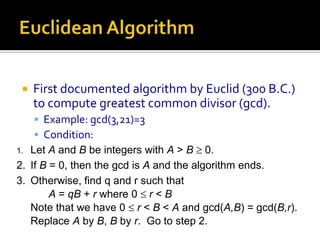
   First documented algorithm by Euclid (300 B.C.)
     to compute greatest common divisor (gcd).
     Example: gcd(3,21)=3
     Condition:
1. Let A and B be integers with A > B 0.
2. If B = 0, then the gcd is A and the algorithm ends.
3. Otherwise, find q and r such that
        A = qB + r where 0 r < B
   Note that we have 0 r < B < A and gcd(A,B) = gcd(B,r).
   Replace A by B, B by r. Go to step 2.
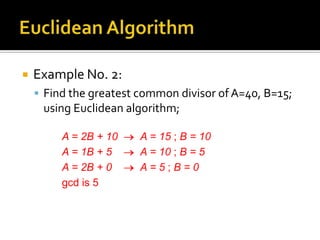
   Example No. 2:
     Find the greatest common divisor of A=40, B=15;
     using Euclidean algorithm;

         A = 2B + 10    A = 15 ; B = 10
         A = 1B + 5     A = 10 ; B = 5
         A = 2B + 0     A=5;B=0
         gcd is 5
   There are three properties of algorithm that
    must have to consider in solving a certain
    problem in programming:
       Finiteness
       Absence of Ambiguity
       Sequence Definition
       Input and Output Definition
       Effectiveness
       Scope of Definition
   Finiteness
     The execution of a programmed algorithm must
     be complete after a finite number of operations
     have been performed. Otherwise, we cannot
     claim that the execution produces a solution.
   Absence of Ambiguity
     The representation of every step of an algorithm
      should have a unique interpretation which also
      understand by the human.
     It is convenient to deal with algorithms presented
      in notational with sparse detail:
      ▪ Example:
       ▪ Pseudo code
       ▪ Flowcharts
   Sequence of Definition
     The sequence in which the steps of the algorithm
      are to carried out should be clearly specified.
     In algorithmic specifications, the instructions are
      performed from top to button, unless the
      instruction themselves otherwise specified.
   Input and Output Definition
     Inputs – are the data items that is presented in the
      algorithm.
     Outputs – are the data items presented to the
      outside world as the result of the execution of a
      program based on the algorithm.
     An algorithm ought to produce at least one
      output (otherwise, what use is it?...)
   Effectiveness
     it consists of basic instructions that are realizable.
      This means that the instructions can be
      performed by using the given inputs in a finite
      amount of time.
     The instructions of an algorithm may order the
      computer only to perform tasks that is capable of
      carrying out.
   Scope Definition
     An algorithm applies to the following:
      ▪ Specific problem or class of problem
      ▪ The range of inputs has to be predefined
      ▪ The range determines the generality of the algorithm.
   Algorithms can be expressed in many kinds of
    notation, including:
     Natural language
     Pseudo Code
     Flowcharts
     Programming Language
   “Pseudo” means imitation or false and “code”
    refers to the instructions written in a
    programming language.
   Pseudocode is another programming analysis
    tool that is used for planning a program.
   Pseudocode is also called Program Design
    Language (PDL).
   By wikipedia definition:
     Pseudocode is a compact and informal
      high-level description of a computer
      programming algorithm that uses the
      structural conventions of some
      programming language, but is intended for
      human reading rather than machine
      reading.
   Pseudocode is made up of the following logic
    structures that have been proved to be
    sufficient for writing any computer program:
     Sequence Logic
     Selection Logic
     Iteration Logic
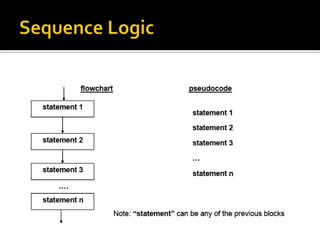
   It is used to perform instructions in a
    sequence, that is one after another.
   Thus, for sequence logic, pseudocode
    instructions are written in an order in which
    they are to be performed.
   The logic flow of pseudocode is from top to
    bottom.
   It is used for making decisions and for
    selecting the proper path out of two or more
    alternative paths in program logic.
   It is also known as decision logic.
   Selection logic is depicted as either an
    IF...THEN or an IF...THEN...ELSE structure.
   It is used to produce loops when one or more
    instructions may be executed several times
    depending on some of the conditions.
   It uses structures called the DO_WHILE, FOR
    and the REPEAT_UNTIL.
1. Write only one statement per line.
   Each statement in your pseudocode should
    express just one action for the computer.
   If the task list is properly drawn, then in
    most cases each task will correspond to one
    line of pseudocode.
   Examples
2. Capitalized initial keyword.
   In the example above, READ and WRITE
    are in caps.
   There are just a few keywords we will use:
    ▪ READ, WRITE, IF, ELSE, ENDIF, WHILE,
      ENDWHILE, REPEAT, UNTIL
3. Indent to show hierarchy.
   We will use a particular indentation pattern in
    each of the design structures:
    ▪ SEQUENCE: keep statements that are “stacked” in
      sequence all starting in the same column.
    ▪ SELECTION: indent the statements that fall inside the
      selection structure, but not the keywords that form the
      selection
    ▪ LOOPING: indent the statements that fall inside the
      loop, but not the keywords that form the loop
   Examples:
4. End multi-line structures.
 ▫ All the initial keyword must always in line with the
   last or end of the structure.
5. Keep statement language independent.
 ▫ Resist the urge to write in whatever language you
   are most comfortable with. There may be special
   features available in the language you plan to
   eventually write the program in; if you are SURE it
   will be written in that language, then you can use
   the features. If not, then avoid using the special
   features.
   In summary:
     Write only one statement per line.
     Capitalized initial keyword.
     Indent to show hierarchy.
     End multi-line structures.
     Keep statement language independent.
•   These are follows:
    ▫ Number each instruction.
       This is to enforce the notion, “well-ordered collection of
        ... operations.”
    ▫ Each instruction should be unambiguous.
       It means the computing agent, in this case the reader,
        should be capable of carrying out the instructions. And
        also, each instruction should be effectively computable
        (do-able).
    ▫ Completeness.
       Nothing should be left out.
   Following are some of the advantages of
    using pseudocode:
     Converting a pseudocode to a programming
      language is much more easier than converting a
      flowchart.
     As compared to flowchart, it is easier to modify a
      pseudocode of a program logic when program
      modifications are necessary.
   It also suffers from some of the limitations.
    These limitations are as follows:
     In the cases of pseudocode, a graphic
      representation of program logic is not available.
     There are no standard rules to follow for using a
      pseudocode. Different programmers use their
      own style of writing pseudocode and hence,
      communication problem occurs due to lack of
      standardization.
   To symbolize the arithmetic operators we use
    these symbols:
     Note: There is a precedence or hierarchy implied
     in this symbols.
   When we have to make a choice between
    actions, we almost always base that choice
    on a test.
   There is a universally accepted set of symbols
    used to represent these phrases:
 It is more difficult to follow the
 logic of or write pseudocode as
 compared to flowcharting.
Prepare ½ crosswise yellow paper for
seatwork after the discussion.