Achieving CI/CD with Kubernetes
Ramit Surana @ramitsurana /in/ramitsurana
Agenda
• History of Kubernetes
• The evolution
• How google uses it ?
• About Jenkins
• How to configure it ?
• Fabric8
• How to configure it ?
• The Final Picture
• Other Tools
• Awesome Kubernetes
• Future of Kubernetes
About Me
• Open Source Guy
• Contributor to Kubernetes
community
• Author of awesome-kubernetes
• ramitsurana@gmail.com
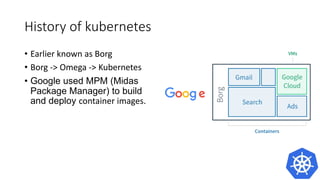
History of kubernetes
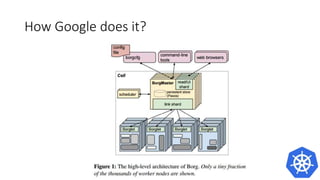
• Earlier known as Borg
• Borg -> Omega -> Kubernetes
• Google used MPM (Midas
Package Manager) to build and
deploy container images.
How Google does it?
Evolution of Kubernetes
• Benefits of containerization go
beyond merely enabling
higher levels of utilization.
• Need for an orchestration
engine with capablities.
• Need of a stable model,to use
docker at large scale that could
run on several cloud platforms.
About Jenkins
• Earlier known as Hudson.
• Primarily a java-based program
• Leading open source CI server
• Used by leading companies such as
Github,Netflix,Linkedin etc.
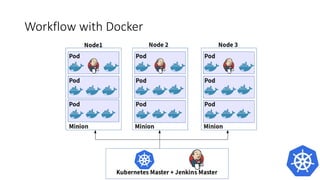
Workflow with Docker
How to configure it ?
• Find the k8s-jenkins plugin at
https://github.com/jenkinsci/k
ubernetes-plugin
• Works using JNLP(Java Network
Launch Protocol)
How to configure it ?
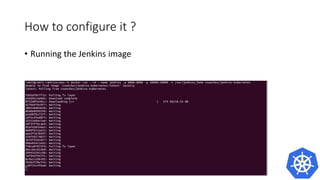
• Running the Jenkins image
docker run –rm –name jenkins – p 8080:8080 – p 50000:50000 –v
/var/jenkins_home csanchez/jenkins-kubernetes
How to configure it ?
• Problem
• It works only one time
• Because of stateless containers the data gets erased after a restart.
• A better solution is to use a container to store and use data to run the
jenkins container
• Better Solution
docker create --name jenkins-k8s csanchez/jenkins-kubernetes
docker run --volumes-from jenkins-k8s -p 8080:8080 -p 50000:50000 -v
/var/jenkins_home csanchez/jenkins-kubernetes
How to configure it ?
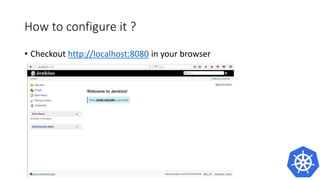
• Checkout http://localhost:8080 in your browser
Behind the scenes
• Jenkins image is automatically connected to the Jenkins master
• Slaves are launched using JNLP
• Some of the environment variables that are automatically injected:
• JENKINS_URL: Jenkins web interface url
• JENKINS_JNLP_URL: url for the jnlp definition of the specific slave
• JENKINS_SECRET: the secret key for authentication
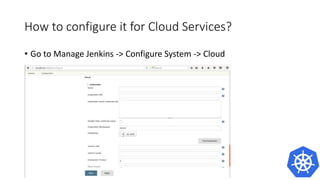
How to configure it?
• Go to Manage Jenkins -> Configure System -> Cloud -> Kubernetes
How to configure it?
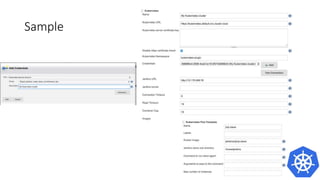
• Sample Configuration file
How to configure it?
• Sample Configuration file for slave pod template
How to configure it with adding new jobs ?
• Sample configuration
while adding a new job
Continuous Delivery with Kubernetes
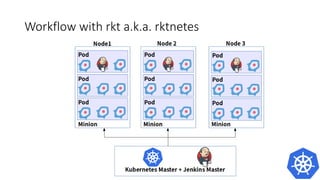
Rkt by CoreOS
• Container project by CoreOS
• Supports ACI and pods by
default
• Main focus is to build containers
keeping in mind the security
aspect for containers.
Workflow with rkt a.k.a. rktnetes
Practical example with Kubernetes
Fabric8
• Microservices platform by
RedHat Guys
• Uses openshift, Jenkins and
kubernetes
• Contains several different apps
for integrations.
Fabric8 workflow
Features
• CI/CD part of fabric8:
• Jenkins
• Gogs
• Fabric8 registry
• Nexus
• SonarQube
How to do it ?
• Install gofabric8 on your local $PATH
• Ensure that you have a running kubernetes cluster
How to do it ?
• Run $ gofabric8 deploy –y
How to do it ?
• Run $ gofabric8 secrets –y
How to do it ?
• $ Kubectl get pods
This will take a while.So try going out for a Coffee :)
• In case anything fails try using $ kubectl describe pods.
How to do it ?
• If everything works out fine, then you should see
• Try using Kubernetes dashboard for the same and fabric8 console to
see your results.
How to do it ?
• Kubernetes Dashboard • Fabric8 console
Behind deploying Fabric8
The Final Picture
Other Tools
• TeamCity
• Codeship
• Travis CI
• Circle CI
• Drone.io
• Semaphore
and many more
Awesome-Kubernetes
• Official list for the Kubernetes
Community
• Awesome collection of resources
of kubernetes.
• Find articles, blogs, videos,
conferences and much more.
• Find out more at:
http://github.com/ramitsurana/awe
some-kubernetes
Future of Kubernetes
• Helm
• Kubernetes Chart
• Minikube
• Kops
• Kubedash
• Persistent Storage
• Use of Stateful Containers
And many more...
Got any Questions ?
Thank You
Happy Birthday
Kubernetes !
May you live a thousand
years old !