A Practical Introduction to
Python Programming
Brian Heinold
Department of Mathematics and Computer Science
Mount St. Mary’s University
ii
©2012 Brian Heinold
Licensed under a Creative Commons Attribution-Noncommercial-Share Alike 3.0 Unported Li-
cense
Contents
I Basics 1
1 Getting Started 3
1.1 Installing Python . . . . . . . . . . . . . . . . . . . . . . . . . . . . . . . . . . . . . . . . . . . . . . 3
1.2 IDLE . . . . . . . . . . . . . . . . . . . . . . . . . . . . . . . . . . . . . . . . . . . . . . . . . . . . . . 3
1.3 A first program . . . . . . . . . . . . . . . . . . . . . . . . . . . . . . . . . . . . . . . . . . . . . . . 4
1.4 Typing things in . . . . . . . . . . . . . . . . . . . . . . . . . . . . . . . . . . . . . . . . . . . . . . . 5
1.5 Getting input . . . . . . . . . . . . . . . . . . . . . . . . . . . . . . . . . . . . . . . . . . . . . . . . . 6
1.6 Printing . . . . . . . . . . . . . . . . . . . . . . . . . . . . . . . . . . . . . . . . . . . . . . . . . . . . 6
1.7 Variables . . . . . . . . . . . . . . . . . . . . . . . . . . . . . . . . . . . . . . . . . . . . . . . . . . . 7
1.8 Exercises . . . . . . . . . . . . . . . . . . . . . . . . . . . . . . . . . . . . . . . . . . . . . . . . . . . 9
2 For loops 11
2.1 Examples . . . . . . . . . . . . . . . . . . . . . . . . . . . . . . . . . . . . . . . . . . . . . . . . . . . 11
2.2 The loop variable . . . . . . . . . . . . . . . . . . . . . . . . . . . . . . . . . . . . . . . . . . . . . . 13
2.3 The range function . . . . . . . . . . . . . . . . . . . . . . . . . . . . . . . . . . . . . . . . . . . . 13
2.4 A Trickier Example . . . . . . . . . . . . . . . . . . . . . . . . . . . . . . . . . . . . . . . . . . . . . 14
2.5 Exercises . . . . . . . . . . . . . . . . . . . . . . . . . . . . . . . . . . . . . . . . . . . . . . . . . . . 15
3 Numbers 19
3.1 Integers and Decimal Numbers . . . . . . . . . . . . . . . . . . . . . . . . . . . . . . . . . . . . 19
3.2 Math Operators . . . . . . . . . . . . . . . . . . . . . . . . . . . . . . . . . . . . . . . . . . . . . . . 19
3.3 Order of operations . . . . . . . . . . . . . . . . . . . . . . . . . . . . . . . . . . . . . . . . . . . . 21
3.4 Random numbers . . . . . . . . . . . . . . . . . . . . . . . . . . . . . . . . . . . . . . . . . . . . . 21
3.5 Math functions . . . . . . . . . . . . . . . . . . . . . . . . . . . . . . . . . . . . . . . . . . . . . . . 21
3.6 Getting help from Python . . . . . . . . . . . . . . . . . . . . . . . . . . . . . . . . . . . . . . . . 22
3.7 Using the Shell as a Calculator . . . . . . . . . . . . . . . . . . . . . . . . . . . . . . . . . . . . . 22
3.8 Exercises . . . . . . . . . . . . . . . . . . . . . . . . . . . . . . . . . . . . . . . . . . . . . . . . . . . 23
4 If statements 27
4.1 A Simple Example . . . . . . . . . . . . . . . . . . . . . . . . . . . . . . . . . . . . . . . . . . . . . 27
4.2 Conditional operators . . . . . . . . . . . . . . . . . . . . . . . . . . . . . . . . . . . . . . . . . . . 28
4.3 Common Mistakes . . . . . . . . . . . . . . . . . . . . . . . . . . . . . . . . . . . . . . . . . . . . . 28
4.4 elif . . . . . . . . . . . . . . . . . . . . . . . . . . . . . . . . . . . . . . . . . . . . . . . . . . . . . . 29
4.5 Exercises . . . . . . . . . . . . . . . . . . . . . . . . . . . . . . . . . . . . . . . . . . . . . . . . . . . 30
iii
iv CONTENTS
5 Miscellaneous Topics I 33
5.1 Counting . . . . . . . . . . . . . . . . . . . . . . . . . . . . . . . . . . . . . . . . . . . . . . . . . . . 33
5.2 Summing . . . . . . . . . . . . . . . . . . . . . . . . . . . . . . . . . . . . . . . . . . . . . . . . . . . 34
5.3 Swapping . . . . . . . . . . . . . . . . . . . . . . . . . . . . . . . . . . . . . . . . . . . . . . . . . . . 35
5.4 Flag variables . . . . . . . . . . . . . . . . . . . . . . . . . . . . . . . . . . . . . . . . . . . . . . . . 36
5.5 Maxes and mins . . . . . . . . . . . . . . . . . . . . . . . . . . . . . . . . . . . . . . . . . . . . . . . 36
5.6 Comments . . . . . . . . . . . . . . . . . . . . . . . . . . . . . . . . . . . . . . . . . . . . . . . . . . 37
5.7 Simple debugging . . . . . . . . . . . . . . . . . . . . . . . . . . . . . . . . . . . . . . . . . . . . . 37
5.8 Example programs . . . . . . . . . . . . . . . . . . . . . . . . . . . . . . . . . . . . . . . . . . . . . 38
5.9 Exercises . . . . . . . . . . . . . . . . . . . . . . . . . . . . . . . . . . . . . . . . . . . . . . . . . . . 40
6 Strings 43
6.1 Basics . . . . . . . . . . . . . . . . . . . . . . . . . . . . . . . . . . . . . . . . . . . . . . . . . . . . . . 43
6.2 Concatenation and repetition . . . . . . . . . . . . . . . . . . . . . . . . . . . . . . . . . . . . . . 44
6.3 The in operator . . . . . . . . . . . . . . . . . . . . . . . . . . . . . . . . . . . . . . . . . . . . . . . 44
6.4 Indexing . . . . . . . . . . . . . . . . . . . . . . . . . . . . . . . . . . . . . . . . . . . . . . . . . . . . 45
6.5 Slices . . . . . . . . . . . . . . . . . . . . . . . . . . . . . . . . . . . . . . . . . . . . . . . . . . . . . . 45
6.6 Changing individual characters of a string . . . . . . . . . . . . . . . . . . . . . . . . . . . . . 46
6.7 Looping . . . . . . . . . . . . . . . . . . . . . . . . . . . . . . . . . . . . . . . . . . . . . . . . . . . . 46
6.8 String methods . . . . . . . . . . . . . . . . . . . . . . . . . . . . . . . . . . . . . . . . . . . . . . . 47
6.9 Escape characters . . . . . . . . . . . . . . . . . . . . . . . . . . . . . . . . . . . . . . . . . . . . . . 48
6.10 Examples . . . . . . . . . . . . . . . . . . . . . . . . . . . . . . . . . . . . . . . . . . . . . . . . . . . 49
6.11 Exercises . . . . . . . . . . . . . . . . . . . . . . . . . . . . . . . . . . . . . . . . . . . . . . . . . . . 51
7 Lists 57
7.1 Basics . . . . . . . . . . . . . . . . . . . . . . . . . . . . . . . . . . . . . . . . . . . . . . . . . . . . . . 57
7.2 Similarities to strings . . . . . . . . . . . . . . . . . . . . . . . . . . . . . . . . . . . . . . . . . . . 58
7.3 Built-in functions . . . . . . . . . . . . . . . . . . . . . . . . . . . . . . . . . . . . . . . . . . . . . . 59
7.4 List methods . . . . . . . . . . . . . . . . . . . . . . . . . . . . . . . . . . . . . . . . . . . . . . . . . 59
7.5 Miscellaneous . . . . . . . . . . . . . . . . . . . . . . . . . . . . . . . . . . . . . . . . . . . . . . . . 60
7.6 Examples . . . . . . . . . . . . . . . . . . . . . . . . . . . . . . . . . . . . . . . . . . . . . . . . . . . 60
7.7 Exercises . . . . . . . . . . . . . . . . . . . . . . . . . . . . . . . . . . . . . . . . . . . . . . . . . . . 62
8 More with Lists 65
8.1 Lists and the random module . . . . . . . . . . . . . . . . . . . . . . . . . . . . . . . . . . . . . 65
8.2 split . . . . . . . . . . . . . . . . . . . . . . . . . . . . . . . . . . . . . . . . . . . . . . . . . . . . . 66
8.3 join . . . . . . . . . . . . . . . . . . . . . . . . . . . . . . . . . . . . . . . . . . . . . . . . . . . . . . 67
8.4 List comprehensions . . . . . . . . . . . . . . . . . . . . . . . . . . . . . . . . . . . . . . . . . . . . 68
8.5 Using list comprehensions . . . . . . . . . . . . . . . . . . . . . . . . . . . . . . . . . . . . . . . . 69
8.6 Two-dimensional lists . . . . . . . . . . . . . . . . . . . . . . . . . . . . . . . . . . . . . . . . . . . 70
8.7 Exercises . . . . . . . . . . . . . . . . . . . . . . . . . . . . . . . . . . . . . . . . . . . . . . . . . . . 72
CONTENTS v
9 While loops 75
9.1 Examples . . . . . . . . . . . . . . . . . . . . . . . . . . . . . . . . . . . . . . . . . . . . . . . . . . . 75
9.2 Infinite loops . . . . . . . . . . . . . . . . . . . . . . . . . . . . . . . . . . . . . . . . . . . . . . . . . 78
9.3 The break statement . . . . . . . . . . . . . . . . . . . . . . . . . . . . . . . . . . . . . . . . . . . 78
9.4 The else statement . . . . . . . . . . . . . . . . . . . . . . . . . . . . . . . . . . . . . . . . . . . . . 79
9.5 The guessing game, more nicely done . . . . . . . . . . . . . . . . . . . . . . . . . . . . . . . . 80
9.6 Exercises . . . . . . . . . . . . . . . . . . . . . . . . . . . . . . . . . . . . . . . . . . . . . . . . . . . 83
10 Miscellaneous Topics II 87
10.1 str, int, float, and list . . . . . . . . . . . . . . . . . . . . . . . . . . . . . . . . . . . . . 87
10.2 Booleans . . . . . . . . . . . . . . . . . . . . . . . . . . . . . . . . . . . . . . . . . . . . . . . . . . . . 89
10.3 Shortcuts . . . . . . . . . . . . . . . . . . . . . . . . . . . . . . . . . . . . . . . . . . . . . . . . . . . 90
10.4 Short-circuiting . . . . . . . . . . . . . . . . . . . . . . . . . . . . . . . . . . . . . . . . . . . . . . . 91
10.5 Continuation . . . . . . . . . . . . . . . . . . . . . . . . . . . . . . . . . . . . . . . . . . . . . . . . . 91
10.6 pass . . . . . . . . . . . . . . . . . . . . . . . . . . . . . . . . . . . . . . . . . . . . . . . . . . . . . . 91
10.7 String formatting . . . . . . . . . . . . . . . . . . . . . . . . . . . . . . . . . . . . . . . . . . . . . . 92
10.8 Nested loops . . . . . . . . . . . . . . . . . . . . . . . . . . . . . . . . . . . . . . . . . . . . . . . . . 93
10.9 Exercises . . . . . . . . . . . . . . . . . . . . . . . . . . . . . . . . . . . . . . . . . . . . . . . . . . . 95
11 Dictionaries 99
11.1 Basics . . . . . . . . . . . . . . . . . . . . . . . . . . . . . . . . . . . . . . . . . . . . . . . . . . . . . . 99
11.2 Dictionary examples . . . . . . . . . . . . . . . . . . . . . . . . . . . . . . . . . . . . . . . . . . . . 100
11.3 Working with dictionaries . . . . . . . . . . . . . . . . . . . . . . . . . . . . . . . . . . . . . . . . 101
11.4 Counting words . . . . . . . . . . . . . . . . . . . . . . . . . . . . . . . . . . . . . . . . . . . . . . . 102
11.5 Exercises . . . . . . . . . . . . . . . . . . . . . . . . . . . . . . . . . . . . . . . . . . . . . . . . . . . 104
12 Text Files 109
12.1 Reading from files . . . . . . . . . . . . . . . . . . . . . . . . . . . . . . . . . . . . . . . . . . . . . 109
12.2 Writing to files . . . . . . . . . . . . . . . . . . . . . . . . . . . . . . . . . . . . . . . . . . . . . . . . 110
12.3 Examples . . . . . . . . . . . . . . . . . . . . . . . . . . . . . . . . . . . . . . . . . . . . . . . . . . . 110
12.4 Wordplay . . . . . . . . . . . . . . . . . . . . . . . . . . . . . . . . . . . . . . . . . . . . . . . . . . . 111
12.5 Exercises . . . . . . . . . . . . . . . . . . . . . . . . . . . . . . . . . . . . . . . . . . . . . . . . . . . 113
13 Functions 119
13.1 Basics . . . . . . . . . . . . . . . . . . . . . . . . . . . . . . . . . . . . . . . . . . . . . . . . . . . . . . 119
13.2 Arguments . . . . . . . . . . . . . . . . . . . . . . . . . . . . . . . . . . . . . . . . . . . . . . . . . . 120
13.3 Returning values . . . . . . . . . . . . . . . . . . . . . . . . . . . . . . . . . . . . . . . . . . . . . . 121
13.4 Default arguments and keyword arguments . . . . . . . . . . . . . . . . . . . . . . . . . . . . 122
13.5 Local variables . . . . . . . . . . . . . . . . . . . . . . . . . . . . . . . . . . . . . . . . . . . . . . . 123
13.6 Exercises . . . . . . . . . . . . . . . . . . . . . . . . . . . . . . . . . . . . . . . . . . . . . . . . . . . 125
14 Object-Oriented Programming 129
14.1 Python is objected-oriented . . . . . . . . . . . . . . . . . . . . . . . . . . . . . . . . . . . . . . . 129
14.2 Creating your own classes . . . . . . . . . . . . . . . . . . . . . . . . . . . . . . . . . . . . . . . . 130
14.3 Inheritance . . . . . . . . . . . . . . . . . . . . . . . . . . . . . . . . . . . . . . . . . . . . . . . . . . 132
14.4 A playing-card example . . . . . . . . . . . . . . . . . . . . . . . . . . . . . . . . . . . . . . . . . 133
vi CONTENTS
14.5 A Tic-tac-toe example . . . . . . . . . . . . . . . . . . . . . . . . . . . . . . . . . . . . . . . . . . . 136
14.6 Further topics . . . . . . . . . . . . . . . . . . . . . . . . . . . . . . . . . . . . . . . . . . . . . . . . 138
14.7 Exercises . . . . . . . . . . . . . . . . . . . . . . . . . . . . . . . . . . . . . . . . . . . . . . . . . . . 138
II Graphics 141
15 GUI Programming with Tkinter 143
15.1 Basics . . . . . . . . . . . . . . . . . . . . . . . . . . . . . . . . . . . . . . . . . . . . . . . . . . . . . . 143
15.2 Labels . . . . . . . . . . . . . . . . . . . . . . . . . . . . . . . . . . . . . . . . . . . . . . . . . . . . . 144
15.3 grid . . . . . . . . . . . . . . . . . . . . . . . . . . . . . . . . . . . . . . . . . . . . . . . . . . . . . . 145
15.4 Entry boxes . . . . . . . . . . . . . . . . . . . . . . . . . . . . . . . . . . . . . . . . . . . . . . . . . . 146
15.5 Buttons . . . . . . . . . . . . . . . . . . . . . . . . . . . . . . . . . . . . . . . . . . . . . . . . . . . . 146
15.6 Global variables . . . . . . . . . . . . . . . . . . . . . . . . . . . . . . . . . . . . . . . . . . . . . . . 148
15.7 Tic-tac-toe . . . . . . . . . . . . . . . . . . . . . . . . . . . . . . . . . . . . . . . . . . . . . . . . . . . 149
16 GUI Programming II 155
16.1 Frames . . . . . . . . . . . . . . . . . . . . . . . . . . . . . . . . . . . . . . . . . . . . . . . . . . . . . 155
16.2 Colors . . . . . . . . . . . . . . . . . . . . . . . . . . . . . . . . . . . . . . . . . . . . . . . . . . . . . 156
16.3 Images . . . . . . . . . . . . . . . . . . . . . . . . . . . . . . . . . . . . . . . . . . . . . . . . . . . . . 157
16.4 Canvases . . . . . . . . . . . . . . . . . . . . . . . . . . . . . . . . . . . . . . . . . . . . . . . . . . . 158
16.5 Check buttons and Radio buttons . . . . . . . . . . . . . . . . . . . . . . . . . . . . . . . . . . . 159
16.6 Text widget . . . . . . . . . . . . . . . . . . . . . . . . . . . . . . . . . . . . . . . . . . . . . . . . . 160
16.7 Scale widget . . . . . . . . . . . . . . . . . . . . . . . . . . . . . . . . . . . . . . . . . . . . . . . . 161
16.8 GUI Events . . . . . . . . . . . . . . . . . . . . . . . . . . . . . . . . . . . . . . . . . . . . . . . . . . 162
16.9 Event examples . . . . . . . . . . . . . . . . . . . . . . . . . . . . . . . . . . . . . . . . . . . . . . . 164
17 GUI Programming III 169
17.1 Title bar . . . . . . . . . . . . . . . . . . . . . . . . . . . . . . . . . . . . . . . . . . . . . . . . . . . . 169
17.2 Disabling things . . . . . . . . . . . . . . . . . . . . . . . . . . . . . . . . . . . . . . . . . . . . . . . 169
17.3 Getting the state of a widget . . . . . . . . . . . . . . . . . . . . . . . . . . . . . . . . . . . . . . . 169
17.4 Message boxes . . . . . . . . . . . . . . . . . . . . . . . . . . . . . . . . . . . . . . . . . . . . . . . . 170
17.5 Destroying things . . . . . . . . . . . . . . . . . . . . . . . . . . . . . . . . . . . . . . . . . . . . . . 171
17.6 Updating . . . . . . . . . . . . . . . . . . . . . . . . . . . . . . . . . . . . . . . . . . . . . . . . . . . 171
17.7 Dialogs . . . . . . . . . . . . . . . . . . . . . . . . . . . . . . . . . . . . . . . . . . . . . . . . . . . . 172
17.8 Menu bars . . . . . . . . . . . . . . . . . . . . . . . . . . . . . . . . . . . . . . . . . . . . . . . . . . 174
17.9 New windows . . . . . . . . . . . . . . . . . . . . . . . . . . . . . . . . . . . . . . . . . . . . . . . . 174
17.10pack . . . . . . . . . . . . . . . . . . . . . . . . . . . . . . . . . . . . . . . . . . . . . . . . . . . . . . 175
17.11StringVar . . . . . . . . . . . . . . . . . . . . . . . . . . . . . . . . . . . . . . . . . . . . . . . . . 175
17.12More with GUIs . . . . . . . . . . . . . . . . . . . . . . . . . . . . . . . . . . . . . . . . . . . . . . . 176
18 Further Graphical Programming 177
18.1 Python 2 vs Python 3 . . . . . . . . . . . . . . . . . . . . . . . . . . . . . . . . . . . . . . . . . . . 177
18.2 The Python Imaging Library . . . . . . . . . . . . . . . . . . . . . . . . . . . . . . . . . . . . . . 179
18.3 Pygame . . . . . . . . . . . . . . . . . . . . . . . . . . . . . . . . . . . . . . . . . . . . . . . . . . . . 182
CONTENTS vii
III Intermediate Topics 183
19 Miscellaneous topics III 185
19.1 Mutability and References . . . . . . . . . . . . . . . . . . . . . . . . . . . . . . . . . . . . . . . . 185
19.2 Tuples . . . . . . . . . . . . . . . . . . . . . . . . . . . . . . . . . . . . . . . . . . . . . . . . . . . . . 187
19.3 Sets . . . . . . . . . . . . . . . . . . . . . . . . . . . . . . . . . . . . . . . . . . . . . . . . . . . . . . . 187
19.4 Unicode . . . . . . . . . . . . . . . . . . . . . . . . . . . . . . . . . . . . . . . . . . . . . . . . . . . . 189
19.5 sorted . . . . . . . . . . . . . . . . . . . . . . . . . . . . . . . . . . . . . . . . . . . . . . . . . . . . 190
19.6 if-else operator . . . . . . . . . . . . . . . . . . . . . . . . . . . . . . . . . . . . . . . . . . . . . 190
19.7 continue . . . . . . . . . . . . . . . . . . . . . . . . . . . . . . . . . . . . . . . . . . . . . . . . . . 190
19.8 eval and exec . . . . . . . . . . . . . . . . . . . . . . . . . . . . . . . . . . . . . . . . . . . . . . 191
19.9 enumerate and zip . . . . . . . . . . . . . . . . . . . . . . . . . . . . . . . . . . . . . . . . . . 192
19.10copy . . . . . . . . . . . . . . . . . . . . . . . . . . . . . . . . . . . . . . . . . . . . . . . . . . . . . . 193
19.11More with strings . . . . . . . . . . . . . . . . . . . . . . . . . . . . . . . . . . . . . . . . . . . . . . 194
19.12Miscellaneous tips and tricks . . . . . . . . . . . . . . . . . . . . . . . . . . . . . . . . . . . . . . 195
19.13Running your Python programs on other computers . . . . . . . . . . . . . . . . . . . . . . 196
20 Useful modules 199
20.1 Importing modules . . . . . . . . . . . . . . . . . . . . . . . . . . . . . . . . . . . . . . . . . . . . 199
20.2 Dates and times . . . . . . . . . . . . . . . . . . . . . . . . . . . . . . . . . . . . . . . . . . . . . . . 200
20.3 Working with files and directories . . . . . . . . . . . . . . . . . . . . . . . . . . . . . . . . . . . 202
20.4 Running and quitting programs . . . . . . . . . . . . . . . . . . . . . . . . . . . . . . . . . . . . 204
20.5 Zip files . . . . . . . . . . . . . . . . . . . . . . . . . . . . . . . . . . . . . . . . . . . . . . . . . . . . 204
20.6 Getting files from the internet . . . . . . . . . . . . . . . . . . . . . . . . . . . . . . . . . . . . . . 205
20.7 Sound . . . . . . . . . . . . . . . . . . . . . . . . . . . . . . . . . . . . . . . . . . . . . . . . . . . . . 205
20.8 Your own modules . . . . . . . . . . . . . . . . . . . . . . . . . . . . . . . . . . . . . . . . . . . . . 206
21 Regular expressions 207
21.1 Introduction . . . . . . . . . . . . . . . . . . . . . . . . . . . . . . . . . . . . . . . . . . . . . . . . . 207
21.2 Syntax . . . . . . . . . . . . . . . . . . . . . . . . . . . . . . . . . . . . . . . . . . . . . . . . . . . . . 208
21.3 Summary . . . . . . . . . . . . . . . . . . . . . . . . . . . . . . . . . . . . . . . . . . . . . . . . . . . 212
21.4 Groups . . . . . . . . . . . . . . . . . . . . . . . . . . . . . . . . . . . . . . . . . . . . . . . . . . . . . 214
21.5 Other functions . . . . . . . . . . . . . . . . . . . . . . . . . . . . . . . . . . . . . . . . . . . . . . . 214
21.6 Examples . . . . . . . . . . . . . . . . . . . . . . . . . . . . . . . . . . . . . . . . . . . . . . . . . . . 216
22 Math 219
22.1 The math module . . . . . . . . . . . . . . . . . . . . . . . . . . . . . . . . . . . . . . . . . . . . . 219
22.2 Scientific notation . . . . . . . . . . . . . . . . . . . . . . . . . . . . . . . . . . . . . . . . . . . . . 220
22.3 Comparing floating point numbers . . . . . . . . . . . . . . . . . . . . . . . . . . . . . . . . . . 221
22.4 Fractions . . . . . . . . . . . . . . . . . . . . . . . . . . . . . . . . . . . . . . . . . . . . . . . . . . . 221
22.5 The decimal module . . . . . . . . . . . . . . . . . . . . . . . . . . . . . . . . . . . . . . . . . . 222
22.6 Complex numbers . . . . . . . . . . . . . . . . . . . . . . . . . . . . . . . . . . . . . . . . . . . . . 224
22.7 More with lists and arrays . . . . . . . . . . . . . . . . . . . . . . . . . . . . . . . . . . . . . . . . 226
22.8 Random numbers . . . . . . . . . . . . . . . . . . . . . . . . . . . . . . . . . . . . . . . . . . . . . 226
22.9 Miscellaneous topics . . . . . . . . . . . . . . . . . . . . . . . . . . . . . . . . . . . . . . . . . . . . 228
viii CONTENTS
22.10Using the Python shell as a calculator . . . . . . . . . . . . . . . . . . . . . . . . . . . . . . . . 229
23 Working with functions 231
23.1 First-class functions . . . . . . . . . . . . . . . . . . . . . . . . . . . . . . . . . . . . . . . . . . . . 231
23.2 Anonymous functions . . . . . . . . . . . . . . . . . . . . . . . . . . . . . . . . . . . . . . . . . . . 232
23.3 Recursion . . . . . . . . . . . . . . . . . . . . . . . . . . . . . . . . . . . . . . . . . . . . . . . . . . . 233
23.4 map, filter, reduce, and list comprehensions . . . . . . . . . . . . . . . . . . . . . . . . 234
23.5 The operator module . . . . . . . . . . . . . . . . . . . . . . . . . . . . . . . . . . . . . . . . . 235
23.6 More about function arguments . . . . . . . . . . . . . . . . . . . . . . . . . . . . . . . . . . . . 235
24 The itertools and collections modules 237
24.1 Permutations and combinations . . . . . . . . . . . . . . . . . . . . . . . . . . . . . . . . . . . . 237
24.2 Cartesian product . . . . . . . . . . . . . . . . . . . . . . . . . . . . . . . . . . . . . . . . . . . . . 238
24.3 Grouping things . . . . . . . . . . . . . . . . . . . . . . . . . . . . . . . . . . . . . . . . . . . . . . 239
24.4 Miscellaneous things from itertools . . . . . . . . . . . . . . . . . . . . . . . . . . . . . . 240
24.5 Counting things . . . . . . . . . . . . . . . . . . . . . . . . . . . . . . . . . . . . . . . . . . . . . . . 241
24.6 defaultdict . . . . . . . . . . . . . . . . . . . . . . . . . . . . . . . . . . . . . . . . . . . . . . . 242
25 Exceptions 245
25.1 Basics . . . . . . . . . . . . . . . . . . . . . . . . . . . . . . . . . . . . . . . . . . . . . . . . . . . . . . 245
25.2 Try/except/else . . . . . . . . . . . . . . . . . . . . . . . . . . . . . . . . . . . . . . . . . . . 246
25.3 try/finally and with/as . . . . . . . . . . . . . . . . . . . . . . . . . . . . . . . . . . . . 247
25.4 More with exceptions . . . . . . . . . . . . . . . . . . . . . . . . . . . . . . . . . . . . . . . . . . . 247
Bibliography 249
Index 249
Preface
My goal here is for something that is partly a tutorial and partly a reference book. I like how
tutorials get you up and running quickly, but they can often be a little wordy and disorganized.
Reference books contain a lot of good information, but they are often too terse, and they don’t
often give you a sense of what is important. My aim here is for something in the spirit of a tutorial
but still useful as a reference. I summarize information in tables and give a lot of short example
programs. I also like to jump right into things and fill in background information as I go, rather
than covering the background material first.
This book started out as about 30 pages of notes for students in my introductory programming class
at Mount St. Mary’s University. Most of these students have no prior programming experience, and
that has affected my approach. I leave out a lot of technical details and sometimes I oversimplify
things. Some of these details are filled in later in the book, though other details are never filled in.
But this book is not designed to cover everything, and I recommend reading other books and the
Python documentation to fill in the gaps.
The style of programming in this book is geared towards the kinds of programming things I like to
do—short programs, often of a mathematical nature, small utilities to make my life easier, and small
computer games. In fact, the things I cover in the book are the things that I have found most useful
or interesting in my programming experience, and this book serves partly to document those things
for myself. This book is not designed as a thorough preparation for a career in software engineering.
Interested readers should progress from this book to a book that has more on computer science and
the design and organization of large programs.
In terms of structuring a course around this book or learning on your own, the basis is most of
Part I. The first four chapters are critically important. Chapter 5 is useful, but not all of it is critical.
Chapter 6 (strings) should be done before Chapter 7 (lists). Chapter 8 contains some more advanced
list topics. Much of this can be skipped, though it is all interesting and useful. In particular, that
chapter covers list comprehensions, which I use extensively later in the book. While you can get
away without using list comprehensions, they provide an elegant and efficient way of doing things.
Chapter 9 (while loops) is important. Chapter 10 contains a bunch of miscellaneous topics, all of
which are useful, but many can be skipped if need be. The final four chapters of Part I are about
dictionaries, text files, functions, and object-oriented programming.
Part II is about graphics, mostly GUI programming with Tkinter. You can very quickly write some
nice programs using Tkinter. For instance, Section 15.7 presents a 20-line working (though not
ix
x CONTENTS
perfect) tic-tac-toe game. The final chapter of Part II covers a bit about the Python Imaging Library.
Part III contains a lot of the fun and interesting things you can do with Python. If you are structur-
ing a one-semester course around this book, you might want to pick a few topics in Part III to go
over. This part of the book could also serve as a reference or as a place for interested and motivated
students to learn more. All of the topics in this part of the book are things that I have found useful
at one point or another.
Though this book was designed to be used in an introductory programming course, it is also useful
for those with prior programming experience looking to learn Python. If you are one of those
people, you should be able to breeze through the first several chapters. You should find Part II to
be a concise, but not superficial, treatment on GUI programming. Part III contains information on
the features of Python that allow you to accomplish big things with surprisingly little code.
In preparing this book the Python documentation at www.python.org was indispensable. This
book was composed entirely in L
A
TEX. There are a number of L
A
TEXpackages, particularly listings
and hyperref, that were particulary helpful. L
A
TEXcode from http://blog.miliauskas.lt/ helped
me get the listings package to nicely highlight the Python code.
Listings for the longer programs are available at https://www.brianheinold.net/python/. Text
files used in the text and exercises are available at https://www.brianheinold.net/python/textfiles.html
I don’t have solutions available to the exercises here, but there is a separate set of a few hundred
exercises and solutions at https://www.brianheinold.net/python/worked_exercises.html.
Please send comments, corrections, and suggestions to heinold@msmary.edu.
Last updated January 22, 2021.
Part I
Basics
1
Chapter 1
Getting Started
This chapter will get you up and running with Python, from downloading it to writing simple
programs.
1.1 Installing Python
Go to www.python.org and download the latest version of Python (version 3.5 as of this writing).
It should be painless to install. If you have a Mac or Linux, you may already have Python on your
computer, though it may be an older version. If it is version 2.7 or earlier, then you should install
the latest version, as many of the programs in this book will not work correctly on older versions.
1.2 IDLE
IDLE is a simple integrated development environment (IDE) that comes with Python. It’s a pro-
gram that allows you to type in your programs and run them. There are other IDEs for Python, but
for now I would suggest sticking with IDLE as it is simple to use. You can find IDLE in the Python
3.4 folder on your computer.
When you first start IDLE, it starts up in the shell, which is an interactive window where you can
type in Python code and see the output in the same window. I often use the shell in place of my
calculator or to try out small pieces of code. But most of the time you will want to open up a new
window and type the program in there.
Note At least on Windows, if you click on a Python file on your desktop, your system will run the
program, but not show the code, which is probably not what you want. Instead, if you right-click
on the file, there should be an option called Edit with Idle. To edit an existing Python file,
3
4 CHAPTER 1. GETTING STARTED
either do that or start up IDLE and open the file through the File menu.
Keyboard shortcuts The following keystrokes work in IDLE and can really speed up your work.
Keystroke Result
CTRL+C Copy selected text
CTRL+X Cut selected text
CTRL+V Paste
CTRL+Z Undo the last keystroke or group of keystrokes
CTRL+SHIFT+Z Redo the last keystroke or group of keystrokes
F5 Run module
1.3 A first program
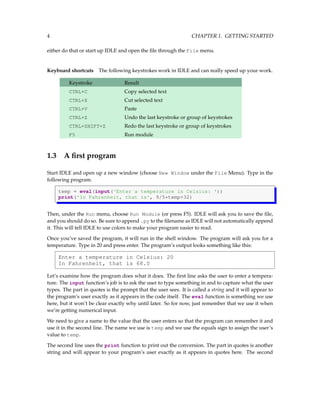
Start IDLE and open up a new window (choose New Window under the File Menu). Type in the
following program.
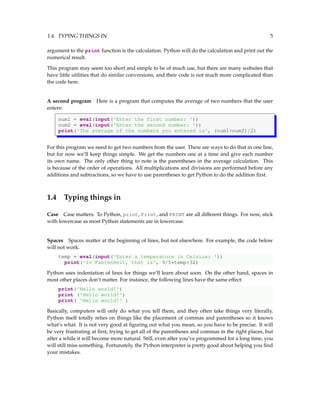
temp = eval(input('Enter a temperature in Celsius: '))
print('In Fahrenheit, that is', 9/5*temp+32)
Then, under the Run menu, choose Run Module (or press F5). IDLE will ask you to save the file,
and you should do so. Be sure to append .py to the filename as IDLE will not automatically append
it. This will tell IDLE to use colors to make your program easier to read.
Once you’ve saved the program, it will run in the shell window. The program will ask you for a
temperature. Type in 20 and press enter. The program’s output looks something like this:
Enter a temperature in Celsius: 20
In Fahrenheit, that is 68.0
Let’s examine how the program does what it does. The first line asks the user to enter a tempera-
ture. The input function’s job is to ask the user to type something in and to capture what the user
types. The part in quotes is the prompt that the user sees. It is called a string and it will appear to
the program’s user exactly as it appears in the code itself. The eval function is something we use
here, but it won’t be clear exactly why until later. So for now, just remember that we use it when
we’re getting numerical input.
We need to give a name to the value that the user enters so that the program can remember it and
use it in the second line. The name we use is temp and we use the equals sign to assign the user’s
value to temp.
The second line uses the print function to print out the conversion. The part in quotes is another
string and will appear to your program’s user exactly as it appears in quotes here. The second
1.4. TYPING THINGS IN 5
argument to the print function is the calculation. Python will do the calculation and print out the
numerical result.
This program may seem too short and simple to be of much use, but there are many websites that
have little utilities that do similar conversions, and their code is not much more complicated than
the code here.
A second program Here is a program that computes the average of two numbers that the user
enters:
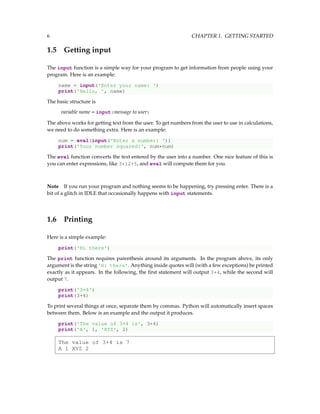
num1 = eval(input('Enter the first number: '))
num2 = eval(input('Enter the second number: '))
print('The average of the numbers you entered is', (num1+num2)/2)
For this program we need to get two numbers from the user. There are ways to do that in one line,
but for now we’ll keep things simple. We get the numbers one at a time and give each number
its own name. The only other thing to note is the parentheses in the average calculation. This
is because of the order of operations. All multiplications and divisions are performed before any
additions and subtractions, so we have to use parentheses to get Python to do the addition first.
1.4 Typing things in
Case Case matters. To Python, print, Print, and PRINT are all different things. For now, stick
with lowercase as most Python statements are in lowercase.
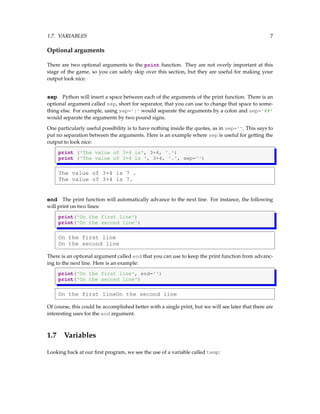
Spaces Spaces matter at the beginning of lines, but not elsewhere. For example, the code below
will not work.
temp = eval(input('Enter a temperature in Celsius: '))
print('In Fahrenheit, that is', 9/5*temp+32)
Python uses indentation of lines for things we’ll learn about soon. On the other hand, spaces in
most other places don’t matter. For instance, the following lines have the same effect:
print('Hello world!')
print ('Hello world!')
print( 'Hello world!' )
Basically, computers will only do what you tell them, and they often take things very literally.
Python itself totally relies on things like the placement of commas and parentheses so it knows
what’s what. It is not very good at figuring out what you mean, so you have to be precise. It will
be very frustrating at first, trying to get all of the parentheses and commas in the right places, but
after a while it will become more natural. Still, even after you’ve programmed for a long time, you
will still miss something. Fortunately, the Python interpreter is pretty good about helping you find
your mistakes.
6 CHAPTER 1. GETTING STARTED
1.5 Getting input
The input function is a simple way for your program to get information from people using your
program. Here is an example:
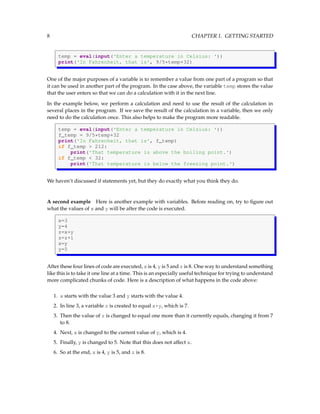
name = input('Enter your name: ')
print('Hello, ', name)
The basic structure is
variable name = input(message to user)
The above works for getting text from the user. To get numbers from the user to use in calculations,
we need to do something extra. Here is an example:
num = eval(input('Enter a number: '))
print('Your number squared:', num*num)
The eval function converts the text entered by the user into a number. One nice feature of this is
you can enter expressions, like 3*12+5, and eval will compute them for you.
Note If you run your program and nothing seems to be happening, try pressing enter. There is a
bit of a glitch in IDLE that occasionally happens with input statements.
1.6 Printing
Here is a simple example:
print('Hi there')
The print function requires parenthesis around its arguments. In the program above, its only
argument is the string 'Hi there'. Anything inside quotes will (with a few exceptions) be printed
exactly as it appears. In the following, the first statement will output 3+4, while the second will
output 7.
print('3+4')
print(3+4)
To print several things at once, separate them by commas. Python will automatically insert spaces
between them. Below is an example and the output it produces.
print('The value of 3+4 is', 3+4)
print('A', 1, 'XYZ', 2)
The value of 3+4 is 7
A 1 XYZ 2
1.7. VARIABLES 7
Optional arguments
There are two optional arguments to the print function. They are not overly important at this
stage of the game, so you can safely skip over this section, but they are useful for making your
output look nice.
sep Python will insert a space between each of the arguments of the print function. There is an
optional argument called sep, short for separator, that you can use to change that space to some-
thing else. For example, using sep=':' would separate the arguments by a colon and sep='##'
would separate the arguments by two pound signs.
One particularly useful possibility is to have nothing inside the quotes, as in sep=''. This says to
put no separation between the arguments. Here is an example where sep is useful for getting the
output to look nice:
print ('The value of 3+4 is', 3+4, '.')
print ('The value of 3+4 is ', 3+4, '.', sep='')
The value of 3+4 is 7 .
The value of 3+4 is 7.
end The print function will automatically advance to the next line. For instance, the following
will print on two lines:
print('On the first line')
print('On the second line')
On the first line
On the second line
There is an optional argument called end that you can use to keep the print function from advanc-
ing to the next line. Here is an example:
print('On the first line', end='')
print('On the second line')
On the first lineOn the second line
Of course, this could be accomplished better with a single print, but we will see later that there are
interesting uses for the end argument.
1.7 Variables
Looking back at our first program, we see the use of a variable called temp:
8 CHAPTER 1. GETTING STARTED
temp = eval(input('Enter a temperature in Celsius: '))
print('In Fahrenheit, that is', 9/5*temp+32)
One of the major purposes of a variable is to remember a value from one part of a program so that
it can be used in another part of the program. In the case above, the variable temp stores the value
that the user enters so that we can do a calculation with it in the next line.
In the example below, we perform a calculation and need to use the result of the calculation in
several places in the program. If we save the result of the calculation in a variable, then we only
need to do the calculation once. This also helps to make the program more readable.
temp = eval(input('Enter a temperature in Celsius: '))
f_temp = 9/5*temp+32
print('In Fahrenheit, that is', f_temp)
if f_temp > 212:
print('That temperature is above the boiling point.')
if f_temp < 32:
print('That temperature is below the freezing point.')
We haven’t discussed if statements yet, but they do exactly what you think they do.
A second example Here is another example with variables. Before reading on, try to figure out
what the values of x and y will be after the code is executed.
x=3
y=4
z=x+y
z=z+1
x=y
y=5
After these four lines of code are executed, x is 4, y is 5 and z is 8. One way to understand something
like this is to take it one line at a time. This is an especially useful technique for trying to understand
more complicated chunks of code. Here is a description of what happens in the code above:
1. x starts with the value 3 and y starts with the value 4.
2. In line 3, a variable z is created to equal x+y, which is 7.
3. Then the value of z is changed to equal one more than it currently equals, changing it from 7
to 8.
4. Next, x is changed to the current value of y, which is 4.
5. Finally, y is changed to 5. Note that this does not affect x.
6. So at the end, x is 4, y is 5, and z is 8.
1.8. EXERCISES 9
Variable names
There are just a couple of rules to follow when naming your variables.
• Variable names can contain letters, numbers, and the underscore.
• Variable names cannot contain spaces.
• Variable names cannot start with a number.
• Case matters—for instance, temp and Temp are different.
It helps make your program more understandable if you choose names that are descriptive, but not
so long that they clutter up your program.
1.8 Exercises
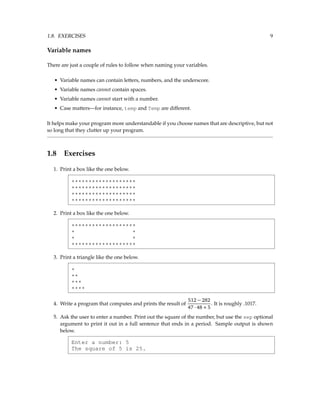
1. Print a box like the one below.
*******************
*******************
*******************
*******************
2. Print a box like the one below.
*******************
* *
* *
*******************
3. Print a triangle like the one below.
*
**
***
****
4. Write a program that computes and prints the result of
512 − 282
47 · 48 + 5
. It is roughly .1017.
5. Ask the user to enter a number. Print out the square of the number, but use the sep optional
argument to print it out in a full sentence that ends in a period. Sample output is shown
below.
Enter a number: 5
The square of 5 is 25.
10 CHAPTER 1. GETTING STARTED
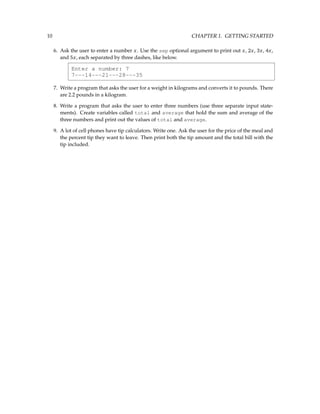
6. Ask the user to enter a number x. Use the sep optional argument to print out x, 2x, 3x, 4x,
and 5x, each separated by three dashes, like below.
Enter a number: 7
7---14---21---28---35
7. Write a program that asks the user for a weight in kilograms and converts it to pounds. There
are 2.2 pounds in a kilogram.
8. Write a program that asks the user to enter three numbers (use three separate input state-
ments). Create variables called total and average that hold the sum and average of the
three numbers and print out the values of total and average.
9. A lot of cell phones have tip calculators. Write one. Ask the user for the price of the meal and
the percent tip they want to leave. Then print both the tip amount and the total bill with the
tip included.
Chapter 2
For loops
Probably the most powerful thing about computers is that they can repeat things over and over
very quickly. There are several ways to repeat things in Python, the most common of which is the
for loop.
2.1 Examples
Example 1 The following program will print Hello ten times:
for i in range(10):
print('Hello')
The structure of a for loop is as follows:
for variable name in range( number of times to repeat ):
statements to be repeated
The syntax is important here. The word for must be in lowercase, the first line must end with a
colon, and the statements to be repeated must be indented. Indentation is used to tell Python which
statements will be repeated.
Example 2 The program below asks the user for a number and prints its square, then asks for
another number and prints its square, etc. It does this three times and then prints that the loop is
done.
for i in range(3):
num = eval(input('Enter a number: '))
print ('The square of your number is', num*num)
print('The loop is now done.')
11
12 CHAPTER 2. FOR LOOPS
Enter a number: 3
The square of your number is 9
Enter a number: 5
The square of your number is 25
Enter a number: 23
The square of your number is 529
The loop is now done.
Since the second and third lines are indented, Python knows that these are the statements to be
repeated. The fourth line is not indented, so it is not part of the loop and only gets executed once,
after the loop has completed.
Looking at the above example, we see where the term for loop comes from: we can picture the
execution of the code as starting at the for statement, proceeding to the second and third lines,
then looping back up to the for statement.
Example 3 The program below will print A, then B, then it will alternate C’s and D’s five times
and then finish with the letter E once.
print('A')
print('B')
for i in range(5):
print('C')
print('D')
print('E')
The first two print statements get executed once, printing an A followed by a B. Next, the C’s and
D’s alternate five times. Note that we don’t get five C’s followed by five D’s. The way the loop
works is we print a C, then a D, then loop back to the start of the loop and print a C and another D,
etc. Once the program is done looping with the C’s and D’s, it prints one E.
Example 4 If we wanted the above program to print five C’s followed by five D’s, instead of
alternating C’s and D’s, we could do the following:
print('A')
print('B')
for i in range(5):
print('C')
for i in range(5):
print('D')
print('E')
2.2. THE LOOP VARIABLE 13
2.2 The loop variable
There is one part of a for loop that is a little tricky, and that is the loop variable. In the example
below, the loop variable is the variable i. The output of this program will be the numbers 0, 1, ...,
99, each printed on its own line.
for i in range(100):
print(i)
When the loop first starts, Python sets the variable i to 0. Each time we loop back up, Python
increases the value of i by 1. The program loops 100 times, each time increasing the value of i by
1, until we have looped 100 times. At this point the value of i is 99.
You may be wondering why i starts with 0 instead of 1. Well, there doesn’t seem to be any really
good reason why other than that starting at 0 was useful in the early days of computing and it has
stuck with us. In fact most things in computer programming start at 0 instead of 1. This does take
some getting used to.
Since the loop variable, i, gets increased by 1 each time through the loop, it can be used to keep
track of where we are in the looping process. Consider the example below:
for i in range(3):
print(i+1, '-- Hello')
1 -- Hello
2 -- Hello
3 -- Hello
Names There’s nothing too special about the name i for our variable. The programs below will
have the exact same result.
for i in range(100): for wacky_name in range(100):
print(i) print(wacky_name)
It’s a convention in programming to use the letters i, j, and k for loop variables, unless there’s a
good reason to give the variable a more descriptive name.
2.3 The range function
The value we put in the range function determines how many times we will loop. The way range
works is it produces a list of numbers from zero to the value minus one. For instance, range(5)
produces five values: 0, 1, 2, 3, and 4.
14 CHAPTER 2. FOR LOOPS
If we want the list of values to start at a value other than 0, we can do that by specifying the starting
value. The statement range(1,5) will produce the list 1, 2, 3, 4. This brings up one quirk of the
range function—it stops one short of where we think it should. If we wanted the list to contain the
numbers 1 through 5 (including 5), then we would have to do range(1,6).
Another thing we can do is to get the list of values to go up by more than one at a time. To do this,
we can specify an optional step as the third argument. The statement range(1,10,2) will step
through the list by twos, producing 1, 3, 5, 7, 9.
To get the list of values to go backwards, we can use a step of -1. For instance, range(5,1,-1)
will produce the values 5, 4, 3, 2, in that order. (Note that the range function stops one short of the
ending value 1). Here are a few more examples:
Statement Values generated
range(10) 0,1,2,3,4,5,6,7,8,9
range(1,10) 1,2,3,4,5,6,7,8,9
range(3,7) 3,4,5,6
range(2,15,3) 2,5,8,11,14
range(9,2,-1) 9,8,7,6,5,4,3
Here is an example program that counts down from 5 and then prints a message.
for i in range(5,0,-1):
print(i, end=' ')
print('Blast off!!')
5 4 3 2 1 Blast off!!!
The end=' ' just keeps everything on the same line.
2.4 A Trickier Example
Let’s look at a problem where we will make use of the loop variable. The program below prints a
rectangle of stars that is 4 rows tall and 6 rows wide.
for i in range(4):
print('*'*6)
The rectangle produced by this code is shown below on the left. The code '*'*6 is something we’ll
cover in Section 6.2; it just repeats the asterisk character six times.
****** *
****** **
****** ***
****** ****
2.5. EXERCISES 15
Suppose we want to make a triangle instead. We can accomplish this with a very small change to
the rectangle program. Looking at the program, we can see that the for loop will repeat the print
statement four times, making the shape four rows tall. It’s the 6 that will need to change.
The key is to change the 6 to i+1. Each time through the loop the program will now print i+1 stars
instead of 6 stars. The loop counter variable i runs through the values 0, 1, 2, and 3. Using it allows
us to vary the number of stars. Here is triangle program:
for i in range(4):
print('*'*(i+1))
2.5 Exercises
1. Write a program that prints your name 100 times.
2. Write a program to fill the screen horizontally and vertically with your name. [Hint: add the
option end='' into the print function to fill the screen horizontally.]
3. Write a program that outputs 100 lines, numbered 1 to 100, each with your name on it. The
output should look like the output below.
1 Your name
2 Your name
3 Your name
4 Your name
...
100 Your name
4. Write a program that prints out a list of the integers from 1 to 20 and their squares. The output
should look like this:
1 --- 1
2 --- 4
3 --- 9
...
20 --- 400
5. Write a program that uses a for loop to print the numbers 8, 11, 14, 17, 20, ..., 83, 86, 89.
6. Write a program that uses a for loop to print the numbers 100, 98, 96, ..., 4, 2.
7. Write a program that uses exactly four for loops to print the sequence of letters below.
AAAAAAAAAABBBBBBBCDCDCDCDEFFFFFFG
8. Write a program that asks the user for their name and how many times to print it. The pro-
gram should print out the user’s name the specified number of times.
16 CHAPTER 2. FOR LOOPS
9. The Fibonacci numbers are the sequence below, where the first two numbers are 1, and each
number thereafter is the sum of the two preceding numbers. Write a program that asks the
user how many Fibonacci numbers to print and then prints that many.
1,1,2,3,5,8,13,21,34,55,89...
10. Use a for loop to print a box like the one below. Allow the user to specify how wide and how
high the box should be. [Hint: print('*'*10) prints ten asterisks.]
*******************
*******************
*******************
*******************
11. Use a for loop to print a box like the one below. Allow the user to specify how wide and how
high the box should be.
*******************
* *
* *
*******************
12. Use a for loop to print a triangle like the one below. Allow the user to specify how high the
triangle should be.
*
**
***
****
13. Use a for loop to print an upside down triangle like the one below. Allow the user to specify
how high the triangle should be.
****
***
**
*
14. Use for loops to print a diamond like the one below. Allow the user to specify how high the
diamond should be.
*
***
*****
*******
*****
***
*
2.5. EXERCISES 17
15. Write a program that prints a giant letter A like the one below. Allow the user to specify how
large the letter should be.
*
* *
*****
* *
* *
18 CHAPTER 2. FOR LOOPS
Chapter 3
Numbers
This chapter focuses on numbers and simple mathematics in Python.
3.1 Integers and Decimal Numbers
Because of the way computer chips are designed, integers and decimal numbers are represented
differently on computers. Decimal numbers are represented by what are called floating point num-
bers. The important thing to remember about them is you typically only get about 15 or so digits
of precision. It would be nice if there were no limit to the precision, but calculations run a lot more
quickly if you cut off the numbers at some point.
On the other hand, integers in Python have no restrictions. They can be arbitrarily large.
For decimal numbers, the last digit is sometimes slightly off due to the fact that computers work in
binary (base 2) whereas our human number system is base 10. As an example, mathematically, we
know that the decimal expansion of 7/3 is 2.333···, with the threes repeating forever. But when
we type 7/3 into the Python shell, we get 2.3333333333333335. This is called roundoff error. For
most practical purposes this is not too big of a deal, but it actually can cause problems for some
mathematical and scientific calculations. If you really need more precision, there are ways. See
Section 22.5.
3.2 Math Operators
Here is a list of the common operators in Python:
19
20 CHAPTER 3. NUMBERS
Operator Description
+ addition
- subtraction
* multiplication
/ division
** exponentiation
// integer division
% modulo (remainder)
Exponentiation Python uses ** for exponentiation. The caret, ^, is used for something else.
Integer division The integer division operator, //, requires some explanation. Basically, for pos-
itive numbers it behaves like ordinary division except that it throws away the decimal part of the
result. For instance, while 8/5 is 1.6, we have 8//5 equal to 1. We will see uses for this operator
later. Note that in many other programming languages and in older versions of Python, the usual
division operator / actually does integer division on integers.
Modulo The modulo operator, %, returns the remainder from a division. For instance, the result
of 18%7 is 4 because 4 is the remainder when 18 is divided by 7. This operation is surprisingly
useful. For instance, a number is divisible by n precisely when it leaves a remainder of 0 when
divided by n. Thus to check if a number, n, is even, see if n%2 is equal to 0. To check if n is divisible
by 3, see if n%3 is 0.
One use of this is if you want to schedule something in a loop to happen only every other time
through the loop, you could check to see if the loop variable modulo 2 is equal to 0, and if it is, then
do that something.
The modulo operator shows up surprisingly often in formulas. If you need to “wrap around” and
come back to the start, the modulo is useful. For example, think of a clock. If you go six hours past
8 o’clock, the result is 2 o’clock. Mathematically, this can be accomplished by doing a modulo by
12. That is, (8+6)%12 is equal to 2.
As another example, take a game with players 1 through 5. Say you have a variable player that
keeps track of the current player. After player 5 goes, it’s player 1’s turn again. The modulo
operator can be used to take care of this:
player = player%5+1
When player is 5, player%5 will be 0 and expression will set player to 1.
3.3. ORDER OF OPERATIONS 21
3.3 Order of operations
Exponentiation gets done first, followed by multiplication and division (including // and %), and
addition and subtraction come last. The classic math class mnemonic, PEMDAS (Please Excuse My
Dear Aunt Sally), might be helpful.
This comes into play in calculating an average. Say you have three variables x, y, and z, and you
want to calculate the average of their values. To expression x+y+z/3 would not work. Because
division comes before addition, you would actually be calculating x + y + z
3 instead of
x+y+z
3 . This
is easily fixed by using parentheses: (x+y+z)/3.
In general, if you’re not sure about something, adding parentheses might help and usually doesn’t
do any harm.
3.4 Random numbers
To make an interesting computer game, it’s good to introduce some randomness into it. Python
comes with a module, called random, that allows us to use random numbers in our programs.
Before we get to random numbers, we should first explain what a module is. The core part of
the Python language consists of things like for loops, if statements, math operators, and some
functions, like print and input. Everything else is contained in modules, and if we want to use
something from a module we have to first import it—that is, tell Python that we want to use it.
At this point, there is only one function, called randint, that we will need from the random mod-
ule. To load this function, we use the following statement:
from random import randint
Using randint is simple: randint(a,b) will return a random integer between a and b including
both a and b. (Note that randint includes the right endpoint b unlike the range function). Here
is a short example:
from random import randint
x = randint(1,10)
print('A random number between 1 and 10: ', x)
A random number between 1 and 10: 7
The random number will be different every time we run the program.
3.5 Math functions
The math module Python has a module called math that contains familiar math functions, in-
cluding sin, cos, tan, exp, log, log10, factorial, sqrt, floor, and ceil. There are also the
inverse trig functions, hyperbolic functions, and the constants pi and e. Here is a short example:
22 CHAPTER 3. NUMBERS
from math import sin, pi
print('Pi is roughly', pi)
print('sin(0) =', sin(0))
Pi is roughly 3.14159265359
sin(0) = 0.0
Built-in math functions There are two built in math functions, abs (absolute value) and round
that are available without importing the math module. Here are some examples:
print(abs(-4.3))
print(round(3.336, 2))
print(round(345.2, -1))
4.3
3.34
350.0
The round function takes two arguments: the first is the number to be rounded and the second is
the number of decimal places to round to. The second argument can be negative.
3.6 Getting help from Python
There is documentation built into Python. To get help on the math module, for example, go to the
Python shell and type the following two lines:
>>> import math
>>> dir(math)
['__doc__', '__name__', '__package__', 'acos', 'acosh', 'asin',
'asinh', 'atan', 'atan2', 'atanh', 'ceil', 'copysign', 'cos',
'cosh', 'degrees', 'e', 'exp', 'fabs', 'factorial', 'floor',
'fmod', 'frexp', 'fsum', 'hypot', 'isinf', 'isnan', 'ldexp',
'log', 'log10', 'log1p', 'modf', 'pi', 'pow', 'radians', 'sin',
'sinh', 'sqrt', 'tan', 'tanh', 'trunc']
This gives a list of all the functions and variables in the math module. You can ignore all of the
ones that start with underscores. To get help on a specific function, say the floor function, you
can type help(math.floor). Typing help(math) will give you help for everything in the math
module.
3.7 Using the Shell as a Calculator
The Python shell can be used as a very handy and powerful calculator. Here is an example session:
3.8. EXERCISES 23
>>> 23**2
529
>>> s = 0
>>> for n in range(1,10001):
s = s + 1/n**2
>>> s
1.6448340718480652
>>> from math import *
>>> factorial(10)
3628800
The second example here sums the numbers 1 + 1/4 + 1/9 + ··· + 1/100002
. The result is stored in
the variable s. To inspect the value of that variable, just type its name and press enter. Inspecting
variables is useful for debugging your programs. If a program is not working properly, you can
type your variable names into the shell after the program has finished to see what their values are.
The statement from math import* imports every function from the math module, which can make
the shell a lot like a scientific calculator.
Note Under the Shell menu, select Restart shell if you want to clear the values of all the
variables.
3.8 Exercises
1. Write a program that generates and prints 50 random integers, each between 3 and 6.
2. Write a program that generates a random number, x, between 1 and 50, a random number y
between 2 and 5, and computes x y
.
3. Write a program that generates a random number between 1 and 10 and prints your name
that many times.
4. Write a program that generates a random decimal number between 1 and 10 with two decimal
places of accuracy. Examples are 1.23, 3.45, 9.80, and 5.00.
5. Write a program that generates 50 random numbers such that the first number is between 1
and 2, the second is between 1 and 3, the third is between 1 and 4, ..., and the last is between
1 and 51.
6. Write a program that asks the user to enter two numbers, x and y, and computes
|x−y|
x+y .
7. Write a program that asks the user to enter an angle between −180◦
and 180◦
. Using an
expression with the modulo operator, convert the angle to its equivalent between 0◦
and
360◦
.
24 CHAPTER 3. NUMBERS
8. Write a program that asks the user for a number of seconds and prints out how many minutes
and seconds that is. For instance, 200 seconds is 3 minutes and 20 seconds. [Hint: Use the //
operator to get minutes and the % operator to get seconds.]
9. Write a program that asks the user for an hour between 1 and 12 and for how many hours in
the future they want to go. Print out what the hour will be that many hours into the future.
An example is shown below.
Enter hour: 8
How many hours ahead? 5
New hour: 1 o'clock
10. (a) One way to find out the last digit of a number is to mod the number by 10. Write a
program that asks the user to enter a power. Then find the last digit of 2 raised to that
power.
(b) One way to find out the last two digits of a number is to mod the number by 100. Write
a program that asks the user to enter a power. Then find the last two digits of 2 raised to
that power.
(c) Write a program that asks the user to enter a power and how many digits they want.
Find the last that many digits of 2 raised to the power the user entered.
11. Write a program that asks the user to enter a weight in kilograms. The program should
convert it to pounds, printing the answer rounded to the nearest tenth of a pound.
12. Write a program that asks the user for a number and prints out the factorial of that number.
13. Write a program that asks the user for a number and then prints out the sine, cosine, and
tangent of that number.
14. Write a program that asks the user to enter an angle in degrees and prints out the sine of that
angle.
15. Write a program that prints out the sine and cosine of the angles ranging from 0 to 345◦
in
15◦
increments. Each result should be rounded to 4 decimal places. Sample output is shown
below:
0 --- 0.0 1.0
15 --- 0.2588 0.9659
30 --- 0.5 0.866
...
345 --- -0.2588 0.9659
16. Below is described how to find the date of Easter in any year. Despite its intimidating appear-
ance, this is not a hard problem. Note that bxc is the floor function, which for positive numbers
just drops the decimal part of the number. For instance b3.14c = 3. The floor function is part
of the math module.
C = century (1900’s → C = 19)
3.8. EXERCISES 25
Y = year (all four digits)
m = (15 + C − bC
4 c − b8C+13
25 c) mod 30
n = (4 + C − bC
4 c) mod 7
a = Y mod 4
b = Y mod 7
c = Y mod 19
d = (19c + m) mod 30
e = (2a + 4b + 6d + n) mod 7
Easter is either March (22+d +e) or April (d +e−9). There is an exception if d = 29 and e = 6.
In this case, Easter falls one week earlier on April 19. There is another exception if d = 28,
e = 6, and m = 2,5,10,13,16,21,24, or 39. In this case, Easter falls one week earlier on April
18. Write a program that asks the user to enter a year and prints out the date of Easter in that
year. (See Tattersall, Elementary Number Theory in Nine Chapters, 2nd ed., page 167)
17. A year is a leap year if it is divisible by 4, except that years divisible by 100 are not leap years
unless they are also divisible by 400. Ask the user to enter a year, and, using the // operator,
determine how many leap years there have been between 1600 and that year.
18. Write a program that given an amount of change less than $1.00 will print out exactly how
many quarters, dimes, nickels, and pennies will be needed to efficiently make that change.
[Hint: the // operator may be useful.]
19. Write a program that draws “modular rectangles” like the ones below. The user specifies the
width and height of the rectangle, and the entries start at 0 and increase typewriter fashion
from left to right and top to bottom, but are all done mod 10. Below are examples of a 3 × 5
rectangle and a 4 × 8.
0 1 2 3 4
5 6 7 8 9
0 1 2 3 4
0 1 2 3 4 5 6 7
8 9 0 1 2 3 4 5
6 7 8 9 0 1 2 3
4 5 6 7 8 9 0 1
26 CHAPTER 3. NUMBERS
Chapter 4
If statements
Quite often in programs we only want to do something provided something else is true. Python’s
if statement is what we need.
4.1 A Simple Example
Let’s try a guess-a-number program. The computer picks a random number, the player tries to
guess, and the program tells them if they are correct. To see if the player’s guess is correct, we need
something new, called an if statement.
from random import randint
num = randint(1,10)
guess = eval(input('Enter your guess: '))
if guess==num:
print('You got it!')
The syntax of the if statement is a lot like the for statement in that there is a colon at the end of
the if condition and the following line or lines are indented. The lines that are indented will be
executed only if the condition is true. Once the indentation is done with, the if block is concluded.
The guess-a-number game works, but it is pretty simple. If the player guesses wrong, nothing
happens. We can add to the if statement as follows:
if guess==num:
print('You got it!')
else:
print('Sorry. The number is ', num)
We have added an else statement, which is like an “otherwise.”
27
28 CHAPTER 4. IF STATEMENTS
4.2 Conditional operators
The comparison operators are ==, >, <, >=, <=, and !=. That last one is for not equals. Here are a few
examples:
Expression Description
if x>3: if x is greater than 3
if x>=3: if x is greater than or equal to 3
if x==3: if x is 3
if x!=3: if x is not 3
There are three additional operators used to construct more complicated conditions: and, or, and
not. Here are some examples:
if grade>=80 and grade<90:
print('Your grade is a B.')
if score>1000 or time>20:
print('Game over.')
if not (score>1000 or time>20):
print('Game continues.')
Order of operations In terms of order of operations, and is done before or, so if you have a
complicated condition that contains both, you may need parentheses around the or condition.
Think of and as being like multiplication and or as being like addition. Here is an example:
if (score<1000 or time>20) and turns_remaining==0:
print('Game over.')
4.3 Common Mistakes
Mistake 1 The operator for equality consists of two equals signs. It is a really common error to
forget one of the equals signs.
Incorrect Correct
if x=1: if x==1:
Mistake 2 A common mistake is to use and where or is needed or vice-versa. Consider the
following if statements:
if x>1 and x<100:
if x>1 or x<100:
4.4. ELIF 29
The first statement is the correct one. If x is any value between 1 and 100, then the statement will
be true. The idea is that x has to be both greater than 1 and less than 100. On the other hand, the
second statement is not what we want because for it to be true, either x has to be greater than 1 or
x has to be less than 100. But every number satisfies this. The lesson here is if your program is not
working correctly, check your and’s and or’s.
Mistake 3 Another very common mistake is to write something like below:
if grade>=80 and <90:
This will lead to a syntax error. We have to be explicit. The correct statement is
if grade>=80 and grade<90:
On the other hand, there is a nice shortcut that does work in Python (though not in many other
programming languages):
if 80<=grade<90:
4.4 elif
A simple use of an if statement is to assign letter grades. Suppose that scores 90 and above are A’s,
scores in the 80s are B’s, 70s are C’s, 60s are D’s, and anything below 60 is an F. Here is one way to
do this:
grade = eval(input('Enter your score: '))
if grade>=90:
print('A')
if grade>=80 and grade<90:
print('B')
if grade>=70 and grade<80:
print('C')
if grade>=60 and grade<70:
print('D')
if grade<60:
print('F')
The code above is pretty straightforward and it works. However, a more elegant way to do it is
shown below.
grade = eval(input('Enter your score: '))
if grade>=90:
print('A')
elif grade>=80:
print('B')
elif grade>=70:
print('C')
30 CHAPTER 4. IF STATEMENTS
elif grade>=60:
print('D')
else:
print('F')
With the separate if statements, each condition is checked regardless of whether it really needs to
be. That is, if the score is a 95, the first program will print an A but then continue on and check
to see if the score is a B, C, etc., which is a bit of a waste. Using elif, as soon as we find where
the score matches, we stop checking conditions and skip all the way to the end of the whole block
of statements. An added benefit of this is that the conditions we use in the elif statements are
simpler than in their if counterparts. For instance, when using elif, the second part of the second
if statement condition, grade<90, becomes unnecessary because the corresponding elif does not
have to worry about a score of 90 or above, as such a score would have already been caught by the
first if statement.
You can get along just fine without elif, but it can often make your code simpler.
4.5 Exercises
1. Write a program that asks the user to enter a length in centimeters. If the user enters a negative
length, the program should tell the user that the entry is invalid. Otherwise, the program
should convert the length to inches and print out the result. There are 2.54 centimeters in an
inch.
2. Ask the user for a temperature. Then ask them what units, Celsius or Fahrenheit, the temper-
ature is in. Your program should convert the temperature to the other unit. The conversions
are F = 9
5 C + 32 and C = 5
9 (F − 32).
3. Ask the user to enter a temperature in Celsius. The program should print a message based
on the temperature:
• If the temperature is less than -273.15, print that the temperature is invalid because it is
below absolute zero.
• If it is exactly -273.15, print that the temperature is absolute 0.
• If the temperature is between -273.15 and 0, print that the temperature is below freezing.
• If it is 0, print that the temperature is at the freezing point.
• If it is between 0 and 100, print that the temperature is in the normal range.
• If it is 100, print that the temperature is at the boiling point.
• If it is above 100, print that the temperature is above the boiling point.
4. Write a program that asks the user how many credits they have taken. If they have taken 23
or less, print that the student is a freshman. If they have taken between 24 and 53, print that
they are a sophomore. The range for juniors is 54 to 83, and for seniors it is 84 and over.
4.5. EXERCISES 31
5. Generate a random number between 1 and 10. Ask the user to guess the number and print a
message based on whether they get it right or not.
6. A store charges $12 per item if you buy less than 10 items. If you buy between 10 and 99
items, the cost is $10 per item. If you buy 100 or more items, the cost is $7 per item. Write a
program that asks the user how many items they are buying and prints the total cost.
7. Write a program that asks the user for two numbers and prints Close if the numbers are
within .001 of each other and Not close otherwise.
8. A year is a leap year if it is divisible by 4, except that years divisible by 100 are not leap years
unless they are also divisible by 400. Write a program that asks the user for a year and prints
out whether it is a leap year or not.
9. Write a program that asks the user to enter a number and prints out all the divisors of that
number. [Hint: the % operator is used to tell if a number is divisible by something. See Section
3.2.]
10. Write a multiplication game program for kids. The program should give the player ten ran-
domly generated multiplication questions to do. After each, the program should tell them
whether they got it right or wrong and what the correct answer is.
Question 1: 3 x 4 = 12
Right!
Question 2: 8 x 6 = 44
Wrong. The answer is 48.
...
...
Question 10: 7 x 7 = 49
Right.
11. Write a program that asks the user for an hour between 1 and 12, asks them to enter am or pm,
and asks them how many hours into the future they want to go. Print out what the hour will
be that many hours into the future, printing am or pm as appropriate. An example is shown
below.
Enter hour: 8
am (1) or pm (2)? 1
How many hours ahead? 5
New hour: 1 pm
12. A jar of Halloween candy contains an unknown amount of candy and if you can guess exactly
how much candy is in the bowl, then you win all the candy. You ask the person in charge the
following: If the candy is divided evenly among 5 people, how many pieces would be left
over? The answer is 2 pieces. You then ask about dividing the candy evenly among 6 people,
and the amount left over is 3 pieces. Finally, you ask about dividing the candy evenly among
7 people, and the amount left over is 2 pieces. By looking at the bowl, you can tell that there
are less than 200 pieces. Write a program to determine how many pieces are in the bowl.
32 CHAPTER 4. IF STATEMENTS
13. Write a program that lets the user play Rock-Paper-Scissors against the computer. There
should be five rounds, and after those five rounds, your program should print out who won
and lost or that there is a tie.
Chapter 5
Miscellaneous Topics I
This chapter consists of a several common techniques and some other useful information.
5.1 Counting
Very often we want our programs to count how many times something happens. For instance, a
video game may need to keep track of how many turns a player has used, or a math program may
want to count how many numbers have a special property. The key to counting is to use a variable
to keep the count.
Example 1 This program gets 10 numbers from the user and counts how many of those numbers
are greater than 10.
count = 0
for i in range(10):
num = eval(input('Enter a number: '))
if num>10:
count=count+1
print('There are', count, 'numbers greater than 10.')
Think of the count variable as if we are keeping a tally on a piece of paper. Every time we get
a number larger than 10, we add 1 to our tally. In the program, this is accomplished by the line
count=count+1. The first line of the program, count=0, is important. Without it, the Python
interpreter would get to the count=count+1 line and spit out an error saying something about
not knowing what count is. This is because the first time the program gets to this line, it tries to
do what it says: take the old value of count, add 1 to it, and store the result in count. But the
first time the program gets there, there is no old value of count to use, so the Python interpreter
doesn’t know what to do. To avoid the error, we need to define count, and that is what the first
33
34 CHAPTER 5. MISCELLANEOUS TOPICS I
line does. We set it to 0 to indicate that at the start of the program no numbers greater than 10 have
been found.
Counting is an extremely common thing. The two things involved are:
1. count=0 — Start the count at 0.
2. count=count+1 — Increase the count by 1.
Example 2 This modification of the previous example counts how many of the numbers the user
enters are greater than 10 and also how many are equal to 0. To count two things we use two count
variables.
count1 = 0
count2 = 0
for i in range(10):
num = eval(input('Enter a number: '))
if num>10:
count1=count1+1
if num==0:
count2=count2+1
print('There are', count1, 'numbers greater than 10.')
print('There are', count2, 'zeroes.')
Example 3 Next we have a slightly trickier example. This program counts how many of the
squares from 12
to 1002
end in a 4.
count = 0
for i in range(1,101):
if (i**2)%10==4:
count = count + 1
print(count)
A few notes here: First, because of the aforementioned quirk of the range function, we need to use
range(1,101) to loop through the numbers 1 through 100. The looping variable i takes on those
values, so the squares from 12
to 1002
are represented by i**2. Next, to check if a number ends
in 4, a nice mathematical trick is to check if it leaves a remainder of 4 when divided by 10. The
modulo operator, %, is used to get the remainder.
5.2 Summing
Closely related to counting is summing, where we want to add up a bunch of numbers.
5.3. SWAPPING 35
Example 1 This program will add up the numbers from 1 to 100. The way this works is that each
time we encounter a new number, we add it to our running total, s.
s = 0
for i in range(1,101):
s = s + i
print('The sum is', s)
Example 2 This program that will ask the user for 10 numbers and then computes their average.
s = 0
for i in range(10):
num = eval(input('Enter a number: '))
s = s + num
print('The average is', s/10)
Example 3 A common use for summing is keeping score in a game. Near the beginning of the
game we would set the score variable equal to 0. Then when we want to add to the score we would
do something like below:
score = score + 10
5.3 Swapping
Quite often we will want to swap the values of two variables, x and y. It would be tempting to try
the following:
x = y
y = x
But this will not work. Suppose x is 3 and y is 5. The first line will set x to 5, which is good, but
then the second line will set y to 5 also because x is now 5. The trick is to use a third variable to
save the value of x:
hold = x
x = y
y = hold
In many programming languages, this is the usual way to swap variables. Python, however, pro-
vides a nice shortcut:
x,y = y,x
We will learn later exactly why this works. For now, feel free to use whichever method you prefer.
The latter method, however, has the advantage of being shorter and easier to understand.
36 CHAPTER 5. MISCELLANEOUS TOPICS I
5.4 Flag variables
A flag variable can be used to let one part of your program know when something happens in
another part of the program. Here is an example that determines if a number is prime.
num = eval(input('Enter number: '))
flag = 0
for i in range(2,num):
if num%i==0:
flag = 1
if flag==1:
print('Not prime')
else:
print('Prime')
Recall that a number is prime if it has no divisors other than 1 and itself. The way the program
above works is flag starts off at 0. We then loop from 2 to num-1. If one of those values turns out
to be a divisor, then flag gets set to 1. Once the loop is finished, we check to see if the flag got set
or not. If it did, we know there was a divisor, and num isn’t prime. Otherwise, the number must be
prime.
5.5 Maxes and mins
A common programming task is to find the largest or smallest value in a series of values. Here is
an example where we ask the user to enter ten positive numbers and then we print the largest one.
largest = eval(input('Enter a positive number: '))
for i in range(9):
num = eval(input('Enter a positive number: '))
if num>largest:
largest=num
print('Largest number:', largest)
The key here is the variable largest that keeps track of the largest number found so far. We start
by setting it equal to the user’s first number. Then, every time we get a new number from the user,
we check to see if the user’s number is larger than the current largest value (which is stored in
largest). If it is, then we set largest equal to the user’s number.
If, instead, we want the smallest value, the only change necessary is that > becomes <, though it
would also be good to rename the variable largest to smallest.
Later on, when we get to lists, we will see a shorter way to find the largest and smallest values, but
the technique above is useful to know since you may occasionally run into situations where the list
way won’t do everything you need it to do.
5.6. COMMENTS 37
5.6 Comments
A comment is a message to someone reading your program. Comments are often used to describe
what a section of code does or how it works, especially with tricky sections of code. Comments
have no effect on your program.
Single-line comments For a single-line comment, use the # character.
# a slightly sneaky way to get two values at once
num1, num2 = eval(input('Enter two numbers separated by commas: '))
You can also put comments at the end of a line:
count = count + 2 # each divisor contributes two the count
Multi-line comments For comments that span several lines, you can use triple quotes.
""" Program name: Hello world
Author: Brian Heinold
Date: 1/9/11 """
print('Hello world')
One nice use for the triple quotes is to comment out parts of your code. Often you will want to
modify your program but don’t want to delete your old code in case your changes don’t work. You
could comment out the old code so that it is still there if you need it, and it will be ignored when
your new program is run. Here is a simple example:
"""
print('This line and the next are inside a comment.')
print('These lines will not get executed.')
"""
print('This line is not in a comment and it will be executed.')
5.7 Simple debugging
Here are two simple techniques for figuring out why a program is not working:
1. Use the Python shell. After your program has run, you can type in the names of your pro-
gram’s variables to inspect their values and see which ones have the values you expect them
to have and which don’t. You can also use the Shell to type in small sections of your program
and see if they are working.
2. Add print statements to your program. You can add these at any point in your program to
see what the values of your variables are. You can also add a print statement to see if a point
in your code is even being reached. For instance, if you think you might have an error in
38 CHAPTER 5. MISCELLANEOUS TOPICS I
a condition of an if statement, you can put a print statement into the if block to see if the
condition is being triggered.
Here is an example from the part of the primes program from earlier in this chapter. We put
a print statement into the for loop to see exactly when the flag variable is being set:
flag = 0
num = eval(input('Enter number: '))
for i in range(2,num):
if num%i==0:
flag = 1
print(i, flag)
3. An empty input statement, like below, can be used to pause your program at a specific point:
input()
5.8 Example programs
It is a valuable skill is to be able to read code. In this section we will look in depth at some simple
programs and try to understand how they work.
Example 1 The following program prints Hello a random number of times between 5 and 25.
from random import randint
rand_num = randint(5,25)
for i in range(rand_num):
print('Hello')
The first line in the program is the import statement. This just needs to appear once, usually near
the beginning of your program. The next line generates a random number between 5 and 25. Then,
remember that to repeat something a specified number of times, we use a for loop. To repeat some-
thing 50 times, we would use range(50) in our for loop. To repeat something 100 times, we would
use range(100). To repeat something a random number of times, we can use range(rand_num),
where rand_num is a variable holding a random number. Although if we want, we can skip the
variable and put the randint statement directly in the range function, as shown below.
from random import randint
for i in range(randint(5,25)):
print('Hello')
5.8. EXAMPLE PROGRAMS 39
Example 2 Compare the following two programs.
from random import randint from random import randint
rand_num = randint(1,5) for i in range(6):
for i in range(6): rand_num = randint(1,5)
print('Hello'*rand_num) print('Hello'*rand_num)
Hello Hello Hello Hello Hello
Hello Hello Hello
Hello Hello Hello Hello Hello Hello
Hello Hello Hello Hello Hello
Hello Hello Hello Hello
Hello Hello Hello
The only difference between the programs is in the placement of the rand_num statement. In
the first program, it is located outside of the for loop, and this means that rand_num is set once
at the beginning of the program and retains that same value for the life of the program. Thus
every print statement will print Hello the same number of times. In the second program, the
rand_num statement is within the loop. Right before each print statement, rand_num is assigned a
new random number, and so the number of times Hello is printed will vary from line to line.
Example 3 Let us write a program that generates 10000 random numbers between 1 and 100 and
counts how many of them are multiples of 12. Here are the things we will need:
• Because we are using random numbers, the first line of the program should import the
random module.
• We will require a for loop to run 10000 times.
• Inside the loop, we will need to generate a random number, check to see if it is divisible by
12, and if so, add 1 to the count.
• Since we are counting, we will also need to set the count equal to 0 before we start counting.
• To check divisibility by 12, we use the modulo, %, operator.
When we put this all together, we get the following:
from random import randint
count = 0
for i in range(10000):
num = randint(1, 100)
if num%12==0:
count=count+1
print('Number of multiples of 12:', count)
40 CHAPTER 5. MISCELLANEOUS TOPICS I
Indentation matters
A common mistake is incorrect indentation. Suppose we take the above and indent the last line.
The program will still run, but it won’t run as expected.
from random import randint
count = 0
for i in range(10000):
num = randint(1, 100)
if num%12==0:
count=count+1
print('Number of multiples of 12:', count)
When we run it, it outputs a whole bunch of numbers. The reason for this is that by indenting
the print statement, we have made it a part of the for loop, so the print statement will be executed
10,000 times.
Suppose we indent the print statement one step further, like below.
from random import randint
count = 0
for i in range(10000):
num = randint(1, 100)
if num%12==0:
count=count+1
print('Number of multiples of 12:', count)
Now, not only is it part of the for loop, but it is also part of the if statement. What will happen is
every time we find a new multiple of 12, we will print the count. Neither this, nor the previous
example, is what we want. We just want to print the count once at the end of the program, so we
don’t want the print statement indented at all.
5.9 Exercises
1. Write a program that counts how many of the squares of the numbers from 1 to 100 end in a
1.
2. Write a program that counts how many of the squares of the numbers from 1 to 100 end in a
4 and how many end in a 9.
3. Write a program that asks the user to enter a value n, and then computes (1+ 1
2 + 1
3 +···+ 1
n )−
ln(n). The ln function is log in the math module.
4. Write a program to compute the sum 1 − 2 + 3 − 4 + ··· + 1999 − 2000.
5.9. EXERCISES 41
5. Write a program that asks the user to enter a number and prints the sum of the divisors of
that number. The sum of the divisors of a number is an important function in number theory.
6. A number is called a perfect number if it is equal to the sum of all of its divisors, not including
the number itself. For instance, 6 is a perfect number because the divisors of 6 are 1, 2, 3, 6
and 6 = 1 + 2 + 3. As another example, 28 is a perfect number because its divisors are 1, 2, 4,
7, 14, 28 and 28 = 1 + 2 + 4 + 7 + 14. However, 15 is not a perfect number because its divisors
are 1, 3, 5, 15 and 15 6= 1 + 3 + 5. Write a program that finds all four of the perfect numbers
that are less than 10000.
7. An integer is called squarefree if it is not divisible by any perfect squares other than 1. For
instance, 42 is squarefree because its divisors are 1, 2, 3, 6, 7, 21, and 42, and none of those
numbers (except 1) is a perfect square. On the other hand, 45 is not squarefree because it is
divisible by 9, which is a perfect square. Write a program that asks the user for an integer and
tells them if it is squarefree or not.
8. Write a program that swaps the values of three variables x, y, and z, so that x gets the value
of y, y gets the value of z, and z gets the value of x.
9. Write a program to count how many integers from 1 to 1000 are not perfect squares, perfect
cubes, or perfect fifth powers.
10. Ask the user to enter 10 test scores. Write a program to do the following:
(a) Print out the highest and lowest scores.
(b) Print out the average of the scores.
(c) Print out the second largest score.
(d) If any of the scores is greater than 100, then after all the scores have been entered, print
a message warning the user that a value over 100 has been entered.
(e) Drop the two lowest scores and print out the average of the rest of them.
11. Write a program that computes the factorial of a number. The factorial, n!, of a number n is the
product of all the integers between 1 and n, including n. For instance, 5! = 1 · 2 · 3 · 4 · 5 = 120.
[Hint: Try using a multiplicative equivalent of the summing technique.]
12. Write a program that asks the user to guess a random number between 1 and 10. If they guess
right, they get 10 points added to their score, and they lose 1 point for an incorrect guess. Give
the user five numbers to guess and print their score after all the guessing is done.
13. In the last chapter there was an exercise that asked you to create a multiplication game for
kids. Improve your program from that exercise to keep track of the number of right and
wrong answers. At the end of the program, print a message that varies depending on how
many questions the player got right.
14. This exercise is about the well-known Monty Hall problem. In the problem, you are a con-
testant on a game show. The host, Monty Hall, shows you three doors. Behind one of those
doors is a prize, and behind the other two doors are goats. You pick a door. Monty Hall, who
42 CHAPTER 5. MISCELLANEOUS TOPICS I
knows behind which door the prize lies, then opens up one of the doors that doesn’t contain
the prize. There are now two doors left, and Monty gives you the opportunity to change your
choice. Should you keep the same door, change doors, or does it not matter?
(a) Write a program that simulates playing this game 10000 times and calculates what per-
centage of the time you would win if you switch and what percentage of the time you
would win by not switching.
(b) Try the above but with four doors instead of three. There is still only one prize, and
Monty still opens up one door and then gives you the opportunity to switch.
Chapter 6
Strings
Strings are a data type in Python for dealing with text. Python has a number of powerful features
for manipulating strings.
6.1 Basics
Creating a string A string is created by enclosing text in quotes. You can use either single quotes,
', or double quotes, ". A triple-quote can be used for multi-line strings. Here are some examples:
s = 'Hello'
t = "Hello"
m = """This is a long string that is
spread across two lines."""
Input Recall from Chapter 1 that when getting numerical input we use an eval statement with
the input statement, but when getting text, we do not use eval. The difference is illustrated
below:
num = eval(input('Enter a number: '))
string = input('Enter a string: ')
Empty string The empty string '' is the string equivalent of the number 0. It is a string with
nothing in it. We have seen it before, in the print statement’s optional argument, sep=''.
Length To get the length of a string (how many characters it has), use the built-in function len.
For example, len('Hello') is 5.
43
44 CHAPTER 6. STRINGS
6.2 Concatenation and repetition
The operators + and * can be used on strings. The + operator combines two strings. This operation
is called concatenation. The * repeats a string a certain number of times. Here are some examples.
Expression Result
'AB'+'cd' 'ABcd'
'A'+'7'+'B' 'A7B'
'Hi'*4 'HiHiHiHi'
Example 1 If we want to print a long row of dashes, we can do the following
print('-'*75)
Example 2 The + operator can be used to build up a string, piece by piece, analogously to the way
we built up counts and sums in Sections 5.1 and 5.2. Here is an example that repeatedly asks the
user to enter a letter and builds up a string consisting of only the vowels that the user entered.
s = ''
for i in range(10):
t = input('Enter a letter: ')
if t=='a' or t=='e' or t=='i' or t=='o' or t=='u':
s = s + t
print(s)
This technique is very useful.
6.3 The in operator
The in operator is used to tell if a string contains something. For example:
if 'a' in string:
print('Your string contains the letter a.')
You can combine in with the not operator to tell if a string does not contain something:
if ';' not in string:
print('Your string does not contain any semicolons.')
Example In the previous section we had the long if condition
if t=='a' or t=='e' or t=='i' or t=='o' or t=='u':
Using the in operator, we can replace that statement with the following:
if t in 'aeiou':
6.4. INDEXING 45
6.4 Indexing
We will often want to pick out individual characters from a string. Python uses square brackets to
do this. The table below gives some examples of indexing the string s='Python'.
Statement Result Description
s[0] P first character of s
s[1] y second character of s
s[-1] n last character of s
s[-2] o second-to-last character of s
• The first character of s is s[0], not s[1]. Remember that in programming, counting usually
starts at 0, not 1.
• Negative indices count backwards from the end of the string.
A common error Suppose s='Python' and we try to do s[12]. There are only six characters in
the string and Python will raise the following error message:
IndexError: string index out of range
You will see this message again. Remember that it happens when you try to read past the end of a
string.
6.5 Slices
A slice is used to pick out part of a string. It behaves like a combination of indexing and the range
function. Below we have some examples with the string s='abcdefghij'.
index: 0 1 2 3 4 5 6 7 8 9
letters: a b c d e f g h i j
Code Result Description
s[2:5] cde characters at indices 2, 3, 4
s[ :5] abcde first five characters
s[5: ] fghij characters from index 5 to the end
s[-2:] ij last two characters
s[ : ] abcdefghij entire string
s[1:7:2] bdf characters from index 1 to 6, by twos
s[ : :-1] jihgfedcba a negative step reverses the string
46 CHAPTER 6. STRINGS
• The basic structure is
string name[starting location : ending location+1]
Slices have the same quirk as the range function in that they do not include the ending
location. For instance, in the example above, s[2:5] gives the characters in indices 2, 3, and
4, but not the character in index 5.
• We can leave either the starting or ending locations blank. If we leave the starting location
blank, it defaults to the start of the string. So s[:5] gives the first five characters of s. If
we leave the ending location blank, it defaults to the end of the string. So s[5:] will give
all the characters from index 5 to the end. If we use negative indices, we can get the ending
characters of the string. For instance, s[-2:] gives the last two characters.
• There is an optional third argument, just like in the range statement, that can specify the step.
For example, s[1:7:2] steps through the string by twos, selecting the characters at indices
1, 3, and 5 (but not 7, because of the aforementioned quirk). The most useful step is -1, which
steps backwards through the string, reversing the order of the characters.
6.6 Changing individual characters of a string
Suppose we have a string called s and we want to change the character at index 4 of s to 'X'. It
is tempting to try s[4]='X', but that unfortunately will not work. Python strings are immutable,
which means we can’t modify any part of them. There is more on why this is in Section 19.1. If we
want to change a character of s, we have to instead build a new string from s and reassign it to s.
Here is code that will change the character at index 4 to 'X':
s = s[:4] + 'X' + s[5:]
The idea of this is we take all the characters up to index 4, then X, and then all of the characters
after index 4.
6.7 Looping
Very often we will want to scan through a string one character at a time. A for loop like the one
below can be used to do that. It loops through a string called s, printing the string, character by
character, each on a separate line:
for i in range(len(s)):
print (s[i])
In the range statement we have len(s) that returns how long s is. So, if s were 5 characters long,
this would be like having range(5) and the loop variable i would run from 0 to 4. This means
that s[i] will run through the characters of s. This way of looping is useful if we need to keep
track of our location in the string during the loop.
If we don’t need to keep track of our location, then there is a simpler type of loop we can use:
6.8. STRING METHODS 47
for c in s:
print(c)
This loop will step through s, character by character, with c holding the current character. You can
almost read this like an English sentence, “For every character c in s, print that character.”
6.8 String methods
Strings come with a ton of methods, functions that return information about the string or return a
new string that is a modified version of the original. Here are some of the most useful ones:
Method Description
lower() returns a string with every letter of the original in lowercase
upper() returns a string with every letter of the original in uppercase
replace(x,y) returns a string with every occurrence of x replaced by y
count(x) counts the number of occurrences of x in the string
index(x) returns the location of the first occurrence of x
isalpha() returns True if every character of the string is a letter
Important note One very important note about lower, upper, and replace is that they do not
change the original string. If you want to change a string, s, to all lowercase, it is not enough to just
use s.lower(). You need to do the following:
s = s.lower()
Short examples Here are some examples of string methods in action:
Statement Description
print(s.count(' ')) prints the number of spaces in the string
s = s.upper() changes the string to all caps
s = s.replace('Hi','Hello') replaces each 'Hi' in s with 'Hello'
print(s.index('a')) prints location of the first 'a' in s
isalpha The isalpha method is used to tell if a character is a letter or not. It returns True if
the character is a letter and False otherwise. When used with an entire string, it will only return
True if every character of the string is a letter. The values True and False are called booleans
and are covered in Section 10.2. For now, though, just remember that you can use isalpha in if
conditions. Here is a simple example:
s = input('Enter a string')
48 CHAPTER 6. STRINGS
if s[0].isalpha():
print('Your string starts with a letter')
if not s.isalpha():
print('Your string contains a non-letter.')
A note about index If you try to find the index of something that is not in a string, Python will
raise an error. For instance, if s='abc' and you try s.index('z'), you will get an error. One way
around this is to check first, like below:
if 'z' in s:
location = s.index('z')
Other string methods There are many more string methods. For instance, there are methods
isdigit and isalnum, which are analogous to isalpha. Some other useful methods we will
learn about later are join and split. To see a list of all the string methods, type dir(str) into
the Python shell. If you do this, you will see a bunch of names that start with __. You can ignore
them. To read Python’s documentation for one of the methods, say the isdigit method, type
help(str.isdigit).
6.9 Escape characters
The backslash, , is used to get certain special characters, called escape characters, into your string.
There are a variety of escape characters, and here are the most useful ones:
• n the newline character. It is used to advance to the next line. Here is an example:
print('Hinnthere!')
Hi
There!
• ' for inserting apostrophes into strings. Say you have the following string:
s = 'I can't go'
This will produce an error because the apostrophe will actually end the string. You can use
' to get around this:
s = 'I can't go'
Another option is to use double quotes for the string:
"s = I can't go"
• " analogous to '.
6.10. EXAMPLES 49
•  This is used to get the backslash itself. For example:
filename = 'c:programsfile.py'
• t the tab character
6.10 Examples
Example 1 An easy way to print a blank line is print(). However, if we want to print ten blank
lines, a quick way to do that is the following:
print('n'*9)
Note that we get one of the ten lines from the print function itself.
Example 2 Write a program that asks the user for a string and prints out the location of each 'a'
in the string.
s = input('Enter some text: ')
for i in range(len(s)):
if s[i]=='a':
print(i)
We use a loop to scan through the string one character at a time. The loop variable i keeps track of
our location in the string, and s[i] gives the character at that location. Thus, the third line checks
each character to see if it is an 'a', and if so, it will print out i, the location of that 'a'.
Example 3 Write a program that asks the user for a string and creates a new string that doubles
each character of the original string. For instance, if the user enters Hello, the output should be
HHeelllloo.
s = input('Enter some text: ')
doubled_s = ''
for c in s:
doubled_s = doubled_s + c*2
Here we can use the second type of loop from Section 6.7. The variable c will run through the
characters of s. We use the repetition operator, *, to double each character. We build up the string
s in the way described at the end of Section 6.2.
Example 4 Write a program that asks a user for their name and prints it in the following funny
pattern:
E El Elv Elvi Elvis
50 CHAPTER 6. STRINGS
We will require a loop because we have to repeatedly print sections of the string, and to print the
sections of the string, we will use a slice:
name = input('Enter your name: ')
for i in range(len(name)):
print(name[:i+1], end=' ')
The one trick is to use the loop variable i in the slice. Since the number of characters we need
to print is changing, we need a variable amount in the slice. This is reminiscent of the triangle
program from Section 2.4. We want to print one character of the name the first time through the
loop, two characters the second time, etc. The loop variable, i, starts at 0 the first time through the
loop, then increases to 1 the second time through the loop, etc. Thus we use name[:i+1] to print
the first i+1 characters of the name. Finally, to get all the slices to print on the same line, we use
the print function’s optional argument end=''.
Example 5 Write a program that removes all capitalization and common punctuation from a
string s.
s = s.lower()
for c in ',.;:-?!()'"':
s = s.replace(c, '')
The way this works is for every character in the string of punctuation, we replace every occurrence
of it in s with the empty string, ''. One technical note here: We need the ' character in a string. As
described in the previous section, we get it into the string by using the escape character '.
Example 6 Write a program that, given a string that contains a decimal number, prints out the
decimal part of the number. For instance, if given 3.14159, the program should print out .14159.
s = input('Enter your decimal number: ')
print(s[s.index('.'):])
The key here is the index method will find where the decimal point is. The decimal part of the
number starts there and runs to the end of the string, so we use a slice that starts at s.index('.').
Here is another, more mathematical way, to do this:
from math import floor
num = eval(input('Enter your decimal number: ')
print(num - floor(num))
One difference between the two methods is the first produces a string, whereas the second produces
a number.
6.11. EXERCISES 51
Example 7 A simple and very old method of sending secret messages is the substitution cipher.
Basically, each letter of the alphabet gets replaced by another letter of the alphabet, say every a gets
replaced with an x, and every b gets replaced by a z, etc. Write a program to implement this.
alphabet = 'abcdefghijklmnopqrstuvwxyz'
key = 'xznlwebgjhqdyvtkfuompciasr'
secret_message = input('Enter your message: ')
secret_message = secret_message.lower()
for c in secret_message:
if c.isalpha():
print(key[alphabet.index(c)],end='')
else:
print(c, end='')
The string key is a random reordering of the alphabet.
The only tricky part of the program is the for loop. What it does is go through the message one
character at a time, and, for every letter it finds, it replaces it with the corresponding letter from the
key. This is accomplished by using the index method to find the position in the alphabet of the
current letter and replacing that letter with the letter from the key at that position. All non-letter
characters are copied as is. The program uses the isalpha method to tell whether the current
character is a letter or not.
The code to decipher a message is nearly the same. Just change key[alphabet.index(c)] to
alphabet[key.index(c)]. Section 19.11 provides a different approach to the substitution ci-
pher.
6.11 Exercises
1. Write a program that asks the user to enter a string. The program should then print the
following:
(a) The total number of characters in the string
(b) The string repeated 10 times
(c) The first character of the string (remember that string indices start at 0)
(d) The first three characters of the string
(e) The last three characters of the string
(f) The string backwards
(g) The seventh character of the string if the string is long enough and a message otherwise
(h) The string with its first and last characters removed
(i) The string in all caps
(j) The string with every a replaced with an e
52 CHAPTER 6. STRINGS
(k) The string with every letter replaced by a space
2. A simple way to estimate the number of words in a string is to count the number of spaces
in the string. Write a program that asks the user for a string and returns an estimate of how
many words are in the string.
3. People often forget closing parentheses when entering formulas. Write a program that asks
the user to enter a formula and prints out whether the formula has the same number of open-
ing and closing parentheses.
4. Write a program that asks the user to enter a word and prints out whether that word contains
any vowels.
5. Write a program that asks the user to enter a string. The program should create a new string
called new_string from the user’s string such that the second character is changed to an
asterisk and three exclamation points are attached to the end of the string. Finally, print
new_string. Typical output is shown below:
Enter your string: Qbert
Q*ert!!!
6. Write a program that asks the user to enter a string s and then converts s to lowercase, re-
moves all the periods and commas from s, and prints the resulting string.
7. Write a program that asks the user to enter a word and determines whether the word is a
palindrome or not. A palindrome is a word that reads the same backwards as forwards.
8. At a certain school, student email addresses end with @student.college.edu, while pro-
fessor email addresses end with @prof.college.edu. Write a program that first asks the
user how many email addresses they will be entering, and then has the user enter those ad-
dresses. After all the email addresses are entered, the program should print out a message
indicating either that all the addresses are student addresses or that there were some profes-
sor addresses entered.
9. Ask the user for a number and then print the following, where the pattern ends at the number
that the user enters.
1
2
3
4
10. Write a program that asks the user to enter a string, then prints out each letter of the string
doubled and on a separate line. For instance, if the user entered HEY, the output would be
HH
EE
YY
6.11. EXERCISES 53
11. Write a program that asks the user to enter a word that contains the letter a. The program
should then print the following two lines: On the first line should be the part of the string up
to and including the first a, and on the second line should be the rest of the string. Sample
output is shown below:
Enter a word: buffalo
buffa
lo
12. Write a program that asks the user to enter a word and then capitalizes every other letter of
that word. So if the user enters rhinoceros, the program should print rHiNoCeRoS.
13. Write a program that asks the user to enter two strings of the same length. The program
should then check to see if the strings are of the same length. If they are not, the program
should print an appropriate message and exit. If they are of the same length, the program
should alternate the characters of the two strings. For example, if the user enters abcde and
ABCDE the program should print out AaBbCcDdEe.
14. Write a program that asks the user to enter their name in lowercase and then capitalizes the
first letter of each word of their name.
15. When I was a kid, we used to play this game called Mad Libs. The way it worked was a friend
would ask me for some words and then insert those words into a story at specific places
and read the story. The story would often turn out to be pretty funny with the words I had
given since I had no idea what the story was about. The words were usually from a specific
category, like a place, an animal, etc.
For this problem you will write a Mad Libs program. First, you should make up a story and
leave out some words of the story. Your program should ask the user to enter some words
and tell them what types of words to enter. Then print the full story along with the inserted
words. Here is a small example, but you should use your own (longer) example:
Enter a college class: CALCULUS
Enter an adjective: HAPPY
Enter an activity: PLAY BASKETBALL
CALCULUS class was really HAPPY today. We learned how to
PLAY BASKETBALL today in class. I can't wait for tomorrow's
class!
16. Companies often try to personalize their offers to make them more attractive. One simple
way to do this is just to insert the person’s name at various places in the offer. Of course,
companies don’t manually type in every person’s name; everything is computer-generated.
Write a program that asks the user for their name and then generates an offer like the one
below. For simplicity’s sake, you may assume that the person’s first and last names are one
word each.
Enter name: George Washington
54 CHAPTER 6. STRINGS
Dear George Washington,
I am pleased to offer you our new Platinum Plus Rewards card
at a special introductory APR of 47.99%. George, an offer
like this does not come along every day, so I urge you to call
now toll-free at 1-800-314-1592. We cannot offer such a low
rate for long, George, so call right away.
17. Write a program that generates the 26-line block of letters partially shown below. Use a loop
containing one or two print statements.
abcdefghijklmnopqrstuvwxyz
bcdefghijklmnopqrstuvwxyza
cdefghijklmnopqrstuvwxyzab
...
yzabcdefghijklmnopqrstuvwx
zabcdefghijklmnopqrstuvwxy
18. The goal of this exercise is to see if you can mimic the behavior of the in operator and the
count and index methods using only variables, for loops, and if statements.
(a) Without using the in operator, write a program that asks the user for a string and a letter
and prints out whether or not the letter appears in the string.
(b) Without using the count method, write a program that asks the user for a string and a
letter and counts how many occurrences there are of the letter in the string.
(c) Without using the index method, write a program that asks the user for a string and
a letter and prints out the index of the first occurrence of the letter in the string. If the
letter is not in the string, the program should say so.
19. Write a program that asks the user for a large integer and inserts commas into it according
to the standard American convention for commas in large numbers. For instance, if the user
enters 1000000, the output should be 1,000,000.
20. Write a program that converts a time from one time zone to another. The user enters the time
in the usual American way, such as 3:48pm or 11:26am. The first time zone the user enters
is that of the original time and the second is the desired time zone. The possible time zones
are Eastern, Central, Mountain, or Pacific.
Time: 11:48pm
Starting zone: Pacific
Ending zone: Eastern
2:48am
21. An anagram of a word is a word that is created by rearranging the letters of the original.
For instance, two anagrams of idle are deli and lied. Finding anagrams that are real words is
beyond our reach until Chapter 12. Instead, write a program that asks the user for a string
and returns a random anagram of the string—in other words, a random rearrangement of the
letters of that string.
6.11. EXERCISES 55
22. A simple way of encrypting a message is to rearrange its characters. One way to rearrange the
characters is to pick out the characters at even indices, put them first in the encrypted string,
and follow them by the odd characters. For example, the string message would be encrypted
as msaeesg because the even characters are m, s, a, e (at indices 0, 2, 4, and 6) and the odd
characters are e, s, g (at indices 1, 3, and 5).
(a) Write a program that asks the user for a string and uses this method to encrypt the string.
(b) Write a program that decrypts a string that was encrypted with this method.
23. A more general version of the above technique is the rail fence cipher, where instead of break-
ing things into evens and odds, they are broken up by threes, fours or something larger. For
instance, in the case of threes, the string secret message would be broken into three groups. The
first group is sr sg, the characters at indices 0, 3, 6, 9 and 12. The second group is eemse, the
characters at indices 1, 4, 7, 10, and 13. The last group is ctea, the characters at indices 2, 5, 8,
and 11. The encrypted message is sr sgeemsectea.
(a) Write a program the asks the user for a string and uses the rail fence cipher in the threes
case to encrypt the string.
(b) Write a decryption program for the threes case.
(c) Write a program that asks the user for a string, and an integer determining whether to
break things up by threes, fours, or whatever. Encrypt the string using the rail-fence
cipher.
(d) Write a decryption program for the general case.
24. In calculus, the derivative of x4
is 4x3
. The derivative of x5
is 5x4
. The derivative of x6
is
6x5
. This pattern continues. Write a program that asks the user for input like x^3 or x^25
and prints the derivative. For example, if the user enters x^3, the program should print out
3x^2.
25. In algebraic expressions, the symbol for multiplication is often left out, as in 3x+4y or 3(x+5).
Computers prefer those expressions to include the multiplication symbol, like 3*x+4*y or
3*(x+5). Write a program that asks the user for an algebraic expression and then inserts
multiplication symbols where appropriate.
56 CHAPTER 6. STRINGS
Chapter 7
Lists
Say we need to get thirty test scores from a user and do something with them, like put them in
order. We could create thirty variables, score1, score2, ..., score30, but that would be very
tedious. To then put the scores in order would be extremely difficult. The solution is to use lists.
7.1 Basics
Creating lists Here is a simple list:
L = [1,2,3]
Use square brackets to indicate the start and end of the list, and separate the items by commas.
The empty list The empty list is []. It is the list equivalent of 0 or ''.
Long lists If you have a long list to enter, you can split it across several lines, like below:
nums = [0, 1, 2, 3, 4, 5, 6, 7, 8, 9, 10, 11, 12, 13, 14, 15, 16,
17, 18, 19, 20, 21, 22, 23, 24, 25, 26, 27, 28, 29, 30, 31,
32, 33, 34, 35, 36, 37, 38, 39, 40]
Input We can use eval(input()) to allow the user to enter a list. Here is an example:
L = eval(input('Enter a list: '))
print('The first element is ', L[0])
Enter a list: [5,7,9]
The first element is 5
57
58 CHAPTER 7. LISTS
Printing lists You can use the print function to print the entire contents of a list.
L = [1,2,3]
print(L)
[1, 2, 3]
Data types Lists can contain all kinds of things, even other lists. For example, the following is a
valid list:
[1, 2.718, 'abc', [5,6,7]]
7.2 Similarities to strings
There are a number of things which work the same way for lists as for strings.
• len — The number of items in L is given by len(L).
• in — The in operator tells you if a list contains something. Here are some examples:
if 2 in L:
print('Your list contains the number 2.')
if 0 not in L:
print('Your list has no zeroes.')
• Indexing and slicing — These work exactly as with strings. For example, L[0] is the first
item of the list L and L[:3] gives the first three items.
• index and count — These methods work the same as they do for strings.
• + and * — The + operator adds one list to the end of another. The * operator repeats a list.
Here are some examples:
Expression Result
[7,8]+[3,4,5] [7,8,3,4,5]
[7,8]*3 [7,8,7,8,7,8]
[0]*5 [0,0,0,0,0]
The last example is particularly useful for quickly creating a list of zeroes.
• Looping — The same two types of loops that work for strings also work for lists. Both of the
following examples print out the items of a list, one-by-one, on separate lines.
for i in range(len(L)): for item in L:
print(L[i]) print(item)
The left loop is useful for problems where you need to use the loop variable i to keep track of
where you are in the loop. If that is not needed, then use the right loop, as it is a little simpler.
7.3. BUILT-IN FUNCTIONS 59
7.3 Built-in functions
There are several built-in functions that operate on lists. Here are some useful ones:
Function Description
len returns the number of items in the list
sum returns the sum of the items in the list
min returns the minimum of the items in the list
max returns the maximum of the items in the list
For example, the following computes the average of the values in a list L:
average = sum(L)/len(L)
7.4 List methods
Here are some list methods:
Method Description
append(x) adds x to the end of the list
sort() sorts the list
count(x) returns the number of times x occurs in the list
index(x) returns the location of the first occurrence of x
reverse() reverses the list
remove(x) removes first occurrence of x from the list
pop(p) removes the item at index p and returns its value
insert(p,x) inserts x at index p of the list
Important note There is a big difference between list methods and string methods: String meth-
ods do not change the original string, but list methods do change the original list. To sort a list L,
just use L.sort() and not L=L.sort(). In fact, the latter will not work at all.
wrong right
s.replace('X','x') s = s.replace('X','x')
L = L.sort() L.sort()
Other list methods There are a few others list methods. Type help(list) in the Python shell to
see some documentation for them.
60 CHAPTER 7. LISTS
7.5 Miscellaneous
Making copies of lists Making copies of lists is a little tricky due to the way Python handles lists.
Say we have a list L and we want to make a copy of the list and call it M. The expression M=L will
not work for reasons covered in Section 19.1. For now, do the following in place of M=L:
M = L[:]
Changing lists Changing a specific item in a list is easier than with strings. To change the value
in location 2 of L to 100, we simply say L[2]=100. If we want to insert the value 100 into location
2 without overwriting what is currently there, we can use the insert method. To delete an entry
from a list, we can use the del operator. Some examples are shown below. Assume L=[6,7,8] for
each operation.
Operation New L Description
L[1]=9 [6,9,8] replace item at index 1 with 9
L.insert(1,9) [6,9,7,8] insert a 9 at index 1 without replacing
del L[1] [6,8] delete second item
del L[:2] [8] delete first two items
7.6 Examples
Example 1 Write a program that generates a list L of 50 random numbers between 1 and 100.
from random import randint
L = []
for i in range(50):
L.append(randint(1,100))
We use the append method to build up the list one item at a time starting with the empty list, [].
An alternative to append is to use the following:
L = L + [randint(1,100)]
Example 2 Replace each element in a list L with its square.
for i in range(len(L)):
L[i] = L[i]**2
Example 3 Count how many items in a list L are greater than 50.
7.6. EXAMPLES 61
count = 0
for item in L:
if item>50:
count=count+1
Example 4 Given a list L that contains numbers between 1 and 100, create a new list whose first
element is how many ones are in L, whose second element is how many twos are in L, etc.
frequencies = []
for i in range(1,101):
frequences.append(L.count(i))
The key is the list method count that tells how many times a something occurs in a list.
Example 5 Write a program that prints out the two largest and two smallest elements of a list
called scores.
scores.sort()
print('Two smallest: ', scores[0], scores[1])
print('Two largest: ', scores[-1], scores[-2])
Once we sort the list, the smallest values are at the beginning and the largest are at the end.
Example 6 Here is a program to play a simple quiz game.
num_right = 0
# Question 1
print('What is the capital of France?', end=' ')
guess = input()
if guess.lower()=='paris':
print('Correct!')
num_right+=1
else:
print('Wrong. The answer is Paris.')
print('You have', num_right, 'out of 1 right')
#Question 2
print('Which state has only one neighbor?', end=' ')
guess = input()
if guess.lower()=='maine':
print('Correct!')
num_right+=1
else:
print('Wrong. The answer is Maine.')
print('You have', num_right, 'out of 2 right,')
62 CHAPTER 7. LISTS
The code works, but it is very tedious. If we want to add more questions, we have to copy and
paste one of these blocks of code and then change a bunch of things. If we decide to change one
of the questions or the order of the questions, then there is a fair amount of rewriting involved. If
we decide to change the design of the game, like not telling the user the correct answer, then every
single block of code has to be rewritten. Tedious code like this can often be greatly simplified with
lists and loops:
questions = ['What is the capital of France?',
'Which state has only one neighbor?']
answers = ['Paris','Maine']
num_right = 0
for i in range(len(questions)):
guess = input(questions[i])
if guess.lower()==answers[i].lower():
print('Correct')
num_right=num_right+1
else:
print('Wrong. The answer is', answers[i])
print('You have', num_right, 'out of', i+1, 'right.')
If you look carefully at this code, you will see that the code in the loop is the nearly the same as the
code of one of the blocks in the previous program, except that in the statements where we print the
questions and answers, we use questions[i] and answers[i] in place of the actual text of the
questions themselves.
This illustrates the general technique: If you find yourself repeating the same code over and over,
try lists and a for loop. The few parts of your repetitious code that are varying are where the list
code will go.
The benefits of this are that to change a question, add a question, or change the order, only the
questions and answers lists need to be changed. Also, if you want to make a change to the
program, like not telling the user the correct answer, then all you have to do is modify a single line,
instead of twenty copies of that line spread throughout the program.
7.7 Exercises
1. Write a program that asks the user to enter a list of integers. Do the following:
(a) Print the total number of items in the list.
(b) Print the last item in the list.
(c) Print the list in reverse order.
(d) Print Yes if the list contains a 5 and No otherwise.
(e) Print the number of fives in the list.
(f) Remove the first and last items from the list, sort the remaining items, and print the
result.
7.7. EXERCISES 63
(g) Print how many integers in the list are less than 5.
2. Write a program that generates a list of 20 random numbers between 1 and 100.
(a) Print the list.
(b) Print the average of the elements in the list.
(c) Print the largest and smallest values in the list.
(d) Print the second largest and second smallest entries in the list
(e) Print how many even numbers are in the list.
3. Start with the list [8,9,10]. Do the following:
(a) Set the second entry (index 1) to 17
(b) Add 4, 5, and 6 to the end of the list
(c) Remove the first entry from the list
(d) Sort the list
(e) Double the list
(f) Insert 25 at index 3
The final list should equal [4,5,6,25,10,17,4,5,6,10,17]
4. Ask the user to enter a list containing numbers between 1 and 12. Then replace all of the
entries in the list that are greater than 10 with 10.
5. Ask the user to enter a list of strings. Create a new list that consists of those strings with their
first characters removed.
6. Create the following lists using a for loop.
(a) A list consisting of the integers 0 through 49
(b) A list containing the squares of the integers 1 through 50.
(c) The list ['a','bb','ccc','dddd', ...] that ends with 26 copies of the letter z.
7. Write a program that takes any two lists L and M of the same size and adds their elements
together to form a new list N whose elements are sums of the corresponding elements in L
and M. For instance, if L=[3,1,4] and M=[1,5,9], then N should equal [4,6,13].
8. Write a program that asks the user for an integer and creates a list that consists of the factors
of that integer.
9. When playing games where you have to roll two dice, it is nice to know the odds of each
roll. For instance, the odds of rolling a 12 are about 3%, and the odds of rolling a 7 are about
17%. You can compute these mathematically, but if you don’t know the math, you can write
a program to do it. To do this, your program should simulate rolling two dice about 10,000
times and compute and print out the percentage of rolls that come out to be 2, 3, 4, ..., 12.
64 CHAPTER 7. LISTS
10. Write a program that rotates the elements of a list so that the element at the first index moves
to the second index, the element in the second index moves to the third index, etc., and the
element in the last index moves to the first index.
11. Using a for loop, create the list below, which consists of ones separated by increasingly many
zeroes. The last two ones in the list should be separated by ten zeroes.
[1,1,0,1,0,0,1,0,0,0,1,0,0,0,0,1,....]
12. Write a program that generates 100 random integers that are either 0 or 1. Then find the
longest run of zeros, the largest number of zeros in a row. For instance, the longest run of
zeros in [1,0,1,1,0,0,0,0,1,0,0] is 4.
13. Write a program that removes any repeated items from a list so that each item appears at most
once. For instance, the list [1,1,2,3,4,3,0,0] would become [1,2,3,4,0].
14. Write a program that asks the user to enter a length in feet. The program should then give
the user the option to convert from feet into inches, yards, miles, millimeters, centimeters,
meters, or kilometers. Say if the user enters a 1, then the program converts to inches, if they
enter a 2, then the program converts to yards, etc. While this can be done with if statements,
it is much shorter with lists and it is also easier to add new conversions if you use lists.
15. There is a provably unbreakable cipher called a one-time pad. The way it works is you shift
each character of the message by a random amount between 1 and 26 characters, wrapping
around the alphabet if necessary. For instance, if the current character is y and the shift is 5,
then the new character is d. Each character gets its own shift, so there needs to be as many
random shifts as there are characters in the message. As an example, suppose the user enters
secret. The program should generate a random shift between 1 and 26 for each character.
Suppose the randomly generated shifts are 1, 3, 2, 10, 8, and 2. The encrypted message would
be thebmv.
(a) Write a program that asks the user for a message and encrypts the message using the
one-time pad. First convert the string to lowercase. Any spaces and punctuation in the
string should be left unchanged. For example, Secret!!! becomes thebmv!!! using
the shifts above.
(b) Write a program to decrypt a string encrypted as above.
The reason it is called a one-time-pad is that the list of random shifts should only be used once.
It becomes easily breakable if the same random shifts are used for more than one message.
Moreover, it is only provably unbreakable if the random numbers are truly random, and the
numbers generated by randint are not truly random. For this problem, just use randint,
but for cryptographically safe random numbers, see Section 22.8.
Chapter 8
More with Lists
8.1 Lists and the random module
There are some nice functions in the random module that work on lists.
Function Description
choice(L) picks a random item from L
sample(L,n) picks a group of n random items from L
shuffle(L) Shuffles the items of L
Note The shuffle function modifies the original list, so if you don’t want your list changed,
you’ll need to make a copy of it.
Example 1 We can use choice to pick a name from a list of names.
from random import choice
names = ['Joe', 'Bob', 'Sue', 'Sally']
current_player = choice(names)
Example 2 The sample function is similar to choice. Whereas choice picks one item from a
list, sample can be used to pick several.
from random import sample
names = ['Joe', 'Bob', 'Sue', 'Sally']
team = sample(names, 2)
65
66 CHAPTER 8. MORE WITH LISTS
Example 3 The choice function also works with strings, picking a random character from a
string. Here is an example that uses choice to fill the screen with a bunch of random characters.
from random import choice
s='abcdefghijklmnopqrstuvwxyz1234567890!@#$%^&*()'
for i in range(10000):
print(choice(s), end='')
Example 4 Here is a nice use of shuffle to pick a random ordering of players in a game.
from random import shuffle
players = ['Joe', 'Bob', 'Sue', 'Sally']
shuffle(players)
for p in players:
print(p, 'it is your turn.')
# code to play the game goes here...
Example 5 Here we use shuffle divide a group of people into teams of two. Assume we are
given a list called names.
shuffle(names)
teams = []
for i in range(0,len(names),2):
teams.append([names[i], names[i+1]])
Each item in teams is a list of two names. The way the code works is we shuffle the names so they
are in a random order. The first two names in the shuffled list become the first team, the next two
names become the second team, etc. Notice that we use the optional third argument to range to
skip ahead by two through the list of names.
8.2 split
The split method returns a list of the words of a string. The method assumes that words are sep-
arated by whitespace, which can be either spaces, tabs or newline characters. Here is an example:
s = 'Hi! This is a test.'
print(s.split())
['Hi!', 'This', 'is', 'a', 'test.']
As we can see, since split breaks up the string at spaces, the punctuation will be part of the
words. There is a module called string that contains, among other things, a string variable called
punctuation that contains common punctuation. We can remove the punctuation from a string s
with the following code:
8.3. JOIN 67
from string import punctuation
for c in punctuation:
s = s.replace(c, '')
Example Here is a program that counts how many times a certain word occurs in a string.
from string import punctuation
s = input('Enter a string: ')
for c in punctuation:
s = s.replace(c, '')
s = s.lower()
L = s.split()
word = input('Enter a word: ')
print(word, 'appears', L.count(word), 'times.')
Optional argument The split method takes an optional argument that allows it to break the
string at places other than spaces. Here is an example:
s = '1-800-271-8281'
print(s.split('-'))
['1', '800', '271', '8281']
8.3 join
The join method is in some sense the opposite of split. It is a string method that takes a list
of strings and joins them together into a single string. Here are some examples, using the list
L = ['A','B','C']
Operation Result
' '.join(L) A B C
''.join(L) ABC
', '.join(L) A, B, C
'***'.join(L) A***B***C
Example Write a program that creates an anagram of a given word. An anagram of a word uses
the same letters as the word but in a different order. For instance, two anagrams of the word there
are three and ether. Don’t worry about whether the anagram is a real word or not.
68 CHAPTER 8. MORE WITH LISTS
This sounds like something we could use shuffle for, but shuffle only works with lists. What
we need to do is convert our string into a list, use shuffle on it, and then convert the list back into
a string. To turn a string s into a list, we can use list(s). (See Section 10.1.) To turn the list back
into a string, we will use join.
from random import shuffle
word = input('Enter a word: ')
letter_list = list(word)
shuffle(letter_list)
anagram = ''.join(letter_list)
print(anagram)
8.4 List comprehensions
List comprehensions are a powerful way to create lists. Here is a simple example:
L = [i for i in range(5)]
This creates the list [0,1,2,3,4]. Notice that the syntax of a list comprehension is somewhat rem-
iniscent of set notation in mathematics. Here are a couple more examples of list comprehensions.
For these examples, assume the following:
string = 'Hello'
L = [1,14,5,9,12]
M = ['one', 'two', 'three', 'four', 'five', 'six']
List comprehension Resulting list
[0 for i in range(10)] [0,0,0,0,0,0,0,0,0,0]
[i**2 for i in range(1,8)] [1,4,9,16,25,36,49]
[i*10 for i in L] [10,140,50,90,120]
[c*2 for c in string] ['HH','ee','ll','ll','oo']
[m[0] for m in M] ['o','t','t','f','f','s']
[i for i in L if i<10] [1,5,9]
[m[0] for m in M if len(m)==3] ['o','t','s']
As we see in the last two examples, we can add an if to a list comprehension. Compare the last
example with the long way of building the list:
L = []
for m in M:
if len(m)==3:
L.append(m)
Multiple fors You can use more than one for in a list comprehension:
8.5. USING LIST COMPREHENSIONS 69
L = [[i,j] for i in range(2) for j in range(2)]
[[0, 0], [0, 1], [1, 0], [1, 1]]
This is the equivalent of the following code:
L = []
for i in range(2):
for j in range(2):
L.append([i,j])
Here is another example:
[[i,j] for i in range(4) for j in range(i)]
[[1, 0], [2, 0], [2, 1], [3, 0], [3, 1], [3, 2]]
8.5 Using list comprehensions
To further demonstrate the power of list comprehensions, we will do the first four examples of
Section 7.6 in one line apiece using list comprehensions.
Example 1 Write a program that generates a list L of 50 random numbers between 1 and 100.
L = [randint(1,100) for i in range(50)]
Example 2 Replace each element in a list L with its square.
L = [i**2 for i in L]
Example 3 Count how many items in a list L are greater than 50.
len([i for i in L if i>50])
Example 4 Given a list L that contains numbers between 1 and 100, create a new list whose first
element is how many ones are in L, whose second element is how many twos are in L, etc.
frequencies = [L.count(i) for i in range(1,101)]
Another example The join method can often be used with list comprehensions to quickly build
up a string. Here we create a string that contains a random assortment of 1000 letters.
from random import choice
alphabet = 'abcdefghijklmnopqrstuvwxyz'
s = ''.join([choice(alphabet) for i in range(1000)])
70 CHAPTER 8. MORE WITH LISTS
One more example Suppose we have a list whose elements are lists of size 2, like below:
L = [[1,2], [3,4], [5,6]]
If we want to flip the order of the entries in the lists, we can use the following list comprehension:
M = [[y,x] for x,y in L]
[[2, 1], [4, 3], [6, 5]]
Note You can certainly get away without using list comprehensions, but once you get the hang of
them, you’ll find they are both quicker to write and easier to read than the longer ways of creating
lists.
8.6 Two-dimensional lists
There are a number of common things that can be represented by two-dimensional lists, like a Tic-
tac-toe board or the pixels on a computer screen. In Python, one way to create a two-dimensional
list is to create a list whose items are themselves lists. Here is an example:
L = [[1,2,3],
[4,5,6],
[7,8,9]]
Indexing We use two indices to access individual items. To get the entry in row r, column c, use
the following:
L[r][c]
Printing a two-dimensional list To print a two-dimensional list, you can use nested for loops.
The following example prints a 10 × 5 list:
for r in range(10):
for c in range(5):
print(L[r][c], end=" ")
print()
Another option is to use the pprint function of the pprint module. This function is used to
“pretty-print” its argument. Here is an example to print a list L:
from pprint import pprint
pprint(L)
The pprint function can be used to nicely print ordinary lists and other objects in Python.
Working with two-dimensional lists Nested for loops, like the ones used in printing a two-
dimensional list, can also be used to process the items in a two-dimensional list. Here is an example
that counts how many entries in a 10 × 5 list are even.
8.6. TWO-DIMENSIONAL LISTS 71
count = 0
for r in range(10):
for c in range(5):
if L[r][c]%2==0:
count = count + 1
This can also be done with a list comprehension:
count = sum([1 for r in range(10) for c in range(5) if L[r][c]%2==0])
Creating large two-dimensional lists To create a larger list, you can use a list comprehension like
below:
L = [[0]*50 for i in range(100)]
This creates a list of zeroes with 100 rows and 50 columns.
Picking out rows and columns To get the row r of L (starting at row r = 0), use the following:
L[r]
To get the column c of L (starting at column c = 0), use a list comprehension:
[L[i][c] for i in range(len(L))]
Flattening a list To flatten a two-dimensional list, that is, return a one-dimensional list of its
elements, use the following:
[j for row in L for j in row]
For instance, suppose we have the following list:
L = [[1,2,3],
[4,5,6],
[7,8,9]]
The flattened list will be:
[1, 2, 3, 4, 5, 6, 7, 8, 9]
Higher dimensions Creating and using 3-dimensional and higher lists is similar. Here we create
a 5 × 5 × 5 list:
L = [[[0]*5 for i in range(5)] for j in range(5)]
It is a list whose items are lists of lists. The first entry in the list is
L[0][0][0]
72 CHAPTER 8. MORE WITH LISTS
8.7 Exercises
1. Write a program that asks the user to enter some text and then counts how many articles are
in the text. Articles are the words 'a', 'an', and 'the'.
2. Write a program that allows the user to enter five numbers (read as strings). Create a string
that consists of the user’s numbers separated by plus signs. For instance, if the user enters 2,
5, 11, 33, and 55, then the string should be '2+5+11+33+55'.
3. (a) Ask the user to enter a sentence and print out the third word of the sentence.
(b) Ask the user to enter a sentence and print out every third word of the sentence.
4. (a) Write a program that asks the user to enter a sentence and then randomly rearranges the
words of the sentence. Don’t worry about getting punctuation or capitalization correct.
(b) Do the above problem, but now make sure that the sentence starts with a capital, that
the original first word is not capitalized if it comes in the middle of the sentence, and
that the period is in the right place.
5. Write a simple quote-of-the-day program. The program should contain a list of quotes, and
when the user runs the program, a randomly selected quote should be printed.
6. Write a simple lottery drawing program. The lottery drawing should consist of six different
numbers between 1 and 48.
7. Write a program that estimates the average number of drawings it takes before the user’s
numbers are picked in a lottery that consists of correctly picking six different numbers that
are between 1 and 10. To do this, run a loop 1000 times that randomly generates a set of
user numbers and simulates drawings until the user’s numbers are drawn. Find the average
number of drawings needed over the 1000 times the loop runs.
8. Write a program that simulates drawing names out of a hat. In this drawing, the number of
hat entries each person gets may vary. Allow the user to input a list of names and a list of
how many entries each person has in the drawing, and print out who wins the drawing.
9. Write a simple quiz game that has a list of ten questions and a list of answers to those ques-
tions. The game should give the player four randomly selected questions to answer. It should
ask the questions one-by-one, and tell the player whether they got the question right or
wrong. At the end it should print out how many out of four they got right.
10. Write a censoring program. Allow the user to enter some text and your program should print
out the text with all the curse words starred out. The number of stars should match the length
of the curse word. For the purposes of this program, just use the“curse” words darn, dang,
freakin, heck, and shoot. Sample output is below:
Enter some text: Oh shoot, I thought I had the dang problem
figured out. Darn it. Oh well, it was a heck of a freakin try.
Oh *****, I thought I had the **** problem figured out.
**** it. Oh well, it was a **** of a ****** try.
8.7. EXERCISES 73
11. Section 8.3 described how to use the shuffle method to create a random anagram of a string.
Use the choice method to create a random anagram of a string.
12. Write a program that gets a string from the user containing a potential telephone number.
The program should print Valid if it decides the phone number is a real phone number, and
Invalid otherwise. A phone number is considered valid as long as it is written in the form
abc-def-hijk or 1-abc-def-hijk. The dashes must be included, the phone number should contain
only numbers and dashes, and the number of digits in each group must be correct. Test your
program with the output shown below.
Enter a phone number: 1-301-447-5820
Valid
Enter a phone number: 301-447-5820
Valid
Enter a phone number: 301-4477-5820
Invalid
Enter a phone number: 3X1-447-5820
Invalid
Enter a phone number: 3014475820
Invalid
13. Let L be a list of strings. Write list comprehensions that create new lists from L for each of the
following.
(a) A list that consists of the strings of s with their first characters removed
(b) A list of the lengths of the strings of s
(c) A list that consists of only those strings of s that are at least three characters long
14. Use a list comprehension to produce a list that consists of all palindromic numbers between
100 and 1000.
15. Use a list comprehension to create the list below, which consists of ones separated by increas-
ingly many zeroes. The last two ones in the list should be separated by ten zeroes.
[1,1,0,1,0,0,1,0,0,0,1,0,0,0,0,1,....]
16. Let L=[2,3,5,7,11,13,17,19,23,29,31,37,41,43,47]. Use a list comprehension to
produce a list of the gaps between consecutive entries in L. Then find the maximum gap size
and the percentage of gaps that have size 2.
17. Write a program that finds the average of all of the entries in a 4 × 4 list of integers.
18. Write a program that creates a 10×10 list of random integers between 1 and 100. Then do the
following:
(a) Print the list.
(b) Find the largest value in the third row.
(c) Find the smallest value in the sixth column.
74 CHAPTER 8. MORE WITH LISTS
19. Write a program that creates and prints an 8 × 8 list whose entries alternate between 1 and 2
in a checkerboard pattern, starting with 1 in the upper left corner.
20. Write a program that checks to see if a 4 × 4 list is a magic square. In a magic square, every
row, column, and the two diagonals add up to the same value.
21. Write a program that asks the user to enter a length. The program should ask them what
unit the length is in and what unit they would like to convert it to. The possible units are
inches, yards, miles, millimeters, centimeters, meters, and kilometers. While this can be done
with 25 if statements, it is shorter and easier to add on to if you use a two-dimensional list of
conversions, so please use lists for this problem.
22. The following is useful as part of a program to play Battleship. Suppose you have a 5 × 5 list
that consists of zeroes and ones. Ask the user to enter a row and a column. If the entry in the
list at that row and column is a one, the program should print Hit and otherwise it should
print Miss.
23. This exercise is useful in creating a Memory game. Randomly generate a 6 × 6 list of assorted
characters such that there are exactly two of each character. An example is shown below.
@ 5 # A A !
5 0 b @ $ z
$ N x ! N z
0 - + # b :
- : + c c x
24. The following is useful in implementing computer players in a number of different games.
Write a program that creates a 5 × 5 list consisting of zeroes and ones. Your program should
then pick a random location in the list that contains a zero and change it to a one. If all the
entries are one, the program should say so. [Hint: one way to do this is to create a new list
whose items are the coordinates of all the ones in the list and use the choice method to
randomly select one. Use a two-element list to represent a set of coordinates.]
25. Here is an old puzzle question you can solve with a computer program. There is only one
five-digit number n that is such that every one of the following ten numbers shares exactly
one digit in common in the same position as n. Find n.
01265,12171,23257,34548,45970,56236,67324,78084,89872,99414
26. We usually refer to the entries of a two-dimensional list by their row and column, like below
on the left. Another way is shown below on the right.
(0,0) (0,1) (0,2) 0 1 2
(1,0) (1,1) (1,2) 3 4 5
(2,0) (2,1) (2,2) 6 7 8
(a) Write some code that translates from the left representation to the right one. The // and
% operators will be useful. Be sure your code works for arrays of any size.
(b) Write some code that translates from the right representation to the left one.
Chapter 9
While loops
We have already learned about for loops, which allow us to repeat things a specified number of
times. Sometimes, though, we need to repeat something, but we don’t know ahead of time exactly
how many times it has to be repeated. For instance, a game of Tic-tac-toe keeps going until someone
wins or there are no more moves to be made, so the number of turns will vary from game to game.
This is a situation that would call for a while loop.
9.1 Examples
Example 1 Let’s go back to the first program we wrote back in Section 1.3, the temperature con-
verter. One annoying thing about it is that the user has to restart the program for every new tem-
perature. A while loop will allow the user to repeatedly enter temperatures. A simple way for the
user to indicate that they are done is to have them enter a nonsense temperature like −1000 (which
is below absolute 0). This is done below:
temp = 0
while temp!=-1000:
temp = eval(input('Enter a temperature (-1000 to quit): '))
print('In Fahrenheit that is', 9/5*temp+32)
Look at the while statement first. It says that we will keep looping, that is, keep getting and
converting temperatures, as long as the temperature entered is not −1000. As soon as −1000 is
entered, the while loop stops. Tracing through, the program first compares temp to −1000. If temp
is not −1000, then the program asks for a temperature and converts it. The program then loops
back up and again compares temp to −1000. If temp is not −1000, the program will ask for another
temperature, convert it, and then loop back up again and do another comparison. It continues this
process until the user enters −1000.
We need the line temp=0 at the start, as without it, we would get a name error. The program would
75
76 CHAPTER 9. WHILE LOOPS
get to the while statement, try to see if temp is not equal to −1000 and run into a problem because
temp doesn’t yet exist. To take care of this, we just declare temp equal to 0. There is nothing special
about the value 0 here. We could set it to anything except −1000. (Setting it to −1000 would cause
the condition on the while loop to be false right from the start and the loop would never run.)
Note that is natural to think of the while loop as continuing looping until the user enters -1000.
However, when we construct the condition, instead of thinking about when to stop looping, we
instead need to think in terms of what has to be true in order to keep going.
A while loop is a lot like an if statement. The difference is that the indented statements in an if
block will only be executed once, whereas the indented statements in a while loop are repeatedly
executed.
Example 2 One problem with the previous program is that when the user enters in −1000 to
quit, the program still converts the value −1000 and doesn’t give any message to indicate that the
program has ended. A nicer way to do the program is shown below.
temp = 0
while temp!=-1000:
temp = eval(input('Enter a temperature (-1000 to quit): '))
if temp!=-1000:
print('In Fahrenheit that is', 9/5*temp+32)
else:
print('Bye!')
Example 3 When first met if statements in Section 4.1, we wrote a program that played a simple
random number guessing game. The problem with that program is that the player only gets one
guess. We can, in a sense, replace the if statement in that program with a while loop to create a
program that allows the user to keep guessing until they get it right.
from random import randint
secret_num = randint(1,10)
guess = 0
while guess != secret_num:
guess = eval(input('Guess the secret number: '))
print('You finally got it!')
The condition guess!=secret_num says that as long as the current guess is not correct, we will
keep looping. In this case, the loop consists of one statement, the input statement, and so the pro-
gram will keep asking the user for a guess until their guess is correct. We require the line guess=0
prior to the while loop so that the first time the program reaches the loop, there is something in
guess for the program to use in the comparison. The exact value of guess doesn’t really matter
at this point. We just want something that is guaranteed to be different than secret_num. When
the user finally guesses the right answer, the loop ends and program control moves to the print
statement after the loop, which prints a congratulatory message to the player.
9.1. EXAMPLES 77
Example 4 We can use a while loop to mimic a for loop, as shown below. Both loops have the
exact same effect.
for i in range(10): i=0
print(i) while i<10:
print(i)
i=i+1
Remember that the for loop starts with the loop variable i equal to 0 and ends with it equal to 9.
To use a while loop to mimic the for loop, we have to manually create our own loop variable i. We
start by setting it to 0. In the while loop we have the same print statement as in the for loop, but
we have another statement, i=i+1, to manually increase the loop variable, something that the for
loop does automatically.
Example 5 Below is our old friend that converts from Fahrenheit to Celsius.
temp = eval(input('Enter a temperature in Celsius: '))
print('In Fahrenheit, that is', 9/5*temp+32)
A program that gets input from a user may want to check to see that the user has entered valid data.
The smallest possible temperature is absolute zero, -273.15 ◦
C. The program below takes absolute
zero into account:
temp = eval(input('Enter a temperature in Celsius: '))
if temp<-273.15:
print('That temperature is not possible.'))
else:
print('In Fahrenheit, that is', 9/5*temp+32)
One way to improve this is to allow the user to keep reentering the temperature until they enter
a valid one. You may have experienced something similar using an online form to enter a phone
number or a credit card number. If you enter an invalid number, you are told to reenter it. In the
code below, the while loop acts very similarly to the if statement in the previous example.
temp = eval(input('Enter a temperature in Celsius: '))
while temp<-273.15:
temp = eval(input('Impossible. Enter a valid temperature: '))
print('In Fahrenheit, that is', 9/5*temp+32)
Note that we do not need an else statement here, like we had with the if statement.. The condition
on the while loop guarantees that we will only get to the print statement once the user enters a
valid temperature. Until that point, the program will be stuck in the loop, continually asking the
user for a new temperature.
Example 6 As mentioned before, it is a valuable skill is to be able to read code. One way to do so
is to pretend to be the Python interpreter and go through the code line by line. Let’s try it with the
78 CHAPTER 9. WHILE LOOPS
code below.
i = 0
while i<50:
print(i)
i=i+2
print('Bye!')
The variable i gets set to 0 to start. Next, the program tests the condition on the while loop. Because
i is 0, which is less than 50, the code indented under the while statement will get executed. This
code prints the current value of i and then executes the statement i=i+2 which adds 2 to i.
The variable i is now 2 and the program loops back to the while statement. It checks to see if i is
less than 50, and since i is 2, which is less than 50, the indented code should be executed again. So
we print i again, add 2 to it, and then loop back to check the while loop condition again. We keep
doing this until finally i gets to 50.
At this point, the while condition will finally not be true anymore and the program jumps down
to the first statement after the while, which prints Bye!. The end result of the program is the
numbers 0, 2, 4, ..., 48 followed by the message, Bye!.
9.2 Infinite loops
When working with while loops, sooner or later you will accidentally send Python into a never-
ending loop. Here is an example:
i=0
while i<10:
print(i)
In this program, the value of i never changes and so the condition i<10 is always true. Python will
continuously print zeroes. To stop a program caught in a never-ending loop, use Restart Shell
under the Shell menu. You can use this to stop a Python program before it is finished executing.
Sometimes a never-ending loop is what you want. A simple way to create one is shown below:
while True:
# statements to be repeated go here
The value True is called a boolean value and is discussed further in Section 10.2.
9.3 The break statement
The break statement can be used to break out of a for or while loop before the loop is finished.
9.4. THE ELSE STATEMENT 79
Example 1 Here is a program that allows the user to enter up to 10 numbers. The user can stop
early by entering a negative number.
for i in range(10):
num = eval(input('Enter number: '))
if num<0:
break
This could also be accomplished with a while loop.
i=0
num=1
while i<10 and num>0:
num = eval(input('Enter a number: '))
Either method is ok. In many cases the break statement can help make your code easier to under-
stand and less clumsy.
Example 2 Earlier in the chapter, we used a while loop to allow the user to repeatedly enter
temperatures to be converted. Here is, more or less, the original version on the left compared with
a different approach using the break statement.
temp = 0 while True:
while temp!=-1000: temp = eval(input(': '))
temp = eval(input(': ')) if temp==-1000:
if temp!=-1000: print('Bye')
print(9/5*temp+32) break
else: print(9/5*temp+32)
print('Bye!')
9.4 The else statement
There is an optional else that you can use with break statements. The code indented under the
else gets executed only if the loop completes without a break happening.
Example 1 This is a simple example based off of Example 1 of the previous section.
for i in range(10):
num = eval(input('Enter number: '))
if num<0:
print('Stopped early')
break
else:
print('User entered all ten values')
80 CHAPTER 9. WHILE LOOPS
The program allows the user to enter up to 10 numbers. If they enter a negative, then the program
prints Stopped early and asks for no more numbers. If the user enters no negatives, then the
program prints User entered all ten values.
Example 2 Here are two ways to check if an integer num is prime. A prime number is a number
whose only divisors are 1 and itself. The approach on the left uses a while loop, while the approach
on the right uses a for/break loop:
i=2 for i in range(2, num):
while i<num and num%i!=0: if num%i==0:
i=i+1 print('Not prime')
if i==num: break
print('Prime') else:
else: print('Prime')
print('Not prime')
The idea behind both approaches is to scan through all the integers between 2 and num-1, and if
any of them is a divisor, then we know num is not prime. To see if a value i is a divisor of num, we
just have to check to see if num%i is 0.
The idea of the while loop version is we continue looping as long as we haven’t found a divisor. If
we get all the way through the loop without finding a divisor, then i will equal num, and in that
case the number must be prime.
The idea of the for/break version is we loop through all the potential divisors, and as soon as we
find one, we know the number is not prime and we print Not prime and stop looping. If we get
all the way through the loop without breaking, then we have not found a divisor. In that case the
else block will execute and print that the number is prime.
9.5 The guessing game, more nicely done
It is worth going through step-by-step how to develop a program. We will modify the guessing
game program from Section 9.1 to do the following:
• The player only gets five turns.
• The program tells the player after each guess if the number is higher or lower.
• The program prints appropriate messages for when the player wins and loses.
Below is what we want the program to look like:
Enter your guess (1-100): 50
LOWER. 4 guesses left.
Enter your guess (1-100): 25
9.5. THE GUESSING GAME, MORE NICELY DONE 81
LOWER. 3 guesses left.
Enter your guess (1-100): 12
LOWER. 2 guesses left.
Enter your guess (1-100): 6
HIGHER. 1 guesses left.
Enter your guess (1-100): 9
LOWER. 0 guesses left.
You lose. The correct number is 8
First, think about what we will need in the program:
• We need random numbers, so there will be an import statement at the beginning of the pro-
gram and a randint function somewhere else.
• To allow the user to guess until they either guess right or run out of turns, one solution is to
use while loop with a condition that takes care of both of these possibilities.
• There will be an input statement to get the user’s guess. As this is something that is repeatedly
done, it will go inside the loop.
• There will be an if statement to take care of the higher/lower thing. As this comparison will
be done repeatedly and will depend on the user’s guesses, it will go in the loop after the input
statement.
• There will be a counting variable to keep track of how many turns the player has taken. Each
time the user makes a guess, the count will go up by one, so this statement will also go inside
the loop.
Next start coding those things that are easy to do:
from random import randint
secret_num = randint(1,100)
num_guesses = 0
while #some condition goes here#
guess = eval(input('Enter your guess (1-100): '))
num_guesses = num_guesses + 1
# higher/lower if statement goes here
For the while loop, we want to continue looping as long as the user has not guessed the secret
number and as long as the player has not used up all of their guesses:
while guess != secret_num and num_guesses <= 4:
The higher/lower if statement can be done like this:
82 CHAPTER 9. WHILE LOOPS
if guess < secret_num:
print('HIGHER.', 5-num_guesses, 'guesses left.n')
elif guess > secret_num:
print('LOWER.', 5-num_guesses, 'guesses left.n')
else:
print('You got it!')
Finally, it would be nice to have a message for the player if they run out of turns. When they run
out of turns, the while loop will stop looping and program control will shift to whatever comes
outside of the loop. At this point we can print the message, but we only want to do so if the reason
that the loop stopped is because of the player running out of turns and not because they guessed
correctly. We can accomplish this with an if statement after the loop. This is shown below along
with the rest of the completed program.
from random import randint
secret_num = randint(1,100)
num_guesses = 0
guess = 0
while guess != secret_num and num_guesses <= 4:
guess = eval(input('Enter your guess (1-100): '))
num_guesses = num_guesses + 1
if guess < secret_num:
print('HIGHER.', 5-num_guesses, 'guesses left.n')
elif guess > secret_num:
print('LOWER.', 5-num_guesses, 'guesses left.n')
else:
print('You got it!')
if num_guesses==5 and guess != secret_num:
print('You lose. The correct number is', secret_num)
Here is an alternative solution using a for/break loop:
from random import randint
secret_num = randint(1,100)
for num_guesses in range(5):
guess = eval(input('Enter your guess (1-100): '))
if guess < secret_num:
print('HIGHER.', 5-num_guesses, 'guesses left.n')
elif guess > secret_num:
print('LOWER.', 5-num_guesses, 'guesses left.n')
else:
print('You got it!')
break
else:
print('You lose. The correct number is', secret_num)
9.6. EXERCISES 83
9.6 Exercises
1. The code below prints the numbers from 1 to 50. Rewrite the code using a while loop to
accomplish the same thing.
for i in range(1,51):
print(i)
2. (a) Write a program that uses a while loop (not a for loop) to read through a string and print
the characters of the string one-by-one on separate lines.
(b) Modify the program above to print out every second character of the string.
3. A good program will make sure that the data its users enter is valid. Write a program that
asks the user for a weight and converts it from kilograms to pounds. Whenever the user
enters a weight below 0, the program should tell them that their entry is invalid and then ask
them again to enter a weight. [Hint: Use a while loop, not an if statement].
4. Write a program that asks the user to enter a password. If the user enters the right password,
the program should tell them they are logged in to the system. Otherwise, the program
should ask them to reenter the password. The user should only get five tries to enter the
password, after which point the program should tell them that they are kicked off of the
system.
5. Write a program that allows the user to enter any number of test scores. The user indicates
they are done by entering in a negative number. Print how many of the scores are A’s (90 or
above). Also print out the average.
6. Modify the higher/lower program so that when there is only one guess left, it says 1 guess,
not 1 guesses.
7. Recall that, given a string s, s.index('x') returns the index of the first x in s and an error
if there is no x.
(a) Write a program that asks the user for a string and a letter. Using a while loop, the
program should print the index of the first occurrence of that letter and a message if the
string does not contain the letter.
(b) Write the above program using a for/break loop instead of a while loop.
8. The GCD (greatest common divisor) of two numbers is the largest number that both are di-
visible by. For instance, gcd(18,42) is 6 because the largest number that both 18 and 42 are
divisible by is 6. Write a program that asks the user for two numbers and computes their gcd.
Shown below is a way to compute the GCD, called Euclid’s Algorithm.
• First compute the remainder of dividing the larger number by the smaller number
• Next, replace the larger number with the smaller number and the smaller number with
the remainder.
• Repeat this process until the smaller number is 0. The GCD is the last value of the larger
number.
84 CHAPTER 9. WHILE LOOPS
9. A 4000-year old method to compute the square root of 5 is as follows: Start with an initial
guess, say 1. Then compute
1 + 5
1
2
= 3.
Next, take that 3 and replace the 1’s in the previous formula with 3’s . This gives
3 + 5
3
2
= 7/3 ≈ 2.33.
Next replace the 3 in the previous formula with 7/3. This gives
7/3 + 5
7/3
2
=
47
21
≈ 2.24.
If you keep doing this process of computing the formula, getting a result, and plugging it back
in, the values will eventually get closer and closer to
p
5. This method works for numbers
other than 5. Write a program that asks the user for a number and uses this method to estimate
the square root of the number correct to within 10−10
. The estimate will be correct to within
10−10
when the absolute value of the difference between consecutive values is less than 10−10
.
10. Write a program that has a list of ten words, some of which have repeated letters and some
which don’t. Write a program that picks a random word from the list that does not have any
repeated letters.
11. Write a program that starts with an 5 × 5 list of zeroes and randomly changes exactly ten of
those zeroes to ones.
12. Write a program in which you have a list that contains seven integers that can be 0 or 1. Find
the first nonzero entry in the list and change it to a 1. If there are no nonzero entries, print a
message saying so.
13. In Chapter 4 there was a problem that asked you to write a program that lets the user play
Rock-Paper-Scissors against the computer. In that program there were exactly five rounds.
Rewrite the program so that it is a best 3 out of 5. That is, the first player to win three times is
the winner.
14. Write a program to play the following simple game. The player starts with $100. On each
turn a coin is flipped and the player has to guess heads or tails. The player wins $9 for each
correct guess and loses $10 for each incorrect guess. The game ends either when the player
runs out of money or gets to $200.
15. Write a program to play the following game. There is a list of several country names and the
program randomly picks one. The player then has to guess letters in the word one at a time.
Before each guess the country name is displayed with correctly guessed letters filled in and
the rest of the letters represented with dashes. For instance, if the country is Canada and the
player has correctly guessed a, d, and n, the program would display -ana-da. The program
should continue until the player either guesses all of the letters of the word or gets five letters
wrong.
9.6. EXERCISES 85
16. Write a text-based version of the game Memory. The game should generate a 5 × 5 board (see
the exercise from Chapter 8). Initially the program should display the board as a 5 × 5 grid of
asterisks. The user then enters the coordinates of a cell. The program should display the grid
with the character at those coordinates now displayed. The user then enters coordinates of
another cell. The program should now display the grid with the previous character and the
new character displayed. If the two characters match, then they should permanently replace
the asterisks in those locations. Otherwise, when the user enters the next set of coordinates,
those characters should be replaced by asterisks. The game continues this way until the player
matches everything or runs out of turns. You can decide how many turns they player gets.
17. Ask the user to enter the numerator and denominator of a fraction, and the digit they want to
know. For instance, if the user enters a numerator of 1 and a denominator of 7 and wants to
know the 4th digit, your program should print out 8, because 1
7 = .142856... and 8 is the 4th
digit. One way to do this is to mimic the long division process you may have learned in grade
school. It can be done in about five lines using the // operator at one point in the program.
18. Randomly generate a 6 × 6 list that has exactly 12 ones placed in random locations in the list.
The rest of the entries should be zeroes.
19. Randomly generate a 9 × 9 list where the entries are integers between 1 and 9 with no repeat
entries in any row or in any column.
86 CHAPTER 9. WHILE LOOPS
Chapter 10
Miscellaneous Topics II
In this chapter we will look at variety of useful things to know.
10.1 str, int, float, and list
The str, int, float, and list functions are used to convert one data type into another.
str Quite often we will want to convert a number to a string to take advantage of string methods
to break the number apart. The built-in function str is used to convert things into strings. Here
are some examples:
Statement Result
str(37) '37'
str(3.14) '3.14'
str([1,2,3]) '[1,2,3]'
int and float The int function converts something into an integer. The float function con-
verts something into a floating point number. Here are some examples.
Statement Result
int('37') 37
float('3.14') 3.14
int(3.14) 3
To convert a float to an integer, the int function drops everything after the decimal point.
87
88 CHAPTER 10. MISCELLANEOUS TOPICS II
list The list function takes something that can be converted into a list and makes into a list.
Here are two uses of it.
list(range(5)) [0,1,2,3,4]
list('abc') ['a','b','c']
Examples
Example 1 Here is an example that finds all the palindromic numbers between 1 and 10000. A
palindromic number is one that is the same backwards as forwards, like 1221 or 64546.
for i in range(1,10001):
s = str(i)
if s==s[::-1]:
print(s)
We use the str function here to turn the integer i into a string so we can use slices to reverse it.
Example 2 Here is an example that tells a person born on January 1, 1991 how old they are in
2010.
birthday = 'January 1, 1991'
year = int(birthday[-4:])
print('You are', 2010-year, 'years old.')
The year is in the last four characters of birthday. We use int to convert those characters into an
integer so we can do math with the year.
Example 3 Write a program that takes a number num and adds its digits. For instance, given the
number 47, the program should return 11 (which is 4 + 7). Let us start with a 2-digit example.
digit = str(num)
answer = int(digit[0]) + int(digit[1])
The idea here is that we convert num to a string so that we can use indexing to get the two digits
separately. We then convert each back to an integer using the int function. Here is a version that
handles numbers with arbitrarily many digits:
digit = str(num)
answer = 0
for i in range(len(digit)):
answer = answer + int(digit[i])
We can do the above program in a single line using a list comprehension.
answer = sum([int(c) for c in str(num)])
10.2. BOOLEANS 89
Example 4 To break a decimal number, num, up into its integer and fractional parts, we can do the
following:
ipart = int(num)
dpart = num - int(num)
For example, if num is 12.345, then ipart is 12 and dpart is 12.345 − 12 = .345.
Example 5 If we want to check to see if a number is prime, we can do so by checking to see if it has
any divisors other than itself and 1. In Section 9.4 we saw code for this, and we had the following
for loop:
for i in range(2,num):
This checks for divisibility by the integers 2, 3, ..., num-1. However, it turns out that you really
only have to check the integers from 2 to the square root of the number. For instance, to check if
111 is prime, you only need to check if it is divisible by the integers 2 through 10, as
p
111 ≈ 10.5.
We could then try the following for loop:
for i in range(2,num**.5):
However, this gives an error, because num**.5 might not be an integer, and the range function
needs integers. We can use int to correct this:
for i in range(2,int(num**.5)+1):
The +1 at the end is needed due to the range function not including the last value.
10.2 Booleans
Boolean variables in Python are variables that can take on two values, True and False. Here are
two examples of setting Boolean variables:
game_over = True
highlight_text = False
Booleans can help make your programs more readable. They are often used as flag variables or to
indicate options. Booleans are often used as conditions in if statements and while loops:
if game_over:
print('Bye!')
Note the following equivalences:
if game_over: ⇔ if game_over==True:
while not game_over: ⇔ while game_over==False:
note Conditional expressions evaluate to booleans and you can even assign them to variables.
For instance, the following assigns True to x because 6==6 evaluates to True.
x = (6==6)
90 CHAPTER 10. MISCELLANEOUS TOPICS II
We have seen booleans before. The isalpha string method returns True if every character of the
string is a letter and False otherwise.
10.3 Shortcuts
• Shortcut operators Operations like count=count+1 occur so often that there is a shorthand
for them. Here are a couple of examples:
Statement Shorthand
count=count+1 count+=1
total=total-5 total-=5
prod=prod*2 prod*=2
There are also shortcut operators /=, %=, //=, and **=.
• An assignment shortcut
Look at the code below.
a = 0
b = 0
c = 0
A nice shortcut is:
a = b = c = 0
• Another assignment shortcut
Say we have a list L with three elements in it, and we want to assign those elements to variable
names. We could do the following:
x = L[0]
y = L[1]
z = L[2]
Instead, we can do this:
x,y,z = L
Similarly, we can assign three variables at a time like below:
x,y,z = 1,2,3
And, as we have seen once before, we can swap variables using this kind of assignment.
x,y,z = y,z,x
• Shortcuts with conditions
Here are some handy shortcuts:
Statement Shortcut
if a==0 and b==0 and c==0: if a==b==c==0:
if 1<a and a<b and b<5: if 1<a<b<5: