Building data flows with Celery
and SQLAlchemy
PyCon Australia 2013
Roger Barnes
@mindsocket
roger@mindsocket.com.au
http://slideshare.net/mindsocket
Coming up
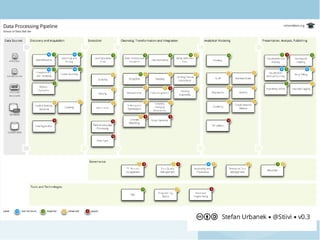
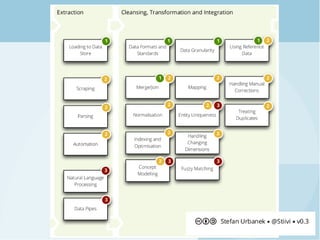
● Data warehousing
– AKA data integration
● Processing data flows
– SQLAlchemy
– Celery
● Tying it all together
About me
● 15 years doing all things software
● 11 years at a Business Intelligence vendor
● Currently contracting
– This talk based on a real reporting system
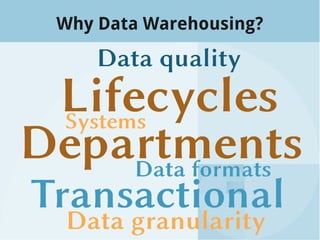
Why Data Warehousing?
But we need reports that are
● Timely
● Unambiguous
● Accurate
● Complete
● … and don't impact production systems
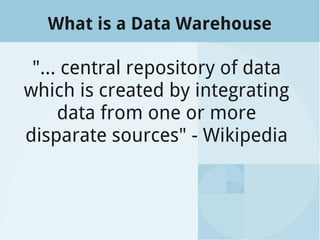
What is a Data Warehouse
"… central repository of data
which is created by integrating
data from one or more
disparate sources" - Wikipedia
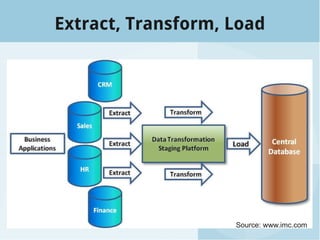
Extract, Transform, Load
Source: www.imc.com
Python can help!
● Rapid prototyping
● Code re-use
● Existing libraries
● Decouple
– data flow management
– data processing
– business logic
Existing solutions
● Not a lot available in the Python space
● People roll their own
● Bubbles (Brewery 2)
– Framework for Python 3
– "Focus on the process, not the data technology"
Ways to move data around
● Flat files
● NOSQL data stores
● RDBMS
SQLAlchemy is...
Python SQL toolkit
&
Object Relational Mapper
About SQLAlchemy
● Full featured
● Mature, robust, documented, maintained
● Flexible
Enterprise!
DB support
● SQLite
● Postgresql
● MySQL
● Oracle
● MS-SQL
● Firebird
● Sybase
● ...
Python support
cPython 2.5+
cPython 3+
Jython 2.5+
Pypy 1.5+
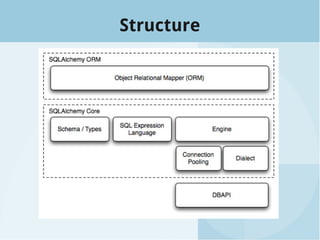
Structure
SQLAlchemy Core
● Abstraction over Python's DBAPI
● SQL language via generative Python
expressions
SQLAlchemy Core
● Good for DB performance
– bulk operations
– complex queries
– fine-tuning
– connection/tx management
Create a table
from sqlalchemy import *
engine = create_engine('sqlite:///:memory:')
metadata = MetaData()
vehicles_table = Table('vehicles', metadata,
Column('model', String),
Column('registration', String),
Column('odometer', Integer),
Column('last_service', Date),)
vehicles_table.create(bind=engine)
Insert data
values = [
{'model': 'Ford Festiva',
'registration': 'HAX00R',
'odometer': 3141 },
{'model': 'Lotus Elise',
'registration': 'DELEG8',
'odometer': 31415 },
]
rows = engine.execute(
vehicles_table.insert(),
list(values)).rowcount
Query data
query = select(
[vehicles_table]
).where(
vehicles_table.c.odometer < 100
)
results = engine.execute(query)
for row in results:
print row
Encapsulating a unit of work
Example Processor Types
● Extract
– Extract from CSV
– Extract from DB table
– Scrape web page
● Transform
– Copy table from extract layer
– Derive column
– Join tables
Abstract Processor
class BaseProcessor(object):
def dispatch(self):
return self._run()
def _run(self):
return self.run()
def run(self):
raise NotImplementedError
Abstract Database Processor
class DatabaseProcessor(BaseProcessor):
db_class = None
engine = None
metadata = None
@contextlib.contextmanager
def _with_session(self):
with self.db_class().get_engine() as engine:
self.engine = engine
self.metadata = MetaData(bind=engine)
yield
def _run(self):
with self._with_session():
return self.run()
CSV Extract Mixin
class CSVExtractMixin(object):
input_file = None
def _run(self):
with self._with_engine():
self.reader = csv.DictReader(
self.input_file
)
return self.run()
A Concrete Extract
class SalesHistoryExtract(CSVExtractMixin,
DatabaseProcessor):
target_table_name = 'SalesHistoryExtract'
input_file = SALES_FILENAME
def run(self):
target_table = Table(self.target_table_name,
self.metadata)
columns = self.reader.next()
[target_table.append_column(Column(column, ...))
for column in columns if column]
target_table.create()
insert = target_table.insert()
new_record_count = self.engine.execute(insert,
list(self.reader)).rowcount
return new_record_count
An Abstract Derive Transform
class AbstractDeriveTransform(DatabaseProcessor):
table_name = None
key_columns = None
select_columns = None
target_columns = None
def process_row(self, row):
raise NotImplementedError
...
# Profit!
A Concrete Transform
from business_logic import derive_foo
class DeriveFooTransform(AbstractDeriveTransform):
table_name = 'SalesTransform'
key_columns = ['txn_id']
select_columns = ['location', 'username']
target_columns = [Column('foo', FOO_TYPE)]
def process_row(self, row):
foo = derive_foo(row.location, row.username)
return {'foo': foo}
Introducing Celery
Distributed Task Queue
A Processor Task
class AbstractProcessorTask(celery.Task):
abstract = True
processor_class = None
def run(self, *args, **kwargs):
processor = self.processor_class(
*args, **kwargs)
return processor.dispatch()
class DeriveFooTask(AbstractProcessorTask):
processor_class = DeriveFooTransform
DeriveFooTask().apply_async() # Run it!
Canvas: Designing Workflows
● Combines a series of tasks
● Groups run in parallel
● Chains run in series
● Can be combined in different ways
>>> new_user_workflow = (create_user.s() | group(
... import_contacts.s(),
... send_welcome_email.s()))
... new_user_workflow.delay(username='artv',
... first='Art',
... last='Vandelay',
... email='art@vandelay.com')
Sample Data Processing Flow
Extrac
t sales
Extract
customers
Extract
product
s
Copy sales to
transform
Copy customers
to transform
Copy products
to transform
Join
table
s
Aggregate sales
by customer
Normalis
e
currency
Aggregate
sales by region
Customer data
exception report
Sample Data Processing Flow
extract_flow = group((
ExtractSalesTask().si(),
ExtractCustTask().si(),
ExtractProductTask().si()))
transform_flow = group((
CopySalesTask().si() | NormaliseCurrencyTask().si(),
CopyCustTask().si(),
CopyProductTask().si())) | JoinTask().si()
load_flow = group((
QualityTask().si(),
AggregateTask().si('cust_id'),
AggregateTask().si('region_id')))
all_flow = extract_flow | transform_flow | load_flow
Monitoring – celery events
Monitoring – celery flower
Turning it up to 11
● A requires/depends structure
● Incremental data loads
● Parameterised flows
● Tracking flow history
● Hooking into other libraries
– NLTK
– SciPy/NumPy
– ...
Summary
● Intro to data warehousing
● Process data with SQLAlchemy
● Task dependencies with Celery
canvas
Resources
● SQLAlchemy core: http://bit.ly/10FdYZo
● Celery Canvas: http://bit.ly/MOjazT
● http://databrewery.org
– Bubbles: http://bit.ly/14hNsV0
– Pipeline: http://bit.ly/15RXvWa
● http://schoolofdata.org
Thank You!
Questions?
http://slideshare.net/mindsocket