Course Name- B Sc
    Subject Name - C++
       Semester - II


                         Neetu Gupta

1
Contents
•   streams
•   IOS
•   IOStream library
•   Class hierarchy
•   Organisation
•   Streambuf
•   Ostream
•   istream
Contents
• File handling
• ofstream, ifstream, fstream
IOstream Library

• This is usually called as Standard Input /
  Output Streams Library

• The iostream library is an object-oriented
  library that provides input and output
  functionality using streams.
What is a stream?
• A stream is an abstraction that represents a device on which input
  and output operations are performed.

• A stream can basically be represented as a source or destination of
  characters of indefinite length.

• Streams are generally associated to a physical source or destination
  of characters, like a disk file, the keyboard, or the console, so the
  characters gotten or written to/from our abstraction called stream
  are physically input/output to the physical device.

• For example, file streams are C++ objects to manipulate and
  interact with files; Once a file stream is used to open a file, any input
  or output operation performed on that stream is physically reflected
  in the file.
CLASS HIERARCHY
            DIAGRAM
• C++ provides a complete set of abstract
  classes and concrete classes for
  input/output.

• The classes are divided into groups that
  few work with files, few on streams, string
  or characters etc.
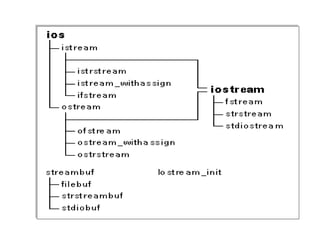
• A complete class hierarchy diagram is as
Organization
•   The library and its hierarchy of classes is split in
    different files:

2. <ios>, <istream>, <ostream>, <streambuf> and
   <iosfwd> aren't usually included directly in most C++
   programs.
    –   They describe the base classes of the hierarchy and are
        automatically included by other header files of the library that
        contain derived classes.

3. <iostream> declares the objects used to communicate
   through the standard input and output (including cin
   and cout).
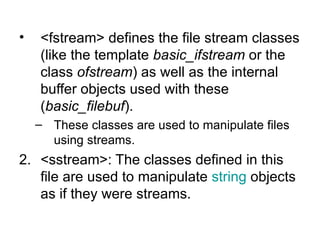
•   <fstream> defines the file stream classes
    (like the template basic_ifstream or the
    class ofstream) as well as the internal
    buffer objects used with these
    (basic_filebuf).
    – These classes are used to manipulate files
      using streams.
2. <sstream>: The classes defined in this
   file are used to manipulate string objects
   as if they were streams.
streambuf
• streambuf is Base buffer class for streams

• streambuf objects are in charge of providing
  reading and writing functionality to/from certain
  types of character sequences, such as external
  files or strings.

• streambuf objects are usually associated with
  one specific character sequence, from which
  they read and write data through an internal
  memory buffer.
• This is an abstract base class, therefore
  no objects can be directly instantiated
  from it.
• The standard hierarchy defines two
  classes derived from this one that can be
  used to directly instantiate objects: filebuf
  and stringbuf.
ostream
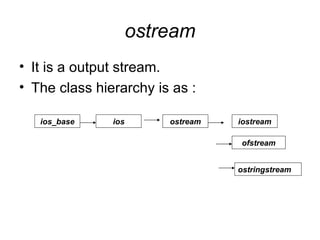
• It is a output stream.
• The class hierarchy is as :

   ios_base    ios       ostream   iostream

                                   ofstream


                                   ostringstream
• ostream objects are stream objects used to
  write and format output as sequences of
  characters.

• Specific members are provided to perform
  these output operations, which can be divided
  in two main groups:
  •   Formatted output
      These member functions interpret and format the
      data to be written as sequences of characters.
      These type of operation is performed using
      member and global functions that overload
      the insertion operator (operator<<).
– Unformatted output
       Most of the other member functions of the
       ostream class are used to perform unformatted
       output operations, i.e. output operations that
       write the data as it is, with no formatting
       adaptations.
       These member functions can write a determined
       number of characters to the output character
       sequence (put, write) and manipulate the put
       pointer (seekp, tellp).
•   The standard objects cout, cerr and clog
    are instantiations of this class.
• ostream class inherits all the internal fields from
   its parent classes i.e. ios_base and ios:
2. Formatting information
      •   format flags: a set of internal indicators describing how
          certain input/output operations shall be interpreted or
          generated. The state of these indicators can be obtained or
          modified by calling the members flags, setf and unsetf, or by
          using manipulators.
      •   field width: describes the width of the next element to be
          output. This value can be obtained/modified by calling the
          member function width or parameterized manipulator setw.
      •   display precision: describes the decimal precision to be
          used to output floating-point values. This value can be
          obtained/modified by calling member precision or
          parameterized manipulator setprecision.
•   fill character: character used to pad a field up to the field
         width. It can be obtained or modified by calling member
         function fill or parameterized manipulator setfill.
     •   locale object: describes the localization properties to be
         considered when formatting i/o operations. The locale
         object used can be obtained calling member getloc and
         modified using member imbue.


1. State information
     •   error state: internal indicator reflecting the integrity and
         current error state of the stream. The current object may be
         obtained by calling rdstate and can be modified by calling
         clear and setstate. Individual values may be obtained by
         calling good, eof, fail and bad.
     •   exception mask: internal exception status indicator. Its
         value can be retrieved/modified by calling member
         exceptions.
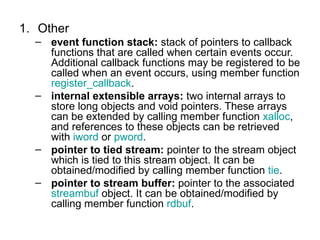
1. Other
  – event function stack: stack of pointers to callback
    functions that are called when certain events occur.
    Additional callback functions may be registered to be
    called when an event occurs, using member function
    register_callback.
  – internal extensible arrays: two internal arrays to
    store long objects and void pointers. These arrays
    can be extended by calling member function xalloc,
    and references to these objects can be retrieved
    with iword or pword.
  – pointer to tied stream: pointer to the stream object
    which is tied to this stream object. It can be
    obtained/modified by calling member function tie.
  – pointer to stream buffer: pointer to the associated
    streambuf object. It can be obtained/modified by
    calling member function rdbuf.
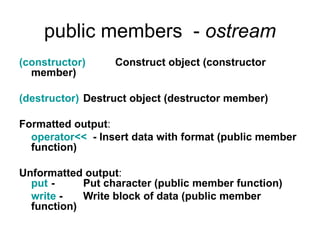
public members - ostream
(constructor)     Construct object (constructor
  member)

(destructor) Destruct object (destructor member)

Formatted output:
  operator<< - Insert data with format (public member
  function)

Unformatted output:
  put -     Put character (public member function)
  write -   Write block of data (public member
  function)
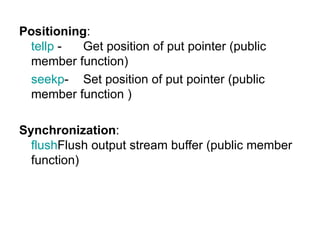
Positioning:
 tellp -   Get position of put pointer (public
 member function)
 seekp- Set position of put pointer (public
 member function )

Synchronization:
  flushFlush output stream buffer (public member
  function)
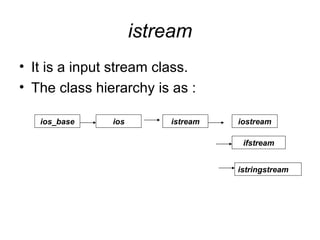
istream
• It is a input stream class.
• The class hierarchy is as :

   ios_base    ios       istream   iostream

                                    ifstream


                                   istringstream
•   istream objects are stream objects used to read
    and interpret input from sequences of
    characters.
•   Specific members are provided to perform
    these input operations, which can be divided in
    two main groups:

•   Formatted input
    These functions extract data from a sequence
    of characters that may be interpreted and
    formatted to a value of a certain type. These
    type of operation is performed using member
    and global functions that overload the
    extraction operator ().
•   Unformatted input Most of the other member
    functions of the istream class are used to perform
    unformatted input, i.e. no interpretation is made on the
    characters got form the input.
    These member functions can get a determined number
    of characters from the input character sequence (get,
    getline, peek, read, readsome), manipulate the get
    pointer i(ignore, seekg, tellg, unget) or get information
    of the last unformatted input operation (gcount).

•   Additionally, a member function exists to synchronize
    the stream with the associated external source of
    characters: sync.

•   The standard object cin is an instantiation of this class.
•   The class inherits all the internal fields from its parent
    classes ios_base and ios:

3. Formatting information
           – format flags: a set of internal indicators describing how certain
             input/output operations shall be interpreted or generated. The state of
             these indicators can be obtained or modified by calling the members
             flags, setf and unsetf, or by using manipulators.
           – field width: describes the width of the next element to be output. This
             value can be obtained/modified by calling the member function width
             or parameterized manipulator setw.
           – display precision: describes the decimal precision to be used to
             output floating-point values. This value can be obtained/modified by
             calling member precision or parameterized manipulator setprecision.
           – fill character: character used to pad a field up to the field width. It can
             be obtained or modified by calling member function fill or
             parameterized manipulator setfill.
           – locale object: describes the localization properties to be considered
             when formatting i/o operations. The locale object used can be obtained
             calling member getloc and modified using member imbue.
1. State information
    •   error state: internal indicator reflecting the
        integrity and current error state of the stream.
        The current object may be obtained by calling
        rdstate and can be modified by calling clear and
        setstate. Individual values may be obtained by
        calling good, eof, fail and bad.
    •   exception mask: internal exception status
        indicator. Its value can be retrieved/modified by
        calling member exceptions.
1. Other
       – event function stack: stack of pointers to callback
         functions that are called when certain events occur.
         Additional callback functions may be registered to be
         called when an event occurs, using member function
         register_callback.
       – internal extensible arrays: two internal arrays to store
         long objects and void pointers. These arrays can be
         extended by calling member function xalloc, and
         references to these objects can be retrieved with iword
         or pword.
       – pointer to tied stream: pointer to the stream object
         which is tied to this stream object. It can be
         obtained/modified by calling member function tie.
       – pointer to stream buffer: pointer to the associated
         streambuf object. It can be obtained/modified by calling
         member function rdbuf.
public members - istream
• (constructor) Construct object (constructor member)

• (destructor) Destruct object (destructor member)

• Formatted input:
  operator>> Extract formatted data (public member function )

• Positioning:
  tellg -      Get position of the get pointer. (public member
  function)
  seekg -      Set position of the get pointer (public member
  function )

• Synchronization:
  sync - Synchronize input buffer with source of characters
  (public member function)
• Unformatted input:
2. gcount - Get number of characters extracted by last
    unformatted input operation (public member function)
3. get - Get unformatted data from stream (public member
    function )
4. Getline - Get line from stream (public member function )
5. Ignore - Extract and discard characters (public member
    functions)
6. Peek - Peek next character (public member function )
7. Read - Read block of data (public member function)
8. Readsome - Read block of data available in the buffer
    (public member function )
9. Putback - Put character back (public member function )
10. Unget - Decrement get pointer (public member
    function )
File Handling
C++ provides the following classes to
  perform output and input of characters
  to/from files:
• ofstream: Stream class to write on files
• ifstream: Stream class to read from files
• fstream: Stream class to both read and
  write from/to files.
• These classes are derived directly or indirectly from the
  classes istream, and ostream.
• We have already used objects whose types were these
  classes:

      cin is an object of class istream
      cout is an object of class ostream

• Therefore, we have already been using classes that are
  related to our file streams.

• And in fact, we can use our file streams the same way
  we are already used to use cin and cout, with the only
  difference that we have to associate these streams with
  physical files.
Why file handling
•   Convenient way to deal large quantities of data.
•   Store data permanently (until file is deleted).
•   Avoid typing data into program multiple times.
•   Share data between programs.

We need to know:
 how to "connect" file to program
 how to tell the program to read data
 how to tell the program to write data
 error checking and handling EOF
A sample code
// basic file operations
#include <iostream>
#include <fstream>
using namespace std;
int main () {
    ofstream myfile;
    myfile.open ("example.txt");
    myfile << "Writing this to a file.n";
    myfile.close();
    return 0;
}
• This code creates a file called example.txt
• Inserts a sentence into it in the same way
  we are used to do with cout,
• But it is using the file stream myfile instead
  of using the standard output stream i.e.
  cout.
Step1 – open a file
• The first operation generally performed on an object of
  one of these classes is to associate it to a real file. This
  procedure is known as to open a file.

• An open file is represented within a program by a stream
  object (an instantiation of one of these classes, in the
  previous example this was myfile) and

• Any input or output operation performed on this stream
  object will be applied to the physical file associated to it.
open function
• In order to open a file with a stream object i.e. an object
  of type ofstream we use its member function open():

              open (filename, mode);

  Where
  filename - is a null-terminated character sequence of
  type const char * (the same type that string literals have)
  representing the name of the file to be opened,

  mode - is an optional parameter with a combination of
  the following flags:
modes
ios::in       Open for input operations.

ios::out      Open for output operations.

ios::binary   Open in binary mode.

ios::ate      Set the initial position at the end of the file.

              If this flag is not set to any value, the initial position is the
                   beginning of the file.

ios::app      All output operations are performed at the end of the file,
                   appending the content to the current content of the file.
                   This flag can only be used in streams open for output-only
                   operations.


ios::trunc    If the file opened for output operations already existed before,
                   its previous content is deleted and replaced by the new one.
• All these mode flags can be combined using the
  bitwise operator OR (|).

• For example, if we want to open the file
  example.bin in binary mode to add data we
  could do it by the following call to member
  function open():

     ofstream myfile;
     myfile.open ("example.bin", ios::out |
                             ios::app | ios::binary);
• For ifstream and ofstream classes, ios::in
  and ios::out are automatically and
  respectively assumed, even if a mode that
  does not include them is passed as
  second argument to the open() member
  function.
Default open mode
• If we do not specify any mode with the open
  function, it assumes some default values
  depending upon the type of stream object you
  are creating.

• Each one of the open() member functions of the
  classes ofstream, ifstream and fstream has a
  default mode that is used if the file is opened
  without a second argument:
default mode parameter
 class

ofstream           ios::out

ifstream            ios::in

fstream        ios::in | ios::out
• For ifstream and ofstream classes, ios::in and
  ios::out are automatically and respectively
  assumed, even if a mode that does not include
  them is passed as second argument to the
  open() member function.

• The default value is only applied if the function is
  called without specifying any value for the mode
  parameter. If the function is called with any value
  in that parameter the default mode is overridden,
  not combined.
• File streams opened in binary mode
  perform input and output operations
  independently of any format
  considerations.

• Non-binary files are known as text files,
  and some translations may occur due to
  formatting of some special characters (like
  newline and carriage return characters).
Using constructor
                 to open a file
• Since the first task that is performed on a file stream
  object is generally to open a file, these three classes
  include a constructor that automatically calls the open()
  member function and has the exact same parameters as
  this member function.

• Therefore, we could also have declared the previous
  myfile object and conducted the same opening operation
  in our previous example by using the constructor only,
  that will create the stream object for file and will open it
  as well:
ofstream myfile ("example.bin",
            ios::out | ios::app |
                            ios::binary);


• Combining object construction and stream
  opening in a single statement.
• Both forms to open a file are valid and
  equivalent.
Error checking for
                opening a file
• To check if a file stream was successful opening
  a file, you can do it by calling to member
  is_open() with no arguments.

• This member function returns a bool value of
  true in the case that indeed the stream object is
  associated with an open file, or false otherwise:

        if (myfile.is_open()) {
              /* ok, proceed with output */
    }
Step 2.
     Using the file stream object
• After the file stream is opened
  successfully with desired opening mode,
  we can use the object to read/write data to
  the file

• For example, if I need to open a file for
  output operations and want o write some
  data to file, we will write a code lines like
……….
// create an object of ofstream type
ofstream myfile;

// open the stream for file example.txt.
// note – no open mode is specified so
// default will be used i.e. ios::out here
// as it is an objetc of ofstream class
myfile.open ("example.txt");

// use the myfile object to write to file.
// note – the use of << to write to file, in the same
// way as with cout.
myfile << "Writing this to a file.n";
……………
Step 3 – close a file
• When we are finished with our input and output
  operations on a file we shall close it so that its resources
  become available again for some other process/program
  for further usage of the same file.

• In order to do that we have to call the stream's member
  function close().

• This member function takes no parameters, and what it
  does is
   – to flush the associated buffers and
   – close the file.
Syntax – close()
• The code will be like
            myfile.close();

Where myfile is a stream object already opened with the
 open member function.

• Once this member function is called, the stream object
  like myfile here can be used to open another file,

• The file is available again to be opened by other
  processes.
Text files
• Text file streams are those where we do not
  include the ios::binary flag in their opening
  mode.
• These files are designed to store text and thus
  all values that we input or output from/to them
  can suffer some formatting transformations,
  which do not necessarily correspond to their
  literal binary value.
• These are the types of files those are widely
  used for storing data.
Data output on text files
• Data output operations on text files are
  performed in the same way we operated
  with cout.

• We can create an object of type ofstream
  and use this stream object for any output
  to the associated file.
• Example to write to file example.txt
// writing on a text file

#include <iostream>
#include <fstream>
using namespace std;
int main () {
    ofstream myfile ("example.txt");
    if (myfile.is_open()) {
          myfile << "This is a line.n";
          myfile << "This is another line.n";
          myfile.close();
    }
    else {
          cout << "Unable to open file";
    }
    return 0;
}
• After running the above program, see the
  contents of file example.txt.
• The contents will be what we write to file in
  the program as

[file example.txt]
This is a line.
This is another line.
Data input from a text files
• Data input from a file can also be
  performed in the same way that we did
  with cin.

• We can create an object of type ofstream
  and use this stream object for any output
  to the associated file.
• Example to read from file example.txt
// reading a text file
#include <iostream>
#include <fstream>
#include <string>
using namespace std;
int main () {
     string line;
     ifstream myfile ("example.txt");
     if (myfile.is_open())
     {
            while ( myfile.good() )
            {
                       getline (myfile,line);
                       cout << line << endl;
            }
            myfile.close();
     }
     else {
            cout << "Unable to open file";
     }
return 0;
}
• This last example reads a text file and prints out
  its content on the screen.

• Notice how we have used a new member
  function, called good() that returns true in the
  case that the stream is ready for input/output
  operations.
• We have created a while loop that finishes when
  indeed myfile.good() is no longer true, which
  will happen either
      • if the end of the file has been reached or
      • if some other error occurred.
Checking status flags
• In addition to good(), which checks
  whether the stream is ready for
  input/output operations, other member
  functions exist to check for specific states
  of a stream
• All of them return a bool type value.
bad()
   – Returns true if a reading or writing operation
     fails.
   – For example in the case that we try to write to
     a file that is not open for writing or if the
     device where we try to write has no space left.
fail()
   – Returns true in the same cases as bad(), but
     also in the case that a format error happens,
     like when an alphabetical character is
     extracted when we are trying to read an
     integer number.
eof()
   – Returns true if a file open for reading has reached the
     end.

good()
   – It is the most generic state flag: it returns false in the
     same cases in which calling any of the previous
     functions would return true.

  In order to reset the state flags checked by any
  of these member functions we have just seen we
  can use the member function clear(), which
  takes no parameters.
get and put
                   stream pointers

• All i/o streams objects have, at least, one internal stream pointer.

• ifstream, like istream, has a pointer known as the get pointer that
  points to the element to be read in the next input operation.

• ofstream, like ostream, has a pointer known as the put pointer that
  points to the location where the next element has to be written.
• Finally, fstream, inherits both, the get and the put
  pointers, from iostream (which is itself derived
  from both istream and ostream).

• These internal stream pointers that point to the
  reading or writing locations within a stream can
  be manipulated using the following member
  functions:

      • tellg() and tellp()
      • seekg() and seekp()
tellg()
• Get position of the get pointer.

• Returns the absolute position of the get pointer.

• The get pointer determines the next location in the input
  sequence to be read by the next input operation.
streampos tellg ( );

• Parameters         :none

• Return Value
  An integral value of type streampos with the number of
  characters between the beginning of the input sequence
  and the current position.

• Failure is indicated by returning a value of -1.

Example: In this example, tellg is used to get the position in
  the stream after it has been moved with seekg to the end
  of the stream, therefore determining the size of the file.
// read a file into memory
#include <iostream>
#include <fstream>
using namespace std;
int main () {
     int length;
     char * buffer;
     ifstream is;
     is.open ("test.txt", ios::binary );
     // get length of file:
     is.seekg (0, ios::end);
     length = is.tellg();
     is.seekg (0, ios::beg);

    // allocate memory:
    buffer = new char [length];
    // read data as a block:
    is.read (buffer,length);
    is.close();
    cout.write (buffer,length);
    return 0;
}
tellp
• Get position of put pointer
• Returns the absolute position of the put
  pointer.

 The put pointer determines the location in
 the output sequence where the next
 output operation is going to take place.
• Parameters: none
• Return Value
  An integral value of type streampos with the number of
  characters between the beginning of the output
  sequence and the current position.
• Failure is indicated by returning a value of -1.

• Example:
  In this example, tellp is used to get the position of the put
  pointer after the writing operation.
  The pointer is then moved back 7 characters to modify
  the file at that position,
  so the final content of the file shall be:

                     This is a sample
// position of put pointer
#include <fstream>
using namespace std;
int main () {
    long pos;
    ofstream outfile;
    outfile.open ("test.txt");
    outfile.write ("This is an apple",16); pos=outfile.tellp();
    outfile.seekp (pos-7);
    outfile.write (" sam",4);
    outfile.close();
    return 0;
}
seekg()
• Set position of the get pointer
• Sets the position of the get pointer.
• The get pointer determines the next
  location to be read in the source
  associated to the stream.

     istream& seekg ( streampos pos );
     istream& seekg ( streamoff off, ios_base::seekdir dir );
•  Parameters
pos: The new position in the stream buffer. This parameter is an
   integral value of type streampos.
Off: Integral value of type streamoff representing the offset to be
   applied relative to an absolute position specified in the dir
   parameter.
Dir: Seeking direction. It is an object of type ios_base::seekdir that
   specifies an absolute position from where the offset parameter off
   is applied. It can take any of the following member constant values:


               value                    offset is relative to...

        ios_base::beg    beginning of the stream buffer

        ios_base::cur    current position in the stream buffer

        ios_base::end    end of the stream buffer
• Return Value : The function returns *this.
• Errors are signaled by modifying the internal
  state flags:

              flag                             error
             eofbit       -
                          The parameter(s) describe a position that could
             failbit         not be reached.
             badbit       An error other than the above happened.


Additionally, in any of these cases, if the appropriate flag has been set with
member function ios::exceptions, an exception of type ios_base::failure is
thrown.
// load a file into memory -
// In this example seekg is used to move the get pointer to the end of the file, and then back to the
      beginning.

#include <iostream>
#include <fstream>
using namespace std;
int main () {
     int length;
     char * buffer;
     ifstream is;
     is.open ("test.txt", ios::binary );
     // get length of file:
     is.seekg (0, ios::end);
     length = is.tellg();
     is.seekg (0, ios::beg);
     // allocate memory:
     buffer = new char [length];
     // read data as a block:
     is.read (buffer,length);
     is.close();
     cout.write (buffer,length);
     delete[] buffer;
     return 0;
}
seekp

      ostream& seekp ( streampos pos );
      ostream& seekp ( streamoff off, ios_base::seekdir dir );


• Set position of put pointer
• Sets the position of the put pointer.
• The put pointer determines the location in
  the output sequence where the next
  output operation is going to take place.
• Parameters
pos: The new position in the stream buffer. This parameter
  is an integral value of type streampos.

off: Integral value of type streamoff representing the offset
   to be applied relative to an absolute position specified in
   the dir parameter.

dir: Seeking direction. It is an object of type
   ios_base::seekdir that specifies an absolute


               value               offset is relative to...

        ios_base::beg   beginning of the stream buffer
        ios_base::cur   current position in the stream buffer
        ios_base::end   end of the stream buffer
• Return Value
The function returns *this.
• Errors are signaled by modifying the internal state
  flags:

              flag                error
    eofbit           -
                     The parameter(s) describe a
                       position that could not be
    failbit            reached.
                     An error other than the above
    badbit             happened.
// position of put pointer
#include <fstream>
using namespace std;
int main () {
    long pos;
    ofstream outfile;
    outfile.open ("test.txt");
    outfile.write ("This is an apple",16); pos=outfile.tellp();
    outfile.seekp (pos-7);
    outfile.write (" sam",4);
    outfile.close();
    return 0;
}
• In this previous example,
  seekp is used to move the put pointer
  back to a position 7 characters before the
  end of the first output operation.

 The final content of the file shall be:
         This is a sample
Thank You


76