09.1. Database
Oum Saokosal
Master of Engineering in Information Systems, South Korea
855-12-252-752
oum_saokosal@yahoo.com
SQLite
• SQLite is popular light-weight database
• For Android, SQLite is "baked into" the
Android runtime, so every Android application
can create SQLite databases.
Fundamental of SQL
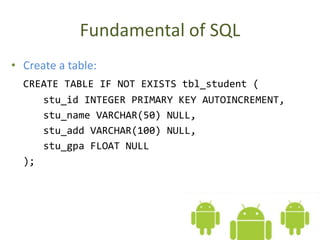
• Create a table:
CREATE TABLE IF NOT EXISTS tbl_student (
stu_id INTEGER PRIMARY KEY AUTOINCREMENT,
stu_name VARCHAR(50) NULL,
stu_add VARCHAR(100) NULL,
stu_gpa FLOAT NULL
);
• Insert a record:
INSERT INTO tbl_student VALUES (
80123,
'Sok Visal',
'Phnom Penh',
4.0
);
• Select a record:
SELECT *
FROM tbl_student
WHERE stu_id=80123
ORDER BY stu_name ASC
• View many records:
SELECT *
FROM tbl_student
WHERE stu_name LIKE '%sok%'
ORDER BY stu_name DESC
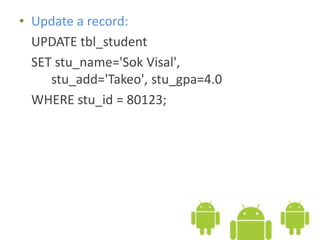
• Update a record:
UPDATE tbl_student
SET stu_name='Sok Visal',
stu_add='Takeo', stu_gpa=4.0
WHERE stu_id = 80123;
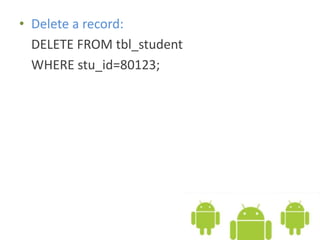
• Delete a record:
DELETE FROM tbl_student
WHERE stu_id=80123;
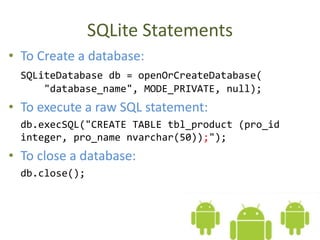
SQLite Statements
• To Create a database:
SQLiteDatabase db = openOrCreateDatabase(
"database_name", MODE_PRIVATE, null);
• To execute a raw SQL statement:
db.execSQL("CREATE TABLE tbl_product (pro_id
integer, pro_name nvarchar(50));");
• To close a database:
db.close();
• To create a table by executing a raw SQL
statement:
db.execSQL("CREATE TABLE IF NOT EXISTS tbl_student
(stu_id INT PRIMARY KEY AUTOINCREMENT,
stu_name VARCHAR(50) NULL,
stu_add VARCHAR(100) NULL,
stu_gpa FLOAT);");
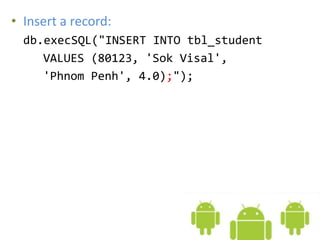
• Insert a record:
db.execSQL("INSERT INTO tbl_student
VALUES (80123, 'Sok Visal',
'Phnom Penh', 4.0);");
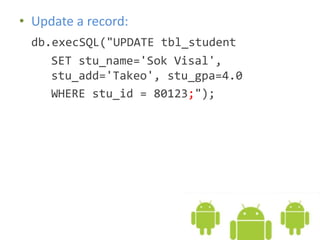
• Update a record:
db.execSQL("UPDATE tbl_student
SET stu_name='Sok Visal',
stu_add='Takeo', stu_gpa=4.0
WHERE stu_id = 80123;");
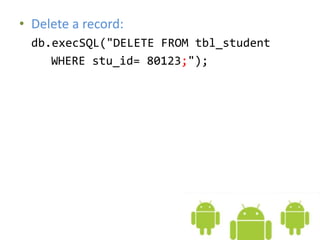
• Delete a record:
db.execSQL("DELETE FROM tbl_student
WHERE stu_id= 80123;");
Records Retrieval
• After you select records using SELECT, you need
to display it. In Android, you will use Cursor class
to store the records.
Cursor result = db.rawQuery("SELECT * FROM
tbl_student WHERE stu_id=80123
ORDER BY stu_name ASC", null);
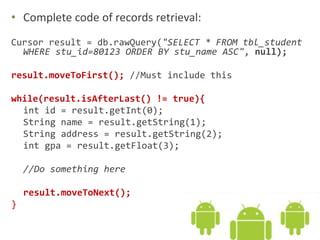
• Complete code of records retrieval:
Cursor result = db.rawQuery("SELECT * FROM tbl_student
WHERE stu_id=80123 ORDER BY stu_name ASC", null);
result.moveToFirst(); //Must include this
while(result.isAfterLast() != true){
int id = result.getInt(0);
String name = result.getString(1);
String address = result.getString(2);
int gpa = result.getFloat(3);
//Do something here
result.moveToNext();
}
Where is My Database?
• Please note that to see the database folder, you
need to run the emulator first.
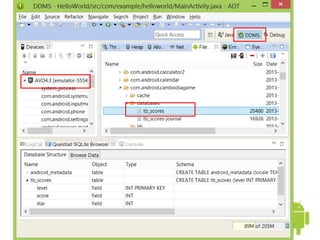
• After created a database, you can find it by going
to DDMS -> File Explorer -> Then open the folder:
data/data/your.app.package/databases/yourdbname
How to View My Database?
• There is a plugin that allows you to view SQLite file in Eclipse.
Below is the url:
http://www.tylerfrankenstein.com/user/4/browse-android-
emulator-sqlite-database-eclipse
• After you download it onto your machine, place it here:
How to View My Database? Cont.
Project Assignment
• Think of your own favorite project related to a
database and intent. And then make it a nice
App for Android.
Go on to the next slide