Web framework for Python
Django Book: pdf version
compiled by Suvash Sedhain
bir2su.blogspot.com
Visit www.djangobook.com for online version of the book
The Django Book
The Dj ango Book
Table of contents
Beta, English
October 30, 2006
Chapter 1: Introduction to Django
October 30, 2006
Chapter 2: Getting started
November 6, 2006
Chapter 3: The basics of generating Web pages
November 7, 2006
Chapter 4: The Django template system
November 13, 2006
Chapter 5: Interacting with a database: models
November 13, 2006
Chapter 6: The Django admin site
TBA
Chapter 7: Form processing
December 11, 2006
Chapter 8: Advanced views and URLconfs
November 20, 2006
Chapter 9: Generic views
December 4, 2006
Chapter 10: Extending the template engine
December 11, 2006
Chapter 11: Outputting non-HTML content
December 24, 2006
Chapter 12: Sessions, users, and registration
TBA
Chapter 13: Comments
November 20, 2006
Chapter 14: Caching
December 18, 2006
Chapter 15: Other contributed sub-frameworks
December 25, 2006
Chapter 16: Middleware
December 25, 2006
Chapter 17: Integrating with legacy databases and applications
January 3, 2007
Chapter 18: Customizing the Django admin
file:///D|/books/computer/programming/python/books/DJANGO BOOK/TOC.HTML (1 of 2)9/28/2007 2:33:44 PM
The Django Book
January 8, 2007
Chapter 19: Internationalization and localization
January 8, 2007
Chapter 20: Security
January 24, 2007
Chapter 21: Deploying Django
TBA
Appendix A: Case studies
TBA
Appendix B: Model definition reference
TBA
Appendix C: Database API reference
TBA
Appendix D: URL dispatch reference
TBA
Appendix E: Settings reference
TBA
Appendix F: Built-in template tag/ filter reference
TBA
Appendix G: The django-admin utility
TBA
Appendix H: Request and response object reference
TBA
Appendix I: Regular expression reference
Copyright 2006 Adrian Holovaty and Jacob Kaplan-Moss.
This work is licensed under the GNU Free Document License.
file:///D|/books/computer/programming/python/books/DJANGO BOOK/TOC.HTML (2 of 2)9/28/2007 2:33:44 PM
The Dj ango Book
table of contents ◊ next »
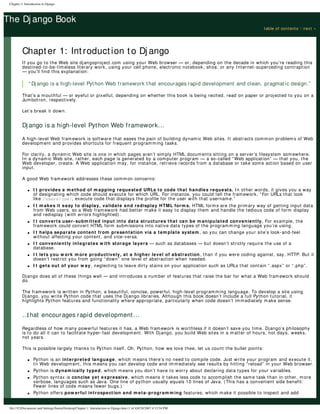
Chapter 1: Introduction to Dj ango
If you go to the Web site djangoproject.com using your Web browser — or, depending on the decade in which you’re reading this
destined-to-be-timeless literary work, using your cell phone, electronic notebook, shoe, or any Internet-superceding contraption
— you’ll find this explanation:
“ Dj ango is a high-level Python Web framework that encourages rapid development and clean, pragmatic design.”
That’s a mouthful — or eyeful or pixelful, depending on whether this book is being recited, read on paper or projected to you on a
Jumbotron, respectively.
Let’s break it down.
Dj ango is a high-level Python Web framework…
A high-level Web framework is software that eases the pain of building dynamic Web sites. It abstracts common problems of Web
development and provides shortcuts for frequent programming tasks.
For clarity, a dynamic Web site is one in which pages aren’t simply HTML documents sitting on a server’s filesystem somewhere.
In a dynamic Web site, rather, each page is generated by a computer program — a so-called “Web application” — that you, the
Web developer, create. A Web application may, for instance, retrieve records from a database or take some action based on user
input.
A good Web framework addresses these common concerns:
● I t provides a m ethod of m apping requested URLs to code that handles requests. In other words, it gives you a way
of designating which code should execute for which URL. For instance, you could tell the framework, “For URLs that look
like /users/joe/, execute code that displays the profile for the user with that username.”
● I t m akes it easy to display, validate and redisplay HTML form s. HTML forms are the primary way of getting input data
from Web users, so a Web framework had better make it easy to display them and handle the tedious code of form display
and redisplay (with errors highlighted).
● I t converts user-subm itted input into data structures that can be m anipulated conveniently. For example, the
framework could convert HTML form submissions into native data types of the programming language you’re using.
● I t helps separate content from presentation via a tem plate system , so you can change your site’s look-and-feel
without affecting your content, and vice-versa.
● I t conveniently integrates w ith storage layers — such as databases — but doesn’t strictly require the use of a
database.
● I t lets you w ork m ore productively, at a higher level of abstraction, than if you were coding against, say, HTTP. But it
doesn’t restrict you from going “down” one level of abstraction when needed.
● I t gets out of your w ay, neglecting to leave dirty stains on your application such as URLs that contain “.aspx” or “.php”.
Django does all of these things well — and introduces a number of features that raise the bar for what a Web framework should
do.
The framework is written in Python, a beautiful, concise, powerful, high-level programming language. To develop a site using
Django, you write Python code that uses the Django libraries. Although this book doesn’t include a full Python tutorial, it
highlights Python features and functionality where appropriate, particularly when code doesn’t immediately make sense.
…
that encourages rapid development…
Regardless of how many powerful features it has, a Web framework is worthless if it doesn’t save you time. Django’s philosophy
is to do all it can to facilitate hyper-fast development. With Django, you build Web sites in a matter of hours, not days; weeks,
not years.
This is possible largely thanks to Python itself. Oh, Python, how we love thee, let us count the bullet points:
● Python is an interpreted language, which means there’s no need to compile code. Just write your program and execute it.
In Web development, this means you can develop code and immediately see results by hitting “reload” in your Web browser.
● Python is dynam ically typed, which means you don’t have to worry about declaring data types for your variables.
● Python syntax is concise yet expressive, which means it takes less code to accomplish the same task than in other, more
verbose, languages such as Java. One line of python usually equals 10 lines of Java. (This has a convenient side benefit:
Fewer lines of code means fewer bugs.)
● Python offers pow erful introspection and m eta-program m ing features, which make it possible to inspect and add
Chapter 1: Introduction to Django
file:///C|/Documents and Settings/Suren/Desktop/Chapter 1 Introduction to Django.htm (1 of 4)9/28/2007 4:13:54 PM
Chapter 1: Introduction to Django
behavior to objects at runtime.
Beyond the productivity advantages inherent in Python, Django itself makes every effort to encourage rapid development. Every
part of the framework was designed with productivity in mind. We’ll see examples throughout this book.
…
and clean, pragmatic design
Finally, Django strictly maintains a clean design throughout its own code and makes it easy to follow best Web-development
practices in the applications you create.
That means, if you think of Django as a car, it would be an elegant sports car, capable not only of high speeds and sharp turns,
but delivering excellent mileage and clean emissions.
The philosophy here is: Django makes it easy to do things the “right” way.
Specifically, Django encourages loose coupling: the programming philosophy that different pieces of the application should be
interchangeable and should communicate with each other via clear, concise APIs.
For example, the template system knows nothing about the database-access system, which knows nothing about the HTTP
request/ response layer, which knows nothing about caching. Each one of these layers is distinct and loosely coupled to the rest.
In practice, this means you can mix and match the layers if need be.
Django follows the “model-view-controller” (MVC) architecture. Simply put, this is a way of developing software so that the code
for defining and accessing data (the model) is separate from the business logic (the controller), which in turn is separate from the
user interface (the view).
MVC is best explained by an example of what not to do. For instance, look at the following PHP code, which retrieves a list of
people from a MySQL database and outputs the list in a simple HTML page. (Yes, we realize it’s possible for disciplined
programmers to write clean PHP code; we’re simply using PHP to illustrate a point.):
<html>
<head><title>Friends of mine</title></head>
<body>
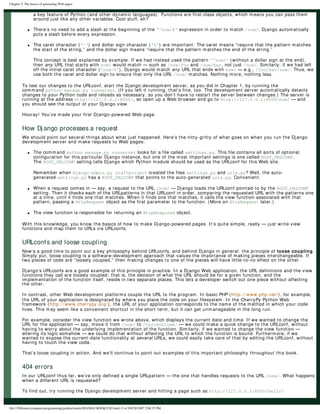
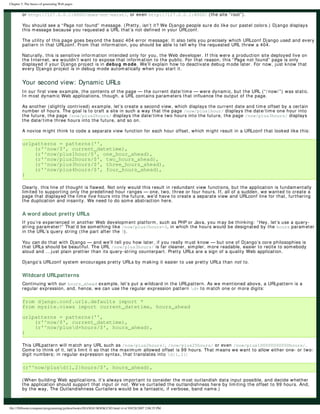
<h1>Friends of mine</h1>
<ul>
<?php
$connection = @mysql_connect("localhost", "my_username", "my_pass");
mysql_select_db("my_database");
$people = mysql_query("SELECT name, age FROM friends");
while ( $person = mysql_fetch_array($people, MYSQL_ASSOC) ) {
?>
<li>
<?php echo $person['name'] ?> is <?php echo $person['age'] ?> years old.
</li>
<?php } ?>
</ul>
</body>
</html>
While this code is conceptually simple for beginners — because everything is in a single file — it’s bad practice for several reasons:
1. The presentation is tied to the code. If a designer wanted to edit the HTML of this page, he or she would have to edit this
code, because the HTML and PHP core are intertwined.
By contrast, the Django/ MVC approach encourages separation of code and presentation, so that presentation is governed by
templates and business logic lives in Python modules. Programmers deal with code, and designers deal with HTML.
2. The database code is tied to the business logic. This is a problem of redundancy: If you rename your database tables or
columns, you’ll have to rewrite your SQL.
By contrast, the Django/ MVC approach encourages a single, abstracted data-access layer that’s responsible for all data
access. In Django’s case, the data-access layer knows your database table and column names and lets you execute SQL
queries via Python instead of writing SQL manually. This means, if database table names change, you can change it in a
single place — your data-model definition — instead of in each SQL statement littered throughout your code.
3. The URL is coupled to the code. If this PHP file lives at /foo/index.php, it’ll be executed for all requests to that address.
But what if you want this same code to execute for requests to /bar/ and /baz/? You’d have to set up some sort of includes
or rewrite rules, and those get unmanageable quickly.
file:///C|/Documents and Settings/Suren/Desktop/Chapter 1 Introduction to Django.htm (2 of 4)9/28/2007 4:13:54 PM
Chapter 1: Introduction to Django
By contrast, Django decouples URLs from callback code, so you can change the URLs for a given piece of code.
4. The database connection param eters and backend are hard-coded. It’s messy to have to specify connection
information — the server, username and password — within this code, because that’s configuration, not programming logic.
Also, this example hard-codes the fact that the database engine is MySQL.
By contrast, Django has a single place for storing configuration, and the database-access layer is abstracted so that
switching database servers (say, from MySQL to PostgreSQL) is easy.
What Dj ango doesn’ t do
Of course, we want this book to be fair and balanced. With that in mind, we should be honest and outline what Django doesn’t do:
● Feed your cat.
● Mind-read your project requirements and implement them on a carefully timed basis so as to fool your boss into thinking
you’re not really staying home to watch “The Price is Right.”
On a more serious note, Django does not yet reverse the effects of global warming.
Why was Dj ango developed?
Django is deeply rooted in the problems and solutions of the Real World. It wasn’t created to be marketed and sold to developers,
nor was it created as an academic exercise in somebody’s spare time. It was built from Day One to solve daily problems for an
industry-leading Web-development team.
It started in fall 2003, at — wait for it — a small-town newspaper in Lawrence, Kansas.
For one reason or another, The Lawrence Journal-World newspaper managed to attract a talented bunch of Web designers and
developers in the early 2000s. The newspaper’s Web operation, World Online, quickly turned into one of the most innovative
newspaper Web operations in the world. Its three main sites, LJWorld.com (news), Lawrence.com (entertainment/ music) and
KUsports.com (college sports), began winning award after award in the online-journalism industry. Its innovations were many,
including:
● The most in-depth local entertainment site in the world, Lawrence.com, which merges databases of local events, bands,
restaurants, drink specials, downloadable songs and traditional-format news stories.
● A summer section of LJWorld.com that treated local Little League players like they were the New York Yankees — giving each
team and league its own page, hooking into weather data to display forecasts for games, providing 360-degree panoramas
of every playing field in the vicinity and alerting parents via cell-phone text messages when games were cancelled.
● Cell-phone game alerts for University of Kansas basketball and football games, which let fans get notified of scores and key
stats during games, and a second system that used artificial-intelligence algorithms to let fans send plain-English text
messages to the system to query the database (“how many points does giddens have” or “pts giddens”).
● A deep database of all the college football and basketball stats you’d ever want, including a way to compare any two or more
players or teams in the NCAA.
● Giving out blogs to community members and featuring community writing prominently — back before blogs were trendy.
Journalism pundits worldwide pointed to World Online as an example of the future of journalism. The New York Times did a front-
page business-section story on the company; National Public Radio did a two-day series on it. World Online’s head editor, Rob
Curley, spoke nearly weekly at journalism conferences across the globe, showcasing World Online’s innovative ideas and site
features. In a bleak, old-fashioned industry resistant to change, World Online was a rare exception.
Much of World Online’s success was due to the technology behind its sites, and the philosophy that computer programmers are
just as important in creating quality 21st Century journalism as are journalists themselves.
This is why Django was developed: World Online’s developers needed a framework for developing complex database-driven Web
sites painlessly, easily and on journalism deadlines.
In fall 2003, World Online’s two developers, Adrian Holovaty and Simon Willison, set about creating this framework. They decided
to use Python, a language with which they’d recently fallen in love. After exploring (and being disappointed by) the available
Python Web-programming libraries, they began creating Django.
Two years later, in summer 2005, after having developed Django to a point where it was efficiently powering most of World
Online’s sites, the World Online team, which now included Jacob Kaplan-Moss, decided it’d be a good idea to open-source the
framework. That way, they could give back to the open-source community, get free improvements from outside developers, and
generate some buzz for their commercial Django-powered content-management system, Ellington (http: / / www.ellingtoncms.
com/ ). Django was open-sourced in July 2005 and quickly became popular.
Although Django is now an open-source project with contributors across the planet, the original World Online developers still
provide central guidance for the framework’s growth, and World Online contributes other important aspects such as employee
time, marketing materials and hosting/ bandwidth for the framework’s Web site (http: / / www.djangoproject.com/ ).
file:///C|/Documents and Settings/Suren/Desktop/Chapter 1 Introduction to Django.htm (3 of 4)9/28/2007 4:13:54 PM
Chapter 1: Introduction to Django
Who uses Dj ango?
Web developers around the world use Django. Some specific examples:
● World Online, of course, continues to use Django for all its Web sites, both internal and for commercial clients. Some of its
Django-powered sites are:
❍ http: / / www.ljworld.com/
❍ http: / / www.lawrence.com/
❍ http: / / www.6newslawrence.com/
❍ http: / / www.visitlawrence.com/
❍ http: / / www.lawrencechamber.com/
❍ http: / / www2.kusports.com/ stats/
● The Washington Post’s Web site, washingtonpost.com, uses Django for database projects and various bits of functionality
across the site. Some examples:
❍ The U.S. Congress votes database, http: / / projects.washingtonpost.com/ congress/
❍ The staff directory and functionality that lets readers contact reporters, appearing as links on most article pages.
❍ Faces of the Fallen, http: / / projects.washingtonpost.com/ fallen/
● Chicagocrime.org, a freely browsable database of crime reported in Chicago and one of the original Google Maps mashups,
was developed in Django.
● Tabblo.com, an innovative photo-sharing site, uses Django. The site lets you piece together your photos to create photo
pages that tell stories.
● Texasgigs.com, a local music site in Dallas, Texas, was written with Django.
● Grono.net, a Polish social-networking site, started replacing its Java code with Django. It found that Django not only was
faster (and more fun) to develop in — it performed better than Java and required less hardware.
● Traincheck.com was developed in Django. The site lets you send text-messages from your cell phone to get subway train
schedules for your immediate location.
An up-to-date list of dozens of sites that use Django is located at http: / / code.djangoproject.com/ wiki/ DjangoPoweredSites
About this book
The goal of this book is to explain all the things Django does — and to make you an expert at using it.
By reading this book, you’ll learn the skills needed to develop powerful Web sites quickly, with code that’s clean and easy to
maintain.
We’re glad you’re here!
table of contents ◊ next »
Copyright 2006 Adrian Holovaty and Jacob Kaplan-Moss.
This work is licensed under the GNU Free Document License.
file:///C|/Documents and Settings/Suren/Desktop/Chapter 1 Introduction to Django.htm (4 of 4)9/28/2007 4:13:54 PM
The Dj ango Book
« previous ◊ table of contents ◊ next »
Chapter 2: Getting started
Let’s get started, shall we?
Fortunately, installing Django is easy. Because Django runs anywhere Python does, Django can be configured in many ways.
We’ve tried to cover the common scenarios for Django installations in this chapter.
Installing Python
Django is written in 100% pure Python code, so you’ll need to install Python on your system. Django requires Python 2.3 or
higher.
If you’re on Linux or Mac OS X, you probably already have Python installed. Type python at a command prompt (or in Terminal,
in OS X). If you see something like this, then Python is installed:
Python 2.4.1 (#2, Mar 31 2005, 00:05:10)
[GCC 3.3 20030304 (Apple Computer, Inc. build 1666)] on darwin
Type "help", "copyright", "credits" or "license" for more information.
>>>
Otherwise, if you see an error such as "command not found", you’ll have to download and install Python. See http: / / www.python.
org/ download/ to get started. The installation is fast and easy.
Installing Dj ango
Installing an official release
Most people will want to install the latest official release from http: / / www.djangoproject.com/ download/ . Django uses the
standard Python distutils installation method, which in Linux land looks like:
1. Download the tarball, which will be named something like Django-1.0.tar.gz.
2. tar xzvf Django-*.tar.gz
3. cd Django-*
4. sudo python setup.py install
If everything worked, you should be able to import the module django from the Python interactive interpreter.
>>> import django
>>> django.VERSION
(1, 0, ‘official’)
The Python interactive interpreter:
The Python interactive interpreter is a command-line program that lets you write a Python program interactively. To
start it, just run the command python at the command line. Throughout this book, we’ll feature example Python
code that’s printed as if it’s being entered in the interactive interpreter. The triple greater-than signs (“> > > ”)
signify a prompt.
Installing Django from Subversion
If you want to work on the bleeding edge, or if you want to contribute code to Django itself, you should install Django from its
Subversion repository.
Subversion is a free, open-source revision-control system similar to CVS, and the Django team uses it to manage changes to the
Django codebase. At any given time, you can use a Subversion client to grab the very latest Django source code, and, at any
given time, you can update your local version of the Django code — known as your “local checkout” — to get the latest changes
and improvements made by Django developers.
The latest-and-greatest Django development code is referred to as “the trunk.”
Chapter 2: Getting started
file:///C|/Documents and Settings/Suren/Desktop/DJANGO/CH2.html (1 of 4)9/28/2007 2:07:18 PM
Chapter 2: Getting started
To grab the latest Django trunk:
1. Make sure you have a Subversion client installed. You can get the software free from http: / / subversion.tigris.org/ and
excellent documentation from http: / / svnbook.red-bean.com/
2. Check out the trunk using the command svn co http://code.djangoproject.com/svn/django/trunk django_src
3. Symlink django_src/django so that django is within your Python site-packages directory, or update your PYTHONPATH to
point to it.
When installing from Subversion, you don’t need to run python setup.py install.
Because the Django trunk changes often with bug fixes and feature additions, you’ll probably want to update it every once in a
while — or hourly, if you’re really obsessed. To update the code, just run the command svn update from within the django_src
directory. When you run that command, Subversion will contact our Web server, see if any code has changed and update your
local version of the code with any changes that have been made since you last updated. It’s quite slick.
Setting up a database
Django’s only prerequisite is a working installation of Python. However, this book focuses on one of Django’s sweet spots, which
is developing database-backed Web sites — so you’ll need to install a database server of some sort, for storing your data.
If you just want to get started playing with Django, skip ahead to Starting a project, but trust us — you’ll want to install a
database eventually. All of the examples in the book assume you’ve got a database set up.
As of version 1.0, Django supports five database engines:
● PostgreSQL (http: / / www.postgresql.org/ )
● SQLite 3 (http: / / www.sqlite.org/ )
● MySQL (http: / / www.mysql.com/ )
● Microsoft SQL Server (http: / / www.microsoft.com/ sql/ )
● Oracle (http: / / www.oracle.com/ database/ )
We’re quite fond of PostgreSQL ourselves, for reasons outside the scope of this book, so we mention it first. However, all those
engines will work equally well with Django.
SQLite also deserves special notice: It’s an extremely simple in-process database engine that doesn’t require any sort of server
set up or configuration. It’s by far the easiest to set up if you just want to play around with Django.
Using Django with PostgreSQL
If you’re using PostgreSQL, you’ll need the psycopg package available from http: / / initd.org/ projects/ psycopg1. Make sure you
use version 1, not version 2 (which is still in beta).
If you’re using PostgreSQL on Windows, you can find precompiled binaries of psycopg at http: / / stickpeople.com/ projects/ python/
win-psycopg/ .
Using Django with SQLite 3
You’ll need SQLite 3 — not version 2 — and the pysqlite package from http: / / initd.org/ tracker/ pysqlite. Make sure you
have pysqlite version 2.0.3 or higher.
Using Django with MySQL
Django requires MySQL 4.0 or above; the 3.x versions don’t support transactions, nested procedures, and some other fairly
standard SQL statements. You’ll also need the MySQLdb package from http: / / sourceforge.net/ projects/ mysql-python.
Using Django with MSSQL
Using Django with Oracle
Using Django without a database
As mentioned above, Django doesn’t actually require a database. If you just want to use it to serve dynamic pages that don’t hit
a database, that’s perfectly fine.
file:///C|/Documents and Settings/Suren/Desktop/DJANGO/CH2.html (2 of 4)9/28/2007 2:07:18 PM
Chapter 2: Getting started
With that said, bear in mind that some of the extra tools bundled with Django do require a database, so if you choose not to use
a database, you’ll miss out on those features. (We’ll highlight these features throughout this book.)
Starting a proj ect
If this is your first time using Django, you’ll have to take care of some initial setup.
Run the command django-admin.py startproject mysite. That’ll create a mysite directory in your current directory.
Note
django-admin.py should be on your system path if you installed Django via its setup.py utility. If it’s not on your
path, you can find it in site-packages/django/bin; consider symlinking to it from some place on your path, such
as / usr/ local/ bin.
A project is a collection of settings for an instance of Django — including database configuration, Django-specific options and
application-specific settings. Let’s look at what startproject created:
mysite/
__init__.py
manage.py
settings.py
urls.py
These files are:
manage.py
A command-line utility that lets you interact with this Django project in various ways.
settings.py
Settings/ configuration for this Django project.
urls.py
The URL declarations for this Django project; a “table of contents” of your Django-powered site.
W here should this code live?
If your background is in PHP, you’re probably used to putting code under the Web server’s document root (in a
place such as /var/www). With Django, you don’t do that. It’s not a good idea to put any of this Python code within
your Web server’s document root, because it risks the possibility that people may be able to view your code over
the Web. That’s not good for security.
Put your code in some directory outside of the document root, such as /home/mycode.
The development server
Change into the mysite directory, if you haven’t already, and run the command python manage.py runserver. You’ll see
something like this:
Validating models...
0 errors found.
Django version 1.0, using settings 'mysite.settings'
Development server is running at http://127.0.0.1:8000/
Quit the server with CONTROL-C.
You’ve started the Django development server, a lightweight Web server you can use while developing your site. We’ve included
this with Django so you can develop things rapidly, without having to deal with configuring your production Web server (e.g.,
Apache) until you’re ready for production. This development server watches your code for changes and automatically reloads,
helping you make many rapid changes to your project without needing to restart anything.
Although the development server is extremely nice for, well, development, resist the temptation to use this server in anything
resembling a production environment. The development server can only handle a single request at a time reliably, and it has not
gone through a security audit of any sort. When the time comes to launch your site, see Chapter XXX for information on how to
deploy Django.
Changing the host or the port
file:///C|/Documents and Settings/Suren/Desktop/DJANGO/CH2.html (3 of 4)9/28/2007 2:07:18 PM
Chapter 2: Getting started
By default, the runserver command starts the development server on port 8000, listening only for local
connections. If you want to change the server’s port, pass it as a command-line argument:
python manage.py runserver 8080
You can also change the IP address that the server listens on. This is especially helpful if you’d like to share a
development site with other developers:
python manage.py runserver 0.0.0.0:8080
will make Django listen on any network interface, thus allowing other computers to connect to the development
server.
Now that the server’s running, visit http: / / 127.0.0.1: 8000/ with your Web browser. You’ll see a “Welcome to Django” page, in
pleasant, light-blue pastel. It worked!
What’ s next?
Now that we’ve got everything installed and the development server running, let’s write some basic code that demonstrates how
to serve Web pages using Django.
« previous ◊ table of contents ◊ next »
Copyright 2006 Adrian Holovaty and Jacob Kaplan-Moss.
This work is licensed under the GNU Free Document License.
file:///C|/Documents and Settings/Suren/Desktop/DJANGO/CH2.html (4 of 4)9/28/2007 2:07:18 PM
The Dj ango Book
« previous ◊ table of contents ◊ next »
Chapter 3: The basics of dynamic Web pages
In the previous chapter, we explained how to set up a Django project and run the Django development server. Of course, that
site doesn’t actually do anything useful yet — all it does is display the “It worked!” message. Let’s change that.
This chapter introduces how to create dynamic Web pages with Django.
Your first view: Dynamic content
As our first goal, let’s create a Web page that displays the current date and time. This is a good example of a dynamic Web page,
because the contents of the page are not static — rather, the contents change according to the result of a computation (in this
case, a calculation of the current time).
This simple example doesn’t involve a database or any sort of user input — just the output of your server’s internal clock.
To create this page, we’ll write a view function. A view function, or view for short, is simply a Python function that takes a Web
request and returns a Web response. This response can be the HTML contents of a Web page, or a redirect, or a 404 error, or an
XML document, or an image…or anything, really. The view itself contains whatever arbitrary logic is necessary to return that
response.
Here’s a view that returns the current date and time, as an HTML document:
from django.http import HttpResponse
import datetime
def current_datetime(request):
now = datetime.datetime.now()
html = "<html><body>It is now %s.</body></html>" % now
return HttpResponse(html)
Let’s step through this code one line at a time:
● First, we import the class HttpResponse, which lives in the django.http module.
● Next, we import the datetime module from Python’s standard library — the set of useful modules that comes with Python.
The datetime module contains several functions and classes for dealing with dates and times, including a function that
returns the current time.
● Next, we define a function called current_datetime. This is the view function, and, as such, it takes an HttpRequest
object as its first parameter. Each view function takes an HttpRequest object as its first parameter. In this case, we call that
parameter request.
Note that the name of the view function doesn’t matter; Django doesn’t care what it’s called, and it doesn’t have to be
named in a certain way in order for Django to recognize it. We’re calling it current_datetime here, because that name
clearly indicates what it does, but it could just as well be named super_duper_awesome_current_time, or something equally
revolting. Django doesn’t care. (How does Django find this function, then? We’ll get to that in a moment.)
● The first line of code within the function calculates the current date/ time, as a datetime.datetime object, and stores that as
the local variable now.
● The second line of code within the function constructs an HTML response using Python’s format-string capability. The %s
within the string is a placeholder, and the percent sign after the string means “replace the %s with the value of the
variable now.”
(A note to the HTML purists: Yes, we know we’re missing a DOCTYPE, and a <head>, and all that stuff. We’re trying to keep
it simple.)
● Finally, the view returns an HttpResponse object that contains the generated HTML. Each view function is responsible for
returning an HttpResponse object. (There are exceptions, but we’ll get to those later.)
Your first URLconf
So, to recap, this view function returns an HTML page that includes the current date and time. But where should this code live,
how do we tell Django to use this code?
The answer to the first question is: This code can live anywhere you want, as long as it’s on your Python path. There’s no other
Chapter 3: The basics of generating Web pages
file:///D|/books/computer/programming/python/books/DJANGO BOOK/CH3.html (1 of 9)9/28/2007 2:08:35 PM
Chapter 3: The basics of generating Web pages
requirement — no “magic,” so to speak. For the sake of putting it somewhere, let’s create a file called views.py, copy this view
code into that file and save it into the mysite directory you created in the previous chapter.
Your Python path
The Python path is the list of directories on your system where Python looks when you use the Python import
statement.
For example, let’s say your Python path is set to ['', '/usr/lib/python2.4/site-packages', '/home/mycode'].
If you execute the Python code from foo import bar, Python will first check for a module called foo.py in the
current directory. (The first entry in the Python path, an empty string, means “the current directory.”) If that file
doesn’t exist, Python will look for the file /usr/lib/python2.4/site-packages/foo.py. If that file doesn’t exist, it
will try /home/mycode/foo.py. Finally, if that file doesn’t exist, it will raise ImportError.
If you’re interested in seeing the value of your Python path, start the Python interactive interpreter and
type import sys, followed by print sys.path.
Generally you don’t have to worry about setting your Python path — Python and Django will take care of things for
you automatically behind the scenes. (If you’re curious, setting the Python path is one of the things that
the manage.py file does.)
How do we tell Django to use this view code? That’s where URLconfs come in.
A URLconf is like a table of contents for your Django-powered Web site. Basically, it’s a mapping between URL patterns and the
view functions that should be called for those URL patterns. It’s how you tell Django “For this URL, call this code, and for that
URL, call that code.”
When you executed django-admin.py startproject in the previous chapter, the script created a URLconf for you automatically:
the file urls.py. Let’s edit that file. By default, it looks something like this:
from django.conf.urls.defaults import *
urlpatterns = patterns('',
# Example:
# (r'^mysite/', include('mysite.apps.foo.urls.foo')),
# Uncomment this for admin:
# (r'^admin/', include('django.contrib.admin.urls')),
)
Let’s step through this code one line at a time:
● The first line imports all objects from the django.conf.urls.defaults module, including a function called patterns.
● The second line calls the function patterns() and saves the result into a variable called urlpatterns. The patterns()
function gets passed only a single argument — the empty string. The rest of the lines are commented out.
The main thing to see here is the variable urlpatterns. This defines the mapping between URLs and the code that handles those
URLs.
By default, everything in the URLconf is commented out — your Django application is a blank slate. (As a side note, that’s how
Django knew to show you the “It worked!” page in the last chapter: If your URLconf is empty, Django assumes you just started a
new project and, hence, displays that message.)
Let’s edit this file to expose our current_datetime view:
from django.conf.urls.defaults import *
from mysite.views import current_datetime
urlpatterns = patterns('',
(r'^now/$', current_datetime),
)
We made two changes here. First, we imported the current_datetime view from its module (mysite/views.py, which translates
into mysite.views in Python import syntax). Next, we added the line (r'^now/$', current_datetime),. This line is referred to
as a URLpattern — it’s a Python tuple in which the first element is a simple regular expression and the second element is the
view function to use for that pattern.
In a nutshell, we just told Django that any request to the URL /now/ should be handled by the current_datetime view function.
A few things are worth pointing out:
● Note that, in this example, we passed the current_datetime view function as an object without calling the function. This is
file:///D|/books/computer/programming/python/books/DJANGO BOOK/CH3.html (2 of 9)9/28/2007 2:08:35 PM
Chapter 3: The basics of generating Web pages
a key feature of Python (and other dynamic languages): Functions are first-class objects, which means you can pass them
around just like any other variables. Cool stuff, eh?
● There’s no need to add a slash at the beginning of the '^now/$' expression in order to match /now/. Django automatically
puts a slash before every expression.
● The caret character ('^') and dollar sign character ('$') are important. The caret means “require that the pattern matches
the start of the string,” and the dollar sign means “require that the pattern matches the end of the string.”
This concept is best explained by example. If we had instead used the pattern '^now/' (without a dollar sign at the end),
then any URL that starts with now/ would match — such as /now/foo and /now/bar, not just /now/. Similarly, if we had left
off the initial caret character ('now/$'), Django would match any URL that ends with now/ — e.g., /foo/bar/now/. Thus, we
use both the caret and dollar sign to ensure that only the URL /now/ matches. Nothing more, nothing less.
To test our changes to the URLconf, start the Django development server, as you did in Chapter 1, by running the
command python manage.py runserver. (If you left it running, that’s fine, too. The development server automatically detects
changes to your Python code and reloads as necessary, so you don’t have to restart the server between changes.) The server is
running at the address http://127.0.0.1:8000/, so open up a Web browser and go to http://127.0.0.1:8000/now/ — and
you should see the output of your Django view.
Hooray! You’ve made your first Django-powered Web page.
How Dj ango processes a request
We should point out several things about what just happened. Here’s the nitty-gritty of what goes on when you run the Django
development server and make requests to Web pages:
● The command python manage.py runserver looks for a file called settings.py. This file contains all sorts of optional
configuration for this particular Django instance, but one of the most important settings is one called ROOT_URLCONF.
The ROOT_URLCONF setting tells Django which Python module should be used as the URLconf for this Web site.
Remember when django-admin.py startproject created the files settings.py and urls.py? Well, the auto-
generated settings.py has a ROOT_URLCONF that points to the auto-generated urls.py. Convenient.
● When a request comes in — say, a request to the URL /now/ — Django loads the URLconf pointed-to by the ROOT_URLCONF
setting. Then it checks each of the URLpatterns in that URLconf in order, comparing the requested URL with the patterns one
at a time, until it finds one that matches. When it finds one that matches, it calls the view function associated with that
pattern, passing a HttpRequest object as the first parameter to the function. (More on HttpRequest later.)
● The view function is responsible for returning an HttpResponse object.
With this knowledge, you know the basics of how to make Django-powered pages. It’s quite simple, really — just write view
functions and map them to URLs via URLconfs.
URLconfs and loose coupling
Now’s a good time to point out a key philosophy behind URLconfs, and behind Django in general: the principle of loose coupling.
Simply put, loose coupling is a software-development approach that values the importance of making pieces interchangeable. If
two pieces of code are “loosely coupled,” then making changes to one of the pieces will have little-to-no effect on the other.
Django’s URLconfs are a good example of this principle in practice. In a Django Web application, the URL definitions and the view
functions they call are loosely coupled; that is, the decision of what the URL should be for a given function, and the
implementation of the function itself, reside in two separate places. This lets a developer switch out one piece without affecting
the other.
In contrast, other Web development platforms couple the URL to the program. In basic PHP (http: / / www.php.net/ ), for example,
the URL of your application is designated by where you place the code on your filesystem. In the CherryPy Python Web
framework (http: / / www.cherrypy.org/ ), the URL of your application corresponds to the name of the method in which your code
lives. This may seem like a convenient shortcut in the short term, but it can get unmanageable in the long run.
For example, consider the view function we wrote above, which displays the current date and time. If we wanted to change the
URL for the application — say, move it from /now/ to /currenttime/ — we could make a quick change to the URLconf, without
having to worry about the underlying implementation of the function. Similarly, if we wanted to change the view function —
altering its logic somehow — we could do that without affecting the URL to which the function is bound. Furthermore, if we
wanted to expose the current-date functionality at several URLs, we could easily take care of that by editing the URLconf, without
having to touch the view code.
That’s loose coupling in action. And we’ll continue to point out examples of this important philosophy throughout this book.
404 errors
In our URLconf thus far, we’ve only defined a single URLpattern — the one that handles requests to the URL /now/. What happens
when a different URL is requested?
To find out, try running the Django development server and hitting a page such as http://127.0.0.1:8000/hello/
file:///D|/books/computer/programming/python/books/DJANGO BOOK/CH3.html (3 of 9)9/28/2007 2:08:35 PM
Chapter 3: The basics of generating Web pages
or http://127.0.0.1:8000/does-not-exist/, or even http://127.0.0.1:8000/ (the site “root”).
You should see a “Page not found” message. (Pretty, isn’t it? We Django people sure do like our pastel colors.) Django displays
this message because you requested a URL that’s not defined in your URLconf.
The utility of this page goes beyond the basic 404 error message: It also tells you precisely which URLconf Django used and every
pattern in that URLconf. From that information, you should be able to tell why the requested URL threw a 404.
Naturally, this is sensitive information intended only for you, the Web developer. If this were a production site deployed live on
the Internet, we wouldn’t want to expose that information to the public. For that reason, this “Page not found” page is only
displayed if your Django project is in debug m ode. We’ll explain how to deactivate debug mode later. For now, just know that
every Django project is in debug mode automatically when you start it.
Your second view: Dynamic URLs
In our first view example, the contents of the page — the current date/ time — were dynamic, but the URL (“/ now/ ”) was static.
In most dynamic Web applications, though, a URL contains parameters that influence the output of the page.
As another (slightly contrived) example, let’s create a second view, which displays the current date and time offset by a certain
number of hours. The goal is to craft a site in such a way that the page /now/plus1hour/ displays the date/ time one hour into
the future, the page /now/plus2hours/ displays the date/ time two hours into the future, the page /now/plus3hours/ displays
the date/ time three hours into the future, and so on.
A novice might think to code a separate view function for each hour offset, which might result in a URLconf that looked like this:
urlpatterns = patterns('',
(r'^now/$', current_datetime),
(r'^now/plus1hour/$', one_hour_ahead),
(r'^now/plus2hours/$', two_hours_ahead),
(r'^now/plus3hours/$', three_hours_ahead),
(r'^now/plus4hours/$', four_hours_ahead),
)
Clearly, this line of thought is flawed. Not only would this result in redundant view functions, but the application is fundamentally
limited to supporting only the predefined hour ranges — one, two, three or four hours. If, all of a sudden, we wanted to create a
page that displayed the time five hours into the future, we’d have to create a separate view and URLconf line for that, furthering
the duplication and insanity. We need to do some abstraction here.
A word about pretty URLs
If you’re experienced in another Web development platform, such as PHP or Java, you may be thinking: “Hey, let’s use a query-
string parameter!” That’d be something like /now/plus?hours=3, in which the hours would be designated by the hours parameter
in the URL’s query string (the part after the ?).
You can do that with Django — and we’ll tell you how later, if you really must know — but one of Django’s core philosophies is
that URLs should be beautiful. The URL /now/plus3hours/ is far cleaner, simpler, more readable, easier to recite to somebody
aloud and … just plain prettier than its query-string counterpart. Pretty URLs are a sign of a quality Web application.
Django’s URLconf system encourages pretty URLs by making it easier to use pretty URLs than not to.
Wildcard URLpatterns
Continuing with our hours_ahead example, let’s put a wildcard in the URLpattern. As we mentioned above, a URLpattern is a
regular expression, and, hence, we can use the regular expression pattern d+ to match one or more digits:
from django.conf.urls.defaults import *
from mysite.views import current_datetime, hours_ahead
urlpatterns = patterns('',
(r'^now/$', current_datetime),
(r'^now/plusd+hours/$', hours_ahead),
)
This URLpattern will match any URL such as /now/plus2hours/, /now/plus25hours/ or even /now/plus100000000000hours/.
Come to think of it, let’s limit it so that the maximum allowed offset is 99 hours. That means we want to allow either one- or two-
digit numbers; in regular expression syntax, that translates into d{1,2}:
(r'^now/plusd{1,2}hours/$', hours_ahead),
(When building Web applications, it’s always important to consider the most outlandish data input possible, and decide whether
the application should support that input or not. We’ve curtailed the outlandishness here by limiting the offset to 99 hours. And,
by the way, The Outlandishness Curtailers would be a fantastic, if verbose, band name.)
file:///D|/books/computer/programming/python/books/DJANGO BOOK/CH3.html (4 of 9)9/28/2007 2:08:35 PM
Chapter 3: The basics of generating Web pages
Regular expressions
Regular expressions (or “regexes”) are a compact way of specifying patterns in text. While Django URLconfs allow
arbitrary regexes for powerful URL-matching capability, you’ll probably only use a few regex patterns in practice.
Here’s a small selection of common patterns:
Sym bol Matches
. (dot) Any character
d Any digit
[A-Z] Any character from A-Z (uppercase)
[a-z] Any character from a-z (lowercase)
[A-Za-z] Any character from a-z (case-insensitive)
[^/]+ All characters until a forward slash (excluding the slash itself)
+ One or more of the previous character (e.g., d+ matches one or more digit)
? Zero or more of the previous character (e.g., d* matches zero or more digits)
{1,3} Between one and three (inclusive) of the previous character
For more on regular expressions, see Appendix XXX, Regular Expressions.
Now that we’ve designated a wildcard for the URL, we need a way of passing that data to the view function, so that we can use a
single view function for any arbitrary hour offset. We do this by placing parentheses around the data in the URLpattern that we
want to save. In the case of our example, we want to save whatever number was entered in the URL — so let’s put parentheses
around the d{1,2}:
(r'^now/plus(d{1,2})hours/$', hours_ahead),
If you’re familiar with regular expressions, you’ll be right at home here; we’re using parentheses to capture data from the
matched text.
The final URLconf, including our previous current_datetime view, looks like this:
from django.conf.urls.defaults import *
from mysite.views import current_datetime, hours_ahead
urlpatterns = patterns('',
(r'^now/$', current_datetime),
(r'^now/plus(d{1,2})hours/$', hours_ahead),
)
With that taken care of, let’s write the hours_ahead view.
..admonition: : Coding order
In this case, we wrote the URLpattern first and the view second, but in the previous example, we wrote the view
first, then the URLpattern. Which technique is better?
Well, every developer is different.
If you’ re a big-picture type of person, it may make most sense to you to write all of the URLpatterns for your
application at the same time, at the start of your proj ect, then coding up the views. This has the advantage of
giving you a clear to-do list, and it essentially defines the parameter requirements for the view functions you’ ll
need to write.
If you’ re more of a bottom-up developer, you might prefer to write the views first, then anchor them to URLs
afterward. That’ s OK, too.
In the end, it comes down to what fits your brain the best. Either approach is valid.
hours_ahead is very similar to the current_datetime view we wrote earlier, with a key difference: it takes an extra argument,
the number of hours of offset. Here it is:
file:///D|/books/computer/programming/python/books/DJANGO BOOK/CH3.html (5 of 9)9/28/2007 2:08:35 PM
Chapter 3: The basics of generating Web pages
from django.http import HttpResponse
import datetime
def hours_ahead(request, offset):
offset = int(offset)
dt = datetime.datetime.now() + datetime.timedelta(hours=offset)
html = "<html><body>In %s hour(s), it will be %s.</body></html>" % (offset, dt)
return HttpResponse(html)
Let’s step through this code one line at a time:
● Just as we did for our current_datetime view, we import the class django.http.HttpResponse and the datetime module.
● The view function, hours_ahead, takes two parameters: request and offset.
❍ request is an HttpRequest object, just as in current_datetime. We’ll say it again: Each view always takes
an HttpRequest object as its first parameter.
❍ offset is the string captured by the parentheses in the URLpattern. For example, if the requested URL
were /now/plus3hours/, then offset would be the string '3'. If the requested URL were /now/plus21hours/,
then offset would be the string '21'. Note that captured strings will always be strings, not integers, even if the string is
composed of only digits, such as '21'.
We decided to call the variable offset, but you can call it whatever you’d like, as long as it’s a valid Python identifier. The
variable name doesn’t matter; all that matters is that it’s the second argument to the function (after request).
● The first thing we do within the function is call int() on offset. This converts the string value to an integer.
Note that Python will raise a ValueError exception if you call int() on a value that cannot be converted to an integer, such
as the string 'foo'. However, we don’t have to worry about catching that exception, because we can be certain offset will
be a string containing only digits. We know that because the regular-expression pattern in our URLconf — d{1,2} —
captures only digits. This illustrates another nicety of URLconfs: They provide a fair level of input validation.
● The next line of the function shows why we called int() on offset. On this line, we calculate the current time plus a time
offset of offset hours, storing the result in dt. The datetime.timedelta function requires the hours parameter to be an
integer.
● Next, we construct the HTML output of this view function, just as we did in current_datetime. A small difference in this line
from the previous line is that it uses Python’s format-string capability with two values, not just one. Hence, there are two %s
symbols in the string and a tuple of values to insert — (offset, dt).
● Finally, we return an HttpResponse of the HTML — again, just as we did in current_datetime.
With that view function and URLconf written, start the Django development server (if it’s not already running), and
visit http://127.0.0.1:8000/now/plus3hours/ to verify it works. Then try http://127.0.0.1:8000/now/plus5hours/.
Then http://127.0.0.1:8000/now/plus24hours/. Finally, visit http://127.0.0.1:8000/now/plus100hours/ to verify that the
pattern in your URLconf only accepts one- or two-digit numbers; Django should display a “Page not found” error in this case, just
as we saw in the “404 errors” section above. The URL http://127.0.0.1:8000/now/plushours/ (with no hour designation)
should also throw a 404.
If you’re following along while coding at the same time, you’ll notice that the views.py file now contains two views. (We omitted
the current_datetime view from the last set of examples for clarity.) Put together, views.py should look like this:
from django.http import HttpResponse
import datetime
def current_datetime(request):
now = datetime.datetime.now()
html = "<html><body>It is now %s.</body></html>" % now
return HttpResponse(html)
def hours_ahead(request, offset):
offset = int(offset)
dt = datetime.datetime.now() + datetime.timedelta(hours=offset)
html = "<html><body>In %s hour(s), it will be %s.</body></html>" % (offset, dt)
return HttpResponse(html)
Dj ango’ s pretty error pages
Take a moment to admire the fine Web application we’ve made so far…and break it!
Let’s deliberately introduce a Python error into our views.py file, by commenting-out the offset = int(offset) line in
the hours_ahead view:
file:///D|/books/computer/programming/python/books/DJANGO BOOK/CH3.html (6 of 9)9/28/2007 2:08:35 PM
Chapter 3: The basics of generating Web pages
def hours_ahead(request, offset):
# offset = int(offset)
dt = datetime.datetime.now() + datetime.timedelta(hours=offset)
html = "<html><body>In %s hour(s), it will be %s.</body></html>" % (offset, dt)
return HttpResponse(html)
Now load up the development server and navigate to /now/plus3hours/. You’ll see an error page with a significant amount of
information, including a TypeError message displayed at the very top: “unsupported type for timedelta hours component: str”.
What happened?
Well, the datetime.timedelta function expects the hours parameter to be an integer, and we commented-out the bit of code
that converted offset to an integer. That caused datetime.timedelta to raise the TypeError. It’s the typical kind of small bug
that every programmer runs into at some point.
The point of this example was to demonstrate Django’s error pages. Take some time to explore the error page and get to know
the various bits of information it gives you.
Some highlights:
● At the top of the page, you get the key information about the exception: the type of exception, any parameters to the
exception (e.g., the "unsupported type" message in this case), the file in which the exception was raised and the offending
line number.
● Under that, the page displays the full Python traceback for this exception. This is similar to the standard traceback you get in
Python’s command-line interpreter, except it’s more interactive. For each frame in the stack, Django displays the name of
the file, the function/ method name, the line number and the source code of that line.
Click the line of source code (in dark gray), and you’ll see several lines from before and after the erroneous line, to give you
context.
Click “Local vars” under any frame in the stack to view a table of all local variables, and their values, in that frame, at the
exact point in the code at which the exception was raised. This debugging information is invaluable.
● Note the “Switch to copy-and-paste view” text just under the “Traceback” header. Click those words, and the traceback will
switch to a alternate version that can be easily copied and pasted. Use this when you want to share your exception
traceback with others to get technical support — such as the kind folks in the Django IRC chat room or on the Django users
mailing list.
● Next, the “Request information” section includes a wealth of information about the incoming Web request that spawned the
error: GET and POST information, cookie values and meta information, such as CGI headers. If this information seems like
gibberish to you at the moment, don’t fret — we’ll explain it later in this book.
Below, the “Settings” section lists all of the settings for this particular Django installation. Again, we’ll explain settings later
in this book. For now, take a look at the settings to get an idea of the information available.
The Django error page is capable of displaying more information in certain special cases, such as the case of template syntax
errors. We’ll get to those later, when we discuss the Django template system. For now, uncomment the offset = int(offset)
line to get the view function working properly again.
Are you the type of programmer who likes to debug with the help of carefully placed print statements? You can use the Django
error page to do just that — just without the print statements. At any point in your view, temporarily insert an assert False to
trigger the error page. Then, you can view the local variables and state of the program. (There’s a more advanced way to debug
Django views, which we’ll explain later, but this is the quickest and easiest.)
Finally, it’s obvious that much of this information is sensitive — it exposes the innards of your Python code and Django
configuration — and it would be foolish to show this information on the public Internet. A malicious person could use it to attempt
to reverse-engineer your Web application and do nasty things. For that reason, the Django error page is only displayed when
your Django project is in debug mode. We’ll explain how to deactivate debug mode later. For now, just know that every Django
project is in debug mode automatically when you start it. (Sound familiar? The “Page not found” errors, described in the “404
errors” section above, work the same way.)
Exercises
Here are a few exercises that will solidify some of the things you learned in this chapter. (Hint: Even if you think you understood
everything, at least give these exercises, and their respective answers, a read. We introduce a couple of new tricks here.)
1. Create another view, hours_behind, that works like hours_ahead but instead displays the date/ time with an offset into the
past, not the future. This view should bind to URLs in the style /now/minusXhours/, where X is the offset, in hours.
2. Once you’ve done that, be a good programmer and notice how similar the hours_ahead and hours_behind views are. How
redundant! Eliminate the redundancy and combine them into a single view, hour_offset. The URLs should stay the same as
before: e.g., /now/minusXhours/ and /now/plusXhours/. Don’t forget to change the HTML to say either “In X hour(s)” or “X
hour(s) ago”, depending on whether the offset is positive or negative.
3. We were lazy and hard-coded the plural form of “hour” in the URL, resulting in the grammatic atrocity /now/plus1hours/.
Do your part to uphold proper English grammar, and improve the application so that it accepts the URL /now/plus1hour/.
file:///D|/books/computer/programming/python/books/DJANGO BOOK/CH3.html (7 of 9)9/28/2007 2:08:35 PM
Chapter 3: The basics of generating Web pages
For bonus points, be a perfectionist: allow /now/plus1hour/ and /now/plus2hours/ but disallow /now/plus1hours/
and /now/plus2hour/.
4. Similarly, we were lazy in the HTML display, saying "In %s hour(s), it will be %s." Fix this to remove the hour(s).
The (s) was such a cop-out! If the offset is singular, use 'hour'; otherwise, use 'hours'.
Answers to exercises
1. Here’s one implementation of the hours_behind view:
def hours_behind(request, offset):
offset = int(offset)
dt = datetime.datetime.now() - datetime.timedelta(hours=offset)
html = "<html><body>%s hour(s) ago, it was %s.</body></html>" % (offset, dt)
return HttpResponse(html)
Not much is different between this view and hours_ahead — only the calculation of dt and the text within the HTML.
The URLpattern would look like this:
(r'^now/minus(d{1,2})hours/$', hours_behind),
2. Here’s one implementation of the hour_offset view:
def hour_offset(request, plus_or_minus, offset):
offset = int(offset)
if plus_or_minus == 'plus':
dt = datetime.datetime.now() + datetime.timedelta(hours=offset)
html = 'In %s hour(s), it will be %s.' % (offset, dt)
else:
dt = datetime.datetime.now() - datetime.timedelta(hours=offset)
html = '%s hour(s) ago, it was %s.' % (offset, dt)
html = '<html><body>%s</body></html>' % html
return HttpResponse(html)
The URLpattern would look like this:
(r'^now/(plus|minus)(d{1,2})hours/$', hour_offset),
In this implementation, we capture two values from the URL — the offset, as we did before, but also the string that
designates whether the offset should be positive or negative. They’re passed to the view function in the order in which
they’re captured.
Inside the view code, the variable plus_or_minus will be either the string 'plus' or the string 'minus'. We test that to
determine how to calculate the offset — either by adding or subtracting a datetime.timedelta.
If you’re particularly anal, you may find it inelegant that the view code is “aware” of the URL, having to test for the
string 'plus' or 'minus' rather than some other variable that has been abstracted from the URL. There’s no way around
that; Django does not include any sort of “middleman” layer that converts captured URL parameters to abstracted data
structures, for simplicity’s sake.
3. To accomplish this, we wouldn’t have to change the hour_offset view at all. We’d just need to edit the URLconf slightly.
Here’s one way to do it, by using two URLpatterns:
(r'^now/(plus|minus)(1)hour/$', hour_offset),
(r'^now/(plus|minus)([2-9]|dd)hours/$', hour_offset),
More than one URLpattern can point to the same view; Django processes the patterns in order and doesn’t care how many
times a certain view is referenced. In this case, the first pattern matches the URLs /now/plus1hour/ and /now/minus1hour/
. The (1) is a neat little trick — it passes the value '1' as the captured value, without allowing any sort of wildcard.
The second pattern is more complex, as it uses a slightly tricky regular expression. The key part is ([2-9]|dd). The pipe
character ('|') means “or,” so the pattern in full means “match either the pattern [2-9] or dd.” In other words, that
matches any one-digit number from 2 through 9, or any two-digit number.
4. Here’s a basic way of accomplishing this. Alter the hour_offset function like so:
def hour_offset(request, plus_or_minus, offset):
offset = int(offset)
if offset == 1:
file:///D|/books/computer/programming/python/books/DJANGO BOOK/CH3.html (8 of 9)9/28/2007 2:08:35 PM
Chapter 3: The basics of generating Web pages
hours = 'hour'
else:
hours = 'hours'
if plus_or_minus == 'plus':
dt = datetime.datetime.now() + datetime.timedelta(hours=offset)
output = 'In %s %s, it will be %s.' % (offset, hours, dt)
else:
dt = datetime.datetime.now() - datetime.timedelta(hours=offset)
output = '%s %s ago, it was %s.' % (offset, hours, dt)
output = '<html><body>%s</body></html>' % output
return HttpResponse(output)
Ideally, though, we wouldn’t have to edit Python code to make small presentation-related changes like this. Wouldn’t it be
nice if we could separate presentation from Python logic? Ah, foreshadowing…
« previous ◊ table of contents ◊ next »
Copyright 2006 Adrian Holovaty and Jacob Kaplan-Moss.
This work is licensed under the GNU Free Document License.
file:///D|/books/computer/programming/python/books/DJANGO BOOK/CH3.html (9 of 9)9/28/2007 2:08:35 PM
The Dj ango Book
« previous ◊ table of contents ◊ next »
Chapter 4: The Dj ango template system
In the previous chapter, you may have noticed something peculiar in how we returned the HTML in our example views. Namely, the
HTML was hard-coded directly in our Python code!
This arrangement leads to several problems:
● Obviously, any change to the design of the page would require a change to the Python code. The design of a site tends to
change far more frequently than the underlying Python code, so it would be convenient if the frequency of HTML changes were
separated from changes to Python code.
● Second, writing backend Python code and designing/ coding HTML are two different disciplines, and most professional Web
development environments split these responsibilities across separate people (or even separate departments). Designers and
HTML/ CSS coders shouldn’t have to edit Python code to get their job done; they should deal with HTML.
● Similarly, it’s most efficient if programmers can work on Python code and designers can work on templates at the same time,
rather than one person waiting for the other to finish editing a single file that contains both Python and HTML.
For these reasons, it’s much cleaner and more maintainable to separate the design of the page from the Python code itself. We can
do this with Django’s tem plate system .
Template system basics
A Django template is a string of text that is intended to separate the presentation of a document from its data. A template defines
placeholders and various bits of basic logic — tags — that regulate how the document should be displayed. Usually, templates are
used for outputting HTML, but Django templates are equally capable of generating any text-based format.
Let’s dive in with a simple example template. This template describes an HTML page that thanks a person for making an order from
a company. Think of it as a form letter:
<html>
<head><title>Ordering notice</title></head>
<body>
<p>Dear {{ person_name }},</p>
<p>Thanks for placing an order from {{ company }}. It's scheduled to
ship on {{ ship_date|date:"F j, Y" }}.</p>
<p>Here are the items you've ordered:</p>
Chapter 4: The Django template system
file:///D|/books/computer/programming/python/books/DJANGO BOOK/CH4.html (1 of 34)9/28/2007 2:09:26 PM
Chapter 4: The Django template system
<ul>
{% for item in item_list %}
<li>{{ item }}</li>
{% endfor %}
</ul>
{% if ordered_warranty %}
<p>Your warranty information will be included in the packaging.</p>
{% endif %}
<p>Sincerely,<br />{{ company }}</p>
</body>
</html>
This template is basic HTML with some variables and tem plate tags thrown in. Let’s step through it:
● Any text surrounded by a pair of braces — e.g., {{ person_name }} — is a variable. This means “insert the value of the
variable with the given name.” (How do we specify the values of the variables? We’ll get to that in a moment.)
● Any text that’s surrounded by curly braces and percent signs — e.g., {% if ordered_warranty %} — is a block tag. The
definition of a block tag is quite broad: A block tag just tells the template system to do something.
This example template contains two block tags — the {% for item in item_list %} tag (a “for” tag) and
the {% if ordered_warranty %} tag (an “if” tag). A “for” tag acts as a simple loop construct, letting you loop over each item
in a sequence. An “if” tag, as you may expect, acts as a logical “if” statement. In this particular case, the tag checks whether
the value of the ordered_warranty variable evaluates to True. If it does, the template system will display everything between
the {% if ordered_warranty %} and {% endif %}. If not, the template system won’t display it. The template system also
supports {% else %} and other various logic statements.
Each Django template has access to several built-in block tags. In addition, you can write your own tags.
● Finally, the second paragraph of this template has an example of a filter. Filters are a way to alter the display of a variable. In
this example — {{ ship_date|date:"F j, Y" }} — we’re passing the ship_date variable to the date filter, giving the date
filter an argument "F j, Y". The date filter formats dates in a given format, as specified by that argument. Filters are
attached using a pipe character (|), as a reference to Unix pipes.
Each Django template has access to several built-in filters. In addition, you can write your own filters.
Using the template system
To use the template system in Python code, just follow these two steps:
● First, create a Template object by providing the raw template code as a string. Django also offers a way to create Template
objects by designating the path to a template file on the filesystem; we’ll see that in a bit.
● Then, call the render() method of the Template object with a given set of variables — the context. This returns a fully
rendered template, as a string, with all of the variables and block tags evaluated according to the context.
file:///D|/books/computer/programming/python/books/DJANGO BOOK/CH4.html (2 of 34)9/28/2007 2:09:26 PM
Chapter 4: The Django template system
Creating template objects
The easiest way to create a Template object is to instantiate it directly. The Template class lives in the django.template module,
and the constructor takes one argument, the raw template code. Let’s dip into the Python interactive interpreter to see how this
works in code. (Type python at the command line to start the interactive interpreter.) Here’s a basic walkthrough:
>>> from django.template import Template
>>> t = Template("My name is {{ my_name }}.")
>>> print t
If you’re following along interactively, you’ll see something like this after typing print t:
<django.template.Template object at 0xb7d5f24c>
That 0xb7d5f24c will be different every time, and it doesn’t really matter; it’s simply the Python “identity” of the Template object.
I nteractive interpreter exam ples
Throughout this book, we’ll feature example Python interactive interpreter sessions. You can recognize these
examples by spotting the triple greater-than signs (>>>), which designate the interpreter’s prompt. If you’re copying
examples from this book, don’t copy those greater-than signs.
Multiline statements in the interactive interpreter are padded with three dots (...). For example:
>>> print """This is a
... string that spans
... three lines."""
This is a
string that spans
three lines.
>>> def my_function(value):
... print value
>>> my_function('hello')
hello
Those three dots at the start of the additional lines are inserted by the Python shell — they’re not part of our input.
We include them here to be faithful to the actual output of the interpreter. If you copy our examples to follow along,
don’t copy those dots.
When you create a Template object, the template system compiles the raw template code into an internal, optimized form, ready
for rendering. But if your template code includes any syntax errors, the call to Template() will cause a TemplateSyntaxError
exception:
file:///D|/books/computer/programming/python/books/DJANGO BOOK/CH4.html (3 of 34)9/28/2007 2:09:26 PM
Chapter 4: The Django template system
>>> from django.template import Template
>>> t = Template('{% notatag %} ')
Traceback (most recent call last):
File "<stdin>", line 1, in ?
...
django.template.TemplateSyntaxError: Invalid block tag: 'notatag'
The system raises a TemplateSyntaxError exception for any of the following cases:
● Invalid block tags
● Invalid arguments to valid block tags
● Invalid filters
● Invalid arguments to valid filters
● Invalid template syntax
● Unclosed block tags (for block tags that require closing tags)
Rendering a template
Once you have a Template object, you can pass it data by giving it a context. A context is simply a set of variables and their
associated values. A template uses this to populate its variable tags and evaluate its block tags.
A context is represented in Python by the Context class, which lives in the django.template module. Its constructor takes one
optional argument: a dictionary mapping variable names to variable values. Call the Template object’s render() method with the
context to “fill” the template. For example:
>>> from django.template import Context, Template
>>> t = Template("My name is {{ name }}.")
>>> c = Context({"name": "Stephane"})
>>> t.render(c)
'My name is Stephane.'
Variable names must begin with a letter (A-Z or a-z) and may contain digits, underscores and dots. (Dots are a special case we’ll
get to in a moment.) Variable names are case sensitive.
Here’s an example of template compilation and rendering, using the sample template from the beginning of this chapter:
>>> from django.template import Template, Context
>>> raw_template = """<p>Dear {{ person_name }},</p>
...
... <p>Thanks for ordering {{ product }} from {{ company }}. It's scheduled to
... ship on {{ ship_date|date:"F j, Y" }}.</p>
...
... {% if ordered_warranty %}
... <p>Your warranty information will be included in the packaging.</p>
file:///D|/books/computer/programming/python/books/DJANGO BOOK/CH4.html (4 of 34)9/28/2007 2:09:26 PM
Chapter 4: The Django template system
... {% endif %}
...
... <p>Sincerely,<br />{{ company }}</p>"""
>>> t = Template(raw_template)
>>> import datetime
>>> c = Context({'person_name': 'John Smith',
... 'product': 'Super Lawn Mower',
... 'company': 'Outdoor Equipment',
... 'ship_date': datetime.date(2009, 4, 2),
... 'ordered_warranty': True})
>>> t.render(c)
"<p>Dear John Smith,</p>nn<p>Thanks for ordering Super Lawn Mower from Outdoor Equipment.
It's scheduled to ship on April 2, 2009.</p>nn<p>Your warranty information will be included
in the packaging.</p>nnn<p>Sincerely,<br />Outdoor Equipment</p>"
Let’s step through this one statement at a time:
● First, we import the classes Template and Context, which both live in the module django.template.
● Next, we save the raw text of our template into the variable raw_template. Note that we use a triple quote marks to designate
the string, because it wraps over multiple lines; strings designated with single quote marks cannot be wrapped over multiple
lines.
● Next, we create a template object t by passing raw_template to the Template class constructor.
● Then we import the datetime module from Python’s standard library, because we’ll need it in the following statement.
● Next, we create a context object c. The Context constructor takes a Python dictionary mapping variable names to values.
Here, for example, we specify that the person_name is 'John Smith', product is 'Super Lawn Mower', etc.
● Finally, we call the render() method on our template object, passing it the context. This returns the rendered template — that
is, it replaces template variables with the actual values of the variables, and it executes any block tags.
Note that the warranty paragraph was displayed because the ordered_warranty variable evaluated to True. Also note the
date, April 2, 2009, which is displayed according to the format string 'F j, Y'. (We’ll explain format strings for the date
filter shortly.)
If you’re new to Python, you may wonder why this output includes newline characters ('n') rather than displaying the line
breaks. That’s happening because of a subtlety in the Python interactive interpreter: The call to t.render(c) returns a string,
and by default the interactive interpreter displays the representation of the string, rather than the printed value of the string.
If you want to see the string with line breaks displayed as true line breaks rather than 'n' characters, use the print
statement: print t.render(c).
Those are the fundamentals of using the Django template system — just write a template, create a template object, create a
context and call the render() method.
Multiple contexts, same template
file:///D|/books/computer/programming/python/books/DJANGO BOOK/CH4.html (5 of 34)9/28/2007 2:09:26 PM
Chapter 4: The Django template system
Once you have a template object, you can render multiple contexts through it. For example:
>>> from django.template import Template, Context
>>> t = Template('Hello, {{ name }}')
>>> print t.render(Context({'name': 'John'}))
Hello, John
>>> print t.render(Context({'name': 'Julie'}))
Hello, Julie
>>> print t.render(Context({'name': 'Pat'}))
Hello, Pat
Whenever you’re using the same template to render multiple contexts like this, it’s most efficient to create the Template object
once, then call render() on it multiple times. For example:
# Bad
for name in ('John', 'Julie', 'Pat'):
t = Template('Hello, {{ name }}')
print t.render(Context({'name': name}))
# Good
t = Template('Hello, {{ name }}')
for name in ('John', 'Julie', 'Pat'):
print t.render(Context({'name': name}))
Django’s template parsing is quite fast. Behind the scenes, most of the parsing happens via a single call to a short regular
expression. This is a stark contrast to XML-based templating engines, which incur the overhead of an XML parser and tend to be
orders of magnitude slower than Django’s template rendering engine.
Context variable lookup
In the examples so far, we’ve passed simple values in the template contexts — mostly strings, plus a datetime.date example.
However, the template system elegantly handles more complex data structures, such as lists, dictionaries and custom objects.
The key to traversing complex data structures in Django templates is the dot (.) character. Use a dot to access dictionary keys,
attributes, indices or methods of an object.
This is best illustrated with a few examples. First, say you’re passing a Python dictionary to a template. To access the values of that
dictionary by dictionary key, use a dot:
>>> from django.template import Template, Context
>>> person = {'name': 'Sally', 'age': '43'}
>>> t = Template('{{ person.name }} is {{ person.age }} years old.')
>>> c = Context({'person': person})
>>> t.render(c)
'Sally is 43 years old.'
file:///D|/books/computer/programming/python/books/DJANGO BOOK/CH4.html (6 of 34)9/28/2007 2:09:26 PM
Chapter 4: The Django template system
Similarly, dots also allow access of object attributes. For example, a Python datetime.date object has year, month and day
attributes, and you can use a dot to access those attributes in a Django template:
>>> from django.template import Template, Context
>>> import datetime
>>> d = datetime.date(1993, 5, 2)
>>> d.year
1993
>>> d.month
5
>>> d.day
2
>>> t = Template('The month is {{ date.month }} and the year is {{ date.year }}.')
>>> c = Context({'date': d})
>>> t.render(c)
'The month is 5 and the year is 1993.'
This example uses a custom class:
>>> from django.template import Template, Context
>>> class Person(object):
... def __init__(self, first_name, last_name):
... self.first_name, self.last_name = first_name, last_name
>>> t = Template('Hello, {{ person.first_name }} {{ person.last_name }}.')
>>> c = Context({'person': Person('John', 'Smith')})
>>> t.render(c)
'Hello, John Smith.'
Dots are also used to access list indices. For example:
>>> from django.template import Template, Context
>>> t = Template('Item 2 is {{ items.2 }}.')
>>> c = Context({'items': ['apples', 'bananas', 'carrots']})
>>> t.render(c)
'Item 2 is carrots.'
Negative list indices are not allowed. For example, the template variable {{ items.-1 }} would cause a TemplateSyntaxError.
Finally, dots are also used to call methods on objects. For example, each Python string has the methods upper() and isdigit(),
and you can call those in Django templates using the same dot syntax:
>>> from django.template import Template, Context
>>> t = Template('{{ var }} -- {{ var.upper }} -- {{ var.isdigit }}')
file:///D|/books/computer/programming/python/books/DJANGO BOOK/CH4.html (7 of 34)9/28/2007 2:09:26 PM
Chapter 4: The Django template system
>>> t.render(Context({'var': 'hello'}))
'hello -- HELLO -- False'
>>> t.render(Context({'var': '123'}))
'123 -- 123 -- True'
Note that, in the method calls, you don’t include parentheses. Also, it’s not possible to pass arguments to the methods; you can
only call methods that have no required arguments. (We’ll explain this philosophy later in this chapter.)
The dot lookups can be summarized like this: When the template system encounters a dot in a variable name, it tries the following
lookups, in this order:
● Dictionary lookup. Example: foo["bar"]
● Attribute lookup. Example: foo.bar
● Method call. Example: foo.bar()
● List-index lookup. Example: foo[bar]
The system uses the first lookup type that works. It’s short-circuit logic.
Dot lookups can be nested multiple levels deep. For instance, the following example uses {{ person.name.upper }}, which
translates into a dictionary lookup (person['name']), then a method call (upper()):
>>> from django.template import Template, Context
>>> person = {'name': 'Sally', 'age': '43'}
>>> t = Template('{{ person.name.upper }} is {{ person.age }} years old.')
>>> c = Context({'person': person})
>>> t.render(c)
'SALLY is 43 years old.'
A word about method calls
Method calls are slightly more complex than the other lookup types. Here are some things to keep in mind:
● If, during the method lookup, a method raises an exception, the exception will be propagated, unless the exception has an
attribute silent_variable_failure whose value is True. If the exception does have a silent_variable_failure attribute,
the variable will render as an empty string. For example:
>>> t = Template("My name is {{ person.first_name }}.")
>>> class PersonClass3:
... def first_name(self):
... raise AssertionError, "foo"
>>> p = PersonClass3()
>>> t.render(Context({"person": p}))
Traceback (most recent call last):
...
AssertionError: foo
file:///D|/books/computer/programming/python/books/DJANGO BOOK/CH4.html (8 of 34)9/28/2007 2:09:26 PM
Chapter 4: The Django template system
>>> class SilentAssertionError(AssertionError):
... silent_variable_failure = True
>>> class PersonClass4:
... def first_name(self):
... raise SilentAssertionError
>>> p = PersonClass4()
>>> t.render(Context({"person": p}))
"My name is ."
● A method call will only work if the method has no required arguments. Otherwise, the system will move to the next lookup
type (list-index lookup).
● Obviously, some methods have side effects, and it’d be foolish at best, and possibly even a security hole, to allow the template
system to access them.
Say, for instance, you have a BankAccount object that has a delete() method. The template system shouldn’t be allowed to
do something like this:
I will now delete this valuable data. {{ account.delete }}
To prevent this, set a function attribute alters_data on the method. The template system won’t execute a method if the
method has alters_data=True set. For example:
def delete(self):
# Delete the account
delete.alters_data = True
How invalid variables are handled
By default, if a variable doesn’t exist, the template system renders it as an empty string, failing silently. For example:
>>> from django.template import Template, Context
>>> t = Template('Your name is {{ name }}.')
>>> t.render(Context())
'Your name is .'
>>> t.render(Context({'var': 'hello'}))
'Your name is .'
>>> t.render(Context({'NAME': 'hello'}))
'Your name is .'
>>> t.render(Context({'Name': 'hello'}))
'Your name is .'
The system fails silently rather than raising an exception because it’s intended to be resilient to human error. In the real world, it’s
unacceptable for a Web site to become inaccessible due to a small template syntax error.
file:///D|/books/computer/programming/python/books/DJANGO BOOK/CH4.html (9 of 34)9/28/2007 2:09:26 PM
Chapter 4: The Django template system
Note that it’s possible to change Django’s default behavior in this regard, by tweaking a setting in your Django configuration. We’ll
discuss this in Chapter 10, “Extending the template engine.”
Playing with Context objects
Most of the time, you’ll instantiate Context objects by passing in a fully-populated dictionary to Context(). But you can add and
delete items from a Context object once it’s been instantiated, too, using standard Python dictionary syntax:
>>> from django.template import Context
>>> c = Context({"foo": "bar"})
>>> c['foo']
'bar'
>>> del c['foo']
>>> c['foo']
''
>>> c['newvariable'] = 'hello'
>>> c['newvariable']
'hello'
A Context object is a stack. That is, you can push() and pop() it. If you pop() too much, it’ll
raise django.template.ContextPopException:
>>> c = Context()
>>> c['foo'] = 'first level'
>>> c.push()
>>> c['foo'] = 'second level'
>>> c['foo']
'second level'
>>> c.pop()
>>> c['foo']
'first level'
>>> c['foo'] = 'overwritten'
>>> c['foo']
'overwritten'
>>> c.pop()
Traceback (most recent call last):
...
django.template.ContextPopException
Using a Context as a stack comes in handy in some custom template tags, as you’ll see in Chapter 10.
Basic template tags and filters
As we’ve mentioned already, the template system ships with built-in tags and filters. Here’s a rundown of the most common ones.
file:///D|/books/computer/programming/python/books/DJANGO BOOK/CH4.html (10 of 34)9/28/2007 2:09:26 PM
Chapter 4: The Django template system
Appendix 6 includes a full list of all built-in tags and filters, and it’s a good idea to familiarize yourself with that list to have an idea
of what’s possible.
if/else
The {% if %} tag evaluates a variable, and if that variable is “true” (i.e., it exists, is not empty, and is not a false boolean value),
the system will display everything between {% if %} and {% endif %}. For example:
{% if today_is_weekend %}
<p>Welcome to the weekend!</p>
{% endif %}
An {% else %} tag is optional:
{% if today_is_weekend %}
<p>Welcome to the weekend!</p>
{% else %}
<p>Get back to work.</p>
{% endif %}
The {% if %} tag accepts and, or or not for testing multiple variables, or to negate a given variable. For example:
{% if athlete_list and coach_list %}
Both athletes and coaches are available.
{% endif %}
{% if not athlete_list %}
There are no athletes.
{% endif %}
{% if athlete_list or coach_list %}
There are some athletes or some coaches.
{% endif %}
{% if not athlete_list or coach_list %}
There are no athletes or there are some coaches (OK, so
writing English translations of boolean logic sounds
stupid; it's not our fault).
{% endif %}
{% if athlete_list and not coach_list %}
There are some athletes and absolutely no coaches.
{% endif %}
{% if %} tags don’t allow and and or clauses within the same tag, because the order of logic would be ambiguous. For example,
file:///D|/books/computer/programming/python/books/DJANGO BOOK/CH4.html (11 of 34)9/28/2007 2:09:26 PM
Chapter 4: The Django template system
this is invalid:
{% if athlete_list and coach_list or cheerleader_list %}
If you need to combine and and or to do advanced logic, just use nested {% if %} tags. For example:
{% if athlete_list %}
{% if coach_list or cheerleader_list %}
We have athletes, and either coaches or cheerleaders!
{% endif %}
{% endif %}
Multiple uses of the same logical operator are fine, as long as you use the same operator. For example, this is valid:
{% if athlete_list or coach_list or parent_list or teacher_list %}
There is no {% elif %} tag. Use nested {% if %} tags to accomplish the same thing:
{% if athlete_list %}
<p>Here are the athletes: {{ athlete_list }}.</p>
{% else %}
<p>No athletes are available.</p>
{% if coach_list %}
<p>Here are the coaches: {{ coach_list }}.</p>
{% endif %}
{% endif %}
Make sure to close each {% if %} with an {% endif %}. Otherwise, Django will throw a TemplateSyntaxError.
for
The {% for %} tag allows you to loop over each item in a sequence. As in Python’s for statement, the syntax is for X in Y,
where Y is the sequence to loop over and X is the name of the variable to use for a particular cycle of the loop. Each time through
the loop, the template system will render everything between {% for %} and {% endfor %}.
For example, to display a list of athletes given a variable athlete_list:
<ul>
{% for athlete in athlete_list %}
<li>{{ athlete.name }}</li>
{% endfor %}
</ul>
file:///D|/books/computer/programming/python/books/DJANGO BOOK/CH4.html (12 of 34)9/28/2007 2:09:26 PM
Chapter 4: The Django template system
Add reversed to the tag to loop over the list in reverse:
{% for athlete in athlete_list reversed %}
...
{% endfor %}
It’s possible to nest {% for %} tags:
{% for country in countries %}
<h1>{{ country.name }}</h1>
<ul>
{% for city in country.city_list %}
<li>{{ city }}</li>
{% endfor %}
</ul>
{% endfor %}
There is no support for “breaking” out of a loop before the loop is finished. If you want to accomplish this, change the variable
you’re looping over so that it only includes the values you want to loop over. Similarly, there is no support for a “continue”
statement that would instruct the loop processor to return immediately to the front of the loop. (See “Philosophies and limitations”
later in this chapter for the reasoning behind this design decision.)
The {% for %} tag sets a magic forloop template variable within the loop. This variable has a few attributes that give you
information about the progress of the loop:
● forloop.counter is always set to an integer representing the number of times the loop has been entered. This is one-indexed,
so the first time through the loop, forloop.counter will be set to 1. Example:
{% for item in todo_list %}
<p>{{ forloop.counter }}: {{ item }}</p>
{% endfor %}
● forloop.counter0 is like forloop.counter, except it’s zero-indexed. Its value will be set to 0 the first time through the loop.
● forloop.revcounter is always set to an integer representing the number of remaining items in the loop. The first time
through the loop, forloop.revcounter will be set to the total number of items in the sequence you’re traversing. The last
time through the loop, forloop.revcounter will be set to 1.
● forloop.revcounter0 is like forloop.revcounter, except it’s zero-indexed. The first time through the
loop, forloop.revcounter0 will be set to the number of elements in the sequence minus one. The last time through the loop,
it will be set to 0.
● forloop.first is a boolean value set to True if this is the first time through the loop. This is convenient for special-casing:
file:///D|/books/computer/programming/python/books/DJANGO BOOK/CH4.html (13 of 34)9/28/2007 2:09:26 PM
Chapter 4: The Django template system
{% for object in objects %}
{% if forloop.first %}<li class="first">{% else %}<li>{% endif %}
{{ object }}
</li>
{% endfor %}
● forloop.last is a boolean value set to True if this is the last time through the loop. An example use for this would be to put
pipe characters between a list of links:
{% for link in links %}{{ link }}{% if not forloop.last %} | {% endif %}{% endfor %}
● forloop.parentloop is a reference to the forloop object for the parent loop, in case of nested loops. For example:
{% for country in countries %}
<table>
{% for city in country.city_list %}
<tr>
<td>Country #{{ forloop.parentloop.counter }}</td>
<td>City #{{ forloop.counter }}</td>
<td>{{ city }}</td>
</tr>
{% endfor %}
</table>
{% endfor %}
The magic forloop variable is only available within loops. After the template parser has reached {% endfor %}, forloop
disappears.
If your template context already contains a variable called forloop, Django will override it within {% for %} tags. In other, non-
loop parts of the template, your forloop will still be available and unchanged. We advise against setting template variables with
the name forloop, but if you need to do this and want to access your custom forloop from within a {% for %} tag, you can
use forloop.parentloop, described above.
ifequal/ifnotequal
The Django template system deliberately is not a full-fledged programming language and, thus, does not allow you to execute
arbitrary Python statements. (More on this in “Philosophies and limitations” below.) However, it’s quite a common template
requirement to compare two values and display something if they’re equal — and Django provides an {% ifequal %} tag for that
purpose.
The {% ifequal %} tag compares two values and displays everything between {% ifequal %} and {% endifequal %} if the values
are equal.
This example compares the template variables user and currentuser:
file:///D|/books/computer/programming/python/books/DJANGO BOOK/CH4.html (14 of 34)9/28/2007 2:09:26 PM
Chapter 4: The Django template system
{% ifequal user currentuser %}
<h1>Welcome!</h1>
{% endifequal %}
The arguments can be hard-coded strings, with either single or double quotes, so the following is valid:
{% ifequal section 'sitenews' %}
<h1>Site News</h1>
{% endifequal %}
{% ifequal section "community" %}
<h1>Community</h1>
{% endifequal %}
Just like {% if %}, the {% ifequal %} tag supports an optional {% else %}:
{% ifequal section 'sitenews' %}
<h1>Site News</h1>
{% else %}
<h1>No News Here</h1>
{% endifequal %}
Only template variables, strings, integers and decimal numbers are allowed as arguments to {% ifequal %}. These are valid
examples:
{% ifequal variable 1 %}
{% ifequal variable 1.23 %}
{% ifequal variable 'foo' %}
{% ifequal variable "foo" %}
Any other types of variables, such as Python dictionaries, lists or booleans, can not be hard-coded in {% ifequal %}. These are
invalid examples:
{% ifequal variable True %}
{% ifequal variable [1, 2, 3] %}
{% ifequal variable {'key': 'value'} %}
If you need to test whether something is true or false, use the {% if %} tags instead of {% ifequal %}.
Comments
Just as in HTML or in a programming language such as Python, the Django template language allows for comments. To designate a
comment, use {# #}. For example:
file:///D|/books/computer/programming/python/books/DJANGO BOOK/CH4.html (15 of 34)9/28/2007 2:09:26 PM
Chapter 4: The Django template system
{# This is a comment #}
Comment will not be output when the template is rendered.
A comment cannot span multiple lines. In the following template, the rendered output will look exactly the same as the template (i.
e., the comment tag will not be parsed as a comment):
This is a {# comment goes here
and spans another line #}
test.
Filters
As explained earlier in this chapter, template filters are simple ways of altering the value of variables before they’re displayed.
Filters look like this:
{{ name|lower }}
This displays the value of the {{ name }} variable after being filtered through the lower filter, which converts text to lowercase.
Use a pipe (|) to apply a filter.
Filters can be chained — that is, the output of one filter is applied to the next. Here’s a common idiom for escaping text contents,
then converting line breaks to <p> tags:
{{ my_text|escape|linebreaks }}
Some filters take arguments. A filter argument looks like this:
{{ bio|truncatewords:"30" }}
This displays the first 30 words of the bio variable. Filter arguments always are in double quotes.
Here are a few of the most important filters:
● addslashes — Adds a backslash before any backslash, single quote or double quote. This is useful if you’re outputting some
text into a JavaScript string.
● date — Formats a date or datetime object according to a format string given in the parameter. For example:
{{ pub_date|date:"F j, Y" }}
file:///D|/books/computer/programming/python/books/DJANGO BOOK/CH4.html (16 of 34)9/28/2007 2:09:26 PM
Chapter 4: The Django template system
Format strings are defined in Appendix 6.
● escape — Escapes ampersands, quotes and angle brackets in the given string. This is useful for sanitizing user-submitted data
and for ensuring data is valid XML or XHTML. Specifically, escape makes these conversions:
❍ Converts & to &amp;
❍ Converts < to &lt;
❍ Converts > to &gt;
❍ Converts " (double quote) to &quot;
❍ Converts ' (single quote) to &#39;
● length — Returns the length of the value. You can use this on a list or a string, or any Python object that knows how to
determine its length (i.e., any object that has a __len__() method).
Philosophies and limitations
Now that you’ve gotten a feel for the Django template language, we should point out some of its intentional limitations, along with
some philosophies on why it works the way it works.
More than any other component of Web applications, programmer opinions on template systems vary wildly — a statement
supported by the fact that Python alone has dozens, if not hundreds, of open-source template-language implementations, each
inevitably created because its developer deemed all existing template languages inadequate. (In fact, it is said to be a rite of
passage for a Python developer to write his or her own template language! And if you haven’t done this yet, consider it. It’s a fun
exercise.)
With that in mind, the first Django philosophy to point out is that Django doesn’t require that you use its template language.
Because Django is intended to be a full-stack Web framework that provides all the pieces necessary to be a productive Web
developer, many times it’s more convenient to use Django’s template system than other Python template libraries, but it’s not a
strict requirement in any sense. As we’ll see in the section “Using templates in views” below, it’s very easy to use another template
language with Django — almost as easy as to use Django’s template language.
Still, it’s clear we have a strong preference for the way Django’s template language works. The template system has roots in how
Web development is done at World Online and the combined experience of Django’s creators. Here are a few of those philosophies:
● Business logic should be separated from presentation logic. We see a template system as a tool that controls
presentation and presentation-related logic — and that’s it. The template system shouldn’t support functionality that goes
beyond this basic goal.
For that reason, it’s impossible to call Python code directly within Django templates. All “programming” is fundamentally
limited to the scope of what template tags can do. It is possible to write custom template tags that do arbitrary things, but the
out-of-the-box Django template tags intentionally do not allow for arbitrary Python code execution.
● Syntax should be decoupled from HTML/ XML. Although Django’s template system is used primarily to output HTML, it’s
intended to be just as usable for non-HTML formats, such as plain text. Some other template languages are XML-based,
placing all template logic within XML tags or attributes, but Django deliberately avoids this limitation. Requiring valid XML to
write templates introduces a world of human mistakes and hard-to-understand error messages, and using an XML engine to
parse templates incurs an unacceptable level of overhead in template processing.
file:///D|/books/computer/programming/python/books/DJANGO BOOK/CH4.html (17 of 34)9/28/2007 2:09:26 PM
Chapter 4: The Django template system
● Designers are assum ed to be com fortable w ith HTML code. The template system isn’t designed so that templates
necessarily are displayed nicely in WYSIWYG editors such as Dreamweaver. That is too severe of a limitation and wouldn’t
allow the syntax to be as nice as it is. Django expects template authors are comfortable editing HTML directly.
● Designers are assum ed not to be Python program m ers. The template system authors recognize that Web page
templates are most often written by designers, not programmers, and therefore should not assume Python knowledge.
However, the system also intends to accomodate small teams in which the templates are created by Python programmers. It
offers a way to extend the system’s syntax by writing raw Python code. (More on this in Chapter 10.)
● The goal is not to invent a program m ing language. The goal is to offer just enough programming-esque functionality,
such as branching and looping, that is essential for making presentation-related decisions.
As a result of these design philosophies, the Django template language has the following limitations:
● A tem plate cannot set a variable or change the value of a variable. It’s possible to write custom template tags that
accomplish these goals (see Chapter 10), but the stock Django template tags do not allow it.
● A tem plate cannot call raw Python code. There’s no way to “drop into Python mode” or use raw Python constructs. Again,
it’s possible to write custom template tags to do this, but the stock Django template tags don’t allow it.
Using templates in views
We’ve learned the basics of using the template system; now, let’s integrate this into a view. Recall the current_datetime view
from the previous chapter. Here’s what it looked like:
from django.http import HttpResponse
import datetime
def current_datetime(request):
now = datetime.datetime.now()
html = "<html><body>It is now %s.</body></html>" % now
return HttpResponse(html)
Let’s change this view to use Django’s template system. At first, you might think to do something like this:
from django.template import Template, Context
from django.http import HttpResponse
import datetime
def current_datetime(request):
now = datetime.datetime.now()
t = Template("<html><body>It is now {{ current_date }}.</body></html>")
html = t.render(Context({'current_date': now}))
return HttpResponse(html)
Sure, that uses the template system, but it doesn’t solve the problems we pointed out in the introduction of this chapter. Namely,
file:///D|/books/computer/programming/python/books/DJANGO BOOK/CH4.html (18 of 34)9/28/2007 2:09:26 PM
Chapter 4: The Django template system
the template is still embedded in the Python code. Let’s fix that by putting the template in a separate file, which this view will load.
The simple, “dumb” way to do this would be to save your template somewhere on your filesystem and use Python’s built-in file-
opening functionality to read the contents of the template. Here’s what that might look like, assuming the template was saved as
the file /home/djangouser/templates/mytemplate.html:
from django.template import Template, Context
from django.http import HttpResponse
import datetime
def current_datetime(request):
now = datetime.datetime.now()
# Simple, "dumb" way of saving templates on the filesystem.
# This doesn't account for missing files!
fp = open('/home/djangouser/templates/mytemplate.html')
t = Template(fp.read())
fp.close()
html = t.render(Context({'current_date': now}))
return HttpResponse(html)
This approach, however, is inelegant for these reasons:
● For one, it doesn’t handle the case of a missing file. If the file mytemplate.html doesn’t exist or isn’t readable, the open() call
would raise an IOError exception.
● Second, it hard-codes your template location. If you were to use this technique for every view function, you’d be duplicating
the template locations. Not to mention that’s a lot of typing!
● Third, it includes a lot of boring boilerplate code. The calls to open(), fp.read() and fp.close() require a lot of typing and
not much creativity.
To solve these issues, we’ll use template loading and template directories.
Template loading
Django provides a convenient and powerful API for loading templates from disk, with the goal of removing redundancy both in your
template-loading calls and in your templates themselves.
In order to use this template-loading API, first you’ll need to tell the framework where you store your templates. The place to do
this is in your settings file.
A Django settings file is the place to put configuration for your Django instance (aka your Django project). It’s a simple Python
module with module-level variables, one for each setting.
When you ran django-admin.py startproject mysite in Chapter 2, the script created a default settings file for you, aptly
named settings.py. Have a look at the file’s contents. It contains variables that look like this (though not necessarily in this
order):
file:///D|/books/computer/programming/python/books/DJANGO BOOK/CH4.html (19 of 34)9/28/2007 2:09:26 PM
Chapter 4: The Django template system
DEBUG = True
TIME_ZONE = 'America/Chicago'
USE_I18N = True
ROOT_URLCONF = 'mysite.urls'
This is pretty self-explanatory; the settings and their respective values are simple Python variables. And because the settings file is
just a plain Python module, you can do dynamic things such as checking the value of one variable before setting another. (This also
means that you should avoid Python syntax errors in your settings file.)
We’ll cover settings files in depth later in this book, but for now, have a look at the TEMPLATE_DIRS setting. This setting tells
Django’s template loading mechanism where to look for templates. By default, it’s an empty tuple. Pick a directory where you’d like
to store your templates, and add it to TEMPLATE_DIRS, like so:
TEMPLATE_DIRS = (
'/home/django/mysite/templates',
)
A few things to note:
● You can specify any directory you want, as long as the directory and templates within that directory are readable by the user
account under which your Web server runs. If you can’t think of an obvious place to put your templates, we recommend
creating a templates directory within your Django project (i.e., within the mysite directory you created in Chapter 2, if you’ve
been following along with our examples).
● Don’t forget the comma at the end of the template-directory string! Python requires commas within single-element tuples to
disambiguate the tuple from a parenthetical statement. This is a common newbie gotcha.
If you want to avoid this error, you can make TEMPLATE_DIRS a list instead of a tuple, because single-element lists don’t
require a trailing comma:
TEMPLATE_DIRS = [
'/home/django/mysite/templates'
]
A tuple is slightly more efficient than a list, though, so we recommend using a tuple for your TEMPLATE_DIRS setting.
● It’s simplest to use absolute paths, i.e. directory paths that start at the root of the filesystem. If you want to be a bit more
flexible and decoupled, though, you can take advantage of the fact that Django settings files are just Python code by
constructing the contents of TEMPLATE_DIRS dynamically. For example:
import os.path
TEMPLATE_DIRS = (
os.path.join(os.path.basename(__file__), 'templates'),
)
file:///D|/books/computer/programming/python/books/DJANGO BOOK/CH4.html (20 of 34)9/28/2007 2:09:26 PM
Chapter 4: The Django template system
This example uses the “magic” Python variable __file__, which is automatically set to the filename of the Python module in
which the code lives.
● If you’re on Windows, include your drive letter and use Unix-style forward slashes rather than backslashes. For example:
TEMPLATE_DIRS = (
'C:/www/django/templates',
)
With TEMPLATE_DIRS set, the next step is to change the view code to use Django’s template-loading functionality rather than hard-
coding the template paths. Returning to our current_datetime view, let’s change it like so:
from django.template.loader import get_template
from django.template import Context
from django.http import HttpResponse
import datetime
def current_datetime(request):
now = datetime.datetime.now()
t = get_template('current_datetime.html')
html = t.render(Context({'current_date': now}))
return HttpResponse(html)
In this example, we’re using the function django.template.loader.get_template() rather than loading the template from the
filesystem manually. The get_template() function takes a template name as its argument, figures out where the template lives on
the filesystem, opens that file and returns a compiled Template object.
If get_template() cannot find the template with the given name, it raises a TemplateDoesNotExist exception. To see what that
looks like, fire up the Django development server again, as in Chapter 3, by running python manage.py runserver within your
Django project’s directory. Then, point your browser at the page that activates the current_datetime view (e.
g., http://127.0.0.1:8000/now/). Assuming your DEBUG setting is set to True and you haven’t yet created
a current_datetime.html template, you should see a Django error page highlighting the TemplateDoesNotExist error.
(We’ll have a screenshot here.)
This error page is similar to the one we explained in Chapter 3, with one additional piece of debugging information: a “Template-
loader postmortem” section. This section tells you which templates Django tried to load, along with the reason each attempt failed
(e.g., “File does not exist”). This information is invaluable when you’re trying to debug template-loading errors.
As you can probably tell by looking at the error messages, Django attempted to look for a template by combining the directory in
your TEMPLATE_DIRS setting with the template name you passed to get_template(). So if your TEMPLATE_DIRS
contained '/home/django/templates', it would look for the file '/home/django/templates/current_datetime.html'.
Moving along, create the current_datetime.html file within your template directory, using the following template code:
file:///D|/books/computer/programming/python/books/DJANGO BOOK/CH4.html (21 of 34)9/28/2007 2:09:26 PM
Chapter 4: The Django template system
<html><body>It is now {{ current_date }}.</body></html>
Refresh the page in your Web browser, and you should see the fully rendered page.
render_to_response()
Because it’s such a common idiom to load a template, fill a Context and return an HttpResponse object with the result of the
rendered template, Django provides a shortcut that lets you do those things in one line of code. This shortcut is a function
called render_to_response(), which lives in the module django.shortcuts. Most of the time, you’ll be
using render_to_response() rather than loading templates and creating Context and HttpResponse objects manually.
Here’s the ongoing current_datetime example rewritten to use render_to_response():
from django.shortcuts import render_to_response
import datetime
def current_datetime(request):
now = datetime.datetime.now()
return render_to_response('current_datetime.html', {'current_date': now})
What a difference! Let’s step through the code changes:
● We no longer have to import get_template, Template, Context or HttpResponse. Instead, we
import django.shortcuts.render_to_response. The import datetime remains.
● Within the current_datetime function, we still calculate now, but the template loading, context creation, template rendering
and HttpResponse creation is all taken care of by the render_to_response() call. Because render_to_response() returns
an HttpResponse object, we can simply return that value in the view.
The first argument to render_to_response() should be the name of the template to use, relative to your template directory. The
second argument, if given, should be a dictionary to use in creating a Context for that template. If you don’t provide a second
argument, render_to_response() will use an empty dictionary.
The locals() trick
Consider our latest incarnation of current_datetime:
def current_datetime(request):
now = datetime.datetime.now()
return render_to_response('current_datetime.html', {'current_date': now})
Many times, as in this example, you’ll find yourself calculating some values, storing them in variables (e.g., now above) and sending
those variables to the template. Particularly lazy programmers would note that it’s slightly redundant to have to give names for
temporary variables and give names for the template variables. Not only is it redundant; it’s extra typing.
So if you’re one of those lazy programmers and you like keeping code particularly concise, you can take advantage of a built-in
file:///D|/books/computer/programming/python/books/DJANGO BOOK/CH4.html (22 of 34)9/28/2007 2:09:26 PM
Chapter 4: The Django template system
Python function called locals(). locals() returns a dictionary of all variables defined within the local scope, along with their
values. Thus, the above view could be rewritten like so:
def current_datetime(request):
current_date = datetime.datetime.now()
return render_to_response('current_datetime.html', locals())
Here, instead of manually specifying the context dictionary as before, we instead pass the value of locals(), which will include all
variables defined at that point in the function’s execution. As a consequence, we’ve renamed the now variable to current_date,
because that’s the variable name that the template expects. In this example, locals() doesn’t offer a huge improvement, but this
technique can save you some typing if you’ve got several template variables to define — or if you’re lazy.
One thing to watch out for when using locals() is that it includes every local variable, which may comprise more variables than
you actually want your template to have access to. In the above example, locals() will also include request. Whether this
matters to you depends on your application.
A final thing to consider is that locals() incurs a small bit of overhead, because when you call it, Python has to create the
dictionary dynamically. If you specify the context dictionary manually, you avoid this overhead.
Subdirectories in get_template()
It can get unwieldy to store all of your templates in a single directory. You might like to store templates in subdirectories of your
template directory, and that’s fine. (In fact, we’d recommend it, and some more advanced Django features, such as the generic
views system we’ll cover in Chapter 9, expect this template layout as a default convention.)
Accomplishing that is easy. In your calls to get_template(), just include the subdirectory name and a slash before the template
name, like so:
t = get_template('dateapp/current_datetime.html')
Because render_to_response() is a small wrapper around get_template(), you can do the same thing with the first argument
to render_to_response().
There’s no limit to the depth of your subdirectory tree. Feel free to use subdirectories of subdirectories of subdirectories.
Windows users, note: Make sure to use forward slashes rather than backslashes. get_template() assumes a Unix-style filename
designation.
The include template tag
Now that we’ve covered the template loading mechanism, we can introduce a built-in template tag that takes advantage of
it: {% include %}. This tag allows you to include the contents of another template. The argument to the tag should be the name of
the template to include, and the template name can be either a variable or a hard-coded (quoted) string, in either single or double
quotes.
These two examples include the contents of the template nav.html. The examples are equivalent and illustrate that either single or
double quotes are allowed:
file:///D|/books/computer/programming/python/books/DJANGO BOOK/CH4.html (23 of 34)9/28/2007 2:09:26 PM
Chapter 4: The Django template system
{% include 'nav.html' %}
{% include "nav.html" %}
This example includes the contents of the template includes/nav.html:
{% include 'includes/nav.html' %}
This example includes the contents of the template whose name is contained in the variable template_name:
{% include template_name %}
As in get_template(), the filename of the template is determined by adding the template directory from TEMPLATE_DIRS to the
requested template name.
If an included template contains any template code — such as tags or variables — then it will get evaluated with the context of the
template that’s including it.
If a template with the given name isn’t found, Django will do one of two things:
● If your DEBUG setting is set to True, you’ll see the TemplateDoesNotExist exception on a Django error page.
● If your DEBUG setting is set to False, the tag will fail silently, displaying nothing in the place of the tag.
Template inheritance
Our template examples so far have been tiny HTML snippets, but in the real world, you’ll be using Django’s template system to
output entire HTML pages. This leads to a common Web development problem: Across a Web site, how does one reduce the
duplication and redundancy of common page areas, such as sitewide navigation?
A classic way of solving this problem is to use server-side includes, directives you can embed within your HTML pages to “include”
one Web page inside another. Indeed, Django supports that approach, with the {% include %} template tag we described above.
But the preferred way of solving this problem with Django is to use a more elegant strategy called tem plate inheritance.
In essence, template inheritance lets you build a base “skeleton” template that contains all the common parts of your site and
defines “blocks” that child templates can override.
Let’s see an example of this by creating a more complete template for our current_datetime view, by editing
the current_datetime.html file:
<!DOCTYPE HTML PUBLIC "-//W3C//DTD HTML 4.01//EN">
<html lang="en">
<head>
<title>The current time</title>
</head>
file:///D|/books/computer/programming/python/books/DJANGO BOOK/CH4.html (24 of 34)9/28/2007 2:09:26 PM
Chapter 4: The Django template system
<body>
<h1>My helpful timestamp site</h1>
<p>It is now {{ current_date }}.</p>
<hr>
<p>Thanks for visiting my site.</p>
</body>
</html>
That looks just fine, but what happens when we want to create a template for another view — say, the hours_ahead view from
Chapter 3? If we want again to make a nice, valid, full HTML template, we’d create something like:
<!DOCTYPE HTML PUBLIC "-//W3C//DTD HTML 4.01//EN">
<html lang="en">
<head>
<title>Future time</title>
</head>
<body>
<h1>My helpful timestamp site</h1>
<p>In {{ hour_offset }} hour(s), it will be {{ next_time }}.</p>
<hr>
<p>Thanks for visiting my site.</p>
</body>
</html>
Clearly, we’ve just duplicated a lot of HTML. Imagine if we had a few stylesheets included on every page, maybe a navigation bar,
perhaps some JavaScript… We’d end up putting all sorts of redundant HTML into each template.
The server-side include solution to this problem would be to factor out the common bits in both templates and save them in
separate template snippets, which would then be included in each template. Perhaps you’d store the top bit of the template in a file
called header.html:
<!DOCTYPE HTML PUBLIC "-//W3C//DTD HTML 4.01//EN">
<html lang="en">
<head>
And perhaps you’d store the bottom bit in a file called footer.html:
<hr>
<p>Thanks for visiting my site.</p>
</body>
</html>
With an include-based strategy, headers and footers are easy. But it’s the middle ground that’s messy. In this example, both pages
file:///D|/books/computer/programming/python/books/DJANGO BOOK/CH4.html (25 of 34)9/28/2007 2:09:26 PM
Chapter 4: The Django template system
feature a title — <h1>My helpful timestamp site</h1> — but that title can’t fit into header.html because the <title> on both
pages is different. If we included the <h1> in the header, we’d have to include the <title>, which wouldn’t allow us to customize it
per page. See where this is going?
Django’s template inheritance system solves these problems. You can think of it as an “inside out” version of server-side includes.
Instead of defining the snippets that are common, you define the snippets that are different.
The first step is to define a base tem plate — a skeleton of your page that child tem plates will later fill in. Here’s a base template
for our ongoing example:
<!DOCTYPE HTML PUBLIC "-//W3C//DTD HTML 4.01//EN">
<html lang="en">
<head>
<title>{% block title %}{% endblock %}</title>
</head>
<body>
<h1>My helpful timestamp site</h1>
{% block content %}{% endblock %}
{% block footer %}
<hr>
<p>Thanks for visiting my site.</p>
{% endblock %}
</body>
</html>
This template, which we’ll call base.html, defines a simple HTML skeleton document that we’ll use for all the pages on the site. It’s
the job of child templates to override, or add to, or leave alone the contents of the blocks. (If you’re following along at home, save
this file to your template directory.)
We’re using a template tag here that you haven’t seen before — the {% block %} tag. All the {% block %} tags do is to tell the
template engine that a child template may override those portions of the template.
Now that we’ve got this base template, we can modify our existing current_datetime.html template to use it:
{% extends "base.html" %}
{% block title %}The current time{% endblock %}
{% block content %}
<p>It is now {{ current_date }}.</p>
{% endblock %}
While we’re at it, let’s create a template for the hours_ahead view from Chapter 3. (If you’re following along with code, we’ll leave
it up to you to change hours_ahead to use the template system.) Here’s what that would look like:
{% extends "base.html" %}
file:///D|/books/computer/programming/python/books/DJANGO BOOK/CH4.html (26 of 34)9/28/2007 2:09:26 PM
Chapter 4: The Django template system
{% block title %}Future time{% endblock %}
{% block content %}
<p>In {{ hour_offset }} hour(s), it will be {{ next_time }}.</p>
{% endblock %}
Isn’t this beautiful? Each template contains only the code that’s unique to that template. No redundancy needed. If you need to
make a sitewide design change, just make the change to base.html, and all of the other templates will immediately reflect the
change.
Here’s how it works:
● When you load the template current_datetime.html, the template engine sees the {% extends %} tag, noting that this
template is a child template. The engine immediately loads the parent template — in this case, base.html.
● At that point, the template engine notices the three {% block %} tags in base.html and replaces those blocks with the
contents of the child template. So, the title we’ve defined in {% block title %} will be used, as will the {% block content %}
.
Note that since the child template doesn’t define the footer block, the template system uses the value from the parent
template instead. Content within a {% block %} tag in a parent template is always used as a fallback.
You can use as many levels of inheritance as needed. One common way of using inheritance is the following three-level approach:
● Create a base.html template that holds the main look-and-feel of your site. This is the stuff that rarely, if ever, changes.
● Create a base_SECTION.html template for each “section” of your site. For example, base_photos.html, base_forum.html.
These templates all extend base.html and include section-specific styles/ design.
● Create individual templates for each type of page, such as a forum page or a photo gallery. These templates extend the
appropriate section template.
This approach maximizes code reuse and makes it easy to add items to shared areas, such as section-wide navigation.
Here are some tips for working with template inheritance:
● If you use {% extends %} in a template, it must be the first template tag in that template. Otherwise, template inheritance
won’t work.
● Generally, the more {% block %} tags in your base templates, the better. Remember, child templates don’t have to define all
parent blocks, so you can fill in reasonable defaults in a number of blocks, then only define the ones you need in the child
templates. It’s better to have more hooks than fewer hooks.
● If you find yourself duplicating code in a number of templates, it probably means you should move that code to a {% block %}
in a parent template.
● If you need to get the content of the block from the parent template, the {{ block.super }} variable will do the trick. This is
useful if you want to add to the contents of a parent block instead of completely overriding it.
● You may not define multiple {% block %} tags with the same name in the same template. This limitation exists because a
block tag works in “both” directions. That is, a block tag doesn’t just provide a hole to fill — it also defines the content that fills
file:///D|/books/computer/programming/python/books/DJANGO BOOK/CH4.html (27 of 34)9/28/2007 2:09:26 PM
Chapter 4: The Django template system
the hole in the parent. If there were two similarly-named {% block %} tags in a template, that template’s parent wouldn’t
know which one of the blocks’ content to use.
● The template name you pass to {% extends %} is loaded using the same method that get_template() uses. That is, the
template name is appended to your TEMPLATE_DIRS setting.
● In most cases, the argument to {% extends %} will be a string, but it can also be a variable, if you don’t know the name of
the parent template until runtime. This lets you do some cool, dynamic stuff.
Exercises
Here are a few exercises that will solidify some of the things you learned in this chapter. (Hint: Even if you think you understood
everything, at least give these exercises, and their respective answers, a read. We introduce a couple of new tricks here.)
1. You’ve got a list of musicians and the genre of music each one plays. This data is stored as a list of dictionaries, which will be
hard-coded in your view module. (Usually we’d use a database for this, but we haven’t yet covered Django’s database layer.)
The list looks like this:
MUSICIANS = [
{'name': 'Django Reinhardt', 'genre': 'jazz'},
{'name': 'Jimi Hendrix', 'genre': 'rock'},
{'name': 'Louis Armstrong', 'genre': 'jazz'},
{'name': 'Pete Townsend', 'genre': 'rock'},
{'name': 'Yanni', 'genre': 'new age'},
{'name': 'Ella Fitzgerald', 'genre': 'jazz'},
{'name': 'Wesley Willis', 'genre': 'casio'},
{'name': 'John Lennon', 'genre': 'rock'},
{'name': 'Bono', 'genre': 'rock'},
{'name': 'Garth Brooks', 'genre': 'country'},
{'name': 'Duke Ellington', 'genre': 'jazz'},
{'name': 'William Shatner', 'genre': 'spoken word'},
{'name': 'Madonna', 'genre': 'pop'},
]
Write a Django view and corresponding template(s) that display an HTML <table> with a row for each musician in this list, in
order. Each row should have two columns: the musician’s name and the type of music he/ she plays.
2. Once you’ve done that: For all the musicians who play jazz or rock — but not the others — bold their names by applying
a style="font-weight: bold;" to their <td> cells.
3. Once you’ve done that: For all the musicians who have a one-word name — but not the others — display an asterisk after their
name. Add a footnote to the page that says “* Pretentious.” Maintain the style="font-weight bold;" from the previous
exercise.
4. Given the following three templates, devise a template-inheritance scheme that removes as much redundancy as possible.
Template 1:
file:///D|/books/computer/programming/python/books/DJANGO BOOK/CH4.html (28 of 34)9/28/2007 2:09:26 PM
Chapter 4: The Django template system
<!DOCTYPE HTML PUBLIC "-//W3C//DTD HTML 4.01//EN">
<html lang="en">
<head>
<link rel="stylesheet" href="default.css" type="text/css">
<title>My to-do list</title>
</head>
<body>
<h1 id="top">Latest tasks</h1>
{% if task_list %}
<ul>
{% for task in task_list %}<li>{{ task }}</li>{% endfor %}
</ul>
{% else %}
<p>You have no tasks.</p>
{% endif %}
<hr>
<p><a href="#top">Back to top</a>.</p>
</body>
</html>
Template 2:
<!DOCTYPE HTML PUBLIC "-//W3C//DTD HTML 4.01//EN">
<html lang="en">
<head>
<title>Task: {{ task.title }} | To-do list</title>
<link rel="stylesheet" href="default.css" type="text/css">
</head>
<body>
<h1 id="top">{{ task.title }}</h1>
<p>{{ task.description }}</p>
<hr>
<p><a href="#top">Back to top</a>.</p>
</body>
</html>
Template 3:
<!DOCTYPE HTML PUBLIC "-//W3C//DTD HTML 4.01//EN">
<html lang="en">
<head>
<title>Completed tasks | To-do list</title>
<link rel="stylesheet" href="default.css" type="text/css">
<script type="text/javascript" src="completed.js">
</head>
file:///D|/books/computer/programming/python/books/DJANGO BOOK/CH4.html (29 of 34)9/28/2007 2:09:26 PM
Chapter 4: The Django template system
<body>
<h1 id="top">{{ task.title }}</h1>
<p>{{ task.description }}</p>
<hr>
<p><a href="#top">Back to top</a>.</p>
</body>
</html>
Answers to exercises
1. Here’s one possible implementation of the view:
from django.shortcuts import render_to_response
MUSICIANS = [
# ...
]
def musician_list(request):
return render_to_response('musician_list.html', {'musicians': MUSICIANS})
And here’s the template:
<!DOCTYPE HTML PUBLIC "-//W3C//DTD HTML 4.01//EN">
<html lang="en">
<head>
<title>Musician list</title>
</head>
<body>
<table>
<tr><th>Musician</th><th>Genre</th></tr>
{% for musician in musicians %}
<tr>
<td>{{ musician.name }}</td>
<td>{{ musician.genre }}</td>
</tr>
{% endfor %}
</table>
</body>
</html>
2. A rather clumsy way to do this would be to use {% ifequal %} in the template. The view would stay the same as in the
answer to the last exercise, and the template’s {% for %} loop would change to something like this:
file:///D|/books/computer/programming/python/books/DJANGO BOOK/CH4.html (30 of 34)9/28/2007 2:09:26 PM
Chapter 4: The Django template system
{% for musician in musicians %}
<tr>
<td {% ifequal musician.genre 'jazz' %}style="font-weight: bold;"{% endifequal %}
{% ifequal musician.genre 'rock' %}style="font-weight: bold;"{% endifequal %}>
{{ musician.name }}
</td>
<td>{{ musician.genre }}</td>
</tr>
{% endfor %}
This is overly verbose, repetitive and error-prone — and it illustrates an important point. A key to mastering Django’s template
system is to know what to pass to the template. Because templates do not have the full programming-language power of an
environment you might be used to, it’s more important in a Django environment to do as much business logic (as opposed to
presentation logic) as possible in your view.
In this case, a cleaner way of solving the problem would be to have the view precalculate whether a musician’s name is
bolded. After all, this is business logic, not presentation logic. The presentation logic dictates how the special-case genres
should be displayed, not which genres are special-cased. This is an important distinction.
Here’s one way to code the view:
def musician_list(request):
musicians = []
for m in MUSICIANS:
musicians.append({
'name': m['name'],
'genre': m['genre'],
'is_important': m['genre'] in ('rock', 'jazz'),
})
return render_to_response('musician_list.html', {'musicians': musicians})
And with that view, you could use this template code:
{% for musician in musicians %}
<tr>
<td{% if musician.is_important %} style="font-weight: bold;"{% endif %}>
{{ musician.name }}
</td>
<td>{{ musician.genre }}</td>
</tr>
{% endfor %}
See how much cleaner that is in the template? Even this is more complex than it usually will be, because usually you’ll be
dealing with database objects, and database objects can have custom methods (such as is_important()). We’ll cover
database objects in the next chapter.
file:///D|/books/computer/programming/python/books/DJANGO BOOK/CH4.html (31 of 34)9/28/2007 2:09:26 PM
Chapter 4: The Django template system
3. This is a similar problem to the previous exercise, and the solution is also similar. The key is to precalculate whether a
musician deserves an asterisk next to his or her name. Because that’s business logic, it belongs in the view.
Here’s one possible view implementation:
def musician_list(request):
musicians = []
for m in MUSICIANS:
musicians.append({
'name': m['name'],
'genre': m['genre'],
'is_important': m['genre'] in ('rock', 'jazz'),
'is_pretentious': ' ' not in m['name'],
})
return render_to_response('musician_list.html', {'musicians': musicians})
We’re using the expression ' ' not in m['name'], which returns True if m['name'] doesn’t include a space. You could also
use the .find() method, like this:
'is_pretentious': m['name'].find(' ') == -1
Note that we’re calling this variable is_pretentious rather than has_asterisk, because the fact that we’re using asterisks is
a presentation decision.
With the above view, you could use this template code:
{% for musician in musicians %}
<tr>
<td{% if musician.is_important %} style="font-weight: bold;"{% endif %}>
{% if musician.is_pretentious %}* {% endif %}{{ musician.name }}
</td>
<td>{{ musician.genre }}</td>
</tr>
{% endfor %}
Don’t forget the “* Pretentious.” at the bottom of the template.
For bonus points, be a perfectionist and only display the “* Pretentious” footnote if there’s at least one pretentious musician.
Determine the presence of a pretentious musician in the view, like so:
def musician_list(request):
musicians = []
has_pretentious = False
for m in MUSICIANS:
file:///D|/books/computer/programming/python/books/DJANGO BOOK/CH4.html (32 of 34)9/28/2007 2:09:26 PM
Chapter 4: The Django template system
if ' ' not in m['name']:
has_pretentious = True
musicians.append({
'name': m['name'],
'genre': m['genre'],
'is_important': m['genre'] in ('rock', 'jazz'),
'is_pretentious': ' ' not in m['name'],
})
return render_to_response('musician_list.html', {
'musicians': musicians,
'has_pretentious': has_pretentious,
})
In this implementation, we pass an extra template variable, has_pretentious, to the template. Then use it in the template
like so:
{% if has_pretentious %}* Pretentious{% endif %}
4. Here’s one way to write the base template:
<!DOCTYPE HTML PUBLIC "-//W3C//DTD HTML 4.01//EN">
<html lang="en">
<head>
<link rel="stylesheet" href="default.css" type="text/css">
<title>{% block title %}{% endblock %}</title>
{% block extrahead %}{% endblock %}
</head>
<body>
<h1 id="top">{% block headline %}{% endblock %}</h1>
{% block content %}{% endblock %}
<hr>
<p><a href="#top">Back to top</a>.</p>
</body>
</html>
And, with that base template, here’s how the child templates might look.
Template 1:
{% extends "base.html" %}
{% block title %}My to-do list{% endblock %}
{% block headline %}Latest tasks{% endblock %}
file:///D|/books/computer/programming/python/books/DJANGO BOOK/CH4.html (33 of 34)9/28/2007 2:09:26 PM
Chapter 4: The Django template system
{% block content %}
{% if task_list %}
<ul>
{% for task in task_list %}<li>{{ task }}</li>{% endfor %}
</ul>
{% else %}
<p>You have no tasks.</p>
{% endif %}
{% endblock %}
Template 2:
{% extends "base.html" %}
{% block title %}Task: {{ task.title }} | To-do list{% endblock %}
{% block headline %}{{ task.title }}{% endblock %}
{% block content %}<p>{{ task.description }}</p>{% endblock %}
Template 3:
{% extends "base.html" %}
{% block title %}Completed tasks | To-do list{% endblock %}
{% block extrahead %}<script type="text/javascript" src="completed.js">{% endblock %}
{% block headline %}{{ task.title }}{% endblock %}
{% block content %}<p>{{ task.description }}</p>{% endblock %}
Note that we like to put an empty line of space between {% block %} sections, but that’s just our personal style. Any text
outside of {% block %} tags in child templates will not be rendered.
« previous ◊ table of contents ◊ next »
Copyright 2006 Adrian Holovaty and Jacob Kaplan-Moss.
This work is licensed under the GNU Free Document License.
file:///D|/books/computer/programming/python/books/DJANGO BOOK/CH4.html (34 of 34)9/28/2007 2:09:26 PM
The Dj ango Book
« previous ◊ table of contents ◊ next »
Chapter 5: Interacting with a database: Models
In Chapter 3, we covered the fundamentals of building dynamic Web sites with Django: setting up views and URLconfs. As we
explained, a view is responsible for doing some arbitrary logic, then returning a response. In the example, our arbitrary logic was
to calculate the current date and time.
In modern Web applications, the arbitrary logic often involves interacting with a database. Behind the scenes, a database-
driven W eb site connects to a database server, retrieves some data out of it and displays that data, nicely formatted, on a Web
page. Or, similarly, the site could provide functionality that lets site visitors populate the database on their own.
Many complex Web sites provide some combination of the two. Amazon.com, for instance, is a great example of a database-
driven site. Each product page is essentially an extract of Amazon’s product database formatted as HTML, and when you post a
customer review, it gets inserted into the database of reviews.
Django is very well-suited for making database-driven Web sites, as it comes with easy yet powerful ways of performing database
queries using Python. This chapter explains that functionality — Django’s database layer.
(Note: While it’s not strictly necessary to know basic database theory and SQL in order to use Django’s database layer, it’s highly
recommended. An introduction to those concepts is out of the scope of this book, but keep reading even if you’re a database
newbie. You’ll probably be able to follow along and grasp concepts based on context.)
The “ dumb” way to do database queries in views
Just as the previous chapter detailed a “dumb” way to output HTML within a view (by hard-coding HTML directly within the view),
there’s a “dumb” way to retrieve data from a database in a view. It’s simple: Just use any existing Python library to execute an
SQL query and do something with the results.
In this example view, we use the MySQLdb library (available at http: / / sourceforge.net/ projects/ mysql-python) to connect to a
MySQL database, retrieve some records and feed them to a template for display as a Web page:
from django.shortcuts import render_to_response
import MySQLdb
def book_list(request):
db = MySQLdb.connect(user='me', db='mydb', passwd='secret', host='localhost')
cursor = db.cursor()
cursor.execute('SELECT name FROM books ORDER BY name')
names = [row[0] for row in cursor.fetchall()]
db.close()
return render_to_response('book_list.html', {'names': names})
This approach works, but some problems should jump out at you immediately:
● We’re hard-coding the database connection parameters. Ideally, these parameters would be stored in the Django
configuration.
● We’re having to write a fair bit of boilerplate code: creating a connection, creating a cursor, executing a statement and
closing the connection. Ideally, all we’d have to do is specify which results we wanted.
● It ties us to MySQL. If, down the road, we switch from MySQL to PostgreSQL, we’ll have to use a different database adapter
(e.g., psycopg rather than MySQLdb), alter the connection parameters and — depending on the nature of the SQL statement
— possibly rewrite the SQL. Ideally, the database server we’re using would be abstracted, so that a database server change
could be made in a single place.
As you might expect, Django’s database layer aims to solve these problems. Here’s a sneak preview of how the above view can
be rewritten using Django’s database API:
from django.shortcuts import render_to_response
from mysite.books.models import Book
def book_list(request):
books = Book.objects.order_by('name')
return render_to_response('book_list.html', {'books': books})
We’ll explain this code a little later in this chapter. For now, just get a feel for how it looks.
The MTV development pattern
Chapter 5: Interacting with a database: models
file:///D|/books/computer/programming/python/books/DJANGO BOOK/CH5.html (1 of 9)9/28/2007 2:09:56 PM
Chapter 5: Interacting with a database: models
Before we delve into any more code, let’s take a moment to consider the overall design of a database-driven Django Web
application.
As we’ve mentioned in previous chapters, Django is designed to encourage loose coupling and strict separation between pieces of
an application. If you follow this philosophy, it’s easy to make changes to one particular piece of the application without affecting
other pieces of the application. In view functions, for instance, we discussed the importance of separating the business logic from
the presentation logic by using a template system. With the database layer, we’re applying that same philosophy to data-access
logic.
Those three pieces together — data-access logic, business logic and presentation logic — comprise a concept that’s sometimes
called the “Model View Controller” (MVC) pattern of software architecture. In this pattern, “Model” refers to the data-access layer,
“View” refers to the part of the system that selects what to display and how to display it, and “Controller” refers to the part of the
system that decides which view to use, depending on user input, accessing the model as needed.
W hy the acronym ?
MVC? MTV? What’s the point of these terms?
The goal of explicitly defining patterns such as MVC is mostly to streamline communication among developers.
Instead of having to tell your coworkers, “Let’s make an abstraction of the data-access, then have a separate layer
that handles data display, and let’s put a layer in the middle that regulates this,” you can take advantage of a
shared vocabulary and say, “Let’s use the MVC pattern here.”
Django follows this MVC pattern closely enough that it can be called an MVC framework. Here’s roughly how the M, V and C break
down in Django:
● M, the data-access portion, is handled by Django’s database layer, which is described in this chapter.
● V, the portion that selects which data to display and how to display it, is handled by views and templates.
● C, the portion that delegates to a view depending on user input, is handled by the framework itself by following your
URLconf and calling the appropriate Python function for the given URL.
Because the “C” is handled by the framework itself and most of the excitement in Django happens in models, templates and
views, Django has been referred to as an MTV fram ew ork. In the MTV development pattern,
● “M” stands for model, the data-access layer. This layer contains anything and everything about the data: how to access it,
how to validate it, which behaviors it has and the relationships between the data.
● “T” stands for template, the presentation layer. This layer contains presentation-related decisions: how something should be
displayed on a Web page or other type of document.
● “V” stands for view, the business-logic layer. This layer contains the logic that access the model and defers to the
appropriate template(s). You can think of it as the bridge between models and templates.
If you’re familiar with other MVC Web-development frameworks, such as Ruby on Rails, you may consider Django views to be the
“controllers” and Django templates to be the “views.” This is an unfortunate confusion brought about by differing interpretations
of MVC. In Django’s interpretation of MVC, the “view” describes the data that gets presented to the user; it’s not necessarily just
how the data looks, but which data is presented. In contrast, Ruby on Rails and similar frameworks suggest that the controller’s
job includes deciding which data gets presented to the user, whereas the view is strictly how the data looks, not which data is
presented.
Neither interpretation is more “correct” than the other. The important thing is to understand the underlying concepts.
Configuring the database
With all of that philosophy in mind, let’s start exploring Django’s database layer. First, we need to take care of some initial
configuration; we need to tell Django which database server to use and how to connect to it.
We’ll assume you’ve set up a database server, activated it and created a database within it (e.g., using a CREATE DATABASE
statement). SQLite is a special case; in that case, there’s no database to create, because SQLite uses standalone files on the
filesystem to store its data.
As TEMPLATE_DIRS in the previous chapter, database configuration lives in the Django settings file, called settings.py by default.
Edit that file and look for the database settings:
DATABASE_ENGINE = ''
DATABASE_NAME = ''
DATABASE_USER = ''
DATABASE_PASSWORD = ''
DATABASE_HOST = ''
DATABASE_PORT = ''
Here’s a rundown of each setting.
● DATABASE_ENGINE tells Django which database engine to use. If you’re using a database with Django, DATABASE_ENGINE
must be set to one of the following strings:
file:///D|/books/computer/programming/python/books/DJANGO BOOK/CH5.html (2 of 9)9/28/2007 2:09:56 PM
Chapter 5: Interacting with a database: models
Setting Database Required adapter
postgresql PostgreSQL psycopg version 1.x, http: / / initd.org/ projects/ psycopg1
postgresql_psycopg2 PostgreSQL psycopg version 2.x, http: / / initd.org/ projects/ psycopg2
mysql MySQL MySQLdb, http: / / sourceforge.net/ projects/ mysql-python
sqlite3 SQLite
No adapter needed if using Python 2.5+ .
Otherwise, pysqlite, http: / / initd.org/ tracker/ pysqlite
ado_mssql Microsoft SQL Server adodbapi version 2.0.1+ , http: / / adodbapi.sourceforge.net/
oracle Oracle cx_Oracle, http: / / www.python.net/ crew/ atuining/ cx_Oracle/
Note that for whichever database backend you use, you’ll need to download and install the appropriate database adapter.
Each one is available for free on the Web.
● DATABASE_NAME tells Django what the name of your database is. If you’re using SQLite, specify the full filesystem path to the
database file on your filesystem, e.g., '/home/django/mydata.db'
● DATABASE_USER tells Django which username to use when connecting to your database. If you’re using SQLite, leave this
blank.
● DATABASE_PASSWORD tells Django which password to use when connecting to your database. If you’re using SQLite or have
an empty password, leave this blank.
● DATABASE_HOST tells Django which host to use when connecting to your database. If your database is on the same computer
as your Django installation (i.e., localhost), leave this blank. If you’re using SQLite, leave this blank.
MySQL is a special case here. If this value starts with a forward slash ('/') and you’re using MySQL, MySQL will connect via
a Unix socket to the specified socket. For example:
DATABASE_HOST = '/var/run/mysql'
If you’re using MySQL and this value doesn’t start with a forward slash, then this value is assumed to be the host.
● DATABASE_PORT tells Django which port to use when connecting to your database. If you’re using SQLite, leave this blank.
Otherwise, if you leave this blank, the underlying database adapter will use whichever port is default for your given database
server. In most cases, the default port is fine, so you can leave this blank.
Once you’ve entered those settings, test your configuration. First, from within the mysite project directory you created in Chapter
2, run the command python manage.py shell.
You’ll notice this starts a Python interactive interpreter. Looks can be deceiving, though! There’s an important difference between
running the command python manage.py shell within your Django project directory and the more generic python. The latter is
the basic Python shell, but the former tells Django which settings file to use before it starts the shell. This is a key requirement
for doing database queries: Django needs to know which settings file to use in order to get your database connection information.
Behind the scenes, python manage.py shell sets the environment variable DJANGO_SETTINGS_MODULE. We’ll cover the subtleties
of this later, but for now, just know that you should use python manage.py shell whenever you need to drop into the Python
interpreter to do Django-specific tinkering.
Once you’ve entered the shell, type these commands to test your database configuration:
>>> from django.db import connection
>>> cursor = connection.cursor()
If nothing happens, then your database is configured properly. Otherwise, check the error message for clues about what’s wrong.
Here are some common errors:
Error m essage Solution
You haven’t set the DATABASE_ENGINE setting
yet.
Set the DATABASE_ENGINE setting to something other than
an empty string.
Environment variable
DJANGO_SETTINGS_MODULE is undefined.
Run the command python manage.py shell rather
than python.
Error loading _____ module: No module named
_____.
You haven’t installed the appropriate database-specific
adapter (e.g. psycopg or MySQLdb).
_____ isn’t an available database backend.
Set your DATABASE_ENGINE setting to one of the valid
engine settings described above. Perhaps you made a typo?
file:///D|/books/computer/programming/python/books/DJANGO BOOK/CH5.html (3 of 9)9/28/2007 2:09:56 PM
Chapter 5: Interacting with a database: models
database _____ does not exist
Change the DATABASE_NAME setting to point to a database
that exists, or execute the appropriate CREATE DATABASE
statement in order to create it.
role _____ does not exist
Change DATABASE_USER setting to point to a user that
exists, or create the user in your database.
could not connect to server
Make sure DATABASE_HOST and DATABASE_PORT are set
correctly, and make sure the server is running.
Your first app
Now that you’ve verified the connection is working, it’s time to create a Django app — a bundle of Django code, including
models and views, that lives together in a single Python package and represents a full Django application.
It’s worth explaining the terminology here, because this tends to trip up beginners. We’d already created a project, in Chapter 2,
so what’s the difference between a project and an app? The difference is that of configuration vs. code:
● A project is an instance of a certain set of Django apps, plus the configuration for those apps.
Technically, the only requirement of a project is that it supplies a settings file, which defines the database connection
information, the list of installed apps, the TEMPLATE_DIRS, etc.
● An app is a portable set of Django functionality, usually including models and views, that lives together in a single Python
package.
For example, Django comes with a number of apps, such as a commenting system and an automatic admin interface. A key
thing to note about these apps is that they’re portable and reusable across multiple projects.
There are very few hard-and-fast rules about how you fit your Django code into this scheme; it’s flexible. If you’re building a
simple Web site, you may only use a single app. If you’re building a complex Web site with several rather unrelated pieces such
as an e-commerce system and a message board, you’ll probably want to split those into separate apps so that you’ll be able to
reuse them individually in the future.
Indeed, you don’t necessarily need to create apps at all, as evidenced by the example view functions we’ve created so far in this
book. In those cases, we simply created a file called views.py, filled it with view functions and pointed our URLconf at those
functions. No “apps” were needed.
However, there’s one requirement regarding the app convention: If you’re using Django’s database layer (models), you must
create a Django app. Models must live within apps. Thus, in order to start writing our models, we’ll need to create a new app.
Within the mysite project directory you created in Chapter 2, type this command to create a new app:
python manage.py startapp books
(Why books? That’s the sample book app we’ll be building together.)
This command does not result in any output, but it will have created a books directory within the mysite directory. Let’s look at
the contents of that directory:
books/
__init__.py
models.py
views.py
These files will contain your models and views for this app.
Have a look at models.py and views.py in your favorite text editor. Both files are empty, except for an import in models.py. This
is the blank slate for your Django app.
Defining models in Python
As we discussed above, the “M” in “MTV” stands for “Model.” A Django model is a description of the data in your database,
represented as Python code. It’s your data layout — the equivalent of your SQL CREATE TABLE statements — except it’s in Python
instead of SQL, and it includes more than just database definitions. Django uses a model to execute SQL code behind the scenes
and return convenient Python data structures representing the rows in your database tables. Django also uses models to
represent higher-level concepts that SQL can’t necessarily handle.
If you’re familiar with databases, your immediate thought might be, “Isn’t it redundant to define data models in Python and in
SQL?” Django works the way it does for several reasons:
● Introspection requires overhead and is imperfect.
In order to provide convenient data-access APIs, Django needs to know the database layout somehow, and there are two
file:///D|/books/computer/programming/python/books/DJANGO BOOK/CH5.html (4 of 9)9/28/2007 2:09:56 PM
Chapter 5: Interacting with a database: models
ways of accomplishing this. The first way would be to explicitly describe the data in Python, and the second way would be to
introspect the database at runtime to determine the data models.
This second way seems cleaner, because the metadata about your tables only lives in one place, but it introduces a few
problems. First, introspecting a database at runtime obviously requires overhead. If the framework had to introspect the
database each time it processed a request, or even when the Web server was initialized, this would incur an unacceptable
level of overhead. (While some believe that level of overhead is acceptable, Django’s developers aim to trim as much
framework overhead as possible, and this approach has succeeded in making Django faster than its high-level framework
competitors in benchmarks.) Second, some databases, notably older versions of MySQL, do not store sufficient metadata for
accurate and complete introspection.
● Writing Python is fun, and keeping everything in Python limits the number of times your brain has to do a “context switch.”
It helps productivity if you keep yourself in a single programming environment/ mentality for as long as possible. Having to
write SQL, then Python, then SQL again, is disruptive.
● Having data models stored as code rather than in your database makes it easier to keep your models under version control.
This way, you can easily keep track of changes to your data layouts.
● SQL only allows for a certain level of metadata about a data layout. Most database systems, for example, do not provide a
specialized data type for representing e-mail addresses or URLs. Django models do. The advantage of higher-level data
types is higher productivity and more reusable code.
● SQL is inconsistent across database platforms. If you’re distributing a Web application, for example, it’s much more
pragmatic to distribute a Python module that describes your data layout than separate sets of CREATE TABLE statements for
MySQL, PostgreSQL and SQLite.
A drawback of this approach, however, is that it’s possible for the Python code to get out of sync with what’s actually in the
database. If you make changes to a Django model, you’ll need to make the same changes inside your database to keep your
database consistent with the model. We’ll detail some strategies for handling this problem later in this chapter.
Finally, we should note that Django includes a utility that can generate models by introspecting an existing database. This is
useful for quickly getting up and running with legacy data.
Your first model
As an ongoing example in this chapter and the next chapter, we’ll focus on a basic book/ author/ publisher data layout. We use this
as our example because the conceptual relationships between books, authors and publishers are well-known, and this is a
common data layout used in introductory SQL textbooks. You’re also reading a book, written by authors, produced by a publisher!
We’ll suppose the following concepts, fields and relationships:
● An author has a salutation (e.g., Mr. or Mrs.), a first name, a last name, an e-mail address and a headshot photo.
● A publisher has a name, a street address, a city, a state/ province, a country and a Web site.
● A book has a title and a publication date. It also has one or more authors (a many-to-many relationship to author) and a
single publisher (a one-to-many relationship, aka foreign key, to publisher).
The first step in using this database layout with Django is to express it as Python code. In the models.py file that was created by
the startapp command, enter the following:
from django.db import models
class Publisher(models.Model):
name = models.CharField(maxlength=30)
address = models.CharField(maxlength=50)
city = models.CharField(maxlength=60)
state_province = models.CharField(maxlength=30)
country = models.CharField(maxlength=50)
website = models.URLField()
class Author(models.Model):
salutation = models.CharField(maxlength=10)
first_name = models.CharField(maxlength=30)
last_name = models.CharField(maxlength=40)
email = models.EmailField()
headshot = models.ImageField(upload_to='/tmp')
class Book(models.Model):
title = models.CharField(maxlength=100)
authors = models.ManyToManyField(Author)
publisher = models.ForeignKey(Publisher)
publication_date = models.DateField()
We will cover model syntax and options throughout this chapter, but let’s quickly examine this code to cover the basics. The first
thing to notice is that each model is represented by a Python class that is a subclass of django.db.models.Model. The parent
class, Model, contains all the machinery necessary to make these objects capable of interacting with a database — and that
file:///D|/books/computer/programming/python/books/DJANGO BOOK/CH5.html (5 of 9)9/28/2007 2:09:56 PM
Chapter 5: Interacting with a database: models
leaves our models responsible solely for defining their fields, in a nice and compact syntax. Believe it or not, this is all the code
we need to write to have basic data access with Django.
Each model generally corresponds to a single database table, and each attribute on a model generally corresponds to a column in
that database table. The attribute name corresponds to the column’s name, and the type of field (e.g., CharField) corresponds
to the database column type (e.g., varchar). For example, the Publisher model is equivalent to the following table (assuming
PostgreSQL CREATE TABLE syntax):
CREATE TABLE "books_publisher" (
"id" serial NOT NULL PRIMARY KEY,
"name" varchar(30) NOT NULL,
"address" varchar(50) NOT NULL,
"city" varchar(60) NOT NULL,
"state_province" varchar(30) NOT NULL,
"country" varchar(50) NOT NULL,
"website" varchar(200) NOT NULL
);
Indeed, Django can generate that CREATE TABLE statement itself, as we’ll see in a moment.
The exception to the one-class-per-database-table rule is the case of many-to-many relationships. In our example models, Book
has a ManyToManyField called authors. This designates that a book has one or many authors, but the Book database table
doesn’t get an authors column. Rather, Django creates an additional table — a many-to-many “join table” — that handles the
mapping of books to authors.
Finally, note we haven’t explicitly defined a primary key in any of these models. Unless you instruct it otherwise, Django
automatically gives every model an integer primary key field called id. Each Django model is required to have a single-column
primary key.
Installing the model
We’ve written the code; now, let’s create the tables in our database. In order to do that, the first step is to activate these models
in our Django project. We do that by adding this books app to the list of installed apps in the settings file.
Edit the settings.py file again, and look for the INSTALLED_APPS setting. INSTALLED_APPS tells Django which apps are activated
for a given project. By default, it looks something like this:
INSTALLED_APPS = (
'django.contrib.auth',
'django.contrib.contenttypes',
'django.contrib.sessions',
'django.contrib.sites',
)
Temporarily comment out all four of those strings by putting a hash character (#) in front of them. (They’re included by default as
a common-case convenience, but we’ll activate them and discuss them later.) Then, add 'mysite.books' to the INSTALLED_APPS
list, so the setting ends up looking like this:
INSTALLED_APPS = (
#'django.contrib.auth',
#'django.contrib.contenttypes',
#'django.contrib.sessions',
#'django.contrib.sites',
'mysite.books',
)
(As we’re dealing with a single-element tuple here, don’t forget the trailing comma. By the way, this book’s authors prefer to put
a comma after every element of a tuple, regardless of whether the tuple has only a single element. This avoids the issue of
forgetting commas, and there’s no penalty for using that extra comma.)
'mysite.books' refers to the books app we’re working on. Each app in INSTALLED_APPS is represented by its full Python path —
that is, the path of packages, separated by dots, leading to the app package.
Now that the Django app has been activated in the settings file, we can create the database tables in our database. First, let’s
validate the models by running this command:
python manage.py validate
The validate command checks whether your models’ syntax and logic are correct. If all is well, you’ll see the
message 0 errors found. If you don’t, make sure you typed in the model code correctly. The error output should give you
helpful information about what was wrong with the code.
file:///D|/books/computer/programming/python/books/DJANGO BOOK/CH5.html (6 of 9)9/28/2007 2:09:56 PM
Chapter 5: Interacting with a database: models
Any time you think you have problems with your models, run python manage.py validate. It tends to catch all the common
model problems.
If your models are valid, run the following command for Django to generate CREATE TABLE statements for your models in
the books app (with colorful syntax highlighting available if you’re using Unix):
python manage.py sqlall books
In this command, books is the name of the app. It’s what you specified when you ran the command manage.py startapp. When
you run the command, you should see something like this:
BEGIN;
CREATE TABLE "books_publisher" (
"id" serial NOT NULL PRIMARY KEY,
"name" varchar(30) NOT NULL,
"address" varchar(50) NOT NULL,
"city" varchar(60) NOT NULL,
"state_province" varchar(30) NOT NULL,
"country" varchar(50) NOT NULL,
"website" varchar(200) NOT NULL
);
CREATE TABLE "books_book" (
"id" serial NOT NULL PRIMARY KEY,
"title" varchar(100) NOT NULL,
"publisher_id" integer NOT NULL REFERENCES "books_publisher" ("id"),
"publication_date" date NOT NULL
);
CREATE TABLE "books_author" (
"id" serial NOT NULL PRIMARY KEY,
"salutation" varchar(10) NOT NULL,
"first_name" varchar(30) NOT NULL,
"last_name" varchar(40) NOT NULL,
"email" varchar(75) NOT NULL,
"headshot" varchar(100) NOT NULL
);
CREATE TABLE "books_book_authors" (
"id" serial NOT NULL PRIMARY KEY,
"book_id" integer NOT NULL REFERENCES "books_book" ("id"),
"author_id" integer NOT NULL REFERENCES "books_author" ("id"),
UNIQUE ("book_id", "author_id")
);
CREATE INDEX books_book_publisher_id ON "books_book" ("publisher_id");
COMMIT;
Note the following:
● Table names are automatically generated by combining the name of the app (books) and the lowercase name of the model
— publisher, book and author. You can override this behavior, as we’ll see later in this chapter.
● As we mentioned above, Django adds a primary key for each table automatically — the id fields. You can override this, too.
● By convention, Django appends "_id" to the foreign key field name. As you might have guessed, you can override this
behavior, too.
● The foreign key relationship is made explicit by a REFERENCES statement.
● These CREATE TABLE statements are tailored to the database you’re using, so database-specific field types such
as auto_increment (MySQL), serial (PostgreSQL), or integer primary key (SQLite) are handled for you automatically.
The same goes for quoting of column names — e.g., using double quotes or single quotes. This example output is in
PostgreSQL syntax.
The sqlall command doesn’t actually create the tables or otherwise touch your database — it just prints output to the screen so
you can see what SQL Django would execute if you asked it. If you wanted to, you could copy and paste this SQL into your
database client, or use Unix pipes to pass it directly. However, Django provides an easier way of committing the SQL to the
database. Run the syncdb command, like so:
python manage.py syncdb
You’ll see something like this:
Creating table books_publisher
Creating table books_book
Creating table books_author
Installing index for books.Book model
file:///D|/books/computer/programming/python/books/DJANGO BOOK/CH5.html (7 of 9)9/28/2007 2:09:56 PM
Chapter 5: Interacting with a database: models
The syncdb command is a simple “sync” of your models to your database. It looks at all of the models in each app in
your INSTALLED_APPS setting, checks the database to see whether the appropriate tables exist yet, and creates the tables if they
don’t yet exist. Note that syncdb does not sync changes in models or deletions of models; if you make a change to a model or
delete a model, and you want to update the database, syncdb will not handle that. (More on this later.)
If you run python manage.py syncdb again, nothing happens, because you haven’t added any models to the books app, or
added any apps to INSTALLED_APPS. Ergo, it’s always safe to run python manage.py syncdb — it won’t clobber things.
If you’re interested, take a moment to dive into your database server’s command-line client and see the database tables Django
created. You can manually run the command-line client — e.g., psql for PostgreSQL — or you can run the
command python manage.py dbshell, which will figure out which command-line client to run, depending on
your DATABASE_SERVER setting. The latter is almost always more convenient.
Basic data access
Once you’ve created a model, Django automatically provides a high-level Python API for working with those models. Try it out by
running python manage.py shell and typing the following:
>>> from books.models import Publisher
>>> p = Publisher(name='Apress', address='2560 Ninth St.',
... city='Berkeley', state_province='CA', country='U.S.A.',
... website='http://www.apress.com/')
>>> p.save()
>>> p = Publisher(name="O'Reilly", address='10 Fawcett St.',
... city='Cambridge', state_province='MA', country='U.S.A.',
... website='http://www.oreilly.com/')
>>> p.save()
>>> publisher_list = Publisher.objects.all()
>>> publisher_list
[<Publisher: Publisher object>, <Publisher: Publisher object>]
In only a few lines of code, this has accomplished quite a bit. The highlights:
● To create an object, just import the appropriate model class and instantiate it by passing in values for each field.
● To save the object to the database, call the save() method on the object. Behind the scenes, Django executes an
SQL INSERT statement here.
● To retrieve objects from the database, use the attribute Publisher.objects. Fetch a list of all Publisher objects in the
database with the statement Publisher.objects.all(). Behind the scenes, Django executes an SQL SELECT statement
here.
Naturally, you can do quite a lot with the Django database API — but first, let’s take care of a small annoyance.
Adding model string representations
Above, when we printed out the list of publishers, all we got was this unhelpful display that makes it difficult to tell the Publisher
objects apart:
[<Publisher: Publisher object>, <Publisher: Publisher object>]
We can fix this easily by adding a method called __str__() to our Publisher object. A __str__() method tells Python how to
display the “string” representation of an object. You can see this in action by adding a __str__() method to the three models:
class Publisher(models.Model):
name = models.CharField(maxlength=30)
address = models.CharField(maxlength=50)
city = models.CharField(maxlength=60)
state_province = models.CharField(maxlength=30)
country = models.CharField(maxlength=50)
website = models.URLField()
def __str__(self):
return self.name
class Author(models.Model):
salutation = models.CharField(maxlength=10)
first_name = models.CharField(maxlength=30)
last_name = models.CharField(maxlength=40)
email = models.EmailField()
headshot = models.ImageField(upload_to='/tmp')
def __str__(self):
file:///D|/books/computer/programming/python/books/DJANGO BOOK/CH5.html (8 of 9)9/28/2007 2:09:56 PM
Chapter 5: Interacting with a database: models
return '%s %s' % (self.first_name, self.last_name)
class Book(models.Model):
title = models.CharField(maxlength=100)
authors = models.ManyToManyField(Author)
publisher = models.ForeignKey(Publisher)
publication_date = models.DateField()
def __str__(self):
return self.title
As you can see, a __str__() method can do whatever it needs to do in order to return a string representation. Here,
the __str__() methods for Publisher and Book simply return the object’s name and title, respectively, but the __str__()
for Author is slightly more complex — it pieces together the first_name and last_name fields. The only requirement
for __str__() is that it return a string. If __str__() doesn’t return a string — if it returns, say, an integer — then Python will
raise a TypeError with a message like "__str__ returned non-string".
For the changes to take effect, exit out of the Python shell and enter it again with python manage.py shell. (This is the easiest
way to make code changes take effect.) Now, the list of Publisher objects is much easier to understand:
>>> from books.models import Publisher
>>> publisher_list = Publisher.objects.all()
>>> publisher_list
[<Publisher: Apress>, <Publisher: O'Reilly>]
Make sure any model you define has a __str__() method — not only for your own convenience when using the interactive
interpreter, but also because Django uses the output of __str__() in several places when it needs to display objects.
Finally, note that __str__() is a good example of adding behavior to models. A Django model describes more than the database
table layout for an object; it also describes any functionality that object knows how to do. __str__() is one example of such
functionality — a model knows how to display itself.
Creating and modifying obj ects
This chapter is not yet finished.
« previous ◊ table of contents ◊ next »
Copyright 2006 Adrian Holovaty and Jacob Kaplan-Moss.
This work is licensed under the GNU Free Document License.
file:///D|/books/computer/programming/python/books/DJANGO BOOK/CH5.html (9 of 9)9/28/2007 2:09:56 PM
The Dj ango Book
« previous ◊ table of contents ◊ next »
Chapter 6: The Dj ango admin site
There’s one part of Web development we’ve always hated: writing administration interfaces. Developing the parts of the site that the
general public sees is always different and interesting, but the bits that the administrators use to modify the site are always the same.
You’ve got to deal with authenticating users, display and handle forms, deal with tricky validation issues… It’s boring, and it’s
repetitive.
Django’s approach to this boring, repetitive task? Do it all for you — in just a couple of lines of code, no less.
One of the oldest and most powerful parts of Django is the automatic admin interface. It hooks off of metadata in your model to
provide a powerful and production-ready interface that content producers can immediately use to start adding content to the site.
Activating the admin interface
We think the admin interface is the coolest part of Django — and most Djangonauts agree — but since not everyone actually needs it,
it’s an optional piece. That means there are three steps you’ll need to follow to activate the admin interface:
1. Add admin metadata to your models.
Not all models can (or should) be editable by admin users, so you need to “mark” models that should have an admin interface.
You do that be adding an inner Admin class to your model (alongside the Meta class, if you have one). So, to add an admin
interface to our Book model from the previous chapter:
class Book(models.Model):
title = models.CharField(maxlength=100)
authors = models.ManyToManyField(Author)
publisher = models.ForeignKey(Publisher)
publication_date = models.DateField()
class Admin:
pass
The Admin declaration flags the class as having an admin interface. There are a number of options that you can put beneath Admin
, but for now we’re sticking with all the defaults, so we put pass in there to signify to Python that the Admin class is empty.
If you’re following this example with your own code, it’s probably a good idea to add Admin declarations to the Publisher
and Author classes at this point.
2. Install the admin models. Simply add "django.contrib.admin" to your INSTALLED_APPS setting and
run python manage.py syncdb to install the extra tables the admin uses.
Chapter 6: The Django admin site
http://www.djangobook.com/en/beta/chapter06/ (1 of 14)9/28/2007 2:24:34 PM
Chapter 6: The Django admin site
Note
When you first ran syncdb, you were probably asked about creating a superuser. If you didn’t that time, you’ll need
to run django/contrib/auth/bin/create_superuser.py to create an admin user. Otherwise you won’t be able to
log into the admin interface.
3. Add the URL pattern to your urls.py. If you’re still using the one created by startproject, the admin URL pattern should be
already there, but commented out. Either way, your URL patterns should look like:
from django.conf.urls.defaults import *
urlpatterns = patterns('',
(r'^admin/', include('django.contrib.admin.urls')),
)
That’s it. Now run python manage.py runserver to start the development server; you’ll see something like:
Validating models...
0 errors found.
Django version 0.96-pre, using settings 'ch6.settings'
Development server is running at http://127.0.0.1:8000/
Quit the server with CONTROL-C.
Now you can visit the URL given to you by Django (http: / / 127.0.0.1: 8000/ admin/ in the example above), log in, and play around.
Using the admin interface
The admin interface is designed to be used by non-technical users, and as such should be pretty self-explanatory. Nevertheless, a few
notes about the features of the admin are in order.
The first thing you’ll see is a login screen:
http://www.djangobook.com/en/beta/chapter06/ (2 of 14)9/28/2007 2:24:34 PM
Chapter 6: The Django admin site
You’ll use the username and password you set up when you first ran syncdb here. Once you’ve logged in, you’ll see that you can
manage users, groups, and permissions in the admin; see more on that below.
Each object given an Admin declaration shows up on the main index page. Links to add and change objects lead to two pages we refer
to as object “change lists” and “edit forms”:
http://www.djangobook.com/en/beta/chapter06/ (3 of 14)9/28/2007 2:24:34 PM
Chapter 6: The Django admin site
Change lists are essentially index pages of objects in the system:
http://www.djangobook.com/en/beta/chapter06/ (4 of 14)9/28/2007 2:24:34 PM
Chapter 6: The Django admin site
There are a number of options that can control which fields appear on these lists and the appearance of extra features like date drill
downs, search fields, and filter interfaces. There’s more about these features below.
Edit forms are used to edit existing objects and create new ones. Each field defined in your model appears here, and you’ll notice that
fields of different types get different widgets (i.e. date/ time fields have calendar controls; foreign keys use a select box, etc.):
http://www.djangobook.com/en/beta/chapter06/ (5 of 14)9/28/2007 2:24:34 PM
Chapter 6: The Django admin site
You’ll notice that the admin also handles input validation for you; try leaving a required field blank, or putting an invalid time into a
time field and you’ll see those errors when you try to save:
http://www.djangobook.com/en/beta/chapter06/ (6 of 14)9/28/2007 2:24:34 PM
Chapter 6: The Django admin site
This validation actually is done with a powerful validation framework which is discussed in Chapter 7.
When editing an existing object, you’ll notice a “history” link in the upper-right. Every change made through the admin is logged, and
you can examine this log by clicking the history button:
http://www.djangobook.com/en/beta/chapter06/ (7 of 14)9/28/2007 2:24:34 PM
Chapter 6: The Django admin site
Deletions in the admin cascade. That is, when deleting an existing object, you’ll see that the admin asks you to confirm the delete
action to avoid costly mistakes. What might not be instantly obvious is that this page will show you all the related objects that will be
deleted as well:
http://www.djangobook.com/en/beta/chapter06/ (8 of 14)9/28/2007 2:24:34 PM
Chapter 6: The Django admin site
Users, groups, and permissions
Since you’re logged in as a superuser, you have access to create, edit, and delete any object. However, the admin has a user
permissions system that you can use to give other users access only to the portions of the admin they need.
http://www.djangobook.com/en/beta/chapter06/ (9 of 14)9/28/2007 2:24:34 PM
Chapter 6: The Django admin site
You edit these users and permissions through the admin just like any other object; the link to the User and Group models is there on
the admin index along with all the objects you’ve defined yourself.
User objects have the standard username, password, email, and real name fields you might expect, along with a set of fields that
define what the user is allowed to do in the admin. First, there’s a set of three flags:
● The “is active” flag controls whether the user is active at all. If this flag is off, the user has no access to any URLs that require
login.
● The “is staff” flag controls whether the user is allowed to log into the admin (i.e. is considered a “staff member” in your
organization). Since this same user system can be used to control access to public (i.e. non-admin) sites (see Chapter 12), this
flag differentiates between public users and administrators.
● The “is superuser” flag gives the user full unfettered access to every item in the admin; regular permissions are ignored.
For “normal” admin users — active, non-superuser staff members — the access they are granted depends on a set of assigned
permissions. Each object editable through the admin has three permissions: a “create” permission, an “edit” permission, and a
“delete” permission. Assigning permissions to a user grants the user access to do what is described by those permissions.
Note
Notice that access to edit users and permissions is also controlled by this permission system. If you give a user
permission to edit users, she will be able to edit her own permissions, which might not be what you want!
You can also assign users to groups. A group is simply a set of permissions to apply to all members of that group. Groups are
extremely useful for granting a large number of users identical permissions.
Customizing the admin interface
There are a number of ways to customize the way the admin interface looks and behaves. We’ll cover just a few of them below as they
relate to our ` ` Book` ` model, but Chapter 12 covers customizing the admin interface in detail.
As it stands now, the change list for our books show only the string representation of the model we added to its __str__. This works
fine for just a few books, but if we had hundreds or thousands of books, it would be very hard to locate a single needle in the
haystack. However, we can easily add some display, searching, and filtering functions to this interface. Change the Admin declaration
to:
class Book(models.Model):
title = models.CharField(maxlength=100)
authors = models.ManyToManyField(Author)
publisher = models.ForeignKey(Publisher)
publication_date = models.DateField()
class Admin:
list_display = ('title', 'publisher', 'publication_date')
list_filter = ('publisher', 'publication_date')
ordering = ('-publication_date',)
search_fields = ('title',)
http://www.djangobook.com/en/beta/chapter06/ (10 of 14)9/28/2007 2:24:34 PM
Chapter 6: The Django admin site
These four lines of code dramatically change our list interface:
Each of those lines instructed the admin to construct a different piece of this interface:
http://www.djangobook.com/en/beta/chapter06/ (11 of 14)9/28/2007 2:24:34 PM
Chapter 6: The Django admin site
● The ordering option controls what order the objects are presented in the admin. It’s simply a list of fields to order the results by;
prefixing a field with a minus sign reverses the given order. So in this example, we’re ordering by publication date, most recent
first.
● The list_display option controls which columns appear in the change list table. By default, only a single column with the
object’s string representation appears; here we’ve changed that to show the title, publisher, and publication date.
● The list_filter option creates the filtering bar on the right side of the list. We’ve allowed filtering either by date (which allows
you to see only books published in the last week, month, etc.), and by publisher.
You can instruct the admin to filter by any field, but foreign keys or any field with a choices attribute set work best.
● Finally, the search_fields option creates a field that allows text searches. This allows searches by the title field (so you could
type “Django” to show all books with “Django” in the title).
Using these options — and the other ones described in Chapter 12 — you can with only a few lines of code make a very powerful,
production-ready interface for data editing.
Customize the admin look and feel
Clearly, having “Django administration” at the top of each admin page is ridiculous. It’s just placeholder text.
That’s easy to change, though, using Django’s template system. The Django admin is powered by Django itself, and its interfaces use
Django’s own template system. (How meta!)
Open your settings file (mysite/settings.py, remember) and look at the TEMPLATE_DIRS setting. TEMPLATE_DIRS is a tuple of
filesystem directories to check when loading Django templates. It’s a search path.
By default, TEMPLATE_DIRS is empty. So, let’s add a line to it, to tell Django where our templates live:
TEMPLATE_DIRS = (
"/home/mytemplates", # Change this to your own directory.
)
Note
Make sure to include the trailing comma there — Python uses it to distinguish between single-element tuples and
parenthesized expressions.
Now copy the template admin/base_site.html from within the default Django admin template directory
(django/contrib/admin/templates) into an admin subdirectory of whichever directory you’re using in TEMPLATE_DIRS. For example,
if your TEMPLATE_DIRS includes "/home/mytemplates", as above, then
copy django/contrib/admin/templates/admin/base_site.html to /home/mytemplates/admin/base_site.html. Don’t forget
that admin subdirectory.
Then, just edit the new admin/base_site.html file to replace the generic Django text with your own site’s name as you see fit.
http://www.djangobook.com/en/beta/chapter06/ (12 of 14)9/28/2007 2:24:34 PM
Chapter 6: The Django admin site
Note that any of Django’s default admin templates can be overridden. To override a template, just do the same thing you did
with base_site.html — copy it from the default directory into your custom directory and make changes to the copy.
Astute readers wonder how, if TEMPLATE_DIRS was empty by default, Django was finding the default admin templates? The answer is
that, by default, Django automatically looks for templates within a templates/ subdirectory in each app package as a fallback. See
“Template loaders” in Chapter 10 for more information about how this works.
Customize the admin index page
On a similar note, you might want to customize the look and feel of the Django admin index page.
By default, it displays all available apps, according to your INSTALLED_APPS setting, sorted by the name of the application. You might,
however, want to change this order to make it easier to find the apps you’re looking for. After all, the index is probably the most
important page of the admin, so it should be easy to use.
The template to customize is admin/index.html. (Remember to copy admin/base_site.html to your custom template directory as in
the previous example.) Edit the file, and you’ll see it uses a template tag called {% get_admin_app_list as app_list %}. That’s the
magic that retrieves every installed Django app. Instead of using that, you can hard-code links to object-specific admin pages in
whatever way you think is best. If hard-coding links doesn’t appeal to you, you can also see Chapter 10 for details on implementing
your own template tags.
Django offers another shortcut in this department. Run the command python manage.py adminindex <app> to get a chunk of
template code for inclusion in the admin index template. It’s a useful starting point.
For full details on customizing the look and feel of the Django admin site in general, see Chapter 12.
When and why to use the admin interface
We think Django’s admin interface is pretty spectacular. In fact, we’d call it one of Django’s “killer features”. However, we often get
asked questions about “use cases” for the admin — when do we use it, and why? Over the years, we’ve discovered a number of
patterns for using the admin interface that we think might be helpful.
Obviously, it’s extremely useful for editing data (fancy that). If you have any sort of data entry tasks, the admin simply can’t be beat.
We suspect that the vast majority of readers of this book will have a whole host of data entry tasks.
Django’s admin especially shines when non-technical users need to be able to enter data; that’s the original genesis of the feature. At
the newspaper where Django was first developed, development of a typical online feature — a special report on water quality in the
municipal supply, say — goes something like this:
● The reporter responsible for the story meets with one of the developers and goes over the available data.
● The developer designs a model around this data, and then opens up the admin interface to the reporter.
● While the reporter enters data into Django, the programmer can focus on developing the publicly-accessible interface (the fun
part!)
In other works, the raison d’être of Django’s admin is facilitating the simultaneous work of content producers and programmers.
However, beyond the obvious data-entry tasks, we find the admin useful in a few other cases:
http://www.djangobook.com/en/beta/chapter06/ (13 of 14)9/28/2007 2:24:34 PM
Chapter 6: The Django admin site
● Inspecting data models: the first thing we do when we’ve defined a new model is to call it up in the admin and enter some
dummy data. This is usually when we find any data modeling errors; having a graphical interface to a model quickly reveals those
mistakes.
● Managing acquired data: there’s little actual data entry associated with a site like chicagocrime.org since most of the data comes
from an automated source. However, when problems with the automatically acquired data crop up, it’s very useful to be able to
go in and edit that data easily.
What’ s next?
So far we’ve created a few models and configured a top-notch interface for editing that data. In the next chapter, we’ll move onto the
real “meat and potatoes” of Web development: form creation and processing.
So grab another cup of your favorite beverage and let’s get started.
« previous ◊ table of contents ◊ next »
Copyright 2006 Adrian Holovaty and Jacob Kaplan-Moss.
This work is licensed under the GNU Free Document License.
http://www.djangobook.com/en/beta/chapter06/ (14 of 14)9/28/2007 2:24:34 PM
The Dj ango Book
« previous ◊ table of contents ◊ next »
Chapter 8: Advanced views and URLconfs
In Chapter 3, we explained the basics of Django view functions and URLconfs. This chapter goes into more detail about advanced
functionality in those two pieces of the framework.
URLconf tricks
Streamlining function imports
Consider this URLconf, which builds on the example in Chapter 3:
from django.conf.urls.defaults import *
from mysite.views import current_datetime, hours_ahead, hours_behind, now_in_chicago,
now_in_london
urlpatterns = patterns('',
(r'^now/$', current_datetime),
(r'^now/plus(d{1,2})hours/$', hours_ahead),
(r'^now/minus(d{1,2})hours/$', hours_behind),
(r'^now/in_chicago/$', now_in_chicago),
(r'^now/in_london/$', now_in_london),
)
As explained in Chapter 3, each entry in the URLconf includes its associated view function, passed directly as a function object.
This means it’s necessary to import the view functions at the top of the module.
But as a Django application grows in complexity, its URLconf grows, too, and keeping those imports can be tedious to manage.
(For each new view function, you’ve got to remember to import it, and the import statement tends to get overly long if you use
this approach.) It’s possible to avoid that tedium by importing the views module itself. This example URLconf is equivalent to the
previous one:
from django.conf.urls.defaults import *
from mysite import views
urlpatterns = patterns('',
(r'^now/$', views.current_datetime),
(r'^now/plus(d{1,2})hours/$', views.hours_ahead),
(r'^now/minus(d{1,2})hours/$', views.hours_behind),
(r'^now/in_chicago/$', views.now_in_chicago),
(r'^now/in_london/$', views.now_in_london),
)
Django offers another way of specifying the view function for a particular pattern in the URLconf: You can pass a string containing
the module name and function name rather than the function object itself. Continuing the ongoing example:
from django.conf.urls.defaults import *
urlpatterns = patterns('',
(r'^now/$', 'mysite.views.current_datetime'),
(r'^now/plus(d{1,2})hours/$', 'mysite.views.hours_ahead'),
(r'^now/minus(d{1,2})hours/$', 'mysite.views.hours_behind'),
(r'^now/in_chicago/$', 'mysite.views.now_in_chicago'),
(r'^now/in_london/$', 'mysite.views.now_in_london'),
)
Using this technique, it’s no longer necessary to import the view functions; Django automatically imports the appropriate view
function the first time it’s needed, according to the string describing the name and path of the view function.
A further shortcut you can take when using the string technique is to factor out a common “view prefix.” In our URLconf example,
each of the view strings starts with 'mysite.views', which is redundant to type. We can factor out that common prefix and pass
it as the first argument to patterns(), like this:
from django.conf.urls.defaults import *
Chapter 8: Advanced views and URLconfs
file:///D|/books/computer/programming/python/books/DJANGO BOOK/ch8.html (1 of 11)9/28/2007 2:27:13 PM
Chapter 8: Advanced views and URLconfs
urlpatterns = patterns('mysite.views',
(r'^now/$', 'current_datetime'),
(r'^now/plus(d{1,2})hours/$', 'hours_ahead'),
(r'^now/minus(d{1,2})hours/$', 'hours_behind'),
(r'^now/in_chicago/$', 'now_in_chicago'),
(r'^now/in_london/$', 'now_in_london'),
)
Note that you don’t put a trailing dot (".") in the prefix, nor do you put a leading dot in the view strings. Django puts that in
automatically.
With these two approaches in mind, which is better? It really depends on your personal coding style and needs.
Advantages of the string approach are:
● It’s more compact, because it doesn’t require you to import the view functions.
● It results in more readable and manageable URLconfs if your view functions are spread across several different Python
modules.
Advantages of the function object approach are:
● It allows for easy “wrapping” of view functions. See “Wrapping view functions” later in this chapter.
● It’s more “Pythonic” — that is, it’s more in line with Python traditions, such as passing functions as objects.
Both approaches are valid, and you can even mix them within the same URLconf. The choice is yours.
Multiple view prefixes
In practice, if you use the string technique, you’ll probably end up mixing views to the point where the views in your URLconf
won’t have a common prefix. However, you can still take advantage of the view prefix shortcut to remove duplication. Just add
multiple patterns() objects together, like this:
Old:
from django.conf.urls.defaults import *
urlpatterns = patterns('',
(r'^/?$', 'mysite.views.archive_index'),
(r'^(d{4})/([a-z]{3})/$', 'mysite.views.archive_month'),
(r'^tag/(w+)/$', 'weblog.views.tag'),
)
New:
from django.conf.urls.defaults import *
urlpatterns = patterns('mysite.views',
(r'^/?$', 'archive_index'),
(r'^(d{4})/([a-z]{3})/$','archive_month'),
)
urlpatterns += patterns('weblog.views',
(r'^tag/(w+)/$', 'tag'),
)
All the framework cares about is that there’s a module-level variable called urlpatterns. This variable can be constructed
dynamically, as we do in this example.
Named groups
In all of our URLconf examples so far, we’ve used simple, non-named regular-expression groups — i.e., we put parentheses
around parts of the URL we wanted to capture, and Django passes that captured text to the view function as a positional
argument. In more advanced usage, it’s possible to use named regular-expression groups to capture URL bits and pass them as
keyword arguments to a view.
Keyw ord argum ents vs. positional argum ents
A Python function can be called using keyword arguments or positional arguments — and, in some cases, both at
the same time. In a keyword argument call, you specify the names of the arguments along with the values you’re
passing. In a positional argument call, you simply pass the arguments without explicitly specifying which argument
matches which value; the association is implicit in the arguments’ order.
file:///D|/books/computer/programming/python/books/DJANGO BOOK/ch8.html (2 of 11)9/28/2007 2:27:13 PM
Chapter 8: Advanced views and URLconfs
For example, consider this simple function:
def sell(item, price, quantity):
print "Selling %s unit(s) of %s at %s" % (quantity, item, price)
To call it with positional arguments, you specify the arguments in the order in which they’re listed in the function
definition:
sell('Socks', '$2.50', 6)
To call it with keyword arguments, you specify the names of the arguments along with the values. The following
statements are equivalent:
sell(item='Socks', price='$2.50', quantity=6)
sell(item='Socks', quantity=6, price='$2.50')
sell(price='$2.50', item='Socks', quantity=6)
sell(price='$2.50', quantity=6, item='Socks')
sell(quantity=6, item='Socks', price='$2.50')
sell(quantity=6, price='$2.50', item='Socks')
In Python regular expressions, the syntax for named regular-expression groups is (?P<name>pattern), where name is the name
of the group and pattern is some pattern to match.
Here’s an example URLconf that uses non-named groups:
from django.conf.urls.defaults import *
from mysite import views
urlpatterns = patterns('',
(r'^articles/(d{4})/$', views.year_archive),
(r'^articles/(d{4})/(d{2})/$', views.month_archive),
)
Here’s the same URLconf, rewritten to use named groups:
from django.conf.urls.defaults import *
from mysite import views
urlpatterns = patterns('',
(r'^articles/(?P<year>d{4})/$', views.year_archive),
(r'^articles/(?P<year>d{4})/(?P<month>d{2})/$', views.month_archive),
)
This accomplishes exactly the same thing as the previous example, with one subtle difference: The captured values are passed to
view functions as keyword arguments rather than positional arguments.
For example, with non-named groups, a request to /articles/2006/03/ would result in a function call equivalent to this:
month_archive(request, '2006', '03')
With named groups, though, the same request would result in this function call:
month_archive(request, year='2006', month='03')
In practice, using named groups makes your URLconfs slightly more explicit and less prone to argument-order bugs — and you
can reorder the arguments in your views’ function definitions. Following the above example, if we wanted to change the URLs to
include the month before the year, and we were using non-named groups, we’d have to remember to change the order of
arguments in the month_archive view. If we were using named groups, changing the order of the captured parameters in the
URL would have no effect on the view.
Of course, the benefits of named groups come at the cost of brevity; some developers find the named-group syntax ugly and too
verbose.
The matching/grouping algorithm
If you use both named and non-named groups in the same pattern in your URLconf, you should be aware of how Django treats
this special case. Here’s the algorithm the URLconf parser follows, with respect to named groups vs. non-named groups in a
regular expression:
file:///D|/books/computer/programming/python/books/DJANGO BOOK/ch8.html (3 of 11)9/28/2007 2:27:13 PM
Chapter 8: Advanced views and URLconfs
● If there are any named arguments, it will use those, ignoring non-named arguments.
● Otherwise, it will pass all non-named arguments as positional arguments.
● In both cases, it will pass any extra keyword arguments as keyword arguments. See “Passing extra options to view
functions” below.
Passing extra options to view functions
Sometimes you’ll find yourself writing view functions that are quite similar, with only a few small differences. For example, say
you’ve got two views whose contents are identical except for the template they use:
# urls.py
from django.conf.urls.defaults import *
from mysite import views
urlpatterns = patterns('',
(r'^foo/$', views.foo_view),
(r'^bar/$', views.bar_view),
)
# views.py
from django.shortcuts import render_to_response
from mysite.models import MyModel
def foo_view(request):
m_list = MyModel.objects.filter(is_new=True)
return render_to_response('template1.html', {'m_list': m_list})
def bar_view(request):
m_list = MyModel.objects.filter(is_new=True)
return render_to_response('template2.html', {'m_list': m_list})
We’re repeating ourselves in this code, and that’s inelegant. At first, you may think to remove the redundancy by using the same
view for both URLs, putting parenthesis around the URL to capture it, and checking the URL within the view to determine the
template, like so:
# urls.py
from django.conf.urls.defaults import *
from mysite import views
urlpatterns = patterns('',
(r'^(foo)/$', views.foobar_view),
(r'^(bar)/$', views.foobar_view),
)
# views.py
from django.shortcuts import render_to_response
from mysite.models import MyModel
def foobar_view(request, url):
m_list = MyModel.objects.filter(is_new=True)
if url == 'foo':
template_name = 'template1.html'
elif url == 'bar':
template_name = 'template2.html'
return render_to_response(template_name, {'m_list': m_list})
The problem with that solution, though, is that it couples your URLs to your code. If you decide to rename /foo/ to /fooey/,
you’ll have to remember to change the view code.
The elegant solution involves a feature called extra URLconf options. Each pattern in a URLconf may include a third item — a
dictionary of keyword arguments to pass to the view function.
With this in mind, we can rewrite our ongoing example like this:
# urls.py
from django.conf.urls.defaults import *
file:///D|/books/computer/programming/python/books/DJANGO BOOK/ch8.html (4 of 11)9/28/2007 2:27:13 PM
Chapter 8: Advanced views and URLconfs
from mysite import views
urlpatterns = patterns('',
(r'^foo/$', views.foobar_view, {'template_name': 'template1.html'}),
(r'^bar/$', views.foobar_view, {'template_name': 'template2.html'}),
)
# views.py
from django.shortcuts import render_to_response
from mysite.models import MyModel
def foobar_view(request, template_name):
m_list = MyModel.objects.filter(is_new=True)
return render_to_response(template_name, {'m_list': m_list})
As you can see, the URLconf in this example specifies template_name in the URLconf. The view function treats it as just another
parameter.
This extra URLconf options technique is a nice way of sending additional information to your view functions with minimal fuss. As
such, it’s used by a couple of Django’s bundled applications, most notably its generic views system, which we’ll cover in Chapter 9.
Here are a couple of ideas on how you can use the extra URLconf options technique in your own projects:
Faking captured URLconf values
Say you’ve got a set of views that match a pattern, along with another URL that doesn’t fit the pattern but whose view logic is the
same. In this case, you can “fake” the capturing of URL values by using extra URLconf options to handle that extra URL with the
same view.
For example, you might have an application that displays some data for a particular day, with URLs such as this:
/mydata/jan/01/
/mydata/jan/02/
/mydata/jan/03/
# ...
/mydata/dec/30/
/mydata/dec/31/
This is simple enough to deal with; you can capture those in a URLconf like this (using named group syntax):
urlpatterns = patterns('',
(r'^mydata/(?P<month>w{3})/(?P<day>dd)/$', views.my_view),
)
And the view function signature would look like this:
def my_view(request, month, day):
# ....
This is straightforward — it’s nothing we haven’t seen before. The trick comes in when you want to add another URL that
uses my_view but whose URL doesn’t include a month and/ or day.
For example, you might want to add another URL, /mydata/birthday/, which would be equivalent to /mydata/jan/06/. We can
take advantage of extra URLconf options like so:
urlpatterns = patterns('',
(r'^mydata/birthday/$', views.my_view, {'month': 'jan', 'day': '06'}),
(r'^mydata/(?P<month>w{3})/(?P<day>dd)/$', views.my_view),
)
The cool thing here is that we don’t have to change our view function at all. The view function only cares that it gets month
and day parameters — it doesn’t matter whether they come from the URL capturing itself or extra parameters.
Making a view generic
It’s good programming practice to “factor out” commonalities in code. For example, with these two Python functions:
def say_hello(person_name):
print 'Hello, %s' % person_name
file:///D|/books/computer/programming/python/books/DJANGO BOOK/ch8.html (5 of 11)9/28/2007 2:27:13 PM
Chapter 8: Advanced views and URLconfs
def say_goodbye(person_name):
print 'Goodbye, %s' % person_name
…we can factor out the greeting to make it a parameter:
def greet(person_name, greeting):
print '%s, %s' % (greeting, person_name)
You can apply this same philosophy to your Django views by using extra URLconf parameters.
With this in mind, you can start making higher-level abstractions of your views. Instead of thinking to yourself, “This view
displays a list of Event objects,” and “That view displays a list of BlogEntry objects,” realize they’re both specific cases of “A view
that displays a list of objects, where the type of object is variable.”
Take this code, for example:
# urls.py
from django.conf.urls.defaults import *
from mysite import views
urlpatterns = patterns('',
(r'^events/$', views.event_list),
(r'^blog/entries/$', views.entry_list),
)
# views.py
from django.shortcuts import render_to_response
from mysite.models import Event, BlogEntry
def event_list(request):
obj_list = Event.objects.all()
return render_to_response('mysite/event_list.html', {'event_list': obj_list})
def entry_list(request):
obj_list = BlogEntry.objects.all()
return render_to_response('mysite/blogentry_list.html', {'entry_list': obj_list})
The two views do essentially the same thing: they display a list of objects. So let’s factor out the type of object they’re displaying:
# urls.py
from django.conf.urls.defaults import *
from mysite import models, views
urlpatterns = patterns('',
(r'^events/$', views.object_list, {'model': models.Event}),
(r'^blog/entries/$', views.object_list, {'model': models.BlogEntry}),
)
# views.py
from django.shortcuts import render_to_response
def object_list(request, model):
obj_list = model.objects.all()
template_name = 'mysite/%s_list.html' % model.__name__.lower()
return render_to_response(template_name, {'object_list': obj_list})
With those small changes, we suddenly have a reusable, model-agnostic view! From now on, any time we need a view that lists a
set of objects, we can simply reuse this object_list view rather than writing view code. Here are a couple of notes about what
we did:
● We’re passing the model classes directly, as the model parameter. The dictionary of extra URLconf options can pass any type
of Python object — not just strings.
● The model.objects.all() line is an example of duck typing: “If it walks like a duck and talks like a duck, we can treat it
like a duck.” Note the code doesn’t know what type of object model is; the only requirement is that model have an objects
attribute, which in turn has an all() method.
file:///D|/books/computer/programming/python/books/DJANGO BOOK/ch8.html (6 of 11)9/28/2007 2:27:13 PM
Chapter 8: Advanced views and URLconfs
● We’re using model.__name__.lower() in determining the template name. Every Python class has a __name__ attribute that
returns the class name. This feature is useful at times like these, when we don’t know the type of class until runtime.
For example, the BlogEntry class’ __name__ is the string 'BlogEntry'.
● In a slight difference between this example and the previous example, we’re passing the generic variable name object_list
to the template. We could easily change this variable name to be blogentry_list or event_list, but we’ve left that as an
exercise for the reader.
Because database-driven Web sites have several common patterns, Django comes with a set of “generic views” that use this
exact technique to save you time. We’ll cover Django’s built-in generic views in the next chapter.
Giving a view configuration options
If you’re distributing a Django application, chances are that your users will want some degree of configuration. In this case, it’s a
good idea to add hooks to your views for any configuration options you think people may want to change. You can use extra
URLconf parameters for this purpose.
A common bit of an application to make configurable is the template name:
def my_view(request, template_name):
var = do_something()
return render_to_response(template_name, {'var': var})
Precedence of captured values vs. extra options
When there’s a conflict, extra URLconf parameters get precedence over captured parameters. In other words, if your URLconf
captures a named-group variable and an extra URLconf parameter includes a variable with the same name, the extra URLconf
parameter value will be used.
For example, consider this URLconf:
from django.conf.urls.defaults import *
urlpatterns = patterns('',
(r'^mydata/(?P<id>d+)/$', views.my_view, {'id': 3}),
)
Here, both the regular expression and the extra dictionary include an id. The hard-coded id gets precedence. That means any
request — e.g., /mydata/2/ or /mydata/432432/ — will be treated as if id is set to 3, regardless of the value captured in the URL.
Astute readers will note that in this case, it’s a waste of time and typing to capture the id in the regular expression, because its
value will always be overridden by the dictionary’s value. Those astute readers would be correct. We bring this up only to help
you avoid making the mistake.
Using default view arguments
Another convenient trick is to specify default parameters for a view’s arguments. This tells the view which value to use for a
parameter by default if none is specified.
For example:
# urls.py
from django.conf.urls.defaults import *
urlpatterns = patterns('',
(r'^blog/$', views.page),
(r'^blog/page(?P<num>d+)/$', views.page),
)
# views.py
def page(request, num="1"):
# Output the appropriate page of blog entries, according to num.
# ...
Here, both URL patterns point to the same view — views.page — but the first pattern doesn’t capture anything from the URL. If
the first pattern matches, the page() function will use its default argument for num, "1". If the second pattern matches, page()
will use whatever num value was captured by the regex.
It’s common to use this technique in conjunction with configuration options, as explained above. This example makes a slight
file:///D|/books/computer/programming/python/books/DJANGO BOOK/ch8.html (7 of 11)9/28/2007 2:27:13 PM
Chapter 8: Advanced views and URLconfs
improvement to the example in the Giving a view configuration options section by providing a default value for template_name:
def my_view(request, template_name='mysite/my_view.html'):
var = do_something()
return render_to_response(template_name, {'var': var})
Special-casing views
Sometimes you’ll have a pattern in your URLconf that handles a large set of URLs but you’ll need to special-case one of them. In
this case, take advantage of the linear way a URLconf is processed and put the special case first.
For example, the “add an object” pages in Django’s admin site are represented by this URLconf line:
urlpatterns = patterns('',
# ...
('^([^/]+)/([^/]+)/add/$', 'django.contrib.admin.views.main.add_stage'),
# ...
)
This matches URLs such as /myblog/entries/add/ and /auth/groups/add/. However, the “add” page for a user object
(/auth/user/add/) is a special case — it doesn’t display all of the form fields, it displays two password fields, etc. We could solve
this by special-casing in the view, like so:
def add_stage(request, app_label, model_name):
if app_label == 'auth' and model_name == 'user':
# do special-case code
else:
# do normal code
…but that’s inelegant for a reason we’ve touched on multiple times in this chapter: it puts URL logic in the view. As a more
elegant solution, we can take advantage of the fact that URLconfs are processed in order from top to bottom:
urlpatterns = patterns('',
# ...
('^auth/user/add/$', 'django.contrib.admin.views.auth.user_add_stage'),
('^([^/]+)/([^/]+)/add/$', 'django.contrib.admin.views.main.add_stage'),
# ...
)
With this in place, a request to /auth/user/add/ will be handled by the user_add_stage view. Although that URL matches the
second pattern, it matches the top one first. (This is short-circuit logic.)
Notes on capturing text in URLs
Each captured argument is sent to the view as a plain Python string, regardless of what sort of match the regular expression
makes. For example, in this URLconf line:
(r'^articles/(?P<year>d{4})/$', views.year_archive),
…the year argument to views.year_archive() will be a string, not an integer, even though the d{4} will only match integer
strings.
This is important to keep in mind when you’re writing view code. Many built-in Python functions are fussy (and rightfully so)
about accepting only objects of a certain type. A common error is to attempt to create a datetime.date object with string values
instead of integer values:
>>> import datetime
>>> datetime.date('1993', '7', '9')
Traceback (most recent call last):
...
TypeError: an integer is required
>>> datetime.date(1993, 7, 9)
datetime.date(1993, 7, 9)
Translated to a URLconf and view, the error looks like this:
# urls.py
from django.conf.urls.defaults import *
file:///D|/books/computer/programming/python/books/DJANGO BOOK/ch8.html (8 of 11)9/28/2007 2:27:13 PM
Chapter 8: Advanced views and URLconfs
urlpatterns = patterns('',
(r'^articles/(d{4})/(d{2})/(d{2})/$', views.day_archive),
)
# views.py
import datetime
def day_archive(request, year, month, day)
# The following statement raises a TypeError!
date = datetime.date(year, month, day)
Instead, day_archive() can be written correctly like this:
def day_archive(request, year, month, day)
date = datetime.date(int(year), int(month), int(day))
Note that int() itself raises a ValueError when you pass it a string that is not comprised solely of digits, but we’re avoiding that
error in this case because the regular expression in our URLconf has ensured that only strings containing digits are passed to the
view function.
What the URLconf searches against
When a request comes in, Django tries to match the URLconf patterns against the requested URL, as a normal Python string (not
as a Unicode string). This does not include GET or POST parameters, or the domain name. It also does not include the leading
slash, because every URL has a leading slash.
For example, in a request to http://www.example.com/myapp/, Django will try to match myapp/.
In a request to http://www.example.com/myapp/?page=3, Django will try to match myapp/.
The request method — e.g., POST, GET, HEAD — is not taken into account when traversing the URLconf. In other words, all request
methods will be routed to the same function for the same URL. It’s the responsibility of a view function to perform branching
based on request method.
Including other URLconfs
At any point, your URLconf can “include” other URLconf modules. This essentially “roots” a set of URLs below other ones.
For example, this URLconf includes other URLconfs:
from django.conf.urls.defaults import *
urlpatterns = patterns('',
(r'^weblog/', include('mysite.blog.urls')),
(r'^photos/', include('mysite.photos.urls')),
(r'^about/$', 'mysite.views.about'),
)
There’s an important gotcha here: The regular expressions in this example that point to an include() do not have a $ (end-of-
string match character) but do include a trailing slash. Whenever Django encounters include(), it chops off whatever part of the
URL matched up to that point and sends the remaining string to the included URLconf for further processing.
Continuing this example, here’s the URLconf mysite.blog.urls:
from django.conf.urls.defaults import *
urlpatterns = patterns('',
(r'^(dddd)/$', 'mysite.blog.views.year_detail'),
(r'^(dddd)/(dd)/$', 'mysite.blog.views.month_detail'),
)
With these two URLconfs, here’s how a few sample requests would be handled:
● /weblog/2007/ — In the first URLconf, the pattern r'^weblog/' matches. Because it is an include(), Django strips all the
matching text, which is 'weblog/' in this case. The remaining part of the URL is 2007/, which matches the first line in
the mysite.blog.urls URLconf.
● /weblog//2007/ — In the first URLconf, the pattern r'^weblog/' matches. Because it is an include(), Django strips all the
matching text, which is 'weblog/' in this case. The remaining part of the URL is /2007/ (with a leading slash), which does
not match any of the lines in the mysite.blog.urls URLconf.
file:///D|/books/computer/programming/python/books/DJANGO BOOK/ch8.html (9 of 11)9/28/2007 2:27:13 PM
Chapter 8: Advanced views and URLconfs
● /about/ — Matches the view mysite.views.about in the first URLconf. This demonstrates that you can mix include()
patterns with non-include() patterns.
How captured parameters work with include()
An included URLconf receives any captured parameters from parent URLconfs. For example:
# root urls.py
from django.conf.urls.defaults import *
urlpatterns = patterns('',
(r'^(?P<username>w+)/blog/', include('foo.urls.blog')),
)
# foo/urls/blog.py
from django.conf.urls.defaults import *
urlpatterns = patterns('',
(r'^$', 'foo.views.blog_index'),
(r'^archive/$', 'foo.views.blog_archive'),
)
In this example, the captured username variable is passed to the included URLconf and, hence, to every view function within that
URLconf.
Note that the captured parameters will always be passed to every line in the included URLconf, regardless of whether the line’s
view actually accepts those parameters as valid. For this reason, this technique is only useful if you’re certain that every view in
the the included URLconf accepts the parameters you’re passing.
How extra URLconf options work with include()
Similarly, you can pass extra URLconf options to include(), just as you can pass extra URLconf options to a normal view — as a
dictionary. When you do this, each line in the included URLconf will be passed the extra options.
For example, these two URLconf sets are functionally identical:
Set one:
# urls.py
from django.conf.urls.defaults import *
urlpatterns = patterns('',
(r'^blog/', include('inner'), {'blogid': 3}),
)
# inner.py
from django.conf.urls.defaults import *
urlpatterns = patterns('',
(r'^archive/$', 'mysite.views.archive'),
(r'^about/$', 'mysite.views.about'),
(r'^rss/$', 'mysite.views.rss'),
)
Set two:
# urls.py
from django.conf.urls.defaults import *
urlpatterns = patterns('',
(r'^blog/', include('inner')),
)
# inner.py
from django.conf.urls.defaults import *
file:///D|/books/computer/programming/python/books/DJANGO BOOK/ch8.html (10 of 11)9/28/2007 2:27:13 PM
Chapter 8: Advanced views and URLconfs
urlpatterns = patterns('',
(r'^archive/$', 'mysite.views.archive', {'blogid': 3}),
(r'^about/$', 'mysite.views.about', {'blogid': 3}),
(r'^rss/$', 'mysite.views.rss', {'blogid': 3}),
)
Note that extra options will always be passed to every line in the included URLconf, regardless of whether the line’s view actually
accepts those options as valid. For this reason, this technique is only useful if you’re certain that every view in the the included
URLconf accepts the extra options you’re passing.
View tricks
This chapter is not yet finished. What else would you like to see? Leave a comment on this paragraph and let us know!
Interaction is cool.
« previous ◊ table of contents ◊ next »
Copyright 2006 Adrian Holovaty and Jacob Kaplan-Moss.
This work is licensed under the GNU Free Document License.
file:///D|/books/computer/programming/python/books/DJANGO BOOK/ch8.html (11 of 11)9/28/2007 2:27:13 PM
The Dj ango Book
« previous ◊ table of contents ◊ next »
Chapter 9: Generic views
Here again is a recurring theme of this book: at its worst, web development is boring and monotonous.
So far we’ve covered how Django tries to take away some of that monotony at the model and template layers, but web
developers also experience this boredom at the view level.
Django’s generic view s were to developed to ease that pain. They take certain common idioms and patterns in view
development and abstract them so that you can quickly write common views of onto data without having to write too much code.
In fact, nearly every view example in the preceding chapters could be re-written with the help of generic views.
Django contains generic views to do the following:
● Perform common “simple” tasks: redirect to a different page, and render a given template.
● Display list and detail pages for a single object. For example, the Django documentation index (http: / / www.djangoproject.
com/ documentation/ ) and individual document pages are built this way. The crime index and list of crimes by type views
from Chapter 5 could easily be re-written to use generic views; we’ll do so below.
● Present date-based objects in year/ month/ day archive pages, associated detail and “latest” pages. The Django weblog’s
(http: / / www.djangoproject.com/ weblog/ ) year, month, and day archives are built with these, as are ljworld.com’s news
archives, and a whole host of others.
● Allow users to create, update, and delete objects — with or without authorization.
Taken together, these views provide easy interfaces to perform the most common tasks developers encounter.
Using generic views
All of these views are used by creating configuration dictionaries in your URLconf files and passing those dictionaries as the third
member of the URLconf tuple for a given pattern.
For example, here’s the URLconf for the simple weblog app that drives the blog on djangoproject.com:
from django.conf.urls.defaults import *
from django_website.apps.blog.models import Entry
info_dict = {
'queryset': Entry.objects.all(),
'date_field': 'pub_date',
}
urlpatterns = patterns('django.views.generic.date_based',
(r'^(?P<year>d{4})/(?P<month>[a-z]{3})/(?P<day>w{1,2})/(?P<slug>[-w]+)/$',
'object_detail', dict(info_dict, slug_field='slug')),
(r'^(?P<year>d{4})/(?P<month>[a-z]{3})/(?P<day>w{1,2})/$',
'archive_day', info_dict),
(r'^(?P<year>d{4})/(?P<month>[a-z]{3})/$',
'archive_month', info_dict),
(r'^(?P<year>d{4})/$',
'archive_year', info_dict),
(r'^/?$',
'archive_index', info_dict),
)
As you can see, this URLconf defines a few options in info_dict. 'queryset' gives the generic view a QuerySet of objects to use
(in this case, all of the Entry objects) and tells the generic view which model is being used. The remaining arguments to each
generic view are taken from the named captures in the URLconf.
This is really all the “view” code for Django’s weblog! The only thing that’s left is writing a template.
Documentation of each generic view follows, along with a list of all keyword arguments that a generic view expects. Remember
that as in the example above, arguments may either come from the URL pattern (as month, day, year, etc. do above) or from the
additional-information dictionary (as for queryset, date_field, etc.).
Most generic views require the queryset key, which is a QuerySet instance; see the database API reference in Appendix 3 for
more information about QuerySet objects.
Chapter 9: Generic views
file:///D|/books/computer/programming/python/books/DJANGO BOOK/09.html (1 of 17)9/28/2007 2:27:38 PM
Chapter 9: Generic views
Most views also take an optional extra_context dictionary that you can use to pass any auxiliary information you wish to the
view. The values in the extra_context dictionary can be either functions (or other callables) or other objects. Functions are
evaluated just before they are passed to the template.
“ Simple” generic views
The django.views.generic.simple module contains simple views to handle a couple of common cases: rendering a template
when no view logic is needed, and issuing a redirect.
Rendering a template
The function django.views.generic.simple.direct_to_template renders a given template, passing it a {{ params }}
template variable, which is a dictionary of the parameters captured in the URL.
Example
Given the following URL patterns:
urlpatterns = patterns('django.views.generic.simple',
(r'^foo/$', 'direct_to_template', {'template': 'foo_index.html'}),
(r'^foo/(?P<id>d+)/$', 'direct_to_template', {'template': 'foo_detail.html'}),
)
a request to /foo/ would render the template foo_index.html, and a request to /foo/15/ would render the foo_detail.html
with a context variable {{ params.id }} that is set to 15.
Required arguments
template
The full name of a template to use.
Redirecting to another URL
django.views.generic.simple.redirect_to redirects to another URL. The given URL may contain dictionary-style string
formatting, which will be interpolated against the parameters captured in the URL.
If the given URL is None, Django will return an HTTP 410 (Gone) message.
Example
This example redirects from /foo/<id>/ to /bar/<id>/:
urlpatterns = patterns('django.views.generic.simple',
('^foo/(?p<id>d+)/$', 'redirect_to', {'url': '/bar/%(id)s/'}),
)
This example returns a 410 HTTP error for requests to /bar/:
urlpatterns = patterns('django.views.generic.simple',
('^bar/$', 'redirect_to', {'url': None}),
)
Required arguments
url
The URL to redirect to, as a string. Or None to return a 410 (“gone”) HTTP response.
More complex generic views
Although the simple generic views certainly are useful, the real power in Django’s generic views comes from the more complex
views that allow you to build common CRUD (Create/ Retrieve/ Update/ Delete) pages with a minimum amount of code.
These views break down into a few different types:
● List/ detail views, which provide flat lists of objects and individual object detail pages (for example, a list of places and
individual place information pages).
● Date-based views, which provide year/ month/ day drill-down pages of date-centric information.
● Create/ update/ delete views, which allow you to quickly create views to create, modify, or delete objects.
file:///D|/books/computer/programming/python/books/DJANGO BOOK/09.html (2 of 17)9/28/2007 2:27:38 PM
Chapter 9: Generic views
Common optional arguments
Most of these views take a large number of optional arguments that can control various bits of behavior. Many of these
arguments may be given to any of these views, so many of the views below refer back to this list of optional arguments:
allow_empty
A boolean specifying whether to display the page if no objects are available. If this is False and no objects are available, the
view will raise a 404 instead of displaying an empty page. By default, this is False.
context_processors
A list of template-context processors to apply to the view’s template. See Chapter 10 for information on template context
processors.
extra_context
A dictionary of values to add to the template context. By default, this is an empty dictionary. If a value in the dictionary is
callable, the generic view will call it just before rendering the template.
mimetype
The MIME type to use for the resulting document. Defaults to the value of the DEFAULT_MIME_TYPE setting.
template_loader
The template loader to use when loading the template. By default, it’s django.template.loader. See Chapter 10 for
information on template loaders.
template_name
The full name of a template to use in rendering the page. This lets you override the default template name derived from
the QuerySet.
template_object_name
Designates the name of the template variable to use in the template context. By default, this is 'object'. Views list list more
than one objec will append '_list' to the value of this parameter.
List/ detail generic views
The list-detail generic views (in the module django.views.generic.list_detail) handles the common case of displaying a list
of items at one view, and individual “detail” views of those items at another.
For the examples in the rest of this chapter, we’ll be working with the simple book/ author/ publisher objects from chapters 5 and
6:
class Publisher(models.Model):
name = models.CharField(maxlength=30)
address = models.CharField(maxlength=50)
city = models.CharField(maxlength=60)
state_province = models.CharField(maxlength=30)
country = models.CharField(maxlength=50)
website = models.URLField()
class Author(models.Model):
salutation = models.CharField(maxlength=10)
first_name = models.CharField(maxlength=30)
last_name = models.CharField(maxlength=40)
email = models.EmailField()
headshot = models.ImageField()
class Book(models.ModelField):
title = models.CharField(maxlength=100)
authors = models.ManyToManyField(Author)
publisher = models.ForeignKey(Publisher)
publication_date = models.DateField()
We’ll also be working with a URL module; if you’re following along, you can start with an skeleton URL config in bookstore.urls:
from django.conf.urls.defaults import *
from django.views.generic import list_detail, date_based, create_update
from bookstore.models import Publisher, Author, Book
urlpatterns = patterns('',
# We'll add URL patterns here.
)
We’ll build this up with generic views as we go.
Lists of objects
file:///D|/books/computer/programming/python/books/DJANGO BOOK/09.html (3 of 17)9/28/2007 2:27:38 PM
Chapter 9: Generic views
The view django.views.generic.list_detail.object_list is used to create a page representing a list of objects.
Example
We can use the object_list view to show a simple list of all authors in the bookstore. First, we’ll need to construct a info
dictionary for the generic view. Add the following to the top of the bookstore/urls.py file:
author_list_info = {
'queryset' : Author.objects.all(),
'allow_empty': True,
}
Then, we need to register this view at a certain URL. We can do that by adding this URL config piece (inside the patterns
directive):
(r'authors/$', list_detail.object_list, author_list_info)
From there, we just need to make a template for this generic view to render. Since we didn’t provide the template_name
parameter (see below), Django will guess the name of the template; here it’ll use bookstore/author_list.html. See below for
more details on how this “guess” is made.
Required arguments
queryset
A QuerySet of objects to list
Optional arguments
paginate_by
An integer specifying how many objects should be displayed per page. If this is given, the view will paginate objects
with paginate_by objects per page. The view will expect either a page query string parameter (via GET) containing a zero-
indexed page number, or a page variable specified in the URLconf. See “Notes on pagination” below.
Additionally, this view may take any of these common arguments described above:
● allow_empty
● context_processors
● extra_context
● mimetype
● template_loader
● template_name
● template_object_name
Template name
If template_name isn’t specified, this view will use the template <app_label>/<model_name>_list.html by default. Both the app
label and the model name are derived from the queryset parameter: the app label is the name of the app that the model is
defined in, and the model name is the lower-cased version of the name of the model class.
So, if we passed Author.objects.all() as the queryset, the app label would be bookstore and the model name would
be author. This means the default template would be bookstore/author_list.html.
Template context
In addition to extra_context, the template’s context will contain:
object_list
The list of objects. This variable’s name depends on the template_object_name parameter, which is 'object' by default.
If template_object_name is 'foo', this variable’s name will be foo_list.
is_paginated
A boolean representing whether the results are paginated. Specifically, this is set to False if the number of available objects is
less than or equal to paginate_by.
If the results are paginated, the context will contain these extra variables:
results_per_page
The number of objects per page. (Same as the paginate_by parameter.)
has_next
file:///D|/books/computer/programming/python/books/DJANGO BOOK/09.html (4 of 17)9/28/2007 2:27:38 PM
Chapter 9: Generic views
A boolean representing whether there’s a next page.
has_previous
A boolean representing whether there’s a previous page.
page
The current page number, as an integer. This is 1-based.
next
The next page number, as an integer. If there’s no next page, this will still be an integer representing the theoretical next-page
number. This is 1-based.
previous
The previous page number, as an integer. This is 1-based.
pages
The total number of pages, as an integer.
hits
The total number of objects across all pages, not just this page.
A note on pagination:
If paginate_by is specified, Django will paginate the results. You can specify the page number in the URL in one of
two ways:
● Use the page parameter in the URLconf. For example, this is what your URLconf might look like:
(r'^objects/page(?P<page>[0-9]+)/$', 'object_list', dict(info_dict))
● Pass the page number via the page query-string parameter. For example, a URL would look like this:
/ obj ects/ ?page=3
In both cases, page is 1-based, not 0-based, so the first page would be represented as page 1.
Detail views
The django.views.generic.list_detail.object_detail gives a “detail” view of a single object.
Example
Extending the example above, we could make a detail view for a given author. Given an info dict like this:
author_detail_info = {
"queryset" : Author.objects.all(),
"template_object_name" : "author",
}
We could use a urlpattern like:
(r'^authors/(?P<object_id>d+)/$', list_detail.object_detail, author_detail_info),
to show details about a given book, rendered in the bookstore/author_detail.html template. In that template, the Author
object itself would be put into the {{ author }} variable.
Required arguments
queryset`
A QuerySet that will be searched for the object.
Either:
object_id
The value of the primary-key field for the object.
or:
slug
The slug of the given object. If you pass this field, then the slug_field argument (below) is also required.
file:///D|/books/computer/programming/python/books/DJANGO BOOK/09.html (5 of 17)9/28/2007 2:27:38 PM
Chapter 9: Generic views
Optional arguments
slug_field
The name of the field on the object containing the slug. This is required if you are using the slug argument, but must be
absent if you’re using the object_id argument.
template_name_field
The name of a field on the object whose value is the template name to use. This lets you store template names in your data.
In other words, if your object has a field 'the_template' that contains a string 'foo.html', and you set template_name_field
to 'the_template', then the generic view for this object will use the template 'foo.html'.
It’s a bit of a brain-bender, but it’s useful in some cases.
This view may also take these common arguments (documented above):
● context_processors
● extra_context
● mimetype
● template_loader
● template_name
● template_object_name
Template name
If template_name and template_name_field aren’t specified, this view will use the
template <app_label>/<model_name>_detail.html by default.
Template context
In addition to extra_context, the template’s context will be:
object
The object. This variable’s name depends on the template_object_name parameter, which is 'object' by default.
If template_object_name is 'foo', this variable’s name will be foo.
Date-based generic views
Date-based generic views are generally used to provide a set of “archive” pages for dated material. Think year/ month/ day
archives for a newspaper, or a blog like the official Django blog described at the beginning of this chapter.
For the examples, we’ll be using the Book object from above, and build up a way to browse books by year, month, and day
published. Notice that for each of these views, we have to tell Django the name of the date field we want to key off of. We have
to provide this information since models could contain multiple date or datetime fields.
I nto the future…
By default, these views ignore objects with dates in the future.
This means that if you try to visit an archive page in the future, Django will automatically show a 404 (“not found”)
error, even if there are objects published that day.
Thus, you can publish post-dated objects that don’t appear publically until after their publication date.
However, for different types of date-based objects this isn’t appropriate (for example, a calendar of upcoming
events). For these views, setting the allow_future option to True will make the future objects appear (and allow
users to visit “future” archive pages).
Archive index
The django.views.generic.date_based.archive_index view provides a top-level index page showing the “latest” objects, by
date.
Example
A typical publisher probably wants to highlight recently-published books. We can use the archive_index view for this common
task. Here’s a info dict:
book_info = {
file:///D|/books/computer/programming/python/books/DJANGO BOOK/09.html (6 of 17)9/28/2007 2:27:38 PM
Chapter 9: Generic views
"queryset" : Book.objects.all(),
"date_field" : "publication_date"
}
And the corresponding urlconf piece (which roots this index at the bottom level of wherever it’s included):
(r'^books/$', date_based.archive_index, book_info),
Required arguments
date_field:
The name of the DateField or DateTimeField in the QuerySet‘s model that the date-based archive should use to determine
the objects on the page.
queryset
A QuerySet of objects for which the archive serves.
Optional arguments
allow_future
A boolean specifying whether to include “future” objects on this page, as described in the note above.
num_latest
The number of latest objects to send to the template context. By default, it’s 15.
This view may also take these common arguments (documented above):
● allow_empty
● context_processors
● extra_context
● mimetype
● template_loader
● template_name
Template name
If template_name isn’t specified, this view will use the template <app_label>/<model_name>_archive.html by default.
Template context
In addition to extra_context, the template’s context will be:
date_list
A list of datetime.date objects representing all years that have objects available according to queryset. These are ordered in
reverse.
For example, if you have blog entries from 2003 through 2006, this list will contain four datetime.date objects: one for each
of those years.
latest
The num_latest objects in the system, ordered descending by date_field. For example, if num_latest is 10, then latest will
be a list of the latest 10 objects in queryset.
Year archives
The django.views.generic.date_based.archive_year view provides a yearly archive page showing all available months in a
given year.
Example
Contuting on with our example, we’ll want to add a way to view all the books published in a given year. We can keep using
the book_info dictionary from the above example, but this time we’ll wire it up to the archive_year view:
(r'^books/(?P<year>d{4})/?$', date_based.archive_year, book_info),
Since there are likely many, many books published each year, we won’t display them on this page, just a list of years in which
books are available. Conveniently for us, this is what Django does by default; to change it we could use the make_object_list
argument; see below.
file:///D|/books/computer/programming/python/books/DJANGO BOOK/09.html (7 of 17)9/28/2007 2:27:38 PM
Chapter 9: Generic views
Required arguments
date_field
As above.
queryset
A QuerySet of objects for which the archive serves.
year
The four-digit year for which the archive serves (usually taken from URL parameters).
Optional arguments
make_object_list
A boolean specifying whether to retrieve the full list of objects for this year and pass those to the template. If True, this list of
objects will be made available to the template as object_list. (The name object_list may be different; see the information
about object_list in the “Template context” section below.) By default, this is False.
allow_future
A boolean specifying whether to include “future” objects on this page, as described in the note above.
This view may also take these common arguments (documented above):
● allow_empty
● context_processors
● extra_context
● mimetype
● template_loader
● template_name
● template_object_name
Template name
If template_name isn’t specified, this view will use the template <app_label>/<model_name>_archive_year.html by default.
Template context
In addition to extra_context, the template’s context will be:
date_list
A list of datetime.date objects representing all months that have objects available in the given year, according to queryset,
in ascending order.
year
The given year, as a four-character string.
object_list
If the make_object_list parameter is True, this will be set to a list of objects available for the given year, ordered by the date
field. This variable’s name depends on the template_object_name parameter, which is 'object' by default.
If template_object_name is 'foo', this variable’s name will be foo_list.
If make_object_list is False, object_list will be passed to the template as an empty list.
Monthly archives
The django.views.generic.date_based.archive_month views provides a monthly archive page showing all objects in a given
month.
Example
Continuing on with our example, creating month views should look mighty familiar:
(r'^(?P<year>d{4})/(?P<month>[a-z]{3})/$', date_based.archive_month, book_info),
Required arguments
year
The four-digit year for which the archive serves (a string).
month
The month for which the archive serves, formatted according to the month_format argument.
file:///D|/books/computer/programming/python/books/DJANGO BOOK/09.html (8 of 17)9/28/2007 2:27:38 PM
Chapter 9: Generic views
queryset
A QuerySet of objects for which the archive serves.
date_field
The name of the DateField or DateTimeField in the QuerySet‘s model that the date-based archive should use to determine
the objects on the page.
Optional arguments
month_format
A format string that regulates what format the month parameter uses. This should be in the syntax accepted by
Python’s time.strftime. (See Python’s strftime docs at http: / / www.python.org/ doc/ current/ lib/ module-time.html# l2h-1941)
It’s set to "%b" by default, which is a three-letter month abbreviation (i.e. “jan”, “feb”, etc.). To change it to use numbers,
use "%m".
allow_future
A boolean specifying whether to include “future” objects on this page, as described in the note above.
This view may also take these common arguments (documented above):
● allow_empty
● context_processors
● extra_context
● mimetype
● template_loader
● template_name
● template_object_name
Template name
If template_name isn’t specified, this view will use the template <app_label>/<model_name>_archive_month.html by default.
Template context
In addition to extra_context, the template’s context will be:
month
A datetime.date object representing the given month.
next_month
A datetime.date object representing the first day of the next month. If the next month is in the future, this will be None.
previous_month
A datetime.date object representing the first day of the previous month. Unlike next_month, this will never be None.
object_list
A list of objects available for the given month. This variable’s name depends on the template_object_name parameter, which
is 'object' by default. If template_object_name is 'foo', this variable’s name will be foo_list.
Week archives
The django.views.generic.date_based.archive_week view shows all objects in a given week.
Note
Django believes that weeks start on Sunday, for the perfectly arbitrary reason that Python does, too.
Example
Are you starting to see a pattern here yet?
(r'^(?P<year>d{4})/(?P<week>d{2})/$', date_based.archive_week, book_info),
Required arguments
year
The four-digit year for which the archive serves (a string).
week
The week of the year for which the archive serves (a string).
file:///D|/books/computer/programming/python/books/DJANGO BOOK/09.html (9 of 17)9/28/2007 2:27:38 PM
Chapter 9: Generic views
queryset
A QuerySet of objects for which the archive serves.
date_field
The name of the DateField or DateTimeField in the QuerySet‘s model that the date-based archive should use to determine
the objects on the page.
Optional arguments
allow_future
A boolean specifying whether to include “future” objects on this page, as described in the note above.
This view may also take these common arguments (documented above):
● allow_empty
● context_processors
● extra_context
● mimetype
● template_loader
● template_name
● template_object_name
Template name
If template_name isn’t specified, this view will use the template <app_label>/<model_name>_archive_week.html by default.
Template context
In addition to extra_context, the template’s context will be:
week
A datetime.date object representing the first day of the given week.
object_list
A list of objects available for the given week. This variable’s name depends on the template_object_name parameter, which
is 'object' by default. If template_object_name is 'foo', this variable’s name will be foo_list.
Day archives
The django.views.generic.date_based.archive_day view provides a page showing all objects in a given day.
Example
Keep on keepin’ on:
(r'^(?P<year>d{4})/(?P<month>[a-z]{3})/(?P<day>d{2})/$', date_based.archive_day, book_info),
Required arguments
year
The four-digit year for which the archive serves (a string).
month
The month for which the archive serves, formatted according to the month_format argument.
day
The day for which the archive serves, formatted according to the day_format argument.
queryset
A QuerySet of objects for which the archive serves.
date_field
The name of the DateField or DateTimeField in the QuerySet‘s model that the date-based archive should use to determine
the objects on the page.
Optional arguments
month_format
A format string that regulates what format the month parameter uses. See the detailed explanation above.
day_format
Like month_format, but for the day parameter. It defaults to "%d" (day of the month as a decimal number, 01-31).
file:///D|/books/computer/programming/python/books/DJANGO BOOK/09.html (10 of 17)9/28/2007 2:27:38 PM
Chapter 9: Generic views
allow_future
A boolean specifying whether to include “future” objects on this page, as described in the note above.
This view may also take these common arguments (documented above):
● allow_empty
● context_processors
● extra_context
● mimetype
● template_loader
● template_name
● template_object_name
Template name
If template_name isn’t specified, this view will use the template <app_label>/<model_name>_archive_day.html by default.
Template context
In addition to extra_context, the template’s context will be:
day
A datetime.date object representing the given day.
next_day
A datetime.date object representing the next day. If the next day is in the future, this will be None.
previous_day
A datetime.date object representing the given day. Unlike next_day, this will never be None.
object_list
A list of objects available for the given day. This variable’s name depends on the template_object_name parameter, which
is 'object' by default. If template_object_name is 'foo', this variable’s name will be foo_list.
Archive for today
The django.views.generic.date_based.archive_today view shows all objects for today. This is exactly the same
as archive_day, except the year/ month/ day arguments are not used, and today’s date is used instead.
Date-based detail pages
The django.views.generic.date_based.object_detail view shows a page representing an individual object. This differs from
the object_detail page in their respective URLs; the object_detail view uses URLs like /entries/<slug>/, while this one
uses URLs like /entries/2006/aug/27/<slug>/.
Note
If you’re using date-based detail pages with slugs in the URLs, you probably also want to use the unique_for_date
option on the slug field to validate that slugs aren’t duplicated in a single day. See Appendix 2 for details
on unique_for_date.
Example
This one differs (slightly) from all the other examples in that we need to either provide an object ID or a slug so that Django can
look up the object in question.
Since the object we’re using doesn’t have a slug field, we’ll use the slightly uglyier ID-based URLs. In practice we’d prefer to use
a slug field, but in the interest of simplicity we’ll let it go.
We’ll add the following to the URLconf:
(r'^(?P<year>d{4})/(?P<month>[a-z]{3})/(?P<day>d{2})/(?P<object_id>[w-]+)/$', date_based.
object_detail, book_info),
Required arguments
year
The object’s four-digit year (a string).
month
file:///D|/books/computer/programming/python/books/DJANGO BOOK/09.html (11 of 17)9/28/2007 2:27:38 PM
Chapter 9: Generic views
The object’s month , formatted according to the month_format argument.
day
The object’s day , formatted according to the day_format argument.
queryset
A QuerySet that contains the object.
date_field
The name of the DateField or DateTimeField in the QuerySet‘s model that the generic view should use to look up the object
according to year, month and day.
Either:
object_id
The value of the primary-key field for the object.
or:
slug
The slug of the given object. If you pass this field, then the slug_field argument (below) is also required.
Optional arguments
allow_future
A boolean specifying whether to include “future” objects on this page, as described in the note above.
day_format
Like month_format, but for the day parameter. It defaults to "%d" (day of the month as a decimal number, 01-31).
month_format
A format string that regulates what format the month parameter uses. See the detailed explanation above.
slug_field
The name of the field on the object containing the slug. This is required if you are using the slug argument, but must be
absent if you’re using the object_id argument.
template_name_field
The name of a field on the object whose value is the template name to use. This lets you store template names in the data. In
other words, if your object has a field 'the_template' that contains a string 'foo.html', and you set template_name_field
to 'the_template', then the generic view for this object will use the template 'foo.html'.
It’s a bit of a brain-bender, but it’s useful in some cases.
This view may also take these common arguments (documented above):
● context_processors
● extra_context
● mimetype
● template_loader
● template_name
● template_object_name
Template name
If template_name isn’t specified, this view will use the template <app_label>/<model_name>_detail.html by default.
Template context
In addition to extra_context, the template’s context will be:
object
The object. This variable’s name depends on the template_object_name parameter, which is 'object' by default.
If template_object_name is 'foo', this variable’s name will be foo.
Create/ update/ delete generic views
Note
These views will change slightly when Django’s revised form architecture (currently under development
as django.newforms) is finalized. This section will be updated accordingly.
file:///D|/books/computer/programming/python/books/DJANGO BOOK/09.html (12 of 17)9/28/2007 2:27:38 PM