Cloud Computing
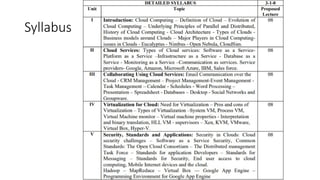
Syllabus
Cloud Definition
• Definition from NIST(National Institute of Standards and Technology)
 Cloud computing is a model for enabling convenient, on-demand network access to a shared
pool of configurable computing resources (e.g., networks, servers, storage, applications, and
services) that can be rapidly provisioned and released with minimal management effort or
service provider interaction.
 This cloud model promotes availability and is composed of five essential characteristics, three
service models, and four deployment models (5:3:4 model).
 Definition from Wikipedia
 Cloud computing is Internet-based computing, whereby shared resources, software, and
information are provided to computers and other devices on demand, like the electricity grid.
 Cloud computing is a style of computing in which dynamically scalable and often virtualized
resources are provided as a service over the Internet.
The National Institute of Standards and Technology (NIST) was
founded in 1901 and is now part of the U.S. Department of
Commerce. NIST is one of the nation's oldest physical science
laboratories.
Cloud Disclaimers
• Talk from Oracle CEO Larry Ellison
• We’ve redefined Cloud Computing to include everything
that we already do. I don’t understand what we would do
differently other than change the wording of some of our
ads.
• Talk from Rich Stallman
• It's stupidity. It's worse than stupidity: it's a marketing hype
campaign. Somebody is saying this is inevitable – and
whenever you hear somebody saying that, it's very likely to
be a set of businesses campaigning to make it true.
Cloud Definitions
• Definition from Whatis.com
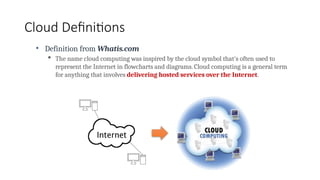
 The name cloud computing was inspired by the cloud symbol that's often used to
represent the Internet in flowcharts and diagrams. Cloud computing is a general term
for anything that involves delivering hosted services over the Internet.
Cloud Definitions
• Definition from Berkeley
 Cloud Computing refers to both the applications delivered as services
over the Internet and the hardware and systems software in the
datacenters that provide those services.
 The services themselves have long been referred to as Software as a
Service (SaaS), so we use that term. The datacenter hardware and software
is what we will call a Cloud.
 When a Cloud is made available in a pay-as-you-go manner to the
public…… The service being sold is Utility Computing.
Electrical Engineering and Computer Sciences University of
California at Berkeley
Cloud Definitions
• Definition from Buyya
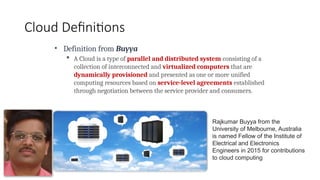
 A Cloud is a type of parallel and distributed system consisting of a
collection of interconnected and virtualized computers that are
dynamically provisioned and presented as one or more unified
computing resources based on service-level agreements established
through negotiation between the service provider and consumers.
Rajkumar Buyya from the
University of Melbourne, Australia
is named Fellow of the Institute of
Electrical and Electronics
Engineers in 2015 for contributions
to cloud computing
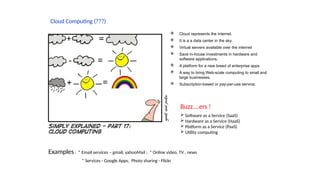
Cloud Computing (???)
 Cloud represents the internet.
 It is a a data center in the sky.
 Virtual servers available over the internet
 Save in-house investments in hardware and
software applications.
 A platform for a new breed of enterprise apps
 A way to bring Web-scale computing to small and
large businesses.
 Subscription-based or pay-per-use service.
Buzz….ers !
 Software as a Service (SaaS)
 Hardware as a Service (HaaS)
 Platform as a Service (PaaS)
 Utility computing
Examples : * Email services – gmail, yahooMail ; * Online video, TV , news
* Services - Google Apps, Photo sharing - Flickr
Cloud Definition
• Cloud computing is a paradigm of computing, a new way of thinking about
IT industry but not any specific technology.
• Central ideas
• Utility Computing
• SOA - Service Oriented Architecture
• SLA - Service Level Agreement
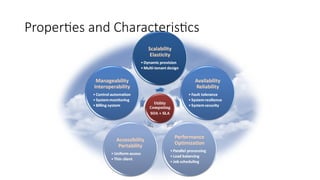
• Properties and characteristics
• High scalability and elasticity
• High availability and reliability
• High manageability and interoperability
• High accessibility and portability
• High performance and optimization
• Enabling techniques
• Hardware virtualization
• Parallelized and distributed computing
• Web service
Properties and Characteristics
Benefits
• Cost savings
• Security
• Flexibility
• Mobility: Cloud computing allows mobile access to corporate data via smartphones and
devices, which, considering over 2.6 billion smartphones are being used globally today, is a
great way to ensure that no one is ever left out of the loop.
• Increased collaboration:Team members can view and share information easily and securely
across a cloud-based platform.
• Quality control
• Disaster recovery
• Automatic software updates
• Competitive edge
Benefits
• Loss prevention:If you aren't on the cloud, you're at risk of losing all the information you had saved locally due to virus, h/w
issue etc . This may not seem like a problem, but the reality is that if your local hardware experiences a problem, you might
end up permanently losing your data. With a cloud-based server, however, all the information you've uploaded to the cloud
remains safe and easily accessible from any computer with an internet connection.
• Trade capital expense for variable expense – Instead of having to invest heavily in data centers and servers before you know
how you’re going to use them, you can pay only when you consume computing resources, and pay only for how much you
consume.
• Benefit from massive economies of scale – By using cloud computing, you can achieve a lower variable cost than you can get
on your own. Because usage from hundreds of thousands of customers is aggregated in the cloud, providers such as AWS can
achieve higher economies of scale, which translates into lower pay as-you-go prices.
• Stop guessing about capacity – Eliminate guessing on your infrastructure capacity needs. When you make a capacity decision
prior to deploying an application, you often end up either sitting on expensive idle resources or dealing with limited capacity.
With cloud computing, these problems go away. You can access as much or as little capacity as you need, and scale up and
down as required with only a few minutes’ notice.
• Increase speed and agility – In a cloud computing environment, new IT resources are only a click away, which means that you
reduce the time to make those resources available to your developers from weeks to just minutes. This results in a dramatic
increase in agility for the organization, since the cost and time it takes to experiment and develop is significantly lower.
• Stop spending money running and maintaining data centers – Focus on projects that differentiate your business, not the
infrastructure. Cloud computing lets you focus on your own customers, rather than on the heavy lifting of racking, stacking,
and powering servers.
• Go global in minutes – Easily deploy your application in multiple regions around the world with just a few clicks. This means
you can provide lower latency and a better experience for your customers at minimal cost.
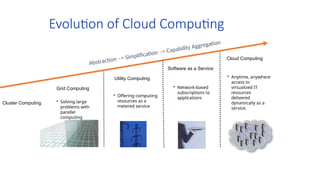
Evolution of Cloud Computing
• Solving large
problems with
parallel
computing
• Network-based
subscriptions to
applications
• Offering computing
resources as a
metered service
• Anytime, anywhere
access to
virtualized IT
resources
delivered
dynamically as a
service.
Software as a Service
Utility Computing
Cloud Computing
Grid Computing
Abstraction –> Simplification -> Capability Aggregation
Cluster Computing
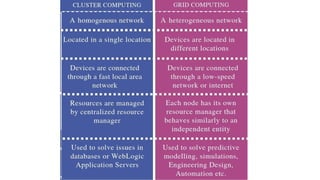
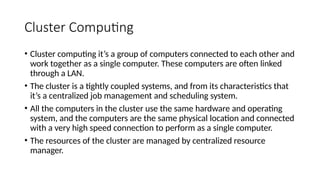
Cluster Computing
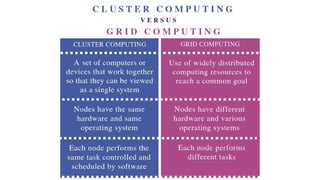
• Cluster computing it’s a group of computers connected to each other and
work together as a single computer. These computers are often linked
through a LAN.
• The cluster is a tightly coupled systems, and from its characteristics that
it’s a centralized job management and scheduling system.
• All the computers in the cluster use the same hardware and operating
system, and the computers are the same physical location and connected
with a very high speed connection to perform as a single computer.
• The resources of the cluster are managed by centralized resource
manager.
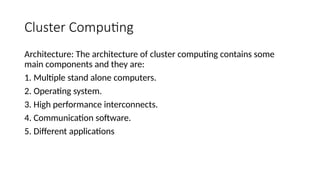
Cluster Computing
Architecture: The architecture of cluster computing contains some
main components and they are:
1. Multiple stand alone computers.
2. Operating system.
3. High performance interconnects.
4. Communication software.
5. Different applications
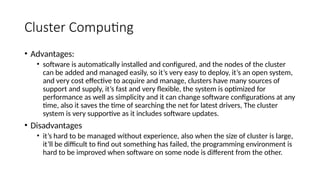
Cluster Computing
• Advantages:
• software is automatically installed and configured, and the nodes of the cluster
can be added and managed easily, so it’s very easy to deploy, it’s an open system,
and very cost effective to acquire and manage, clusters have many sources of
support and supply, it’s fast and very flexible, the system is optimized for
performance as well as simplicity and it can change software configurations at any
time, also it saves the time of searching the net for latest drivers, The cluster
system is very supportive as it includes software updates.
• Disadvantages
• it’s hard to be managed without experience, also when the size of cluster is large,
it’ll be difficult to find out something has failed, the programming environment is
hard to be improved when software on some node is different from the other.
Grid Computing
• Grid computing is a combination of resources from multiple
administrative domains to reach a common target, and this group of
computers can distributed on several location and each a group of grids
can be connected to each other.
• The computers in the grid are not required to be in the same physical
location and can be operated independently, so each computer on the
grid is concerned a distinct computer.
• The computers in the grid are not tied to only on operating system and
can run different OSs and different hardware, when it comes to a large
project, the grid divides it to multiple computers to easily use their
resources.
Grid Computing
• Architecture:
• Fabric layer to provide the resources which shared access is mediated by grid
computing.
• Connectivity layer and it means the core communication and authentication
protocols required for grid specific network functions.
• Resource layer and it defines the protocols, APIs and SDK for secure
negotiations, imitations, monitoring control, accounting and payment of
sharing operations on individual resources.
• Collective layer which it contains protocols and services that capture
interactions among a collection of resources
• Application layer, it’s user applications that operate within environment.
Grid Computing
• Advantages:
• One of the advantages of grid computing that you don’t need to buy large servers for
applications that can be split up and farmed out to smaller commodity type servers,
• secondly it’s more efficient in use of resources.
• Also the grid environments are much more modular and don't have much points of failure.
• About policies in the grid it can be managed by the grid software, beside that upgrading can be
done without scheduling downtime, and jobs can be executed in parallel speeding performance.
• Disadvantages:
• It needs fast interconnect between computers resources,
• some applications may need to be pushed to take full advantage of the new model,
• licensing across many servers may make it forbidden for some applications,
• the grid environments include many smaller servers across various administrative domains. also
political challenges associated with sharing resources especially across different admin domains.
Utility Computing
• Utility Computing refers to a type of computing technologies and business models
which provide services and computing resources to the customers, such as storage,
applications and computing power.
• This repackaging of computing services is the foundation of the shift to on demand
computing, software as a service and cloud computing models which late developed
the idea of computing, applications and network as a service.
• Utility computing is kind of virtualization, that means the whole web storage space
and computing power which it’s available to users is much larger than the single
time-sharing computer.
• Multiple backend web servers used to make this kind of web service possible.
• Utility computing is similar to cloud computing and it often requires a cloud-like
infrastructure.
Utility Computing
• Architecture:
• It depends on the devices of the users and the providing company for the
utility service. And similar to the architecture of the cloud.
Utility Computing
• Advantages:
• the client doesn't have to buy all the hardware, software and licenses needed to
do business. Instead, the client relies on another party to provide these services.
• It also gives companies the option to subscribe to a single service and use the
same suite of software throughout the entire client organization.
• it offers compatibility of all the computers in large companies.
• Disadvantages:
• reliability which means the service could be stopped from the utility computing
company for any reason such as a financial trouble or equipment problems.
• Also utility computing systems can also be attractive targets for hackers, and
much of the responsibility of keeping the system safe falls to the provider
Cloud Computing
• Cloud computing is a term used when we are not talking about local
devices which it does all the hard work when you run an application,
but the term used when we’re talking about all the devices that run
remotely on a network owned by another company which it would
provide all the possible services from e-mail to complex data analysis
programs.
• This method will decrease the users’ demands for software and super
hardware.
• The only thing the user will need is running the cloud computing
system software on any device that can access to the Internet
• cloud and utility computing often conjoined together as a same
concept but the difference between them is that
• utility computing relates to the business model in which application
infrastructure resources are delivered, whether these resources are
hardware, software or both.
• While cloud computing relates to the way of design, build, and run
applications that work in a virtualization environment, sharing resources and
boasting the ability grow dynamically, shrink and the ability of self healing.
Cloud Computing
• Architecture:
• Cloud computing architecture consists of two components
• the first one is the front end which it’s comprises the client's device or a computer
network and some applications are needed for accessing the cloud computing system.
• the second one is the back end, it refers to the cloud itself which may contain various
computer machines, data storage systems and servers. Group of these clouds make a
whole cloud computing system.
Cloud Computing
• Cloud computing has five properties and clarified by the National Institute of
Standards and Technology (NIST):
1. On-demand self-service, the services are available on demand, the user can get the services
at any time, all it takes is an Internet connection.
2. Broad network access, the cloud is accessed remotely over the network, while the access to
the cloud is through the internet; it means that it is accessible to its computing capabilities,
software, and hardware from anywhere.
3. Resources pooling in an independent location and resources serve a large number of users
with all their different devices and their required resources.
4. Rapid elasticity, dealing with the cloud is very easy, the user can simply reduce or increase
the capacity, and also it’s faster than the regular computing types.
5. Measured Service, the cloud systems control and reuse the resources by using measurement
capabilities and according to the type of service, these services also have financial return,
depending on usage.
Cloud Computing
Advantages:
• it offers an unlimited storage capacity
• it provides lower computer costs, so, instead of buying a high features computer you can only get a regular
computer can access to the net,
• you can get most of the applications, You need for free instead of buying it and it’s very expensive,
• computers in a cloud computing performs faster because there’s fewer programs and processes in the memory.
• there’s no need to worry about upgrading software because the cloud updates them automatically.
• You don’t have to worry about the compatibility of the documents, you create on your machine with other
users' applications or operating systems.
• Beside if your hard-disk crashes and all your valuable data destroyed this will not affect the storage of your data
because it’s stored in the cloud.
• You can access to your data whenever you have a computer and an Internet connection wherever you are and
that’s because it’s reachable through the internet,
• you are no longer connected to a single computer to reach your data,
• sharing documents leads to a better collaboration between companies and people.
Cloud Computing
Disadvantages:
• it requires a constant internet connection because it’s impossible to
reach it without an internet connection
• it doesn’t work well with low-speed connections, such as dial-up
services,
• though that the cloud sometimes can be slow, even with using fast
connection, because web based applications can be slower than
accessing a similar software program on your desktop.
• its applications may have limited featured compared to their desktop
based applications
computi
ng type
Characteristics Advantages Disadvantage Comments S/W and H/W
Cluster 1. Tightly coupled systems
2. Single system image 3.
Centralized Job
management &
scheduling system
1. Easy to deploy 2.Complete 3.Open 4.Easy to
manage 5.Flexible 6.Optimized 7.Expandable
8.Supported
1. no need to experience 2. difficult to
find failure
3.Programming is hard to be improved
when software is different between the
nodes.
In cluster computing, a bunch of
similar (or identical) computers
are hooked up locally (in the
same physical location, directly
connected with very high speed
connections) to operate as a
single computer
The cluster
computers all have
the same
hardware and OS.
Grid 1. Loosely coupled 2.
Diversity and Dynamism
3. Distributed Job
Management &
scheduling
1. No need to buy large servers for applications 2.
More efficient use of idle resources. 3. Its
environments are more modular and don't have
much points of failure. 4.Policies can be managed
by the grid software. 5.Upgrading can be done
without scheduling downtime. 6.Jobs can be
executed in parallel speeding
1. Needs a fast interconnect. 2. Some
applications don’t take full advantage of
the new models. 3. No licensing across
many servers for some applications. 4.
Includes many smaller servers across
various administrative domains.
In grid computing, the
computers do not have to be in
the same physical location and
can be operated independently.
As far as other computers are
concerned each computer on
the grid is a distinct computer.
The computers
that are part of a
grid can run
different operating
systems and have
different hardware
Utility 1. Scalability. 2. Demand
pricing. 3. Standardized
Utility Computing
Services. 4. Share the
web and other resources
in the shared pool of
machines. 5. Automation.
[
1. Lower computer costs. 2. Subscription of a
single service with the same suite of software. 3.
Compatibility. 4. Unlimited storage capacity.
1. Needs a fast interconnect. 2. Some
applications don’t take full advantage of
the new models. 3. No licensing across
many servers for some applications. 4.
Includes many smaller servers across
various administrative domains. 5.
Political challenges.
In utility computing, the
computers need not to be in the
same physical location.
The memory,
storage devices
and net work
communications
are managed by
the OS of the basic
physical cloud
units
Cloud 1.On-demand self-
service. 2. Broad network
access. 3.Resources
pooling 4. Rapid elasticity
5.Measured Service.[8]
1. Lower computer costs. 2. Improved
performance. 3. Reduced software costs. 4.
Instant software updates 5.Improved document
format compatibility 6.Unlimited storage capacity,
7. Increased data reliability, 8.Universal document
access, 9.Latest version availability of your
documents, 10.Easier group collaboration, 11. You
are no longer connected to a single computer.
1. Requires a constant internet
connection. 2. Does not work well with
low-speed connections. 3. Can be slow,
Even with a fast connection 5. Stored
data might not be secure 6. if the cloud
destroyed you can’t backup your data.[7]
In cloud computing, the
computers need not to be in the
same physical location.
The memory,
storage device and
network
communication
are managed by
the operating
system of the basic
physical cloud
units.
Cloud Computing Technologies and Types
With cloud computing technology, large pools of resources can be connected together in
many ways. This technology simplifies infrastructure planning and provides dynamically
scalable infrastructure for cloud based applications, data, and file storage. Businesses
can choose to deploy applications on Public, Private, Hybrid clouds or the newer
Community Cloud.
1. Private Cloud
2. Public Cloud
3. Hybrid Cloud
4. Community Cloud
Depending on the organization work nature, location and its infrastructure, we can
choose one of the following types of Cloud Computing, to work with:
• Each one of the above has its advantages and drawbacks
• Types of Cloud Computing technologies might intersect with each other.
37
38
Public Cloud Advantages:
• Free or offered on a pay-per-
usage model.
• Easy and inexpensive setup.
• No wasted resources
because you pay for only
what you use.
Disadvantages:
• Data security and privacy
issues. You may not know
where your data is stored, if
or how it is backed up, and
whether access is given to
unauthorized users.
• Reliability.
Amazon, Google, Microsoft are the most
known Public Cloud Service providers.
40
Community Cloud
Community clouds are designed for businesses and organizations working on joint
projects, applications, or research, which requires a central cloud computing facility
for building, managing and executing such projects, regardless of the solution rented
Cloud.
41
Private Cloud
Advantages:
• More Security
• Most Control over data.
Disadvantages:
• Most Expensive type of
Cloud Computing.
• More Support operations
and employees are required.
• Complexity in
implementation.
Most private Clouds are structured of already made solutions, offered by
many vendors, such as: Microsoft, VMWare and Citrix
42
Hybrid Cloud
It allows you to retain sensitive data within your organization, while taking
advantage of the lower cost and flexibility of the public cloud.
Public Clouds
 Resources - applications and
storage, available to the general
public over the Internet.
 May be free or offered on a pay-
per-usage model.
Benefits
 Easy and inexpensive set-up
 hardware, application and
bandwidth costs are covered by
the provider.
 Scalability to meet needs.
 No wasted resources because you
pay for what you use
Examples
3Tera, Eucalyptus, Cloudera
Private Clouds
 Internal cloud or a corporate cloud - A
proprietary hosting.
 Services to a limited number of people
behind a firewall.
 Allow corporate network and
datacenter administrators to effectively
become service providers that meet
the needs of their "customers" within
the corporation.
 An organization that needs or wants
more control over their data than they
can get by using a third-party hosted
service such as Amazon's Elastic
Compute Cloud (EC2) or Simple
Storage Service (S3).
Examples
IBM, VMware, Sun/Oracle
44
Cloud Computing Architecture
45
Cloud Computing Architecture
46
Major Players in Cloud Computing
https://www.softwaretestinghelp.com/cloud-computing-service-providers/
1.Amazon Web Services
2.Microsoft Azure
3.Google Cloud Platform
4.Adobe
5.VMware
6.IBM Cloud
7.Rackspace
8.Red Hat
9.Salesforce
10.Oracle Cloud
11.SAP
12.Verizon Cloud
13.Navisite
14.Dropbox
15.Egnyte
47
Vendor IaaS PaaS SaaS Storage
Amazon EC2 (Elastic Cloud Comp
ute)
Amazon Web Services* Amazon Web Serv
ices
*
S3 (Simple Storage Service)
Google n/a Google App Engine (Python, J
ava, Go)
Google Aps Google Cloud Storage
HP Enterprise Services Clou
d – Compute
Cloud Application Delivery HP Software as a S
ervice
Enterprise Services Cloud –
Compute
IBM SmartCloud Enterprise SmartCloud Application Servi
ces
SaaS products SmartCloud Enterprise – o
bject storage
Microsoft Microsoft Private Cloud Windows Azure (includes .NE
T, Node.js, Java, PHP)
MS Office 365 Microsoft Private Cloud
JoyentCloud SmartMachines Node.js n/a n/a
Rackspace Cloud Servers Cloud Sites Email & Apps Cloud Files
Salesforce.com n/a Force.com Salesforce.com n/a
VMware** VMware vSphere,
vCloud
VMware vFabric (Java Spring)
, vCloud API
n/a n/a
Major Players in Cloud Computing
http://www.itmanagerdaily.com/cloud-computing-vendors/
Cloud Market Place
49
Major Players in Cloud Computing
https://www.zdnet.com/article/cloud-providers-ranking-2018-how-aws-microsoft-google-cloud-platform-ibm-cloud-oracle-
alibaba-stack/
50
Three Service Models
51
52
IaaS
• Infrastructure as a Service (IaaS) is a form of cloud computing where
hardware is provided and managed by an external provider. This
hardware is provided in the cloud environment and can include
anything from virtual servers to network connections and load
balancers.
• Because this hardware is virtualised, it gives businesses the ability to
easily scale their IT solutions. This makes it particularly popular with
growing businesses and when working on temporary projects.
Benefits of IaaS:
• Scalability —one of the main benefits of IaaS is the scalability it offers. Through a subscription
service, you access the IT system you require when you need it. Due to its virtualisation, scaling
up your systems can be done quickly and efficiently, minimising downtime.
• Minimised hardware maintenance — the hardware behind your IaaS system is managed
externally, minimising the time and money your business spends on this type of maintenance.
• Flexibility — many IaaS systems can be accessed remotely, although this will vary from system
to system.
• Reduced downtime — if your hardware fails, you’ll usually need to wait for a repair, impacting
the productivity of both your staff and business overall. An IaaS system relies on a multitude of
servers and data centres; if one area fails, other hardware resources are available to pick up the
slack.
• On–demand access — an IaaS system can be accessed on-demand and you’ll only pay for the
resources you use, keeping costs down.
PaaS
• Platform as a Service (PaaS) is a form of cloud computing that allows a
dedicated space to build and test applications. It’s predominantly
used by software and web developers, although it can also be utilised
by businesses who want to create and test their own internal
software. It’s usually available on a subscription basis.
Benefits of PaaS
• Reduced costs — in the past, developing software was costly, as a result of
the hardware, skills and experience needed. Instead, PaaS allows users to
effectively rent the required infrastructure, paid for through their
subscription fee.
• Eliminates skills barrier — PaaS systems are often simple to use, meaning
businesses don’t need to employ specialists to develop their apps. Rather,
an app can be developed in-house through only a web browser.
• Increased collaboration — in larger businesses, multiple parties may be
working on the same app development project. Via cloud connectivity,
multiple developers across different locations can collaborate on the same
project.
SaaS
• Software as a Service (SaaS) is a way for software applications to be
delivered over the internet through the cloud. Because of this, SaaS is
often referred to as cloud software.
• Different from previous methods of purchasing software outright and
installing it onto a device, SaaS is usually subscription-based. The
software isn’t localised on a specific PC — rather, it’s accessed via an
internet connection.
• Although the acronym SaaS may sound complicated, you’ll actually come
into contact with this type of software every day — whether you’re
logging into Office 365 or streaming your favourite films via Netflix.
Benefits of SaaS
• Eradicates initial costs — because SaaS is usually delivered on a subscription basis, it
eliminates the initial costs that were traditionally associated with implementing
software. With cost a barrier for many, this approach makes accessing more
sophisticated systems easier and more affordable.
• Stop using, stop paying — another benefit of a subscription SaaS system is that it
means you can often terminate your contract when you no longer require the software.
• Keep your data safer — through using cloud-connected software systems, you
eliminate the vulnerability of storing files to a local device. PCs, laptops and tablets can
fail, but you’ll always have a digital back-up to hand.
• Flexibility —one of the main benefits of SaaS is the flexibility it offers. You’re no longer
tethered to specific devices that have the software capability; rather, you can access the
applications you need wherever you are using a simple internet connection.
59
60
Examples of Cloud
• Google Drive: This is a pure cloud computing service, with all the storage
found online so it can work with the cloud apps: Google Docs, Google
Sheets, and Google Slides.
• Apple iCloud: Apple's cloud service is primarily used for online storage,
backup, and synchronization of your mail, contacts, calendar, and more.
All the data you need is available to you on your iOS, Mac OS, or
Windows device (Windows users have to install the iCloud control panel)
• Amazon Cloud Drive: Storage at the big retailer is mainly for music,
preferably MP3s that you purchase from Amazon, and images—if you
have Amazon Prime, you get unlimited image storage.
Examples of Cloud
• Facebook and Instagram—which are definitely cloud services—
regarding what they get to do with your photos
• Chromebook: The primary example of a device that is completely
cloud-centric is the Chromebook. These are laptops that have just
enough local storage and power to run the Chrome OS, which
essentially turns the Google Chrome Web browser into an operating
system. With a Chromebook, most everything you do is online: apps,
media, and storage are all in the cloud.
Disadvantages of cloud computing
• Dependent on internet connections
• Users are subject to terms and conditions
• Data in hands of a 3rd
party
• It’s not environmentally sustainable
• No worldwide accepted standards
The Cloud vs. the Data Center
• Data Center – An organization can run an in-house data center
maintained by trained IT employees whose job is to keep the system
up and running.
• Pros: Organizations able to have an in-house data storage center are
far less reliant on maintaining an Internet connection. Data will be
accessible as long as the local network remains stable.
• Cons: Having all or most of your data stored in one location makes it
more easily accessible to those you don’t want having access, both
virtually and physically.
The Cloud vs. the Data Center
• Cloud Computing—Before the dawn of the Internet, cloud computing
didn’t exist. It simply couldn’t. The cloud is an online storage system
designed to fragment and duplicate your data across multiple
locations. In case of failures, a cloud system ensures that there is
always a backup of the backup.
• Pros: In our increasingly interconnected world, the cloud is the
answer. Services like Microsoft Office 365 and Google Drive have
embraced its ability to store data online and have created services to
capitalize on its potential.
• Cons: Anything online is more susceptible to virtual attack.
• Commercial cloud service providers charge CPU time and bandwidth.
• For large organizations, it’s more cost effective to purchase the hardware and
create own cloud.
• Researchers and academia need open standards.
• More secure and flexible.
• No vendor lock in.
Open Source Clouds
• Commercial:
• Open Source:
IaaS Platforms
Amazon AWS IBM Smartcloud
Microsoft Azure HP Cloud
Rackspace cloud GoGrid
Eucalyptus Nimbus
Open Nebula Enomaly
Open Stack Cloud Stack
• Elastic Utility Computing Architecture for Linking Your Programs to
Useful Systems
Eucalyptus
• Eucalyptus was founded out of a research project in the Computer Science
Department at the University of California, Santa Barbara, and became a for-profit
business called Eucalyptus Systems in 2009.
• Open source architecture for implementing cloud functionality at the IaaS level.
• Can be installed and deployed without modification to the existing infrastructure
(From laptops to data centers)
• Linux based, highly modular and compatible with Amazon AWS (uses AWS APIs).
Eucalyptus
70
Eucalyptus
• The goal of Eucalyptus is to allow sites with existing clusters and
server infrastructure to host a cloud that is interface-compatible with
Amazon's AWS and (soon) the Sun Cloud open API.
71
Eucalyptus
• The Eucalyptus cloud platform pools together existing virtualized
infrastructure to create cloud resources for infrastructure as a
service, network as a service and storage as a service.
• Eucalyptus is an open-source software platform that
implements IaaS-style cloud computing using the existing
Linux-based infrastructure
72
Eucalyptus
oIaaS Cloud Services providing atomic allocation for
Set of VMs
Set of Storage resources
Networking
73
Eucalyptus
• Eucalyptus Systems announced a formal agreement with Amazon
Web Services (AWS) in March 2012.
• allowing administrators to move instances between a Eucalyptus private
cloud and the Amazon Elastic Compute Cloud (EC2) to create a hybrid cloud.
• The partnership also allows Eucalyptus to work with Amazon’s product teams
to develop unique AWS-compatible features.
74
EC2
• Amazon Elastic Compute Cloud (Amazon EC2) provides scalable
computing capacity in the Amazon Web Services (AWS) cloud.
• Using Amazon EC2 eliminates your need to invest in hardware up
front, so you can develop and deploy applications faster.
• You can use Amazon EC2 to launch as many or as few virtual servers
as you need, configure security and networking, and manage storage.
• Amazon EC2 enables you to scale up or down to handle changes in
requirements or spikes in popularity, reducing your need to forecast
traffic.
75
EC2
Amazon EC2 provides the following features:
• Virtual computing environments, known as instances
• Preconfigured templates for your instances, known as Amazon Machine Images (AMIs), that package the bits you need
for your server (including the operating system and additional software)
• Various configurations of CPU, memory, storage, and networking capacity for your instances, known as instance types
• Secure login information for your instances using key pairs (AWS stores the public key, and you store the private key in a
secure place)
• Storage volumes for temporary data that's deleted when you stop or terminate your instance, known as instance store
volumes
• Persistent storage volumes for your data using Amazon Elastic Block Store (Amazon EBS), known as Amazon EBS volumes
• Multiple physical locations for your resources, such as instances and Amazon EBS volumes, known
as regions and Availability Zones
• A firewall that enables you to specify the protocols, ports, and source IP ranges that can reach your instances
using security groups
• Static IPv4 addresses for dynamic cloud computing, known as Elastic IP addresses
• Metadata, known as tags, that you can create and assign to your Amazon EC2 resources
• Virtual networks you can create that are logically isolated from the rest of the AWS cloud, and that you can optionally
connect to your own network, known as virtual private clouds(VPCs)
76
Eucalyptus
Eucalyptus features include:
• Supports both Linux and Windows virtual machines (VMs).
• Application program interface- (API) compatible with Amazon EC2 platform.
• Compatible with Amazon Web Services (AWS) and Simple Storage Service
(S3).
• Works with multiple hypervisors including VMware, Xen and KVM.
• Can be installed and deployed from source code.
• Multiple clusters can be virtualized as a single cloud.
• Administrative features such as user and group management and reports.
Eucalyptus Account Creation
• Use the Eucalyptus Web Interfaces at
https://eucalyptus.india.futuregrid.org:8443/
• On the Login page click on Apply for account.
• On the next page that pops up fill out ALL the Mandatory AND optional fields of the form.
• Once complete click on signup and the Eucalyptus administrator will be notified of the account
request.
• You will get an email once the account has been approved.
• Click on the link provided in the email to confirm and complete the account creation process.
http://futuregrid.org
Architectural Overview
1 - Instances
2 - Networking
3 - Compute nodes
4 - Storage
5 - User interface
6 - Overall cloud platform
79
key components of AWS
• Simple E-mail Service: Sending of E-mail is done by using RESTFUL API call or via regular
SMTP (Simple Mail Transfer Protocol).
• Identity and Access Management: Improvised security and Identity management is
provided for AWS account.
• Simple Storage Device or (S3): It is a huge storage medium, widely used for AWS services.
• Elastic Compute Cloud (EC2): Allows on-demand computing resources for hosting
applications and essentially useful for unpredictable workloads
• Elastic Block Store (EBS): Storage volumes which is being attached to EC2 and allows the
data lifespan of a single EC2
• Cloud Watch: It is used to monitor AWS resources and it allows administrators to view and
collect keys required. Access is provided so that one can set a notification alarm in case of
trouble.
What is Nimbus?
http://www.nimbusproject.org/
• An open source Infrastructure-as-a-Service implementation
• Turns your cluster into a cloud
• Nimbus Platform is an integrated set of tools that deliver the power and versatility
of infrastructure clouds to scientific users. Nimbus Platform allows you to combine
Nimbus, OpenStack, Amazon, and other clouds.
• Enable providers of resources to build private or community IaaS clouds.
• Enable users to use IaaS clouds.
• Enable developers to extend, experiment and customize IaaS.
• The current stable release of Nimbus Infrastructure is 2.10.1.
• Nimbus on GitHub
81
82
The design of
Nimbus which
consists of a number
of components
based on the web
service technology
as illustrated in
figure.
83
Components of Nimbus
1. Workspace service: Allows clients to manage and administer VMs by providing to two interfaces; One
interface is based on the web service resource framework (WSRF) and the other is based on EC2
WSDL. This service communicates with a workspace resource manager or a workspace pilot to
manage instances.
2. Workspace resource manager: Implements VM instance creation on a site and management.
3. Workspace pilot: provides virtualization with significant changes to the site configurations.
4. Workspace control: implements VM instance management such as start, stop and pause VM. It also
provides image management and sets up networks and provides IP assignment.
5. Context broker: allows clients coordinate large virtual cluster launches automatically and repeatedly.
6. Workspace client: a complex client that provides full access to the workspace service functionality.
7. Cloud client: a simpler client providing access to selected functionalities in the workspace service.
8. Storage service: Cumulus is a web service providing users with storage capabilities to store images
and works in conjunction.
84
Xen
• The Xen Project Hypervisor was built by Cambridge University for the
XenoServers project as a mechanism to divide up the physical
resources among the clouds and to provide resource management,
accounting and auditing that was needed to run a cloud service.
• In other words, the hypervisor was built for the Cloud straight from
the outset, anticipating a highly virtualized world, which today is
known as cloud computing.
85
Web Services Resource Framework (WSRF)
• WSRF defines a generic and open framework for modeling and
accessing stateful resources using Web Services.
• WS + state management
• This includes mechanisms to describe views on the state, to support
management of the state through properties associated with the Web
Service, and to describe how these mechanisms are extensible to
groups of Web Services.
• It defines the means by which:
• Web Services can be associated with one or more stateful resources
86
Nimbus
• Allow providers to build clouds
• Private clouds (privacy, expense considerations)
• Workspace Service: open source EC2 implementation
• Allow users to use cloud computing
• Do whatever it takes to enable scientists to use IaaS
• Context Broker: turnkey virtual clusters
• IaaS Gateway: interoperability
• Allow developers to experiment with Nimbus
• For research or usability/performance improvements
• Community extensions and contributions
87
88
CloudSim
• It is a framework for modeling and simulation of cloud computing
infrastructures and services.
• Originally built primarily at the Cloud Computing and Distributed Systems
(CLOUDS) Laboratory,The University of Melbourne, Australia
• CloudSim has become one of the most popular open source cloud
simulators in the research and academia.
• CloudSim is completely written in Java.
• CloudSim is a software framework that supports several core functionality of
cloud like job/task queue, processing of events, creation of cloud entities,
communication between entities, implementation of broker policies etc.
89
Core features of CloudSim
• Support of modeling and simulation of large scale computing environment.
• A self contained platform for modeling clouds, service brokers and allocation
policies.
• Support for simulation of network connections among the simulated system
elements.
• Facility for simulation of federated cloud environment, that inter-networks
resources from both private and public domains.
• Availability of a virtualization engine that aids in the creation and management
of multiple independent and co-hosted virtual services on a data center node.
• Flexibility to switch between space shared and time shared allocation of
processing cores to virtualized services.
90
CloudSim
• Complete kit is available at-
• https://www.superwits.com/library/cloudsim-simulation-framework
• https://anupinders.gitbooks.io/up-and-running-with-cloudsim/content/
getting-set-up.html
91