
Automatically replace the plain icons of your Windows game shortcuts with real cover art from SteamGridDB.



If you keep a folder of game shortcuts on Windows, they usually show plain, mismatched icons. Game Icons Studio scans that folder, finds the right cover art for each game, builds clean Windows icons, and applies them automatically — turning a messy folder into a tidy game shelf.
It runs entirely on your PC. The interface opens in your web browser, but it is not a website — it is a local tool, and nothing is uploaded anywhere.
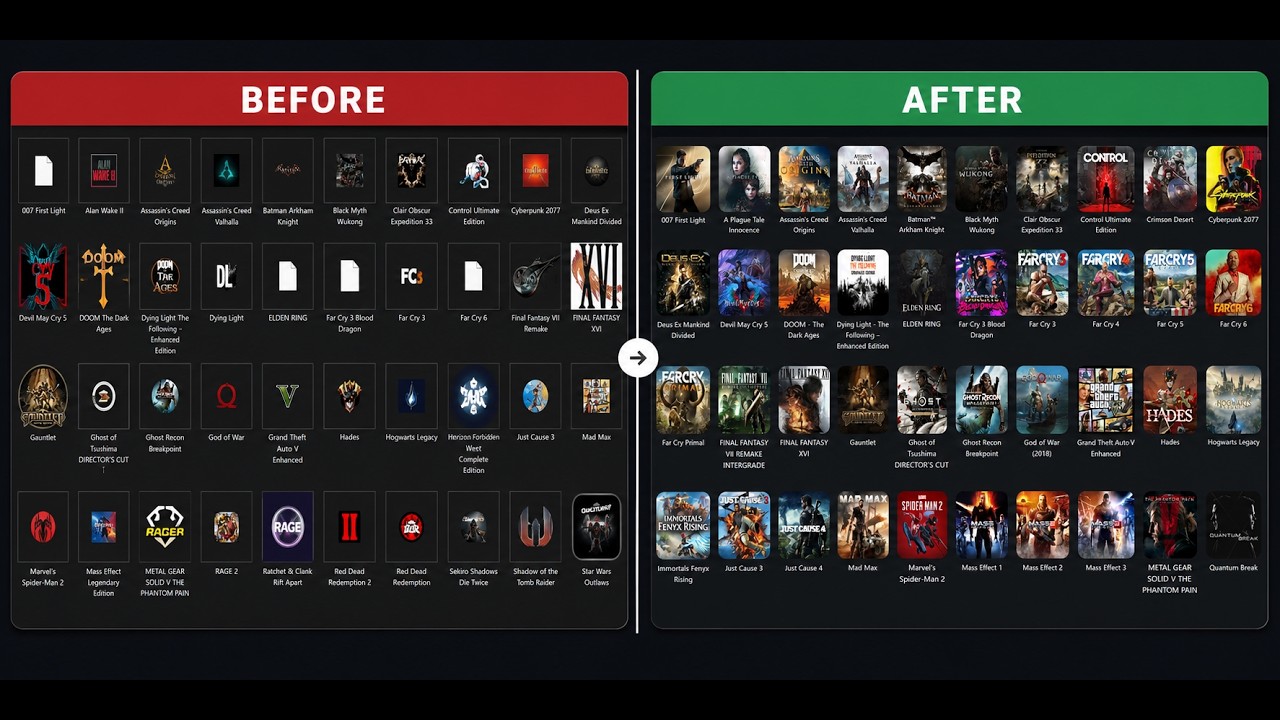

- 🎮 Automatic matching — finds the right game on SteamGridDB for each shortcut
- 🖼️ High-quality icons — downloads square cover art and builds crisp multi-size
.icofiles - ✅ You stay in control — review every cover, change the ones you don't like, or accept all automatically
- 🎨 7 themes, fullscreen, zoom, and keyboard navigation
- 🔁 Quick re-apply and a searchable history of your changes
- 🧰 Repair icon cache for when Windows shows blank or stale icons
- 🆕 New-game detection — only processes games you've added since last time
- Windows 10 or 11
- PowerShell 7+ (recommended) — get it here
- A free SteamGridDB API key (the app walks you through getting one on first run)
- Download the latest release (the
.zipfile). - Right-click the
.zip→ Properties → check "Unblock" → OK, then extract it anywhere. - Open the folder and double-click
Game Icons Studio.bat. - On first run, follow the on-screen steps to paste your free SteamGridDB API key.
- Choose your game shortcuts folder and let it work. Review the covers, then apply.
💡 New here? Click "What is GIS?" inside the app for a quick tour.
Yes — and it's open source so you can read exactly what it does.
- It only changes the icon of a shortcut. Nothing is deleted; your shortcuts keep working exactly as before.
- It runs 100% locally. Your API key and your files never leave your PC. The only internet connection is to SteamGridDB, to fetch cover art.
- Because it's a PowerShell tool, Windows SmartScreen or your antivirus may show a caution prompt the first time. That's normal for unsigned scripts — the source here is fully open for inspection.
⚠️ Note: Applying icons is currently not reversible from within the app (there is no built-in undo/restore). Use the "Change specific icons" option if you want to redo individual ones.
Does this work with Steam / Epic / GOG games?
It works with any Windows shortcut (.lnk). If you have a folder of shortcuts to your games (from any launcher), it works. It also offers to convert .url launcher shortcuts to .lnk so their icons can be customized.
Does it change my actual games or library? No. It only changes the icon shown on the shortcut file. Your games and launchers are untouched.
Do I have to pay for the SteamGridDB API key? No, it's completely free. You create a SteamGridDB account (sign in with Steam) and generate a key — the app links you straight to it.
Why does it open in my browser? The browser is just the app's window. It's served from your own PC on localhost; there's no website and no data leaves your machine.
Issues and suggestions are welcome — open an issue. If you'd like to contribute code, feel free to open a pull request.
Released under the MIT License. Free to use, modify, and share.
- Cover art is provided by the wonderful SteamGridDB community.
- This is an independent project and is not affiliated with or endorsed by SteamGridDB, Valve, or any game publisher.
If you find this useful, consider starring ⭐ the repo — it helps other people find it!