
AI-native CLI for building DingTalk Yida low-code applications.
OpenYida connects AI coding agents with Yida's low-code platform, so developers can create apps, forms, workflows, custom pages, reports, integrations, and deployment configuration from a normal chat-driven development workflow.
Quick Start · Capabilities · CLI Reference · Examples · Contributing · Changelog




Documentation: English · 简体中文 · 繁體中文 · 日本語 · 한국어 · Français · Deutsch · Español · Português · Tiếng Việt · हिन्दी · العربية
OpenYida is a bridge between AI coding tools and Yida. It gives agents a stable command-line interface for the full application lifecycle:
| Area | What you can do |
|---|---|
| Application delivery | Create, update, export, and import Yida applications |
| Form modeling | Create forms, update fields, inspect schemas, and manage permissions |
| Custom pages | Generate React-based pages, lint Yida runtime rules, compile, and publish |
| Workflow automation | Create process forms, configure approval flows, preview process instances |
| Data operations | Query form/process/task/subform data and run anomaly checks |
| Integrations | Manage HTTP connectors, connector actions, auth accounts, and automation flows |
| Operations | Diagnose environment issues, manage login state, configure sharing, upload CDN assets |
The result remains a native Yida application: teams can continue editing it in Yida, use existing enterprise security controls, and deploy through the Yida platform.
npm install -g openyidaOpenYida requires Node.js 18 or later. The package exposes both openyida and yida commands.
If Codex is already installed, OpenYida also imports a local Codex plugin during postinstall. Restart Codex after installation, then type @宜搭 or @openyida in the composer to attach the OpenYida context.
Run this from the AI coding workspace where you want OpenYida to operate:
openyida env
openyida env --json
openyida commands --json
OpenYida detects the active agent environment, workspace path, login state, and organization context. Use --json when an agent needs a stable machine-readable snapshot.
openyida commands --json emits the command manifest used by the CLI help, so agents can inspect available routes without scraping terminal output.
openyida loginIn Codex, QoderWork, Qoder, Wukong, Claude Code, OpenCode, Cursor, and other detected AI tools, OpenYida first tries local Chrome/Edge/Chromium CDP when no valid cached login exists. If local CDP is unavailable, it falls back to an AI-dialog QR handoff. The agent should render qr_image_markdown or paste agent_response_markdown directly in the conversation so the QR code is visible, then run poll_command after the user scans it with DingTalk. If image rendering is unavailable, fall back to qr_url. The explicit openyida login --browser command still prefers CDP first and uses Playwright as an optional browser fallback.
The explicit QR polling command remains available:
openyida login --agent-qrFor terminal QR login, use:
openyida login --qr
openyida login --qr --corp-id dingxxxxxxxx
openyida login --check-only --json
OpenYida does not install Playwright by default.
Ask your coding agent for a concrete Yida application or workflow:
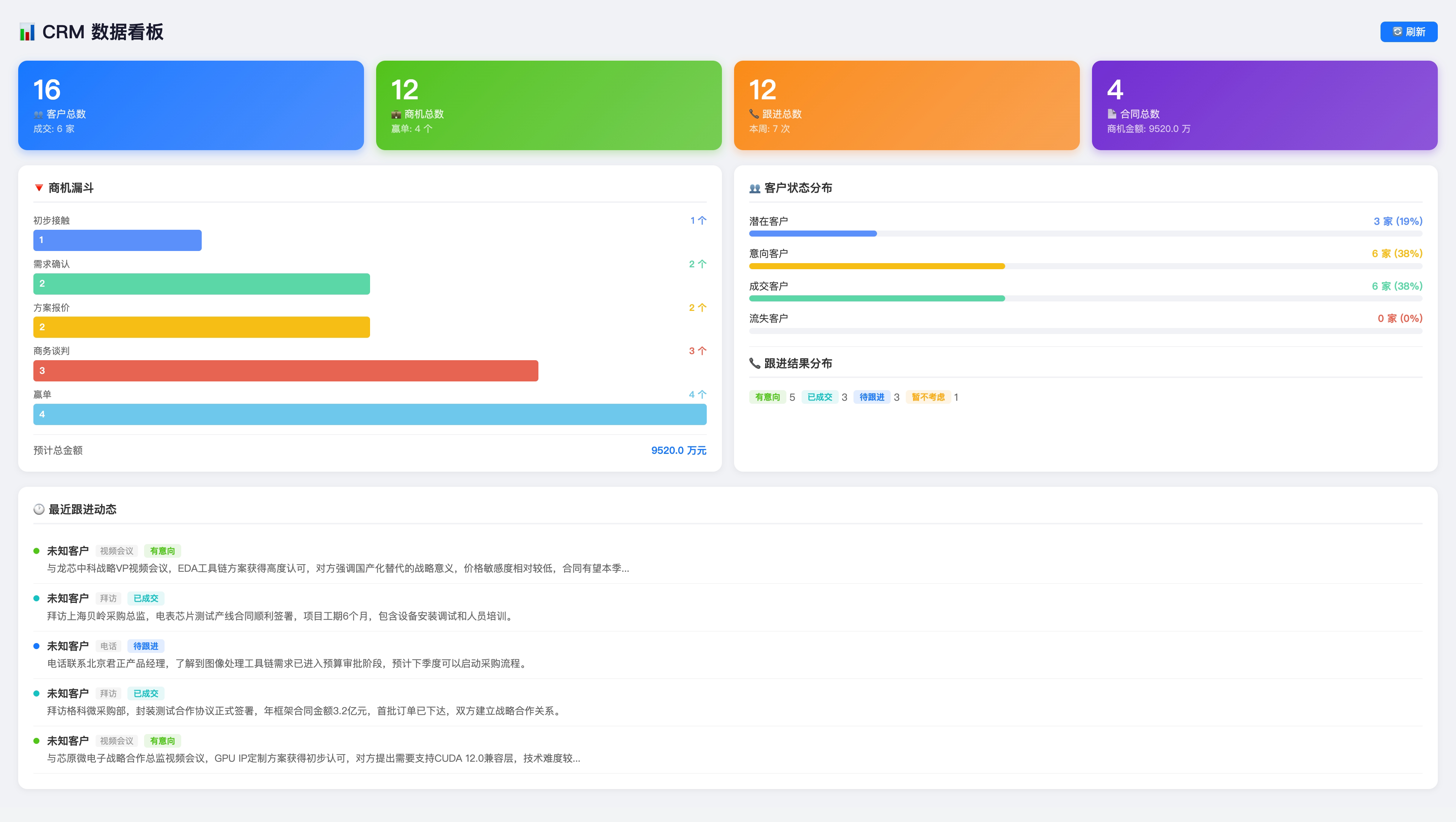
Create a CRM application in Yida with customer, contact, opportunity, and follow-up forms.
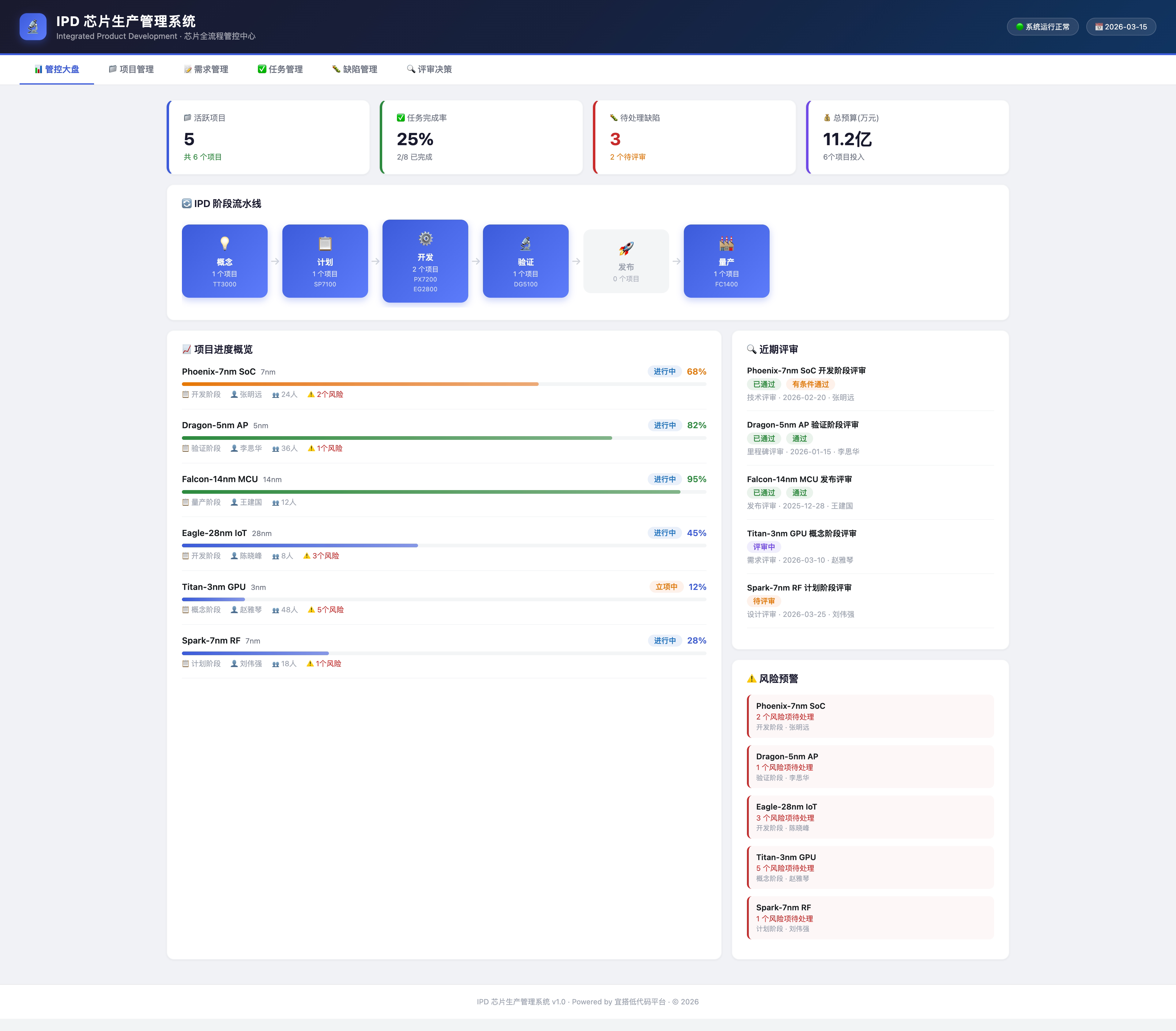
Build an IPD workflow for chip production, including approval nodes and dashboard pages.
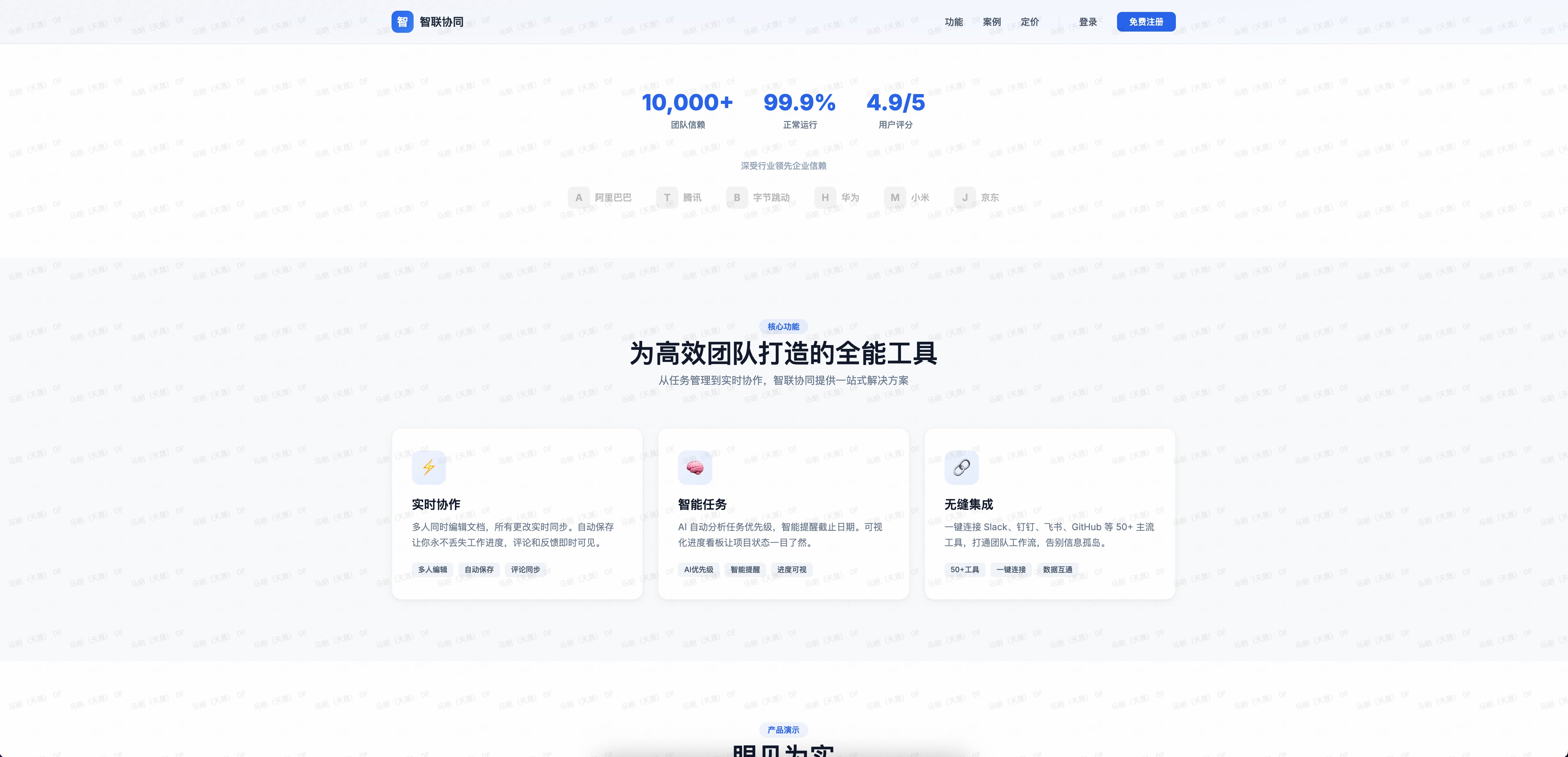
Generate a public landing page and publish it to my Yida app.
The agent can then call OpenYida commands to create the application, generate source files, publish pages, and return the final Yida URLs. In Codex, QoderWork, Qoder, and Wukong environments, successful creation and publish commands also include a browser handoff so the agent can open the resulting Yida page in the in-app browser. Use --open to force this handoff or --no-open to suppress it.
Wukong uses manual skill package installation instead of npm:
- Download the latest
.zipskill package from GitHub Releases. - Open Wukong.
- Go to Skill Center > Upload Skill and select the downloaded package.
For Wukong terminal work, make sure its bundled Node.js path is active before running node, npm, or npx commands:
export PATH="$HOME/.real/.bin/node/bin:$PATH"| Tool | Support |
|---|---|
| Codex | Full support |
| Claude Code | Full support |
| Aone Copilot | Full support |
| OpenCode | Full support |
| Cursor | Full support |
| Visual Studio Code | Full support |
| QoderWork | Full support |
| Qoder | Full support |
| Wukong | Full support |
flowchart LR
  A["AI coding agent"] --> B["OpenYida CLI"]
  B --> C["Environment detection"]
  B --> D["Login and organization context"]
  B --> E["Yida API operations"]
  B --> F["Local page generation and compile"]
  E --> G["Native Yida app"]
  F --> G
OpenYida keeps platform-specific behavior inside the CLI, while agents interact with predictable commands and project files.
openyida/
├── bin/yida.js                 # CLI entry and command routing
├── lib/
│   ├── app/                    # Application, form, page, import/export commands
│   ├── auth/                   # Login, QR login, browser handoff, organization switch
│   ├── connector/              # HTTP connector lifecycle and smart creation
│   ├── core/                   # Environment detection, i18n, diagnostics, data commands
│   ├── process/                # Process form creation, configuration, preview
│   ├── report/                 # Yida report and chart generation
│   └── samples/                # Templates emitted by openyida sample
├── project/                    # Default workspace template for generated Yida projects
├── yida-skills/                # Source skill docs and Yida API references
└── scripts/                    # CI, packaging, and installation helpers
openyida create-app "CRM"
openyida create-app --name "CRM" --desc "Customer management" --theme deepBlue
openyida app-list --size 20
openyida corp-efficiency
openyida create-form create APP_XXX "Customer" .cache/openyida/forms/customer-fields.json
openyida create-form update APP_XXX FORM_XXX .cache/openyida/forms/customer-changes.json
openyida get-schema APP_XXX FORM_XXX
openyida get-schema APP_XXX --all --output-dir .cache/schemasopenyida create-page APP_XXX "Dashboard" --mode dashboard
openyida generate-page product-homepage --spec .cache/openyida/page-specs/home.json --output pages/src/home.oyd.jsx --compile
openyida generate-page todo-mvc --output pages/src/todo-mvc.oyd.jsx --compile
openyida check-page pages/src/home.oyd.jsx
openyida compile pages/src/home.oyd.jsx
openyida publish pages/src/home.oyd.jsx APP_XXX FORM_XXXgenerate-page turns a structured spec into a Page IR, renders a curated React 16-compatible template, writes a .openyida-page.json manifest, and optionally compiles the result. The manifest makes follow-up AI edits safer because agents can update known blocks instead of rewriting a large JSX file by hand.
Built-in templates currently include product-homepage for product/portal pages and todo-mvc for a full interaction smoke page covering events, custom state, list rendering, editing, filtering, and localStorage persistence.
openyida create-process APP_XXX "Purchase Request" .cache/openyida/process/fields.json .cache/openyida/process/process.json
openyida configure-process APP_XXX FORM_XXX .cache/openyida/process/process.json
openyida process preview APP_XXX PROC_INST_XXX --output .cache/openyida/process/process.html
openyida data query form APP_XXX FORM_XXX --page 1 --size 20
openyida data create form APP_XXX FORM_XXX --data-file .cache/openyida/data-import/record.json
openyida get-permission APP_XXX FORM_XXX
configure-process 的流程 JSON 中,审批人可配置为发起人、指定成员、指定角色、部门主管或直属主管,例如:
{
  "nodes": [
    {
      "type": "approval",
      "name": "主管审批",
      "approver": {
        "type": "user",
        "users": [{ "id": "manager7350", "name": "九神" }],
        "multiApproverType": "all"
      }
    }
  ]
}
When creating or updating test data with openyida data, Yida date fields must use 13-digit millisecond timestamps, for example "dateField_xxx": 1719705600000. Do not submit YYYY-MM-DD strings for DateField or CascadeDateField values.
Temporary JSON, CSV, and one-off import scripts should live under .cache/openyida/ so generated run artifacts do not clutter the repository root.
Most checks should stay offline, but OpenYida also includes an explicit real-environment smoke path for release and nightly validation:
OPENYIDA_E2E=1 npm run test:e2e:real
OPENYIDA_E2E=1 npm run test:e2e:real:full
npm run test:e2e:real:skills
The runner creates a disposable app, form, and custom page with an OY_E2E_* prefix, then verifies login, app listing, schema fetch, data query, and page publish. It writes a registry to project/.cache/e2e-real/ so created resources can be audited later. To inject CI cookies without relying on a local login cache, pass OPENYIDA_E2E_COOKIES_BASE64 as a base64 encoded cookie array or { "cookies": [...] } object.
test:e2e:real:full extends the smoke path into a broad deterministic feature matrix: auth/env, app update, form update and option mutation, page build/compile/generate/publish, data create/get/update/query, permission read, page config and short URL check, report create/append, dashboard skill verification, export/import, batch, task-center, formula/doctor/sample/CDN config, and local connector parsing/template generation. AI-backed commands such as flash-to-prd are available as the optional ai stage because they depend on remote model availability.
test:e2e:real:skills enforces coverage for every directory under yida-skills/skills/. Each skill must be classified as real E2E, offline/unit, opt-in, or deprecated with an explicit reason. This prevents new skills from quietly bypassing the real-environment test plan.
Each successful full run leaves a human-inspectable result app in the target organization. The final step publishes a dedicated Full E2E Dashboard custom page, renames the app to OY_E2E_*_PASSED by default, and prints direct links for the app, form, dashboard page, and report; the same links are saved under resultApp in the registry JSON.
Useful options:
| Env var | Purpose |
|---|---|
OPENYIDA_E2E_PREFIX |
Override the disposable resource name prefix |
OPENYIDA_E2E_CORP_ID |
Switch to the dedicated test organization before creating resources |
OPENYIDA_E2E_RESULT_APP_NAME |
Override the final app name shown as the full-run result |
OPENYIDA_E2E_BASE_URL |
Override the Yida base URL for private deployments |
OPENYIDA_E2E_FIELDS_FILE |
Use a custom form fields fixture |
OPENYIDA_E2E_PAGE_SOURCE |
Use a custom page source for publish verification |
OPENYIDA_E2E_SKIP_PUBLISH=1 |
Skip custom page creation and publish |
OPENYIDA_E2E_REGISTRY_DIR |
Write registries outside project/.cache/e2e-real/ |
OPENYIDA_E2E_FULL_STAGES |
Comma-separated stage list for test:e2e:real:full; use all or omit for the default broad matrix |
Use npm run test:e2e:real:cleanup to list recorded disposable resources. OpenYida does not yet expose a safe app/form deletion command, so cleanup is intentionally a registry-backed audit step rather than an automatic destructive action.
openyida connector smart-create --curl "curl https://api.example.com/users"
openyida connector list
openyida integration create APP_XXX FORM_XXX "Sync customer data"
openyida integration create APP_XXX FORM_XXX "Approval result notify" \
  --events processFinish --approval-actions agree,disagree --receivers 123456
openyida create-report APP_XXX "Sales Dashboard" .cache/openyida/reports/charts.json
openyida append-chart APP_XXX REPORT_XXX .cache/openyida/reports/chart.jsonRun openyida --help or openyida <command> --help for detailed usage.
| Command | Description |
|---|---|
openyida env [--json] |
Detect the active AI tool environment and login state |
openyida env setup |
Choose a customer-friendly login environment preset: public, overseas, Alibaba intranet, or private deployment |
openyida env <list|show|switch|add|remove> |
Manage public/private Yida environment profiles |
openyida commands [--json] |
Emit the machine-readable command manifest |
openyida login [--qr|--agent-qr|--codex|--browser] [--env <name>|--intl|--overseas|--global|--yidaapps] [--corp-id <corpId>] |
Log in to Yida |
openyida logout |
Log out or switch account |
openyida auth <status|login|refresh|logout> |
Manage login status |
openyida org list |
List accessible organizations |
openyida org switch --corp-id <corpId> |
Switch organization without logging in again |
Environment selectors such as --env intl, --intl, --overseas, --global, and --yidaapps can be used on login-required commands to choose the target Yida environment for that run. The intl preset uses https://www.yidaapps.com as the built-in Global YiDA entrypoint (not the bare https://yidaapps.com domain) and DingTalk International OAuth at https://login.dingtalk.io; business API requests still use the authenticated environment baseUrl, so customer custom subdomains are supported.
For overseas apps, pass --locale en_US or --locale ja_JP on creation commands, or set OPENYIDA_CONTENT_LOCALE. OpenYida writes YiDA resource names with zh_CN, en_US, and ja_JP values so Global YiDA does not fall back to Chinese-only metadata.
| Command | Description |
|---|---|
openyida app-list [--size N] |
List Yida applications |
openyida corp-efficiency [overview|details|detail|groups|notify] [options] [--open|--no-open] |
Query enterprise efficiency metrics, detail report entries, and related notification actions |
openyida create-app "<name>"|--name <name> [options] [--locale zh_CN|en_US|ja_JP] [--open|--no-open] |
Create an application and output appType |
openyida update-app <appType> --name "..." |
Update application metadata |
openyida nav-group <list|create|rename|delete|move|hide|show> <appType> ... |
Manage sidebar navigation groups and move pages between groups |
openyida app-permission <get|set|add|remove|search-user> ... |
Manage app primary admins, data admins, and developer members |
openyida i18n <overview|config|languages|list|upsert|delete|translate|translate-all|upgrade> <appType> ... |
Manage app multilingual copy and language configuration |
openyida export <appType> [output] |
Export an application migration package |
openyida import <file> [name] |
Import a migration package into a target environment |
| Command | Description |
|---|---|
openyida create-form create <appType> "<name>" <fields.json> [--locale zh_CN|en_US|ja_JP] [--open|--no-open] |
Create a form page |
openyida create-form update <appType> <formUuid> <changes.json> [--locale zh_CN|en_US|ja_JP] [--open|--no-open] |
Update a form page |
openyida create-form patch <appType> <formUuid> <patch.json> [--open|--no-open] |
Apply controlled schema patches for designer-only form settings |
openyida create-form rule <appType> <formUuid> <rules.json> [--open|--no-open] |
Configure field show/hide linkage and onChange auto-assignment rules |
openyida create-form bind-datasource <appType> <formUuid> <fieldLabelOrId> <datasource.json> [--open|--no-open] |
Bind URL/search data sources to SelectField/MultiSelectField-style option fields |
openyida create-form add-option <appType> <formUuid> <fieldLabel> <option1> [option2] ... |
Append options to a SelectField/RadioField/CheckboxField/MultiSelectField |
openyida list-forms <appType> [--keyword <text>] |
List forms in an application |
openyida get-schema <appType> <formUuid|--all> [--field <labelOrFieldId>] |
Fetch one form schema, batch export all, or pick a single field's full props |
openyida create-page <appType> "<name>" [--mode dashboard] [--locale zh_CN|en_US|ja_JP] [--open|--no-open] |
Create a custom display page; dashboard mode hides top/workbench chrome |
openyida generate-page <template> [--spec file] |
Generate custom page source from templates (product-homepage, todo-mvc) |
openyida build-page <sourceFile> [--output file|--write] |
Build/fix Yida-compatible page source from OpenYida authoring JSX |
openyida check-page <sourceFile> [--compat] [--json] |
Check page compatibility; .oyd.jsx is compatibility-built before linting |
openyida compile <sourceFile> [--compat] |
Compile a custom page locally; .oyd.jsx sources are compatibility-built first |
openyida publish <sourceFile> <appType> <formUuid> [--compat] [--health-check] [--force] [--open|--no-open] |
Compile and publish a custom display page; by default the target must be formType=display |
openyida update-form-config <appType> <formUuid> <isRenderNav> <title> [--locale zh_CN|en_US|ja_JP] |
Update page/form display configuration |
openyida publish preserves existing custom page data sources by default. Before saving the new compiled JSX Schema, it reads the current page Schema and merges the Page-level dataSource with the built-in urlParams and timestamp sources, so manually configured data sources are not deleted during republish.
| Command | Description |
|---|---|
openyida data <action> <resource> [args] |
Unified data management for forms, processes, tasks, and subforms |
openyida data check <appType> <formUuid> <rules.json> |
Detect anomalous process-form records |
openyida task-center <type> [options] |
Query todo, created, processed, CC, or proxy-submitted tasks |
openyida agent-center <sub-command> |
Manage Yida process delegation and departure delegation |
openyida basic-info <overview|commodity|grant|capacity|quota|abs-path|dataflow|i18n|domain> |
Query organization basic info, capacity, quotas, fixed-domain records, and domain settings |
openyida get-permission <appType> <formUuid> |
Query form permission configuration |
openyida save-permission <appType> <formUuid> [options] |
Save form permission configuration, including raw --field-permission <json> |
openyida corp-manager <sub-command> |
Manage platform admins, sub-admins, app admins, and address book visibility |
openyida verify-short-url <appType> <formUuid> <url> |
Verify a short URL |
openyida save-share-config <appType> <formUuid> <url> <isOpen> [openAuth] |
Save public access or sharing configuration |
openyida get-page-config <appType> <formUuid> |
Query public access or sharing configuration |
openyida externalize-form <appType> <formUuid> [--schema-file file] |
Assess public-access blockers and generate external-safe mirror fields |
openyida externalize-form is useful when a form contains fields such as AssociationFormField, EmployeeField, or DepartmentSelectField that depend on internal organization permissions. It produces a report plus optional --mirror-fields-output JSON that can be used with openyida create-form create to build a separate public intake form while keeping the internal form and its association fields private.
| Command | Description |
|---|---|
openyida create-process <appType> ... |
Create a process form and configure workflow |
openyida configure-process <appType> ... |
Configure and publish process rules |
openyida process preview <appType> <processInstanceId> [--output <path>] |
Generate a visual process preview |
openyida create-report <appType> "<name>" <charts.json> [--open|--no-open] |
Create a Yida report |
openyida append-chart <appType> <reportId> <charts.json> [--open|--no-open] |
Append a chart to an existing report |
openyida connector <sub-command> |
Manage HTTP connectors, actions, tests, and auth accounts |
openyida integration create <appType> <formUuid> <flowName> [options] |
Create an integration automation flow, including form and approval-process events |
openyida integration list <appType> [--form-uuid <uuid>] [--status y|n] [--json] |
List automation flows in an app, optionally filtered by form/status |
openyida integration enable <appType> <formUuid> <processCode> |
Enable an automation flow |
openyida integration disable <appType> <formUuid> <processCode> |
Disable an automation flow |
openyida dws <command> [args] |
Access DingTalk CLI capabilities such as contacts, calendar, todo, and approval |
openyida dingtalk-link <url> [--target fullScreen] [--legacy-scheme] [--json] |
Generate DingTalk AppLink URLs for opening pages in DingTalk; use --legacy-scheme only when old dingtalk:// links are required |
openyida integration create supports form events (insert, update, delete, comment) and approval events (processFinish, activityTask; aliases: approval, approvalNode). Approval events require --approval-actions agree,disagree,terminated; activityTask also requires --approval-node-ids <nodeId,...>.
| Command | Description |
|---|---|
openyida copy [--force] |
Initialize the local project/ workspace |
openyida sample [--list] |
Emit sample templates |
openyida bridge start [--token <pair-token>] [--port 6736] [--open] |
Start the local OpenYida web bridge for https://demo.aliwork.com/s/openyida |
openyida doctor [--fix] |
Diagnose and repair environment issues |
openyida formula evaluate <formula|file> [--schema file] |
Static-check formula syntax and field references |
openyida update |
Update OpenYida through npm |
openyida export-conversation [options] |
Export AI conversation history |
openyida feedback <setup|url|dismiss|status> |
Create a public Yida feedback form, generate privacy-safe feedback links, and manage local reminder snooze state |
openyida flash-to-prd --file <path> --name "<project>" |
Convert flash notes or meeting notes into a PRD prompt |
openyida ai text --prompt "..." |
Call Yida's text generation AI API |
openyida ai image --file <image> --app-type APP_XXX |
Upload an image and call the image recognition connector |
openyida cdn-config |
Configure image upload to Aliyun OSS/CDN |
openyida cdn-upload <image-path> |
Upload an image to CDN |
openyida cdn-refresh [options] |
Refresh CDN cache |
openyida batch <file> [--stop-on-error] [--json] |
Run multiple commands from a file (one login, sequential execution) |
openyida batch --commands "cmd1 ; cmd2" [--stop-on-error] [--json] |
Run inline batch commands |
The yida-skills/ directory is the source skill library used by OpenYida during development. Release assets for Wukong are generated by npm run build:skills: the expanded package is written to dist/skills/openyida/, and the upload-ready zip is written to openyida-skills.zip.
| Path | Purpose |
|---|---|
yida-skills/SKILL.md |
Entry point and skill index |
yida-skills/skills/ |
Self-contained sub-skills for app, form, process, page, data, and integration work |
yida-skills/references/ |
Shared Yida API, model API, and query-condition references |
dist/skills/openyida/ |
Generated Wukong upload package root; contains one root SKILL.md and reference-only subskill docs |
openyida-skills.zip |
Generated Wukong upload package; upload this file in Wukong |
When OpenYida is used inside a supported AI coding environment, these skills help the agent choose the right command sequence and file conventions.
For Wukong manual import, upload the generated openyida-skills.zip. The package follows Wukong's custom skill rules: folder name and frontmatter.name are both openyida, root frontmatter only contains name and description, and long references live under references/.
For Codex, npm install -g openyida additionally creates a local plugin marketplace under ~/.openyida/codex-plugin and enables openyida@openyida in ~/.codex/config.toml when Codex is detected. This makes OpenYida show up in Codex's @ plugin menu as 宜搭 after Codex reloads.
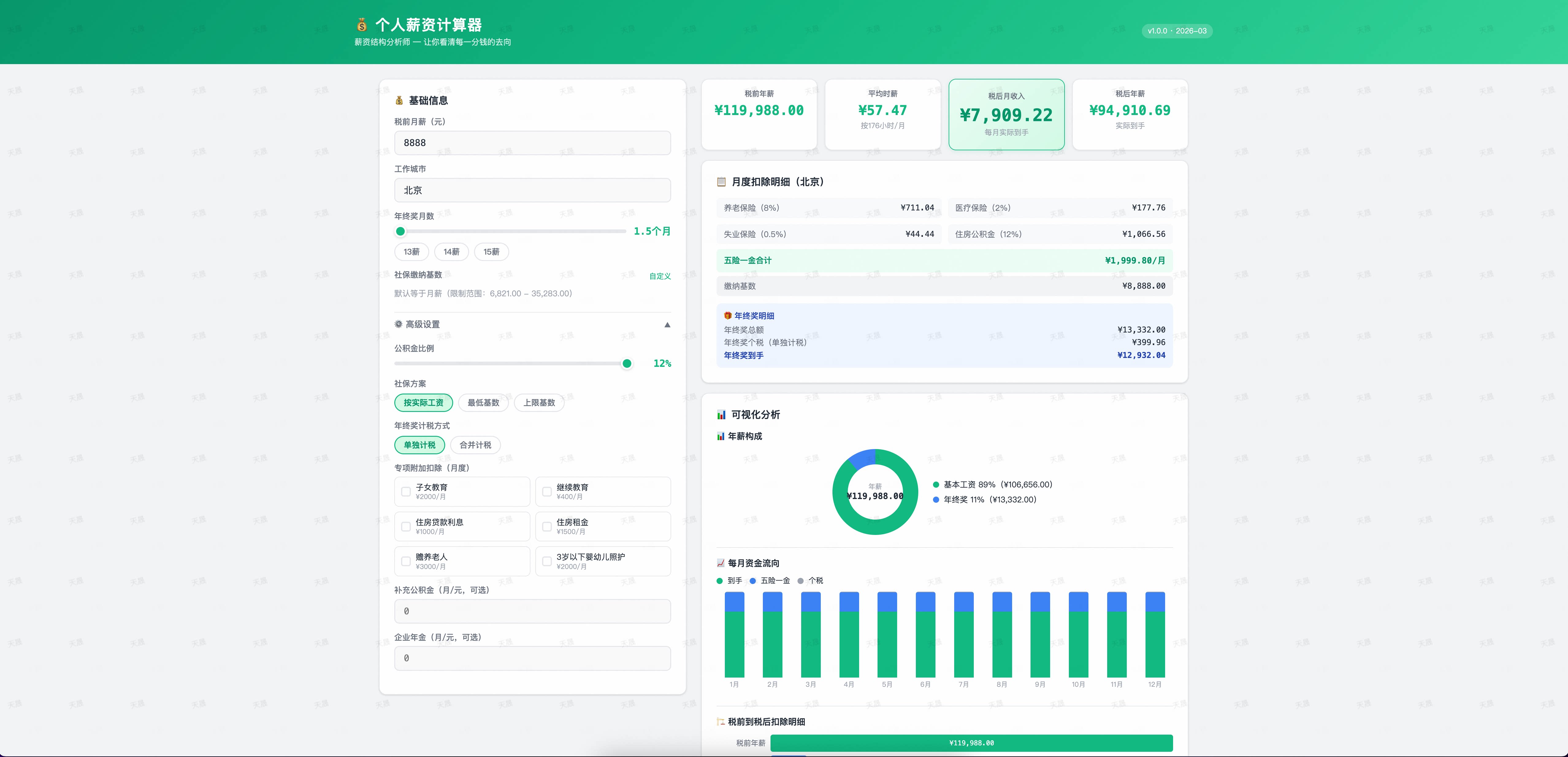
Describe your requirements in one sentence; the agent can create a complete multi-form Yida application.
Build a Yida application for [business scenario].
Generate an app from this requirements document.
Create a [name] form page with these fields.
Add a required [field type] field named [field name] to [form name].
Publish this custom page to the Yida app.
Make this page publicly accessible.
Export the application as a migration package.
Use OpenYida through yida-app in OpenClaw:
npx clawhub@latest install nicky1108/yida-appgit clone https://github.com/openyida/openyida.git
cd openyida
npm install
npm run check:ciUseful checks:
| Command | Purpose |
|---|---|
npm test |
Run Jest tests |
npm run lint |
Run ESLint |
npm run check:syntax |
Validate JavaScript syntax |
npm run check:structure |
Validate project structure |
npm run check:package |
Validate npm package contents |
When adding new CLI commands, register the route in bin/yida.js, add it to lib/core/command-manifest.js, update user-facing documentation here, and keep agent skills in yida-skills/ aligned when the workflow changes.
- Login cookies are cached locally and should never be hard-coded into source files.
- Private deployment environments are managed through
lib/core/env-manager.js. - Yida API requests should use the active environment base URL and authenticated cookies.
- For multi-organization accounts, prefer explicit
--corp-idvalues in non-interactive automation.
Scan the QR code to join the OpenYida DingTalk user group for updates and support.

Thanks to everyone who has contributed to OpenYida. Read the Contributing Guide to get involved.
Latest contributors: DDlixin1, fcloud.


MIT © 2026 Alibaba Group Holding Limited