 *Watch the introductory video about Instatic on YouTube.*
*Watch the introductory video about Instatic on YouTube.*
 *One minute to live. Unedited.*
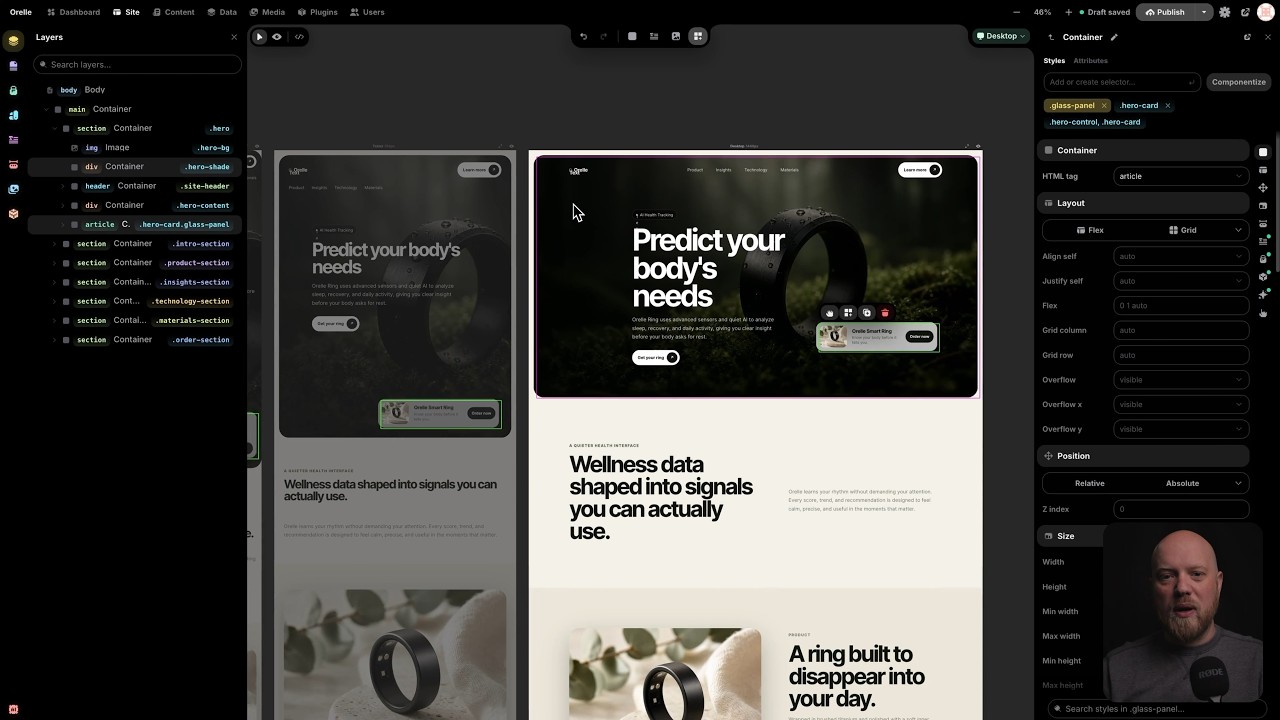
 The editor is a real canvas, not a form with a preview pane stapled to it. You put several breakpoint frames side by side and edit them together. Change the desktop and the mobile frame reacts in the same view. When you'd rather work on the real thing, flip to live mode and edit a single full-size page in place.
The part nobody else has: **[Core Framework](https://coreframework.com) is built in.** It's the design-token engine thousands of WordPress pros already use every day, and here it's a core system, not a plugin you install and pray over.
- **Color tokens that generate their own shade scale.** Define one brand color, get the full set of tuned tints and shades automatically.
- **Type scales that are fluid and mathematical.** One ramp that scales with the viewport, instead of forty hand-picked font sizes you have to keep in sync.
- **Spacing scales** so every page and every breakpoint keeps the same rhythm.
- **A utility-class generator** that emits locked, generated classes into one small `framework.css`. No bloat, no duplicate rules, nothing you didn't ask for.
Your whole design system lives as data. Change one token and every page that uses it updates.
### 🧱 Build
The editor is a real canvas, not a form with a preview pane stapled to it. You put several breakpoint frames side by side and edit them together. Change the desktop and the mobile frame reacts in the same view. When you'd rather work on the real thing, flip to live mode and edit a single full-size page in place.
The part nobody else has: **[Core Framework](https://coreframework.com) is built in.** It's the design-token engine thousands of WordPress pros already use every day, and here it's a core system, not a plugin you install and pray over.
- **Color tokens that generate their own shade scale.** Define one brand color, get the full set of tuned tints and shades automatically.
- **Type scales that are fluid and mathematical.** One ramp that scales with the viewport, instead of forty hand-picked font sizes you have to keep in sync.
- **Spacing scales** so every page and every breakpoint keeps the same rhythm.
- **A utility-class generator** that emits locked, generated classes into one small `framework.css`. No bloat, no duplicate rules, nothing you didn't ask for.
Your whole design system lives as data. Change one token and every page that uses it updates.
### 🧱 Build
 - **Modules** are the building blocks: containers, text, images, buttons, video, lists, links, SVG, forms. Drag them onto the canvas and nest them however you want.
- **Visual Components** are reusable pieces with typed parameters and named slots. A parameter can be a string, number, boolean, color, image, URL, rich text, an enum, or a whole slot of content. Edit the component once and every instance on the site updates. Components that would reference themselves are blocked before they happen, so nothing eats its own tail.
- **Templates** handle the shared chrome. One layout for the whole site, separate layouts per post type, and a real 404 page you design yourself. Content flows into an outlet, so a header and footer get written once and wrap everything.
- **Loops** repeat a layout over a collection: your posts, your pages, your media, or anything a plugin exposes as a source. Give a loop a couple of variants and it alternates between them as it goes. Good for post lists, product grids, galleries.
- **Forms that belong to your CMS.** Build a form out of semantic fields and the submissions land in your own data tables. Instatic can read the fields you placed and create the matching table for you. No third-party form service, no embed, no monthly fee for a contact form.
- **An AI agent that actually edits the page.** Describe what you want and it builds it on the canvas as real, editable nodes, not a screenshot or a wall of code. It writes semantic HTML for structure and CSS for style, through the same import pipeline you use when you paste markup. 28 tools under the hood. Bring your own model: Claude, OpenAI, OpenRouter, or local Ollama. Your key, your model, your bill.
- **Imports that hold up.** Paste raw HTML and get editable nodes. Or drop a whole static site — HTML, CSS, images, fonts — and Super Import turns it into pages, style rules, design tokens, and media. Every conflict is shown to you before anything is written, and the entire import is a single undo.
### 🗂 Manage
- **Modules** are the building blocks: containers, text, images, buttons, video, lists, links, SVG, forms. Drag them onto the canvas and nest them however you want.
- **Visual Components** are reusable pieces with typed parameters and named slots. A parameter can be a string, number, boolean, color, image, URL, rich text, an enum, or a whole slot of content. Edit the component once and every instance on the site updates. Components that would reference themselves are blocked before they happen, so nothing eats its own tail.
- **Templates** handle the shared chrome. One layout for the whole site, separate layouts per post type, and a real 404 page you design yourself. Content flows into an outlet, so a header and footer get written once and wrap everything.
- **Loops** repeat a layout over a collection: your posts, your pages, your media, or anything a plugin exposes as a source. Give a loop a couple of variants and it alternates between them as it goes. Good for post lists, product grids, galleries.
- **Forms that belong to your CMS.** Build a form out of semantic fields and the submissions land in your own data tables. Instatic can read the fields you placed and create the matching table for you. No third-party form service, no embed, no monthly fee for a contact form.
- **An AI agent that actually edits the page.** Describe what you want and it builds it on the canvas as real, editable nodes, not a screenshot or a wall of code. It writes semantic HTML for structure and CSS for style, through the same import pipeline you use when you paste markup. 28 tools under the hood. Bring your own model: Claude, OpenAI, OpenRouter, or local Ollama. Your key, your model, your bill.
- **Imports that hold up.** Paste raw HTML and get editable nodes. Or drop a whole static site — HTML, CSS, images, fonts — and Super Import turns it into pages, style rules, design tokens, and media. Every conflict is shown to you before anything is written, and the entire import is a single undo.
### 🗂 Manage
 - **One content model under everything.** Pages, posts, components, custom collections, and any structured table you invent all live in the same store: `data_tables` and `data_rows`. There's no special-cased "pages" table hiding in a corner. Schemas, raw rows, imports, exports, and form submissions all sit in one consistent place.
- **A Data workspace where you design your own collections.** At `/admin/data` you create custom post types and custom data tables with their own fields, then work the rows in a spreadsheet-style grid: search, sort, filter, bulk publish, bulk export. Custom post types come with a real editorial workflow — draft, scheduled, published — and version history on the published copy. Plain data tables are simple grids you can point at anything: the submissions from a form, a product catalog, a lightweight CRM, a list of testimonials. And every table you build is a content source a loop can render. Define a "Team" table once, loop it onto your about page, done.
- **A content workspace for writing.** A focused surface for posts and collections, plus live mode so authors edit inside the real design of the site instead of a gray textarea.
- **A media workspace that works like a file manager.** Folders and smart folders, bulk operations, usage tracking so you know where a file is actually used, replacement workflows, and pluggable storage adapters when you outgrow local disk.
- **Access control that's real, not decorative.** Roles built from 36 capabilities, token-based sessions, TOTP two-factor with secrets encrypted at rest, account lockout with backoff after repeated failures, and step-up prompts before the dangerous stuff like deleting a user or signing out every device.
- **⌘K for everything.** A fuzzy command palette over the whole admin. Jump anywhere, do anything, without touching the mouse.
- **Drafts stay drafts.** Unpublished edits never leak to a visitor. What you didn't publish, they don't see.
### 📊 Analyze
- **One content model under everything.** Pages, posts, components, custom collections, and any structured table you invent all live in the same store: `data_tables` and `data_rows`. There's no special-cased "pages" table hiding in a corner. Schemas, raw rows, imports, exports, and form submissions all sit in one consistent place.
- **A Data workspace where you design your own collections.** At `/admin/data` you create custom post types and custom data tables with their own fields, then work the rows in a spreadsheet-style grid: search, sort, filter, bulk publish, bulk export. Custom post types come with a real editorial workflow — draft, scheduled, published — and version history on the published copy. Plain data tables are simple grids you can point at anything: the submissions from a form, a product catalog, a lightweight CRM, a list of testimonials. And every table you build is a content source a loop can render. Define a "Team" table once, loop it onto your about page, done.
- **A content workspace for writing.** A focused surface for posts and collections, plus live mode so authors edit inside the real design of the site instead of a gray textarea.
- **A media workspace that works like a file manager.** Folders and smart folders, bulk operations, usage tracking so you know where a file is actually used, replacement workflows, and pluggable storage adapters when you outgrow local disk.
- **Access control that's real, not decorative.** Roles built from 36 capabilities, token-based sessions, TOTP two-factor with secrets encrypted at rest, account lockout with backoff after repeated failures, and step-up prompts before the dangerous stuff like deleting a user or signing out every device.
- **⌘K for everything.** A fuzzy command palette over the whole admin. Jump anywhere, do anything, without touching the mouse.
- **Drafts stay drafts.** Unpublished edits never leak to a visitor. What you didn't publish, they don't see.
### 📊 Analyze
 - **A dashboard you arrange yourself.** A 12-column grid of tile widgets you can drag, resize, and rearrange. Add the ones you care about in customize mode, and the layout saves per user. Plugins can ship their own widgets into the same grid.
- **An audit log that doesn't forget.** Every meaningful admin action writes a row: logins, content changes, role edits, plugin lifecycle. It's append-only, so it's a real record of who did what and when, not something anyone can quietly rewrite.
- **Form data that's yours.** Submissions sit in your own tables. Query them, export them, build on them. No vendor in the middle.
This is the youngest pillar, and the one we're pushing hardest right now. First-party, privacy-respecting analytics are next. See the [roadmap](#early-on-purpose).
### 🔌 Extend
Every CMS has plugins. The difference here is where they run.
An Instatic plugin is a zip package with a manifest, and it runs inside a **QuickJS-WASM sandbox**. No filesystem. No environment variables. No network at all, unless the site owner grants it, one host at a time. A plugin can't read your secrets or phone home, because the sandbox never hands it the door. The classic "a plugin took down my site and emailed the database to a stranger" story doesn't run here.
Inside that sandbox the SDK is genuinely capable. A plugin can add:
- HTTP routes and its own admin pages
- Storage and scheduled background jobs
- Loop data sources, so your content loops can pull from anywhere
- Canvas modules — new blocks that show up in the editor
- Media storage adapters and frontend assets
- Lifecycle hooks across install, activation, and beyond
Start with the [plugin system docs](docs/features/plugin-system.md) and the [template plugin](examples/plugins/template/README.md).
- **A dashboard you arrange yourself.** A 12-column grid of tile widgets you can drag, resize, and rearrange. Add the ones you care about in customize mode, and the layout saves per user. Plugins can ship their own widgets into the same grid.
- **An audit log that doesn't forget.** Every meaningful admin action writes a row: logins, content changes, role edits, plugin lifecycle. It's append-only, so it's a real record of who did what and when, not something anyone can quietly rewrite.
- **Form data that's yours.** Submissions sit in your own tables. Query them, export them, build on them. No vendor in the middle.
This is the youngest pillar, and the one we're pushing hardest right now. First-party, privacy-respecting analytics are next. See the [roadmap](#early-on-purpose).
### 🔌 Extend
Every CMS has plugins. The difference here is where they run.
An Instatic plugin is a zip package with a manifest, and it runs inside a **QuickJS-WASM sandbox**. No filesystem. No environment variables. No network at all, unless the site owner grants it, one host at a time. A plugin can't read your secrets or phone home, because the sandbox never hands it the door. The classic "a plugin took down my site and emailed the database to a stranger" story doesn't run here.
Inside that sandbox the SDK is genuinely capable. A plugin can add:
- HTTP routes and its own admin pages
- Storage and scheduled background jobs
- Loop data sources, so your content loops can pull from anywhere
- Canvas modules — new blocks that show up in the editor
- Media storage adapters and frontend assets
- Lifecycle hooks across install, activation, and beyond
Start with the [plugin system docs](docs/features/plugin-system.md) and the [template plugin](examples/plugins/template/README.md).