Rhex is an unfinished but playable ASCII/Unicode terminal roguelike with a hexagonal map and tactical positioning, written in Rust. It uses hex2d.
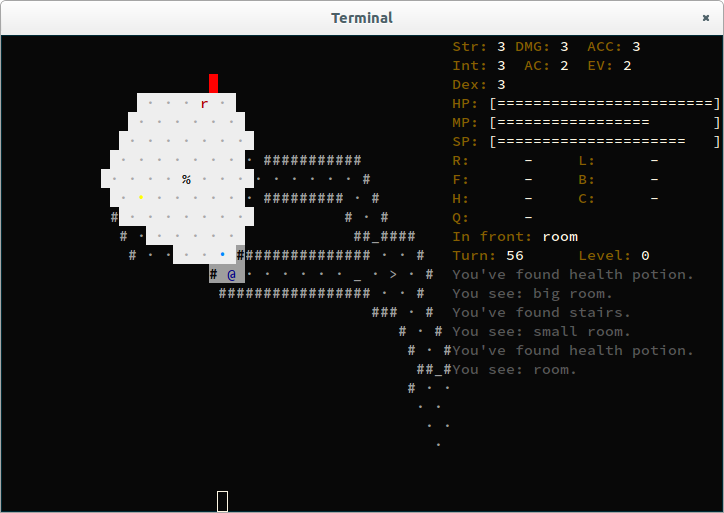
See the core game design for the intended horror and stealth experience and its foundations in the current game.
Use a UTF-8 locale and a terminal with at least 256 colors and a Unicode font.
For a comfortable layout, use at least 100 columns and 30 rows. Enable flakes and
the nix-command feature in Nix.
nix run .The terminal interface uses Crossterm for input and terminal modes, and Ratatui
for buffered rendering. You do not need an ncurses library, a terminfo database,
or a separate tput program. Run from a writable directory: the game writes
debug.log there. The game has no save/load support.
Press any key at the introduction, then choose a race (a for human).
In either input mode, use h/l or the Left/Right arrows to turn left/right.
Use k/j (with or without Shift) or the Up/Down arrows to move
forward/backward. Use Shift-H/Shift-L to strafe front-left/front-right without
changing your facing. You never attack
creatures while strafing. You can open doors and clear thickets while strafing
if your character has those capabilities.
Creatures use the same Move actions to approach targets.
These replace the old a/s/d/w/q/e movement bindings.
You can no longer use Shift-W for automatic walking or u/i to spin.
Press . to wait, , to interact in front, I to open inventory, and ? for help.
Press F2 to toggle Vi input mode. Only in Vi mode, use q to quit.
Shift-K no longer starts automatic walking in Vi mode.
Press Esc to quit in either mode. In menus and inventory, letters still select
entries and actions.
Press comma to interact with the tile in front of you without moving or turning.
You pick up an item first; otherwise you interact with a chest, then a door. This
matches the item-first “In front” readout. A full inventory leaves the item and
door unchanged; an actor in an open doorway prevents you from closing it.
Each permitted attempt takes one normal action, even when there is nothing to
do. Opening a closed chest adds two recovery ticks. Taking its contents or
interacting with an open chest adds no extra recovery ticks, including attempts
with an empty chest or a full backpack. Opening or closing a door makes the same
noise as bump-opening it; pickup and unsuccessful interactions are silent.
Moving into a closed door still opens it without entering. Comma does not clear
thickets or use items, exits, or objects underfoot. Use E for inventory items
and </> for the passage you are standing on.
Press I, then an item's letter to see its available actions. You can equip
backpack equipment, unequip equipped items, drink potions, use a whistle, or drop
any owned item. Press the shortcut beside the action: e for Equip/Unequip,
u for Drink/Use, or d for Drop.
Press Esc to return to inventory, then Esc again to close it. You spend no
turns opening menus, selecting an item, or cancelling. Actions follow the same
game rules and costs as E (equip/use or unequip) and D (drop). You can still
press either shortcut followed by an item letter.
Use inventory letters in either movement input mode.
Choosing an inventory action, including through E or D, returns you to the
map for about 200 ms before the action takes effect. The simulation stays frozen
during this pause. Movement, turning and automatic movement have no added delay.
If you reopen a menu, the pending action waits until you return to the map, then
waits another roughly 200 ms before taking effect.
Face a closed chest (◼) and press comma to open it. Opening takes extra time
and makes noise, and some chests contain nothing. You can see the contents of
an open chest with loot (◻); each further comma moves one item into your
backpack. If the backpack is full, the item stays in the chest. Empty chests
(_) remain in place. Revisiting a chest does not generate new contents. Its
state and remaining loot persist when you leave a level and return during the same
run, without saving to disk. Outside current sight, remembered chests retain
their last-observed symbol.
Short swords sit between knives and swords; clubs need less strength but make more attack noise. A buckler offers protection at the cost of louder footsteps. Equip a hand lantern in your left hand instead of a buckler to light nearby space. The lantern stays shuttered in a backpack or on the ground and needs no fuel. Light helps you scout but can expose you to other creatures.
Select Use on a reusable whistle to make a loud sound at your current position. You see visible map cells turn bold for a moment as the sound wave spreads outward. Your own sound source does not blink or show a red marker. Nearby creatures may investigate, but the whistle cannot act as a remote decoy or guarantee a distraction. Drink a stamina potion to consume it and restore up to five SP. The inventory action menu explains these items' tradeoffs.
Forests have scattered finds and can contain wolves and armored, short-sighted cave beetles. These beasts cannot collect equipment, open doors, or cut thickets. Dungeons introduce beetles from difficulty one and armed skeletons from difficulty two, alongside the existing enemies. Skeletons carry ordinary short swords and bucklers and leave that equipment behind when killed.
Read current/maximum HP, MP and SP in one row. A decrease since the previous turn colors only the current value red, unless it is strictly below 20% of a positive maximum. Below that threshold, the whole ratio stays red, even while steady or rising. Exactly 20% is not critical. Otherwise, increases color the whole ratio green.
Below the equipment, tile readouts and turn counter, use the compact sight
legend to identify entries by X - name. Each entry uses its ordinary map glyph
and fully lit colors, without transient facing, targeting or animation effects.
The legend lists visible creatures, items, chests, doors, passages, statues and
torches.
Enemy creature bodies keep their full-light red at every light level; the player
stays blue. Terrain backgrounds still follow local lighting, and transient
facing, targeting and animation effects can override the base colors.
You will not see bare common terrain (water, walls, trees, thickets and ground),
the player, or remembered or hidden contents in the legend. Creatures and items
on common terrain still appear.
The map's topmost-occupant priority applies: an actor or item can obscure a feature.
Entries with the same symbol and name share one legend entry, using the nearest
example's colors. Creatures come first, followed by items and notable features;
within each group, nearer entries come first. Short names share a row.
Long names use the full width and clip with an ellipsis. +N more counts
additional distinct entries that do not fit. The map and log keep
their space, including at the minimum supported size of 60 columns by 24 rows.
You start in a Dark Forest. Stand on its > exit and press > to enter a
Dungeon. Continue through onward exits to alternate between the two environments,
or use the < return passages to revisit previous levels. Press either < or >
while standing on a passage to use it. Check the tile readout for its destination.
Press G, then > or <, to route to the nearest known passage without using it.
Dark Forests have narrow paths through dense undergrowth and large brown tree
trunks, with small lit canopy openings, a winding creek and a pond. Green γ
thickets block movement and sight. Hit them by moving forward or diagonally
forward into them. The hit consumes an action and makes noise, leaving ground
you can enter on the next move. You can clear thickets unarmed, subject to the
normal action and stamina checks. Charging also stops after clearing one thicket.
Brown # trunks block movement, sight and sound and cannot be cleared.
Blue , shallow water is transparent and walkable; blue ~ deep water is
transparent but impassable. Thickets absorb sound without completely blocking it.
Visited levels stay in memory: returning preserves enemies, awareness, items, terrain changes and exploration. Inactive levels do not take turns. If an actor occupies the return tile, arrival uses the nearest free connected walkable tile; if that component is full, traversal leaves you where you are. This persistence lasts only for the current game; there is still no save/load support.
To exit, press Escape, then y to confirm.
If your terminal has fewer than 60 columns or 24 rows, the game pauses and asks
you to resize it. Press Escape at this prompt to exit without confirmation.
nix develop
cargo run --release --locked
You can also activate the shell with direnv allow.
The project uses flakebox, treefmt, Vale, and selfci:
treefmt
just vale
cargo clippy --all-targets --all-features --locked -- -D warnings
nix build --keep-failed -L .#ci.tests
selfci check
The flake exposes the game as the default package. Run individual checks with
ci.workspace, ci.clippy, ci.tests, and ci.cargoFmt.
The treefmt package checks Rust, Nix, and TOML formatting.
CI rejects compiler and Clippy warnings across all test targets and features.
The project has no optional Cargo features at present. Nix retains failed test
build directories so PTY diagnostics remain available.
GitHub Actions runs on pushes to master, pull requests, and manual dispatch.
It runs the same checks as selfci: formatting, Vale, lockfile consistency,
workspace and package builds, strict Clippy, and the full test suite including
PTY tests. Run the hosted CI command locally with
nix develop -c ./.config/selfci/check.sh.
Without Nix, install a current Rust toolchain and a platform linker, then run
cargo run --release --locked. Builds do not need a terminal. The PTY integration
tests require Python 3 on Unix.
During the terminal migration, we updated all direct dependencies to
the latest stable release or upstream revision available at the time.
The in-house hex2d-dpcext extension still declares an unused rand 0.8
dependency, so its older random-number dependency chain remains in the lockfile
alongside the game's rand 0.10.
We keep the upstream algorithms rather than vendor them to remove that
dependency.
The game is not feature-complete. To suggest improvements or report bugs, open an issue. This project uses the MPL-2.0 license; see LICENSE.