- Ensure that ansible-semaphore is set up. Please see [https://github.com/ansible-semaphore/semaphore] for further details on setting up ansible-semaphore. Once ansible-semaphore is installed, you can verify it by accessing its url.
-
1) Create Access keys - Click "Key Store" from the side-menu and click "create key" on top right corner
- Github ssh key - ssh key of the github repository to be used
- Remote Machines ssh keys - ssh key to access the resource machines of the cloud provider

-
2) Import github repository - Click "Playbook Repositories" from the side-menu and click "create repository" on top right corner
- Import the fabric_as_code using the Github ssh key created in step 1

-
3) Update Inventory - Click "Inventory" from the side-menu and click "create inventory" on top right corner
- Create one inventory for Remote machines using the Remote Machines ssh keys created in step 1
Remote machine inventory example :

- Edit Remote machine inventory - click "edit inventory" on the remote machine's inventory and update the ip addresses of the machines.

-
4) Create Task Templates - Click "Task Templates" from the side-menu and click "new template" on top right corner
- Create 11 Task Templates for the 11 playbooks as shown in the figure below:

-
Extra CLI arugments for 013.mount_fs.yml task - ["-u","root","--extra-vars","gluster_cluster_host0='164.90.198.91' gluster_cluster_volume='gfs0'"]
- Replace "root" as per the username having root access in the remote machines.
- Replace "164.90.198.91" with one of the glusterfs machine's ip address.
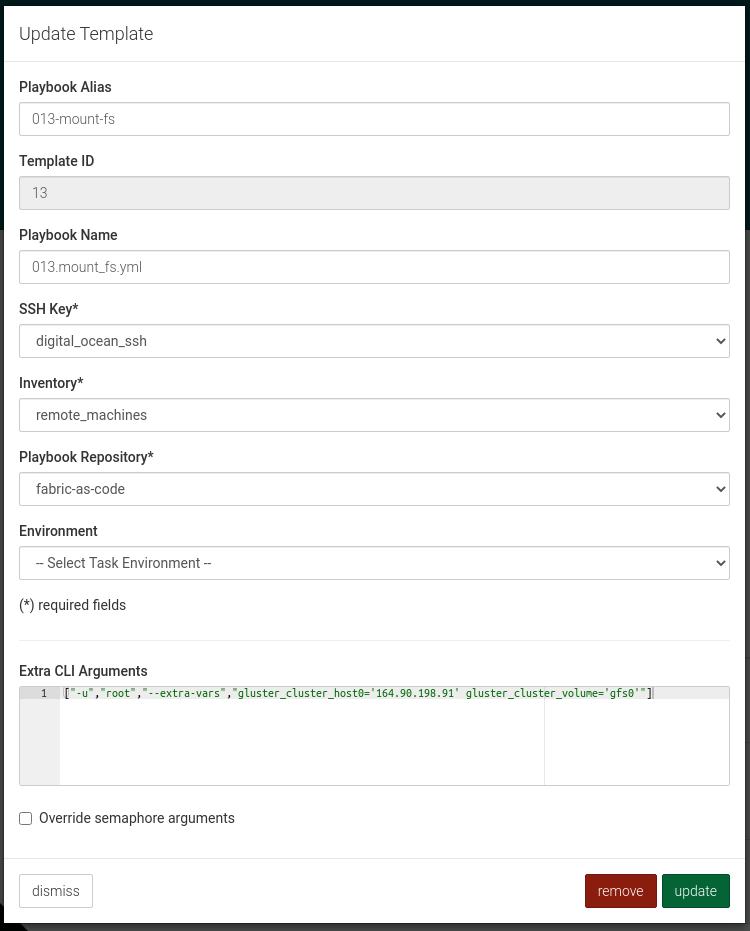
- Extra CLI arugments for all other tasks - ["-u","root"] (Replace "root" as per the username having root access in the remote machines)

-
5) Run Tasks
- Run all of the 11 Tasks one by one.
- Click "run" green button on the right corner of the each tasks
- Click "run" green button on the bottom right corner of the "create task" pop up


