Publish and list your Forge app's Atlassian Government Cloud version
This page is your step-by-step guide to publishing and marketing Atlassian apps for Atlassian Government Cloud on the Marketplace. It covers eligibility, app creation, review, pricing, listing limitations, licensing, support, and marketing best practices. Use this as your reference for a successful Atlassian Government Cloud app launch.
Eligibility
Your app must have a public cloud version available on Marketplace. The Atlassian Government Cloud version must be built with Forge. This includes apps that have begun incrementally moving to Forge.
Pre-publishing checklist
Before you begin, ensure you have:
-
A public cloud version of your app that's live on Marketplace.
-
Deployed your app inside the Atlassian Government Cloud boundary, and have an Atlassian Government Cloud App ID.
-
Set the licensing details in the manifest as per the desired payment model for the app and deployed it using
forge deploy -e production. -
Prepared the product and support information specific to Atlassian Government Cloud for your app.
-
Prepared Atlassian Government Cloud specific privacy and security information for your Marketplace listing.
Transitioning an Atlassian Government Cloud app between FREE and PAID (or vice versa) is not allowed. Once your Atlassian Government Cloud app is published with a pricing model, you cannot switch it from FREE to PAID or from PAID to FREE. Be careful to choose the correct pricing model before you publish.
How to create an Atlassian Government Cloud app version
Before you can list an Atlassian Government Cloud app on the Marketplace, you need to first enable Sharing for it. To do this:
- Open the app in the Atlassian Government Cloud Developer Console.
- Select Distribution.
- In the Distribution controls section, click Edit. This will allow you to configure the app's Distribution status.
- Set the Distribution status to Sharing and click Save changes.
Once the app's distribution is set to Sharing, you can create its Marketplace listing:
-
Log in to Marketplace Partner Portal with your partner account.
-
Select Manage partner account from the profile menu in the upper right.
-
Select your existing cloud app.
-
Select Create version.
-
From the Upload app dropdown list, select Forge app for Government Cloud.
-
In the App ID field, enter the unique Atlassian Government Cloud App ID from your app’s Forge Manifest.
For example, if your App ID is
ari:cloud:ecosystem::app/c7d25161-5c0f-4ef3-8a9b-bcf532d6ef8f, enterc7d25161-5c0f-4ef3-8a9b-bcf532d6ef8f. -
Select Next: Make public.
Update your app listing
Next, review and update your app listing’s details to reflect Atlassian Government Cloud specific information.
- We’ll be reusing content from your commercial app version, but you’ll need to customise these details for Atlassian Government Cloud requirements.
- All updates you make are only for the Atlassian Government Cloud version of your app. This will not change any existing details of your existing commercial cloud app.
Follow the guided process to review and, if necessary, update your app details before submitting your Atlassian Government Cloud app version. When you’re done, select Submit.
Releasing a new Atlassian Government Cloud version
To release a new version of your Atlassian Government Cloud app, upload the updated version using the CLI within the Atlassian Government Cloud environment. The new version will automatically inherit the visibility settings of the previous version.
Marketplace listing limitations
When publishing your app's Atlassian Government Cloud version, it’s important to be aware of certain limitations that apply to Marketplace listings:
- Customers cannot leave public reviews or ratings on Atlassian Government Cloud app listings.
- Some Marketplace features may be restricted or unavailable due to government compliance requirements.
These limitations help ensure Atlassian Government Cloud apps meet strict government standards. Consider adding a note to your app listing to set customer expectations and provide clarity.
Complete the Privacy and Security tab for your Atlassian Government Cloud app
Atlassian Government Cloud apps have their own Privacy and Security tab on the Marketplace listing. Complete this tab with information that accurately reflects how your app runs in the Atlassian Government Cloud environment.
To add Privacy and Security information for your Atlassian Government Cloud app:
- Log in to Marketplace Partner Portal with your partner account.
- Select Manage partner account from the profile menu in the upper right.
- Select the required app's name from the list.
- Open the Privacy and Security tab.
- Select Gov Cloud as the environment you want to update.
- Complete the questionnaire with Atlassian Government Cloud specific information about your app's data handling, permissions, hosting, operational controls, compliance posture, and support model.
- Review your answers, then select Save Draft or Submit.
If your cloud app already has a completed Privacy and Security tab, you may be able to use Copy from Cloud to populate matching fields in the Atlassian Government Cloud form. Copy from Cloud only fills the form as a starting point. You must review the copied answers and manually save or submit them before they are stored.
Maintain separate Privacy and Security information for your cloud and Atlassian Government Cloud app versions. Changes to one environment's Privacy and Security tab don't automatically sync to another environment.
For more details, see Privacy and Security tab in your Marketplace listing.
Determining your Atlassian Government Cloud app's pricing
For Atlassian Government Cloud apps, only the Standard edition is currently supported. As a Marketplace Partner, you will be able to set and upload pricing specifically for the Standard edition of your Atlassian Government Cloud compatible app. This allows you to tailor your pricing for government customers, which may differ from your cloud version.
When configuring your app’s price, make sure to select Government cloud as the hosting type.
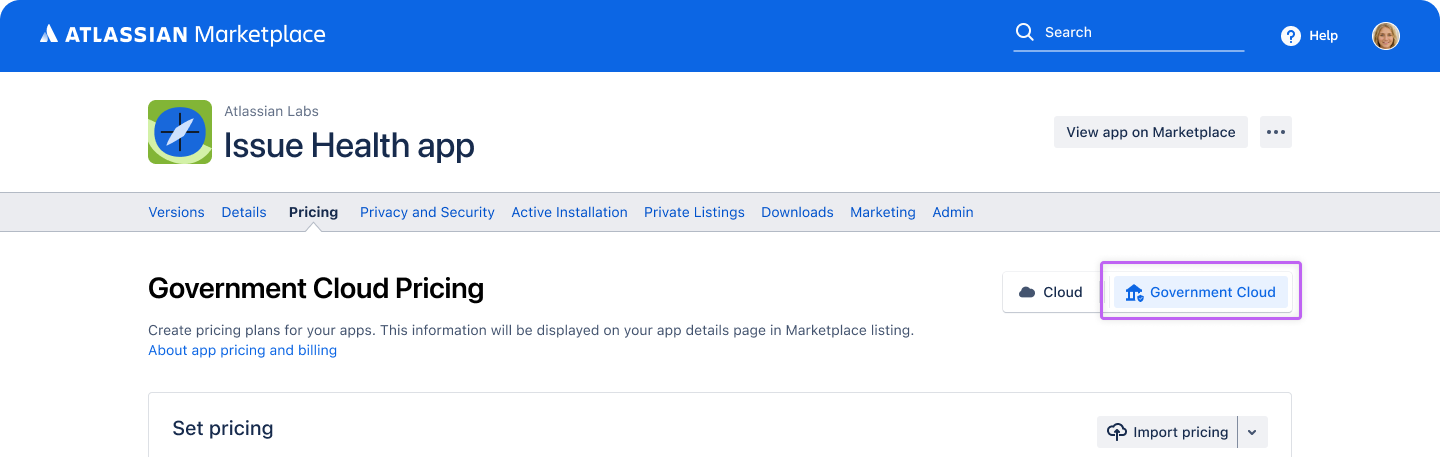
Advanced editions and Multi-instance pricing is not supported for Atlassian Government Cloud apps yet. Ensure that your pricing structure reflects this limitation.
Atlassian Government Cloud app review process
The review process for Atlassian Government Cloud apps is the same as for cloud apps.
After submitting your app through the Marketplace Partner Portal, it will enter the review queue. The Atlassian review team will assess your submission for compliance, accuracy, and completeness.
Monitor your email and the Partner Portal for feedback or requests for additional information. Prompt responses help avoid delays and ensure a smooth review process. Once approved, your app will be published for Atlassian Government Cloud customers
Licenses & transactions
Always select Government Cloud as the hosting type before submitting your app for review.
Key points:
-
When viewing licenses and transactions, filter by Government Cloud in the Hosting field.
-
Only Standard edition licensing is supported; advanced or multi-instance pricing is not available for Atlassian Government Cloud apps.
Marketing your Atlassian Government Cloud app
To maximize your app’s visibility and appeal to government customers on Atlassian Government Cloud, it’s essential to optimize your Marketplace listing and tailor your messaging. Clearly communicate your app’s Atlassian Government Cloud compatibility and compliance features in the first few lines of your listing to capture attention and build trust with government customers.
- Optimize your listing: Begin by clearly stating your app’s Atlassian Government Cloud compatibility and the specific benefits it offers to government users.
- Use Atlassian Government Cloud specific keywords: Incorporate Atlassian Government Cloud specific keywords throughout your app description to improve discoverability and ensure your listing appears in relevant searches.
- Highlight compliance and security features: Emphasize compliance and security features that are particularly relevant to government customers, as these are often key decision factors.
- Promote your app: Use Atlassian Partner channels and participate in Atlassian Government Cloud specific campaigns to further promote your app and reach your target audience.
Frequently Asked Questions (FAQs)
Q: Can I use the same App ID for Atlassian Government Cloud and cloud versions?
A. No, you must create a new App ID for the Atlassian Government Cloud version. Each Atlassian Government Cloud app requires its own unique App ID, separate from your cloud version. This ensures that your Atlassian Government Cloud app is properly identified and managed within the Marketplace, and helps maintain compliance with government requirements.
Q: Who do I contact for Atlassian Government Cloud specific support?
A: If you have questions or need assistance specific to Atlassian Government Cloud, you should contact your Partner Manager. These resources are equipped to help with Atlassian Government Cloud related queries, publishing requirements, and any issues you may encounter during the process.
Support
For help with publishing or technical issues, contact Atlassian Marketplace Support.
For Atlassian Government Cloud specific questions, reach out to your Partner Manager.
Additional resources
Rate this page: