Selenium is an open-source framework designed for automating web browsers. It enables users to test website functionality across different browsers, ensuring consistency and compatibility.
Allows test script creation in various programming languages, including Java, Python, JavaScript, Ruby, C#, and more.
Easily integrates with testing frameworks like TestNG, JUnit, and Cucumber, enhancing flexibility and extensibility.
Importance of Testing in Selenium
Manual testing can be time-consuming and prone to human errors. Selenium Automation allows tests to be executed quickly and accurately, reducing the likelihood of human mistakes and ensuring consistent test results.
Selenium allows developers and testers to automate the testing of web applications across different browsers and platforms.
Scalability: Automated testing with Selenium can easily scale to cover a wide range of test cases, scenarios, and user interactions. This scalability ensures maximum test coverage of the application’s functionality.
Reusable Test Scripts: Selenium allows testers to create reusable test scripts that can be used across different test cases and projects. This reusability saves time and effort in test script creation and maintenance.
Parallel Testing: Selenium supports parallel test execution, allowing multiple tests to run concurrently. This helps reduce the overall testing time, making the development process more efficient.
Documentation and Reporting: Selenium provides detailed test execution logs and reports, making it easier to track test results and identify areas that require attention.
User Experience Testing: Selenium can simulate user interactions and behavior, allowing testers to assess the user experience and ensure that the application is intuitive and user-friendly.
Continuous Integration and Continuous Deployment (CI/CD): Selenium can be integrated into CI/CD pipelines to automate the testing of each code change. This integration helps identify and address issues earlier in the development cycle, allowing for faster and more reliable releases.
History of Selenium
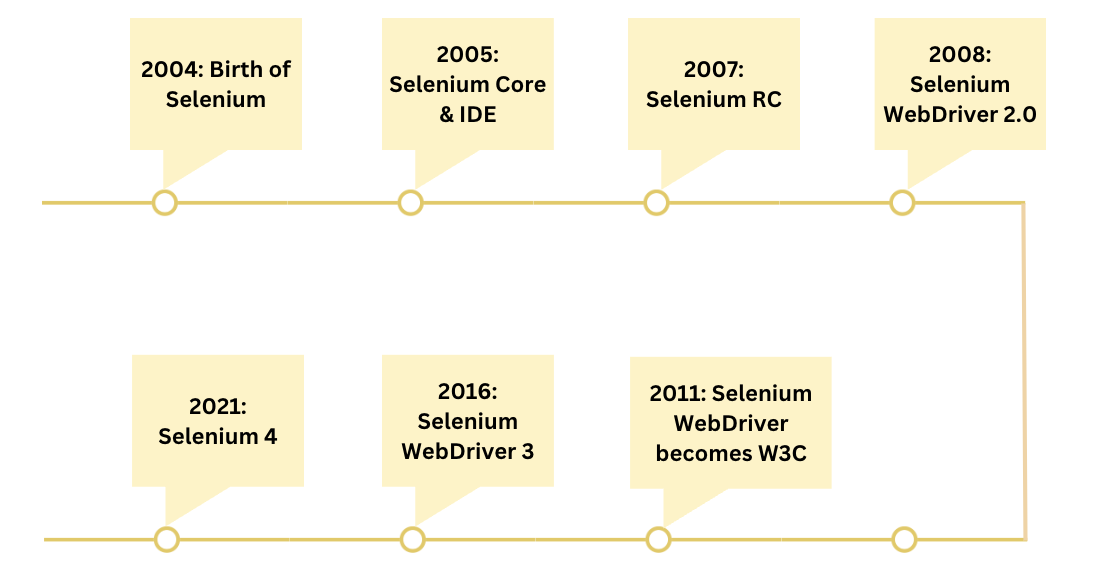
The history of Selenium spans several years and involves the development and evolution of a set of tools aimed at automating web testing. Here’s a chronological overview of the key milestones in the history of Selenium:
Selenium (software) Versions
Given below is a summary of the various software versions of Selenium:
Selenium 1 (2004–2011): Introduced as Selenium Remote Control (RC). Here, a server was required to act as a proxy to inject commands into browsers.
Selenium 2 (2011): Selenium RC was integrated with the WebDriver API. WebDriver directly communicates with browsers for more stable and faster tests. Selenium RC was deprecated but still included for backward compatibility.
Selenium 3 (2016): In Selenium 3, WebDriver became the main focus; Selenium RC was officially deprecated.Support for modern browsers was improved and W3C WebDriver standard was introduced.
Selenium 4 (2021): Selenium 4 provided full support for W3C WebDriver Protocol to ensure better browser compatibility. Selenium Grid (distributed testing) was enhanced. Selenium IDE was revived as a browser extension (Chrome/Firefox). New bi-directional was established for communication for performance and network testing.
Selenium 4.11+ and 4.12+ (2023): This version had minor enhancements that improved Grid logging and Docker support, and support for more browser capabilities.
Selenium 4.14.0 (January 2024): This release includes updates to browser-specific drivers, grid stability improvements, and bug fixes.
Features of Selenium
Here are the key features of Selenium:
Cross-Browser Compatibility: Selenium allows automation testing across major browsers such as Chrome, Firefox, Safari, Edge, and Internet Explorer.
Multi-Language Support: It supports several programming languages including Java, Python, C#, Ruby, and JavaScript, enabling testers to write scripts in their preferred language.
Framework Integration: Selenium easily integrates with popular testing frameworks like JUnit, TestNG, and NUnit for structured and efficient test execution.
Record and Playback Functionality: With tools like Selenium IDE, testers can record actions and replay them without writing any code—ideal for beginners and quick prototyping.
Parallel Test Execution: Selenium enables running tests simultaneously on multiple machines or browsers, significantly reducing test execution time.
Flexible Element Locators: Web elements can be located using various strategies such as ID, Name, XPath, CSS Selector, and Class Name.
Support for Dynamic Elements: It efficiently interacts with dynamic UI elements including dropdowns, pop-ups, and browser alerts.
Third-Party Tool Integration: Selenium works well with tools like Jenkins for CI/CD, Docker for containerized environments, and Appium for mobile testing.
Mobile Testing Support: Through integration with Appium, Selenium can also be used to automate tests for mobile applications on Android and iOS.
Components of Selenium
Selenium Suite has 4 components namely:
Selenium IDE
Selenium RC
Selenium WebDriver
Selenium Grid
Selenium IDE
Selenium IDE is a Chrome and Firefox plugin. The primary use of a Selenium IDE is to record user interactions such as clicks, selections etc in the browser and plays them back as automated tests.
It then generates the test script (of the automated tests) in programming languages like C#, Java, Python, and Ruby and Selenese (Selenium’s own scripting language).
Selenium IDE helps in:
Creating automated test scripts and validating them at speed
Identifying and highlighting errors during the replay of interactions
Selenium RC was built to automate the testing of web applications by simulating user interactions across different browsers and platforms. It provided a way to browser automation remotely and execute test scripts written in various programming languages.
Limitations of Selenium RC:
Browser Limitations: Selenium RC had to work with browsers using a JavaScript-based “proxy” mechanism, which introduced potential instability and limitations, especially when working with modern web applications.
Speed and Performance: The use of a JavaScript proxy added overhead and affected the speed and performance of test execution.
Maintenance and Compatibility: Selenium RC required separate “drivers” for each browser, making maintenance and compatibility challenging as browsers continued to update and evolve.
Synchronization Issues: Selenium RC often faced synchronization problems, where test scripts had to wait for the browser to respond before proceeding to the next step.
Complex Setup: Setting up Selenium RC involved multiple components, which could be complex and difficult to configure correctly.
Selenium WebDriver
Selenium WebDriver is a powerful and enhanced version of Selenium RC which was developed to overcome the limitations of Selenium RC. WebDriver communicates with browsers directly with the help of browser-specific native methods, thereby completely eliminating the need of Selenium RC.
WebDriver works closely with Selenium IDE and Selenium Grid resulting in reliable test execution at speed and scale.
Selenium Grid
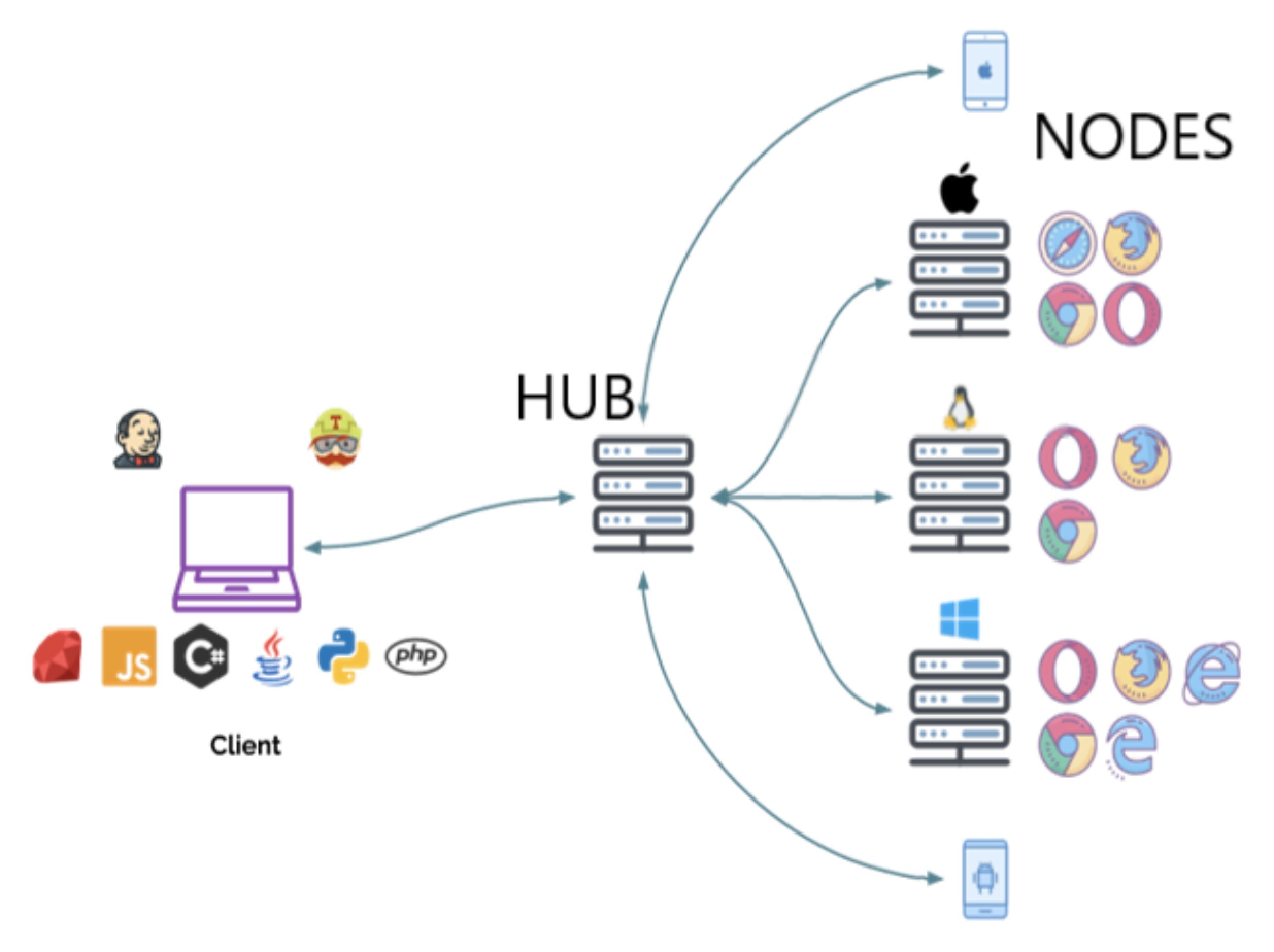
Selenium Grid is a smart proxy server that allows QAs to run tests in parallel on multiple machines. This is done by routing commands to remote web browser instances, where one server acts as the hub. This hub routes test commands that are in JSON format to multiple registered Grid nodes.
Understanding Selenium WebDriver
Selenium WebDriver is a powerful browser automation tool designed to test web applications efficiently. Unlike Selenium RC, WebDriver directly interacts with browser elements, making it faster and more reliable.
It supports multiple browsers, platforms, and programming languages, enabling comprehensive testing across different environments.
What is Selenium WebDriver
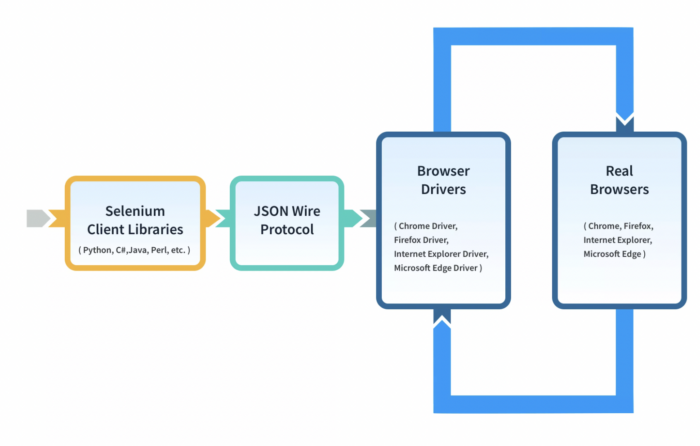
Selenium WebDriver is an open source tool to perform Browser Automation on real browsers. WebDriver communicates with browsers directly using client libraries and JSON wire protocol. It helps testers ensure that the website functions as intended on different browsers.
When to use Selenium WebDriver
Selenium WebDriver is primarily designed to test web applications. You can perform:
Functional Testing: Test the functionality of web applications by automating user interactions such as clicking buttons, filling out forms, navigating pages, and verifying expected outcomes.
Cross-Browser Testing: Test web application for consistency across different browsers and browser versions (e.g., Chrome, Firefox, Edge, Safari)
Data-Driven Testing: Execute the same test script with different sets of input data to validate different scenarios.
Parallel Testing: Selenium WebDriver can be integrated with tools like Selenium Grid to execute tests in parallel across multiple browsers and platforms, reducing testing time.
Complex User Flows: Simulate complex user workflows or interactions that need to be tested repeatedly.
Integration with Continuous Integration (CI) Pipelines: Selenium WebDriver can be seamlessly integrated into your CI/CD pipeline, enabling automated testing with every code change and ensuring code quality.
UI/UX Testing: Automate user interface (UI) testing, ensuring that the visual elements and layout of your application are consistent.
End-to-End Testing: Selenium WebDriver can be used for end-to-end testing, where you simulate real user interactions across different parts of the application to ensure a seamless user experience.
Page Object Model (POM) Implementation: If you adopt the Page Object Model (POM) design pattern, WebDriver can be used effectively to encapsulate the interactions and elements of different web pages, leading to more maintainable and modular test scripts.
Complex Scenarios: When dealing with complex scenarios such as handling alerts, pop-ups, iframes, and dynamic content, Selenium WebDriver provides the flexibility to address these challenges.
Performance Testing: While not its primary use, WebDriver can be used to simulate user load and interactions for basic performance testing.
Architecture of Selenium WebDriver (Selenium 3)
WebDriver Architecture is made up of four major components:
Selenium Client library: Selenium provides support to multiple libraries such as Ruby, Python, Java, etc as language bindings
JSON wire protocol over HTTP: JSON is an acronym for JavaScript Object Notation. It is an open standard that provides a transport mechanism for transferring data between client and server on the web.
Browser Drivers: Selenium browser drivers are native to each browser, interacting with the browser by establishing a secure connection. Selenium supports different browser drivers such as ChromeDriver, GeckoDriver, Microsoft Edge WebDriver, SafariDriver, and InternetExplorerDriver.
Browsers: Selenium provides support for multiple browsers like Chrome, Firefox, Safari, Internet Explorer etc.
Note: Selenium 4 has terminated native support to Opera and PhantomJS browsers
Understanding Selenium 4
Selenium 4 is an advanced version of Selenium and was introduced to improve the efficiency, performance and capabilities of browser automation.
Architecture of Selenium 4
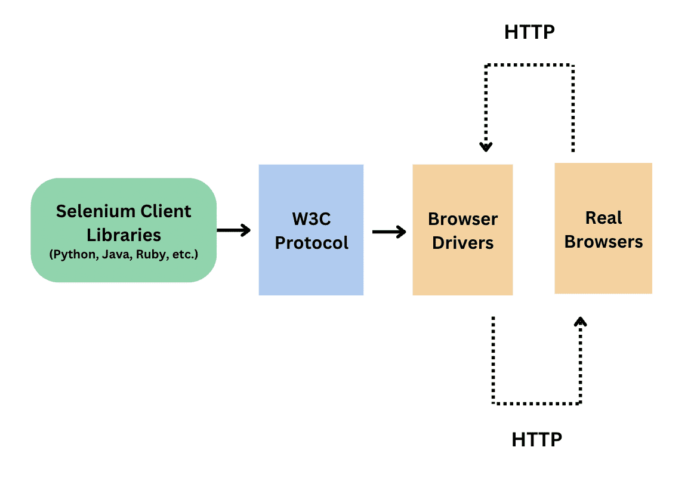
The architecture of Selenium 4 is similar to Selenium 3, however it uses W3C protocol instead of JSON wire protocol for communication between Client Libraries and Browser Drivers.
W3C protocol was introduced because all the web browsers followed the W3C standards and also all the browser drivers followed the W3C standards. To standardize the communication, JSON wire protocol was replaced by W3C in Selenium 4.
This helped in better communication with the browsers, stability, and common code (i.e. no browser specific code required). Due to W3C there is a direct transfer of information between client and server.
Feature Highlights of Selenium 4
Terminated native support to Opera and PhantomJS browsers
Selenium 4 introduced relative locators (enable you to locate web elements on a page based on their relationship to other elements)
Deprecated Desired Capabilities and replaced it with Options class
Selenium Grid is a component of the Selenium testing framework that allows you to run test scripts across multiple browsers, operating systems, and machines in parallel. It enables you to perform large-scale test automation and significantly reduces the time required for testing by executing tests simultaneously on different environments.
When to use Selenium Grid
Parallel testing: You can run multiple tests simultaneously on different nodes. This significantly reduces the overall test execution time and helps test at scale.
Cross-Browser Testing: Selenium Grid is particularly useful for cross-browser testing, where you need to ensure that your web application functions correctly across different web browsers (such as Chrome, Firefox, Edge, Safari). It allows you to run your tests simultaneously on multiple browser-platform combinations.
Cross-Platform Testing: If your web application needs to work seamlessly on different operating systems (Windows, macOS, Linux), Selenium Grid enables you to execute tests on various platforms concurrently.
Continuous Integration (CI) Pipelines: Selenium Grid can be integrated into your CI/CD pipeline. It enables automated testing of each code change across multiple environments. This helps ensure that your application remains functional as new code is introduced.
Architecture of Selenium Grid 3
The two major components of the Selenium Grid 3 architecture are:
Hub is a server that accepts access requests from the WebDriver client, routing the JSON test commands to the remote drives on nodes. It takes instructions from the client and executes them remotely on the various nodes in parallel
Node is a remote device that consists of a native OS and a remote WebDriver. It receives requests from the hub in the form of JSON test commands and executes them using WebDriver
Understanding Selenium Grid 4
Selenium Grid 4 is a smart proxy server that makes it easy to run tests in parallel on multiple machines and manages different browser versions and browser configurations centrally (instead of separately, in individual tests).
Selenium Grid 4 is a fresh implementation and does not share the codebase of the previous version (Grid 3). Grid 4 takes advantage of new technologies in order to facilitate scaling up, while still allowing local execution.
Feature Highlights
Selenium 4 offers Observability with Distributed Tracing and Event Logging.
It supports both Synchronous and Asynchronous communication.
Architecture of Selenium Grid 4
Unlike its predecessor, Selenium Grid 4 does not have Hub and the architecture is more sophisticated to accommodate better scalability. It consists of:
Router:
It is the entry point for the client requests.Router passes new session request to Session Queue.
For a request of an existing session, router passes it to the Session Map which eventually is designated to a Node by assigning a NodeID.
The primary function of Router is to manage the load of the Grid.
Distributor:
It registers and track the capabilities of all the nodes through the GridModel.
It queries the Session Queue and assigns the new session request to the suitable Node.
Once the session is created at a Node, Distributor shares the SessionID and NodeID relation in the Session Map.
Session Map:
It stores the relation between a SessionID and the Node where the session is running.
It helps Router in allocating the Request of a session to Node based on the SessionID.
Session Queue:
It holds information about new session requests in FIFO order.
This is used by Distributor and Router to assign Nodes for the Requests.
Event Bus: It is a communication path between the Nodes, Distributor, Session Queue, and Session Map.
Nodes: It executes the request commands on different browser drivers.
Difference Between Selenium 3 and Selenium 4
Here’s a quick comparison between Selenium 3 and Selenium 4:
Feature
Selenium 3
Selenium 4
WebDriver Protocol
Uses JSON Wire Protocol
Fully compliant with W3C WebDriver Protocol for better browser compatibility
Browser Drivers
Separate communication logic for each browser
Unified and standardized communication via W3C protocol
Selenium Grid
Basic Grid with complex setup
Improved Selenium Grid UI, supports Docker and distributed testing easily
Relative Locators
Not available
Introduced new locators like above(), below(), near(), toLeftOf(), etc.
DevTools Integration
Not Supported
Supports Chrome DevTools Protocol (CDP) for network, performance testing
Selenium IDE
Deprecated and outdated
Revamped with a modern GUI, available as browser extension (Chrome, Firefox)
Documentation
Less structured
Comprehensive and updated documentation
Improved Window/Tab Handling
Limited capabilities
Better support for multi-tab and multi-window operations
Screenshots for Web Elements
Not supported
Ability to capture screenshots of specific web elements
What is Selenium Grid on cloud?
A Selenium Cloud is basically a Selenium Grid configured on cloud servers. The Cloud Selenium Grid connects to a range of browsers and real devices with different operating systems which are configured and made available 24×7 on-demand. This makes it possible for QA teams to automate tests by executing several test scripts simultaneously on multiple device-browser combinations on the cloud using parallel testing.
A Selenium cloud eliminates the overhead of maintaining and updating the physical infrastructure at regular intervals. That means organizations do not have to purchase, maintain, update devices, browsers and operating systems on-site. While maintaining physical devices require a lot of time and effort, buying subscription of a cloud based grid like BrowserStack can be a more feasible solution.
It would allow you to conduct comprehensive testing with the latest and legacy browser versions and devices.
Testers can test web-applications directly on real devices on a robust and highly available cloud. BrowserStack’s real device cloud gives you access to 3500+ real devices and browsers, so that you can test you web application completely under real user conditions. QAs just need to be ready with their test scripts and device coverage requirements. Log in, select devices, start testing.
Open Source and Free to Use: Selenium is completely open-source. Individuals and organizations can use it without any licensing costs.
Cross-Platform and Cross-Browser Support: It works seamlessly across various operating systems and browsers, making it suitable for diverse test environments.
Supports Multiple Programming Languages: Developers can write automation scripts in popular languages such as Java, Python, Ruby, C#, and JavaScript, offering great flexibility.
Vast and Active Community: With a large global community, extensive documentation, forums, tutorials, and open-source contributions are available.
Highly Cost-Effective: Since there are no licensing fees involved, Selenium provides a powerful and budget-friendly solution for web automation testing.
Easy Integration with Testing Tools: Selenium integrates well with testing frameworks like JUnit, TestNG, and others, enabling robust test automation pipelines and reporting.
Who Uses Selenium?
Selenium is widely adopted across industries for automated web testing.
It is used by:
QA Engineers & Testers: Automate functional, regression, and cross-browser testing.
Developers: Perform UI testing and integrate with CI/CD pipelines for continuous testing.
DevOps Teams: Ensure seamless automation within development workflows.
Product Managers & Business Analysts: Validate user flows and website functionality without manual intervention.
Organizations & Enterprises: Optimize testing efforts, reduce costs, and improve product quality through automation.
Parallel Testing in Selenium
Parallel Testing in Selenium refers to the process of executing multiple test cases simultaneously across different browsers, devices, or environments. This approach significantly reduces the total test execution time and improves efficiency. Selenium supports parallel testing through tools like TestNG, JUnit, Selenium Grid and cloud-based tools like BrowserStack.
Popular Frameworks for Selenium Testing
Here’s are popular frameworks used with Selenium testing:
TestNG: A powerful Java testing framework that supports parallel execution, test grouping, and detailed reporting.
JUnit: A widely used unit testing framework for Java, often used in Selenium for structuring and executing test cases.
NUnit: A .NET testing framework compatible with Selenium, offering robust assertions and parallel test execution.
PyTest: A feature-rich Python testing framework that integrates seamlessly with Selenium and supports fixtures and plugins.
RSpec: A BDD framework for Ruby that works well with Selenium to write human-readable test cases.
Mocha + Chai: JavaScript-based frameworks used with Selenium WebDriver for test execution and assertions in Node.js environments.
Cucumber: A BDD framework that allows writing Selenium tests in Gherkin syntax across languages like Java, Ruby, and JavaScript.
Robot Framework: A keyword-driven testing framework ideal for non-programmers, using SeleniumLibrary for browser automation.
Test Reporting in Selenium
Test Reporting in Selenium refers generating well-defined reports that display the results of test execution, like passed, failed, or skipped test cases.
Selenium by itself does not offer built-in reporting, but integrates well with frameworks and tools like TestNG (with built-in reports), JUnit, Extent Reports, and Allure to create detailed, readable reports with logs, screenshots, and execution status. These reports help analyze test outcomes and debug failures efficiently.
What Types of Testing Can Selenium Automate?
Here are the various types of testing supported by Selenium:
Functional Testing: Validates that the application’s features work as expected.
Regression Testing: Ensures new code changes don’t break existing functionality.
Smoke Testing: Quick tests to check if the basic functions of an application are working.
Sanity Testing: Verifies specific functionality after minor changes or bug fixes.
Cross-Browser Testing: Tests the application across different browsers to ensure compatibility.
Data-Driven Testing: Runs the same test with multiple sets of input data to verify behavior under different conditions.
UI Testing: Checks the user interface elements for correctness and usability.
End-to-End Testing: Validates complete workflows from start to finish, simulating real user scenarios.
Integration Testing: Tests interactions between different modules or services within the application.
Parallel Testing: Executes multiple tests at the same time to speed up the testing process.
Load Testing (Limited): Simulates multiple users to test application performance, often combined with other tools as Selenium has limitations here.
Mobile Web Testing: Automates testing of web applications on mobile browsers using Selenium with Appium.
Prerequisites for automation testing in Selenium
1. Programming Language and Environment:
Choose a programming language for writing your Selenium test scripts. Popular choices include like Ruby, Java, PHP, Python, JavaScript, and C#.
Install the programming language’s development environment and necessary tools.
2. Download and Install IDE: Popular Integrated Development Environment (IDE) used for writing and managing Selenium test scripts are Eclipse, Intellij, and Visual Studio.
Useful Resources to learn about setting up IDE for Selenium:
5. Download and Install Web Browser: Install the web browsers versions of Chrome, Firefox, Edge that are compatible with the corresponding browser drivers.
6. Configure Dependencies and Libraries: Install any necessary libraries or packages such as testing frameworks (e.g., JUnit, TestNG, NUnit) or additional utility libraries.
Selenium allows you to run automated tests in different programming languages. Based on the language of test script (i.e. Selenium Client Language bindings) such as Java, Python, the pre-requisites, configuration, and execution varies. Which is why it is important to follow the steps for the chosen language binding to run Selenium Automation Test in it.
Here are resources that can help you learn how to run Selenium Automation Tests in different programming languages.
Why Should you Use Real Devices for Automation Testing in Selenium
By using Real devices for Selenium Test Automation, you would get more accurate test results. Real devices ensure all the real user conditions are taken into account during testing. BrowserStack Automate allows you to integrate your Selenium Test suite and run tests on 3500+ real devices and browsers under real user conditions.
Go through the Official Documentation to learn how to run Selenium Tests with BrowserStack Automate on real devices for various programming languages.
How Selenium Testing is Integral to Continuous Integration/Delivery (CI/CD)
Automation Testing is the core of CI/CD process. Selenium testing plays a crucial role in the Continuous Integration/Delivery (CI/CD) process by automating the testing of software changes. It ensures that code is continuously tested, integrated, and delivered with high quality. Selenium offers a fast feedback loop, automation at scale, parallel testing, and helps execute complex workflows for a comprehensive CI/CD testing.
Moreover, Selenium can be easily integrated with different CI/CD tools like Jenkins, CircleCI, Bamboo, Azure DevOps, Docker, etc.
Headless browser testing uses a web browser for end-to-end testing without loading the browser’s UI.
When the web page is not rendered on the screen, and the tests are executed without UI interaction, the execution gets faster than real browser automation.
Hence Selenium Headless Testing is faster.
Useful Resources to learn Selenium Headless Browser Testing:
Technology landscapes evolve rapidly, and these trends might have evolved further since then. Here are some anticipated directions for the future of Selenium testing:
Greater Emphasis on AI and Machine Learning: AI and machine learning could be integrated into Selenium testing to enhance test generation, data analysis, and test optimization. AI-powered algorithms might help identify patterns in test failures, suggest improvements, and automatically adjust test scripts based on application changes.
Shift Towards Headless and Mobile Testing: With the growing importance of headless browsers and mobile applications, Selenium testing is likely to focus more on automating tests for these environments. Headless browser testing allows for faster execution and enables testing scenarios that are challenging in graphical environments.
Enhanced Browser and OS Support: Selenium WebDriver will likely continue expanding its support for new browser versions, as well as emerging browsers and operating systems. Continued compatibility with evolving browser technologies will be essential to address modern web development practices.
Better Integration with DevOps and CI/CD: Selenium testing will remain integral to DevOps and CI/CD pipelines, with more streamlined integration and faster test execution. Automation frameworks might provide easier ways to integrate with popular CI/CD tools and environments.
Advancements in Parallel and Distributed Testing: Selenium Grid and other parallel testing solutions are expected to become more sophisticated, efficient, and user-friendly. Cloud-based solutions might offer scalable and cost-effective options for running tests across various configurations.
Improved Reporting and Visualization: Test reporting and visualization tools might be enhanced to provide more actionable insights into test results, making it easier to identify trends, failures, and areas for improvement.
Incorporation of User Experience (UX) Testing: Selenium testing might evolve to include more UX-related testing, ensuring that applications not only function correctly but also provide a seamless and intuitive user experience.
Increased Focus on Security Testing: Security testing could become a more integral part of Selenium testing, with specialized tools and libraries to automate security-related tests.
Best Practices for Using Selenium
Use Explicit Waits instead of implicit waits to handle dynamic web elements more reliably.
Organize tests with a proper framework like TestNG or JUnit for better structure and reporting.
Keep locators robust and maintainable by preferring IDs or stable attributes over fragile XPath.
Implement Page Object Model (POM) to separate test code from page-specific code, improving readability and reuse.
Run tests in parallel to reduce execution time using Selenium Grid or cloud services.
Use descriptive test names and meaningful assertions to improve test clarity and debugging.
Capture screenshots on failure for easier issue analysis.
Maintain test data separately and use data-driven testing techniques to increase coverage.
Integrate Selenium tests with CI/CD pipelines for continuous testing and faster feedback.
Avoid using Thread.sleep(); rely on WebDriver waits instead to make tests more stable.
Regularly update browser drivers and Selenium versions to leverage the latest features and fixes.
Write reusable utility functions for common actions to reduce code duplication.
Resources for Learning Automation Testing in Selenium
Selenium is moderately easy to learn for those with basic programming knowledge, especially in languages like Java or Python. Beginners can face some challenges initially with concepts like locators and waits, but community support can make the learning curve manageable.
2. What is the difference between automation testing and Selenium testing?
Automation testing is the broader practice of using tools for automating software testing. On the other hand, Selenium testing particularly refers to using the Selenium tool to automate web application testing. Overall, Selenium is one tool used to perform automation testing focused on browsers.